Video Basics and Compression Part 3


Free Download Mp4Gain
picture

Video Basics and Compression Part 3

Video Compression

Drawing method

video compression

The drawing method is a method of scanning video signals.
There are “progressives” and “interlaced”.

Progressive performs one scan drawing at a time. Interlacing, on the other hand, is a gradual and clear drawing method.

Main video compression methods and functions
From here, I will explain the following three main video compression methods.

MPEG
H.264
Motion JPEG (MJPEG)
MPEG
MPEG is read as “Mpeg”. It is one of the standards for compressing video and audio.

MPEG Features
High degree of freedom in encoder control.
Not suitable for taking a frame clearly.
Originally, it was an abbreviation taken by the acronym for “Moving Picture Experts Group”, an international standardization organization for video encoding, but it has come to be used as the name of the encoding method (compression method) standardized by that organization. . .

MPEG processes the differences frame by frame block by block.

The “block” here refers to a group of adjacent pixels.

In video compression, groups of adjacent pixels in a square range are generally treated as a group, and this is called a macroblock. This block is compared to the block at the same position in the next frame, and only the difference is sent as data.

Quoted from Wikipedia “Data compression” (last consultation: 05/21/2020)

A frame is a “one-by-one still image”.

If multiple still images (frames) continue, “shifting portions” and “unchanging portions” will appear.
The part that does not change is the “duplicate information”, so it can be compressed.

Thus, in MPEG, the part that changes and the part that does not change for each frame are processed in block units.

H.264
H.264 is read as “H.dot Nirokuyon”. This is also the standard method for video compression.

H.264 Features
High compression rate. (More than twice that of MPEG-2)
The bit rate is low.
It is sometimes called “MPEG-4 AVC” because it is standardized as “MPEG-4 Part 10 Advanced Video Coding” in the MPEG-4 standard. (MPEG-4 AVC is read as “Mpeg for AVC”. AVC is an abbreviation for “Advanced Video Coding”).

Motion JPEG (MJPEG)
Motion JPEG is read as “Motion Jepeg”. Also written as “MJPEG”.
As the name suggests, the still images (frames) that make up a movie are “JPEG images.” (To be exact, the frame is compressed in JPEG format.)

These JPEG images are made continuous like a flip book.
So to speak, “a set of continuous JPEG images” is the video data.

Motion JPEG (MJPEG) features
It is beautiful even if you look at it in a painting.
The video capacity is great.
The compression ratio is not as high as MPEG.
However, due to the characteristics of MPEG processing in “block units”, there is a drawback that “block noise” occurs when the bit rate is low.
Also, in cases where there is a lot of movement (the change is large for each frame), the image tends to be rough, but in the case of Motion JPEG, it can be handled even in cases where there is a lot of movement. .

In addition, Motion JPEG has a powerful advantage that MPEG and H.264 do not have, ie “you can extract a frame clearly”.


Free Download Mp4Gain
picture


Mp4Gain Main Window
picture


Mp4Gain Features
picture


Free Download Mp4Gain
picture

Video Basics and Compression Part 2

Video Basics and Compression Part 2

Video Compression

The amount of data is huge because video is made up of a series of “still images.”

VIDEO COMPRESSION

Therefore, as it is, the amount of data is large and unwieldy (cannot be handled), so “compression” is required.

Compressing video is called “encoding.”
Encoding is “scrambling the data”, which refers to the conversion (compression in this case) of the data according to certain rules (compression algorithms).

Restoring the converted data to its original state is called “decoding.”

Please note that it does not necessarily include audio
It’s easy to think of video as “audio is a set”, but that’s not the case.

Certainly it generally comes with audio that is in sync with the video, but since “video” is just a “continuous still image” it can be called “video” even if it does not come with audio data.

Machine Vision Page

Video Data Terms
From here, I will explain the terms related to “compression” of video data.

frames per second
Bit rate
Compression rate
Drawing method (progressive, interlaced)
These words are “video specifications” and are closely related to compression.

frames per second
The frame rate represents the number of still images per unit of time.
In the case of video, it generally refers to “how many still images are composed per second”. The unit is fps (frames per second).

Explanatory frame rate drawing
For example, in the case of “5 still images per second”, 5 fps.
In the case of “10 still images per second”, it is 10 fps.

The frame rate represents the “smoothness of movement”.
For example, if the frame rate is small, it will be a “messy video”. On the other hand, the higher the frame rate, the smoother the motion of the video, but the greater the amount of data.

Bit rate
Bit rate is the amount of data per unit of time.
The frame rate was “the number of still images per second”, but in the case of bit rate, it means “the amount of data per second”.

If the frame rate is high, the amount of data will be large, so the bit rate will also be high.
Also, if the resolution of the “still image” is high, the amount of data will be large. (Comparing HD and Full HD, Full HD has a higher amount of data.)

Compression rate
It is a percentage that shows how much the amount of information in the compressed data has decreased compared to the original data.

Video and compression basics

Video and compression basics

Video Compression

On this page, we will look at “video compression format”, but why is “compression” necessary in the first place?

Video Compression

And although it is called “video compression”, several questions arise about “what does compression mean?”

In this way, I would like to take a look at the important points to understand “video compression”.

What is compression in the first place?
First, let’s look at “compression”.

When you think of “data compression”, you may think of it as “reducing the amount of data”, but in reality there is “lossless compression” and “lossy compression”.

Lossless compression reduces the amount of data while retaining the amount of information in the data.
As it is called “reversible”, it is a method that can be reverted to “before compression”. In other words, lossless compression is a method that enables complete restoration of compressed data.

Lossy compression, on the other hand, compresses data and cannot be fully restored to its pre-compressed state.

In other words, the method that can be restored before compression is “lossless compression” and the method that cannot be restored before compression is “lossy compression”.
In this way, compressed data is classified into lossless compression and lossy compression according to “whether the data can be restored before compression.”

And most video data compression methods fall under this “lossy compression”.

Why do you need “compression”?
This is because “video data” is “a continuous image data set”.

Video is “continuous still image”
The animation looks like a flip book, with several images stacked on top of each other, but the “video” is similar to this and expresses the “change” by stacking the images.

In this way, a video is made up of a series of still images.

Even if there is only one image, a certain amount of data is required, but imagine if there are multiple images … You also need to operate all the time and keep storing data as a “surveillance camera”.
If you handle it “as is” without compressing it, the amount of data will be enormous.

Video compression and decoding | Codecs and Decoders

Video compression and decoding | Codecs and Decoders

Video Container and Video Codecs

Before doing serious testing, there are a few simple things to clear up. It is important to distinguish between codecs and file containers. For example, Blu-ray files often appear with the extension .m2ts. But the BDAV (blu-ray Disc Audio / Video) container format generally acts as a storage container. In this case, you can use three codecs: MPEG-2, H.264, and VC-1.

Video Codec and container

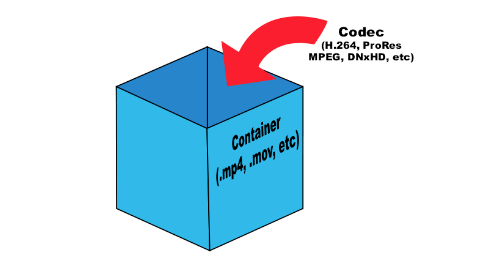
What is the difference between a codec and a container? Think about your last vacation. Your suitcase, in this case, is a “container”. Baggage is content (video, audio, subtitles, and other information), and a codec is the way you store everything (data) in your suitcase to fit. You can put things in a suitcase by folding carefully (one codec) or press them into rolls and wrap them with tape to fit more (another codec). This is true for any multimedia content. For example, the Microsoft AVI (Audio Video Interleave) format is a file container, but the video it contains can be encoded with different codecs, from DivX to MPEG-2.

When you play something back on a video player, generally the encoded video is passed through a decoder, converted to YUV (color space) data, and sent to the screen. The decoder recognizes the format and decompresses the compressed data into useful information that can be processed and displayed.

There are two types of decoders: software and hardware. Before UVD, PureVideo, and Intel GMA 4500MHD, video was decoded using software decoders that relied on the power of the processors. Therefore, many companies tried to do something to play videos. But only two of them managed to do this really well: CyberLink and InterVideo (now Corel), so ATI later licensed the PowerDVD decoder for their ATI DVD decoder. Naturally, software decoders consume a large amount of processor time, which, while not affecting the performance of modern processors, significantly reduces the battery life of mobile devices.

Over time, graphics card manufacturers addressed this problem and began developing fixed-function decoders, which were logic circuits in the GPU for video processing. Today they are called hardware accelerators. Its advantage was that when the GPU was working, the time of the main processor was not wasted.

There are some interesting points. Since the decoder processes video, it is quite difficult to set parameters for its performance or efficiency. Regardless of whether the video goes through the hardware or software conversion pipeline, the data changes long before it appears on your monitor. When using software, it is not necessary to compare the systems used in decoding. However, when using the same system, different decoders can produce different images or change the image quality. Most Blu-ray discs played on nVidia or AMD graphics cards will look the same if you disable acceleration in PowerDVD. In both cases, the video is processed using software on the processor, giving the same result.

When hardware decoding is added to the process, things look different. Why? Modern GPUs have a special unit for decoding and processing video data. This is exactly the logic with a fixed function, which was discussed earlier. Hardware accelerated decoding on Sandy Bridge processors is designed and programmed differently than on AMD and nVidia graphics cards.

We must understand clearly: there are no general purpose GPU decoders. There are no decoders that can fully work on DirectCompute, APP, or CUDA. Striving to implement such support is doomed beforehand. GPGPU is designed to handle raw data with a high degree of parallelism. But we are talking about video, not raw data. To process images, you have to do a lot and in a sequential execution. Fixed function decoders decode and process video; they do nothing else. Porting this functionality to more general computing resources would be a step back from moving it to the processor, since in both cases you have to work with software decoding.

Elemental Technologies (known for its Badaboom) is unique in developing a CUDA-based MPEG-2 decoder. And it is not a pure GPGPU decoder. Parts of your pipeline, such as entropy encoding, syntax encoding, syntax decoding, and entropy decoding, must be executed sequentially. Other parts of the process can be designed to run in parallel, such as motion estimation, motion compensation, etc.

Video codecs, video formats – what does this all mean?

Video codecs, video formats – what does this all mean?

video codec

What is video codec and video format?
If you are puzzled by the endless list of export options in your video editing software, this article is for you. Let’s first look at the definition of a codec. Then we will look at the concept of video format and then we will look at some of the most common codecs and their uses.

Video Codec

If you are recording or editing a video, you will almost immediately come across the term “codec”. Since there are so many and it’s hard to tell them apart, I’ve made a quick overview to help you get started. Once you understand certain terms, you can better decide which one suits your needs. Let’s start with a simple definition.

The video codec.

A codec is actually a combination of two words: an encoder and a decoder (co / dec). What are they doing? Bottom line, because video files are so large, you need a way to make them smaller. The codec encodes, compresses the data to store or send it, and then decompresses it for playback or editing.

A codec is a computer code that performs its function each time the software calls a file. Codecs can also be used on physical equipment, such as a camera, to digitize incoming video and audio.

This happens in real time, either at the point of capture or at the point of playback. However, if you are not a broadcast engineer, you must rely on your computer or device to select the codec. Hardware compresses your video and audio data for viewing, streaming, or storage.

The video format is.
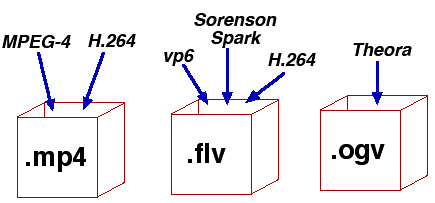
The file format is similar to a container. The container contains data that has been compressed using a specific codec. And sometimes they have the same name.

For example, a file format such as Windows Media Audio contains data that is compressed using the Windows Media Audio codec. However, a file format such as Audio Video Interleaved (AVI) can contain data compressed with any of several different codecs, including MPEG-2, DivX, or XviD codecs.

AVI files can also contain data that is not compressed by any codec. Therefore, depending on the codecs installed on your system, some AVI files will play fine, while other AVI files, despite the same file extension, will not play.

It also affects the audio. Often there is a situation where when playing a video, the sound plays, but the video does not. This means that the appropriate video codec is installed on your device.

Terms display – video format

How do I determine the video format and video codec used?
Unfortunately, the tools built into Windows do not allow you to find detailed information about a video file.

What is the smallest video format?
Currently, the HEVC or H.265 codec is one of the most efficient available on the market and is commonly used to compress 8K UHD video. However, the use of the codec requires the payment of a license fee, so it is not widely supported or widely supported by different devices or browsers. For the Internet, the .WEBM format and the corresponding VP8 / VP9 codec are used. This package is widely supported and popular for reducing the size of video files.

However, it is important to consider factors other than size: where the files will be played and the required video quality.