Video Basics and Compression Part 3


Free Download Mp4Gain
picture

Video Basics and Compression Part 3

Video Compression

Drawing method

video compression

The drawing method is a method of scanning video signals.
There are “progressives” and “interlaced”.

Progressive performs one scan drawing at a time. Interlacing, on the other hand, is a gradual and clear drawing method.

Main video compression methods and functions
From here, I will explain the following three main video compression methods.

MPEG
H.264
Motion JPEG (MJPEG)
MPEG
MPEG is read as “Mpeg”. It is one of the standards for compressing video and audio.

MPEG Features
High degree of freedom in encoder control.
Not suitable for taking a frame clearly.
Originally, it was an abbreviation taken by the acronym for “Moving Picture Experts Group”, an international standardization organization for video encoding, but it has come to be used as the name of the encoding method (compression method) standardized by that organization. . .

MPEG processes the differences frame by frame block by block.

The “block” here refers to a group of adjacent pixels.

In video compression, groups of adjacent pixels in a square range are generally treated as a group, and this is called a macroblock. This block is compared to the block at the same position in the next frame, and only the difference is sent as data.

Quoted from Wikipedia “Data compression” (last consultation: 05/21/2020)

A frame is a “one-by-one still image”.

If multiple still images (frames) continue, “shifting portions” and “unchanging portions” will appear.
The part that does not change is the “duplicate information”, so it can be compressed.

Thus, in MPEG, the part that changes and the part that does not change for each frame are processed in block units.

H.264
H.264 is read as “H.dot Nirokuyon”. This is also the standard method for video compression.

H.264 Features
High compression rate. (More than twice that of MPEG-2)
The bit rate is low.
It is sometimes called “MPEG-4 AVC” because it is standardized as “MPEG-4 Part 10 Advanced Video Coding” in the MPEG-4 standard. (MPEG-4 AVC is read as “Mpeg for AVC”. AVC is an abbreviation for “Advanced Video Coding”).

Motion JPEG (MJPEG)
Motion JPEG is read as “Motion Jepeg”. Also written as “MJPEG”.
As the name suggests, the still images (frames) that make up a movie are “JPEG images.” (To be exact, the frame is compressed in JPEG format.)

These JPEG images are made continuous like a flip book.
So to speak, “a set of continuous JPEG images” is the video data.

Motion JPEG (MJPEG) features
It is beautiful even if you look at it in a painting.
The video capacity is great.
The compression ratio is not as high as MPEG.
However, due to the characteristics of MPEG processing in “block units”, there is a drawback that “block noise” occurs when the bit rate is low.
Also, in cases where there is a lot of movement (the change is large for each frame), the image tends to be rough, but in the case of Motion JPEG, it can be handled even in cases where there is a lot of movement. .

In addition, Motion JPEG has a powerful advantage that MPEG and H.264 do not have, ie “you can extract a frame clearly”.


Free Download Mp4Gain
picture


Mp4Gain Main Window
picture


Mp4Gain Features
picture


Free Download Mp4Gain
picture

Video Basics and Compression Part 2

Video Basics and Compression Part 2

Video Compression

The amount of data is huge because video is made up of a series of “still images.”

VIDEO COMPRESSION

Therefore, as it is, the amount of data is large and unwieldy (cannot be handled), so “compression” is required.

Compressing video is called “encoding.”
Encoding is “scrambling the data”, which refers to the conversion (compression in this case) of the data according to certain rules (compression algorithms).

Restoring the converted data to its original state is called “decoding.”

Please note that it does not necessarily include audio
It’s easy to think of video as “audio is a set”, but that’s not the case.

Certainly it generally comes with audio that is in sync with the video, but since “video” is just a “continuous still image” it can be called “video” even if it does not come with audio data.

Machine Vision Page

Video Data Terms
From here, I will explain the terms related to “compression” of video data.

frames per second
Bit rate
Compression rate
Drawing method (progressive, interlaced)
These words are “video specifications” and are closely related to compression.

frames per second
The frame rate represents the number of still images per unit of time.
In the case of video, it generally refers to “how many still images are composed per second”. The unit is fps (frames per second).

Explanatory frame rate drawing
For example, in the case of “5 still images per second”, 5 fps.
In the case of “10 still images per second”, it is 10 fps.

The frame rate represents the “smoothness of movement”.
For example, if the frame rate is small, it will be a “messy video”. On the other hand, the higher the frame rate, the smoother the motion of the video, but the greater the amount of data.

Bit rate
Bit rate is the amount of data per unit of time.
The frame rate was “the number of still images per second”, but in the case of bit rate, it means “the amount of data per second”.

If the frame rate is high, the amount of data will be large, so the bit rate will also be high.
Also, if the resolution of the “still image” is high, the amount of data will be large. (Comparing HD and Full HD, Full HD has a higher amount of data.)

Compression rate
It is a percentage that shows how much the amount of information in the compressed data has decreased compared to the original data.

Video and compression basics

Video and compression basics

Video Compression

On this page, we will look at “video compression format”, but why is “compression” necessary in the first place?

Video Compression

And although it is called “video compression”, several questions arise about “what does compression mean?”

In this way, I would like to take a look at the important points to understand “video compression”.

What is compression in the first place?
First, let’s look at “compression”.

When you think of “data compression”, you may think of it as “reducing the amount of data”, but in reality there is “lossless compression” and “lossy compression”.

Lossless compression reduces the amount of data while retaining the amount of information in the data.
As it is called “reversible”, it is a method that can be reverted to “before compression”. In other words, lossless compression is a method that enables complete restoration of compressed data.

Lossy compression, on the other hand, compresses data and cannot be fully restored to its pre-compressed state.

In other words, the method that can be restored before compression is “lossless compression” and the method that cannot be restored before compression is “lossy compression”.
In this way, compressed data is classified into lossless compression and lossy compression according to “whether the data can be restored before compression.”

And most video data compression methods fall under this “lossy compression”.

Why do you need “compression”?
This is because “video data” is “a continuous image data set”.

Video is “continuous still image”
The animation looks like a flip book, with several images stacked on top of each other, but the “video” is similar to this and expresses the “change” by stacking the images.

In this way, a video is made up of a series of still images.

Even if there is only one image, a certain amount of data is required, but imagine if there are multiple images … You also need to operate all the time and keep storing data as a “surveillance camera”.
If you handle it “as is” without compressing it, the amount of data will be enormous.

Digital video, its advantages

Digital video, its advantages

DIGITAL VIDEO

Digital technologies provide undeniable advantages over analog technologies.

Digital Video

The digitized signal can store all the information stored in analog form. Modern digital data transmission, recording and storage technologies practically do not distort the signal.

One of the indisputable advantages of digital technologies is the ability to apply a powerful mathematical apparatus to compress video and audio information into a digitized signal. Unlike “analog”, “digital” can be reproduced at any time with 100% repeatability. Consequently, the digitized signal opens up convenient post-processing, analysis, and simulation options.

The main video compression methods come down to compressing data within a single frame and optimizing the transfer of changes between frames. Even when looking at a still image, you can see that it contains a lot of information of the same type and duplicate information. For example, the background intensity is usually a constant value; many separate areas of the image, occupying significant frame sizes, also have the same digital signal level. Naturally, it makes no sense to transmit all this information without compression. With the use of specialized video compression techniques, smoothly changing frame by frame, it is possible to further reduce the resulting density of information transmission over the network.

Unlike universal archivers (such as WinRar or WinZip), video compression can occur with some loss, the amount of which depends on the selected codec. Modern compression algorithms use extensive logical analysis of the video to extract duplicate fragments between frames and reduce the size of the final file. During playback, the compressed information is “stretched” and then displayed to the user. On a low-powered computer, it can take a long time to decompress images compressed with some codecs.

Digital video compression technologies
There are many digital video compression technologies. Some of the compressors considered use more than one compression technology, but a combination of them. For example, both Indeo 3.2 and Cinepak use vector quantization. The international standards MPEG-1, MPEG-2, MPEG-4, H.261 and H.263 use a combined BDKP technology and motion compensation. Some modern algorithms use Discrete Wavelet Transform (DWT) technology. Other technologies include fractal image compression.

Lossless compression

Image compression can be performed without quality loss only if there was no data loss during the compression process. As a result, the image obtained after decompression will match exactly (bit by bit) the original. Examples of such compression are GIF for static graphics and GIF89a for video.

Lossy compression

Compression can be lossy if information is lost during the compression process. However, from the point of view of human perception, lossy compression should be considered only that compression in which it is possible to distinguish with the naked eye the result of compression from the original. Thus, despite the fact that two images, the original and the result of compression with one or the other compressor, may not coincide little by little, however, the difference between them may be completely imperceptible. Examples include the JPEG algorithm for compressing static graphics and the M-JPEG algorithm for compressing video.

Lossless compression from a perceptual perspective

Being formally lossy compression, a compression scheme can at the same time appear to be lossless in terms of human perception. Most lossy compression technologies have the so-called Compression Quality Factor (QF), which characterizes the perceived quality side and ranges from 0 to 100.

About video compression

About video compression

Video Compression

As the days go by, the demands for video quality are constantly increasing.

Video Compression

At the same time, channel width and media capacity could not keep up with this growth if video compression algorithms were not improved.
Next, we will talk about some of the basics of video compression. Some of them are somewhat outdated or described too simply, but at the same time they give a minimal idea of ​​how everything works.

Video Streaming Features

Most everyone knows that any video is a collection of still images that will replace each other over time. In what follows, we will call this ordered set video stream. They are different, so it is extremely useful to do a little classification here:
Pixel format. The pixel does not give us more information than its color. However, color perception is highly subjective and great efforts have been made to create color rendering and rendering systems that are acceptable to most people. So the color that we see in the real world is quite complex in terms of the frequency spectrum of light, which makes it extremely difficult to transmit it in digital form and display it even more. However, it was observed that the three points of the spectrum can quite accurately bring the displayed color closer to the present in the metric of color perception by an ordinary person. These three points are red, green, and blue. That is, due to its linear combination, we can cover most of the spectrum of visible colors. Therefore, the simplest way to represent a pixel is: RGB24, where exactly 8 bits of information are allocated for the Red, Green and Blue components. And so we can transfer 256 gradations of each color and a total of 16,777,216 of all kinds of shades. But in practice, during storage, this color representation is practically not used, not only because we spend up to 3 bytes per pixel, but also for other reasons, but more on that later (on YV12).
Frame size. We already grab and encode all the pixels in the video stream and receive a lot of data, but it is inconvenient to work with. In the beginning, everything is very simple, the frame is characterized by: width, height, size of the visible part and format (more on that later). Here the numbers will probably be familiar to many: 640×480, 720×480, 720×576, 1280×720, 1920×1080. Why? Yes, because they appear in different standards, for example most European DVDs have a resolution of 720×576. No, of course you can make a 417×503 video, but I don’t think there is anything good in that.

Frame format. Even knowing the size of the frame, we cannot represent the pixel array in a more convenient way without knowing how to “pack” the frame. In the simplest case, there is nothing complicated: we take a row of pixels and write the bits of each encoded pixel in a row, and so on line by line. That is, we write as many lines as we are tall by as many pixels as we are wide and all in a row, in order. This is called progressive. But maybe you tried to watch TV shows on a computer without the proper settings and saw the “comb effect”, this is when the same object is in different positions relative to the odd and even lines. You can argue for a long time about the desirability of interlaced (interlaced) scanning, but the truth is that it has remained a relic of the past of traditional television (those who are interested in reading about the kinescope device). I will not talk now about methods to remove (deinterlace) this unpleasant effect. This is where the magic designations come from: 576i, 720p, 1080i, 1080p, where the number of lines (frame height) and the type of scan are indicated.
Frame rate. Some of the standard values: 23.976, 24, 25 and 29.97 frames per second. For example, 25 fps is used on European television, 29.97 on American television, and 24 fps is used in movies. But where did the “strangers” 23.976 and 29.97 come from? Let me tell you a secret: 23.976 = 24 / 1.001, and 29.97 = 30 / 1.001, that is, the 1.001 divisor is included in the American NTSC broadcast standard. Consequently, when the movie is shown, there will be a very slight slowdown, which will not be noticeable to the viewer, but if it is a musical concert, then the speed of the show is so critical that it is better to occasionally skip frames and again the viewer will not notice anything.

Video compression, how it works

Video compression, how it works

Video Compression

Video – This is essentially a three dimensional pixel color matrix. Two measurements indicate the vertical and horizontal resolution of the frame, and the third dimension, this time. Frame – is an array of pixels, visible camera at this moment of time, or just an image. Video is also possible so-called half images (see: Interlace Scan System).

Video Compression

Compression might be impossible, if I would each frame was unique and the pixel placement was completely random, but it’s not so. Therefore, you can compress, in – first, the image itself – for example, the sky blue photo without sun will actually be reduced to the outline dotted description and a gradient fill. In – Second, you can compress a similar neighboring frames. Ultimately, the algorithms for image and video compression are similar, if you consider video as a three-dimensional image with time as the third coordinate.

Lossless compression
In addition to lossy video compression, it can also be compressed and lossless. This means that when the decompression result will be a precision (bit bits) that matches the original’s. However, when lossless compression is impossible to achieve high compression ratios in real (not artificial) video. For this reason, almost all commonly used videos are lossy compressed (by that number on consumer digital video discs, video sharing, on satellite broadcast). On the web – sites for small clips without sound sometimes use simple GIF and APNG formats.

Compress technology and video compensation motion
One of the most powerful technologies, which allows to increase the degree of compression, this compensation movement. When any modern video compression system later frames in the sequence uses the similarity of regions in the previous frames to increase the degree of compression. However, since – for any traffic – any objects in the frame (or the camera itself), the use of adjacent frame similarity was incomplete. Motion compensation technology allows you to find similar sites, even if they move from the previous frame.

The current state of affairs

РЕКЛАМА
Cm. See also: HTML5 video
At the end of 2011 the year almost all algorithms compress the video (for example, the standards, adopted by the ITU – T and ISO) using a discrete cosine transform (DCT) or its modification to eliminate spatial redundancy. Other methods, such as a fractal compression and discrete wavelet- transform, have also been the subject of investigation, but are now generally used only for compression of still images.

The use of most compression methods (such as the discrete cosine transform and wavelet – conversion) also involves the use of the quantization process. Quantization can be like scalar, so and vector, so there are less, most compression schemes in practice use scalar quantization for its simplicity.

Television
Modern digital television broadcasting is available precisely thanks to video compression. The television station can transmit not only high definition video (HDTV), but also it and several channels on one physical channel (6 MHz).

Although most of today’s video content is broadcast with the use of the MPEG – 2 video compression standard, the no less new and more efficient standards for video compression already used in broadcasting – for example, H . 264 and VC – 1.

Video compression

Video compression

Video Compression

Video compression (video compression) is the art of removing the maximum possible amount of data without noticeable degradation in quality.

Video Compression

Most common compression methods are lossy (lossy), ie the unpacking result is not identical to the original source. By reducing resolution, color depth, and frame rate, postage stamp-sized video first appeared on PC, but then ways were developed to better render images and reduce data volume without affecting images. physical dimensions. Video compression is implemented by so-called codecs (codec – from COmpression / DECompression). Various types of codecs were developed, implemented in hardware, software or hardware-software, which provided efficient video compression and decompression.

Lossy compression techniques reduce data size (through complex mathematical transformations and the selective removal of visual information that our eyes and brains often ignore) and can result in degraded image quality. On the other hand, lossless compression only removes redundant information. Codecs can be implemented in hardware, software, or hardware / software. Codec compression ratios range from 2: 1 to 100: 1, allowing it to handle large amounts of video data. The higher the compression ratio, the worse the resulting image will be. It shows faded colors, distortions and interference, the outlines of objects become sharper, and in the end the result may be useless.

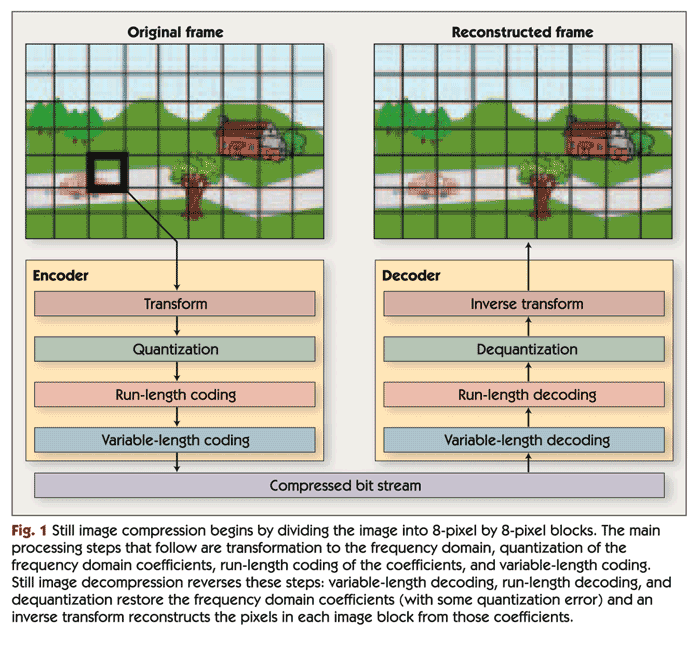
At the end of the 90s of the last century, the most used methods were based on a three-stage discrete cosine transformation algorithm (Discrete Cosine Transform – DCT). The DCT algorithm takes advantage of the fact that neighboring pixels in an image (physically close, in space, or close in successive images, in time) can have the same meaning. The mathematical transformation (similar to the Fourier transform) is performed on 8×8 pixel grids; this explains the block distortions (artifacts) at high compression levels. Low-frequency components have been shown to be more important than high-frequency components in visual systems. Consequently, the quantization process weights them and removes those that contain the least visual information depending on the level of compression required. For example, deleting 50% of the converted data can result in the loss of only 5% of the visual information.

Compression was originally done in software. Insufficient processor power limited the algorithm to execute its task in 1 / 25th of a second, that is, the time it takes to form a frame of fully moving (“live”) video. However, Avid Technology and other non-linear editing (NLE) pioneers released PC-based editing systems that used software compression in the late 1980s. Although the video had a quarter of the resolution of the broadcast television, color fade and block distortion, the NLE system revolutionized the production process. In the beginning, these systems were used for offline editing, when the material was polished with software.

Although the video quality of early PC-based NLE systems was inferior to the quality of offline editing with VHS VCRs, NLE systems had certain advantages. As a word processor for video, they provided a faster and more creative work style. The user could quickly cut and paste parts of the video, enhance them, and perform various editing actions typical of the production process. Also, importing the NLE-generated Edit Decision List (EDE) onto a floppy disk on an online computer was much more convenient than writing a temporary code list. The NLE system not only provided a more convenient edition, but also provided an offline product close to the final version,

However, NLE systems practically disappeared in 1991 when hardware compression provided VHS quality video. The first hardware video compression was called M-JPEG (Motion JPEG). It is derived from the DCT standard for still images called JPEG. This standard was never designed for video compression, but when C-Cube released a codec chip in the early 1990s that could compress JPEG up to 30 still images per second, the pioneers of NLE systems couldn’t resist for long time. By compressing data 50 times, personal computers were able to process digital video.

Meanwhile, PCs were getting faster and memory cheaper, allowing for lower compression ratios with better capacity.