
Video compression and decoding | Codecs and Decoders
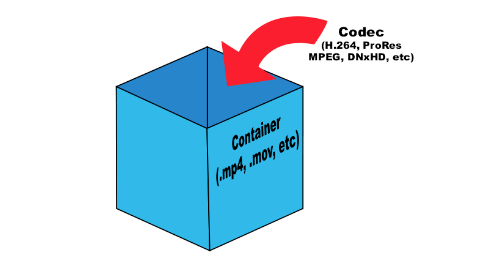
Before doing serious testing, there are a few simple things to clear up. It is important to distinguish between codecs and file containers. For example, Blu-ray files often appear with the extension .m2ts. But the BDAV (blu-ray Disc Audio / Video) container format generally acts as a storage container. In this case, you can use three codecs: MPEG-2, H.264, and VC-1.
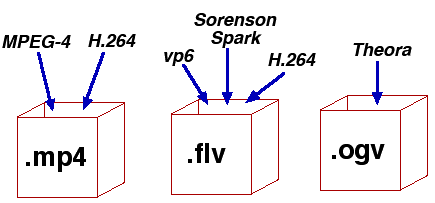
What is the difference between a codec and a container? Think about your last vacation. Your suitcase, in this case, is a “container”. Baggage is content (video, audio, subtitles, and other information), and a codec is the way you store everything (data) in your suitcase to fit. You can put things in a suitcase by folding carefully (one codec) or press them into rolls and wrap them with tape to fit more (another codec). This is true for any multimedia content. For example, the Microsoft AVI (Audio Video Interleave) format is a file container, but the video it contains can be encoded with different codecs, from DivX to MPEG-2.
When you play something back on a video player, generally the encoded video is passed through a decoder, converted to YUV (color space) data, and sent to the screen. The decoder recognizes the format and decompresses the compressed data into useful information that can be processed and displayed.
There are two types of decoders: software and hardware. Before UVD, PureVideo, and Intel GMA 4500MHD, video was decoded using software decoders that relied on the power of the processors. Therefore, many companies tried to do something to play videos. But only two of them managed to do this really well: CyberLink and InterVideo (now Corel), so ATI later licensed the PowerDVD decoder for their ATI DVD decoder. Naturally, software decoders consume a large amount of processor time, which, while not affecting the performance of modern processors, significantly reduces the battery life of mobile devices.
Over time, graphics card manufacturers addressed this problem and began developing fixed-function decoders, which were logic circuits in the GPU for video processing. Today they are called hardware accelerators. Its advantage was that when the GPU was working, the time of the main processor was not wasted.
There are some interesting points. Since the decoder processes video, it is quite difficult to set parameters for its performance or efficiency. Regardless of whether the video goes through the hardware or software conversion pipeline, the data changes long before it appears on your monitor. When using software, it is not necessary to compare the systems used in decoding. However, when using the same system, different decoders can produce different images or change the image quality. Most Blu-ray discs played on nVidia or AMD graphics cards will look the same if you disable acceleration in PowerDVD. In both cases, the video is processed using software on the processor, giving the same result.
When hardware decoding is added to the process, things look different. Why? Modern GPUs have a special unit for decoding and processing video data. This is exactly the logic with a fixed function, which was discussed earlier. Hardware accelerated decoding on Sandy Bridge processors is designed and programmed differently than on AMD and nVidia graphics cards.
We must understand clearly: there are no general purpose GPU decoders. There are no decoders that can fully work on DirectCompute, APP, or CUDA. Striving to implement such support is doomed beforehand. GPGPU is designed to handle raw data with a high degree of parallelism. But we are talking about video, not raw data. To process images, you have to do a lot and in a sequential execution. Fixed function decoders decode and process video; they do nothing else. Porting this functionality to more general computing resources would be a step back from moving it to the processor, since in both cases you have to work with software decoding.
Elemental Technologies (known for its Badaboom) is unique in developing a CUDA-based MPEG-2 decoder. And it is not a pure GPGPU decoder. Parts of your pipeline, such as entropy encoding, syntax encoding, syntax decoding, and entropy decoding, must be executed sequentially. Other parts of the process can be designed to run in parallel, such as motion estimation, motion compensation, etc.


