MP4 vs Webm Comparision

MP4 vs Webm

MP4 vs Webm
MP4 vs Webm
MP4 vs Webm
MP4 vs Webm


Let’s talk about MP4 vs Webm

  • Opening: Picture two popular video formats as cars. MP4 is like a well-known sedan – versatile, widely supported, and loved by many. Webm, on the other hand, is like a sleek sports car, known for its efficient compression and open-source nature. But which one is the right ride for your video needs? As a specialist in video formats, I’ll help you make an informed choice.
MP4 vs Webm
MP4 vs Webm

Video Formats Demystified

  • Video Compression: Let’s dive into the hood of video formats. MP4 and Webm use different compression techniques. MP4 uses H.264, offering excellent quality but at a slightly larger file size. It’s like the reliable V6 engine in your sedan. Webm relies on VP9, which sacrifices a bit of quality for smaller file sizes, making it the energy-efficient electric engine of the sports car world.
  • Browser Compatibility: When it comes to compatibility, MP4 takes the lead. It’s like a highway with smooth roads, compatible with almost all browsers and devices. Webm, on the other hand, is like a scenic route – beautiful but not as widely supported. It may require more effort for some viewers to access.

Video Quality Matters

  • Resolution and Bitrates: Just like choosing the right camera for a movie, you need to consider resolution and bitrates for your video. MP4 often delivers higher quality at the same resolution, while Webm can provide good quality but at a lower bitrate. It’s like comparing a blockbuster movie shot in IMAX with a captivating indie film.
  • Color Depth and Compression Artifacts: Let’s talk about the finer details. MP4 can handle a wider range of colors, making it suitable for professional videos. However, Webm might exhibit more compression artifacts, like pixelation, in complex scenes. It’s like the difference between a painting and a pixel art image.

Efficient File Sizes

  • Storage Considerations: Imagine your video as luggage. MP4 tends to be bulkier, occupying more space in your hard drive. Webm, with its smaller file sizes, is like packing efficiently for a long trip – you get more in with less space.
  • Loading and Streaming: Video load times can be a make-or-break factor. MP4 might take longer to load, especially for viewers with slower connections, while Webm loads faster due to its efficient compression. It’s like choosing between express and regular delivery.

Open Source vs. Proprietary

  • Freedom and Licensing: Webm is like an open-source vehicle – no licensing fees, and anyone can use it freely. MP4, however, involves licensing and royalties, making it more like a luxury car with additional costs.
  • Ecosystem and Support: MP4 has a well-established ecosystem with advanced features and support. It’s akin to a premium car with top-of-the-line accessories. Webm, while open and accessible, might not have the same level of support and features, making it more like a customizable kit car.

Mobile Devices and App Compatibility

  • Mobile Friendliness: MP4 is the go-to choice for mobile devices. It’s like a trusted GPS that guides you seamlessly. Webm, while supported on many mobile devices, might require additional apps or settings adjustments, similar to choosing an alternative route on your journey.

Latest Words on MP4 vs Webm

  • MP4’s Versatility: In the end, MP4’s versatility and widespread support make it a safe bet for most users. It’s like driving a reliable sedan for your daily commute.
  • Webm’s Efficiency: Webm’s efficient compression and open-source nature make it a contender for users looking to optimize their video delivery. It’s like the sports car that zips through traffic while conserving energy.
  • Personal Choice: Just as some prefer the comfort of a sedan, and others love the thrill of a sports car, your choice between MP4 and Webm depends on your specific video needs and priorities.

Comments:


Comments:

MP4 has been my go-to format for years. It’s like driving a reliable sedan, just as you said. But Webm’s efficiency intrigues me for certain projects.

I’m all about quality, so MP4’s higher resolution is tempting. It’s like comparing a blockbuster movie to an indie film – hard to resist the former.

Webm’s smaller file sizes are a game-changer for my storage. It’s like switching to a more fuel-efficient car to save on long trips.

Open-source is the way to go for me, so Webm’s like a free-spirited road trip in the video format world. No licensing fees are a big plus.

MP4’s compatibility with mobile devices is crucial for me, as I’m always on the go. It’s like having a reliable GPS for my video content.


MPEG Format

MPEG Format

MPEG Format
MPEG Format
MPEG Format
MPEG Format

What is the MPEG standard?

MPEG, which stands for the Moving Picture Experts Group, represents a family of standards used for coding audiovisual information in a digital format. Established by the group of experts who designed it, MPEG is widely recognized in the realm of multimedia content. Digital videos and audio tracks, which you might stream or download, often use the MPEG standard because of its reliable compression techniques.

Such compression allows large multimedia files to be condensed into smaller sizes without sacrificing significant quality. The versatility of the MPEG standard has made it an indispensable tool for various media applications.

“The digital revolution is far more significant than the invention of writing or even of printing.” – Douglas Engelbart

History of the MPEG format.

The MPEG format, as we know it today, was initiated in 1988. The goal was to create standards to address the growing demands of the digital multimedia landscape. Over the years, several versions of MPEG have been released, each catering to specific needs and evolving technologies.

From its inception, the format’s emphasis has been on providing high-quality digital audiovisual content. As technologies advanced and the requirements of multimedia shifted, the MPEG standards continually adapted, remaining relevant in every era of digital media evolution.

“Innovation is the calling card of the future.” – Anna Eshoo

How does MPEG compression work?

MPEG compression is a marvel of digital engineering. It uses a combination of temporal and spatial compression techniques. Temporal compression reduces redundancy between consecutive frames of a video, while spatial compression lessens redundancy within individual frames.

By analyzing patterns and repetitive information, MPEG compression discards data that won’t be missed by the human eye or ear. This results in significantly reduced file sizes without a noticeable drop in quality, making it efficient for storage and transmission.

“Simplicity is the ultimate sophistication.” – Leonardo da Vinci

Differences between MPEG versions.

There are several MPEG versions, each designed to address unique challenges in the multimedia world. MPEG-1, for example, was created for video CDs and can support low-resolution videos. MPEG-2, on the other hand, was designed for DVDs and broadcast television.

Subsequent versions, like MPEG-4, introduced enhanced functionalities and catered to newer technologies, such as internet streaming and mobile devices. Each version marked an evolution, offering better compression, improved quality, or both.

“Progress is impossible without change.” – George Bernard Shaw

MPEG format’s impact on multimedia.

The MPEG format revolutionized the multimedia industry. Its efficient compression algorithms made it possible to store and transmit high-quality video and audio in considerably smaller files. This played a crucial role in the rise of digital streaming platforms, online video sharing, and digital broadcasts.

Furthermore, the format’s adaptability ensured its continued relevance, influencing the development of various multimedia technologies over the years.

“Without change, there is no innovation.” – C. Frank Wang

Understanding MPEG’s video and audio components.

MPEG encompasses both video and audio components. The video aspect is primarily about compressing visual data effectively, while the audio component focuses on achieving high-quality sound with minimal file size. Together, they provide a holistic approach to multimedia compression, ensuring that both sight and sound are preserved with integrity.

“Sound and vision become poetry when woven together.” – Anonymous

Evolution and significance of MPEG.

Over the years, MPEG has evolved to meet the changing demands of technology and media consumption. Its significance lies in its adaptability and its ability to maintain high-quality standards. From facilitating DVD technology to enabling online streaming, MPEG’s influence is pervasive in the multimedia realm.

“Adaptability is the simple secret of survival.” – Jessica Hagedorn

Advantages of using MPEG.

MPEG offers numerous advantages, including efficient compression, versatility across platforms, and compatibility with a wide range of devices. Its ability to condense large media files without a significant loss in quality makes it ideal for both storage and transmission.

“In every challenge lies an opportunity for growth.” – Unknown

Limitations of the MPEG format.

While MPEG is highly efficient, it’s not without limitations. Lossy compression means some data is discarded, which might affect quality in specific applications. Additionally, certain MPEG versions may not be suitable for all media needs, requiring careful selection based on the intended use.

“Every limitation is an opportunity in disguise.” – Anonymous

Real-world applications of MPEG.

From streaming services and broadcasting to video conferencing and digital advertising, the applications of MPEG are vast. Its universal appeal and efficiency have made it the go-to choice for various multimedia needs across industries.

“The real world is where the monsters are.” – Rick Riordan

Final Words

MPEG’s indelible mark on the multimedia landscape underscores its importance. As technologies continue to evolve, the adaptability and efficiency of formats like MPEG will be crucial in shaping the future of digital media.

Media File Formats for Mobile Devices: 3GP, M4, and More

Media File Formats for Mobile Devices: 3GP, M4, and More

Media File Formats for Mobile Devices

My Experience with Media File Formats

As someone who has been using mobile devices for years, I have encountered a wide range of media file formats. From 3GP to M4V, each format has its own strengths and weaknesses, and choosing the right format can be a challenge. In this article, I will explore some of the most common media file formats for mobile devices, and provide some tips for choosing the right format for your needs.

Understanding Media File Formats

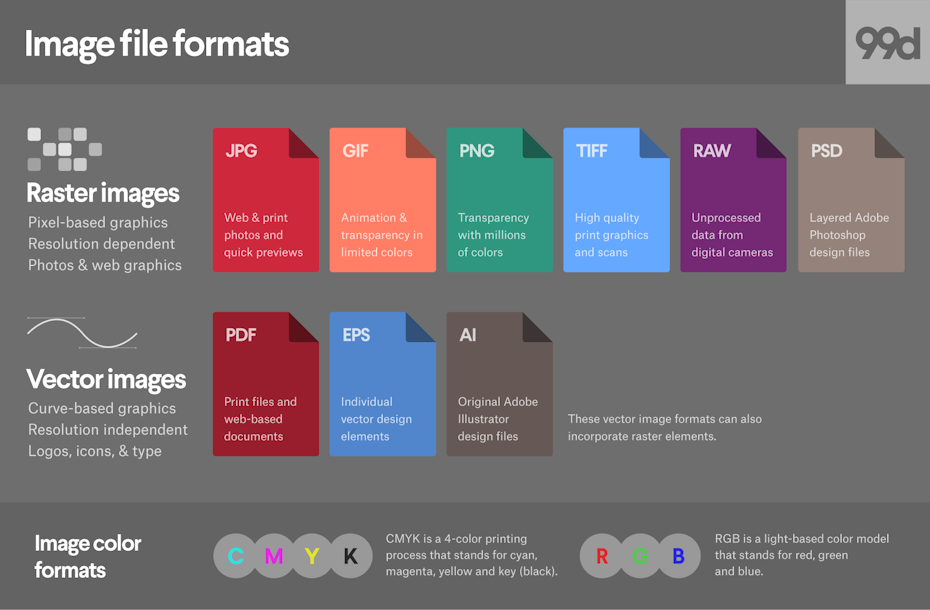
Media file formats are essentially containers that hold audio and video data. Each format has its own unique characteristics, including compression algorithms, video resolutions, and audio quality. Some of the most common media file formats for mobile devices include:
3GP: This format is commonly used for video content on mobile devices, and is known for its small file size and low bandwidth requirements.
M4V: This format is similar to MP4, but is specifically designed for use with Apple devices. It supports high-quality video and audio, and is often used for streaming and downloading content from the iTunes Store.
MP4: This format is widely used for video content on mobile devices, and is known for its high-quality video and audio, as well as its compatibility with a wide range of devices and platforms.

“Choosing the right media file format for your needs can be a challenge, but it is important to consider factors such as file size, video quality, and compatibility with your device and platform.”

Other Media File Formats

In addition to 3GP, M4V, and MP4, there are a number of other media file formats that are commonly used for mobile devices. These include:
AVI: This format is widely used for video content on desktop computers, but is less common on mobile devices due to its large file size and limited compatibility.
WMV: This format is commonly used for video content on Windows devices, and is known for its high-quality video and audio.
MOV: This format is commonly used for video content on Apple devices, and is known for its high-quality video and audio, as well as its compatibility with a wide range of devices and platforms.

“While there are a number of media file formats available for mobile devices, it is important to choose the right format for your specific needs. Factors such as file size, video quality, and compatibility with your device and platform can all play a role in determining the best format for your needs.”

Final Words

As someone who has been using mobile devices for years, I have learned the importance of choosing the right media file format for my needs. Whether I am streaming video content or downloading music, the right format can make all the difference in terms of quality and compatibility. By understanding the various media file formats available for mobile devices, and considering factors such as file size, video quality, and compatibility, you can ensure that your media content looks and sounds its best.

Media File Formats, Mobile Devices, 3GP, M4V, MP4, AVI, WMV, MOV, Audio Quality, Video Quality, Compression Algorithms, Compatibility, File Size, Streaming, Downloading, iTunes Store, Apple Devices, Windows Devices, Desktop Computers, Video Content, Audio Data, Containers, Bandwidth Requirements, High-Quality Video, High-Quality Audio, Video Resolutions, Choosing the Right Format, Quality and Compatibility.
Media File Formats, Mobile Devices, 3GP, M4V, MP4, AVI, WMV, MOV Audio Quality, Video Quality, Compression Algorithms, Compatibility, File Size, Streaming, Downloading, iTunes Store, Apple Devices, Windows Devices, Desktop Computers, Video Content, Audio Data, Containers, Bandwidth Requirements, High-Quality Video, High-Quality Audio, Video Resolutions, Choosing the Right Format, Quality and Compatibility, Media Content, Video Streaming, Audio Streaming, Video Downloading, Audio Downloading, Mobile Video Formats, Mobile Audio Formats, Mobile Media Formats, Mobile Video Quality, Mobile Audio Quality, Mobile Video Compression, Mobile Audio Compression, Mobile Video Resolution, Mobile Audio Resolution, Mobile Video Compatibility, Mobile Audio Compatibility, Mobile Video File Size, Mobile Audio File Size, Mobile Video Streaming Quality, Mobile Audio Streaming Quality, Mobile Video Downloading Quality, Mobile Audio Downloading Quality, Mobile Video Playback, Mobile Audio Playback, Mobile Video Conversion, Mobile Audio Conversion, Mobile Video Editing, Mobile Audio Editing, Mobile Video Production, Mobile Audio Production, Mobile Video Distribution, Mobile Audio Distribution.