Video Deinterlacing


Free Download Mp4Gain
picture

Video Deinterlacing: Enhancing Your Viewing Experience


Video Deinterlacing
Video Deinterlacing
Video Deinterlacing
Video Deinterlacing

As a video enthusiast, I’ve come to appreciate the importance of video deinterlacing in the world of visual content. It’s a term that holds the key to improving the quality of videos and ensuring a smoother and more enjoyable viewing experience.

Understanding Video Deinterlacing

Let’s start with the basics. When we talk about video deinterlacing, we’re referring to the process of converting interlaced video into a progressive format. But what does that really mean?

Well, in the early days of television and video recording, interlaced video was the standard. This means that each frame of video was split into two fields, with one field containing all the odd lines of an image and the other containing the even lines. These two fields were displayed sequentially, creating the illusion of a complete frame. However, this method often resulted in visible lines and flickering, especially when there was fast motion on the screen.

Now, video deinterlacing steps in to solve this problem. It takes those two interlaced fields and combines them into a single, progressively scanned frame. The result? A smoother, flicker-free image that looks significantly better, especially on modern high-definition displays.

The Deinterlace Video Process

So, how does the deinterlace video process work? Think of it as a digital makeover for your video content. When you run a deinterlacing algorithm, it carefully examines each frame of interlaced video and merges the two fields into one. It does this by interpolating the missing lines to create a complete frame.

Let’s use an analogy to make this clearer. Imagine you have a torn photograph that’s been split into two pieces. The first piece has the top half of the image, and the second piece has the bottom half. To restore the full picture, you’d carefully align the torn edges and fill in the missing details. That’s essentially what deinterlacing does for video frames.

Now, it’s important to note that not all deinterlacing methods are created equal. Some algorithms are more sophisticated and effective than others, and the choice of deinterlacing technique can significantly impact the final video quality. This is where choosing the right deinterlacing software tools becomes crucial.

Benefits of Progressive Scan

The switch from interlaced video to progressive scan has brought about several benefits of progressive scan that are impossible to ignore. Firstly, progressive scan eliminates the annoying flicker and visible lines that plagued interlaced content, providing a smoother and more pleasing visual experience.

Additionally, progressive scan is better suited for modern high-definition displays, as these screens are inherently progressive. When you watch a deinterlaced video on such a display, every pixel is utilized to its full potential, resulting in sharper images and more vibrant colors.

Moreover, progressive scan is the preferred format for video editing and post-production. When working with interlaced video, editors often face challenges in maintaining quality and consistency. By deinterlacing the footage, editors can ensure a seamless editing process and achieve professional-grade results.

Interlaced vs. Progressive Video: Making the Choice

Now that you understand the importance of video deinterlacing and the advantages of progressive scan, it’s essential to distinguish between interlaced vs. progressive video and make the right choice depending on your needs.

Interlaced video still has its place, especially in legacy systems and older content. However, for modern applications, progressive scan is the way to go. Whether you’re streaming videos online, watching a Blu-ray disc, or creating your own video content, progressive scan ensures a superior viewing experience.

In conclusion, video deinterlacing is the key to unlocking the full potential of your video content. It’s a process that transforms older, flickering videos into smooth, high-quality visuals that are compatible with today’s displays. So, the next time you’re enjoying your favorite movie or editing a video project, remember the magic of deinterlacing that makes it all possible.

“Video deinterlacing is the key to unlocking the full potential of your video content.”


Free Download Mp4Gain
picture


Mp4Gain Main Window
picture


Mp4Gain Features
picture


Free Download Mp4Gain
picture

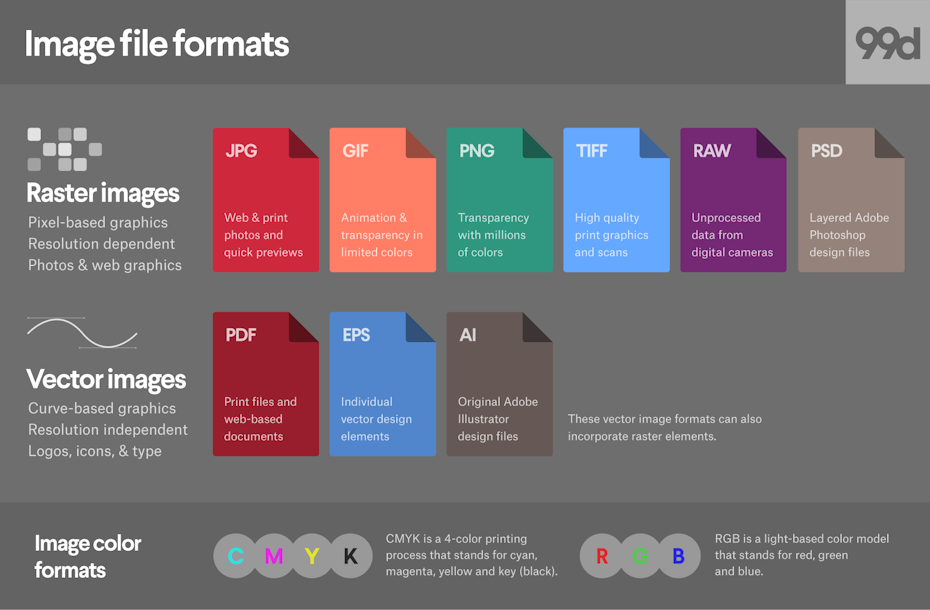
Media File Formats for Mobile Devices: 3GP, M4, and More

Media File Formats for Mobile Devices: 3GP, M4, and More

Media File Formats for Mobile Devices

My Experience with Media File Formats

As someone who has been using mobile devices for years, I have encountered a wide range of media file formats. From 3GP to M4V, each format has its own strengths and weaknesses, and choosing the right format can be a challenge. In this article, I will explore some of the most common media file formats for mobile devices, and provide some tips for choosing the right format for your needs.

Understanding Media File Formats

Media file formats are essentially containers that hold audio and video data. Each format has its own unique characteristics, including compression algorithms, video resolutions, and audio quality. Some of the most common media file formats for mobile devices include:
3GP: This format is commonly used for video content on mobile devices, and is known for its small file size and low bandwidth requirements.
M4V: This format is similar to MP4, but is specifically designed for use with Apple devices. It supports high-quality video and audio, and is often used for streaming and downloading content from the iTunes Store.
MP4: This format is widely used for video content on mobile devices, and is known for its high-quality video and audio, as well as its compatibility with a wide range of devices and platforms.

“Choosing the right media file format for your needs can be a challenge, but it is important to consider factors such as file size, video quality, and compatibility with your device and platform.”

Other Media File Formats

In addition to 3GP, M4V, and MP4, there are a number of other media file formats that are commonly used for mobile devices. These include:
AVI: This format is widely used for video content on desktop computers, but is less common on mobile devices due to its large file size and limited compatibility.
WMV: This format is commonly used for video content on Windows devices, and is known for its high-quality video and audio.
MOV: This format is commonly used for video content on Apple devices, and is known for its high-quality video and audio, as well as its compatibility with a wide range of devices and platforms.

“While there are a number of media file formats available for mobile devices, it is important to choose the right format for your specific needs. Factors such as file size, video quality, and compatibility with your device and platform can all play a role in determining the best format for your needs.”

Final Words

As someone who has been using mobile devices for years, I have learned the importance of choosing the right media file format for my needs. Whether I am streaming video content or downloading music, the right format can make all the difference in terms of quality and compatibility. By understanding the various media file formats available for mobile devices, and considering factors such as file size, video quality, and compatibility, you can ensure that your media content looks and sounds its best.

Media File Formats, Mobile Devices, 3GP, M4V, MP4, AVI, WMV, MOV, Audio Quality, Video Quality, Compression Algorithms, Compatibility, File Size, Streaming, Downloading, iTunes Store, Apple Devices, Windows Devices, Desktop Computers, Video Content, Audio Data, Containers, Bandwidth Requirements, High-Quality Video, High-Quality Audio, Video Resolutions, Choosing the Right Format, Quality and Compatibility.
Media File Formats, Mobile Devices, 3GP, M4V, MP4, AVI, WMV, MOV Audio Quality, Video Quality, Compression Algorithms, Compatibility, File Size, Streaming, Downloading, iTunes Store, Apple Devices, Windows Devices, Desktop Computers, Video Content, Audio Data, Containers, Bandwidth Requirements, High-Quality Video, High-Quality Audio, Video Resolutions, Choosing the Right Format, Quality and Compatibility, Media Content, Video Streaming, Audio Streaming, Video Downloading, Audio Downloading, Mobile Video Formats, Mobile Audio Formats, Mobile Media Formats, Mobile Video Quality, Mobile Audio Quality, Mobile Video Compression, Mobile Audio Compression, Mobile Video Resolution, Mobile Audio Resolution, Mobile Video Compatibility, Mobile Audio Compatibility, Mobile Video File Size, Mobile Audio File Size, Mobile Video Streaming Quality, Mobile Audio Streaming Quality, Mobile Video Downloading Quality, Mobile Audio Downloading Quality, Mobile Video Playback, Mobile Audio Playback, Mobile Video Conversion, Mobile Audio Conversion, Mobile Video Editing, Mobile Audio Editing, Mobile Video Production, Mobile Audio Production, Mobile Video Distribution, Mobile Audio Distribution.