Video Deinterlacing


Free Download Mp4Gain
picture

Video Deinterlacing: Enhancing Your Viewing Experience


Video Deinterlacing
Video Deinterlacing
Video Deinterlacing
Video Deinterlacing

As a video enthusiast, I’ve come to appreciate the importance of video deinterlacing in the world of visual content. It’s a term that holds the key to improving the quality of videos and ensuring a smoother and more enjoyable viewing experience.

Understanding Video Deinterlacing

Let’s start with the basics. When we talk about video deinterlacing, we’re referring to the process of converting interlaced video into a progressive format. But what does that really mean?

Well, in the early days of television and video recording, interlaced video was the standard. This means that each frame of video was split into two fields, with one field containing all the odd lines of an image and the other containing the even lines. These two fields were displayed sequentially, creating the illusion of a complete frame. However, this method often resulted in visible lines and flickering, especially when there was fast motion on the screen.

Now, video deinterlacing steps in to solve this problem. It takes those two interlaced fields and combines them into a single, progressively scanned frame. The result? A smoother, flicker-free image that looks significantly better, especially on modern high-definition displays.

The Deinterlace Video Process

So, how does the deinterlace video process work? Think of it as a digital makeover for your video content. When you run a deinterlacing algorithm, it carefully examines each frame of interlaced video and merges the two fields into one. It does this by interpolating the missing lines to create a complete frame.

Let’s use an analogy to make this clearer. Imagine you have a torn photograph that’s been split into two pieces. The first piece has the top half of the image, and the second piece has the bottom half. To restore the full picture, you’d carefully align the torn edges and fill in the missing details. That’s essentially what deinterlacing does for video frames.

Now, it’s important to note that not all deinterlacing methods are created equal. Some algorithms are more sophisticated and effective than others, and the choice of deinterlacing technique can significantly impact the final video quality. This is where choosing the right deinterlacing software tools becomes crucial.

Benefits of Progressive Scan

The switch from interlaced video to progressive scan has brought about several benefits of progressive scan that are impossible to ignore. Firstly, progressive scan eliminates the annoying flicker and visible lines that plagued interlaced content, providing a smoother and more pleasing visual experience.

Additionally, progressive scan is better suited for modern high-definition displays, as these screens are inherently progressive. When you watch a deinterlaced video on such a display, every pixel is utilized to its full potential, resulting in sharper images and more vibrant colors.

Moreover, progressive scan is the preferred format for video editing and post-production. When working with interlaced video, editors often face challenges in maintaining quality and consistency. By deinterlacing the footage, editors can ensure a seamless editing process and achieve professional-grade results.

Interlaced vs. Progressive Video: Making the Choice

Now that you understand the importance of video deinterlacing and the advantages of progressive scan, it’s essential to distinguish between interlaced vs. progressive video and make the right choice depending on your needs.

Interlaced video still has its place, especially in legacy systems and older content. However, for modern applications, progressive scan is the way to go. Whether you’re streaming videos online, watching a Blu-ray disc, or creating your own video content, progressive scan ensures a superior viewing experience.

In conclusion, video deinterlacing is the key to unlocking the full potential of your video content. It’s a process that transforms older, flickering videos into smooth, high-quality visuals that are compatible with today’s displays. So, the next time you’re enjoying your favorite movie or editing a video project, remember the magic of deinterlacing that makes it all possible.

“Video deinterlacing is the key to unlocking the full potential of your video content.”


Free Download Mp4Gain
picture


Mp4Gain Main Window
picture


Mp4Gain Features
picture


Free Download Mp4Gain
picture

Media File Formats for Mobile Devices: 3GP, M4, and More

Media File Formats for Mobile Devices: 3GP, M4, and More

Media File Formats for Mobile Devices

My Experience with Media File Formats

As someone who has been using mobile devices for years, I have encountered a wide range of media file formats. From 3GP to M4V, each format has its own strengths and weaknesses, and choosing the right format can be a challenge. In this article, I will explore some of the most common media file formats for mobile devices, and provide some tips for choosing the right format for your needs.

Understanding Media File Formats

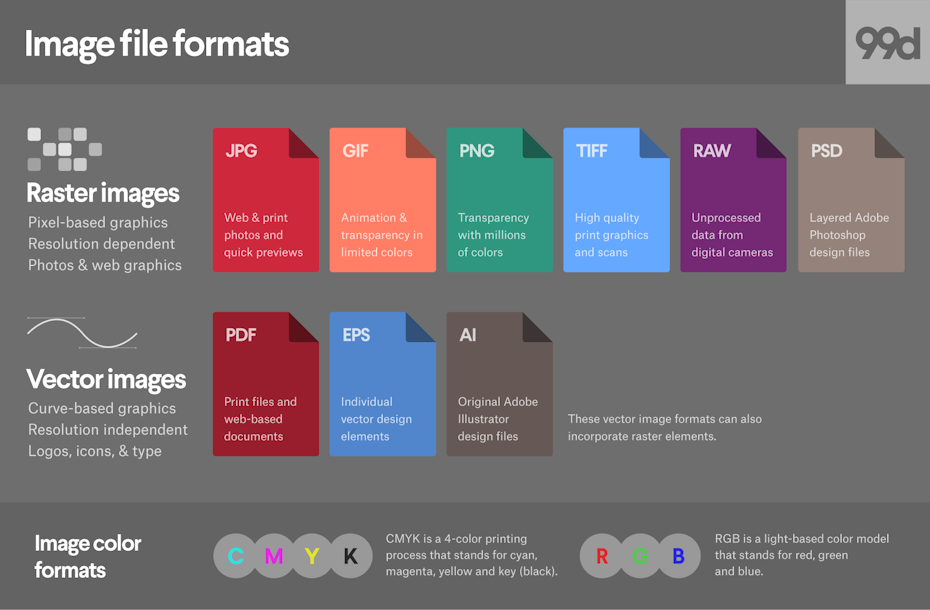
Media file formats are essentially containers that hold audio and video data. Each format has its own unique characteristics, including compression algorithms, video resolutions, and audio quality. Some of the most common media file formats for mobile devices include:
3GP: This format is commonly used for video content on mobile devices, and is known for its small file size and low bandwidth requirements.
M4V: This format is similar to MP4, but is specifically designed for use with Apple devices. It supports high-quality video and audio, and is often used for streaming and downloading content from the iTunes Store.
MP4: This format is widely used for video content on mobile devices, and is known for its high-quality video and audio, as well as its compatibility with a wide range of devices and platforms.

“Choosing the right media file format for your needs can be a challenge, but it is important to consider factors such as file size, video quality, and compatibility with your device and platform.”

Other Media File Formats

In addition to 3GP, M4V, and MP4, there are a number of other media file formats that are commonly used for mobile devices. These include:
AVI: This format is widely used for video content on desktop computers, but is less common on mobile devices due to its large file size and limited compatibility.
WMV: This format is commonly used for video content on Windows devices, and is known for its high-quality video and audio.
MOV: This format is commonly used for video content on Apple devices, and is known for its high-quality video and audio, as well as its compatibility with a wide range of devices and platforms.

“While there are a number of media file formats available for mobile devices, it is important to choose the right format for your specific needs. Factors such as file size, video quality, and compatibility with your device and platform can all play a role in determining the best format for your needs.”

Final Words

As someone who has been using mobile devices for years, I have learned the importance of choosing the right media file format for my needs. Whether I am streaming video content or downloading music, the right format can make all the difference in terms of quality and compatibility. By understanding the various media file formats available for mobile devices, and considering factors such as file size, video quality, and compatibility, you can ensure that your media content looks and sounds its best.

Media File Formats, Mobile Devices, 3GP, M4V, MP4, AVI, WMV, MOV, Audio Quality, Video Quality, Compression Algorithms, Compatibility, File Size, Streaming, Downloading, iTunes Store, Apple Devices, Windows Devices, Desktop Computers, Video Content, Audio Data, Containers, Bandwidth Requirements, High-Quality Video, High-Quality Audio, Video Resolutions, Choosing the Right Format, Quality and Compatibility.
Media File Formats, Mobile Devices, 3GP, M4V, MP4, AVI, WMV, MOV Audio Quality, Video Quality, Compression Algorithms, Compatibility, File Size, Streaming, Downloading, iTunes Store, Apple Devices, Windows Devices, Desktop Computers, Video Content, Audio Data, Containers, Bandwidth Requirements, High-Quality Video, High-Quality Audio, Video Resolutions, Choosing the Right Format, Quality and Compatibility, Media Content, Video Streaming, Audio Streaming, Video Downloading, Audio Downloading, Mobile Video Formats, Mobile Audio Formats, Mobile Media Formats, Mobile Video Quality, Mobile Audio Quality, Mobile Video Compression, Mobile Audio Compression, Mobile Video Resolution, Mobile Audio Resolution, Mobile Video Compatibility, Mobile Audio Compatibility, Mobile Video File Size, Mobile Audio File Size, Mobile Video Streaming Quality, Mobile Audio Streaming Quality, Mobile Video Downloading Quality, Mobile Audio Downloading Quality, Mobile Video Playback, Mobile Audio Playback, Mobile Video Conversion, Mobile Audio Conversion, Mobile Video Editing, Mobile Audio Editing, Mobile Video Production, Mobile Audio Production, Mobile Video Distribution, Mobile Audio Distribution.

Quantization in Video Compression

Quantization in Video Compression

Video Quantization
Video Quantization
Video Quantization
Video Quantization

Introduction:

Quantization is a crucial aspect of video compression that plays a significant role in balancing video quality and file size. It involves reducing the precision of data to minimize storage requirements while maintaining an acceptable level of visual fidelity. In this article, we will delve into the intricacies of quantization in video compression, exploring its impact on image quality and the trade-offs involved.
Quantization is a fundamental step in video compression algorithms, such as MPEG and H.264. Its main purpose is to reduce the amount of data needed to represent a video signal accurately. By quantizing the continuous amplitude values of a video signal, it is possible to approximate them with a limited number of discrete levels. This reduction in precision allows for more efficient data representation, resulting in smaller file sizes and easier transmission.

The Science Behind Quantization:

Quantization is a process in which the continuous values of video data are discretized into a finite set of levels. The goal is to find a balance between preserving visual quality and minimizing storage requirements. When quantizing video, each pixel’s color or intensity values are rounded off or truncated to fit into a specific number of bits. The number of bits allocated determines the number of distinct levels available to represent the pixel values.
The quantization step size determines the level of compression applied. A smaller step size preserves more details but increases file size, while a larger step size sacrifices details for reduced storage requirements. For example, in an 8-bit video, each pixel can have 256 possible levels (2^8). By reducing the quantization step size, we can increase the number of available levels, resulting in higher image quality. However, this comes at the cost of increased file size.

Quantization Techniques and Quality Considerations:

Various quantization techniques are employed in video compression to strike a balance between storage efficiency and perceptual quality. Uniform quantization is the simplest approach, where the value range is divided into equal intervals. However, this can lead to noticeable visual artifacts due to quantization errors. Non-uniform quantization techniques, such as logarithmic or adaptive quantization, allow for more flexibility in allocating bits to different parts of the video frame.
Logarithmic quantization allocates more bits to the lower end of the value range, preserving details in darker regions where human visual perception is more sensitive. Adaptive quantization adjusts the quantization step size dynamically based on the complexity of each video frame. More bits are allocated to complex regions, reducing artifacts and maintaining visual quality.

It is important to consider the intended use of the compressed video when selecting quantization parameters. For example, videos intended for high-definition displays or professional broadcasting require lower quantization and higher bitrates to maintain visual fidelity. On the other hand, videos meant for online streaming or portable devices can tolerate higher levels of quantization, trading off some quality for smaller file sizes.

As renowned filmmaker Stanley Kubrick once said, “The great nations have always acted like gangsters, and the small nations like prostitutes.” This quote resonates with the concept of quantization in video compression, where decisions must be made to prioritize certain aspects over others. Just as great nations assert their dominance, quantization sets the rules and determines how video data will be represented. Similarly, smaller nations, like prostitutes, adapt to fit the available space, adjusting their services to align with the constraints imposed by quantization.

Conclusion:

Quantization is an essential process in video compression that involves discretizing video data into finite levels to reduce file sizes while maintaining acceptable visual quality.