MPEG Format


Free Download Mp4Gain
picture

MPEG Format

MPEG Format
MPEG Format
MPEG Format
MPEG Format

What is the MPEG standard?

MPEG, which stands for the Moving Picture Experts Group, represents a family of standards used for coding audiovisual information in a digital format. Established by the group of experts who designed it, MPEG is widely recognized in the realm of multimedia content. Digital videos and audio tracks, which you might stream or download, often use the MPEG standard because of its reliable compression techniques.

Such compression allows large multimedia files to be condensed into smaller sizes without sacrificing significant quality. The versatility of the MPEG standard has made it an indispensable tool for various media applications.

“The digital revolution is far more significant than the invention of writing or even of printing.” – Douglas Engelbart

History of the MPEG format.

The MPEG format, as we know it today, was initiated in 1988. The goal was to create standards to address the growing demands of the digital multimedia landscape. Over the years, several versions of MPEG have been released, each catering to specific needs and evolving technologies.

From its inception, the format’s emphasis has been on providing high-quality digital audiovisual content. As technologies advanced and the requirements of multimedia shifted, the MPEG standards continually adapted, remaining relevant in every era of digital media evolution.

“Innovation is the calling card of the future.” – Anna Eshoo

How does MPEG compression work?

MPEG compression is a marvel of digital engineering. It uses a combination of temporal and spatial compression techniques. Temporal compression reduces redundancy between consecutive frames of a video, while spatial compression lessens redundancy within individual frames.

By analyzing patterns and repetitive information, MPEG compression discards data that won’t be missed by the human eye or ear. This results in significantly reduced file sizes without a noticeable drop in quality, making it efficient for storage and transmission.

“Simplicity is the ultimate sophistication.” – Leonardo da Vinci

Differences between MPEG versions.

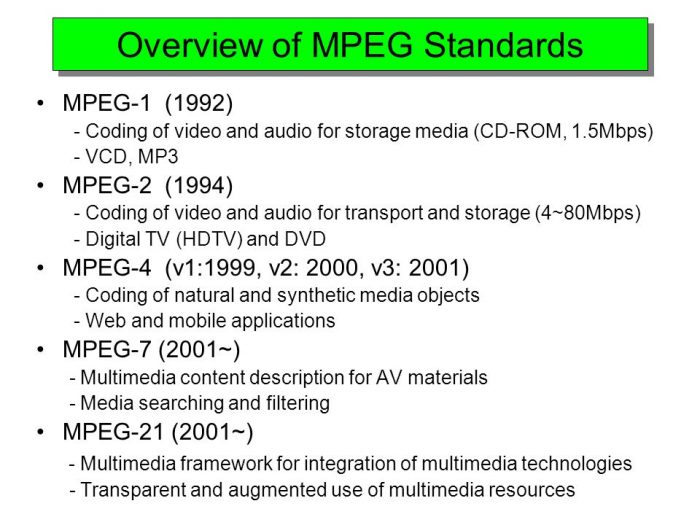
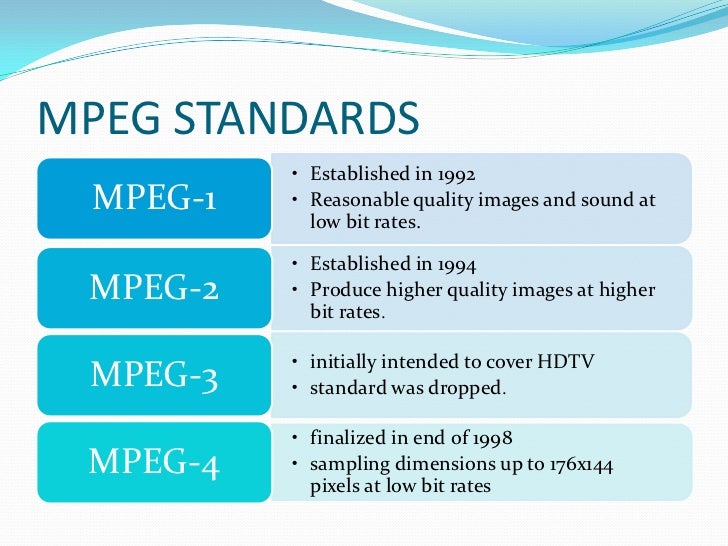
There are several MPEG versions, each designed to address unique challenges in the multimedia world. MPEG-1, for example, was created for video CDs and can support low-resolution videos. MPEG-2, on the other hand, was designed for DVDs and broadcast television.

Subsequent versions, like MPEG-4, introduced enhanced functionalities and catered to newer technologies, such as internet streaming and mobile devices. Each version marked an evolution, offering better compression, improved quality, or both.

“Progress is impossible without change.” – George Bernard Shaw

MPEG format’s impact on multimedia.

The MPEG format revolutionized the multimedia industry. Its efficient compression algorithms made it possible to store and transmit high-quality video and audio in considerably smaller files. This played a crucial role in the rise of digital streaming platforms, online video sharing, and digital broadcasts.

Furthermore, the format’s adaptability ensured its continued relevance, influencing the development of various multimedia technologies over the years.

“Without change, there is no innovation.” – C. Frank Wang

Understanding MPEG’s video and audio components.

MPEG encompasses both video and audio components. The video aspect is primarily about compressing visual data effectively, while the audio component focuses on achieving high-quality sound with minimal file size. Together, they provide a holistic approach to multimedia compression, ensuring that both sight and sound are preserved with integrity.

“Sound and vision become poetry when woven together.” – Anonymous

Evolution and significance of MPEG.

Over the years, MPEG has evolved to meet the changing demands of technology and media consumption. Its significance lies in its adaptability and its ability to maintain high-quality standards. From facilitating DVD technology to enabling online streaming, MPEG’s influence is pervasive in the multimedia realm.

“Adaptability is the simple secret of survival.” – Jessica Hagedorn

Advantages of using MPEG.

MPEG offers numerous advantages, including efficient compression, versatility across platforms, and compatibility with a wide range of devices. Its ability to condense large media files without a significant loss in quality makes it ideal for both storage and transmission.

“In every challenge lies an opportunity for growth.” – Unknown

Limitations of the MPEG format.

While MPEG is highly efficient, it’s not without limitations. Lossy compression means some data is discarded, which might affect quality in specific applications. Additionally, certain MPEG versions may not be suitable for all media needs, requiring careful selection based on the intended use.

“Every limitation is an opportunity in disguise.” – Anonymous

Real-world applications of MPEG.

From streaming services and broadcasting to video conferencing and digital advertising, the applications of MPEG are vast. Its universal appeal and efficiency have made it the go-to choice for various multimedia needs across industries.

“The real world is where the monsters are.” – Rick Riordan

Final Words

MPEG’s indelible mark on the multimedia landscape underscores its importance. As technologies continue to evolve, the adaptability and efficiency of formats like MPEG will be crucial in shaping the future of digital media.


Free Download Mp4Gain
picture


Mp4Gain Main Window
picture


Mp4Gain Features
picture


Free Download Mp4Gain
picture

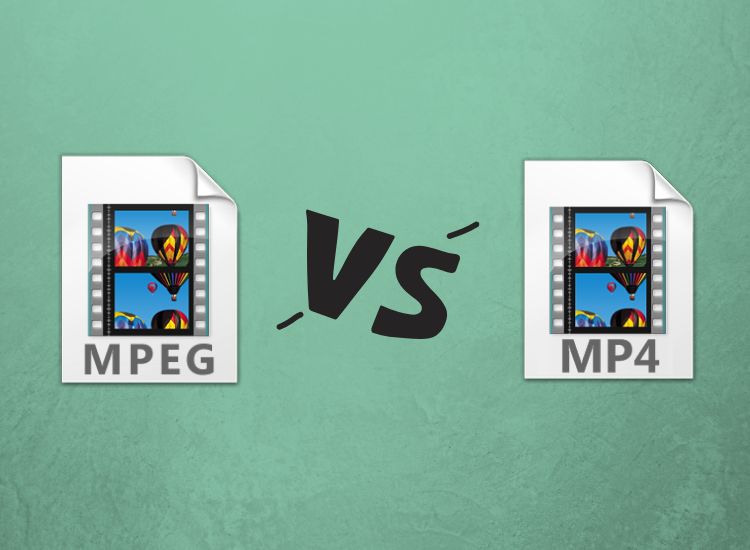
MP4 vs. MPEG Format Comparison

MP4 vs. MPEG Format Comparison

MP4 vs. MPEG
MP4 vs. MPEG
MP4 vs. MPEG
MP4 vs. MPEG

Understanding the Differences Between MP4 and MPEG Formats

When it comes to digital video formats, MP4 and MPEG are two of the most popular options available. While both formats are widely used, they have distinct differences that can impact their performance and compatibility with different devices and software. In this article, we’ll explore the key differences between MP4 and MPEG formats, and help you determine which one is right for your needs.

What is MP4?

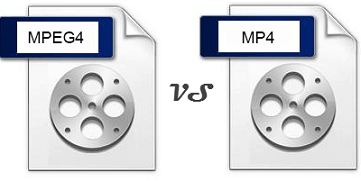
MP4, or MPEG-4 Part 14, is a digital multimedia container format used to store video, audio, and other data such as subtitles and still images. It was developed by the Moving Picture Experts Group (MPEG) and is widely used for streaming video online, as well as for storing video files on mobile devices and computers. One of the key advantages of MP4 is its ability to compress large video files without sacrificing quality, making it an ideal format for sharing and streaming video content.

What is MPEG?

MPEG, or Moving Picture Experts Group, is a family of digital video and audio compression standards developed by the same organization that created MP4. MPEG formats are widely used for creating high-quality video content, and are compatible with a wide range of devices and software. Unlike MP4, which is a container format, MPEG is a compression format that uses a variety of codecs to compress video and audio data.

Which Format is Right for You?

When it comes to choosing between MP4 and MPEG formats, there are a few key factors to consider. If you’re looking for a format that is widely compatible with different devices and software, MPEG may be the better choice. However, if you’re looking for a format that offers high-quality video compression and is ideal for streaming and sharing video content online, MP4 may be the better option. Ultimately, the choice between these two formats will depend on your specific needs and preferences.

Conclusion

In conclusion, MP4 and MPEG are two popular digital video formats that offer distinct advantages and disadvantages. While MPEG is widely compatible with different devices and software, MP4 offers high-quality video compression and is ideal for streaming and sharing video content online. When choosing between these two formats, it’s important to consider your specific needs and preferences, and choose the format that best meets your requirements. And if you’re looking for a reliable tool to normalize and convert your audio and video files, MP4Gain is a great option to consider.
MP4, MPEG, video format, digital video, multimedia container, compression, codecs, streaming, compatibility, quality, online, mobile devices, computers, audio, subtitles, still images, Moving Picture Experts Group, family, standards, high-quality, compression standards, video content, software, advantages, disadvantages, specific needs, preferences, normalize, convert, audio files, video files, MP4Gain, tool, reliable.

History and characteristics of the MPEG standards. Part 5

History and characteristics of the MPEG standards. Part 5

mpeg

ABR: mechanism

Mpeg

Suppose user specified ABR mode and a certain bitrate B (user can specify absolutely any bitrate from 32 to 320, even not from standard bitrate grid, for example you can specify 129 as the rate Average Bit Rate). The encoder accepts a piece of audio (frame) to be encoded. In the same way, as in CBR, it determines its complexity (we will talk about this later). If the passage is complex, then the encoder also takes more bits for it, but not from the repository (as in CBR), but simply increasing the bitrate by the required number of steps (the selected bitrate must be included in the standard grid), thus creating a “virtual repository” (you can increase the bitrate here, this is not CBR). What does “virtual reservoir” mean? It’s simple: we assume that the user-specified bit rate B is not sufficient for the encoder, standard N bit rate, where: N> = K (we call this choice of bit rate “virtual deposit”). Then there is a K-bit encoding of the taken piece of audio. However, N> = K, that is, we use fewer bits than there are in the taken frame, so won’t we throw away these extra bits? It is these extra bits that we write to the actual deposit. Since ABR has the ability to use a “virtual reservoir”, it makes no sense to build a standard reservoir, so when the next piece of audio arrives, the bits from the reservoir will be used to encode it first, and then the encoder will decide what rate bit is needed next. In other words, if in CBR the encoder always tries to accumulate as many bits in the reservoir as possible, then in ABR the encoder, on the contrary, tries to get rid of the bits in the reservoir,

Simple passages are encoded with fewer bits, they take about 95% of the specified bit rate B, but now the rest is not deposited into the repository, the encoder just takes a frame with a lower bit rate. The resulting difference (the remaining bits) is written to the standard repository (don’t discard the remaining bits …). Example. Let’s say a “simple” passage has arrived. Then the encoder takes all the bits (if any) in the repository (present), then looks for the standard bitrate closest to which the total number of bits obtained for this frame (all the bits in the repository + rate of bits taken) is 95% of the user-specified bitrate B performs the encoding and the extra bits (if any) are stored back in the repository.

APR: Summary

So using a tank in ABR is different from CBR. In CBR, the bit rate cannot be changed, and the repository is specially saved by storing there the bits that were left (were saved) from the frame encoding at an initially fixed bit rate determined during a single pass; if bits are required for encoding and the repository is empty, then it is empty, nothing can be done about it, and encoding is simply done at the specified bit rate to the detriment of quality. In ABR, the bit rate is variable and the standard deposit is not really necessary, however, since the increase (decrease) of the bit rate necessarily occurs up to a certain table values ​​that can turn out to be higher than the number. of bits required by the encoder, then the extra bits, of course, are not discarded, but are stored in the repository. In other words, in CBR the accumulation of the standard pool is the main task, while in ABR there is an unlimited “virtual pool” and the standard is used only to store additional bits formed as a result of the difference between the table values. Bitrate and actually required bitrate.

Vbr

VBR: variable bit rate. The user indicates the desired quality. Lame, based on his psychoacoustic model, assigns to each frame exactly the number of bits necessary to achieve a certain quality. In the output stream, the frames have respectively different bit rates (which always fit into the standard bit rate table). Warehouse usage in VBR is absolutely identical to ABR, only unused frame queues go there.

Methods for estimating signal complexity

So the main difference between CBR, ABR and VBR, as you probably already understood from the above, is the use of different methods to calculate the number of bits needed to encode each frame.

History and characteristics of the MPEG standards. Part 4

History and characteristics of the MPEG standards. Part 4

MPEG Standards

What are the differences between CBR, VBR and ABR modes? (applied to the Lame encoder)

mpeg

Before starting the conversation, let’s clarify two details:

1. MP3 encoding occurs block by block: the encoded file is divided into frames (frames) with the same interval, each frame is encoded and written to the output stream; therefore, the output stream also has a frame structure.

2. Frames cannot be encoded at any bit rate, but only at one of the standard MPEG1 Layer III bit rates listed in the table: 32, 40, 48, 56, 64, 80, 96, 112, 128, 160, 192, 224, 256, 320. The standard does not provide encoding at any intermediate bit rate (“free format”).

Introduction

People using VBR in Lame generally argue this with the phrase, “I want to get constant quality, not constant bitrate. In fact, in music there are simple passages, for which 128 Kbps is enough (for example, pauses between songs), and there are also complex passages, in which a person with good hearing, a good audio card and other audio equipment. audio will hear compression. defects even at 320 Kbps / sec. In fact, such an argument is not entirely valid.

CBR

Even in CBR mode, the mp3 encoder can reallocate bits over time, emphasizing more or fewer bits during complex or simple passages, thus improving the overall sound quality. This bit reassignment is done through the so-called bit deposit: during the encoding of simple passages, the encoder spends not the entire user-specified bit rate on them, but only about 90%, about 10% is Store in bin to code difficult spots (bin is empty initially). When encoding complex passages, the encoder will use all 100% of the specified bit rate and add extra bits from the bucket (if any, that is, if the bucket is not empty). Unfortunately, according to the standard, the size of the tank is limited. This means that if a single signal lasts long enough, the tank builds its volume up to certain maximum allowed limits, and then the encoding continues using all 100% bit rate. And the opposite situation: if a complex signal lasts long enough, all the saved bits are taken from the repository (gradually) and then encoding is done using now all 100% of the bit rate.

ABR: Explanation

One could say that the reservoir does a good job with its main function – accumulating “extra” bits during simple passages and issuing them as additional bits when encoding complex passages, if not for one “but”: it has a finite and, moreover, Very limited in size, which means that it can only be stored up to certain limits and consequently can also be removed until the tank is empty. It is to eliminate this major drawback of the tank that the ABR was developed.

The main difference between ABR and CBR is that in CBR all frames must be the same size (that is, the bit rate for all frames must be the same), but in ABR this limitation is removed, respectively, there is an opportunity to use an almost infinite tank instead of the standard, very limited in size. “virtual” reservoir. Does it look like this.

History and characteristics of the MPEG standards. Part 3

History and characteristics of the MPEG standards. Part 3

MPEG

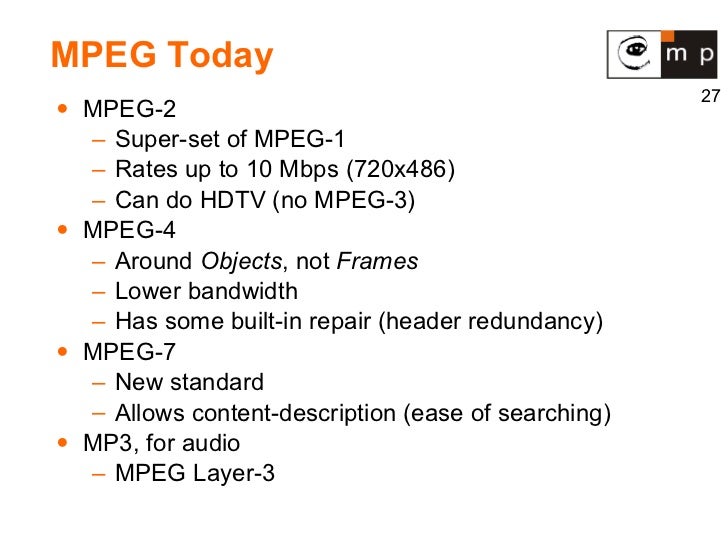
3) The MPEG-4 standard is a special article. MPEG-4 is not just an algorithm for compressing, storing and transmitting video or audio information. MPEG-4 is a new way of presenting information, it is an object-oriented representation of multimedia data. The standard operates with objects, organizes hierarchies, classes, etc. from them, he builds scenes and controls their transfer.

MPEG


The objects can be ordinary audio or video streams, as well as synthesized audio and graphics data (voice, text, effects, sounds …). These scenes are described in a special language. We will not dwell on this standard in detail; this is a topic for a separate extensive discussion. It can only be said that as a means of audio compression in MPEG-4, a set of various audio coding standards is used: the MPEG-2 AAC algorithm, the TwinVQ algorithm, as well as HVXC (Excitation Coding) voice coding algorithms. harmonic vector) – for 2-4 Kbps bit rates and CELP (Code Excited Linear Predictive) – for 4-24 Kbps bit rates. In addition, MPEG-4 has many scalability mechanisms.

4) The MPEG-7 standard, the development of which has not yet been completed, is fundamentally different from all other MPEG standards. The standard is not being developed to establish a framework for transferring data or writing and describing data of any particular kind. The standard is intended to be descriptive, intended to regulate the characteristics of any type of data, even analog. The use of MPEG-7 is intended to be closely related to MPEG-4. MPEG-7 is scheduled for release in 2001.

For the convenience of handling compressed streams, all MPEG algorithms are designed in such a way that they allow decompression (retrieval) and playback of a stream simultaneously with its reception (download) – stream decompression “on the fly” (stream playback) . This opportunity is widely used on the Internet, where the speed of information transfer is limited, and with the use of these algorithms, it is possible to process the information at the moment it is received without waiting for the end of the transfer.

What are CBR and VBR?

As you know, the result of encoding a signal using an algorithm such as MPEG-1 Layer III (MP3) (or some other algorithms) is a bit stream with a frame (block) structure. This is due to the fact that the source stream is not encoded in its entirety, but in parts. That is, in fact, the original stream is divided into blocks of a certain fixed length, then each block (frame) is encoded individually, and the result (encoded information block) is sent to the resulting stream (either a file or a stream of data).

CBR (constant bit rate) is a method of encoding the original audio stream, in which all its blocks (frames) are encoded with the same parameters (with the same bit rate). In other words, the bitrate over the entire length (all frames) of the resulting stream is constant.

VBR (Variable Bit Rate) is a method of encoding the original audio stream, in which each separate block (frame) is encoded with its own bit rate. The choice of the optimal bit rate to encode a given frame is made by the encoder itself by analyzing the “signal complexity” in each individual frame.

History and characteristics of the MPEG standards. Part 2

History and characteristics of the MPEG standards. Part 2

MPEG Standards

2) The MPEG-2 standard was developed especially to encode TV signals from television broadcasts, therefore, we would not have stopped considering MPEG-2 if in April 1997 this set had not received a “continuation” in the form of MPEG- 2 AAC (MPEG-2 Advanced Audio Coding – Advanced Audio Coding) algorithm.

MPEG Video Standards - The Road From 1 to 21


The MPEG-2 AAC standard is a collaborative effort between the Fraunhofer Institute, Sony, NEC, and Dolby. MPEG-2 AAC is a receiver for MPEG-1 technology. There are several types of this algorithm: Homeboy AAC, AT&T a2b AAC, Liquifier AAC, Astrid / Quartex AAC, and Mayah AAC. The highest sound quality compared to MPEG-1 Layer III is provided by the two penultimate implementations. All previous versions of the AAC algorithm are not compatible with each other.

As with the standard MPEG-1 audio coding suite, the AAC algorithm is based on the analysis of psychoacoustic signals. At the same time, the AAC algorithm has many additions to its mechanism, aimed at improving the quality of the output audio signal. In particular, a different type of transformation is used, noise processing is improved, the filter bank is changed, and the way the output bit stream is recorded is improved. Furthermore, AAC allows you to store the so-called encoded audio signal in the encoded audio signal. “Watermarks”: copyright information. This information is embedded in the bit stream during encoding in such a way that it is impossible to destroy it without destroying the integrity of the audio data. This technology (under the Multimedia Protection Protocol) allows you to control the distribution of audio data (which, by the way, is an obstacle to the distribution of the algorithm itself and the files created with it). It should be noted that the AAC algorithm is not backward compatible (NBC – not backward compatible) with MPEG-1 levels, even though it is a continuation (refinement) of MPEG-1 Layer I, II, III.

MPEG-2 AAC provides three different encoding profiles: Main, LC (Low Complexity), and SSR (Scalable Sample Rate). Depending on the profile used during encoding, the encoding time and the quality of the resulting digital stream change. The main main profile provides the highest sound quality (at the slowest compression rate). This is due to the fact that the main profile includes all the mechanisms for analyzing and processing the input stream. The LC profile is simplified, which affects the sound quality of the resulting stream, greatly affects the compression rate, and more importantly, the decompression. The SSR profile is also a simplified version of the main profile.

Speaking of sound quality, we can say that the 96 Kbps AAC (main) transmission provides the same sound quality as the 128 Kbps MPEG-1 Layer III transmission. With 128 Kbps AAC compression, the sound quality is notably superior. to MPEG-1 Layer III 128 Kbps.

History and characteristics of the MPEG standards

History and characteristics of the MPEG standards.

Mpeg

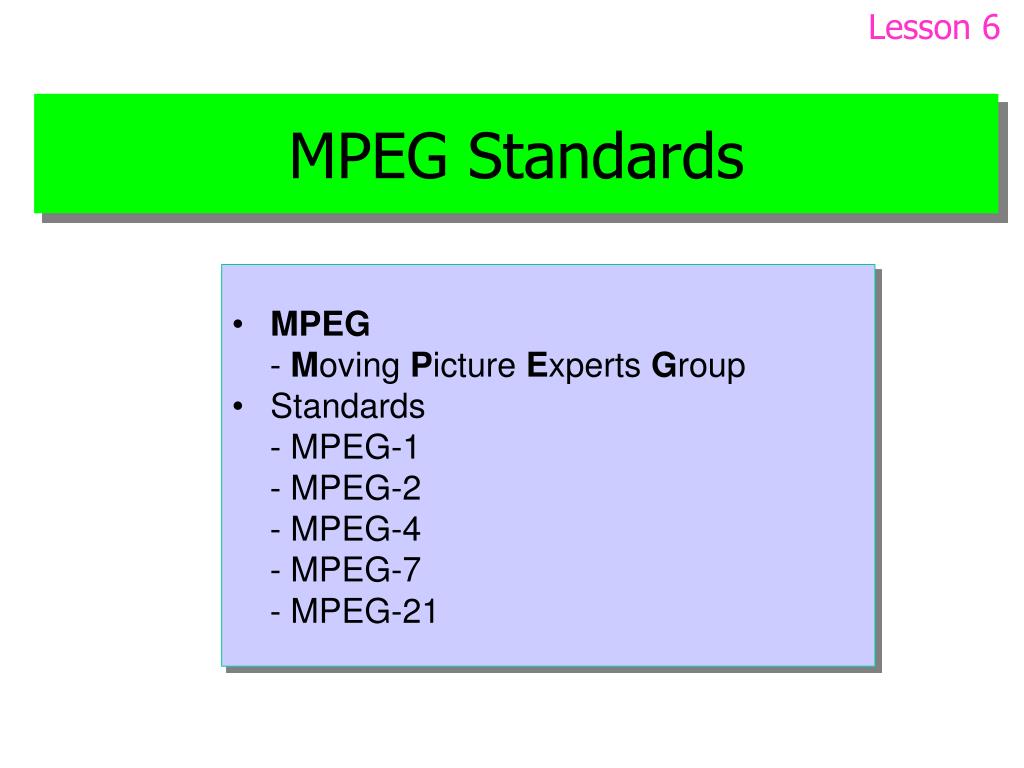
MPEG stands for Moving Picture Coding Experts Group, literally Moving Picture Coding Experts Group. MPEG dates back to January 1988. More precisely, the MPEG group was created by the International Organization for Standardization (ISO) and the International Electrotechnical Commission (IEC).

MPEG

The group was formed to create standards for encoding moving images and audio information. Starting from the first meeting in May 1988, the group began to grow and became a community of high-level professionals. Typically, an MPEG meeting is attended by about 350 professionals from more than 200 companies. Meetings are held about three times a year. Most MPEG members are individual specialists employed in various scientific and academic institutions. This is from the field of history. Now about practice. To date, MPEG has developed the following standards and algorithms:

MPEG-1 (November 1992): a standard for encoding, storing, and decoding moving images and audio information;
MPEG-2 (November 1994): coding standard for digital television;
MPEG-4 – standard for multimedia applications: version 1 (October 1998) and version 2 (December 1999);
MPEG-7 is a universal standard for working with multimedia information, designed to process, filter and manage multimedia information.
In order.

1) Consider the MPEG-1 packet. This kit, according to ISO standards, includes three algorithms of various levels of complexity: Layer I, Layer II and Layer III. The general structure of the coding process is the same for all levels. Each level has its own bitstream recording format and its own decoding algorithm. MPEG algorithms are generally based on the studied properties of the perception of sound signals by the human hearing aid (ie the encoding is done using the so-called “psychoacoustic model”).

Briefly about the encoding algorithm. The input digital signal is first broken down into frequency components of the spectrum. This spectrum is then cleaned of obviously inaudible components – low-frequency noise and the highest harmonics – that is, it really gets filtered out. In the next stage, a much more complex psychoacoustic analysis of the audible frequency spectrum is performed. This is done, among other things, to identify and eliminate “masked” frequencies (frequencies that are not perceived by the hearing aid due to being dampened by other frequencies). After all these manipulations, more than half of the information is excluded from the digital audio signal. Then, depending on the level of complexity of the algorithm used, a predictability analysis of the signal can also be performed. Also, based on the combined stereo (joint stereo) fact. This means that the high and low frequencies are in fact separated and encoded in mono (the mids remain in stereo). Also, if, for example, “silence” appears on one of the channels, the “empty” space is filled with information that increases the quality of the other channel or simply does not fit before. To top it off, the ready-to-use bit stream is compressed using a simplified analog of the Huffman algorithm, which also significantly reduces the volume occupied by the stream.

The MPEG-1 kit is designed to encode digitized signals with a sampling frequency of 32, 44.1 and 48 kHz. As stated above, the MPEG-1 suite has three layers (Layer I, II and III). These levels differ in the compression ratio provided and the sound quality of the resulting transmissions. Layer I allows the storage of 44.1 kHz / 16-bit signals without significant loss of quality at a transmission rate of 384 kbps, which is 4 times gain in occupied space; Layer II provides the same quality at 194 kbps and Layer III at 128 (or 112). The Layer III gain is obvious, but the compression rate when used is the lowest (it should be noted that this limitation is no longer noticeable at modern processor speeds). In fact, Layer III allows you to compress information 10 to 12 times without any loss of quality.