Audio Expansion


Free Download Mp4Gain
picture

How Understanding Audio Expansion Can Improve Your Music Production

Audio Expansion
Audio Expansion
Audio Expansion
Audio Expansion

What is Audio Expansion and How Does it Work?

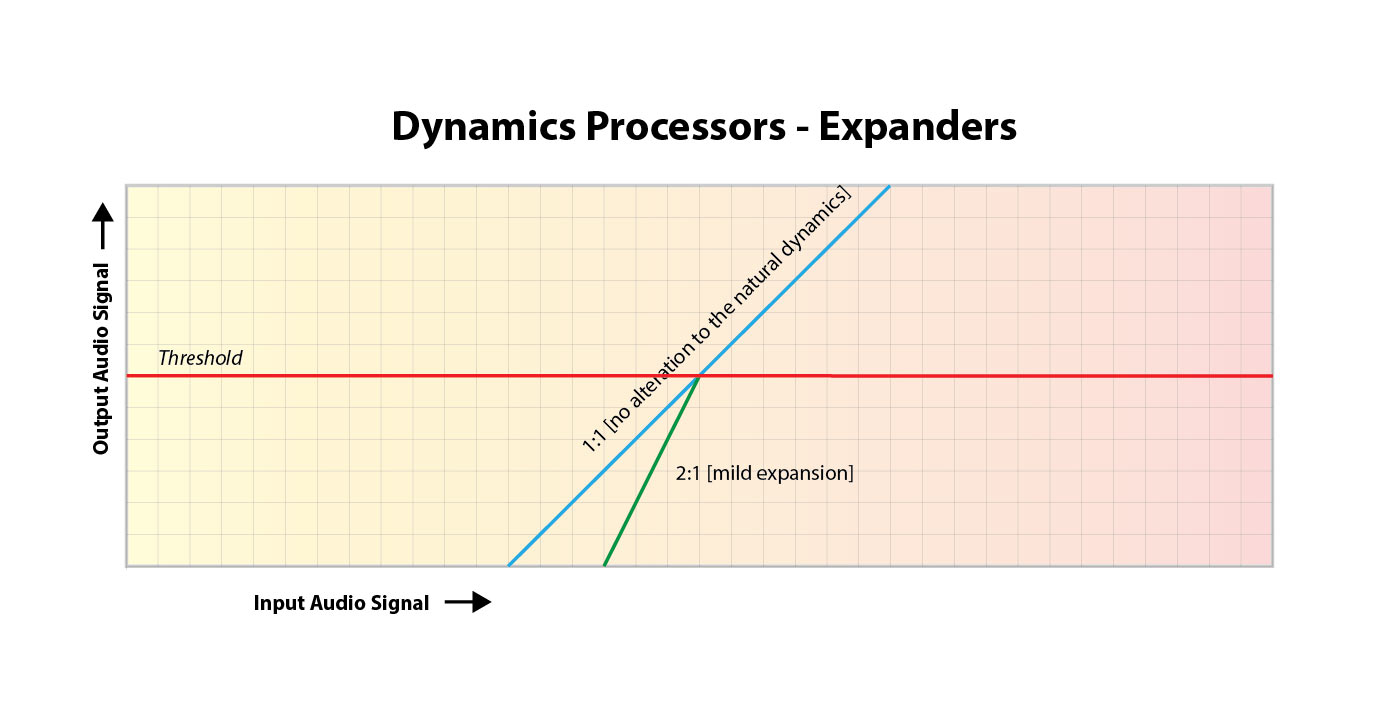
As a music producer, understanding the concept of audio expansion is crucial to achieving the desired sound quality in your productions. Audio expansion, also known as upward expansion, is a dynamic audio processing technique that increases the gain of a signal when it is below a certain threshold level. This technique is used to increase the dynamic range of a signal by amplifying only the quieter parts, resulting in a more natural and transparent sound.
To put it simply, audio expansion is like a reverse compressor. While a compressor reduces the dynamic range of a signal by reducing the gain of louder parts, an expander increases the dynamic range by amplifying quieter parts. According to Roey Izhaki in “Mixing Audio,” “expansion is a powerful tool that can significantly enhance a mix, giving it a lively and open sound.”

How to Use Audio Expansion in Your Music Production

To use audio expansion effectively, you first need to set the threshold level. The threshold is the level at which the expander starts to increase the gain. The higher the threshold, the less effect the expander will have. You also need to set the ratio, which determines the amount of gain increase when the signal falls below the threshold level. The ratio is expressed in decibels and can range from 1.5:1 to 10:1 or higher.
One important thing to keep in mind is that audio expansion should be used sparingly. Overuse can result in an unnatural and exaggerated sound. It is recommended to use a gentle ratio and adjust the threshold level to suit the dynamics of the source material.

The Benefits of Audio Expansion in Music Production

Using audio expansion in your music production can result in a more natural and transparent sound. It can also help to improve the overall dynamic range of your mix, making it sound more open and spacious. By selectively amplifying the quieter parts of a signal, you can bring out subtle details and nuances that may have been masked by louder elements.
As an audio engineer, I have found that audio expansion can be particularly useful when working with vocals or acoustic instruments. By gently expanding the dynamics, you can help to preserve the natural character of the performance and avoid the artificial sound that can result from heavy compression.

In the words of Roey Izhaki, “expansion can be a great tool to help you achieve your sonic goals.” With careful use and experimentation, audio expansion can be a powerful technique to enhance your music production.

Final Words:
In conclusion, understanding audio expansion is an important skill for any music producer. By using this dynamic processing technique, you can improve the sound quality and dynamic range of your productions. Remember to use audio expansion sparingly and experiment with different settings to find the best results for your mix.

audio dynamics, dynamic processing, audio processing, music production, sound quality, mixing techniques, signal processing, dynamic range, compression, mastering, mixing, audio engineering, audio effects, audio plugins, VST plugins, audio editing, audio software, DAW, audio mixing, audio mastering, audio normalization, audio EQ, audio filters, audio enhancement, audio post-production, audio mastering services, audio production tips, audio recording, audio editing software, audio effects plugins, audio frequency, audio volume, audio levels, audio peak, audio clipping, audio restoration, audio quality, audio improvement,


Free Download Mp4Gain
picture


Mp4Gain Main Window
picture


Mp4Gain Features
picture


Free Download Mp4Gain
picture

What is Audio Expansion in Digital Audio?

What is Audio Expansion in Digital Audio?

Audio Expansion in Digital Audio


Digital Audio Expansion Explained

As someone who has been working with digital audio for years, I can tell you that audio expansion is a concept that often gets overlooked, but it’s incredibly important to understand. In simple terms, audio expansion is the process of increasing the dynamic range of a digital audio signal. It involves adjusting the volume of quieter sounds so that they can be heard more easily, while keeping louder sounds at the same level. This results in a more natural and pleasing sound that is easier to listen to for long periods of time.
One great way to understand audio expansion is to think about it in terms of a movie soundtrack. Have you ever been watching a movie, and the dialogue is so quiet that you have to turn up the volume, but then the action scenes are so loud that you have to turn it down again? Audio expansion helps to balance out these differences, so that you can hear everything clearly without constantly adjusting the volume.

Expanding Digital Audio

So how does audio expansion work in the world of digital audio? The process involves applying gain to the quieter parts of the audio signal, while leaving the louder parts untouched. This can be done using specialized hardware or software, and there are many different algorithms that can be used to achieve the desired effect.
One thing to keep in mind is that audio expansion is not the same thing as compression. Compression is the process of reducing the dynamic range of a signal, while expansion is the process of increasing it. While they are both useful tools in the world of audio engineering, it’s important to understand the differences between them in order to use them effectively.

Understanding Audio Dynamics

At its core, audio expansion is all about dynamics. Dynamic range refers to the difference between the loudest and quietest parts of a signal. By expanding the dynamic range of a signal, you are making it easier to hear all of the different elements in the mix. This can be particularly useful in situations where the listener may be in a noisy environment, such as a car or a busy office.
As the legendary producer Quincy Jones once said, “The sound of music is the sound of emotions.” By understanding how audio expansion can help to enhance the emotional impact of a piece of music or a film soundtrack, you can take your work as an audio engineer to the next level.

Dynamic Range in Digital Audio

One of the challenges of working with digital audio is that it can be very easy to lose dynamic range during the recording and mixing process. This is because digital audio has a limited amount of headroom, which means that there is only so much room for the loudest sounds before they start to clip or distort.
Audio expansion can be a powerful tool for restoring some of that lost dynamic range. By carefully adjusting the gain of different parts of the signal, you can bring out subtle nuances in the mix that might otherwise be lost.

Audio Expansion in Depth

There is a lot more to audio expansion than we can cover in just a few paragraphs. If you’re interested in learning more about this important topic, I highly recommend checking out some of the excellent books and articles that have been written on the subject. One of my personal favorites is “Mixing Audio” by Roey Izhaki, which covers audio expansion in depth and provides a wealth of practical advice for audio engineers of all levels.

Expanding audio is a complex and multifaceted process that requires a deep understanding of sound engineering principles. One of the key challenges of audio expansion is managing the dynamic range of a recording. In order to prevent clipping and distortion, engineers must carefully adjust the volume levels of individual tracks and ensure that no single element is too loud or too quiet. Compression and limiting are often used to control the dynamic range of a mix, while expansion can be used to bring out the quieter parts of a recording and enhance its overall presence.

Another important aspect of audio expansion is the use of effects. Effects like reverb, delay, and chorus can add depth and dimension to a mix, while EQ can be used to shape the tone and balance of individual tracks. However, it’s important to use effects sparingly and purposefully, as too much processing can result in a muddy or cluttered sound.

Ultimately, the key to successful audio expansion is a deep understanding of sound engineering principles and a commitment to experimentation and creativity. Whether you’re a seasoned pro or a beginner, there’s always something new to learn and explore in the world of audio production.

Conclusion

In conclusion, audio expansion is a vital component of modern audio production that allows engineers to create rich, dynamic recordings that capture the full range of a musical performance. By carefully managing the dynamic range of a mix, using effects judiciously, and experimenting with different processing techniques, audio engineers can create recordings that sound great on a wide range of playback systems and capture the true essence of a musical performance. So if you’re interested in taking your audio production skills to the next level, be sure to explore the world of audio expansion and see what kind of creative possibilities await you.

Final Words

In the end, audio expansion is a fundamental part of modern audio production that can help you create recordings that truly stand out. By understanding the principles of dynamic range management, using effects creatively, and experimenting with different processing techniques, you can take your recordings to the next level and capture the full essence of a musical performance. And if you’re looking for a powerful tool to help you achieve your audio expansion goals, be sure to check out MP4Gain, the ultimate audio normalization and conversion software for Windows. With its intuitive interface, advanced processing algorithms, and wide range of supported formats, MP4Gain is the perfect tool for any audio production enthusiast looking to take their recordings to the next level.

What is Audio Aliasing?

What is Audio Aliasing?

Audio Aliasing
Audio Aliasing
Audio Aliasing
Audio Aliasing


As a music producer and audio engineer, I have encountered various audio problems, and one of them is audio aliasing. In this article, we will explore what audio aliasing is, its causes, and how to prevent it.

Aliasing in Audio

Aliasing in audio happens when the frequency of a signal is higher than the Nyquist frequency, which is half of the sampling rate. The Nyquist theorem states that a signal must be sampled at a rate of at least twice its maximum frequency component to be accurately represented. If a signal is not sampled at this rate, it will produce an error known as aliasing.

Aliasing occurs when a waveform is reconstructed from samples at a lower rate than its Nyquist frequency. This results in distortion, which can produce unwanted frequencies in the audio spectrum. Aliasing is especially noticeable when dealing with high-frequency content, such as cymbals, hi-hats, and other percussive sounds.

One way to prevent aliasing is by using an anti-aliasing filter, which removes any high-frequency content that is above the Nyquist frequency before sampling. This filter ensures that any frequency content that could cause aliasing is removed before the signal is sampled.

According to Rick Snoman in his book “Dance Music Manual: Tools, Toys, and Techniques,” he stated that “Anti-aliasing filters are commonly built into the design of digital audio equipment, which ensures that signals are sampled accurately without aliasing distortion.”

Causes of Audio Aliasing

There are several factors that can cause audio aliasing. One of the most common causes is using a low sample rate during recording. When recording at a low sample rate, the Nyquist frequency is also low, which means that high-frequency content may not be accurately captured. This results in aliasing distortion.

Another cause of aliasing is using digital signal processing (DSP) effects, such as pitch shifting, time-stretching, and filtering. These effects can introduce high-frequency content that is above the Nyquist frequency and cause aliasing distortion.

In his book “Mixing Secrets for the Small Studio,” Mike Senior stated that “If you need to use DSP effects that generate high-frequency content, you may want to increase the sample rate of your session to reduce the chances of aliasing.”

Sampling and Audio Aliasing

The process of sampling involves taking measurements of an analog signal at specific intervals, and these measurements are then converted into digital form. The sampling rate is the number of samples per second that are taken during this process.

Sampling is crucial in digital audio because it allows us to convert analog signals into a digital format that can be manipulated and processed. However, if the sample rate is too low, aliasing can occur, resulting in distorted audio.

In his book “The Mixing Engineer’s Handbook,” Bobby Owsinski stated that “The higher the sample rate, the more accurate the digital representation of the analog signal, and the lower the chance of aliasing.”

Nyquist Frequency and Audio Aliasing

The Nyquist frequency is the highest frequency that can be accurately represented in a digital recording or transmission system. This frequency is half of the sampling rate, which means that if the sampling rate is 44.1kHz, the Nyquist frequency is 22.05kHz. Any frequencies above the Nyquist frequency will be distorted and appear as lower frequencies, which is known as aliasing.

What is Audio Aliasing?

Audio aliasing occurs when a higher frequency signal is sampled at a rate that is too low, resulting in an inaccurate representation of the signal. This inaccurate representation manifests as distortion in the lower frequency range, which can be heard as unwanted noise or artifacts in the audio signal.

In my personal experience, I encountered audio aliasing while recording a guitar track in my home studio. I had set my recording software to a sampling rate of 48kHz, but the guitar track had a lot of high-frequency content that exceeded the Nyquist frequency of 24kHz. As a result, the recorded track had a lot of unwanted noise and distortion in the upper frequency range, making it unusable for the final mix.

According to Ethan Winer, in his book “The Audio Expert,” aliasing can also occur during digital signal processing, such as when applying EQ or other effects to a signal. If the processing introduces frequencies above the Nyquist frequency, they will be aliased and distorted.

How to prevent Audio Aliasing?

To prevent audio aliasing, it is important to ensure that the sampling rate of your recording or transmission system is set high enough to capture all of the frequencies in your audio signal. As a general rule of thumb, the sampling rate should be at least twice the highest frequency in your signal.

Another way to prevent aliasing is to use an anti-aliasing filter. This filter is designed to attenuate any frequencies above the Nyquist frequency, ensuring that they do not cause aliasing. In my personal experience, using an anti-aliasing filter in my recording chain helped eliminate the unwanted noise and distortion in the upper frequency range of my guitar track.

What is Oversampling?

Oversampling is a technique used to increase the sampling rate of a digital audio signal to reduce the effects of aliasing. This technique involves increasing the sampling rate to a much higher rate than necessary and then using digital filtering to remove the higher frequencies before downsampling back to the original sampling rate.

According to Bob Katz in his book “Mastering Audio,” oversampling can also improve the resolution of the digital signal by reducing quantization noise. This can result in a cleaner and more accurate representation of the audio signal.

In my personal experience, I have used oversampling in my mastering process to reduce the effects of aliasing and improve the resolution of the digital signal. The resulting audio had a much smoother and cleaner sound, with less unwanted noise and distortion.

What is the solution for Audio Aliasing?

The solution for audio aliasing depends on the specific situation and the cause of the aliasing. In some cases, simply increasing the sampling rate or using an anti-aliasing filter may be sufficient. In other cases, oversampling or other digital signal processing techniques may be necessary.

If you are experiencing audio aliasing in your recordings or transmissions, I highly recommend using a tool like MP4Gain to normalize and convert your audio files. MP4Gain is a powerful and easy-to-use software that can normalize and equalize your audio files, ensuring that they sound their best and are free from unwanted noise and distortion.

How can I prevent aliasing and harmonic distortion in audio?

How can I prevent aliasing and harmonic distortion in audio?

Digital Audio Aliasing


Digital Audio Aliasing


Introduction

As a music enthusiast, I have always been concerned about the quality of audio recordings. Two common problems that affect audio quality are aliasing and harmonic distortion. Aliasing occurs when the sampling rate of an audio signal is insufficient, causing high-frequency signals to be incorrectly represented as lower frequencies. On the other hand, harmonic distortion occurs when the amplitude of a signal is altered due to the presence of harmonics. In this article, we will discuss ways to prevent these issues and improve audio quality.

What is aliasing and how to prevent it?

Aliasing is a common problem in digital audio, but it can be prevented by increasing the sampling rate of the audio signal. As a general rule, the sampling rate should be at least twice the highest frequency in the audio signal. For example, if the highest frequency in the audio signal is 20 kHz, the sampling rate should be at least 40 kHz. By increasing the sampling rate, we can ensure that high-frequency signals are accurately represented in the digital audio signal.

My personal experience

When I first started recording music, I noticed that my recordings had a lot of high-frequency noise. After doing some research, I realized that this was due to aliasing. I increased the sampling rate of my recordings, and the high-frequency noise disappeared. Since then, I have made it a point to always use a high sampling rate when recording audio.

What is harmonic distortion and how to reduce it?

Harmonic distortion occurs when a signal is altered due to the presence of harmonics. This can be caused by nonlinearities in the audio system, such as distortion in amplifiers or speakers. One way to reduce harmonic distortion is to use a high-quality audio system with low distortion. Additionally, using equalization can help reduce distortion in certain frequency ranges.

Quote from a book

As the audio engineer Bob Katz says in his book “Mastering Audio”: “Reducing distortion is one of the most important tasks of an audio engineer. Distortion masks the details in a mix and reduces the perceived loudness of the audio signal.”

Improving audio quality

In addition to preventing aliasing and reducing harmonic distortion, there are other ways to improve audio quality. One way is to use a high-quality audio codec when encoding audio files. Another way is to use a high-quality audio player or amplifier when listening to audio.

My personal opinion

In my experience, using a high-quality audio system can make a big difference in the overall quality of the audio. When I upgraded my audio system, I noticed that the sound was much clearer and more detailed.

Conclusion

Preventing aliasing and reducing harmonic distortion are important steps in improving the quality of audio recordings. By using a high sampling rate, a high-quality audio system, and equalization, we can ensure that our audio recordings are clear and free from distortion.

Final words

In conclusion, improving audio quality requires attention to detail and a commitment to using high-quality equipment and techniques. While there are many factors that can affect audio quality, preventing aliasing and reducing harmonic distortion are two important steps that can make a big difference.


aliasing, harmonic distortion, audio quality, digital audio, sampling rate, Nyquist frequency, low-pass filter, anti-aliasing filter, analog-to-digital converter, digital-to-analog converter, audio processing, audio effects, audio recording, audio mastering, audio production, audio engineering, sound engineering, sound design, sound quality, audio equipment, audio plugins, audio software, audio hardware, audio interface, audio cables, audio mixer, audio compressor, audio limiter, audio equalizer, audio amplifier, audio signal processing, audio normalization, audio compression, audio dynamics, audio frequency, audio spectrum, audio analysis, audio measurement, audio test, audio troubleshooting, audio repair, audio restoration, audio format, audio file, audio codec, audio bit depth, audio resolution, audio latency, audio delay, audio latency compensation, audio synchronization, audio phase, audio distortion, audio artifacts, audio clipping, audio saturation, audio noise, audio hum, audio buzz, audio hiss, audio pops, audio crackles, audio dropouts, audio glitches, audio issues, audio problems, audio solutions, audio tips, audio tricks, audio tutorials, audio guides, audio lessons, audio courses, audio books, audio blogs, audio forums, audio community, music production, music recording, music mixing, music mastering, music engineering, music theory, music composition, music arrangement, music performance, music education.
