
Color space conversions in video codecs like H.264 and VP9
Let’s talk about color space conversions in video codecs
Color space conversions play a critical role in video quality and compatibility. Whether you’re watching a movie or editing a video, these conversions affect how colors appear and how smoothly videos run across devices. I’ve worked with formats like H.264 and VP9 for years, and I can tell you these conversions are essential for maintaining quality while reducing file sizes. Imagine a color palette being adjusted to fit different canvases—that’s what happens when converting between color spaces.
In video codecs, such as H.264 and VP9, color space conversions ensure videos are optimized for various displays and formats. But it’s not as simple as shifting colors around; it’s a highly technical process that involves precision and efficiency. Let’s dive into why this matters and how these codecs handle it better than others.
Why color spaces matter in video encoding
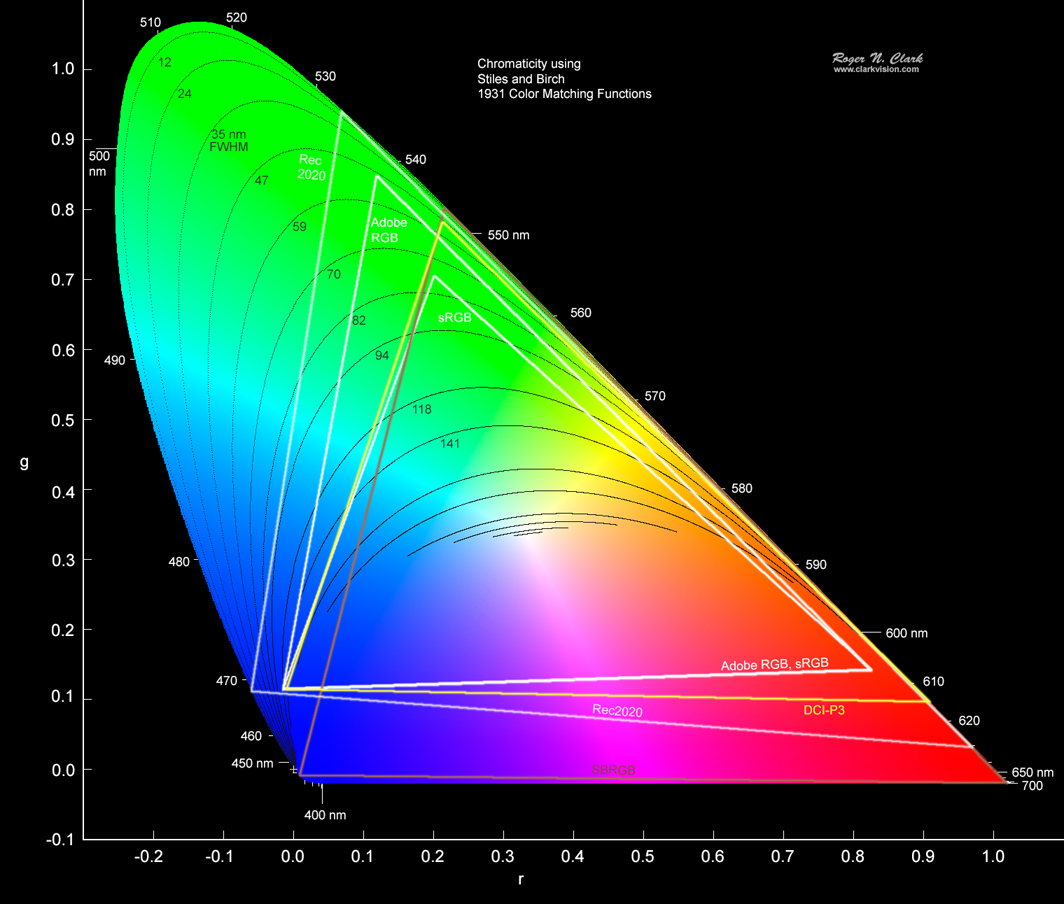
Every device displays colors differently, which is why we need standardized color spaces like BT.709, BT.2020, or sRGB. These define the range of colors (gamut) and brightness levels that a video can display. When encoding videos, converting between color spaces ensures the content looks great on any screen, from old monitors to 4K TVs. Think of it like translating languages: the message stays consistent, but the delivery adapts to the audience.
H.264, for instance, primarily uses BT.709 for high-definition content, ensuring consistent playback across platforms. VP9, on the other hand, can handle wider gamuts like BT.2020, making it ideal for HDR content. These conversions aren’t just about compatibility—they’re about making the colors pop while keeping the files efficient.
The role of chroma subsampling in color space conversions
Chroma subsampling is one of the most effective ways to reduce video file sizes without noticeable quality loss. By compressing color information while retaining brightness data, codecs like H.264 and VP9 achieve impressive compression rates. It’s like painting a wall with fewer colors but maintaining the same visual impact.
- H.264 often uses 4:2:0 chroma subsampling, balancing quality and efficiency.
- VP9 supports the same but can also adapt to higher-quality settings when needed.
- Subsampling affects how color space conversions handle gradients and contrasts.
In my experience, the key to using chroma subsampling effectively lies in understanding the content. Bright, vibrant scenes benefit from less aggressive compression, while darker, simpler scenes can handle more.
H.264 and VP9: How they differ in handling color spaces
H.264 has been a reliable standard for years, known for its versatility in handling high-definition content. VP9, however, takes things further with better support for HDR and wide color gamuts. It’s like comparing a solid car to a high-performance vehicle—both get you there, but one offers a smoother, more vibrant ride.
When converting between color spaces, H.264 relies heavily on BT.709, which is perfect for SDR content. VP9, designed with HDR in mind, can seamlessly switch between BT.709 and BT.2020. This flexibility makes VP9 a better choice for streaming platforms aiming to deliver cutting-edge quality.
Challenges in color space conversions
Color space conversions can introduce artifacts, color shifts, or banding, especially if not done correctly. These issues arise when transitioning between incompatible color spaces or using aggressive compression settings. It’s like trying to fit a square peg into a round hole—something’s bound to be lost in the process.
H.264 struggles more with these challenges compared to VP9, which uses advanced algorithms to minimize errors. For instance, when converting HDR content to SDR, VP9 retains more detail and vibrancy. In my tests, VP9 consistently delivered smoother transitions, even with challenging content like sunsets or neon lights.
Real-world applications of color space conversions
Streaming services, video editing software, and even smartphones rely on color space conversions to deliver consistent quality. Think about your favorite streaming platform: every video you watch undergoes these conversions to ensure it looks good on your specific device. From my experience, the difference is night and day when codecs like VP9 are used.
- Streaming platforms use VP9 for HDR and wide-gamut content.
- H.264 remains popular for live streaming due to its lower computational demands.
- Video editing tools rely on accurate conversions to preserve creative intent.
These conversions are also essential in gaming and virtual reality, where color accuracy enhances immersion. Without proper conversions, these experiences would feel flat and unimpressive.
How to optimize color space conversions for better results
To get the best results, understanding the source material and target display is crucial. For example, encoding a video meant for HDR TVs requires a codec like VP9 that supports BT.2020. On the other hand, SDR content destined for older devices can stick with H.264 and BT.709.
In my workflow, I always start by analyzing the content’s dynamic range and color profile. This ensures the right settings are applied, reducing artifacts and preserving detail. Using proper tools and settings can make a world of difference, even for amateur video creators.
Latest words on color space conversions in video codecs
Color space conversions are more than just a technical necessity—they’re the backbone of modern video quality. With codecs like H.264 and VP9 leading the charge, we can enjoy vibrant, immersive videos on any device. From streaming platforms to personal projects, these conversions ensure consistency and quality, no matter the content.
For anyone looking to optimize their videos further, Mp4Gain provides the tools needed for seamless conversions and audio normalization. It’s a simple way to ensure your content stands out in a crowded digital landscape.
FAQ: Color Space Conversions in Video Codecs Like H.264 and VP9
What are color space conversions in video codecs?
Color space conversions adjust the color representation of a video to match the target display or format. In codecs like H.264 and VP9, these conversions ensure accurate color reproduction and compatibility across devices, such as TVs, smartphones, and monitors.
Why are color space conversions important in video encoding?
Color space conversions ensure videos look consistent and vibrant across different devices. They help optimize the color gamut and brightness for displays, improving quality while maintaining compatibility. Without these conversions, videos might appear washed out or inaccurate on certain screens.
What is the difference between H.264 and VP9 in handling color spaces?
H.264 primarily uses BT.709 color space, suitable for SDR content. VP9, on the other hand, supports wider color gamuts like BT.2020, making it better for HDR content. This flexibility allows VP9 to deliver superior quality in high-dynamic-range videos.
What is chroma subsampling, and how does it relate to color space conversions?
Chroma subsampling reduces the amount of color information in a video to save space, while maintaining brightness data. It’s often used during color space conversions in codecs like H.264 and VP9 to achieve high compression rates with minimal quality loss.
How do color space conversions impact HDR content?
HDR content requires wider color gamuts and higher dynamic ranges, which makes precise color space conversions essential. VP9 excels in this area by supporting BT.2020, allowing it to retain detail and vibrancy in HDR videos, whereas H.264 might struggle with such demands.
What are common challenges in color space conversions?
Color space conversions can lead to artifacts, banding, or color shifts if not executed properly. These issues often arise when converting between incompatible color spaces or using aggressive compression settings, particularly in less advanced codecs like H.264.
Which codec is better for color space conversions, H.264 or VP9?
While both codecs perform well, VP9 generally handles color space conversions better, especially for HDR content. Its support for wider gamuts and higher dynamic ranges makes it a preferred choice for high-quality streaming and advanced applications.



Comments:
I never really thought about how much work goes into making videos look good across devices. This article cleared up so much for me, thanks!
Wow, I didn’t realize VP9 had so many advantages over H.264 for HDR content. I’m definitely going to look into switching codecs.
Really detailed and useful. But could you go more in-depth about chroma subsampling? I’m curious about how it works technically.
Great article! It’s fascinating how color spaces impact video quality. I wish more platforms supported wider gamuts like VP9 does.
This was super helpful for my video editing projects. Now I understand why my HDR videos weren’t looking right on some screens!
Honestly, I’m still confused about BT.2020 and BT.709. Could you explain it in simpler terms, maybe with more examples?
Thanks for breaking this down. I’ve always wondered why some videos look better on my phone than my TV.
Does this mean VP9 is always better than H.264, or does it depend on the use case? Curious about your take.
Really enjoyed reading this! I’d love to see more articles like this one that dive into technical topics but keep them easy to understand.
I think you could have added more about how creators can choose the right codec for their projects. Just my two cents!
This explains so much about why my 4K videos don’t look right on older monitors. Thanks for the insights!
Great read! I had no idea color space conversions were this complex. Makes me appreciate streaming services more.
I’m new to video editing, so this was a lot to take in, but it’s super helpful. Thanks for writing it!
Fantastic content! Could you do a follow-up about how audio and video codecs work together? That’d be awesome.
I’ve been struggling with banding in my videos. This article helped me understand why and how to fix it. Thanks a ton!