Bit rate, let’s see this, you don’t need radio quality to compare MP3 quality


Free Download Mp4Gain
picture

Bit rate, let’s see this, you don’t need radio quality to compare MP3 quality

MP3 Quality

Bit rate refers to the number of bits transmitted per second, and the unit is bps (Bit per second). The higher the bit rate, the higher the data transmission.

MP3 Quality

The bit rate in sound refers to the sampling rate of the conversion of digital sound from analog to digital format. The higher the sampling rate, the better the quality of the restored sound. The bit rate (bit rate) principle in video is the same as in sound, which refers to the sample rate converted from analog signal to digital signal.

Bitrate refers to the sampling precision (quantization precision) of converting digital sound from analog to digital format, that is, the number of bits per sample of sound. The higher the sampling precision (quantization precision), the better the quality of the restored sound.
Bit rate is a benchmark indicator of the compression efficiency of digital music. Bit rate indicates the rate of bps (bit per second, bits per second) transmitted per unit of time (1 second). The unit is usually kbps (1000 bits per second in colloquial terms). The bit rate of digital music on CD is 1411.2 kbps (that is, to burn 1 second of CD music, 1411.2 × 1000 data bits are required), the high BIT RATE of the digital music file music means that it should be processed in a unit of time (1 second) The amount of data (BIT) is large, which means that the sound quality of the music file is good. However, when the BITRATE is high, the file size increases, which will occupy a large amount of memory capacity. they are 32-256 Kbps. Of course, the wider the rate, the better, but 320 Kbps is the highest level at the moment.


Free Download Mp4Gain
picture


Mp4Gain Main Window
picture


Mp4Gain Features
picture


Free Download Mp4Gain
picture

What is a good bitrate guide for mp3 files? Part 2

What is a good bitrate guide for mp3 files? Part 2

mp3 bitrate

For voice recordings such as lectures or language lessons saved to waveforms, a bit rate of 32 kilobits per second (kbps) is acceptable, although 64 kbps may offer better quality, depending on the source.

MP3 BITRATE

At 32 kbps, the sound may sound “flat”, but that’s understandable. A 64 kbps MP3 file created from a voice recording should sound nearly identical to the original.

Desaturated acoustic music with simple arrangements should work fine at 192kbps bitrate. You can choose 256 kbps if the music will be played on a high quality device. Music that falls into this category includes folk, boy band songs, easy listening, and folk music. There are also works by many classic artists such as James Taylor, Linda Longstadt, Jonny Mitchell, and Simon Garfunkel.

To produce high-quality MP3 files of classical and jazz music, the optimal bitrate depends on the characteristics of the song. Smooth jazz can usually be copied at 192kbps to create a good balance between file size and diminishing returns, although 256kbps may sound better in a home entertainment center. A classical orchestra should be 256 kbps for a portable player, but if you want to burn a CD at home or in your car, a 320 kbps file might be a better option.

For saturated music such as hard rock, metal, arena, pop, electronic and house music, 320 kbps will provide the best results. The higher the number of bits per second, the more complex acoustic envelope will be preserved.

If possible, it’s best to create MP3 files with variable bit rates. This allows the encoding program to determine if a particular frame of music requires the full bit rate. Otherwise, the program will reduce data retention for that frame, resulting in a smaller file without sacrificing quality. Forcing the program to “oversample” frames can produce artifacts.

While this article is intended as a general guide, he or she may be equally satisfied with a lower bitrate for a particular song or songs in general. Many factors affect our ability to judge the quality of music, not only the devices we use but also our activities while listening to it. For example, for those who listen to MP3 files while exercising or taking a walk, external noise can make it more difficult to tell the difference in quality. In contrast, audiophiles may prefer to sample at 320 kbps, regardless of their equipment, type of music, or listening habits.

If you create your own MP3 files, there are other settings that affect quality. LAME is an excellent MP3 encoder that is free and has many graphical interfaces as the interface for this popular command line program. LAME allows users to adjust many settings to generate high-quality MP3 files in seconds. You can also experiment with various bitrates in your source file to find the best subjective balance between quality and file size.

What is a good bitrate guide for mp3 files?

What is a good bitrate guide for mp3 files?

MP3 Bitrate

(a good bitrate guideline for mp3 files?)

mp3 bitrate

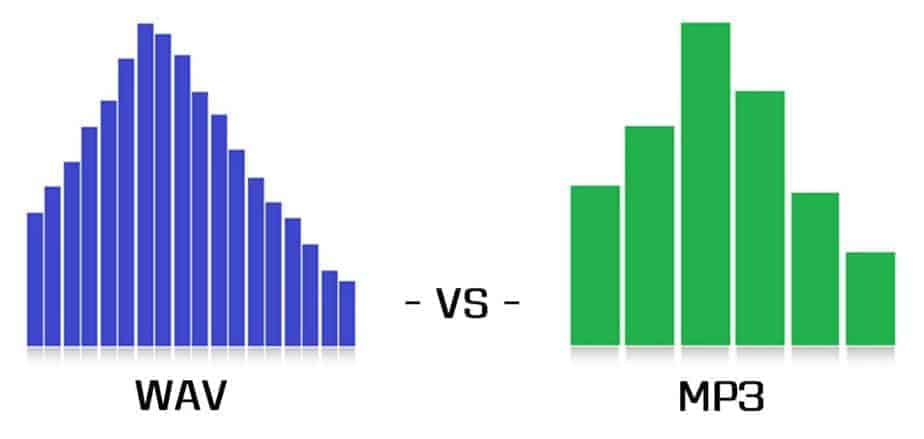
MP3 files are compressed audio files created from audio formats such as wave (.wav). Wave files replicate analog recordings and digital sound files at the expense of large file size, while MP3 files sacrifice some quality for a smaller footprint. There are several factors that mitigate the quality sacrifice during the conversion process. With the correct bitrate and settings, MP3 files can provide very high quality results, making them very close to the original wave files when played on portable audio players. …
MP3 files are compressed audio files created from audio formats such as wave (.wav). Wave files replicate analog recordings and digital sound files at the expense of large file size, while MP3 files sacrifice some quality for a smaller footprint. There are several factors that mitigate the quality sacrifice during the conversion process. With the correct bitrate and settings, MP3 files can provide very high quality results, making them very close to the original wave files when played on portable audio players.

An mp3 player.
The balance between file size and quality is somewhat subjective. For audiophiles, any difference is noticeable. Others may simply not be able to tell the difference between a high quality MP3 file and a raw wave source. In many cases, the nuances of the sound environment will only become clearer when played through a high-quality stereo system.

MP3s are compressed digital music files that sacrifice quality for file size.
MP3 files are primarily targeted at portable audio players. In this field, high-quality MP3 files are played with incredible sound due to their small file size. With the limited memory of portable players, it makes sense that one would want MP3 files to be as small as possible while maintaining the highest possible quality.

For this, one of the most important factors when creating MP3 files is the bit rate. In general, the more bits per second that are preserved from the original file, the higher the quality of the MP3 and the larger the file size. Lower bit rates reduce size and quality. The idea is to use the bitrate for maximum realism without saving unnecessary data, which just creates larger files with no noticeable difference to the ear.

Web Audio and Video Introduction Series: Audio and Video Basics

Web Audio and Video Introduction Series: Audio and Video Basics

Audio

Since the 21st century, with the continuous improvement of network infrastructure, the popularization of 3G, 4G and even now 5G networks, the Internet has completely changed our lives.

Audio

In the past, to watch a movie at home, you needed to buy a DVD and a player. Now you can directly open the browser and go to major video websites to watch it, and there are very rich video resources for you to choose from. . At the same time, many application scenarios have emerged: teleconferencing, telemedicine, online education, etc. Many developers have also started developing their own real-time audio and video applications on the web platform. For this reason, I would like to share a series of contents related to the development of real-time audio and video on the web side, and learn with you. In this chapter, I will share some basic knowledge of audio and video. The level is limited. Welcome to point out bugs or make suggestions!

Audio
Sound that can be heard by the human ear can be called audio, and we often use this word to describe a recorded and playable sound. Next, I will introduce some important concepts related to audio. Includes sample rate, bit rate, and common audio encoding. These are the things we need to know to produce, store and transmit audio.

Sampling rate
Sample rate (also called sample rate or sample rate) defines the number of samples per second taken from a continuous signal to form a discrete signal, and is expressed in hertz (Hz). The inverse of the sample rate is called the sample period or sample time, which is the time interval between samples. Be careful not to confuse sample rate with bit rate (also known as “bit rate”). (taken from Wikipedia)

In simple terms, the most intuitive effect of sample rate on our listening to audio is the “clarity” or “degree of reduction” of the audio. In theory, the higher the sampling frequency during recording, the closer the frequency of the described sound wave is to the original sound, the more it can restore the original appearance of the sound, and the closer the listening experience is to hearing the sound in the original sound. place. However, the sampling rate that the human ear can generally distinguish also has an upper limit. After the sampling rate reaches the threshold that the human ear can distinguish, it is difficult for the human ear to hear the difference no matter how high the sampling rate is. is.

In general, the recording device determines an upper limit on the audio sample rate. In real life, making a phone call and playing a piece of high-definition music can reflect the difference in sampling rate. We can clearly hear that high-definition music is more “clear” and restores sound better. This is because the sample rate of telephone microphones is generally 8000 Hertz around, and a piece of music is recorded in a professional recording studio with specialized recording equipment, and the sample rate is usually in the tens of thousands of hertz.

Audio Format: Comparison and Implementation of MP3 and WAV Part 2

Audio Format: Comparison and Implementation of MP3 and WAV Part 2

MP3 vs WAV

Sound is a mechanical wave, produced by the vibration of an object, and requires a medium to propagate. So, in essence, a sound is a waveform on an axis over time.

MP3 VS WAV

Sound has three elements: pitch, volume, and timbre:

Pitch is determined by the frequency of the sound wave, the higher the frequency, the higher the pitch.
The volume is determined by the amplitude of the sound wave, the larger the amplitude, the louder the sound.
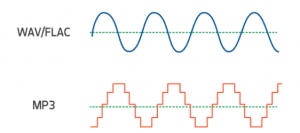
The timbre is determined by the “shape” of the waveform (sounds like square, triangle, and sawtooth are called impulse waves and sound individual).
An audio file is a file obtained by converting an analog signal to a digital signal. In general, there are five important parameters: encoding method, number of channels, sampling rate, bit depth, and bit rate.

Encoding: how this format organizes binary data and how it is compressed.
Number of channels: mono, dual or 5.1 channels, etc.
Sampling rate: The number of samples per second.
Bit Depth: The number of binary bits used to store the y value of the sample point.
Bitrate – The desired number of bits per second for the file.
We know that there is no compression in the WAV format, so its encoding method is to directly write all the sampled points to the file in order.

WAV file size (B) = number of channels * sample rate (Hz) * bit depth (bit) / 8 + file header size (B, it’s 44B)

Implementation

When you open an mp3 or wav file with a text editor, you see numbers like this:
4944 3303 0000 0000 3D48 5459 4552 0000
0006 0000 0032 3031 3800 5444 4154 0000
0006 0000 0000 0000 0000 5449 0000 0000 0000 0000 0000 0000 58330 366
5052 4956 0000
368 50 0000 584d 5000 3c3f 7870 6163 6B65
7420 6266 6769 6E3D 22EP BBBF 2220 6964 3D22 5735 6964
3D22 5735 4D30 4D70 4365 6869 487A 7265
537A 4E54 637A 6B63 3964 223F 3E0A 3C78
3A78 6D70 6D65 7461 2078 6D6C 6E73 3A78
3D22 6164 2F6 62 1654
5249 4646 2E3D 0e05 5741 5645 666d 7420
1200 0000 0300 0200 44ac 0000 2062 0500
0800 2000 0000 6461 7461 A026 0e05 8089
00bc 00E8 f0bb c09e 8dbc 00C2 87bc 80F1
d3bc 8063 CCBC C030 FCBC 8012 f4bc 20BB
13bd E051 0fbd c0b0 2dbd 6079 28bd 4012
46bd 6032 40bd c0e3 5dbd 6040 57bd c015
7cbd e035 74bd b058 8dbd 50e2 88bd f0a7 9dbd e0dd 98bd 70d3 acbd e0a9 a7bd
d043 b8bd b0da b2bd
00e3 c4bd 605c bfbd

This one above is the mp3/wav format of the same song. What is the difference between them?

Audio format: comparison and implementation of MP3 and WAV

Audio format: comparison and implementation of MP3 and WAV

WAV vs MP3

An mp3 is 320kbps, 44100hz, what does this mean?

mp3 vs wav

44100Hz represents the sample rate of the signal. The so-called sampling consists of obtaining the value y of the sound wave at the current moment every unit of time. Sampling is the process of discretizing continuous data (converting an analog signal to a digital signal).
image source

The sampling method mentioned above is called PCM (Pulse Code Modulation). According to the Nyquist-Shannon sampling law, the sampling rate must be at least twice the highest target frequency. The hearing range of the human ear is about 20Hz-20,000Hz (if you’re curious how loud you can hear, you can click here to test your ears), although recording software often has a 48,000 option Hz, but we can safely conclude: 44100Hz can meet almost all our needs, higher is just a waste of your memory and CPU. More than 48,000 samples are meaningless to the human ear, which is similar to 24 frames per second on a movie. 44100Hz happens to be the standard sample rate for almost all music released. In fact, for vocals and many instruments, high-frequency sounds are noise, so high sample rates can sometimes worsen sound quality (which is why we need to adjust the equalizer).

320 kbps represents your bitrate/bitrate, which is shorthand for kilobits per second, which represents the size of the data used to describe sound. In CD (uncompressed audio file), the bit rate is 1411.2kbps, and the mp3 sound quality to achieve CD quality should be higher than 128kbps/44100Hz (128kbps can be said to be the most common bit rate). Generally, a higher number means better quality. The quality depends on many factors (such as the encoding algorithm). Many times we don’t need too high bitrate: our device can play mp3 and CD without difference (sound/sound card is normal).

A wav is 44100 Hz 16-bit stereo or 22050 Hz 8-bit mono, what does this mean? stereo/mono refers to dual/mono. For monophonic sound files, the sample data is an eight-bit short integer (short int 00H-FFH); for two-channel stereo sound files, each sample data is a 16-bit integer (int) and the upper eight bits (left channel) and lower eight bits (right channel) represent the two channels, respectively.

Mp3 format and the differences between VBR and CBR, WHICH IS BETTER?

Mp3 format and the differences between VBR and CBR, WHICH IS BETTER?

CBR & VBR

There is another disadvantage of VBR technology. When playing an audio file, there will inevitably be an operation to jump to the position of the specified time to play (ie, the so-called seek operation).

CBR vs VBR

At this time, it is necessary to convert the time position of the target to the position of the file. Then jump to this file position offset to read and decode. If it is a download and play network playback mode, you must first calculate the position of the file during the search operation. Jump to this position and download a paragraph before continuing to play. . For CBR encoding, the conversion to file position offset is also very simple, using the following formula:

file position (byte) = target time position ( s ) * bit rate (kbps) * 1000/8 + id3v2 field size (if any)
But for VBR encoding, it is obviously impossible to use this formula to convert file position. The reason is also very simple: the bit rate of each frame is not fixed and the length of data per second is not average. Therefore, just like calculating duration, other data fields are needed.

The method to calculate the duration of the audio and implement the seek operation using VBR encoding
To solve the above two problems, VBR encoding adds some data fields. At present, there are mainly two types of VBR encoding technologies, one is the Xing specification proposed by the Xing Company, and the other is the VBRI specification of the Fraunhofer encoder. This article only presents how the Xing specification solves the audio duration computation and the implementation of the seek operation.

The main content of the Xing specification is the Xing header, which means that the first audio frame at the beginning of the VBR-encoded mp3 is not used to store specific audio data, but to store additional audio information. This information is marked with the four characters of “Xing” as the beginning of the field (some files also use the four characters of “Info” as the beginning of the Xing header).

The position of the Xing header in the first audio frame is after the standard 4-byte mp3 audio frame header Between the frame header and the Xing header, there will be a blank part where the data content is all 0. This blank The length of the section is specified. After the decoder parses the frame header of the first audio frame, it skips the blank part of the specified length, and then judges whether the next content is the four characters of ‘Xing’ or ‘Info’ to judge the audio If the VBR encoding.

Mp3, differences between CBR and VBR

Mp3, differences between CBR and VBR

CBR vs VBR

Differences in data content between CBR and VBR mp3 files. It can be seen that the bit rate of the VBR encoded mp3 is not necessarily the same due to the difference in data content between frames. Generally, VBR technology will compress and encode in the range of 8~320kbps, so the bit rate of the whole file is higher than that of the whole file. Constant CBR encoding, VBR encoding has a bit rate variable bit rate throughout the file, hence the name VBR (variable bit rate).

CBR & VBR

In addition to the two encodings CBR and VBR, there is also an ABR (Average Bit Rate, Average Bit Rate) type encoding, which is basically the same as CBR, most audio frames are encoded at the bit rate specified, but they will be The content is encoded with a higher bitrate than specified, but usually this content is short, so there is not much difference in file size compared to CBR, so this type is not common.

Disadvantages of VBR technology compared to CBR technology
Using VBR technology to encode and compress mp3 files can certainly optimize file size, but at the same time, it also brings some new problems in acquiring audio information and monitoring playback progress.

The first is the calculation of the duration of the audio. If it is CBR encoding, since the bitrate is constant, the data size of all audio frames is fixed, so the data size needed to decode for each second of playback is the same, so it is very simple to calculate the audio time length. Just use the following formula:

timelength ( s ) = (total file length (Byte) – total id3 field size (if present)) * 8 / (bitrate (kbps) * 1000 )
In the formula, the id3 field refers to the basic information field that is placed at the beginning or end of the mp3 file, and is generally used to record the audio file name, singer name, and album name. The id3 is divided into two versions, v1 and v2, and only v1 records. The above three types of information, and the size is fixed, are usually placed at the end of the file; v2 is more flexible than v1, the type of the recorded information is not limited to the above three, and the size is not fixed, it is usually placed at the beginning of the file. The id3 field is an optional field, and the mp3 file doesn’t necessarily have it, so to calculate the audio time of the mp3, you must first read it to see if the id3 exists.

For VBR encoded mp3 files, since the bit rate of each frame is not fixed, the data size of each frame is arbitrary. Obviously, the size of the data reproduced per second is different. In this way, the duration of all the audio cannot be calculated with the above formula and other data fields are needed, which is one of the shortcomings of VBR technology: it is relatively difficult and complicated to calculate the duration of the audio.

Basic differences between VBR and CBR in mp3 files

Basic differences between VBR and CBR in mp3 files

CBR vs VBR

From the perspective of bitrate encoding, one of the most common audio file formats, MP3, can be divided into two types: one is constant bitrate CBR (constant bitrate).

CBR & VBR

The bit rate of a frame is constant and unique. ; the other is Variable Bit-Rate VBR, which is the opposite of CBR. The bit rate of each frame is not fixed. The bitrate may or may not be the same. Due to the existence of these two types, some jobs that need to be done when playing mp3 files, such as getting audio information and controlling playback progress, need to be handled separately.

Introduction to some basic concepts.
To clearly understand the specific differences between CBR and VBR, you need to understand an important attribute of audio files: bit rate, also known as bitrate or bit rate, refers to the number of bits transmitted per second. The unit is bps (bits per second). The higher the bit rate, the higher the data transmission speed. Bitrate in audio refers to the amount of binary data per unit of time after converting an analog sound signal to a digital sound signal, which is an indirect measure of audio quality.

The bitrate unit of audio files is generally kbps, 1 kbps = 1000 bps. The default bitrate of mp3 is 128kbps, but the mp3 downloaded from the net is more common at 192kbps, and if you want to get high definition mp3 with better sound quality, the bitrate usually reaches 320kbps. The higher the bitrate, the better the sound quality, but the more disk space it will take up.

In general, the higher the pitch of the sound clip, the more space it needs to store and the higher the bitrate. The traditional mp3 file is encoded with CBR, that is, the bit rate of each frame is the same, which brings a problem: if the bit rate of each frame is the same, then the data size of each frame it’s the same way, no matter the pitch of this frame is high or low, the storage space of the audio frame with the highest pitch in all audio is used to store this frame, but for the audio frame with low pitch, not much storage space is needed. This will result in a loss of storage space and will virtually increase the size of the mp3 file.

The appearance of VBR encoding technology is to solve the problem of this waste of space. VBR technology selects the most suitable bit rate for each audio frame. For audio frames with a lower pitch, the bit rate will be lower and the data size will be smaller. If the pitch is higher, the bit rate will be higher. The size is bigger. In this way, the storage space of the audio data can be saved and the size of the mp3 file can be further compressed without losing the audio quality.

Do you know what bit rate is? Let’s understand the mp3 format

Do you know what bit rate is? Let’s understand the mp3 format

MP3

3, WMA (Windows Media Audio, Windows Media Audio)

Mp3

WMA is Microsoft’s media compression method. It is a technology that only compresses audio data in Microsoft Windows media technology, and the sound quality is similar to MP3. From the perspective of compression rate, under the condition of encoding rate less than 192kbps, WMA can get lower volume than MP3 file in the same sound quality condition, even half (but when the encoding rate encoding is higher than 192 kbps, the general thinking is that MP3 has better sound quality than WMA). According to Microsoft’s official announcement, the WMA format is highly protectable and can even limit the playback machine, playback time and number of playback, and has considerable copyright protection capabilities.

4. WAV (sound resource file)

WAV is a kind of waveform file, which directly records sound waveform without compression. The audio track captured from CD is wav file, which is large in size.

5. AMICD

ADPCM is short for Adaptive Differential Pulse Code Modulation, the full name is Adaptive Differential Pulse Code, and it is also a lossy compressed digital audio format. This format is commonly used in MP3 Walkman recordings. It can provide a very high compression ratio. Generally, a 128MB MP3 Walkman can record up to 16 hours of recording, but the pursuit of long recording time comes at the expense of sound quality.

6. AAC (Advanced Audio Coding, Advanced Audio Coding)

AAC is a lossy compressed audio format jointly developed by the Fraunhofer Institute (creator of the MP3 format), Dolby Laboratory (DOLBY), and AT&T (American Telephone and Telegraph Company), and is part of the MPEG-2 specification. Compared with MP3, AAC adds features that MP3 audio formats do not have, such as perfect stereo sound playback, streaming effect sound scanning, multimedia control, and noise reduction optimization, and also supports more sampling rates and bit rates, and multiple languages. compatibility and higher decoding efficiency. In conclusion, AAC can provide better sound quality with 30% smaller file size than MP3 files.

However, in the current MP3 Walkman, only a few have applied this format.

7. ASF (Advanced Streaming Format, Advanced Streaming Format)

ASF is a new generation of online streaming digital audio compression technology developed by Microsoft for Real. This compression technology is characterized by taking into account both the fidelity and the transmission requirements of the network, so it has a certain advanced character. Also due to the influence of Microsoft, this audio format is gaining more and more support.

8. OGG Vorbis format

OGG is the project name of a large multimedia development program, which involves the development of video and audio encoding. OGG Vorbis is a high-quality audio coding scheme, which is more advanced than MP3 as it supports multi-channel coding. Official data shows that OGG Vorbis can achieve better sound quality than MP3 at relatively low data rates. However, due to the limitation of using headphones to play the Walkman, even multi-channel (more than two channels) encoded OGG Vorbis format audio files cannot be listened to with headphones because headphones only provide two-channel output.