Mp3 converter–youtube

Mp3 converter–youtube

Mp3 converter--youtube
Mp3 converter–youtube

mp3 youtube converter —

Mp3 converter--youtube
Mp3 converter–youtube


mp3 download song – download mp3 song – mp3 song download

Actually, at this time it is not necessary to use Napster-type programs, everything has become simpler.

Normally you just need to download the video of a song in mp4 format, for example, and then convert it to mp3.

Mp4Gain is the ideal tool to convert videos to mp3 or any other popular audio formats like Flac, Ogg, AAC, m4a, etc.

To download a video, simply use any free web page and once we have the video on our computer, we will use Mp4Gain (Windows) to extract the audio and convert it to mp3, with the normalized volume and the highest audio quality.

As we pointed out, this conversion from outube to mp3 is very simple, you only need the following steps:

1.- Download the youtube video on free online pages
2.- Use Mp4Gain to extract the audio and convert it to mp3, with normalized volume level and great audio quality.

Mp4Gain can do this on a video or a batch of videos.

We will obtain MP3S with a normalized volume level and very high audio quality, impossible to distinguish from a CD.

Mp4Gain is the most advanced normalizer available today that equally normalizes audio, video and converts all popular audio & video formats.

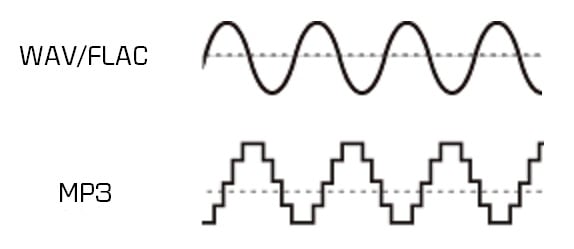
What is the difference between MP3 and lossless sound quality?

What is the difference between MP3 and lossless sound quality?

MP3 LOSSLESS
MP3 LOSSLESS


Is it possible to distinguish Mp3 quality from CD Quality?


mp3 lossless
mp3 lossless


Although the sound quality of a CD does not reach the true hearing limit of the human ear, it is impossible for most people to tell the difference between a CD and a higher sampling rate, so everyone assumes that the CD sound quality is 44.1 kHz can be converted to lossless sound quality.

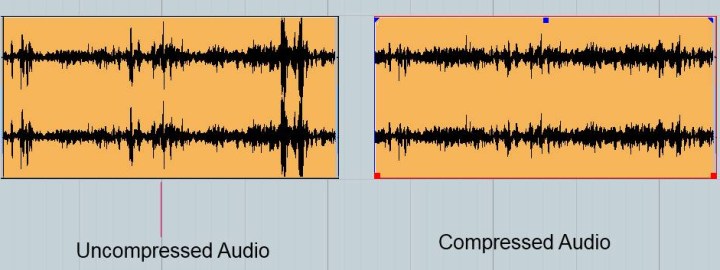
In the past, the capacity of storage media was not large. To store more music and make it easier to stream, we used to compress large CD audio files. High frequency and low volume sounds are removed to achieve the purpose of reducing file size. Similar formats include 3GP, M4A, AA3, WMA, etc.

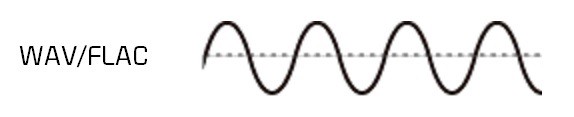
With the development of the Internet and storage media, the size of audio files is no longer important, so lossless compression has gradually become popular. Common formats are APE, FLAC, etc., which are similar to the beginning of ZIP compressed files, compress audio files AND packed, the final file size is basically only half of the original CD file. Here it is emphasized that the WAV format we often say is a waveform record file, which uses uncompressed PCM encoding, which is also a relatively large WAV file. 44.1 kHz 16-bit WAV audio can also be considered uncompressed. Lossless sound quality.

Since different devices support different audio compression formats, we often need to transcode, and each transcode will cause some loss in audio. For example: If you convert MP3 to lossless format, you can only achieve the sound quality of the original MP3 file. This lossless can also be called false lossless. This is the case for most lossless music provided by music portals.

I have been recording for many years and have used speakers ranging from tens of thousands to millions of dollars. Why do I rarely use speakers under 10,000 yuan? Because speakers under 10,000 yuan cannot be used as monitors. I advise everyone not to charge money for listening to music on music portals for lossless sound quality. Untrained ears will not be able to hear the difference between true and false without loss. For normal ears, MP3 with a bit rate of 320 kbps is already the best.

What is the difference between MP3 and lossless sound quality?

What is the difference between MP3 and lossless sound quality?

Mp3 Lossless
Mp3 Lossless

Now, many people think that it is impossible to listen to MP3, so they search for lossless music everywhere on the Internet.

Mp3 Lossless
Mp3 Lossless

So what is the difference between lossless music and MP3? What about the various lossless music formats?

A few days ago, a friend of mine bought a Porsche sports car and then came to ask me for lossless sound quality music. I told him there was no need to play MP3s, but people weren’t happy. The sound in the car was fine. Playing MP3 is a loss of audio.

Now there are many music websites that give lossless to the myth, but do you know what lossless is? What is the difference between lossless music and ordinary MP3? Today I come to talk to you about those things that have no losses.

I remember when Apple held the Iphone4 conference, it came up with a definition: retina display. In short, it has been replaced by a high resolution screen with pixels that exceed the recognition limit of the human eye since the Iphone4. I must say that Mr. Qiao’s trick is very good, he defines a word that everyone can accept and makes Apple mobile phones sell all over the world.

However, the same concept is much older in the world of acoustics. Sound is a type of energy wave. After the experimental research of countless generations of ancestors, it is believed that 40 kHz is a value that can well restore the sound heard by the human ear. Later, for various commercial reasons, some record companies defined the sample rate of CDs at 44.1 kHz, which they considered to be the “retina display” that the ears could hear. Later, 44.1 kHz brought innumerable problems to subsequent generations, because it is not an integer and cannot be divided and multiplied simply by performing SRC sampling, so early Inter defined the output sample rate of the sound card as 48 kHz to save problem. , which creates a sample rate conversion problem that all sound engineers hate

MP3 and FLAC Audio Formats – We Use It Wisely

MP3 and FLAC Audio Formats – We Use It Wisely

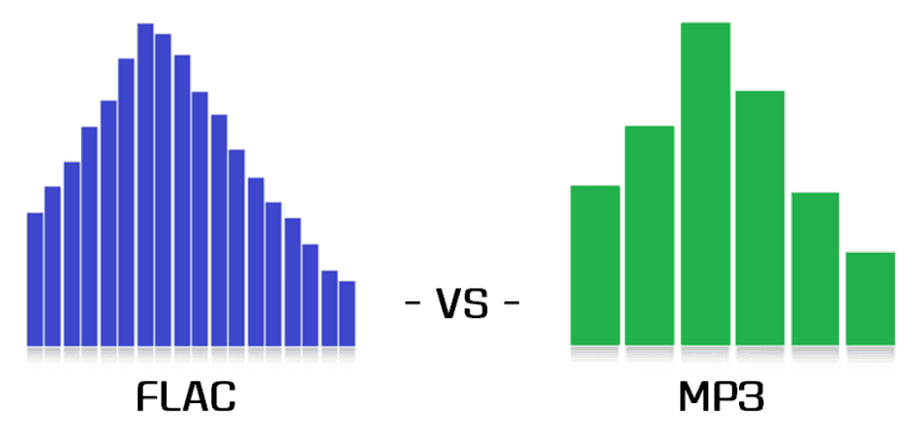
FLAC vs MP3

In this post, I want to talk about how to get the best results when compressing music in FLAC and MP3 formats. In the age of mass distribution of audio and video streaming services, this topic may seem of little relevance, however, as practice shows, this is not the case.

FLAC vs MP3

First, not everyone wants to depend on third-party resources, which can behave as they please at any time, from the introduction of various access restrictions to content to its complete removal. Second, there are many places in the world where the Internet is slow, dreary, and with lunch breaks. Third, the sound quality when listening online is usually quite acceptable for most users, but it can plunge sophisticated listeners with good equipment into depression. Considering all the above, we can assume

Basic concepts

PCM (pulse code modulation), also known as PCM (pulse code modulation) is a method of representing an analog signal in digital form. It works like this: electrical vibrations are fed into the input of a device called the ADC (analog to digital converter), which is an analog audio signal. The ADC measures the level of this signal with a certain frequency and transmits the obtained values ​​to the outside, where they are stored. Thus, a data matrix is ​​formed, which is a sequence of values ​​of the amplitude of the original signal. The process described is called “digitization”. The main problem with storing PCM data in “naked” form is its rather large volume, therefore, for a more rational use of space on the carrier, various digital audio compression algorithms are used.

Encoder (or “encoder” from English “encoder”) is a software designed to convert WAV to any other format in order to reduce the amount of stored data.

Decoder – Software or hardware used to play files compressed in the appropriate format or convert them to uncompressed format.

Lossy is the generic name for a family of audio formats that use lossy data compression. Typical members of the family are MP3, AAC, WMA, Ogg Vorbis. The main characteristic of lossy formats is that when the material is compressed in any of them, a significant part of the original audio information is irretrievably lost and cannot be restored later in any way. Because of this, a high degree of compression is achieved, while the loss is barely perceptible or generally invisible to the ear, as only data that is not critical to human perception is discarded.

Lossless is the generic name for a family of audio formats that use lossless data compression. Typical family members: FLAC, Monkey’s Audio (APE), ALAC, WavPack. Unlike lossy formats, here no information is lost during compression, everything happens in the same way as in normal filing cabinets. Paying for complete data security is significantly lower compression ratio compared to loss.

MP3 (MPEG-1 Layer 3) is historically the first and most widespread lossy compression format. Despite the fact that, due to the era of MP3, today it does not shine with the efficiency of compression, its popularity remains very high due to its versatility: any plate can reproduce this format. At the same time, if a suitable encoder and decoder are used, the MP3 sound quality is at a very decent level. The combination of these two factors justifies the use of the format today. The MP3 compression ratio while maintaining high sound quality is 6 to 9 times. The average bit rate of such an MP3 with 16-bit / 44.1 kHz stereo parameters is 150 to 240 kbps, the file size of a five-minute recording in this form is 6 to 9 MB.

FLAC (Free Lossless Audio Codec) is currently the most popular lossless audio compression format. If lossless support is claimed for any software or equipment, this software / equipment can almost certainly play FLAC. The format is the de facto standard among lovers of quality sound. The FLAC compression ratio is 1.3-2.8 times. FLAC bitrate with parameters 16 bit / 44.1 kHz / stereo – 500-1100 kbps, the file size of a five minute recording in this form is 18-40 MB.

Convert FLAC to MP3: what about bit rate?

If you’re the proud owner of a high-quality FLAC file music library, don’t worry about the bit rate (sample rate). But for lossy formats like MP3 or AAC, it is the bit rate that determines the sound quality. The previous default value was 128 kbps, today you just need to convert to 320 kbps. Almost any converter that converts from FLAC to MP3 should offer this setting.

flac

Opinions differ about the bit rate: some do not hear the difference between an MP3 with 128 kbps and an MP3 with 320 kbps, others do. But if you start with a FLAC file, you should get the most out of your file and convert more than a few kilobits per second (kbps).

mp3 quality

FLAC or MP3: do you hear the difference?

It’s a topic worth discussing, like in the hi-fi world: is there a difference between FLAC and MP3 files? The answer: yes, certainly!

If you don’t hear a difference, it’s not so much the file format, but the computer the song is playing on. If you listen to the same song in MP3 and FLAC format, you will notice a clear difference. A FLAC file simply contains more information. If you play this in a good installation, you will clearly hear the added value. Take the test yourself!

Hi-fi enthusiasts speak deeper. Music sounds fuller and more realistic. The best test is to switch between FLAC and MP3, because switching back to MP3 exposes gaps in the soundtrack. These frequencies are really beyond the audible range of people, or so they thought, but they still seem to be perceived.

However, the MP3 quality is sufficient for use in an MP3 player or smartphone. Although you can hear even finer nuances of the sound through the headphones, you can test it at home. Ambient volume also plays a role when traveling.

Lossless formats, such as the open source FLAC format, are the new standard. In terms of quality, they are comparable to a conventional CD, but take up much less storage space. This is made possible by a “smarter” compression process: while storing the same amount of digital information as on a CD, you save up to 30 percent more space. Therefore, if you want to digitize your CD collection, today it is important to use a lossless format like FLAC.

FLAC files not working? Make them compatible

However, there is also a small drawback to the FLAC format. Many playback devices, such as MP3 players, cannot play FLAC files, only MP3 files. However, it is not necessary to buy a new MP3 player with FLAC support. The audio converter (Mp4Gain), which converts FLAC files to MP3 files, can be found in this website

Once you download Mp4Gain, you can quickly convert your FLAC files to MP3. Then you can use them on a suitable MP3 player or similar device.

All about M4A files. What is M4A?

About M4A Format

M4A is a file extension of an audio file encoded with (advanced audio codingAAC) which is a lossy compression. M4A is generally thought of as the successor of MP3, which was not originally designed for audio only, but was the layer MPEG III or 2 video files. M4A stands for MPEG 4 Audio. The M4A file type is primarily associated with ‘MPEG-4 Audio Layer

m4a

‘.The files in. M4A are actually the audio layer (not video) MPEG 4 movies. M4A is destined to become the new audio file compression standard. This format is also known as Apple Lossless, Apple Lossless Encoder, or ALE. of a new codec designed to provide lossless coding in less storage space.

Both M4A and MP3 file extensions are used for audio-only files. MPEG-only audio 4 container files usually have an M4A file extension. They are unprotected. Protected files usually have an M4P.AAC or M4A file extension. File quality is better and the file size is smaller compared to MP3 files.
Programs that can open M4A files include iTunes, Quicktime, Windows Media Player, and Roxio Popcorn, toast and Creator. Some media players only play the format when renamed MP4.

. Mp4 vs. M4A

M4A means MPEG 4 Audio and is a file extension used to represent audio files.
The existence of two different file extensions. Mp4 and. M4A, to name only MP4 audio files has been a source of confusion between users and multimedia playback software. Some file managers, such as Windows Explorer, look for the type of media and associated applications of a file based on its extension But since MPEG-4 Part 14 is a container format, MPEG-4 files can contain any number of audio, video, and even subtitle streams, so it is impossible to determine the type of streams in an MPEG-4 file depending on of its file extension alone. In response, Apple Inc. began using and popularizing the. File extension m4a, which is used for MP4 containers with audio data in Advanced Audio Coding (AAC) or its own Apple Lossless (ALE, ALAC) format. Software capable of audio / video playback must recognize files with the extension. M4a or file extensions. Mp4, as expected, since there are no file format differences between the two. Most software capable of creating MPEG-4 audio allows the user to choose the file name extension of the created MPEG-4 files.

whats m4a

All about M4A files

The M4A (MPEG-4 Audio) file extension is used for compressed audio files, which were created in the MP4 or MPEG-4 container format. However, unlike these formats, M4A files only contain audio data. Depending on Apple’s QuickTime file format, these documents are often associated with Apple products, such as the iPod or iTunes multimedia software.

A higher compression rate allows smaller file sizes than the usual MP3 standard. At the same time, better reproduction quality is achieved. Files in the relatively new M4A format can be opened with many external media players, except iPod or iTunes. Depending on the operating system used, such as the current Windows Media Player, the latest versions of Winamp Media Player or Apple QuickTime Player to call.

All converters to or from M4A

MP3 to M4A
M4A to MP3
M4A to OGG
M4A to WMA
M4A to WAV
M4A to AAC
M4A to FLAC
OGG to M4A
WMA to M4A
WAV to M4A
AAC to M4A
FLAC to M4A
MP4 to M4A
AVI to M4A
3GPP to M4A
MOV to M4A
OPUS to M4A
AMR to M4A
MKV to M4A
WEBM to M4A
FLV to M4A
WMV to M4A
MPG to M4A
M4A to MP4
AIFF to M4A
MID to M4A
MP2 to M4A
OGV to M4A
GMO to M4A
OGA to M4A
OGX to M4A
M4P to M4A
MXF to M4A
MPEG to M4A
VOB to M4A
TS to M4A
M4V to M4A
ASF to M4A
M2V to M4A
RMVB to M4A
QT to M4A