Comparison of AAC and MP3 compression


Free Download Mp4Gain
picture

Comparison of AAC and MP3 Compression
Comparison of AAC and MP3 compression

Let’s talk about AAC and MP3 compression

When I first began exploring audio compression, the difference between AAC and MP3 stood out as crucial. Both are popular, but AAC often feels like the more efficient option. It’s like comparing an old-school flip phone to a modern smartphone—they both work, but one offers so much more with the same resources. AAC provides higher sound quality at similar bitrates, which makes it a favorite for streaming services and high-quality playback.

MP3, however, has been around longer and is compatible with virtually every device. I’ve used MP3 files on ancient MP3 players that AAC wouldn’t even recognize. But as audio technology evolves, AAC is becoming the go-to choice for those who value efficiency and superior sound.

How does audio compression work?

Compression works by removing parts of the audio that most people won’t notice. Imagine you’re cleaning out your closet—you toss items you haven’t used in years, freeing up space without really losing anything important. That’s essentially what AAC and MP3 do with audio data. They strip out redundant or less noticeable sounds to shrink the file size.

MP3 uses an older algorithm, which means it’s like using a blunt tool. AAC, on the other hand, employs advanced techniques to preserve more detail. When I listen to an AAC file, I often catch subtle nuances like soft background harmonies that might disappear in an MP3 version.

Sound quality differences between AAC and MP3

When I compare AAC and MP3 at the same bitrate, AAC consistently sounds better. For example, at 128 kbps, AAC audio feels fuller and richer, while MP3 can sound flat or distorted. It’s like the difference between watching a high-definition video and a blurry old VHS tape—both convey the same message, but one does it with far more clarity.

In real-life situations, like playing music in my car or through my phone’s speakers, AAC handles compression artifacts better. MP3 files often introduce a noticeable hiss or clipping in quieter passages, which can be distracting if you’re a music enthusiast like me.

Device compatibility and support

MP3 wins when it comes to compatibility. It’s the universal format that works on everything from 90s-era CD players to modern smartphones. I’ve even found old alarm clocks with MP3 support. AAC, however, isn’t always as widely supported, especially on older hardware.

That said, most newer devices and platforms, like iPhones, Android phones, and streaming services like Spotify, fully support AAC. If you’re living in the modern tech world, AAC compatibility likely won’t be an issue.

Bitrate efficiency: AAC vs. MP3

AAC is more efficient than MP3 at delivering high-quality audio at lower bitrates. Think of it like a fuel-efficient car—AAC gets more “miles per gallon.” At 96 kbps, AAC can sound as good as or better than MP3 at 128 kbps. This is why streaming platforms and digital radio stations prefer AAC; it saves bandwidth while maintaining quality.

I’ve tested this myself by converting the same song into both formats at different bitrates. AAC consistently performed better, preserving details like crisp vocals and dynamic bass lines that MP3 often muddled.

Use cases for AAC and MP3

Both formats have their ideal use cases. MP3 is perfect for older devices or situations where compatibility is critical. For instance, I still use MP3 for transferring music to a friend’s vintage MP3 player or for simple tasks like ringtones.

AAC shines in modern applications, particularly streaming. Apple Music and YouTube use AAC to deliver high-quality audio efficiently. It’s also great for personal libraries if you prioritize quality over universal compatibility.

  • MP3: Best for older hardware and universal compatibility.
  • AAC: Ideal for streaming, modern devices, and high-quality playback.

File size comparison

When I tested file sizes, AAC files were generally smaller than MP3 files at the same perceived quality level. For example, a three-minute song at 128 kbps might take up 3 MB as an MP3 but only 2.5 MB as AAC. Over a large library, this adds up to significant space savings.

It’s like packing a suitcase—AAC is the expert packer who fits everything neatly, while MP3 takes up more room with less care for efficiency.

Encoding speed and performance

Encoding AAC files tends to be slightly slower than MP3 because of its more advanced algorithm. However, in real-world use, this difference is negligible unless you’re encoding hundreds of files at once. I’ve converted albums into both formats, and while AAC took a bit longer, the improved quality made the wait worthwhile.

Which format is better for streaming?

Streaming platforms almost universally prefer AAC. Its efficiency means smoother playback with less buffering, even on slower internet connections. I’ve noticed that AAC streams maintain consistent quality, while MP3 streams can dip or distort under the same conditions.

For streaming, AAC also supports features like HE-AAC, which optimizes audio even further for low-bandwidth scenarios. It’s why platforms like Netflix and YouTube rely on AAC for their audio streams.

Latest words on AAC and MP3 compression

If you’re deciding between AAC and MP3, consider your needs. AAC offers better quality at smaller file sizes and is perfect for modern devices and streaming. MP3, while older, remains reliable and universally compatible. Personally, I’ve transitioned most of my library to AAC, as it delivers superior sound for my listening setup.

For those looking to manage and optimize audio files, tools like Mp4Gain can help you analyze and convert formats efficiently. It’s an excellent way to ensure your files are ready for any playback scenario.

FAQ

Which format offers better audio quality, AAC or MP3?

AAC typically offers better audio quality than MP3 at the same bitrate, delivering richer and clearer sound.

Is AAC better than MP3 for streaming?

Yes, AAC is more efficient and widely used for streaming due to its ability to deliver high-quality audio at lower bitrates.

Can all devices play AAC files?

Most modern devices support AAC, but older hardware might only recognize MP3 files.

Why is AAC more efficient than MP3?

AAC uses advanced compression techniques to retain more audio detail at lower bitrates compared to MP3.

Comments:

Wow, I didn’t know AAC could save that much space without sacrificing quality. Thanks for the detailed comparison!

I’ve always used MP3 for compatibility, but maybe it’s time to switch to AAC for my streaming playlists. Good info here.

Can you explain more about HE-AAC? I feel like it wasn’t covered enough in the article. Thanks in advance!

Great article! I’ve been debating which format to use for my music library. This helped a lot.

I tried converting some MP3 files to AAC, but they didn’t sound much better. Is that normal?


Free Download Mp4Gain
picture


Mp4Gain Main Window
picture


Mp4Gain Features
picture


Free Download Mp4Gain
picture

AAC improvements over MP3

Advanced Audio Coding is designed to be the successor to MPEG-1 Audio Layer 3, known as MP3 format, which was specified by ISO / IEC at 11172-3 (MPEG-1 Audio) and 13818-3 (MPEG-2 Audio).

AAC

Blind tests in the late 1990s showed that AAC demonstrated higher sound quality and transparency than MP3 for files encoded with the same bitrate.

The improvements include:

higher sampling frequencies (8-96 kHz) than MP3 format (16 to 48 kHz);
up to 48 channels (MP3 supports up to two channels in MPEG-1 mode and up to 5.1 channels in MPEG-2 mode);
Arbitrary bit rates and variable frame length. Standardized constant bit rate with bit deposit);
higher efficiency and simpler filter bank (instead of hybrid MP3 encoding, AAC uses pure MDCT);
higher coding efficiency for stationary signals (AAC uses a block size of 1024 or 960 samples, allowing more efficient coding of sample blocks than MP3 576);

Aac Logo Vectors Free Download
higher coding precision for transient signals (AAC uses a block equal to 128 or 120 samples, allowing more precise coding of blocks of MP3 192 samples);
possibility of using derivatives of the Kaiser-Bessel window function to eliminate spectral dispersion at the expense of enlarging the main lobe;
much better management of audio frequencies above 16 kHz;
more flexible joint stereo (different methods can be used in different frequency ranges);
additional modules (tools) added to increase compression efficiency: TNS, Back Prediction, PNS, etc. These modules can be combined to form different encoding profiles.
In general, the AAC format allows developers more flexibility in codec design than MP3 and corrects many of the design choices made in the original MPEG-1 audio specification. This increased flexibility often leads to multiple simultaneous encoding strategies and consequently more efficient compression. However, in terms of whether AAC is better than MP3, the advantages of AAC are not entirely conclusive, and the MP3 specification, while dated, has proven surprisingly robust despite notable flaws. AAC and HE-AAC are better than MP3 at low bit rates (typically less than 128 kilobits per second). This is especially true at very low bit rates where superior stereo, pure MDCT encoding, and better transform window sizes let MP3 compete.

While the MP3 format has almost universal hardware and software support, mainly because MP3 was the format of choice during the crucial early years of music sharing / distribution over the Internet, AAC is a strong competitor due to some unwavering support from the industry.

How AAC works

AAC is a wideband audio coding algorithm that takes advantage of two main coding strategies to dramatically reduce the amount of data required to represent high-quality digital audio:

Components of the signals that are perceptually irrelevant are discarded.
Excess in the encoded audio signal is removed.
The actual encoding process consists of the following steps:

The signal is converted from the time domain to the frequency domain using the Forward Modified Discrete Cosine Transform (MDCT). This is done using filter banks that take an adequate number of time samples and convert them to frequency samples.
The signal in the frequency domain is quantized based on a psychoacoustic model and encoded.
Internal error correction codes are added.
The signal is stored or transmitted.
To avoid corrupted samples, a modern implementation of the luhn mod N formula is applied to each frame.
The MPEG-4 audio standard does not define a single or small set of highly efficient compression schemes, but rather a complex set of tools to perform a wide range of bitrate encoding operations, from low speech to audio encoding. high quality and musical synthesis.

The ‘MPEG-4 family audio coding algorithm covers the range from low speech coding bit rate (up to 2 kbit / s) to high quality audio coding (at 64 kbit / s per channel and higher).
AAC offers sample rates between 8 kHz and 96 kHz and any number of channels between 1 and 48.
In contrast to MP3’s hybrid filter bank, AAC uses Modified Discrete Cosine Transform (MDCT) in conjunction with increasing window lengths of 1024 or 960 points.

MP3 audio files and lossless files, which is the best?

For your music collection, better an mp3 audio file or a lossless file? Let’s see the differences together and what format to choose
In the transition from analog music (vinyl records, cassettes, and other similar media) to digital music (audio CDs, mp3 audio files, etc.) experienced a few decades ago, compression algorithms have played a critical role. To avoid taking up too much space on the data storage media (when the transition hit the core, each byte of available space was worth so much gold) it was necessary to develop algorithms that would help compress the file size without overly affecting the audio quality. .

Lossless Audio

It was during these years that names such as mp3 audio files, WMA files, WaV files, and OGG files began to circulate with some frequency in musical environments (and not) around the world.

Lossless vs. at a loss

Over the years, the panorama of audio formats expanded dramatically and there was the curious formation of two opposite blocks. On the one hand, in fact, the so-called lossless files (literally lossless) were to be ‘concentrated’, while on the other side of the musical ‘Iron Curtain’ were the lossy files (literally lossy). As the names suggest, the difference between one format and another is due to the possible loss of musical information.

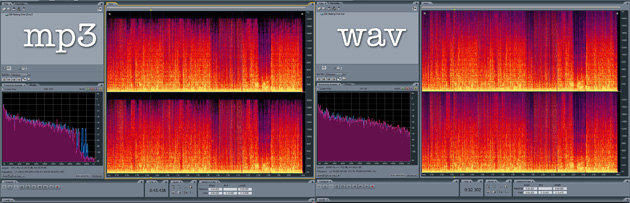
comparision mp3 vs lossless

Phonometric comparison between lossless files and mp3 audio files

Lossless files guarantee (and guarantee) the same sound depth and quality as an audio CD, while lossy files (such as mp3 audio files) reduce the size of a music track in the order 10 times at a partial cost sound quality. For example, if a lossless file takes up 40 megabytes, an mp3 audio file of the same song will be just over 4 megabytes.

Bitrate issue

What makes the difference between the two audio file formats is the bit rate used in the analog to digital conversion process. When we talk about bit rate (sometimes also written bit rate) we mean the number of bits that can process in the unit of time. In music, the bit rate measures the amount of data contained in each second of the audio track: the higher the value of the bit rate, the better the quality of the music.

In an mp3 audio file, this value can range from 32 kbps (kilobits per second) to 320 kbps. However, in a lossless file, there is no compression, and with a bit rate of around 1,411 kbps, the audio quality is comparable to that of an audio CD. According to the numbers, therefore, lossless files are better than mp3 audio files, ensuring deeper, true-to-original sound. However, as experience teaches us, numbers are not always everything.

Slimming differences

The reality of events appears to be quite different. The human ear, in fact, would not be so sensitive as to notice differences between an excellent quality mp3 audio file (with 320kbps bit rates) of a lossless file.

To understand this, just run one or more ABX tests. Such a test consists of cross-comparing two known files (called A and B) and two unknown files (X and Y, which are the same as A and B but with a different bit rate). At the end of the test, two pairs of files must be formed, matching the originals with the relative modified files. If you are using an mp3 audio file with a high bit rate (320 kbps or slightly lower), even the ear with the most musical training will not be able to distinguish the differences.

Despite this, a music file made up of lossless files still guarantees a substantial advantage over a file made up of mp3 audio files. The first, in fact, can be converted to other audio formats without this leading to a loss of quality; Conversions of a lossy file, on the other hand, will cause further loss of music information and deterioration of audio quality.