MP3 Normalizer


Free Download Mp4Gain
picture

MP3 Normalizer

MP3 Normalizer
MP3 Normalizer
MP3 Normalizer
MP3 Normalizer

MP3 Normalizer is an advanced tool designed to optimize and enhance the audio quality of your MP3 files. With this powerful software, you can easily adjust and balance the volume levels of your MP3 tracks, ensuring a consistent and enjoyable listening experience. Whether you have a music collection, podcasts, or audio recordings, MP3 Normalizer provides the perfect solution for achieving optimal audio levels.

Volume Equalizer

Improve the audio quality of your MP3 files with our advanced volume equalizer. This feature allows you to adjust and normalize the volume levels across all your MP3 tracks, eliminating any discrepancies and ensuring a smooth and pleasant listening experience.

Sound Level Normalization

Bring uniformity to your MP3 collection by normalizing the sound levels. Our MP3 Normalizer analyzes each audio file and adjusts the volume to achieve consistent levels, eliminating the need to constantly adjust the volume while listening to your favorite tracks.

Audio Quality Enhancement

Elevate the audio quality of your MP3 files with our advanced normalization techniques. MP3 Normalizer enhances the overall sound clarity and richness, allowing you to enjoy your music or podcasts with improved dynamics and balanced volume levels.

Device-Specific Volume Optimization

MP3 Normalizer provides the flexibility to optimize the volume levels of your MP3 files for different playback devices. Whether you’re using headphones, speakers, or car stereo systems, our software ensures that the volume is optimized for each specific device, delivering an optimal audio experience.

Volume Fluctuation Correction

Eliminate annoying volume fluctuations in your MP3 tracks. MP3 Normalizer detects and corrects any sudden changes in volume, ensuring a smooth and consistent playback experience without any unexpected loud or soft sections within your audio files.

Preserving Audio Quality

Our MP3 Normalizer employs advanced algorithms to normalize the volume levels while preserving the original audio quality. You can confidently normalize your MP3 files without worrying about any degradation in sound or loss of fidelity.

Professional-Grade Audio Output

If you’re a content creator or podcaster, MP3 Normalizer helps you achieve professional-grade audio quality. By normalizing your MP3 files, you can ensure that your recordings have consistent volume levels that meet industry standards.

Batch Processing Efficiency

Save time and effort with the batch processing feature of MP3 Normalizer. This allows you to normalize multiple MP3 files simultaneously, streamlining the optimization process for your entire audio library.

User-Friendly Interface

MP3 Normalizer features a user-friendly interface, making it easy for both novice and advanced users to navigate and utilize its functionalities. The software provides clear instructions and options, ensuring a hassle-free experience in normalizing your MP3 files.

Customizable Normalization Settings

Customize the normalization settings according to your preferences. Adjust the target volume, set desired loudness levels, and fine-tune the normalization process to achieve the perfect balance for your MP3 files.

Compatibility with Various Audio Formats

In addition to MP3 files, MP3 Normalizer supports a wide range of audio formats, including WAV, FLAC, AAC, and more. You can confidently normalize the volume levels of different audio file types, allowing for a unified and harmonious audio experience.

Efficient Performance and Reliable Results

MP3 Normalizer is built to deliver efficient performance. The software operates seamlessly, swiftly processing your MP3 files and providing accurate volume normalization results, ensuring that your audio library is optimized effectively.

Enhanced Music Listening Experience

By normalizing your MP3 files, you can enhance your music listening experience. Say goodbye to constantly adjusting the volume and enjoy a seamless playback with consistent volume levels, allowing you to fully immerse yourself in the music.

Optimal Sound Balance

MP3 Normalizer ensures optimal sound balance in your MP3 files. It intelligently analyzes and adjusts the volume levels, preventing any parts of the audio from being too loud or too soft. This results in a well-balanced audio output that is pleasing to the ears.

Distraction-Free Audio Recordings

If you have audio recordings with inconsistent volume levels, MP3 Normalizer is the solution. By normalizing the volume, you can eliminate distractions caused by sudden changes in volume, ensuring that your focus remains on the content of the recording.

Compatibility with Different Operating Systems

MP3 Normalizer is compatible with various operating systems, including Windows, macOS, and Linux. Regardless of the platform you use, you can easily access and utilize the software to optimize the volume levels of your MP3 files.

Data Integrity and Lossless Normalization

During the normalization process, MP3 Normalizer ensures the integrity of your data. The software performs lossless normalization, meaning it preserves the original audio data without any degradation or loss of quality.



Free Download Mp4Gain
picture


Mp4Gain Main Window
picture


Mp4Gain Features
picture


Free Download Mp4Gain
picture

MP3 Normalizer: How to Select the Best Software for Audio Quality Improvement

MP3 Normalizer: How to Select the Best Software for Audio Quality Improvement

Mp3 Normalizer
Mp3 Normalizer
Mp3 Normalizer
Mp3 Normalizer

MP3 audio files are a popular format for music and other audio recordings, but they can vary widely in volume levels and quality. To improve the listening experience, many people turn to MP3 normalizer software. But with so many options available, what features should you look for when selecting the best software for audio quality improvement? In this article, we’ll explore the top features to consider and answer some common questions about MP3 normalizer software.

Features to Look for in MP3 Normalizer Software

When selecting MP3 normalizer software, there are several key features to consider:

Batch Processing

If you have a large collection of MP3 files, you’ll want software that can process multiple files at once. Batch processing allows you to select a folder or group of files to be normalized, saving you time and effort.

Preserve Audio Quality

The primary goal of MP3 normalizer software is to improve audio quality. Look for software that can normalize volume levels without causing any distortion or loss of quality to the audio file.

Customizable Settings

Different audio files may require different normalization settings. Look for software that allows you to adjust the normalization settings, such as target volume level, peak normalization, and RMS normalization.

File Format Support

While MP3 is a popular audio format, it’s not the only one. Look for software that supports a wide range of audio file formats, such as WAV, FLAC, and AAC.

Simple User Interface

MP3 normalizer software should be user-friendly and easy to use. Look for software with a simple and intuitive interface that allows you to quickly select and normalize your audio files.

How MP3 Normalizer Software Works

MP3 normalizer software works by analyzing the volume levels of an audio file and adjusting them to a target level. The software scans the entire audio file, identifies the loudest and quietest parts, and then adjusts the volume levels to create a more consistent listening experience. This can improve the overall audio quality and prevent the need to constantly adjust the volume levels during playback.

Free vs. Premium MP3 Normalizer Software

There are both free and premium options available for MP3 normalizer software. Free software can be a great option for those on a budget, but it may not offer the same level of features or customization options as premium software. Premium software typically offers more advanced features and better performance.

Potential Loss of Quality or Distortion

While MP3 normalizer software is designed to improve audio quality, it is possible for the software to cause loss of quality or distortion during the normalization process. To avoid this, select software that uses advanced algorithms to preserve audio quality and avoid any unnecessary adjustments that could cause distortion.

Normalization Time

The amount of time it takes to normalize an MP3 file can vary depending on the size of the file and the processing power of your computer. In general, however, most files can be normalized within a few minutes.

Advantages of MP3 Normalizer Software

Using MP3 normalizer software can offer several advantages over adjusting the volume levels manually. For one, it can save you time and effort, as you won’t need to manually adjust the volume levels for each file. Additionally, MP3 normalizer software can improve the overall listening experience by creating a more consistent volume level across multiple files.

Best Software for Different Audio Files

Certain MP3 normalizer software programs may be better suited for certain types of audio files. For example, some software may be better suited for music files, while others may be better suited for speech recordings. Look for software that offers customizable settings and options to ensure optimal results for the specific type of audio file you’re working with.

File Size and Normalization

The normalization process can affect the overall file size of an MP3 audio file. When normalizing, the software may need to make adjustments to the audio file, which can result in a larger file size. However, this increase in file size is usually minimal and shouldn’t be a significant concern.

Cost of MP3 Normalizer Software

The cost of MP3 normalizer software can vary widely, depending on the features and level of performance offered. Some software may be available for free, while others may cost several hundred dollars. Additionally, some software may require ongoing subscription fees or additional costs for updates or advanced features. When selecting MP3 normalizer software, consider your budget and the features you require to find the best option for your needs.

Recommended Settings and Best Practices

To ensure optimal results when using MP3 normalizer software, there are some recommended settings and best practices to follow. For example, it’s important to choose the correct normalization settings for the specific type of audio file you’re working with. Additionally, it’s a good idea to make a backup copy of your original audio files before normalizing them, in case of any unexpected issues or changes.

Conclusion

Selecting the best MP3 normalizer software for your needs can help improve the overall audio quality of your files and provide a more consistent listening experience. When selecting software, consider features such as batch processing, customizable settings, and file format support, and be sure to choose software that can preserve audio quality and avoid distortion. With the right software and best practices, you can easily normalize your MP3 files and enjoy a better listening experience.

Why MP3 is so Popular

Why MP3 is so Popular

Mp3 is so popular
Mp3 is so popular

The MP3 file format has been around since the early 90s and is still the most popular audio format of choice for music, podcasts, and audio books. MP3 is a digital audio encoding format that compresses audio files so that they can be stored and transferred easier. It is an ideal format for those who want to listen to music on their computer, portable device, or car stereo.

Mp3 is so popular
Mp3 is so popular

The popularity of MP3 is due to its convenience, compatibility, and ease of use. Since MP3 files are small in size, they can easily be transferred from one device to another without taking up too much space. This makes it easy to store music, podcasts, and audio books on a computer, phone, or other device.

MP3 files are compatible with almost any device. This means that you can listen to MP3s on your computer, smartphone, car stereo, or any other device that supports the format. This makes it incredibly easy to access your music, podcasts, and audio books wherever you go.

The MP3 format is also incredibly easy to use. All you need to do is download the file, open it with a media player, and you’re ready to go. It’s a simple process that anyone can do.

The Benefits of MP3s

MP3s offer many benefits over other audio formats. Since they are compressed, they take up less space than other formats such as WAV or AIFF. This makes them easier to share and store on your computer or other device.

MP3s also have better sound quality than other formats. They can be encoded at higher bitrates, which means that the sound is more detailed and clear. This makes them ideal for listening to music, podcasts, and audio books.

Finally, MP3s are widely supported by most devices. This makes them ideal for sharing music, podcasts, and audio books with friends and family.

Why MP3s are so Popular

The popularity of MP3s is due to their convenience, compatibility, and ease of use. They are small in size, making them easy to share and store on a device. They are also compatible with most devices, making them easy to access wherever you go. And finally, they are incredibly easy to use, making them ideal for those who are new to digital audio.

Conclusion

The MP3 file format is popular due to its convenience, compatibility, and ease of use. It is the go-to format for music, podcasts, and audio books, and is supported by almost any device. It is also incredibly easy to use, making it ideal for those who are new to digital audio. In conclusion, MP3 is the ideal format for those looking to listen to music, podcasts, and audio books on the go. For the best MP3 audio experience, Mp4Gain is the best solution.

Mp3 Normalize Volume

Mp3 Normalize Volume

Mp3 Normalize Volume

MP3 audio files are popular among music and audio fans because of their small file size and high-quality sound. But sometimes, the volume of these audio files may be too low or too loud. Normalizing the audio volume ensures that all your audio files have the same volume level, so you can enjoy your music or audio files without adjusting the volume manually.

Mp3 Normalize Volume

What is Volume Normalization?

Volume normalization is the process of adjusting the volume of an audio file to a predetermined level. It ensures that all of your audio files are played back at the same volume level. This is especially useful if you have audio files from multiple sources, as some of them may be louder or quieter than others. By normalizing the audio files, you can enjoy them without having to manually adjust the volume.

Why Should You Normalize Volume?

Normalizing the volume of your audio files has several benefits. For one, it helps you maintain a consistent volume level throughout your playlist. This is especially useful if you have a large collection of audio files from different sources. Additionally, it prevents you from having to manually adjust the volume level every time you play a new song or audio file. Finally, it helps keep your audio files safe from distortion or clipping, which can occur when the audio is too loud.

How to Normalize Volume of MP3 Audio Files

Normalizing the volume of your MP3 audio files is a simple process. All you need is an audio editor that supports MP3 files. Many popular audio editors, such as Audacity, support this feature. Once you have an audio editor that supports MP3 files, you can follow these steps to normalize the volume of your audio files:

  • Open your audio editor and import the MP3 audio file.
  • Select the entire audio file by pressing “Ctrl+A”.
  • Go to the “Effects” menu and select “Normalize”.
  • Adjust the “Normalize to” value and click “OK”.
  • Save the file by going to “File” > “Save As”.

After you have followed these steps, your audio file will be normalized to the volume level you specified. You can repeat the process for all your MP3 files to normalize their volume.

Alternatives to Normalizing MP3 Volume

In addition to normalizing the volume of your MP3 files manually, there are several other methods you can use. For example, you can use a dedicated audio normalization software such as Mp4Gain to normalize the volume of multiple files at once. Additionally, many streaming services offer a built-in normalization feature that automatically adjusts the volume of your audio files to a consistent level.

Conclusion

Normalizing the volume of your MP3 audio files is a simple process that helps you maintain a consistent volume level throughout your playlist. There are several methods you can use to normalize the volume of your audio files, including manually using an audio editor and using a dedicated audio normalization software such as Mp4Gain. With the right tools and techniques, you can easily normalize the volume of your audio files for an enjoyable listening experience.

What is MP3 Normalization?

What is MP3 Normalization?

MP3 Normalization
MP3 Normalization

MP3 normalization is the process of making sure that all audio files are of equal volume. The goal is to ensure that all audio is of the same loudness when played back, making it easier to listen to the audio without having to adjust the volume settings. Normalizing audio is especially important when playing back audio files from different sources, such as a CD or a download, to ensure that all audio is heard at the same level.

MP3 Normalization
MP3 Normalization

Benefits of Normalizing Audio

Normalizing audio has several benefits, including making sure that all audio is heard at the same volume level and making it easier to listen to multiple audio files at once. Normalizing audio can also help to reduce distortion and improve the overall sound quality of a recording. Normalization can be used to make sure that all audio is heard at the same volume level, regardless of the source.

How to Normalize Audio Files

Normalizing audio files is a relatively simple process, and can be done using a variety of software programs. Some audio editing programs,  include tools for normalizing audio. These tools allow users to select a target loudness level and adjust the audio accordingly. In addition, there are also a number of dedicated audio normalization programs available for download, such as Mp4Gain.

Tips for Normalizing Audio

When normalizing audio, it is important to make sure that the target loudness level is not too loud or too quiet. If the target level is too loud, the audio may be distorted, resulting in a poor listening experience. It is also important to make sure that all audio files are normalized to the same loudness level. If audio files are normalized to different levels, they may sound unbalanced when played back together.

Conclusion

Normalizing audio is an important process for making sure that audio files are heard at the same volume level. It is important to make sure that the target loudness level is not too loud or too quiet, and that all audio files are normalized to the same level. For the best results, it is recommended to use a dedicated audio normalization program, such as Mp4Gain.

Mp3 normalize volume

Mp3 normalize volume

Mp3 normalize volume

MP3 Normalization: What it is and How to Do it

mp3 normalize volume

MP3 normalization is the process of adjusting the volume level of an MP3 audio file so that it plays at a consistent volume across different devices and playback systems. This is important because MP3 files can have varying levels of volume due to the way they were recorded or encoded.

There are several ways to normalize the volume of an MP3 file. One popular method is to use a software program such as MP3Gain or AIMP. These programs analyze the audio data in an MP3 file and adjust the volume level accordingly. They also provide a “normalize” or “gain” function that can be used to bring the volume level up to a desired level.

Another method for normalizing MP3 volume is to use an online service such as mp3Doctor or AudioNormalizer. These services allow you to upload your MP3 file and then adjust the volume level using a web-based interface. The advantage of using an online service is that you don’t need to download or install any software on your computer.

When normalizing the volume of an MP3 file, it’s important to be careful not to overdo it. If the volume level is too high, it can cause distortion and damage your hearing. It’s also important to keep in mind that some devices and playback systems have a limited dynamic range, so it may not be possible to bring the volume level up to the maximum level without causing distortion.

In conclusion, normalizing the volume of MP3 files is a simple process that can help ensure that your music is heard at the same volume level across different devices and playback systems. Whether you use a software program or an online service, it’s important to be mindful of the volume level and not to overdo it. With the right tools, you can make sure that your music sounds great no matter where or how you listen to it.

How to normalize mp3 files?

How to normalize mp3 files?

normalize mp3 files
normalize mp3 files

Mp3 Loudness equalizer

normalize mp3 files
normalize mp3 files

Mp4Gain is a program that can increase the volume of mp3 files. Mp4Gain can be used to normalize the volume of mp3 files that have been recorded at different levels. It can also be used to change the volume of mp3s without altering their pitch. The program is available in Windows. The program does not include any ads or malware.

Mp4Gain is a tool that can help you increase the volume of mp3 files. This tool can be used to normalize audio levels in your mp3 file so that the sound is more balanced. It can also be used to boost sound and increase mp3 volume. This is especially useful if you are listening to an old mp3 file with low-quality audio.Mp4Gain can be used for more than just mp3 files. It can be used to increase the sound volume in any file format, such as MP4, M4A, WAV, and FLAC. In addition, this tool works with all audio formats that support Advanced Audio Coding (AAC), including Apple’s AAC and Microsoft’s Windows Media Audio Lossless (WMA).

Mp4Gain is an mp3 volume booster that can increase the volume of mp3 files. Mp4Gain works by examining the mp3 file and calculating how much amplification is necessary to bring the audio up to a specific target level. It then adjusts the volume of the mp3 file so that it matches this target level. Mp4Gain is a tool that can increase the volume of audio files. It works by examining the mp3 file and calculating how much amplification is necessary to bring it up to a specific target level. Then it adjusts the volume of the mp3 file so that it matches this target level.

Psychoacoustic model and its application in MP3 encoding

Psychoacoustic model and its application in MP3 encoding

Psychoacoustic Model

Abstract: The psychoacoustic model is the core part of audio perceptual coding, which directly affects the quality and compression ratio of audio coding.

Psychoacoustics mp3 coding

Based on the basic principles of psychoacoustics, the absolute hearing threshold, the masking effect, and the critical frequency band and other related content, combined with the mathematical expression of psychoacoustics, and analyze the algorithm flow in detail according to each module in the standard MP3 encoding program. Finally, the corresponding algorithm is used to describe the pre-echo generation mechanism and its suppression method in MP3 encoding.

Psychoacoustic model and its application in MP3 encoding

Psychoacoustic models and their applications in perceptual audio coding

In this paper, the AAC psychoacoustic model is discussed from the aspects of over-masking, forward and backward time-domain masking, FFT window coefficient analysis, and window shift criterion. Each individually masked…

Auditory psychoacoustic models and their applications in perceptual audio coding

First, the paper describes the masking effect, discusses the principles and algorithms of various perceptual audio coding standards, and focuses on the development process and features of the MPEG audio coding standard. There are two psychoacoustic models: model 1 and model 2. Level 1.

Application of the psychoacoustic model in HDTV digital audio

Digital audio is a very important part of high-definition television (HDTV). In the digital audio codec, the introduction of the psychoacoustic model greatly reduces the complexity of the codec. The basic principles of the psychoacoustic model and various psychoacoustic models in HDTV. ..

Application of the psychoacoustic model in the detection of abnormal loudspeaker sound

China is the largest country in speaker production, and the annual output of speakers can reach hundreds of millions. Due to some unpredictable situations in the speaker design and production process, speaker failure occurs. Therefore, after the speaker is produced, the first product…

Application of the psychoacoustic model in digital audio watermarking

Audio digital watermarking technology plays an increasingly important role in protecting the copyright of digital audio works, and is an effective means of solving the problem of copyright of audio works. digital.A digital watermark algorithm based on a psychoacoustic model is proposed, which can guarantee a good audio signal.. .

An adaptive audio watermarking algorithm that combines the MP3 encoding principle and the psychoacoustic model

Through the investigation of the mp3 encoding algorithm, combined with a psychoacoustic model, a watermarking algorithm for copyright protection of MP3 audio files is proposed. The embedding algorithm runs simultaneously with the compression process. First, reduce the dimension of the embedded watermark information, and then use MP3 encoding to make…

Audio and Video Series: Audio Basics Part 2

Audio and Video Series: Audio Basics Part 2

Psychoacoustics

Introduction to sound

psychoacoustic

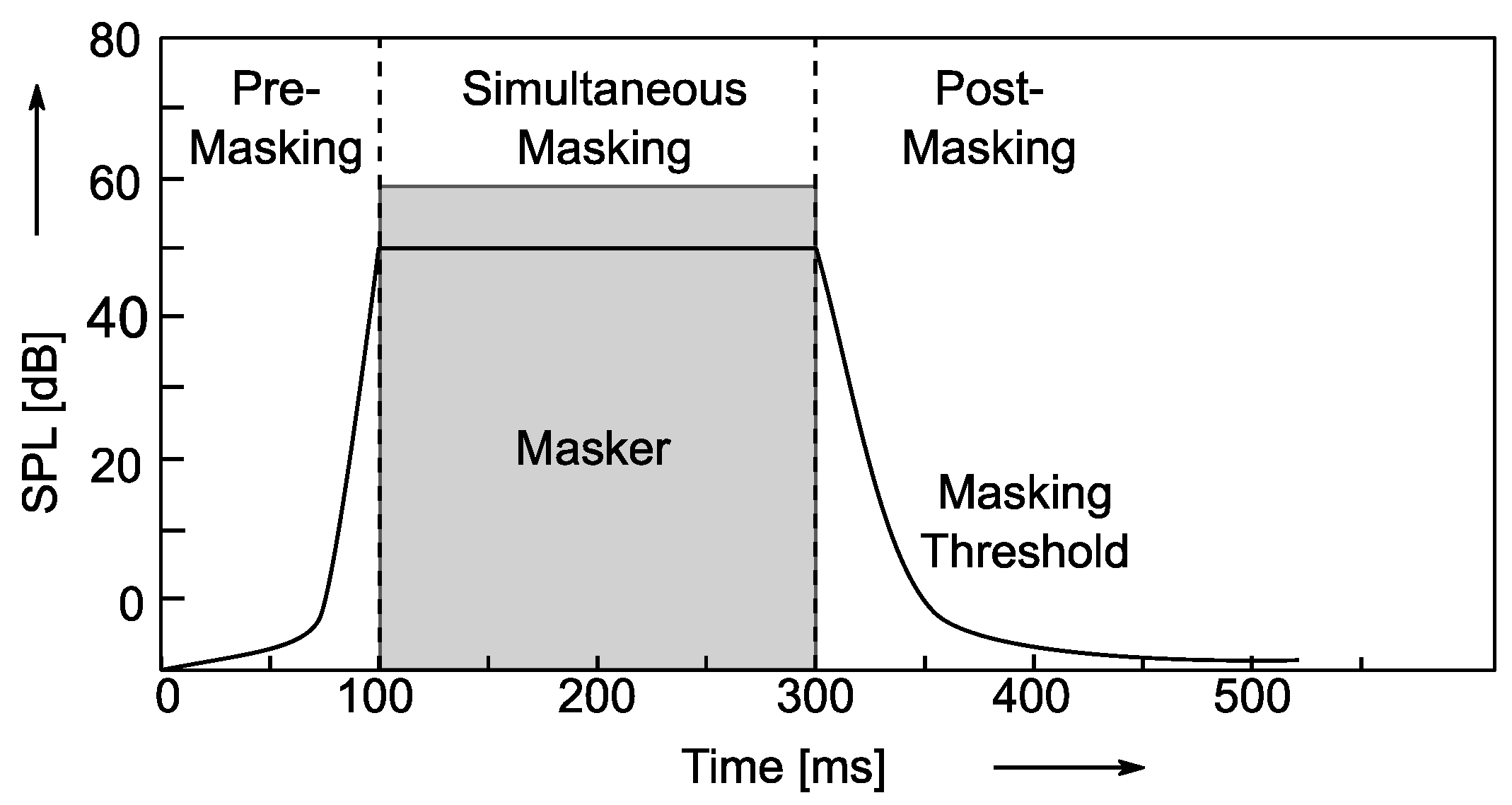
time domain masking
Masking that occurs between temporarily adjacent sounds.

temporary masking

audio encoding
encoding process
coded process

audio file format
Audio File Format ( wiki ): The format of the file that contains the audio data.

Format Classification
Lossless formats: such as WAV, FLAC, APE, ALAC, WavPack (WV)
Lossy formats: such as MP3, AAC, Ogg Vorbis, Opus
performance comparison
Latency Comparison
delay compare

Efficiency Comparison
efficiency comparison

AAC encoding
AAC (wiki): Advanced Audio Coding, a proprietary audio coding standard for lossy digital audio compression based on MPEG-2, which appeared in 1997.

AAC exhibits better sound quality than MP3 and is intended to replace the MP3 format.

usual format
AAC LC : (low complexity) low complexity specification
AAC HE V1 : (high efficiency) AAC LC + SBR (Spectral Band Replication)
AAC HE V2 : AAC LC + SBR + PS (parametric stereo)
ac profile

data exchange format
ADIF : (Audio Data Interchange Format) Audio Data Interchange Format, can only be decoded from scratch, commonly used in disk files.
ADTS : (Audio Data Transport Stream) audio transport stream format, each frame has a sync word, which can be decoded at any position in the audio stream for data transmission.

Audio and Video Series: Audio Basics

Audio and Video Series: Audio Basics

MP3 masking

Introduction to sound

Psychoacoustic

Definition: Sound is a sound wave produced by vibration, a wave phenomenon that propagates through a medium (gas, solid, liquid) and can be perceived by the hearing organs of humans or animals.

Essential: Sound is a mechanical wave.

Three elements of sound.
Tone : sound frequency (audio), boys > girls > boys
Volume: The amplitude (amplitude) of the vibration, also known as the pitch
Timbre: The waveform of the sound, which is essentially harmonic, also known as fret, has a lot to do with the material
Icon:

tone and volume

doorbell

psychoacoustics
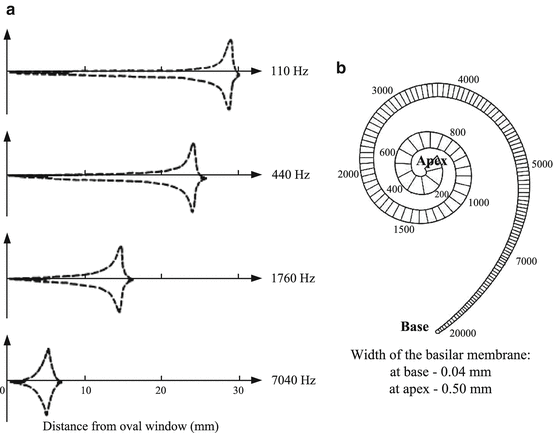
Psychoacoustics is the study of human perception of sound, that is, the science of human physiological and psychological responses to sound (including speech and music).

hearing/voice range
hearing range

sonar heading and range

audio quantization
quantification process
audio quantization

basic concept
Sample Size – How many bits are used to store a sample. 16 bit common
Sampling rate : 8k, 16k, 32k, 44.1k, 48k sampling rate
Number of channels: mono, dual, multichannel
Bit rate calculation
Bit rate = sample rate × sample size × number of channels

What:

The sample rate is 44.1 kHz, the sample size is 16 bits, and the two channel PCM encoded WAV file

Bitrate = 44.1k × 16 × 2 = 1411.2kb/s = 176.4KB/s

audio compression
Audio compression is a type of data compression used to reduce the transmission bandwidth requirements of streaming audio media and the storage size of audio files.

compression method
lossless compression
All the information of the original file is preserved and there is no difference from the original file on playback.

Data compression through information redundancy is a reversible process.

lossy compression
Approximate some information in the original file to get a smaller file.

The incorporation of human psychology and recognition of the auditory system in the compression results is an irreversible process.

Audio signals outside the range of human hearing and audio signals that are masked.

masking effect
Masking effect: A phenomenon in which the auditory system’s perception of one sound is obstructed by another.

frequency domain masking
One sound is drowned out by another sound at the same time.