What is audio and video compression?


Free Download Mp4Gain
picture

Do you know what audio and video compression is? It is the technology that allows you to play and store multimedia files on PCs, mobile phones and tablets.

Audio & Video Compression

Internet users are consuming more and more multimedia content. The audiovisual format is estimated to represent 80% of online content by 2020.

However, files are often heavy and may not run easily on all computers, so understanding what audio and video compression is is essential.

Audio and video compression

To work with audiovisuals, the professional needs to understand how compression of multimedia files works. In this post, you will know what audio and video compression is and why it is so important to do so.

After all, what is audio and video compression?
It is reducing a large volume of data in a file so that it takes up less space in the memory of a device or requires less transmission bandwidth. It can happen with or without loss, although most eliminate some almost imperceptible details.

However, the higher the audio and video compression, the lower the quality.

This is how each type of compression works:

Audio compression

By compressing sound files, the software reduces or simplifies the repetition of bits and eliminates the data considered imperceptible to the human ear.

To play an audio format on a certain device, you must select a codec, a program that encodes and decodes the media file.

In short, it compresses the file into a smaller format and unzips it, converting it back to sound when the user wants to listen to it. However, the same codec will not be used for all types of compressions and decodes.

The standard computer audio storage (WAV) file is too heavy to hold from essential data to unnecessary data to maintain its quality. This is because it transforms information into sounds that are not perceived by our ears. Codecs remove this less important data and offer a quality format, playable by the vast majority of gamers.

Modern techniques explore the perception of the human ear and provide compression that has apparently not suffered any loss. The most popular are:

FLAC (Free Lossless Audio Codec; Lossless Compression) – Unlike most, it doesn’t remove any information from the sound file, but it can shrink by up to 50%. Despite the decrease, it can be up to ten times heavier than MP3 format;
ALAC (Apple Lossless): compression of audio data produced by Apple;
MP3 (MPEG-1/2 Audio Layer 3; lossy) – The most popular audio compression format greatly reduced file size and still maintained its quality. It was officially discontinued in 2017, but is still very popular;
Ogg Vorbis (lossy) – Audio format that offers a lower bit rate and more quality than MP3. It is divided into two parts, Ogg, responsible for the file’s metadata, and Vorbis, an encoder that compresses the songs;
AAC (lossy) – Designed to be the successor to MP3, AAC is the standard format for playing audio on computers like iPhone, iPad, and PlayStation 3.
Video compression
Like audio, video compression involves reducing the file size, but in this case, removing the parts that have already been designed.

When not lost, no part of the data is discarded from the image.

In lossy compression, bits are selectively discarded. One way to do this is to reduce the number of frames, which is generally the same as on television (30 per second).

Once compressed, each type of video uses a specific set of codecs. Some of the most popular compression formats are:

MKV (Matroska Video): Widely used for high resolution videos, MKV offers effective compression and maintains quality. To make this happen, the codec encapsulates the audio, video, and subtitle tracks in a single container;
MPEG (Moving Picture Experts Group): defined by ISO as the standard video compression format, it can vary between MPEG-1 (for VCD), MPEG-2 (DVD) and MPEG-4;
AVI (Audio Video Interleave): Like MKV, AVI encapsulates audio and video in the same container. With this, both play synchronously. As it was produced by Microsoft, the format runs easily on Windows and is recognized by DVD and Blu-Ray players that are compatible with the DivX codec.
Why is audio and video compression technology important?
In addition to taking up less space, downloading and uploading a compressed file takes much less time. This makes it much easier when you want to post a video file on social media.


Free Download Mp4Gain
picture


Mp4Gain Main Window
picture


Mp4Gain Features
picture


Free Download Mp4Gain
picture

What audio and video formats exist?

When we talk about the quality of videos or audio, many doubts arise in people’s minds, as there are many terms that are very confusing for the user. For example, people talk about kbs, people talk about bitrate, the sample rate and many other terms that are not clear in people’s mentality are mentioned.

But in the end the question is always the same, what is it that is truly decisive to have a better video quality or better audio quality? The answer can be simple if we summarize it: because the difference in quality will depend on the amount of information that is stored, because the more we will have more detail.

When we talk about video formats within the different types that are applied to digital video and that there are three important parts to distinguish in them on the Internet or on a DVD:

The video and its codec (When the video is so heavy, it must always be encoded and subsequently decoded). They are simply mathematical algorithms to compress and decompress the video file.
The audio and its different formats or containers.
The file that contains the audio and video. The container
Let’s see which are the most popular and try to explain them:

Digital Video Formats

MPEG: Moving Pictures Expert Group (Mpeg1, Mpeg2, Mp4 or Mpeg4)
AVI: It is the standard format but the one with the most weight. (Xvid or Divx)
WINDOWS MEDIA: Format developed by Microsoft. (. Mp4 or .asf)
MOV: Format developed by Apple. Quicktime needed to read it. Low weight.Ideal for Web (.m4v or .mov)
FLV: Adobe Flash format. Use Sorensen Spark codec. (.flv)
Digital Audio Formats

Mp3 or MPEG-1 Audio Layer 3: Tablet with imperceptible signal loss for humans. (1Mb / Min)
Aiff: Audio Interchange File Format. It has no compression and uses PCM modulation so they are very heavy (10 Mb / Min.)
AAC: Advanced Audio Coding. Mpeg-2 compression. Suitable for surround or surround sounds
Windows Media Audio: The worst quality of all the above, is the Windows format.
Formats of Digital Audio and Video Containers

.mp4
.mov
.avi
.mkv
.flv
.swf
.m4v
The truth is that it is a world and more when the big companies live thinking only of leading their own markets and not from the point of view of the user they have had abandoned for years. Obviously these are not all there are but if I wanted to include the best known.

But if we are talking about a file or files that any DVD or download from the Internet can have in any format or container type Mp4, mkv, avi with greater quality, we must remember that the important thing is the amount of information that they carry inside, it is say the Mbs to which this video is exported.

It is as if we have a 16-ton truck and we put a box of oranges inside when it can carry 1000 boxes of oranges. What we are going to see is oranges but with a very low quality.

I hope I have shed some light on this world of digital video and how the next time you face a file of this type you will be able to understand what each of the things that are attached to it means. I must admit that it is not easy but that with that global vision and knowing what each one means you feel better when facing him.

And you know some kind of format that you are using and do you think it is missing here? This is a live article to be developed among all and thus clarify all more.

Why are there so many audio formats and video formats?

People wonder what the reason is, and why there are so many different audio formats and so many different video formats.
This whole issue of audio formats and video formats seems a great confusion. Most users are not very clear because there are so many possibilities, or which are better for their needs.
In general they are guided by what some people tell them, without actually understanding in depth about the subject, but they are simply guided by some reading, by a video from your YouTube, by someone’s comment, and so on.

codec

What are audio formats or video formats?

The easiest way to explain it would be to say that the sound in raw form, without any kind of compression saves a lot of information so it occupies a large amount of space and also the use of the computer cpu when playing it. If you do a detailed analysis, you will realize that some of this raw data does not need to be saved either because they are redundant, because they are inaudible, etc.

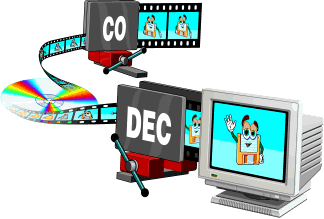
Therefore a large number of organizations and companies have decided to create their codecs to be able to compress and decompress the audio and video. Precisely the term codec comes from CODify and DECodify. That is to say, each one of these organizations or companies creates its own method to encode or compress the audio or video and at the same time has a decoder to be able to listen or watch the audio or video.

Obviously each of these codex have been implemented following different paradigms, looking for different objectives, having different objectives. For example, for some codecs, compression has been the priority, that is, saving space, while others have sought to save space, but without losing quality or details in the audio or video.

video formats

Each of these codecs produces different files that can only be encoded and decoded by the specific codec of that organization or that company, this causes that file to have a different name. From there we understand that there is a great variety of options and not always one is better than the others but it depends on what we are looking for. Which of the options will work better for us. It is not the same what is appropriate for a person who wants to play music on a computer with a high quality audio card and who will use high quality speakers, which will be very different from what is appropriate for a person what will Listen to the music using a small smartphone that perhaps has low quality speakers. Therefore, it would be unnecessary to store the music in a format that will take up more space but maintain a quality that the phone is not able to play. The same applies to any device that is capable of playing music or video files, you should always use that format that saves the files in a quality that is what the device can play. That way we avoid saving poor files that have a lower quality than our device could have played, or on the contrary save files that have too much information and quality that cannot be played by the device we are going to use.

Then we will understand that those people, often extremists and their opinions about audio and video, who ensure that an audio or video format should always be used, may be exaggerating and their recommendation may not be the most optimal. Most likely, we will have to see where we are going to play that audio and depending on the Audio Response Range and the video response range it is what we end up indicating which is the most appropriate format for our need.