Digital Audio player software.


Free Download Mp4Gain
picture

Digital Audio player software.

Audio Players

Which player is better?

Audio player

How to open flac? Most of the audio players handle it without any problem. If you are using a player that cannot open .flac, you can find the correct plugin on the internet. These files are especially recommended for people who value sound quality and feel its full power. It’s also worth adding that many portable players support the playback of these files (including iPods).

AIMP
AIMP is a multifunctional program for playing audio files on your computer. The Russian utility supports many music formats with the ability to add your number using plugins.

Profits:

high quality sound;
economic use of resources;
graphic and sound special effects;
plays and records Internet radio.
Disadvantages:

not detected.
AIMP offers good sound quality and economical use of computing resources, as well as additional options such as opening flac files. It allows you to customize the sound with a graphic equalizer and add special effects (reverb and change of playback speed). AIMP plays and records Internet radio, supports keyboard shortcuts, and adds images to the music that is playing. The program also creates playlists and contains graphic skins. Smooth transitions between tracks will come in handy when playing music at a party.

AIMP, like any decent player, displays extended information about the currently playing file, plays songs randomly, and, moreover, can automatically shut down the computer at the agreed time. It is quite a complex program, but it does not take long to obtain information about all its functions. The default AIMP interface is elegant and functional. Basic functions will not be difficult even for beginners, and advanced users will benefit from the full range of customizations that AIMP offers. It is a great alternative to the popular Winamp player. AIMP is undoubtedly the leader among music players. If you value high-quality sound and fast performance with minimal system load, install AIMP.

jetAudio is multimedia playback software developed by Cowon’s US division. There are two versions available, one basic free and the other Plus that offers additional functions. The program is popular for its faster and more efficient software architecture compared to, for example, the competitor Winamp. If you have a problem about how to play this or that format, there is probably no better solution.

The program offers very wide possibilities, such as support for popular music and video formats (MP3, WAV, OGG, FLAC, RM, AVI, MPEG, RMVB, MOV, etc.), CD recording, sound recording, tag editing ID3, skin support and visualizations, subtitle support, database integration, album and playlist management, music and video conversion, radio and Internet streaming, song synchronization (karaoke) and many others.

Winamp is a popular free music player that has evolved from a simple program to an extensive multimedia processor that also plays movies. It is quite versatile and, thanks to its multiple configurations and skins, it can be adapted to the needs of each user.

Profits:

total configuration;
small file size;
fast action;
skins that change the Winamp interface.
Disadvantages:

does not support MOV files;
it does not support subtitles without additional codec.
Winamp supports skins that allow you to change the look of your player. Controlling the playback is easy, although Winamp allows many additional functions. The minimized version of Winamp in the form of a thin strip on the edge of the screen allows you to use the program without taking up your workspace. Winamp supports most of the multimedia file formats and is fast even on slower computers. Thanks to the plugins available, you can “make” Winamp work with mp3s and listen from an iPod. Winamp also makes it easy to manage your media library on your computer. The full version allows you to burn CDs.

Winamp Remote is an additional function of the new version of the player that allows you to use the multimedia resources of uPnP devices (eg a mobile phone) through your home network. Along with Winamp, it also opens up access to huge multimedia resources on the Internet. This program is ideal for playing Internet radio and Internet TV on the Shoutcast system.


Free Download Mp4Gain
picture


Mp4Gain Main Window
picture


Mp4Gain Features
picture


Free Download Mp4Gain
picture

Digital audio encoding

Digital audio encoding

Digital audio encoding

In fact, one or another digital form of representation of analog audio signals is already a coding method – a sequence of numbers that describes an analog audio signal is itself a digital code.

Digital Audio Encoding

However, the encoding that we are going to talk about now is something else. Now let’s look at the methods of encoding digital audio signals.

A digitized audio signal “in its pure form” is a fairly accurate, but not the most compact, way of recording the original analog signal.

Judge for yourself. To obtain complete information about the original analog signal in the frequency range 0-20 kHz (in the audible frequency range), the analog signal must be sampled at a frequency of at least 40 kHz. Therefore, the CD – DA standard (the standard for recording data on audio CDs familiar to all) establishes the following encoding parameters: recording of two or one channel in PCM format with a sampling frequency of 44.1 kHz and a 16-bit quantization bit depth. One hour of music in this format takes up approximately 600 MB of space (60 minutes * 60 seconds * 2 channels * 44100 samples per second * 2 bytes per sample = approximately 605 MB). Taking into account that, for example, the music collection of an ordinary music lover may have 5,000 tracks with an average length of about 3 minutes each, the amount of memory required to store it in its original digital form is quite significant. Awesome. Therefore, storing relatively large amounts of audio data, ensuring fairly good sound quality, requires the use of various “tricks” to compress the data.

In general, all existing methods for encoding audio information can be conditionally divided into only two types.

1. Lossless data compression (“Lossless Encoding”) is a method of encoding (compacting) digital audio information, which enables one hundred percent recovery of the original data from the compressed transmission (the term ” original data “here means the original form of the digitized audio data). This method of data compression is used in cases where one hundred percent absolute preservation of the quality of the original audio data is required. Lossless compression algorithms that exist today can reduce the volume of data occupied by 20-50% and at the same time guarantee a 100% recovery of the original digital material from the compressed data. The operating mechanisms of such encoders are similar to the operating mechanisms of general data archivers, such as ZIP or RAR, but at the same time they are specially adapted to compress audio data …. Lossless encoding While it is ideal in terms of preserving the quality of audio materials, it cannot provide a high level of compression.

2. There is another more modern way to compact data. This so-called lossy data compression (Engl. “Lossy encoding”) The purpose of encoding is to achieve the highest data compression rate by all means while keeping sound quality at an acceptable level. The idea behind lossy encoding is based on two simple underlying considerations:

original digital audio data is redundant: it contains a lot of unnecessary information that is useless to the ear, which can be removed, thereby increasing the compression ratio;
Requirements for the sound quality of audio material may vary and depend on specific purposes and areas of use.
Lossy encoding is therefore called “lossy”, which results in the loss of some of the audio information. Such encoding leads to the fact that the decoded signal, when reproduced, sounds similar to the original, but in reality it is no longer identical to it. Most lossy coding methods rely on the use of the psychoacoustic properties of the human auditory system, as well as various tricks associated with resampling and resampling the signal. In frequency, during the compression process, the encoder analyzes the audio data to identify various details of the sound that can be ignored. Disguised frequencies, inaudible and inaudible sound details can be sacrificed for a higher compression ratio. Where intelligibility is only important in sound (for example, in telephony, where the presence of frequencies above 4 kHz is not necessary), the audio information during the encoding process undergoes a serious “simplification”, which, together with the use of successful “smart” quantifiers and “greedy” data compression algorithms.

Audio. Digital and analog audio

Audio. Digital and analog audio

Digital Audio

Despite the fact that most of the external information we acquire with the help of sight, sound images are no less important to us and often even more. Try watching a movie with the sound turned off; in 2-3 minutes you will lose the thread of the plot and interest in what is happening, no matter how large the screen and the high quality image. Thus, a pianist played off-screen in silent movies. If you remove the picture and leave the sound, the movie can be “heard” like a fascinating radio show.

DIGITAL AUDIO

Hearing gives us information about what we do not see, since the visual perception sector is limited and the ear captures sounds from all directions, complementing visual images.

Hearing gives us information about what we do not see, since the sector of visual perception is limited and the ear captures the sounds that come from everywhere, complementing the visual images. At the same time, our hearing with great precision can locate an invisible sound source in direction, distance, speed of movement.

They learned to convert sound into electrical vibrations long before images. This was preceded by a mechanical recording of sound vibrations, whose history dates back to the 19th century.

Accelerated progress, including the ability to transmit sound at a distance, was made possible by electricity, with the advent of amplifying, acoustic, and electro-acoustic equipment and transducers – microphones, pickups, dynamic heads, and other emitters. Today, audio signals are transmitted not only over cables and over the air, but also over fiber optic communication lines, primarily in digital form.

The acoustic vibrations are converted into an electrical signal, usually by microphones. Any microphone contains a moving element, the vibrations of which generate a current or voltage in a certain way. The most common type of microphone is the dynamic, which is a reverse speaker. The vibrations of the air set in motion a membrane that is rigidly connected to a moving coil in a magnetic field. A condenser microphone, in fact, is a condenser, one of whose plates vibrates at the same time as the sound, and with it the capacitance between the plates changes. Ribbon microphones use the same principle, only one of the plates is freely suspended. Similar to a condenser electret microphone, whose plates, in the process of oscillation, generate by themselves an electric charge proportional to the amplitude of the oscillations. Many models of microphones have a built-in amplifier (the signal level directly from the acoustic-electric transducer is very low). Unlike a microphone, the pickup of an electric musical instrument registers vibrations not from the air, but from a solid body: a string or the soundboard of an instrument. The cartridge reads the record slot using a needle mechanically connected to moving coils in a magnetic field, or magnets if the coils are stationary. Or the vibrations of the needle are transmitted to the piezoelectric element which, under mechanical stress, generates an electrical charge. In magnetic recording, an audio signal is recorded on a magnetic tape and then read with a special head. Finally, optical recording was traditionally adopted in cinematography: an opaque soundtrack was applied from the edge of the film,

In synthesizers, sound is born directly in the form of electrical vibrations, there is no primary transformation of acoustic waves into an electrical signal.

Modern autumn sound sources are diverse and digital media are becoming more and more common: CDs, DVDs, although vinyl records are also preserved. We continue to listen to radio, both terrestrial and via cable (radio hotspots). Sound accompanies television shows and movies, not to mention a phenomenon as familiar as telephony. A computer receives an increasing share in the world of audio, allowing it to conveniently archive, combine and process sound programs in the form of files. In the digital age, digitized speech and music are transmitted through digital channels, including the Internet, without serious losses in transportation. This is provided by digital encoding and the loss is due solely to compression, which is used most often. However, in digital media, either it does not exist at all (CD, SACD), or lossless audio compression algorithms are used (DVD Audio, DVD Video). In other cases, the degree of compression is determined by the required level of soundtrack quality (MP3 files, digital telephony, digital television, some types of media).

Introduction to digital audio

Introduction to digital audio

Digital audio is the representation of sound signals through a set
of binary data. A complete digital audio system usually begins
with a transceiver (microphone) that converts the pressure wave that represents the
Sound to an analog electrical signal.
This analog signal goes through an analog signal processing system, in
which can be made limitations on frequency, equalization, amplification and
Other processes such as compassion. Equalization aims
counteract the particular frequency response of the transceiver used of
so that the analog signal closely resembles the original audio signal.


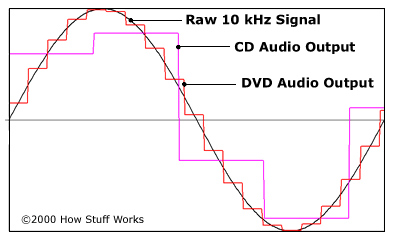
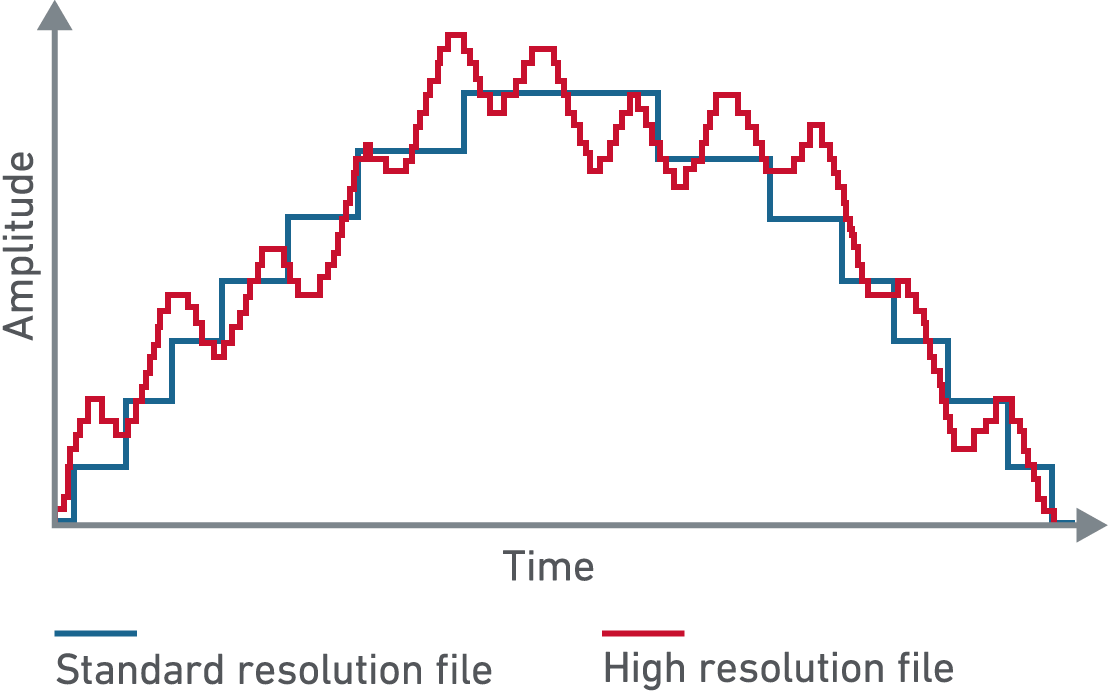
After analog processing, the signal is sampled, quantified and encoded. The
sampling takes a discrete number of analog signal values ​​per second
(sampling rate) and quantification assigns discrete analog values ​​to those
samples, which means a loss of information (the signal is no longer the same
than the original). The encoding assigns a sequence of bits to each value
discrete analog The length of the bit sequence is a function of the number of
analog levels used in quantification. The sampling rate and the
number of bits per sample are two of the fundamental parameters to choose from
when you want to digitally process a certain audio signal.
Digital audio formats try to represent that set of samples
digital (or a modification) of them efficiently, so that it is optimized
depending on the application, either the volume of the data to be stored or the
processing capacity necessary to obtain the starting samples. In
in this sense there is a very extended audio format that is not considered audio
digital: the MIDI format. MIDI does not start with digital sound samples, but
stores the musical description of the sound, being a representation of the
score of them.
The digital audio system usually ends the reverse process to that described. From
the stored digital representation is obtained the set of samples that
represent. These samples go through a process of digital analog conversion
providing an analog signal that after processing (filtering,
amplification, equalization, etc.) affect the output transceiver (speaker)
which converts the electrical signal to a pressure wave that represents the sound.

Fundamental parameters of digital audio

The basic parameters to describe the sequence of samples it represents
The sound are:
ƒ The number of channels: 1 for mono, 2 for stereo, 4 for sound
quadraphonic, etc.
ƒ Sampling rate: The number of samples taken per second in each
channel.
ƒ Number of bits per sample: Usually 8 or 16 bits.
As a general rule, multichannel audio samples are usually organized in
frames A plot is a sequence of as many samples as channels,
each one corresponding to a channel. In this sense the number of samples per
second matches the number of frames per second. In stereo, the channel
Left is usually the first.