Digital audio encoding


Free Download Mp4Gain
picture

Digital audio encoding

Digital audio encoding

In fact, one or another digital form of representation of analog audio signals is already a coding method – a sequence of numbers that describes an analog audio signal is itself a digital code.

Digital Audio Encoding

However, the encoding that we are going to talk about now is something else. Now let’s look at the methods of encoding digital audio signals.

A digitized audio signal “in its pure form” is a fairly accurate, but not the most compact, way of recording the original analog signal.

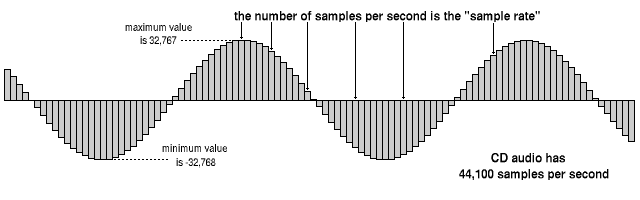
Judge for yourself. To obtain complete information about the original analog signal in the frequency range 0-20 kHz (in the audible frequency range), the analog signal must be sampled at a frequency of at least 40 kHz. Therefore, the CD – DA standard (the standard for recording data on audio CDs familiar to all) establishes the following encoding parameters: recording of two or one channel in PCM format with a sampling frequency of 44.1 kHz and a 16-bit quantization bit depth. One hour of music in this format takes up approximately 600 MB of space (60 minutes * 60 seconds * 2 channels * 44100 samples per second * 2 bytes per sample = approximately 605 MB). Taking into account that, for example, the music collection of an ordinary music lover may have 5,000 tracks with an average length of about 3 minutes each, the amount of memory required to store it in its original digital form is quite significant. Awesome. Therefore, storing relatively large amounts of audio data, ensuring fairly good sound quality, requires the use of various “tricks” to compress the data.

In general, all existing methods for encoding audio information can be conditionally divided into only two types.

1. Lossless data compression (“Lossless Encoding”) is a method of encoding (compacting) digital audio information, which enables one hundred percent recovery of the original data from the compressed transmission (the term ” original data “here means the original form of the digitized audio data). This method of data compression is used in cases where one hundred percent absolute preservation of the quality of the original audio data is required. Lossless compression algorithms that exist today can reduce the volume of data occupied by 20-50% and at the same time guarantee a 100% recovery of the original digital material from the compressed data. The operating mechanisms of such encoders are similar to the operating mechanisms of general data archivers, such as ZIP or RAR, but at the same time they are specially adapted to compress audio data …. Lossless encoding While it is ideal in terms of preserving the quality of audio materials, it cannot provide a high level of compression.

2. There is another more modern way to compact data. This so-called lossy data compression (Engl. “Lossy encoding”) The purpose of encoding is to achieve the highest data compression rate by all means while keeping sound quality at an acceptable level. The idea behind lossy encoding is based on two simple underlying considerations:

original digital audio data is redundant: it contains a lot of unnecessary information that is useless to the ear, which can be removed, thereby increasing the compression ratio;
Requirements for the sound quality of audio material may vary and depend on specific purposes and areas of use.
Lossy encoding is therefore called “lossy”, which results in the loss of some of the audio information. Such encoding leads to the fact that the decoded signal, when reproduced, sounds similar to the original, but in reality it is no longer identical to it. Most lossy coding methods rely on the use of the psychoacoustic properties of the human auditory system, as well as various tricks associated with resampling and resampling the signal. In frequency, during the compression process, the encoder analyzes the audio data to identify various details of the sound that can be ignored. Disguised frequencies, inaudible and inaudible sound details can be sacrificed for a higher compression ratio. Where intelligibility is only important in sound (for example, in telephony, where the presence of frequencies above 4 kHz is not necessary), the audio information during the encoding process undergoes a serious “simplification”, which, together with the use of successful “smart” quantifiers and “greedy” data compression algorithms.


Free Download Mp4Gain
picture


Mp4Gain Main Window
picture


Mp4Gain Features
picture


Free Download Mp4Gain
picture

Why are AV hard drives used in digital recording?

Why are AV hard drives used in digital recording?

AV Hard drives


AV HARD DRIVE

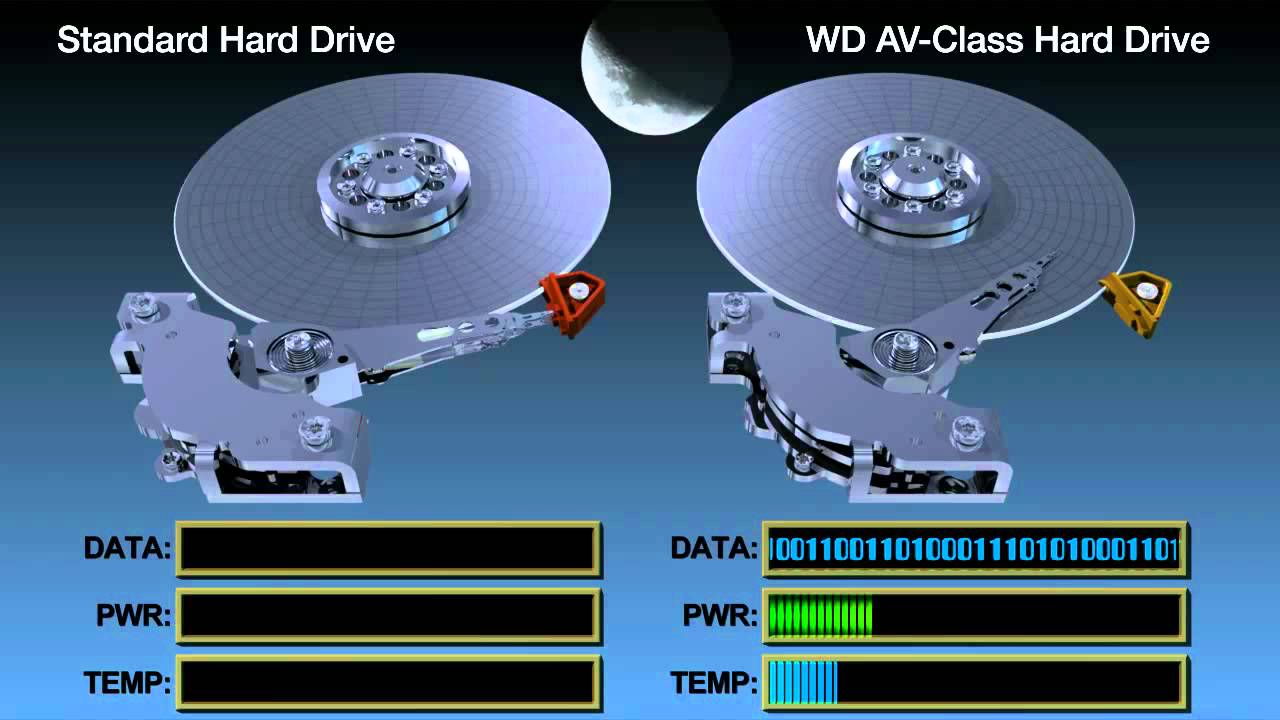
The class of AV (audio / video) hard drives means their ability to
read and write streams of data efficiently and smoothly, without pauses. Reserve Army-
some disks ship with a larger internal buffer and are not interrupted
They read / write the process thermal calibration positioning system.
For digital recording systems with insufficient performance and
amounts of RAM to smooth out possible irregularities in the operation of the
discs, AV discs are the only possible output.

Note that the presence of the abbreviation AV in the designation of the disc
it does not mean that it belongs to the Audio / Video class; must be
It must be explicitly mentioned in the passport of the disc.

However, the specified feature is generally necessary only when working
bot with high-quality video information, whose speed
it is approximately 10 megabytes per second per channel. In the case of sound
systems output the rate of a single 16-bit channel stream with a frequency
The 48 kHz sample rate is two orders of magnitude lower and is only 94 kilograms.
bytes per second. At the same time, almost no workstation
to ensure simultaneous operation with hundreds of channels, as well as
the disk cannot process so much data in parallel,
located in different parts of it. In real applications, multichannel
burning disc to disc, most of the overall disc costs
The howling subsystem relies on head movement between recording areas,
and nothing in the data transfer itself. The low speed of sound flows.
kov makes it more convenient and reliable to store them in the computer’s RAM,
disc thermal calibration compensation within 0.5 – 1 s, instead of
use of expensive and rare AV class discs. Also, it is far from
All conventional discs, thermal calibration has a remarkable effect on the
data stream number.

“Broken” data transmission can also occur when using “unintentional”
correct “operating system (DOS, Windows without 32-bit driver
faith on disk, etc.), insufficient number and size of file buffers
get rid of the operating system and the burning program, the use of low-class discs with
transfer rate of the order of 1-2 megabytes per second and lower, incorrect
connect a disc, etc. In any case, these situations are usually
talk about misconfiguration and hardware and software configuration
parts of the system.

What methods are used to compress digital audio effectively?

What methods are used to compress digital audio effectively?

Compress Digital Audio

COMPRESS DIGITAL AUDIO

Currently, the most famous are Audio MPEG, PASC and ATRAC. All of them
use the so-called “perceptual
encoding) in which information is removed from the sound signal,
perceptible to the ear. As a result, despite the change in shape and spectrum
signal, your hearing perception is practically unchanged, and the degree
Compression accounts for the slight reduction in quality. Such encoding
refers to lossy compression methods, when
it is no longer possible to accurately reconstruct the original waveform from the compressed signal
shape.


The techniques to eliminate part of the information are based on the characteristics of the human being.
who to listen to, called masking: if there is a high
strong peaks (dominant harmonics) weaker frequency content
hear in the immediate vicinity of them practically no
accepted (masked). When encoding, the entire audio stream is divided
is divided into small squares, each of which becomes a spectral
presentation and is divided into several frequency bands. Within the stripes there are
performs the definition and removal of masked sounds, after which each frame
it undergoes adaptive coding directly in spectral form. All
these operations can significantly reduce (several times) the volume
data while maintaining acceptable quality for most listeners
I read.

Each of the encoding methods described is characterized by a bit rate
the bitrate with which the compressed information should come
on the cable box when the audio signal is restored. Decoder converts
a series of instantaneous signal spectra compressed into a conventional digital waveform
shape.

MPEG Audio – A group of MPEG standardized audio compression methods
(Moving Pictures Experts Group – a group of experts to process motion
images). MPEG audio methods exist in various
types – MPEG-1, MPEG-2, etc .; currently the most common
not MPEG-1 type.

There are three layers of MPEG-1 audio for stereo compression.
your signals:

1 – 1: 4 compression ratio with a data stream of 384 kbps;
2-1: 6..1: 8 at 256..192 kbps;
3 – 1: 10..1: 12 at 128..112 kbps.

The minimum data rate in each layer is defined as 32
kbps; specified bit rates maintain signal quality
roughly at the level of a CD.

All three levels use the input split spectral transformation
changing the frame in 32 frequency bands. The most optimal in relation
data volume and sound quality recognized as level 3 with bit rate
128 kbps and a data density of approximately 1 Mb / min. When compressed from a bottom
at what speeds the forced limiting of the frequency band starts to
15-16 kHz, and channel phase distortions also occur (effects such as
phaser or flanger).

MPEG audio is used in computer sound systems, CD-i / DVD,
CD-ROM “audio”, digital radio / television and other systems
massive sound transmission.

PASC (Precision Adaptive Subband Coding – Precise Adaptive Intraband
coding) – a special case of Audio MPEG-1 Layer 1 with a speed
Stream 384 kbps (1: 4 compression). Used in the DCC system.

ATRAC (Adaptive TRansform Acoustic Coding – acoustic coding
adaptive transformation) is based on stereophonic sound
16-bit quantized format with a 44.1 kHz sample rate.
When compressed, each frame is divided into 52 frequency bands, resulting in
transmission speed: 292 kbps (1: 5 compression). Applied in the system

What interfaces are used for digital audio transmission?

What interfaces are used for digital audio transmission?

Digital Interfaces

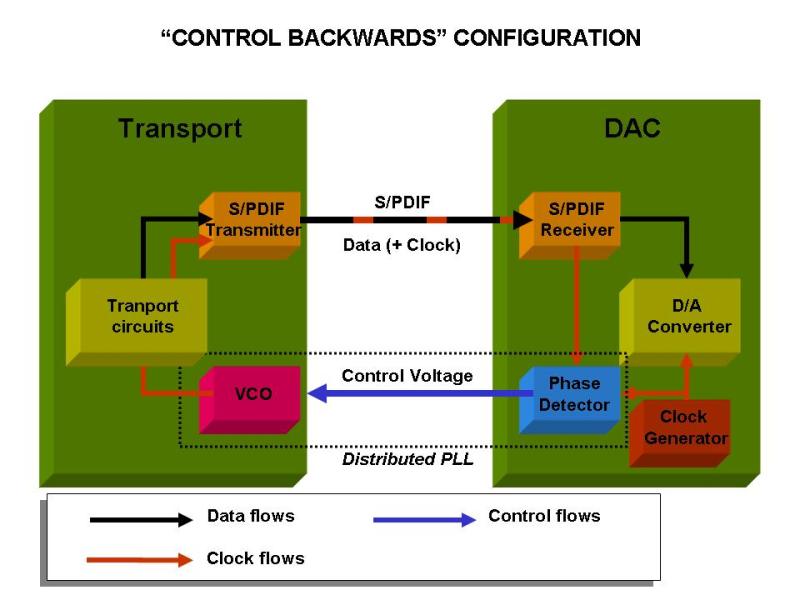
S / PDIF (Sony / Phillips Digital Interface Format – digital information format
terface from Sony and Philiрs) – digital interface for home radio
team.

Digital Audio Interfaces

AES / EBU (Society of Audio Engineers / European Broadcasting Union – Society
sound engineers / European Broadcasting Association) – digital engineering
terface for studio radio equipment.

Both interfaces are serial and use the same form
marking mat and coding system: BMC code with automatic synchronization
(Biphasic brand code: code with a double change representation of a unit
phase) and can transmit signals in PCM format of up to 24 bits
at sample rates up to 48 kHz.

Each signal sample is transmitted as a 32-bit word (frame), in which
rum 20 digits are used to transmit the count, and 12 – to form
synchronization preamble, transmission of additional information and
parity bit. 4 bits of the service group can be used to
extension of the sample format to 24 bits.

192 consecutive frames form a block, the beginning of which is marked
special preamble code of the first frame.

In addition to the parity bit, the service part of the word contains a validity bit
(Validity), which must be zero for each valid answer
accounts. If a word is received with a single bit of Validity or with a violation
parity in the word, the receiver interprets the entire sample as wrong and
you can choose to replace it with the old value or interpolate
based on multiple adjacent valid reads. Counts
marked invalid can transmit CD players that
DAT recorders and other devices, yes, when reading information from
the media could not be corrected during read errors
Ki.

The service part of the word also includes the C bits (Channel Status – Status
channel) and U (user bit). Constant price
kidney of each of these bits, taken one at a time from each block frame,
forms a 192-bit word of block service bits, where information is transmitted
information about the title of the work, track number,
device, CD subcodes, etc. S / PDIF transmits
copy protection settings (SCMS).

The standard encoding format is designed to transmit one and two
channel signal, however, when service bits are used to
By encoding the channel number, a multi-channel signal can be transmitted.

On the electrical side, S / PDIF provides a coaxial connection
cable with characteristic impedance of 75 ohms and RCA connectors (“tulle
pan “), signal amplitude – 0.5 V. AES / EBU provides connection
2-wire shielded symmetrical cable with transformer
decoupling via RS-422 interface with signal amplitude 3-10 V, connectors –
Cannon XLR 3-pin. There are also optical options
transceivers: TosLink (plastic fiber) and AT&T Link
(fiberglass).

Basics of digital audio

Basics of digital audio:

Before the computer can record, manipulate, and reproduce sound, sound must be transformed from an audible analog form to a computer-acceptable digital form, using a process called analog-to-digital conversion (ADC). Once the sound data has been stored as bytes in the computer, the power of the computer’s CPU can be used to transform this sound in thousands of ways. Finally, when you are ready to listen to the result, the digital-to-analog conversion (DAC) process transforms the sound bytes back into an analog electrical signal from the speakers.

Sampling: Analog to Digital Conversion

Given an analog signal, discrete values ​​of its amplitude are taken at small time intervals, obviously the more reliable the reproduction the more samples per second are taken. These obtained values ​​are assigned a digital value that the computer can understand and process as required. We can use 8 or 16 bit words, thus obtaining 256 or 65536 different combinations and obtaining higher resolution.


SAMPLE FREQUENCY: According to the Nyquist theorem, it is possible to accurately repeat a waveform if the sampling frequency is at least twice the frequency of the component with the highest frequency. The highest frequency that the human ear can perceive is close to 20 kHz, so the 44.1 kHz sampling rate of sound cards is more than enough. This value is the one used today by CD audio players.

SAMPLE SIZE: The sample size controls the dynamic range that can be recorded. For example, 8-bit samples limit the dynamic range to 256 steps (50 dB range). In contrast, a 16-bit sample has a dynamic range of 65,536 steps (90 dB range) a substantial improvement. The human ear perceives a whole world of differences between these two sample sizes. Ears are more sensitive to detecting differences in pitch than intensity, but are even more sensitive to the strength of sound.

From the previous processes we can get an audio file, such as (and since it is the best known), a WAV audio file. It is the own format of Windows. They can be 8 or 16 bit with sampling rates of 11,025 kHz, 22.05 kHz, or 44.1 kHz and generally have good sound quality.

Digital audio compression

It could be assumed that all you have to do to get good sound is to record at the 44.1 kHz speed limit with 16-bit (2-byte) samples. The only problem that appears if recording in stereo, sampling simultaneously on the left and right channels at 44.1 kHz, a one minute sound sample needs a 10.58MB storage space. This involves using large disk spaces to store these sound files. Many compressed file formats (codecs) have been developed that enable high-quality recording without the need for so much disk space.

Most common audio formats:

With the simple objective of listing a series of codecs used by different operating systems to perform audio compression. Later, a more complete description of the most used is made: MP3.

Therefore, some of the most used are:

Advanced Audio Coding (AAC): used by Apple computers. More efficient than MP3.

Audio for Unix (AU): Acoustic standard for the JAVA programming language.

Windows Media Audio (WMA)

Ogg Vorbis: It is free, open and not patented.

Atrac: compression and playback technology for minidisc.


The codec par excellence: the MP3

Its origin and current

The abbreviations MP3 respond to the abbreviation of MPEG (Moving Picture Expert Group) 1 Layer 3, which is a perceptual coding algorithm. This among others was developed by the Moving Picture Expert Group (MPEG) (http://www.cselt.it/mpeg/) together with the Fraunhofer Institute of Technology (http://www.ipa.fhg.de/english/ ).

Moving Picture Expert Group is an ISO / IEC research committee. MPEG is in charge of the international development of compression, decompression, processing and encoded rendering standards for movies, audio and the combination of both. It is a non-profit institution created in 1988, which brings together 300 experts from 20 countries three times a year.

Introduction to digital audio

Introduction to digital audio

Digital audio is the representation of sound signals through a set
of binary data. A complete digital audio system usually begins
with a transceiver (microphone) that converts the pressure wave that represents the
Sound to an analog electrical signal.
This analog signal goes through an analog signal processing system, in
which can be made limitations on frequency, equalization, amplification and
Other processes such as compassion. Equalization aims
counteract the particular frequency response of the transceiver used of
so that the analog signal closely resembles the original audio signal.


After analog processing, the signal is sampled, quantified and encoded. The
sampling takes a discrete number of analog signal values ​​per second
(sampling rate) and quantification assigns discrete analog values ​​to those
samples, which means a loss of information (the signal is no longer the same
than the original). The encoding assigns a sequence of bits to each value
discrete analog The length of the bit sequence is a function of the number of
analog levels used in quantification. The sampling rate and the
number of bits per sample are two of the fundamental parameters to choose from
when you want to digitally process a certain audio signal.
Digital audio formats try to represent that set of samples
digital (or a modification) of them efficiently, so that it is optimized
depending on the application, either the volume of the data to be stored or the
processing capacity necessary to obtain the starting samples. In
in this sense there is a very extended audio format that is not considered audio
digital: the MIDI format. MIDI does not start with digital sound samples, but
stores the musical description of the sound, being a representation of the
score of them.
The digital audio system usually ends the reverse process to that described. From
the stored digital representation is obtained the set of samples that
represent. These samples go through a process of digital analog conversion
providing an analog signal that after processing (filtering,
amplification, equalization, etc.) affect the output transceiver (speaker)
which converts the electrical signal to a pressure wave that represents the sound.

Fundamental parameters of digital audio

The basic parameters to describe the sequence of samples it represents
The sound are:
ƒ The number of channels: 1 for mono, 2 for stereo, 4 for sound
quadraphonic, etc.
ƒ Sampling rate: The number of samples taken per second in each
channel.
ƒ Number of bits per sample: Usually 8 or 16 bits.
As a general rule, multichannel audio samples are usually organized in
frames A plot is a sequence of as many samples as channels,
each one corresponding to a channel. In this sense the number of samples per
second matches the number of frames per second. In stereo, the channel
Left is usually the first.