Audio codec


Free Download Mp4Gain
picture

Audio codec

Audio Codec

Software codec

AUDIO CODEC

A software level audio codec is a specialized computer program, a codec that compresses (compresses) or decompresses (decompresses) digital audio data according to an audio file format or streaming audio format. The task of an audio codec as a compressor is to provide an audio signal with a certain quality / precision and the smallest possible size. Compression reduces the amount of space required to store audio data, and it is also possible to reduce the bandwidth of the channel through which the audio data is transmitted. Most audio codecs are implemented as software libraries that interact with one or more audio players such as QuickTime Player, XMMS, Winamp, VLC Media Player, MPlayer, or Windows Media Player.

Popular software audio codecs by application:

MPEG-1 Layer III (MP3): a proprietary audio codec (music, audiobooks, etc.) for computers and digital players
Advanced Audio Codec (AAC) – The second most common proprietary codec, positioned as an alternative to MP3. Most popular along with H.264 (AVC) video codec received in online video (eg flash video on YouTube)
Ogg Vorbis (OGG) is a free codec widely used in computer games and file-sharing networks to transfer music.
Free Lossless Audio Codec (FLAC) is a free codec that uses lossless compression. Alternative and less common lossless codecs: WavPack (WV), Monkey’s Audio (APE), etc.
GSM-FR is the first digital voice coding standard used in GSM phones
Adaptive multi rate (AMR): human voice recording on mobile phones and other mobile devices
G.723.1: one of the basic codecs for IP telephony applications
G.729 is a proprietary narrowband codec used to digitally represent speech
Internet Low Bit Rate Codec (iLBC) – A popular free codec for IP telephony (in particular for Skype and Google Talk)

Hardware codec
Realtek ALC 882 HD audio codec chip on motherboard
A hardware audio codec refers to a separate chip that encodes and decodes an analog audio signal into a digital signal and vice versa using analog-to-digital and digital-to-analog converters. Digital-to-analog conversion occurs when the computer sends sound to external speakers, and analog-to-digital conversion occurs when sound enters the computer from outside.

The audio codec is the main, but not always the only, component of a sound card. It is an intermediate link, an interface between analog ports to receive and transmit sound and digital sound processing units

In massive onboard sound cards on motherboards, the audio codec actually represents the entire sound card: it converts the analog signal received from the connectors into digital and transmits it to the south bridge of the motherboard, from where the sound digital goes to the central processor. This technology for processing digital audio in a central processor is called host signal processing.

In discrete sound cards connected to the motherboard, the audio codec performs the same function as in the integrated ones, but after digitization it transmits the audio signal not to the central processor, but to an audio processing and control chip special, also located on the sound card.

An audio codec chip is typically about 7mm², and in the case of an integrated sound card, it is typically located near the back of the motherboard. The main manufacturers of hardware audio codecs are Realtek, VIA Technologies, C-Media, Intel, and Analog Devices.


Free Download Mp4Gain
picture


Mp4Gain Main Window
picture


Mp4Gain Features
picture


Free Download Mp4Gain
picture

Choosing an audio codec for online streaming and recording.

Choosing an audio codec for online streaming and recording.

Audio Codec

Are you interested in what is an audio codec and how to choose the right one to get the best result from online streaming or recording?

Audio Codecs

Imagine that we live in a completely analog world. Then there would be no need for audio codecs. What is it, you ask? It is an algorithm used to convert analog audio to digital. This is what is needed in the world of digital devices, media players and the Internet.

The quality of audio codecs has improved significantly over the years. Let’s go back, for example, to the 80s, when the first digital amplifiers appeared. Compared to the reproduction quality of a modern digital amp, the difference will be obvious. The best audio codecs offer better and more realistic sound.

But now there are so many different audio codecs. Which to choose?
Many codecs are quite specific. Some of them are proprietary, while others were created for specific applications, most often telecommunications. For voice signals, such as on your phone, you do not need to use high-fidelity audio codecs, as the reproduction of a signal with a limited audio range is more suitable in this case. But for music playback, a high-quality audio signal is certainly preferable.

If you dig deeper, you will find that different audio codecs serve different purposes in processing the original analog signal. For example, an audio codec like PCM is a lossless compression algorithm. This means that the signal is reproduced in digital form without losing a single bit of original information. Other audio codecs, such as AAC and MP3, compress audio with some loss.

Compression reduces the bits of the original content and therefore reduces the file size. If you are listening to songs on a mobile device, you can be sure that these files have been compressed to take up less space. And that is why you can save a large number of music files on your device, but their quality will differ from optimal.

Audio codecs for Epiphan Pearl and Pearl-2
Of course, it is impossible to tell in detail all the characteristics of audio codecs in one article, but it can still help to clarify some of the nuances in choosing the correct audio codec for live streaming or recording using Epiphan Pearl or Pearl- 2 .

There are 3 audio codecs available:

-PCM – Uncompressed audio codec, which may be the best option if you plan to record shows for further editing and if you are not limited by network bandwidth.

-AAC: audio codec with compression algorithm best suited for live streaming or content recording with immediate playback on media players or for uploading to the Internet. Experts believe that AAC plays better audio than MP3 with the same audio bit rate. As a rule, the newer codecs reproduce the analog signal better than their predecessors, you can trust the experts on this.

-MP3: a fairly old, but still very popular audio code compression algorithm, also suitable for live streaming or recording content with immediate playback on media players or uploading to the Internet.
Choosing the correct audio codec is important when setting up live streaming or recording with the Epiphan Pearl or Pearl-2. Sample rate and audio oversampling effects are other important parameters for improving sound quality.

Audio over Bluetooth

Audio over Bluetooth: as detailed as possible about profiles, codecs and devices
Audio  over bluetooth

Due to the massive launch of smartphones without 3.5mm audio jack, Bluetooth wireless headphones have become the main way to listen to music and communicate in headphone mode for many.

Audio over bluetooth
Manufacturers of wireless devices do not always write detailed product specifications, and articles on Bluetooth audio on the Internet are contradictory, in some places incorrect, do not count all functions, and often copy the same information that does not correspond to reality.
Let’s try to understand the protocol, the capabilities of the Bluetooth operating system stacks, headphones and speakers, Bluetooth codecs for music and voice, find out what affects transmitted sound quality and latency, learn how to collect and decode information about supported codecs and other capabilities. Of the device.

Bluetooth music

The functional component of Bluetooth is defined by profiles: specific function specifications. Bluetooth music streaming is done using the A2DP high-quality one-way audio streaming profile. The A2DP standard was adopted in 2003 and has not changed dramatically since then.
Within the profile, 1 mandatory SBC codec of low computational complexity, created specifically for Bluetooth, and 3 additional ones are standardized. It is also allowed to use undocumented codecs of your own implementation.

Why do you need codecs at all, you wonder, when Bluetooth has EDR, which allows data transfer rates at 2 and 3 Mbps, and 1.4 Mbps is sufficient for uncompressed 2-channel 16-bit PCM?

Bluetooth data transmission

In Bluetooth, there are two types of data transfer: Asynchronous Connection Less (ACL) for asynchronous transfer without establishing a connection, and Synchronous Connection Oriented (SCO), for synchronous transfer with prior agreement of the connection.
Transmission is carried out using a time division scheme and the selection of the transmission channel for each packet separately (Frequency Hopping / Time Division-Duplex, FH / TDD), for which time is divided into slots of 625 microseconds called slots. One of the devices transmits in even slot numbers, the other in odd slots. The transmitted packet can occupy 1, 3 or 5 slots, depending on the size of the data and the type of transmission configured, in this case the transmission by a device is carried out in even and odd slots until the end of the transmission. In just one second, you can receive and send up to 1600 packets, if each of them occupies 1 slot, and both devices transmit and receive something without stopping.

2 and 3 Mbps for EDR, which can be found in the advertisements and on the Bluetooth website, are the maximum channel transmission rate of all data in total (including technical headers for all protocols in which they must be encapsulate the data) in two directions simultaneously. Actual data transfer rates will vary greatly.

To transfer music, an asynchronous method is used, almost always with the help of packets of the type 2-DH5 and 3-DH5, which carry the maximum amount of data in EDR mode of 2 Mbps and 3 Mbps, respectively, and occupy 5 time division slots.

Schematic representation of a transmission with 5 slots for one device and 1 slot for another (DH5 / DH1):
5 слотов на передачу, каждый из которых передаётся 625 микросекунд, и один слот на приём, тоже 625 микукро. В сумме – 3.75 миллисекунды.

Due to the principle of division of air in time, we have to wait a time interval of 625 microseconds after transmitting a packet if the second device does not transmit anything or a small packet, and a longer amount of time if the second device is transmitting in large packets. If more than one device is connected to the phone (for example, headphones, watches, and a fitness bracelet), the transfer time is shared among all.

What is the best Bluetooth audio codec: LDAC, aptX, AAC, etc.?

What is the best Bluetooth audio codec: LDAC, aptX, AAC, etc.?

Bluetooth Audio Codec

There is a clear future for wireless devices, in particular for headphones. Smartphone manufacturers are increasingly abandoning the 3.5mm audio jack as they continue to implement wireless solutions, including TWS. In almost every review, the phrase Bluetooth audio codecs appears.

Bluetooth audio codec

What does it actually mean and what are the results of using this specification? Here you select the Bluetooth codec with the best sound quality and maximum connection stability. CONTENTS Best Bluetooth Audio Codecs APTX APTX HD SBC CAA LDAC LHDC

What is the best Bluetooth audio codec? The best Bluetooth audio codecs There are currently dozens of codecs, which can be confusing, but it is very important to understand them. They have a major impact on sound quality, transmission delays, and signal quality. Another part of modern standards allows a more economical use of battery power.

Chances are, the reader has already heard of bit rate and compression, as well as more specific terms like lossy. All this is a real minefield for a person who just wants to buy high-quality headphones with a fast, high-quality and stable connection to the device and a “tasty” sound. Below are the audio codecs that you should definitely be familiar with. APTX The Bluetooth aptX audio codec first appeared in the technological world in the late 1980s. Its essence was the transmission of sound in CD format via Bluetooth. In order to transfer enough data over the wireless network, aptX uses compression. Reduce latency. AptX includes support for 16-bit / 48 kHz LCPM up to 352 kbps, which is why it is classified as a lossy compressed format.

The final file size is really small, but its decryption does not restore the original quality. AptX is now considered the most popular Bluetooth codec among MP3 consumers. Almost all Android smartphones support it. APTX HD It’s not hard to guess that aptX HD is the aptX audio codec with the best audio resolution. The technology was acquired by Qualcomm, so more expensive Android smartphones based on Qualcomm’s chipset support AtpX HD by default. It can handle clear 24-bit / 48 kHz audio with a maximum bit rate of 576 kbps. Now the audio quality is better than that of the CD. The signal-to-noise ratio is much better compared to the previous version, it can be heard even without particularly high-pitched hearing.

It is felt especially in the details of the tools that are merged into aptX. In order to use the technology, both the smartphone and the headphones must support this codec. Today it can be found in OnePlus 8 and 8 Pro, Google Pixel 3a and Huawei P30 and P30 Pro. Among the headphones, the aptX HD codec mainly features world giants and similar models are not cheap. For example Sony WH-1000MX3 and Bowers & Wilkins PX and some TWS like Cambridge Audio Melomania 1. There is also an aptx LL codec which reduces latency. This is Qualcomm technology that increases the audio transmission speed up to 40ms. It is widely used in gaming headsets.

SBC Subband Encoding (SBC) is the default codec used with Bluetooth. It is a low quality Bluetooth audio signal. This is not the audio codec favorably shared by a smartphone or headphones, but almost all devices support it. It is considered mandatory for all A2DP devices. The maximum transmission speed is about 320 kbps.

ACC

Advanced Audio Coding (AAC) is the standard received by Apple iPhone users. It is also used by the free version of YouTube. AAC allows you to fully enjoy MP3 audio quality, but at a limited bit rate of up to 250 kbps. The downside of the codec is high power consumption, which negatively affects the battery life of both devices. To unleash all facets of MP3, you need not only an iPhone, but also premium headphones like the Bose Noise Canceling 700. Подробнее: https://gamesqa.ru/smartfony/kakoj-luchshij-audiokodek-bluetooth-ldac- aptx-aac-18159 /

Bluetooth playback on desktop computer.

Bluetooth playback on desktop computer.

Bluetooth

Recently, more and more wireless headsets and smartphones have been released without a 3.5mm jack, and the latter are getting more and more sophisticated Bluetooth codecs.

Bluetooth audio

However, desktop systems are much more conservative in this regard: here almost all devices are still equipped with a headphone jack, and the cable rarely interferes, therefore, with the transmission of sound via Bluethtooth, here everything is sadder.

However, the customization of a PC is much greater than that of smartphones, so if you bought great wireless headphones, don’t worry, you can also enjoy high-quality sound on the desktop operating system.

What are Bluetooth codecs?

First, a brief introduction to the theory. With wireless sound transmission, everything is more complicated than with a wired one: here you cannot just connect the cable and immediately get high-quality sound; this requires that both the headphones and the device support the desired codec.

Their complete list is quite impressive:
SBC is the basic codec included in the A2DP standard, which is compatible with 99% of all BT devices released in the last 10 years, and absolutely all wireless headphones. Consequently, if you don’t want to understand, you can just buy any BT headset and connect it to your device; the music will be broadcast. It would seem, what is the problem then? And is that SBC is comparable in sound quality to mp3 with a bit rate of 128 kbps: that is, you can listen to podcasts or YouTube videos without any problem, but you can hardly enjoy the music. Therefore, in the last 10 years, more “cooler” codecs have been developed, which transmit sound better.

AptX is perhaps the most qualitative leap after SBC. And while its bit rates are comparable (~ 300 kbps), AptX squeezes sound less harshly, so music in plugs or inexpensive headphones will often sound even better than when the same headphones are connected with a cable to a smartphone. Unfortunately, on a PC, even with a built-in audio card, the sound through the cable can still be better, although you do need some pretty expensive headphones to tell the difference. Therefore, this codec can be considered a basic level – a sufficient number of users listening to music on streaming services in mp3 with bit rates of 250-320 kbps, such BT sound will suit.

AptX LL – Same AptX, but with low latency (low latency). If conventional wireless codecs have a delay of 100-200 ms, here it is below 40 ms, which is important in games. However, in reality, it all largely depends on both your device and the headphones: for example, personally, I do not feel the audio lag in AptX HD in games.
AptX HD is an improved version of AptX with a bit rate almost double (576 kbps). But this is still a lossy transmission of sound, although much less than in the case of previous codecs. As a result, if you listen to music on Spotify, Apple Music, and other services, the sound quality will be indistinguishable from cable or even better if you have high-quality headphones with a good DAC inside. But if you prefer lossless and, most likely, have special equipment to listen to it, unfortunately the cable here will still be noticeably better.

LDAC is Sony’s highest quality codec (available for free on Android 8.0 and above). It has three levels of bitrate: 330, 660 and 990 kbps. The former is similar in quality to AptX, so there is no point in considering it. The second works roughly at the level of Aptx HD. But the third, perhaps the most interesting: it is obvious that for music from streaming services this is excessive, but this is almost the only codec that allows you to transfer without loss with almost no loss of quality. However, problems are already emerging with the stability of transferring music with such a high bit rate; in other words, already behind a wall of the fountain, you will be haunted by the constant stuttering of sound.

LHDC is an analog of Huawei’s LDAC, it has a bit rate of 900 kbps, while only this company’s smartphones and some headphones support it. As a result, in terms of quality, it should work at the LDAC level, but in practice you most likely won’t find it anywhere.
AAC is the only high-quality codec supported by iPhone. Not having the highest bit rate of 256 kbit / s allows you to get quality sound somewhere between AptX and AptX HD due to this being the only psychoacoustic codec between them.

Reasons why Bluetooth can reduce sound quality

Reasons why Bluetooth can reduce sound quality

Bluetooth audio

While Bluetooth technology offers an easy way to listen to wireless audio through speakers and headphones, some people are opposed to Bluetooth because in terms of audio fidelity it is better to choose one of the Wi-Fi based wireless technologies such as AirPlay, DLNA , Play-Fi or Sonos. … While this understanding is generally correct, there is more to using Bluetooth than meets the eye.

audio Bluetooth

A little about Bluetooth technology

Bluetooth was not originally created for audio entertainment, but rather to connect speakerphone and phone headsets. It has also been designed with a very narrow bandwidth, which forces data compression to be applied to the audio signal. While this format may be ideal for phone calls, it is not ideal for playing music. Additionally, Bluetooth can apply this compression over existing data compression, such as digital audio files or sources streamed over the Internet.

Bluetooth 5.0 standard – a new level of wireless communication

But one important thing to keep in mind is that the Bluetooth system should not apply this additional compression. That’s why:

All Bluetooth devices must support low complexity subband encoding. However, Bluetooth devices can also support additional codecs, which can be found in the Bluetooth Advanced Audio Distribution Profile specification. Additional codecs listed: MPEG 1 and 2 Audio, MPEG 3 and 4, ATRAC and aptX.

In fact, the familiar MP3 format is MPEG-1 Layer 3, so MP3 is included in the specification as an additional codec.

Additional Bluetooth codecs

The official Bluetooth standard in section 4.2.2 states: “The device can also support additional codecs to maximize usability. When both SRC and SNK support the same subcode, that codec can be used instead of the required codec. ”

In this document, SRC refers to the source device and SNK refers to the destination (or receiver) device. So the source would be your smartphone, tablet, or computer, and the receiver would be your bluetooth speaker, headset, or receiver.

By design, Bluetooth does not necessarily add additional data compression to material that is already compressed. If both the source and receiver devices support the codec used to encode the original audio signal, the audio can be transmitted and received without change. So if you are listening to MP3 or AAC files that you have saved on your smartphone, tablet, or computer, Bluetooth should not degrade the sound quality if both devices support this format.

This rule also applies to Internet radio and music streaming services that are encoded in MP3 or AAC format, which covers most of what is available today. However, some music services are experimenting with other formats, for example Spotify uses the Ogg Vorbis codec.

According to the Bluetooth SIG, the organization that licenses Bluetooth, compression remains the norm for now. This is mainly due to the fact that the phone has to transmit not only music, but also calls and other notifications related to calls. However, there is no reason why a manufacturer cannot switch from SBC compression to MP3 or AAC if it supports the Bluetooth receiver. This will apply compression to the notifications, but the original MP3 or AAC files will be transmitted without modification.

What about aptX

The quality of stereo sound transmitted via Bluetooth has improved over time. The current aptX codec, which is marketed as an upgrade to the mandatory SBC codec, provides CD-like audio quality via Bluetooth wireless technology.

Just remember that both your Bluetooth source and receiver need to support the aptX codec in order to benefit. However, if you are playing MP3 or AAC material, it is best if the manufacturer uses the proprietary format of the original audio file without additional transcoding via aptX or SBC.

Bluetooth 5.0: new power saving mode

Most Bluetooth audio devices are not made by companies whose employees wear their brand on their chest, but by an original design that you have never heard of. And the Bluetooth receiver used in the audio product was probably not made by ODM, but by another manufacturer. The more complex a digital product is and the more engineers work on it, the more likely it is that no one knows everything about what is actually going on inside the device. One format can easily be transcoded to another and you will never know, because hardly any Bluetooth receiver will tell you what the incoming format is.

WHAT IMPACT DOES BLUETOOTH HAVE ON THE AUDIO QUALITY?

Bluetooth Audio

A must-have brief on Bluetooth, from the basics to daily practice in audio land, was posted on HiFi.nl this summer. That raised a number of questions for readers, which, in short, are almost the same: “Great, that wireless connection, but what is left of the quality of the source file when you send audio over Bluetooth?”

Bluetooth Audio

We know that since the introduction of the current standard in the field of wireless connection, things have evolved considerably. While Bluetooth was never primarily intended to send or receive audio signals, but rather to allow hardware like the mouse and keyboard to communicate with each other, quite a few steps have been taken to exploit and enhance those capabilities. Consider Bluetooth version 4.0 and the arrival of the now-familiar aptX codec. However, the transfer is not (yet) loss-free. Is the quality of the source file sufficiently preserved with a wireless connection via Bluetooth? In other words, does it make sense to play FLAC instead of MP3, for example if you use Bluetooth to send the music to your speaker?

Codecs

The wired versus wireless discussion will likely always persist. After all, there are numerous hi-fi manufacturers that specialize in audio cables and tell a very good story about it (and besides, of course, there’s the good digital cable twist). When talking specifically about wireless audio over Bluetooth, there is always the element of compression. Due to the limited bandwidth of the connection, by definition there will be data compression and therefore loss of quality. (Not to mention, Bluetooth operates within the 2.4Ghz frequency that many other equipment in the house are also ‘connected’ to.)

aptX

The algorithm used also depends on the codecs supported by both the sender and the receiver. The only one that always works is low complexity subband encoding, or SBC. SBC is still used if, for example, the smartphone supports aptX, but the headphones do not; is the backup option. aptX, which has already done a lot to limit compromise, is certainly not the official standard and is still quite rare, regardless of the fact that there are so many different variants of su. What aptX also does exactly to ensure the ‘lossless CD quality’ of the connection is known only to the creator CSR and owner Qualcomm (you know, the American telecom giant), and their interpretation is, at best of the cases, vague. to name. In any case, the transport of audio data is still dependent on the bandwidth of the connection, which does not have the lossless qualities of transmission over optical cables, for example. The essence: With Bluetooth audio streaming, the audio stream is encoded with a lossy algorithm. After all, Bluetooth has insufficient bandwidth for lossless, let alone high resolution.

“It is always recommended to work with lossless FLAC or ALAC files”

Now what?

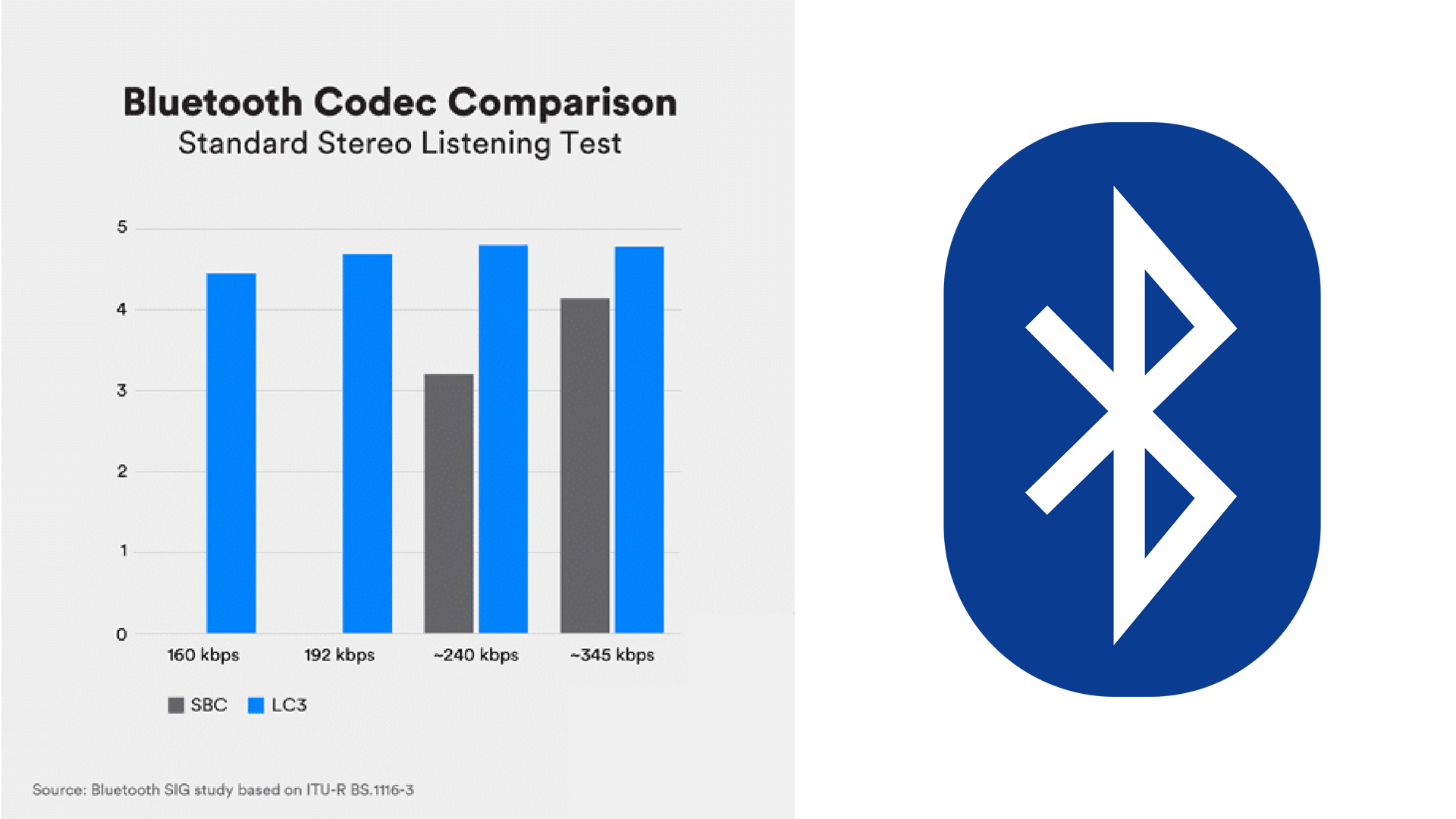
Well then there is loss of audio quality. And it’s no secret that hi-fi enthusiasts aren’t fans of compression. However, is the commitment so present that there is as much to horrify as with MP3? No, because thanks to innovations in the quality and bandwidth of a Bluetooth connection, much is being done to minimize the audible effect of compression, as this study shows between SBC, the younger aptX, and 320 mp3 Kbps. So the question is whether it can still be heard in an a / b test with, for example, optical cabling as an alternative. However, the main question is whether an a / b test with different source files via Bluetooth has any effect. The answer is really simple: do you prefer the loss of a good file or a less good file? After all: the better the source, given the (for the moment) inevitable but increasingly marginal loss of quality via Bluetooth, the better the end result. So it is always wise to work with lossless FLAC or ALAC files, because no matter what happens behind the scenes with Bluetooth streaming, you certainly won’t have to deal with double lossy compression, which is always a downside.

Finally, you have to put the Bluetooth app in perspective. After all, for many seasoned audiophiles, the above won’t be a discussion at all, for the simple reason that the listening room isn’t set up for an audio connection via Bluetooth (“Wired! Wired! “). Therefore, the use depends on the circumstances.

Best Bluetooth Audio Codec

In recent years, the disappearance of 3.5 mm ports from smartphones is causing wireless audio to gain a lot of strength. And among all wireless technologies, Bluetooth stands out strongly.

aptX, aptX HD, SBC o ACC

With the latest versions of Bluetooth, the connectivity between the devices is very stable. The technology already works. So manufacturers are starting to put more emphasis on streaming audio quality by focusing on improving codecs that compress audio files and stream them wirelessly from source to audio device.

 Bluetooth Audio Codec

Basic concepts

Bitrate or bit rate (kbps): usually measured in kbps or Mbps. It is the amount of data that is transmitted per second through the Bluetooth connection.
Sampling frequency (kHz): is the number of data per second in an audio file. We have to bear in mind that we need two data to accurately capture a frequency, which is why refresh rates around 40 kHz (44.1 kHz or 48 kHz) are very common, which is twice the frequency range of the human ear.
Bit Depth (-bit): Represents the number of bits saved for each audio sample. Higher bit depth records a signal more accurately. The quality of CDs is 16-bit, but high-resolution files are typically 24-bit.
If we didn’t compress the files, the bitrate could be calculated by multiplying the sample rate by the bit depth.
Best audio codecs for Bluetooth
Codecs are encoding and decoding algorithms that compress audio into manageable data packets for more efficient transmission.

The efficiency of the codec will determine the speed at which the audio data is sent and also the resulting audio quality.

One very important thing to keep in mind is that, to use a certain codec, both the audio source and receiver must be compatible with it.

This means that, even if my headphones are aptX, if my mobile doesn’t support the aptX codec, the connection between the two can never be aptX. The Bluetooth protocol will negotiate the connection and choose the next best codec. If there are none in between (AAC, for example), the final connection will end up using the SBC codec (which is universal).
Next, we are going to see the most used audio codecs in Bluetooth connections:

To read later …

► The 7 Best Turntables of 2020: Buying, Setting Up and More
► The 8 best Bluetooth and TWS headphones of 2020: cheap, sports, gaming …
► The 7 Best Bluetooth Speakers of 2020 – We Tried Them All!
SBC (low-complexity SubBand Codec)
sbc
The SBC codec was developed by the SIG (Special Interest Group), the organization responsible for developing Bluetooth technology, for the A2DP (Advanced Audio Distribution Profile) audio profile. This codec is one of the minimum requirements that any Bluetooth audio device must be able to use in order to connect to a wireless source. This means that all Bluetooth audio devices have to be capable of working with this codec as a minimum. ref

The SBC was created in 1993 and requires very little computing power. The downside is that the compression efficiency is not very good, so even at its maximum bitrate of 328 kbps, it does not achieve remarkable sound quality either. Also, the sound is quite delayed.

AAC (Advanced Audio Coding)
aac
The AAC codec was developed by several companies (AT&T, Fraunhofer Institute, Dolby Laboratories, Sony Corporation and Nokia) and was announced internationally by the MPEG group (Moving Pictures Experts Group) in April 1997. Besides being a codec used by the protocol Bluetooth, AAC is also one of the most popular codecs on the internet thanks to being used extensively by Apple and YouTube.

The AAC is characterized by having a much higher audio quality for the same bit rate as the SBC codec, however the latency is usually even worse. Ref

aptX, aptX LL, aptX HD, and aptX Adaptive
aptx
AptX (audio data reduction technology) is a codec designed in the 80s of the last century and used in the cinema and on the radio. The codec was later acquired by the company CSR (Cambridge Silicon Radio) which in turn was bought in August 2015 by Qualcomm.ref

The codec is characterized by offering better sound quality, but it requires more processing power. Its typical compression ratio is 4: 1.

Currently, the codec has three variations (aptX Low Latency, aptX HD, aptX Adaptive) that reduce latency or improve your audio quality.

aptX LL (Low Latency): has latencies close to 30 ms. For comparison, the SBC codec has typical latencies of 170 ms. So it is almost 6 times faster.

What is the CODEC?

CODEC is a program that reduces the number of bytes contained in large files (similar to WinZIP) so that they can be stored on storage media and then played back. Typically used to compress and decompress multimedia files such as songs or videos (CODEC is actually short for CO compression / DEC compression, ie compression / decompression). There are audio and video codecs. MPEG-1, MPEG-2, MPEG-4, Vorbis, DivX, … are examples of CODEC.

codec

The main difference between a CODEC and a compression algorithm like WinZIP is that in CODECs the compression / decompression is done in real time. This means that while CODEC is watching a video behind the scenes, it processes the data stream by unpacking it. A CODEC can consist of two parts: an encoder for compressing the multimedia file (encoding) and a decoder for decompressing the file (decoding). Some CODECs can contain both parts, others only one.

codec

CODECs can be installed and updated on older computers or multimedia devices or integrated in dedicated hardware components (e.g. CD or DVD players). CODECs should not be confused with containers. A container contains one or more streams that have already been coded by CODEC. Very often you will find an audio and a video stream in the container at the same time. AVI, Ogg, MOV, ASF, … are examples of containers. while others just one of them.

CODECs should not be confused with containers. A container contains one or more streams that have already been coded by CODEC. Very often you will find an audio and a video stream in the container at the same time. AVI, Ogg, MOV, ASF, … are examples of containers. Very often you will find an audio and a video stream in the container at the same time. AVI, Ogg, MOV, ASF, … are examples of containers. Very often you will find an audio and a video stream in the container at the same time. AVI, Ogg, MOV, ASF, … are examples of containers.

Where can I find the CODEC?

If Tizio creates a document with the Word program and sends it to Caio, the latter must use the Word program to open it. If a film is compressed with the XYZ-CODEC, the same CODEC must be used for the display.
At this point the question arises: Where can the CODECs be found? CODECs are available on the Internet. There are dozens of audio and video formats and related CODECs. However, there is no point in downloading them individually and then installing them on the computer. It is much better to download a collection of CODECs like K-Lite Codec Pack. K-Lite Codec Pack is a collection of CODEC for Microsoft Windows, with which the operating system can play various audio and video formats that are not supported by default.

In addition to CODECs, the K-Lite Codec Package can also contain other tools, including: Media Player Classic for playing multimedia files, information tools such as Media Info and tools for editing CODECs. There are four versions of the K-Lite codec package:

Basic – Plays many of the popular video file formats, e.g. B. AVI, MKV, MP4, OGM and FLV
Standard: Contains everything that is required to reproduce the most commonly used formats.
Full: Supports multiple audio and video formats. It also has coding support
Mega: combines the content of “K-Lite Codec Pack (Full)” and Real Alternative. In the past, it also included QuickTime Alternative. QuickTime Alternative (with Media Player Classic) and QT Lite (without Media Player Classic) are now available as separate programs
The standard version is for the average user, while the full version is for advanced users who edit and decode videos. The K-Lite Codec Pack is updated regularly and contains everything you need to play all movies and music. Any uninstallation will also remove everything that has been installed from the package.