Audio compression

Well, in fact, the bit rate should be said to be another dimension, it is a compression of audio files.
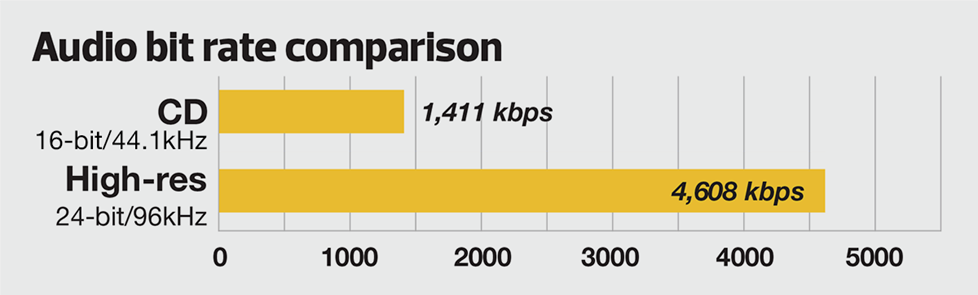
Nowadays, most of the audio formats that we use regularly are based on the original “WAV” file of the audio CD (44.1khz sampling rate, 16bit sampling precision, 2ch). The original recorded sound data is stored in an array, which is in PCM format, while WAV format is an encoding format developed by Microsoft, and its function is to play the PCM format data through encoding.
Since the data in WAV basically completely restores the PCM data, MP3, AAC and other lossless encoding formats are basically recompressed based on the WAV files. Therefore, we can simply think that WAV is the original audio format and other audio formats are compressed formats.
When it comes to compression, storage and transmission are inseparable. The purpose of compression is to improve storage and transmission. Therefore, before we talk about compression, we need to understand the basic units of computers.
We all know that the computer is a binary number system, and the files stored by the computer are made up of two numbers, 0 and 1. Therefore, the computer’s transmission is based on each number, and each number is called 1 ” bit”. For example, for an audio piece, its basic data is “0,1,1,1,0,1, 1 ,0″, and when transmitting, these numbers are transmitted one by one. The sampling precision mentioned above is this unit.
The storage unit of the computer is ” byte (Byte)”. In the computer, 1 byte consists of 8 bits, that is, 8b(bit)=1B(Byte). In computer parlance, data storage is expressed in decimal and data transmission is expressed in binary, so 1KB=1024B=1024×8b. This is also part of the reason why the hard drive capacity we see does not match the actual capacity.
Go back and talk about audio compression, the bitrate of the audio is actually the compression ratio. So the bitrate really just defines the size of the file, but because under normal conditions the larger the file, the less data you lose, so the sound quality is relatively higher. However, the bit rate itself does not directly affect the quality of the file. For example, if we take a 128kb file as the source file, even if it is converted to a 320kb file, the sound quality will not be better than 128kb. .
So what exactly do the numbers and letters in the bitrate mean? First look at the full name of 128k “128kbps”, let’s try to break it down: 128 is a number, k is a thousand symbol, b is a unit, s is a second, and ps is actually “/s”. Thus, 128kbps is 128kb/s. That’s 128kb per second.
Note that the b here is a lowercase b, or bit. Knowing this, we can calculate the approximate storage space that a 128kb file occupies: 128*1000=128000b/s÷8=16000B/s÷1024=15.625KB/s*60=937.5KB/min÷1024=0.9155 MB/ min. So 128Kb audio file size is about 0.92M or 916Kb per minute, so 128Kb mp3 is about 1M in size. You can test and check it locally.
Before talking about lossy and lossless, there are two words to explain to you, that is, we will see CBR and VBR when compressing MP3. And CBR is constant bit rate, constant bit rate; VBR is variable bit rate, dynamic bit rate. In theory, VBR’s way is to automatically correct some bitrates according to the specific frequency of the sound in the source audio file, to achieve a smaller file with the same bitrate effect.
Let’s talk about lossy and lossless. In a nutshell, lossy compression is about achieving compression by removing some less important data from existing data; lossless compression is about achieving compression by optimizing the layout. Since these compression methods involve deeper technical knowledge, we won’t say more, and we can probably look at it this way: lossy compression is like removing some unimportant particles in an article to achieve the purpose, after decompression, it is you deleted the content cannot be recovered; Lossless is achieved through typesetting. After decompression, complete WAV data can be obtained, just like our commonly used winzip and WinRAR.