Normalize audio


Free Download Mp4Gain
picture

Normalize audio

Normalize Audio

What does normalize audio mean?

Audio normalize

The volume of sound is measured in decibels and a video or a song, that is, the audio can have more or less volume.

On the one hand we have that the audio or video file already has a “quantity” or a volume gain. That is, there is an initial volume level.

On the other hand, we would have the volume that we would assign to the amplification of our audio player.

In this case, for audio normalization we will refer to the input volume level or gain.

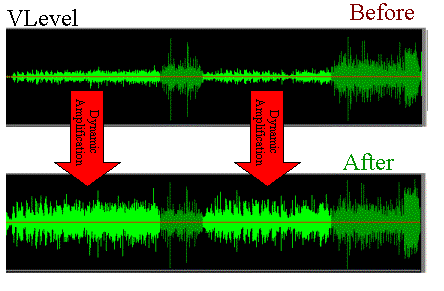
What happens if an audio file has noticeably lower gain? Well, it will sound at a lower loudness unless we manually modify the volume knob, which is annoying and inconvenient.

That is why the idea is that the volume input gain is optimal. Without distortion, but at a good volume.

Mp4Gain is the best software to perform this function, it is not limited to mp3s and even performs it on video files. Additionally, it can be used as a converter since regardless of the format of the input file, we can choose the format we want the output file to have.

For example if our input file is an mp4 video, we can choose to get an mp3. Thus we will have extracted the music, we normalize it and we obtain only the audio in an mp3.

Mp4Gain has many very useful functions to improve the audio quality of your songs or videos.


Free Download Mp4Gain
picture


Mp4Gain Main Window
picture


Mp4Gain Features
picture


Free Download Mp4Gain
picture

MP3 files at the same volume and with the same audio quality.

Now, on all people’s computers, one thing that is not lacking is music in the form of mp3 files.
These mp3 files come from very different sources, some may be derived from “ripping” some CDs, others are downloaded from the Internet or from P2P programs, or have been received by some friends.

Normalize Audio

Over time, everyone has their music collection made of mp3 files that are certainly different from each other in quality and volume.
By playing a random playlist with the media player, you can listen to music at lower volume levels than others and with different audio quality.

We are certainly talking about subtleties, these differences in quality and volume, in most cases, even if perceived, it does not bother.
However, this problem can be easily corrected by setting all mp3 files to the same volume and sound quality.

Volume Normalizer

Normalizing the audio of two tracks or two songs becomes useful even if you need to combine them into a single mp3 file or if you want to create a video presentation with a soundtrack.

MP4Gain normalizes the volume of multiple audio and multiple music tracks by analyzing mp3 files and other formats to determine how much each volume should be corrected.

The operation is really simple and within everyone’s reach, also because Mp4Gain can also be downloaded easily.
First of all, after installing it, add the complete files or folders inside it by pressing the respective buttons.
The next step is to analyze the traces that, after a brief process, will result in an optimal volume level for combining songs and mp3 files.
The default value recommended by MP4Gain is 89.0 dB; Other programs choose 92.0 dB, but since the software works differently, it is always advisable to use the default values, especially if you are not experienced in sound techniques (in that case, more professional software will probably be used).
Analysis of the audio tracks highlights deviations from that value of 89.0 which is detected as the “normal” target volume.

Once the analysis process is complete, you can click the Normalize button and apply the suggested changes to the volume levels for each individual track. Thus,
MP4Gain should be used easily and without complications, managing to improve the problem of the different music volume levels of a collection of MP3 files, without compromising their quality.