Digital Audio – Beginners guide


Free Download Mp4Gain
picture

The Cost of a High Sampling Rate

Although it is true that high sampling rates produce better sound quality … that comes at a price.

That price translates into:

Higher processing load.
Less number of tracks.
Heavier audio files.
So you always give something in return. Professional studies can support higher sampling rates because they use better equipment.

But for most home studios, people often find that the standard 48 kHz configuration is the best.

Following…

4. Bit Depth

In order to understand what bit depth is, we first have to know what bits are.

A bit (or binary digit) is a single unit of binary code, with a value of 1 or 0.

The more bits, the more possible combinations. For example…

As you can see in the diagram below, 4 bits allow a total of 16 combinations.

4 bits

When used to encode information, each of these numbers is assigned a specific value.

As the number of bits increases, the possible values ​​grow exponentially.

4 Bits = 16 possible values
8 Bits = 256 possible values
16 Bits = 16,536 possible values
24 Bits = 16,777,215 possible values
With the bit depth in the digital audio, each value is assigned a specific amplitude of the waveform.

The greater the bit depth, the greater the volume increase between high and low … and a greater dynamic range in the recording.

A good rule of thumb is: for every extra bit, the dynamic range increases by 6dB.

For example:

4 Bits = 24 dB
8 Bits = 48 dB
16 Bits = 96 dB
24 Bits = 144 dB
In the end, what this means is that… the greater the bit depth, the less noise.

Because by adding more processing margin (or headroom), the useful signal (at the high end of the spectrum) can be recorded higher above the background noise (at the low end of the spectrum).

small vs large bit depths

Following…

5. Quantization Noise

Impressive that a 24-bit recording can result in almost 17 million possible values, right?

However, that remains much less than the infinite number of possible values ​​that exist in an analog signal.

Therefore, in almost all samples, the actual value is somewhere between two possible values. The solution of the converter is simply to round it or “quantify” it to the nearest value.

The resulting distortion, known as quantization noise, takes place in 2 phases of the recording process:

at the beginning, during the A / D conversion, and
at the end, during mastering
With mastering, the sampling frequency / bit depth of the final track is usually reduced by converting to the final digital format (CD, mp3, etc.).

When that happens, some of the information is erased and “re-quantized”, generating more distortion in the sound.

The most frequent solution to deal with this problem is …

6. Dither

When reducing a 24-bit file to 16 bits, the screen is used to mask much of the resulting distortion …

Adding a low level of “random noise” to the audio signal.

As it can be difficult to visualize the concept in audio, to explain it, we usually turn to the popular analogy of the screen plot.

Is that how it works:

When a color photo is converted to black and white, a mathematical estimate is made to determine if each color pixel should be “quantized” in a black pixel, or a white one …

As is the case when digital audio samples are quantized.

As you can see in this picture, the “before” photo is pretty bad, right?

dither

But with the plot …

a small number of white pixels are randomly distributed in black parts, and …
a small number of black pixels are randomly distributed in white parts …
By adding that “random noise” to the image, the “after” photo looks much better. Well, the screen in the audio works very similarly.

Following…

7. Latency

The GREAT PROBLEM of current digital studies is the amount of latency that accumulates in the signal chain, especially with DAWs.

With all the calculations that are processed, the audio signal takes time to leave the system between a few milliseconds and a few DOCENAS of milliseconds.

Between 0-11 ms of latency – it is short enough, so a normal person does not notice it.
Between 11-22 ms – an annoying delay is heard which it is difficult to get used to.
More than 22 ms – there is so much delay that it is impossible to play or sing at tempo with the track.
In a normal digital signal chain there are usually 4 phases that contribute to the total latency:

A / D conversion
DAW Buffer
Delay of the Plugins
A / D conversion
The A / D and D / A conversion are the least harmful, contributing to total latency with less than 5 ms.

But nevertheless…

The DAW buffer and certain plugins (including compressors and virtual instruments) can add up to 20, 30 or 40 ms or


Free Download Mp4Gain
picture


Mp4Gain Main Window
picture


Mp4Gain Features
picture


Free Download Mp4Gain
picture

Beginner’s Guide to Digital Audio for Recording Music

62c-digital audio When recording at home began to become popular …

It happened for a simple reason:

The analog equipment of the past decades was being slowly but inexorably replaced …

For a new generation of audio interfaces and other digital equipment that was cheaper and easier to use.

And that trend has continued since then.

Today … digital audio is the standard in almost all studios, both professional and amateur.

However, surprisingly, there are few people who really understand what it is about.

So let’s see what it is about:

1. The Rise of the Digital Age

binary code Although digital audio is the standard in today’s music …

It has not always been that way.

Originally, music information only existed as sound waves in the air.

Then, as technology progressed, people discovered new ways to convert that information to other formats, including:

notes on a page
electrical signals inside a cable
radio waves in the atmosphere
relief on vinyl records
But in the end, with the rise of computers, digital audio ended up being the dominant format in the music production industry, since it allowed copying and transporting songs in a simple and free way.

And the device that made all that possible was … the digital converter.

Let’s see how they work …

2. Digital Converters

In recording studios there are 2 types of digital converters:

Those that are an independent device, which are normally seen in more advanced studies, or …
Those that are integrated into the audio interfaces, which are usually seen in home studios.
To convert the audio to binary code, they take tens of thousands of samples (samples) per second to make an “approximate” image of the analog waveform.

The image is not accurate because in the intervals between samples, the converter basically has to guess what is happening.

Digital waveform

As you can see in the diagram, in which:

the red line is the analog signal, and …
the black line is the conversion …
The results are not perfect, but they are good enough to generate excellent sound quality.

How excellent? That depends largely on …

3. Sample Rate

Check out this image:

sample rate diagram

As you can see…

When taking more samples per second, the highest sampling rate:

Collect more real information,
Go less to the estimate, and
It generates a much more accurate image of the analog signal.
Logically, the end result is … better sound quality.

Let’s talk about specific data:

Normal sampling frequencies in professional audio range around:

44.1 kHz (audio CD)
48 kHz
88.2 kHz
96 kHz
192 kHz
The minimum of 44.1kHz is due to a mathematical principle known as …

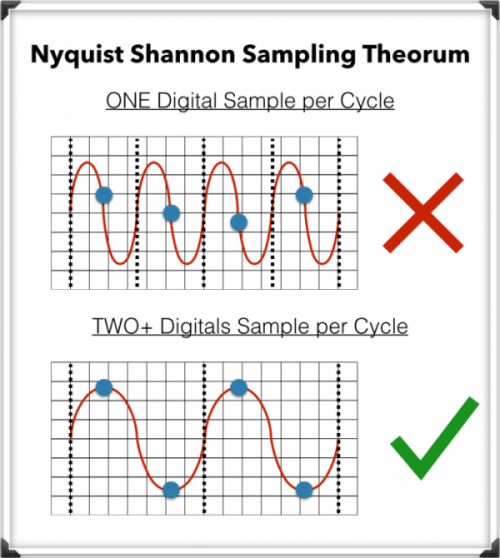
The Nyquist-Shannon Sampling Theorem

To record digital audio accurately, converters have to capture the entire human listening spectrum, which is between 20Hz – 20kHz.

According to the Nyquist-Shannon Sampling Theorem …

To capture a specific frequency, at least 2 samples are needed for each cycle … to measure both the upper and lower points of the sound wave.

That means that recording frequencies of up to 20kHz require a sampling rate of 40kHz or more, which explains why the audio CDs are just above that minimum, at 44.1kHz.

What is an audio compressor.

In the field of professional sound, a compressor is an electronic sound processor designed to reduce the dynamic range of the signal without noticing its presence too much. This task is done by reducing the system gain, when the signal exceeds a certain threshold.

Traditionally, compressors have been electronic equipment with one or two rack units, but software versions of them have appeared for some years.

A compressor acts in such a way that it attenuates the electrical signal by a certain amount (normally measured in decibels) and from a certain input level. The objective is to ensure that the resulting dynamic excursion is lower than the original, to protect certain equipment against possible signal peaks or, if it is a saturated sound, to try to hide the error.

Reasons to compress a signal

-Control the energy of the signal: The human ear is very sensitive, so the compression must be smooth and subtle so as not to capture it. This type of compression is used when there is a signal in which the intensity varies, so it is compressed to achieve a more constant signal within the values ​​assigned to it.

-Control the peak level of the signal: Often the equipment is limited, so the amplifiers can saturate and therefore be damaged. In this case the compression is used to control the signal and thus protect the equipment.

-Reduce the dynamic range of the signal: By attenuating the peaks of a signal, we reduce its dynamic range. Many devices are limited by the peaks, and this allows the RMS level of the signal to be raised.

Compressor Uses

In the field of music, its use ranges from applications for musical recordings to live sound. For example, it is often used to add more glued to the sound, an effect that is achieved by compressing the signal to subsequently apply a gain to the output of the device, which usually conceals possible interpretation failures by the artist, at least as Dynamic control refers. A compressor is highly recommended (and with certain musical styles, indispensable) for when using an electric bass. The slapping effect (hitting the strings with the finger) produces extremely high output peaks (20 dB or 10 times more than normal), which at low output levels generate distortion, and at high volumes (as in recitals) they can cause serious damage to the amplifier, and even the speaker (an excess of “excursion” can cause the speaker to tear from its suspension). Even in the (theoretical) case of a musical system with an infinite dynamic range, the difference, auditory speaking, using or not the compressor is imperceptible. Its use is also very frequent in voices, since not all singers use the appropriate technique so the signal level varies constantly.

-It is widely used in broadcasting, to improve the speaker’s diction.
-Compress during mastering improves the sound definition of the final mix.
-To protect the equipment (speakers).