What is bit rate? Knowledge of the MP3 audio format.


Free Download Mp4Gain
picture

What is bit rate? Knowledge of the MP3 audio format.

mp3

Digital audio formats are audio signals that are recorded, processed, and reproduced in digital form.

MP3

The emergence of digital audio formats is to meet the needs of high-fidelity playback, storage and transmission. Simply put, early analog audio formats had issues with playback distortion and glitches due to media wear. Since the advent of the CD, digital format audio files have become popular, but another problem has arisen: the limitation of the storage volume, and the CD still has the phenomenon of wear. Saving to hard drive (relatively longer storage time) is not a good solution when storage media (mainly hard drives) are still expensive at the time. The rise of the Internet has created a requirement for long-distance file transmission. Under the restriction of bandwidth, the demand to reduce file size has become more intense. All this has led to the generation of lossy compressed digital audio formats from external factors!

In terms of internal factors, with the improvement of computer operation and coding capabilities, the progress of various acoustic psychological models has promoted the emergence of various lossy compressed digital audio formats. Some of the most commonly used audio formats in MP3 players are briefly introduced below: MP3 (CBR, VBR, ABR), WMA, WAV, ADPCM, and the emerging audio formats AAC, ASF, and OGG.

Before introducing various digital audio formats, let’s clarify one concept: bitrate.

In the field of computing, all information is digitized. Bit is the smallest unit of data in a computer, it refers to a number of 0 or 1, which is a mathematical binary number, a “0” or “1” , is a bit. For example, when we say a 2-digit number, it means that it is a two-digit binary number, and there are 4 combinations of “00”, “01”, “10” and “11”, which represent 0, “11” in decimal respectively. 1, 2 and 3 are four numbers.

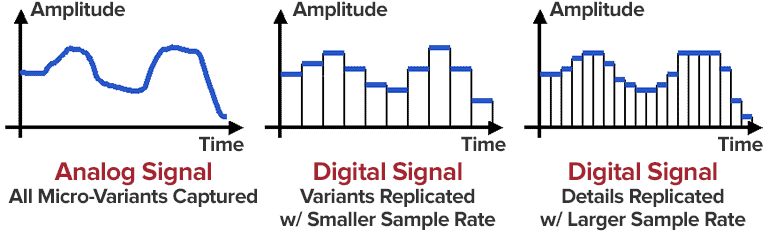
Bitrate is a benchmark indicator of the efficiency of digital music compression. The bit rate represents the number of bits bps (bit per second, bits per second) transmitted per unit of time (1 second). We usually use kbps (in simple terms, it is per second) clock 1000 bits) as the unit. The bit rate of digital music on CD is 1411.2 kbps (ie recording 1 second of CD music requires 1411.2 × 1024 bits of data). The higher the bit rate of the music file, the more data (Bit) must be processed in a unit of time (1 second), and the better the sound quality of the music file. However, when the bit rate is high, the file size increases, which will occupy a large amount of storage capacity. 8 to 320 kbps.

1. WMA (Windows Media Audio, Windows Media Audio)

As a Microsoft media compression method, it is a part of the technology that compresses only audio data in Windows Media Technologies. The sound quality is similar to MP3 and can be compressed with half the technology of MP3. It has the copyrighted Windows Media Rights Manager and can be played by installing it in WMP (Windows Media Player, Windows Media Player). Due to the strong influence of Microsoft and Windows, as well as major copyright reasons, the major American record companies EMI and BMG have officially confirmed that they use the WMA method developed and produced by Microsoft. It is believed that this advanced method will become even more popular in the future.


Free Download Mp4Gain
picture


Mp4Gain Main Window
picture


Mp4Gain Features
picture


Free Download Mp4Gain
picture

What is MP3?

What is MP3?

MP3

“MP3” widely used in audio players. The official name is “MPEG-1 Audio Layer III”, which is the audio format for MPEG-1. The MP3 format itself is being standardized in parallel with MPEG as the video format, and in 1992 it will be standardized as “ISO / IEC IS 11172-3 (MPEG-1 Audio)”.

MP3

After that, MP3s will be distributed “as is” among enthusiasts, but this has not been a major advance since the introduction of the portable “mpman” audio player launched by SAEHAN International in South Korea in 1998. By combining this player, which can download and play music data over the Internet, with Napster, which appeared in 1999, the scene of portable audio players that used to carry cassettes, CDs, MDs, etc. it will change completely.

MP3s can also reduce the original data to less than one tenth. For example, it has become possible to compress a one-hour music CD to about 40MB and, using Napster, etc., we have established a new need for music sharing between users. After that, despite various “RIAA (Recording Industry Association of America)” procedures and the emergence of successor formats formulated by many manufacturers, MP3s remain a widely used audio. It is still used as a format.

■ MPEG

To understand the working principle of MP3, let’s first explain about “MPEG Audio” itself. A feature of MPEG Audio is that it uses auditory psychology, the lower audible limit of hearing, and the masking effect.

Let’s start with this minimum audible limit. In general, it is considered that humans can hear sounds in the range of 20 Hz to 20 kHz. Of course, this is an average value, and some people can hear a wider range, while others can only hear a narrower range, but this time I’ll drop it.

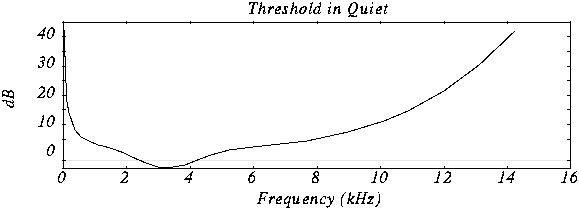
So if you can hear any sound in the 20Hz to 20KHz range, that’s not the case. The lower audible limit curve is shown in Fig. 1, and it is possible to hear even a fairly low sound around 2KHz, but at frequencies above or below it, it is heard that it is not considerably loud. .

You may have heard the term “volume curve”, which is the curve shown in Figure 1. Therefore, even if there is a sound source that sounds in a wide range from bass to treble (Fig. 2 ), the human ear has the characteristic that it can only be heard with both ends drooping (Fig. 3). By taking advantage of this and omitting all inaudible frequency data, a great deal of compression is made possible.

Masking effect

The masking effect is another phenomenon. For example, when a very loud sound is generated at a certain frequency, a specific area called “Critical Band” is created before and after that. And you won’t hear any of the other sounds included in this critical band.

When sound A is generated, the sloping area that extends to the before and after frequencies is the Critical Band. I can hear the part of the B sound that sticks out of the Critical Band without any problem, but I can’t hear the C sound that completely fits into the Critical Band.

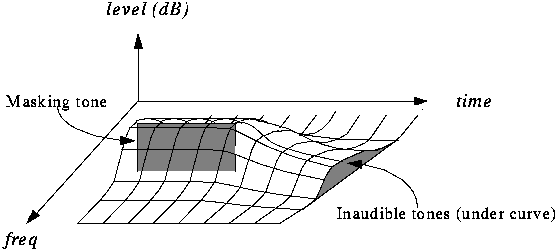
In MPEG Audio, compression efficiency is further improved by omitting sound data that cannot be heard due to this critical band as before. By the way, the masking effect itself is effective not only in the direction of frequency but also in the direction of the time axis. In other words, not only immediately after a loud sound is generated, but also just before that, you cannot hear a small sound for some reason. This is called the temporary masking effect, but in Figure 5, sound B and sound C become inaudible. This is also effective for data compression.

ENCODING PRINCIPLES OF THE MP3 FORMAT.

ENCODING PRINCIPLES OF THE MP3 FORMAT.

Mp3 Encoding

Mp3, or fully MPEG-1, 2 and 2.5 Layer 3, is one of the most popular and widespread standards for storing audio data.

MP3 ENCODING

In this article, we will not delve into the history of creation and further development, but will consider the basic principles of the standard and examples of its implementation.

The mp3 standard does not establish a specific compression algorithm to “encode” the source data, but rather describes the essence of the possible methods.

The quality of the result obtained depends on the modification of the algorithm used, embedded in any encoding program of the “codec”, and on the quality of the original audio data.

There are 3 most common modifications of the mp3 format, which differ in the compression ratio parameters of the original audio data.

Name
Modification of the rule
Data rate per second (bit rate) Possible sample rates
MPEG-1 layer 3
32 – 320 kbps 32000 Hz
44100 Hz
48000 Hz
MPEG-2 Layer 3 16 – 160 kbps 16000 Hz
22050 Hz
24000 Hz
MPEG-2.5 Layer 3 8 – up to 160 kbps 8000 Hz
11025 Hz

Processing begins with dividing the original audio signal into equal time intervals: equal frames, for example 0.05 or 0.26 seconds, after which each frame is analyzed and compressed according to general or individual parameters based on the data of the previous and next frames.

Most of the compression algorithms used are based on the perceptual characteristics of the human ear. Let’s consider the main options, which, as a rule, are applied in a complex way.

It is worth starting with the fact that, by ear, the average person is capable of perceiving a frequency range of approximately 10 Hz to 20,000 Hz. With growth, changes occur in the hearing aid and, for most, the sensitivity the higher frequency range decreases, as a result of which, in some mp3 modifications, during compression, all frequencies above 16000 hertz are cut off, which can significantly reduce the amount of information.

Audio recordings can be encoded in stereo (a surround sound effect that uses separate channels for the left and right speakers) or mono (the opposite of stereo). In mp3 format, different tracks are not recorded for each of your speakers, but information about the differences between the left and right channels.

In acoustics, there is a concept like “harmonics”, these are the frequencies of the “sounds” that sound together with the main and most prominent tone. For example, when hitting a drum, the loudest sound will be the tone and the minor, weaker, will be the harmonics.

After such a loud sound, the so-called “period of deafness” occurs, during a period of duration in which a person’s hearing practically does not respond to changes.

If in the intervals of the “deafness period”, remove all frequencies, then the errors of perception, will practically not allow to notice their absence, because of this, during compression, the weakest harmonics are cut off, located close to the most sounds. strong: tones.

A method is used to replace the near peak values ​​of the signal “peaks” (in terms of volume) with an average value.

There is a concept as bit rate: this is a value that characterizes the number of transmitted bits of information “units” during a period of time, usually one second.
The higher the bit rate, the better the audio detail will be, as long as the original, uncompressed audio data is of high quality.

As you can guess, digital formats consist of certain code sequences, in other words of sequences 0 and 1.
To save space, frequent joins within a file are assigned unique identifiers that replace long sequences.

Thanks to such complex influences, it is possible to compress the original audio signal into one of the popular formats with loss of quality – the mp3 format.

Various experiments have been carried out many times in order to reveal how significant the differences are before and after compression in mp3. As tests have shown, differences, some similar moments were not always possible, quickly and to distinguish, even when reproduced on equipment with higher fidelity.

For those who have never had the opportunity to directly compare the original and compressed audio recording, in most cases it will take some time or even find obvious differences.

What you need to know about MP3

What you need to know about MP3

Mp3

What is MP3?

Mp3

MP3 is short for MPEG Layer3. It is one of the transmission formats for storing and transmitting audio in digital form, developed by Fraunhofer IIS and THOMSON, and later approved as part of the MPEG1 and MPEG2 compressed video and audio standards. This scheme is the most complex scheme in the MPEG Layer 1/2/3 family. It requires the most amount of machine time to encode compared to the other two and provides higher encoding quality. It is mainly used for audio CD encoding.

The high degree of compactness of MP3 compared to other formats such as PCM (i.e. normal WAV- file) and similar formats while maintaining similar sound quality (considered 16-bit stereo at 44.1 kHz) is achieved using additional quantization according to a certain scheme, which minimizes the loss of quality. This is achieved by taking into account the peculiarities of human hearing, including the masking effect of a weak signal from one frequency range with a stronger signal from an adjacent range, when it occurs, or a strong signal from the previous frame, which causes a temporary decrease in the ear’s sensitivity to the current frame signal (simply, background sounds are eliminated, which are not heard by the human ear due to the presence at a given / previous moment of another – louder). It also takes into account the inability of most people to distinguish between signals that are below a certain power level,

This is called adaptive coding, and it allows you to save on the less perceptually significant sound details. The compression ratio (and therefore quality) is not determined by the format, but by the width of the data stream when encoded in MP3. The bit rate when encoding a signal similar to an audio CD (44.1 kHz 16 bit stereo) varies from the largest, 320 kbs (320 kilobits per second, also kbs, kbps or kb / s), up to 96 kbs and less.

Why MP3?

MP3 has two huge advantages over other formats available today. It is true that MicroSoft is trying to squeeze MP3 with its new WMA format, and there are also alternative VQF and AAC formats, but they have not yet received proper distribution and the quality is often a little worse. However, WMA is still, in fact, closed for free use, so you have problems with various encoding / listening / maintenance programs (although, who doubts MicroSoft’s mobilization capabilities :-).

The first advantage of MP3 is that none of the existing similar formats can yet be said to fully guarantee the stable preservation of sound quality at sufficiently high bit rates, except MP3, which has stood the test of time with dignity.
The second, no less important advantage: over the next few years, and perhaps the entire decade, MP3 has become the de facto standard, as the parties that use it (eg me 😉 have made a lot of investments in him, including digital radio stations. There are also many easy-to-use software programs written for MP3. Now the production of hardware MP3 players has been launched, both pocket and car. Thus, MP3 became the first massively recognized audio storage format after Audio CD (although it is often illegal).

The most famous encoders

Today there are 3 main sources that have created programs to encode MP3 music. These are Fraunhofer-IIS, Xing Technologies, and ISO itself, which adhere to the ISO MPEG standard developed by it.
Most of the encoders created to date use modified code from one of these organizations. Fraunhofer-IIS based encoders are not very fast, but very high quality, quality optimized for low bit rates.

128 kbps (11: 1)
The most popular bit rate today. The 11: 1 compression ratio is of course an argument, especially for the internet, where every kilobyte counts. However, the high frequencies are not very well preserved and there is some distortion in the sound. At the same time, I can safely say that on an ordinary computer, for example, using an ordinary sound card, computer speakers, albeit of good quality, or output through a simple recorder to your speakers (using the input for a External CD, like me), the difference will not be noticeable unless you are a sound expert.
However, in normal speakers (at least large and expensive), the lack of high frequencies is quite noticeable.

MP3 ENCODING

MP3 ENCODING

Mp3 encoding

The first step in encoding by the user is to specify a bit rate. This indicates the quality and at the same time the storage requirement of an MP3 file.

MP3 encoding

COMPRESSION RATES

With most recording programs, the quality of an MP3 file can be freely selected before recording begins. According to the Fraunhofer Institute, the CD quality of an MP3 file is a bit rate of 112 to 128 kbit per second, other measurements put CD quality at up to 160 kbit per second. However, the most used and sufficient for most listeners is 128 kbit.

In comparison, a corresponding CD quality for Layer 1 is 384 kbit / s and 256 kbit / s for Layer 2. A wave file works with a 1.4 Mbit / s bit rate and therefore works with roughly the same space requirements. as a CD audio track (CDA).

74 or 80 minutes of music can be put on a CD (depending on the size of the sound carrier), in MP3 format with a bit rate of 128 kbit / s, 11.5 or 12.4 hours would be possible.

PSYCHOACOUSTICS

MP3 audio compression relies on filtering out unnecessary information. Psychoacoustics is a science that deals with the perception of sound by the human ear.

Eg: You are in a disco. Loud music blasts through huge speakers and you try to talk to each other. This is almost impossible unless you yell. In acoustics, this is called masking. To eliminate masking, the sound level of speech should be raised to such an extent that the interfering signal (in this case music) no longer covers it.

Processes like this belong to the fundamental areas of psychoacoustics.

Tones below this threshold are not heard and therefore become noise during MP3 recording (skipped).

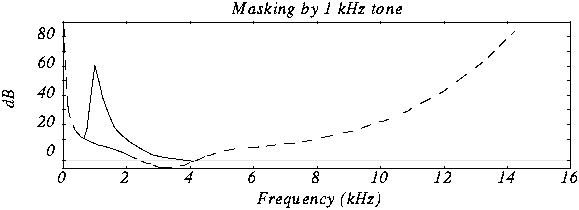
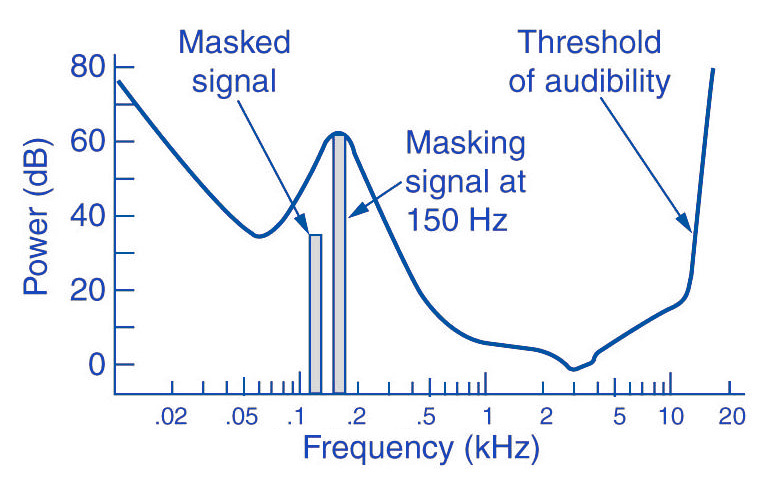
The overlays work as follows: you have, for example (picture 2) a tone with 1 kHz (1) and another tone with 1.1 kHz, which is approximately 18 dB lower (2). The second shade is completely superimposed on the first. This also works for other weaker tones (see Fig. 2). Another tone with a frequency of 2 kHz, which is also 18 dB quieter than the first, would not overlap because it is just outside the threshold of the first tone.

Noise can be another compression option for MP3 recording. The fact that when a sound is digitized it cannot be sampled at an infinite frequency, a noise imperceptible to the human ear (quantization noise) is generated. It is used as a model for the MPEG audio layer and thus increases the noise around a tone. Above all, loud and short tones mask a certain range in the frequency range before and after themselves where the weakest signals would not be audible. With MP3 encoding, the noise level increases in this area, as if digitized at a lower resolution.

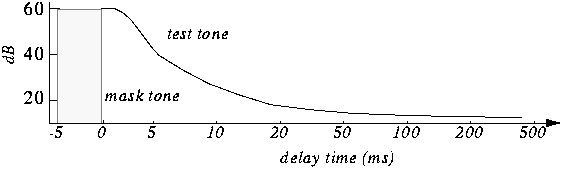
There is also masking in the temporal area: hearing needs a so-called “recovery time” for loud and quiet noises until it is fully functional again. This is especially noticeable with strong, short, and rapidly rising tones. After a delay of about 5 ms, the hearing threshold drops again and after about 200 ms it reaches the normal level, the so-called resting hearing threshold. This effect is called post-masking. The effect of pre-masking is less important, but even more impressive: it is based on the fact that the brain processes loud sounds more quickly than soft ones. To some extent, the strong impulse outweighs the silent one on the way to the brain. This results in a pre-masking time of up to 20 ms.

The above psychoacoustic algorithm is used in the following steps:
– Audio information is divided into subbands
– Subbands are reduced
– 16-bit samples are generated
– Samples are compressed
– Compressed samples are combined into blocks
– Coding according to Huffmann Procedure
: summary in tables

DIVIDED INTO SUBBANDS

Depending on the frequency of the acoustic information, it is divided into 32 subbands. The bands are of different sizes due to adaptation to the human ear according to a psychoacoustic model.

The division is done with the help of a polyphase filter. This means that the samples are decimated and filtered simultaneously.

In layers 1 and 2, the bands were the same size with a bandwidth of 625 Hz each. The reason for this division is to provide the algorithm with a better target.

SUBBAND ​​REDUCTION

The MP3 encoder now examines each of the subbands according to the psychoacoustic model for expendable frequencies. Here, the masking threshold is determined, then the subbands whose level is below this masking function are removed. Another reason for dropping an entire sub-band could be that it is inaudible due to the pitch, similar to a dog’s whistle.

CONVERSION INTO 16-BIT SAMPLES

The frequency bands are sampled and converted to 16-bit samples. Tones are broken down into digital signals and further processed as numerical values. The sample rate determines the length of the sample intervals. However, neither the measurement of the amplitude nor the size of the sampling intervals can be infinitely precise. For this reason, with analog-digital conversion, a value is rounded between two sample points. This results in rounding errors that are noted in what is known as quantization noise. This can be kept inaudible using the highest possible resolution: with 8-bit, a maximum of 256 levels can be displayed, with 12-bit and 4096 and with 16-bit 65536 individual steps, so that noise is not heard.

However, some samples are also digitized with a lower sample rate. In the eighth subband, for example, there is a tone with 1 kHz and 60 dB. The MPEG audio encoder now calculates the masking threshold and recognizes that it is 36dB lower. The acceptable signal-to-noise ratio here is 24 dB, which corresponds to a 4-bit resolution, since the two values ​​are directly related. Leaving one bit out of resolution increases the noise level by 6dB. Since an audio CD is generally digitized with 16 bits, considerable data reduction can be applied here.

SAMPLE COMPRESSION

The next step is to compress the samples further. However, this process no longer has anything to do with the original shades. From here on, compression is only data-driven.

Each sample consists of 16 bits, but not all of them are absolutely necessary to represent a level. For example, leading zeros can be omitted. If, for example, the value 0000011101010101 is obtained for a sample, the algorithm truncates the result to 11101010101. To reconstruct the original 16 bits from this information, the decoder needs two pieces of information: the scale factor and the bit allocation. The scale factor indicates where the remaining bits of the sample were in their original state. The bit mapping contains the information about how many bits are left in the sample, since you can no longer calculate with a fixed 16-bit number. However, if you were to store these values ​​individually for each sample, you wouldn’t gain much,

GROUPING THE SAMPLES

The 16-bit samples that were just created are now combined into blocks. There are two different block lengths for this purpose: the short blocks with twelve samples and the long blocks with 36 samples.

Long blocks are used for low frequencies. However, long blocks would not allow sufficient resolution at higher frequencies; short blocks are used here. In the so-called mixed block mode, long blocks are used for the two frequency bands with the lowest frequencies. For the remaining 30 frequency bands, it is the turn of the short blocks. This mode allows better frequency resolution in the low frequencies without paying tribute to the sampling frequency in the high frequencies.

HUFFMANN CODING

The last step in MP3 compression is Huffmann encoding. This algorithm is also used, for example, in packaging programs such as WinZip. The frequency of certain values ​​is important here. However, the subbands are organized in advance. Subbands with lower frequencies tend to contain significantly more values ​​than those with high frequencies. The subbands are divided into three groups according to their frequency. Each area has its own Huffmann tree (Fig. 3) to achieve the optimal compression factor.

As a first step, the encoder excludes high frequencies; encoding is not necessary here, as its size can be derived from those of the other two regions. The mid-frequency range is treated as is, and the low frequencies are again divided into three regions, each of which is assigned its own Huffmann tree. The appearance of a Huffmann tree is stored in the MP3 file.

The structure of a Huffmann tree works as follows: frequently occurring values ​​are given a short sequence of bits, while rare values ​​are given a long one, so the algorithm first determines the distribution of values ​​within the data to be compressed.

To determine what is known as the Huffman tree, you start with the two rarest values. They are assigned a “0” or a “1”. The two values ​​are summarized, in the order that they are now represented by the sum of their frequency. The same is true for the next two rarer values. This process ends when only one value remains. The result of this procedure is a tree structure. The encoding is based on this structure. Each branch on the left receives a 0, each branch on the right is identified by a “1”. In our little example, the least common would be

Value 4 represented by the sequence of bits 010. The most common value 6, on the other hand, is assigned a simple 1.

FRAMEWORK SUMMARY

The result of the above compression is summarized in so-called frames. Each of these frames contains 1152 samples (32 subbands x 36 samples). A frame consists of a header, a checksum check, the actual audio data, and in certain circumstances a so-called bit repository. Such a deposit arises when the samples within the frame can be compressed in such a way that the full theoretical number of bits in a frame is not required. The encoder can fall back on these buckets if the available bits are insufficient for a subsequent frame. A distinction must be made between two terms: frame size and frame length.

The size of the frame is determined by the number of samples and is constant within a layer. In Layer 1 format, this is always 384 samples per frame, in Layers 2 and 3 1152 per frame. However, the length of the frame may differ at Layer 3 due to the change in bit rate or the pool of unfilled bits. The frame also contains the aforementioned information about the scale factor and bit allocation to be able to reconstruct all the samples again.

A file header, as it is known from other file formats, does not exist in an MP3 file. In the case of an image file, a header would contain information about the entire image (e.g. size, color depth, resolution


MP3: features and alternatives

The peculiarities of the MP3 format and some clues about other solutions of equal or even higher quality.

Impossible to deny, the MP3 format is the most common and most enjoyable to listen to music on the go or, as it has been for some years, streaming. We use it everywhere now and any device can play it today.

MP3 is part of the family of audio files called “lossy”, that is, the types of formats that can also reduce the amount of data that should contain a sound, in any case try to maintain at least an acceptable quality.

The peculiarities of the MP3 format and some clues about other solutions of equal or even higher quality.
The parameters that determine the quality level of an MP3 file are: the sampling rate, bit rate, encoder and of course the source. Now let’s move on to the order.
At the origin of everything is the source, that is, the support or source from which the MP3 file can be downloaded. The higher the quality of the source, the greater the end result: purchasing MP3s from particularly reliable sites or extracting them from compact discs in good condition is the basis for a successful MP3. What becomes crucial is the encoder (the most famous and free is LAME) or the software that takes care of creating the file after properly configuring its parameters.

Portada

The sampling rate is measured in Herz and expresses the number of times per second. Second, as the analog signal is measured and digitized; for MP3 it must be as faithful as possible on a CD, ie 44 100 Hz (44.1 KHz).

Bitrate is the number of binary units flowing, measured every second. The value of the bit rate is not fixed: as it increases, the similarity to the original file will also increase proportionally. The higher the bit rate, the higher the quality, the larger the file size. The bit rate range ranges from 32 kbps to 320 kbps, the maximum that can be obtained from an MP3 file.

The ones we’ve just listed are an important part of the tricks that allow us to have an MP3 quality; however, be aware that a lost file is by no means faithful in all respects to the original source. The most famous lost alternatives are: AAC (the format Apple uses to sell music in the iTunes Store and since July to stream audio from the Apple Music service); WMA; MPC; OGG (excellent quality open source format).

If you are looking for maximum faith in digital audio, give up MP3 and its loss-free alternatives to switch to “loss-free” audio formats, ie loss-free quality. Overall, this file type compresses the original sound while keeping the number of bits intact. Needless to say, quality comes at a cost in terms of the space taken up: a lossless file takes about half of the original audio file, but “weighs” nearly three times as much as a 320Kbps MP3. Of these, the most famous and used are: FLAC; ALAC (Apple Lossless Format); BEE; WavPack. The “lossy” and “lossless” file distinctions are extremely applicable to images and videos as well, not just audio files.

On several occasions it has been said how absolutely difficult it is to distinguish an MP3 at 320 kbps, obtained under the best conditions, from its original version on CD or in lossless files; It is only possible to notice it with instruments at a certain level and with a good ear. When noted, the MP3 format is excellent for listening on the move, as highlighted above; On the other hand, to better preserve our music or listen to it on systems of a certain level, it is better to resort to lossless formats such as FLAC or ALAC.

Advantages and disadvantages of MP3 technology

Advantages and disadvantages of MP3 technology

In the Internet age, MP3 became a de facto standard for digital audio files. With the popular Napster peer-to-peer application, music lovers can exchange MP3 files so they can get songs without paying for them. This article has been written to highlight the advantages and disadvantages of MP3, as well as to help you decide if you want to convert your existing music files in some other format to MP3 or not.

Advantages of MP3

The advantage of MP3 is its high fidelity. The quality of an MP3 file is determined by its bit rate. The bit rate is measured in kilobits per second. The bit rate of an MP3 file can range from 8 kbps to 320 kbps. You should save your songs at 160kbps if they don’t like it very much and don’t put them at the top of the list of MP3 players. Keep your songs at 192kbps if you like them a little. Use 256kbps for the songs you like. And using 320kbps for your all-time favorite songs. Anyway, even a 320kbps MP3 doesn’t sound as good as the song’s WAV file version. But a 320kbps MP3 takes up four times less space than a WAV file. To use an analogy, an MP3 file is a WAV file, which is a JPEG image to a BMP image.

The second advantage is that it can be played by many types of devices, such as CD players and Apple’s iPod. You can also play MP3 files with multimedia players like Winamp, Windows Media Player or QuickTime. The third advantage of MP3 ID3 tags. The ID3 tag of an MP3 file stores the artist name, song title, year, and genre. You can also create your own playlists.

Another benefit of MP3 is that encoding is easy. It’s easy to rip audio CDs, and as easy as burning custom MP3 CD-R files. The encoding speed is also very fast, it also depends on the speed of the CD drive. It takes very little time to produce MP3 files. You can use lossless audio compression if you have a lot of free disk space and lossy audio compression if you have little free disk space. MP3 LAME encoders, as they are free and open source, so that everyone can contribute to their development.

Another point in favor of MP3 is that the distribution is simple. MP3 files can be downloaded through HTTP or FTP sites. You can also distribute MP3 files through portable storage devices, such as USB flash drives. You can also buy MP3s from online music stores like iTunes and eMusic.

You can also use a server to transmit these files. The MP3 stream uses a playlist format, such as M3U (meaning MP3 URL) or PLS. MP3 Streaming is also used by Internet radio stations. You can embed MP3 streams with the help of a Flash player. You can have different rates of dial-up and broadband connections. MP3 audio is not saved on the hard disk.

Problems with MP3

A downside to MP3 is that it takes up quite a lot of storage space. Since an MP3 file usually takes up to 5 megabytes (MB) of disk space, the number of files that can be stored is limited. Also, the relatively large size of an MP3 file makes downloading the file slow if you have a slow Internet connection.

Another problem is that the song may skip in random places. This occurs especially if you have a slow computer and simultaneously with several programs that are hogging the processor. It is not technically free. You will also need an MP3 decoder if you want to convert audio from MP3 format to WAV format. The MP3 format has very little security available. For example, people using the Morpheus file sharing service had their computers accessible by hackers.

Another limitation is that this file is not the highest format fidelity for audio files. Other audio formats, such as Ogg Vorbis and Advanced Audio Coding (AAC), are superior to MP3 in terms of quality. AAC is the format used in Apple iTunes player. However, MP3 is still the most popular audio format in the world.

The advantages and disadvantages of MP3, which I have listed, will help you make an appropriate decision before going for music download next time.

MP3 COMPRESSION

MP3 COMPRESSION

To achieve such a dramatic reduction in the number of bits required to transmit an MP audio signal, use different techniques. These techniques include those based on perceptual coding and others such as byte reservation, stereo assembly or Huffman codes. Percentage coding consists of removing all the information that goes into the audio signal that the human ear is not capable of detecting. We will now describe them:

PERCEPTUAL CODING

Minimum hearing threshold The ear’s minimum hearing threshold is the power below which a tone at a given frequency is not capable of being detected by the ear. This threshold is non-linear. As we see in the figure, which represents the Fletcher and Mundson law, the frequencies in which we hear best are those between 2 and 5 Khz. Therefore frequencies outside that band are not totally essential since they will hardly be perceived. Therefore it is possible to remove the content of the audio signal outside these frequencies.

As we can see in the drawing, the range in which a lower power is needed for the tone to be heard is between 2 and 4 Khz.

The masking effect This effect consists in that, when an audio signal has a tone at a given frequency, it produces a masking effect at the frequencies close to it, so that if at these nearby frequencies the signal does not exceed a certain power threshold cannot be heard and therefore it is not necessary to encode them. The form that this power threshold will take according to the position of the tone or the masking tones is what is called the psychoacoustic model, which as the name itself indicates is a perception model that tries to emulate the perception of the human ear.

In this graph we can see how if we put a tone at 1 Khz of 60 dB (masking tone) and then we put another tone at, for example 1.1 Khz and we vary the frequency of this, it is not possible to detect the presence of this second tone until its power exceeds the threshold presented in the figure.

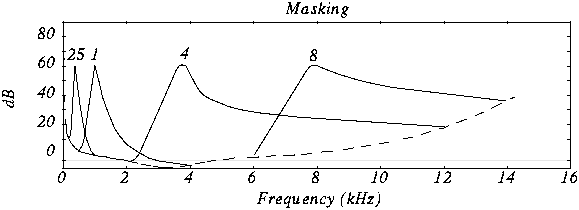
In this case we see various masking tones and the resulting new hearing thresholds. In MP3, what is done is to divide the spectrum to be transmitted (that is, between 2 and 5 Khz) into frequency subbands, so that the power of the subband is evaluated and the masking threshold is created in the nearby subbands. Nearby subbands that exceed that power threshold are coded and those that do not exceed it are not coded.

Furthermore, the masking is not only in appearance but also in time as we can see in the figure.

The byte reserve: Often, some passages of a musical piece cannot be encoded at the same rate without altering the quality of the music. MP · then uses a small byte reservation that acts as a buffer using the capacity of passages that can be encoded at a lower rate in the given stream.
The stereo assembly In the case of a stereo signal, the MP3 format can use a few more tools to further compress the data.
Intensity stereo (IS) The human ear is not able to locate with complete certainty the spatial origin of sounds for very high or very low frequencies. This technique takes advantage of this, recording some frequencies as a monophonic signal, so that a minimum of spatial content is subtracted from the sound.
Mid / Side (M / S) Stereo When the left and right channels are similar then a middle channel (L + R) and a side channel (LR) are created, which are encoded instead of encoding the left channel on one side and the right for another. In this way it is possible to reduce the transmitted data using fewer bits for the lateral channel. Then during playback the MP3 decoder will reconstruct the left and right channels.

Huffman Coding: This coding technique is used at the end of the whole process. It works by creating variable-length codes, so that the symbols that appear in the bitstream most likely have shorter codes. The translation between symbols and codes is done using a table. Each code has a unique prefix so that the codes can be decoded correctly despite their variable length. This type of coding allows on average to reduce by 20% the amount of data to be transmitted. It is an ideal complement to perceptual coding since, during great polyphonies, perceptual coding is very efficient since many sounds are masked, but nevertheless little information is identical and Huffman’s algorithm becomes inefficient. During pure sounds there are few masking effects, but Huffman encoding is very efficient since digitized sound contains many repeating bytes.

How is an mp3 analyzed inside?

How is an mp3 analyzed inside?

MP3 is the acronym for MPEG 1 Layer 3 and is a lossy digital audio format developed by MPEG (Moving Picture Experts Group) in conjunction with the Franunhofer Institute of Technology to include it as an audio format for the MPEG-video format. 1. It is currently an ISO (International Organization for Standardization) standard. The reason it has become so popular is that it allows for high sound quality in very little storage space: About 650 songs can be recorded on a 650MB CDROM, in instead of the 15 that we could store following the format of traditional CD-Audio. Furthermore, it is possible to adjust the quality of the output file by adjusting the bitrate (sampling rate and number of bits per sample), which will be proportional to the size of the output file. Thanks to its small size, high quality and versatility, it became a standard for streaming.

It was said at the beginning that MP3 is a lossy algorithm, this means that the original and encoded sound are not exactly the same. For this, the MP3 takes advantage of the “deficiencies” of the human ear, specifically 3 of them:

Limits of hearing in frequency: The human ear is only capable of hearing frequencies that are approximately between 20 and 20,000 KHz, with which the rest are filtered and discarded as they would not add relevant information to the encoded signal. Also, the closer you are to the 2-4 Khz range (and harder to hear as the frequency gets closer to the extremes of hearing), the more audible it will be.
Masking effect: When 2 signals of similar frequency overlap, human hatred is only able to hear the one with the highest power (volume), therefore, the rest can be eliminated without appreciable loss of quality.
Stereo redundancy: Sometimes there is redundancy between the 2 channels and, furthermore, below a certain frequency, the human ear is not able to distinguish the directionality of the sound with which a single channel can be encoded and add to the other certain complementary information to not lose the spatial sensation of the other channel.
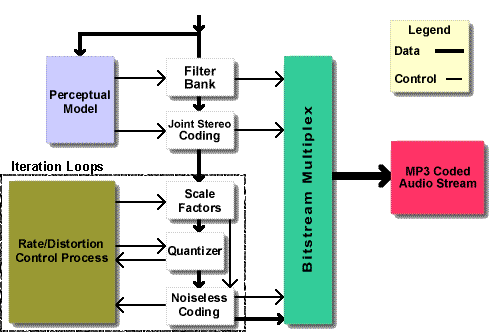
To carry out the three previous proposals, a system based on subbands is used in which the signal is filtered using several filters in order to have the signal separated into sub-signals, each covering a frequency range. Each of these bands is compared to a psychoacoustic model that determines which bands are important and which can be removed.

Specifically, a hybrid polyphase / MDCT (Modified Discrete Cosine Transform) filter bank is used: A filter bank is a set of band-pass filters that aim to separate the original signal into several frequency bands; A multiphase / MDCT hybrid filter bank is nothing more than a normal filter bank together with a block capable of doing the discrete cosine transform (MDCT).

The choice of which bands are maintained and which are removed is made by calculating the masking threshold, that is, it analyzes each audio sub-signal and calculates the amount of noise that can be input (signal is replaced by noise to save storage space) in function of the frequency, taking into account that a frequency masks signals of a higher frequency than yours rather than lower, without being noticeable to the human ear.

The following figure outlines the process described above:

The following figure represents the structure of an mp3 file:

As can be seen, an Mp3 file is made up of different frames which in turn are made up of an Mp3 header and MP3 data. Each of the frames is independent, that is, a person can cut the frames of an MP3 file and then play them back. The graph shows that the header consists of a sync word that is used to indicate the beginning of a valid frame. Following are a series of bits that indicate that the analyzed file is a standard MPEG file and whether or not it uses layer 3.

MP3 undoubtedly owes its success to Internet music downloads and portable audio players capable of playing the format. First, Discman compatible with MP3 were born, which allowed transporting 175 songs per cd instead of the usual 6. Subsequently, MP3 players based on a (small back then) flash memory were born. These had the advantage of being much smaller and lighter than portable CD players, but with the initial disadvantage that flash memory was small and expensive. Initially these devices had 64 or 128 MB memory, which allowed them to store between 16 and 32 songs. Currently these devices are sold with a memory of 1,2,4 or even 8GB. This allows them to store between 256 (for the 1Gb model) and 2048 (for the 8GB model)