Comparison and implementation of MP3, WAV


Free Download Mp4Gain
picture

Comparison and implementation of MP3, WAV
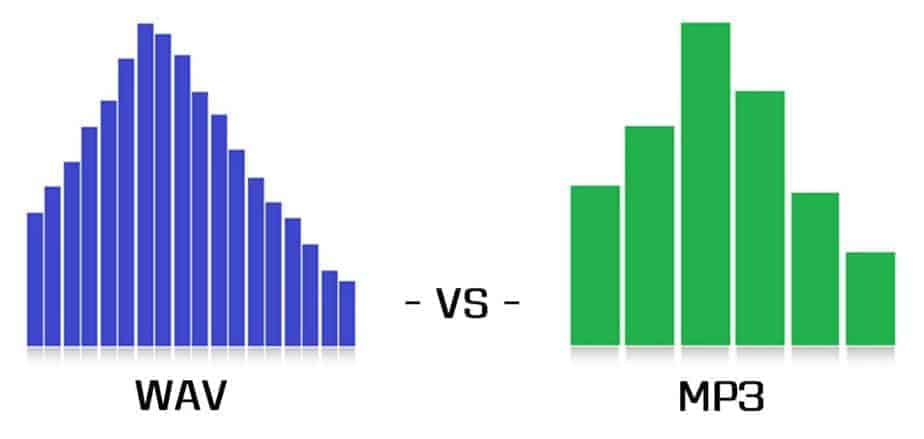
WAV vs MP3
WAV vs MP3

Sound has three elements: pitch, volume, and timbre:

WAV vs MP3
WAV vs MP3

Pitch is determined by the frequency of the sound wave, the higher the frequency, the higher the pitch.
The volume is determined by the amplitude of the sound wave, the larger the amplitude, the louder the sound.
The timbre is determined by the “shape” of the waveform (sounds like square, triangle, and sawtooth are called impulse waves and sound individual).
An audio file is a file obtained by converting an analog signal to a digital signal. In general, there are 5 important parameters: encoding method, number of channels, sampling rate, bit depth, and bit rate.

Encoding: how this format organizes binary data and how it is compressed.
Number of channels: mono, dual or 5.1 channels, etc.
Sampling rate: The number of samples per second.
Bit Depth: The number of binary bits used to store the y value of the sample point.
Bitrate – The desired number of bits per second for the file.
We know that there is no compression in the WAV format, so its encoding method is to directly write all the sampled points to the file in order.

WAV file size (B) = number of channels * sample rate (Hz) * bit depth (bit) / 8 + the file header size (B, it’s 44B)

Implementation
When you open an mp3 or wav file with a text editor, you see numbers like this:
4944 3303 0000 0000 3d48 5459 4552 0000
0006 0000 0032 3031 3800 5444 4154 0000
0006 0000 0032 3230 3300 5449 4d45 0000
0006 0000 0031 3430 3600 5052 4956 0000
168e 0000 584d 5000 3c3f 7870 6163 6b65
7420 6265 6769 6e3d 22ef bbbf 2220 6964
3d22 5735 4D30 4D70 4365 6869 487A 7265
537A 4E54 637A 6B63 3964 223F 3E0A 3A78
6D70 6D65 7461 2078 6D6C 6E78 3D22
6F62 653A 6574 612F
5249 4646 2e3d 0e05 5741 5645 666d 7420
1200 0000 0300 0200 44ac 0000 2062 0500
0800 2000 0000 6461 7461 a026 0e05 8089
00bc 00e8 f0bb c09e 8dbc 00c2 87bc 80f1
d3bc 8063 ccbc c030 fcbc 8012 f4bc 20bb
13bd e051 0fbd c0b0 2dbd 6079 28bd 4012
46bd 6032 40bd c0e3 5dbd 6040 57bd c015
7cbd e035 74bd b058 8dbd 50e2 88bd f0a7 9dbd e0dd 98bd 70d3 acbd e0a9 a7bd
d043 b8bd b0da b2bd
00e3 c4bd 605c bfbd
This one above is the mp3/wav format of the same song. What is the difference between them?

WAV
structure
file header
The WAV format follows the RIFF Resource Interchange File Format, so the WAV format is actually a three-layer relationship, which is simplified here. Its file header format is as follows:

Address Carving type content
00H-03H 4 character * 4 RIFF resource file exchange flag
04H-07H 4 unsigned int The number of bytes from the next address to the end of the file.
08H-0BH 4 character * 4 WAV file WAVE logo
0CH-0FH 4 character * 4 fmt wave file flag, the last digit is 0x20 space
10H-13H 4 unsigned int The size of the subchunk file header. For the WAV subfragment, the value is 0x10.
14H-15H 2 short unsigned Format type, when the value is 1, it means the data is linear PCM encoding
16H-17H 2 short unsigned number of channels
18H-1BH 4 int unsigned Sampling rate
1CH-1FH 4 int unsigned Wave file bytes per second = sample rate Bit depth PCM / 8 channels
20H-21H 2 short unsigned DATA data block unit length = number of channels * PCM bit depth / 8
22H-23H 2 short unsigned Bit depth PCM
24H-27H 4 character * 4 data stamp data
28H-2BH 4 unsigned int Total length of data part (bytes)
struct WAVHeader
{ char RIFF[ 4 ]; ///Resource file exchange flag RIFF unsigned LEN; ///Number of bytes from the next address to the end of the file char WAV[ 4 ]; ///WAV file flag WAVE char FMT [ 4 ]; ///Wave fmt file pointer, last digit is 0x20 space unsigned SubchunkSize; ///The size of the sub-chunk file header, for WAV this sub-chunk, the value is 0x10 DATATYPE short unsigned; / //Format type, when the value is 1, it means the data is unsigned linear PCM encoding short CH ; ///Number of unsigned channels F; ///Unsigned sample rate BYTERATE; ///Number of bytes per second of wave file = sample rate*PCM bit depth/8*Number of unsigned channels

short DATAUNITLEN; ///DATA block unit length=channel number*PCM bit depth/unsigned 8 short BITDEPTH; ///PCM bit depth character DATA[ 4 ]; ///Unsigned data mark data DATALEN ; ///Total data section length (bytes) };


Free Download Mp4Gain
picture


Mp4Gain Main Window
picture


Mp4Gain Features
picture


Free Download Mp4Gain
picture

Comparison and implementation of MP3, WAV

Comparison and implementation of MP3, WAV

WAV vs. MP3
WAV vs. MP3

An mp3 is 320kbps, 44100hz, what does this mean?

WAV vs. MP3
WAV vs. MP3

44100Hz represents the sample rate of the signal. The so-called sampling consists of obtaining the value y of the sound wave at the current moment every unit of time. Sampling is the process of discretizing continuous data (converting an analog signal to a digital signal).
image source

The sampling method mentioned above is called PCM (Pulse Code Modulation). According to the Nyquist-Shannon sampling law, the sampling rate must be at least twice the highest target frequency. The hearing range of the human ear is about 20Hz-20,000Hz (if you’re curious how loud you can hear, you can click here to test your ears), although recording software often has a 48,000 option Hz, but we can safely conclude: 44100Hz can meet almost all our needs, higher is just a waste of your memory and CPU. More than 48,000 samples are meaningless to the human ear, which is similar to 24 frames per second on a movie. 44100Hz happens to be the standard sample rate for almost all music released. In fact, for vocals and many instruments, high-frequency sounds are noise, so high sample rates can sometimes worsen sound quality (which is why we need to adjust the equalizer).

320kbps represents your bit rate/bit rate, which is short for kilobits per second, which represents the size of the data used to describe sound. In CD (uncompressed audio file), the bit rate is 1411.2 kbps, and the mp3 sound quality to achieve CD quality should be higher than 128 kbps / 44100 Hz (128 kbps can be said to be the most common bit rate). Generally, a higher number means better quality. The quality depends on many factors (such as the encoding algorithm). Many times we don’t need too high bitrate: our device can play mp3 and CD without difference (sound/sound card is normal).

A wav is 44100 Hz 16-bit stereo or 22050 Hz 8-bit mono, what does this mean? stereo/mono refers to dual/mono. For monophonic sound files, the sample data is an eight-bit short integer (short int 00H-FFH); for two-channel stereo sound files, each sample data is a 16-bit integer (int) and the upper eight bits (left channel) and lower eight bits (right channel) represent the two channels, respectively.

Sound is a mechanical wave, produced by the vibration of an object, and requires a medium to propagate. So, in essence, a sound is a waveform on an axis over time.

What is a .WAV file?

What is a .WAV file?

wav file
wav file

File extension: .wav

wav file
wav file


Format Type: Uncompressed Lossless

Waveform audio files (also known as WAV files) are one of the most popular digital audio formats and the gold standard for studio recording. WAV was one of the first digital audio formats and quickly became a staple on all platforms. Although decades have passed, it still maintains its position as one of the world’s leading professional audio formats.

WAV files capture and reconstruct the original audio waveform at the highest quality without affecting or altering the sonic character of the sound in any way. WAV uses PCM (Pulse Code Modulation) to encode data by dividing it into small parts to provide the best possible quality. This is a lossless file format, which means no data is lost. Therefore, what is captured and recorded is the closest mathematical/numerical representation of the original audio waveform, with no appreciable loss of audio quality in the process.

WAV files are also uncompressed, which means that the data is stored as-is in its full original format, without decoding.


What is an .AIFF file?
File extension: .aif or .aiff

Format Type: Uncompressed Lossless

AIFF (Audio Interchange File Format) works the same way: it provides studio-quality audio recording and playback. AIFF offers the same sample rate and bit depth options as WAV files, AIFF uses PCM to record audio waveforms as precise samples (slices) to provide the best possible audio recording quality and sound playback. Like WAV, AIFF also stores data in an uncompressed lossless format, which means no quality loss, just pure sound.

So what is the difference between the two? Mainly it’s about the story. WAV was created by a partnership between Microsoft Windows and IBM, so WAV files can only be played natively on Windows computers. AIFF, on the other hand, is the Macintosh’s answer to WAV files, enabling studio-quality audio recording and playback on Apple computers. Today, both formats can be recorded and played back natively on any operating system, making them easily interchangeable and providing the same high-quality audio regardless of format.

Mp3 To wav converter

Mp3 To wav converter

Mp3 to Wav Converter

Mp3 to wav

MP3 to WAV converter

Converting an mp3 to a wav is really easy. Most likely, the mp3 file itself was encoded from a wav.

Convert from Wav to Mp3

In fact, this whole matter of compression to mp3 format began with the search to save space, without losing quality. Why would you want to save space? Firstly to be able to stream the music file over the internet, in days when bandwidth was low, and secondly to save space at a time when available hard drives were quite limited in capacity. The technology did not exist at all neither on the internet nor on hard drives that we have today.

What’s the point of converting an mp3 back to a wav?

The mp3 must have discarded information from the original wav and that information will not be recovered if we do the reverse conversion, in this case from mp3 to wav.
Let us remember what was said above: it was necessary to reduce the size and to achieve this, psychoacoustics were used to find out what information was redundant or could be discarded without it meaning an “audible” loss for human beings.

The mp3 audio format is considered lossy for this reason, because it discards information in order to be compressed. And that information cannot be retrieved if we do the reverse conversion.

Sure, many experiments have been done that have shown that 99% of people can’t tell a 192kb compressed mp3 apart from the original wav, so converting the mp3 to wav again would produce a wav that is indistinguishable from the original wav. most people compare it to the original wav.

mp3 to wav converter using Mp4Gain

Mp4Gain is, in addition to a very modern and efficient normalizer (the most efficient in fact), it is also a very efficient converter. Therefore, you could use Mp4Gain to convert mp3 to wav and get excellent results.

MP3: features and alternatives

The peculiarities of the MP3 format and some clues about other solutions of equal or even higher quality.

Impossible to deny, the MP3 format is the most common and most enjoyable to listen to music on the go or, as it has been for some years, streaming. We use it everywhere now and any device can play it today.

MP3 is part of the family of audio files called “lossy”, that is, the types of formats that can also reduce the amount of data that should contain a sound, in any case try to maintain at least an acceptable quality.

The peculiarities of the MP3 format and some clues about other solutions of equal or even higher quality.
The parameters that determine the quality level of an MP3 file are: the sampling rate, bit rate, encoder and of course the source. Now let’s move on to the order.
At the origin of everything is the source, that is, the support or source from which the MP3 file can be downloaded. The higher the quality of the source, the greater the end result: purchasing MP3s from particularly reliable sites or extracting them from compact discs in good condition is the basis for a successful MP3. What becomes crucial is the encoder (the most famous and free is LAME) or the software that takes care of creating the file after properly configuring its parameters.

Portada

The sampling rate is measured in Herz and expresses the number of times per second. Second, as the analog signal is measured and digitized; for MP3 it must be as faithful as possible on a CD, ie 44 100 Hz (44.1 KHz).

Bitrate is the number of binary units flowing, measured every second. The value of the bit rate is not fixed: as it increases, the similarity to the original file will also increase proportionally. The higher the bit rate, the higher the quality, the larger the file size. The bit rate range ranges from 32 kbps to 320 kbps, the maximum that can be obtained from an MP3 file.

The ones we’ve just listed are an important part of the tricks that allow us to have an MP3 quality; however, be aware that a lost file is by no means faithful in all respects to the original source. The most famous lost alternatives are: AAC (the format Apple uses to sell music in the iTunes Store and since July to stream audio from the Apple Music service); WMA; MPC; OGG (excellent quality open source format).

If you are looking for maximum faith in digital audio, give up MP3 and its loss-free alternatives to switch to “loss-free” audio formats, ie loss-free quality. Overall, this file type compresses the original sound while keeping the number of bits intact. Needless to say, quality comes at a cost in terms of the space taken up: a lossless file takes about half of the original audio file, but “weighs” nearly three times as much as a 320Kbps MP3. Of these, the most famous and used are: FLAC; ALAC (Apple Lossless Format); BEE; WavPack. The “lossy” and “lossless” file distinctions are extremely applicable to images and videos as well, not just audio files.

On several occasions it has been said how absolutely difficult it is to distinguish an MP3 at 320 kbps, obtained under the best conditions, from its original version on CD or in lossless files; It is only possible to notice it with instruments at a certain level and with a good ear. When noted, the MP3 format is excellent for listening on the move, as highlighted above; On the other hand, to better preserve our music or listen to it on systems of a certain level, it is better to resort to lossless formats such as FLAC or ALAC.