How to Convert MP3 to WAV


Free Download Mp4Gain
picture

How to Convert MP3 to WAV
How to Convert MP3 to WAV

Are you looking for an easy way to convert your MP3 files to WAV format? Then look no further than Mp4Gain. Mp4Gain is a powerful audio conversion tool that allows you to quickly and easily convert MP3 files to WAV format.
How to Convert MP3 to WAV

What is Mp4Gain?

Mp4Gain is  software application that enables users to convert MP3 files to WAV format. It is available for Windows operating systems. The software supports a wide range of audio formats, including MP3, WMA, AAC, FLAC, and Ogg. Additionally, the software supports a variety of video formats, including AVI, MPG, DivX, XviD, and WMV.

How to Convert MP3 to WAV using Mp4Gain

The process of converting MP3 to WAV using Mp4Gain is simple and straightforward. To get started, follow the steps below:

  • Download and install the latest version of Mp4Gain on your computer.
  • Launch Mp4Gain and click the “Add” button to add the MP3 files that you want to convert.
  • Select the “Format” tab and choose the “WAV” option.
  • Adjust the settings for the output file, such as the bitrate, sample rate, and channels.
  • Click the “Convert” button to start the conversion process.
  • When the process is complete, the converted WAV files will be saved to the output folder.

Advantages of Using Mp4Gain

Using Mp4Gain to convert MP3 to WAV has several advantages, including:

  • It is easy to use, even for beginners.
  • It supports a wide range of audio and video formats.
  • It can be used to normalize the volume of audio and video files.
  • It is available for free.
  • It is regularly updated to ensure compatibility with the latest operating systems.

Conclusion

Converting MP3 to WAV using Mp4Gain is a simple and straightforward process. The software is easy to use and supports a wide range of audio and video formats. Additionally, Mp4Gain can be used to normalize the volume of audio and video files, making it an invaluable tool for anyone who needs to convert their audio files.


Free Download Mp4Gain
picture


Mp4Gain Main Window
picture


Mp4Gain Features
picture


Free Download Mp4Gain
picture

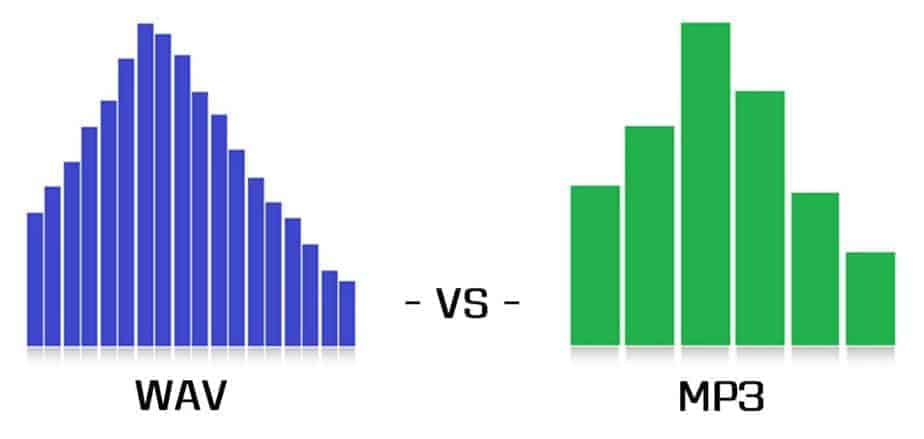
Comparison and implementation of MP3, WAV

Comparison and implementation of MP3, WAV

WAV vs. MP3
WAV vs. MP3

An mp3 is 320kbps, 44100hz, what does this mean?

WAV vs. MP3
WAV vs. MP3

44100Hz represents the sample rate of the signal. The so-called sampling consists of obtaining the value y of the sound wave at the current moment every unit of time. Sampling is the process of discretizing continuous data (converting an analog signal to a digital signal).
image source

The sampling method mentioned above is called PCM (Pulse Code Modulation). According to the Nyquist-Shannon sampling law, the sampling rate must be at least twice the highest target frequency. The hearing range of the human ear is about 20Hz-20,000Hz (if you’re curious how loud you can hear, you can click here to test your ears), although recording software often has a 48,000 option Hz, but we can safely conclude: 44100Hz can meet almost all our needs, higher is just a waste of your memory and CPU. More than 48,000 samples are meaningless to the human ear, which is similar to 24 frames per second on a movie. 44100Hz happens to be the standard sample rate for almost all music released. In fact, for vocals and many instruments, high-frequency sounds are noise, so high sample rates can sometimes worsen sound quality (which is why we need to adjust the equalizer).

320kbps represents your bit rate/bit rate, which is short for kilobits per second, which represents the size of the data used to describe sound. In CD (uncompressed audio file), the bit rate is 1411.2 kbps, and the mp3 sound quality to achieve CD quality should be higher than 128 kbps / 44100 Hz (128 kbps can be said to be the most common bit rate). Generally, a higher number means better quality. The quality depends on many factors (such as the encoding algorithm). Many times we don’t need too high bitrate: our device can play mp3 and CD without difference (sound/sound card is normal).

A wav is 44100 Hz 16-bit stereo or 22050 Hz 8-bit mono, what does this mean? stereo/mono refers to dual/mono. For monophonic sound files, the sample data is an eight-bit short integer (short int 00H-FFH); for two-channel stereo sound files, each sample data is a 16-bit integer (int) and the upper eight bits (left channel) and lower eight bits (right channel) represent the two channels, respectively.

Sound is a mechanical wave, produced by the vibration of an object, and requires a medium to propagate. So, in essence, a sound is a waveform on an axis over time.