MP3 decoding algorithm.Part 2


Free Download Mp4Gain
picture

MP3 decoding algorithm.Part 2
MP3 decoding algorithm

Synchronization and error checking include header information decoding module.

MP3 decoding algorithm


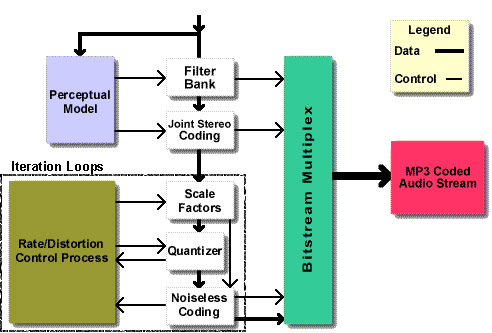
After the main control module starts to work, the main control module passes the data buffer of the bit stream to the synchronization and error checking module. This module includes two functions, namely header information decoding and frame decoding Side information decoding, scale factor decoding and Huffman decoding are performed according to your information, and the obtained results are obtained after of inverse quantization, stereo decoding, alias reduction, IMDCT, frequency inversion, and synthetic polyphase filtering. of the left and right channels is then placed in the output buffer by the main control module and sent to the sound playback device (in short, it’s very complicated).

2. Main control module
The main task of the main control module is to operate the input and output buffers and to call other modules to work together. Among them, the input and output buffers are provided by the DSP control module interface.

The data in the input buffer is the original mp3 compressed data stream, and the DSP control module provides a buffer larger than the maximum possible frame length each time it is concatenated to form a new buffer.

The data stored in the output buffer is the decoded PCM data, which represents the amplitude of the sound. It consists of a fixed-length buffer. Calling the DSP control module’s interface function returns the main pointer. After the output buffer is filled, interrupt processing is called to send to the audio ADC chip (DAC stereo audio and ADC audio) connected to the I2S interface. DirectDrive headphone amplifier) ​​to output analog sound.

3. Synchronization and error detection
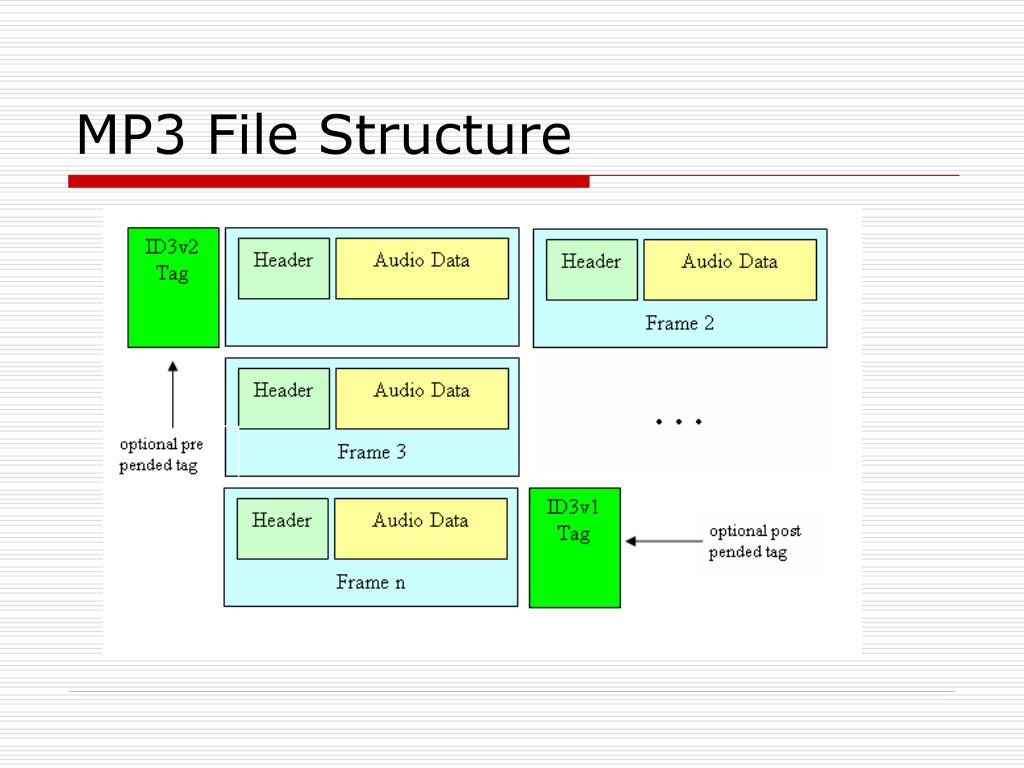
The error detection and synchronization module is mainly used to find the position of the data frame in the bit stream and decode the frame header, CRC check code and frame side information from this position, and the decoding results are used for subsequent scaling factors. Decoder module and Huffman decoder module. The main data format of the Mpeg1 layer 3 stream is shown in the following figure:

Master Data Flowchart

Among them, granule0 and granule1 represent granularity group 1 and granularity group 2 in one frame, channel0 and channel1 represent two channels in one granularity group, scalefactor is the quantized value of scale factor is the quantized Huffman encoding value , which splits into For large values ​​and count1 1 value area

CRC check: expression is X16+X15+X2+1

3.1 Frame synchronization
The purpose of frame synchronization is to find out the position of the frame header in the bit stream. According to ISO 1172-3, the MPEG1 frame header is 12 bits “1111 1111 1111”, and the two adjacent frame headers are separated by equally spaced bytes.


Free Download Mp4Gain
picture


Mp4Gain Main Window
picture


Mp4Gain Features
picture


Free Download Mp4Gain
picture

MP3 decoding algorithm.

MP3 decoding algorithm.

MP3 decoding algorithm

If you are interested in audio and video technology, you can subscribe to my Video Player and Audio and Video Basics topics.

MP3 decoding algorithm

1: Introduction to the general structure of the MP3 codec
MP3 decoding process

Look dumbfounded, right? There are many concepts here that need to be explained one by one.

Bitstream: Bitstream is a content distribution protocol. It uses an efficient software distribution system and peer-to-peer technology to share large files (such as a movie or TV show) and allows each user to provide upload services as a network redistribution node. (Because no professional has studied this content, I will interpret it as a datum for now, and the internal content will have time to discuss.)

Synchronization and error checking – The transmission and synchronization of mp3 data streams are based on frames. A frame is the smallest format unit of MP3, it can no longer be divided. The header of each frame contains basic information about the current frame, including timing information. The composition of the sync information is ‘1’ which contains 12 consecutive bits. The first step in the mp3 video decoding job is to synchronize the decoder with the input data stream. After starting the decoder, it can be done by looking for 12 consecutive bits of ‘1’s in the data. Once the synchronization information is obtained, the subsequent frame header information is: frame header information, which includes information such as sampling rate, padding bits, and bit rate.

Huffman decoding: You can understand it this way, I do a one to one correspondence between different data through a table and use this corresponding code to represent the original information, then the number with high frequency, I use the shortest possible code to represent Numbers that appear less frequently are represented by longer codes. This reduces the amount of content that the information represents. And after transmission, it can be restored according to this comparison code. Probably the beginning is this.

Reverse quantization is the reverse of the quantization process. If you want to understand this, you need to learn the quantization process.

IMDCT: IMDCT is the abbreviation, the full name is: Inverse Modified Discrete Cosine Transform (Inverse Modified Discrete Cosine Transform). In MP3, this algorithm must be used to transform the input data from the frequency domain to the cosine domain and perform compensation operations on the subband filtering. The inverse quantized signal is transformed using the inverse discrete cosine transform formula.

The Conversion Program Described In The MP3 Format.

The Conversion Program Described In The MP3 Format.

mp3 decoding

Today, most of the records that people listen to almost every day are made in the form of the ubiquitous MP3 files, as they are the most common and popular format for storing sound information in terms of.

MP3 DECODING

Now, the nature of this type of data, the codec itself, and the history of coding principles will be discussed. There will also be practical tips on how to convert MP3 files of a different type to another format or create MP3 files, other than that. This is very simple, however, subject to the use of special procedures.

WHAT IS THE MP3 FORMAT?
To date, only a few consider the fact that a voice is in this format. Basically, if you’re not into the nature of audio coding principles, all I can say is that you’re compressing audio information.

MP3 format

Monetized by optAd360

Previously, the basic format for storing music files was WAV. This information takes up too much space on the hard drive, and over time this type of data has become quite inconvenient. In particular, it refers to those times when music began to actively reside on the Internet. That’s when, and audio compression is necessary to reduce the size of the source material. In fact, if we convert the WAV format to MP3, the space saving becomes immediately apparent (the track needs 10 times less space, plus the structure of the new format is described like this, you can even enter some information about the track, for example , the name of the artist, song, album, year of release, and also put some basic technical characteristics of the audio).

Convert MP3 files

It is set to a specific text field in the file structure, called an ID3 tag, after completing all the information that can be displayed in the player window.

HISTORY

In today’s world there are many disagreements about who exactly creates this type of data. Although the MP3 format is accepted, so to speak, a more general concept of MPEG, established by the company Moving Picture Experts Group, the development of the actual encoding technology in MP3 is the Fraunhofer Institute group, which first proposed the The Lame MP3 encoder that uses the codec Who is, is the first criterion in this regard.

WAV to MP3

This was in the mid-90s, however, then this audio (MP3 file) could only be played with the help of a software player, so the new technology was widely adopted until then. It has released the first home player and the portable player is only used as a single at the beginning of this standard. However, it now has many competitors. It is only linked to the rationale for encoding, by which the amount of starting material can be reduced.

ENCODING AND COMPRESSION OF THE MAIN SOUND.
During this process, when the source material is translated into MP3 format, the most important thing: not all cuts are recognized by the human ear at the domestic level. Generally speaking, the track will have a standard sample rate of 44,100 Hz with a bit rate of 320 kbit/s and 128 kbit/s; it’s hard to see the difference in sound. This is why certain characteristics of the audio are reduced during the compression process.

The difference can only be perceived by people’s already sensitive ears or by using sounds from specialized programs. In fact, hardly anyone in the studio works in compressed MP3 format. He’s only involved in the final stages of mastering and post-production, when all tracks need to align quantity to normalize which areas to release to release the full album. Stop after this.

BASIC SOUND CHARACTERISTICS

As we all know, any audio material has several main parameters that determine its sound quality. And here the MP3 format is not an exception. The most important characteristics of the considered sampling frequency (the most common standard 44.1 kHz), the bit rate (accepted values ​​for the basic standard of 128 kbit/s) and the sound mode (mono, stereo, 5.1 surround , 6.1 or 7.1). In general, the latter option is not always considered, and the focus for determining any quality tracking is much more than the first two features.

Analysis of the MP3 decoding algorithm principle. Part 2

Analysis of the MP3 decoding algorithm principle. Part 2

Mp3 Decoding

Synchronization and error checking includes header information decoding module.

MP3 Decoding

After the main control module starts to work, the main control module transfers the data buffer of the bit stream to the synchronization and error checking module. This module includes two functions, namely header information decoding and frame decoding Side information decoding, scale factor decoding and Huffman decoding are performed according to your information, and the obtained results are obtained after of inverse quantization, stereo decoding, alias reduction, IMDCT, frequency inversion, and synthetic polyphase filtering. of the left and right channels is put into the output buffer by the main control module and sent to the sound playback device (in short, it’s very complicated).

2. Main control module
The main task of the main control module is to operate the input and output buffers and to call other modules to work together. Among them, the input and output buffers are provided by the DSP control module interface.

The data in the input buffer is the original mp3 compressed data stream. The DSP control module provides a buffer larger than the maximum possible frame length at a time. This buffer is the same as the data after the last offset (must be less than one frame) concatenated to form a new buffer.

The data stored in the output buffer is the decoded PCM data, which represents the amplitude of the sound. It consists of a fixed-length buffer. Calling the DSP control module’s interface function returns the main pointer. After the output buffer is filled, interrupt processing is called to output it to the audio ADC chip ( stereo audio DAC and audio ADC) connected to the I2S interface. DirectDrive headphone amplifier) ​​to output analog sound.

3. Synchronization and error detection
The error detection and synchronization module is mainly used to find the position of the data frame in the bit stream and decode the frame header, CRC check code and frame side information from this position, and the decoding results are used for subsequent scaling factors. Decoder module and Huffman decoder module.

Analysis of the MP3 decoding algorithm principle.

Analysis of the MP3 decoding algorithm principle.

mp3 decoding

If you are interested in audio and video technology, you can subscribe to my Video Player and Audio and Video Basics topics.

MP3 DECODING

1: Introduction to the general structure of the MP3 codec
MP3 decoding process

Look dumbfounded, right? There are many concepts here that need to be explained one by one.

Bitstream: Bitstream is a content distribution protocol. It uses an efficient software distribution system and peer-to-peer technology to share large files (such as a movie or TV show) and allows each user to provide upload services as a network redistribution node. (Because no professional has studied this content, I will interpret it as a datum for now, and the internal content will have time to discuss.)

Synchronization and error checking – The transmission and synchronization of mp3 data streams are based on frames. A frame is the smallest format unit of MP3, it can no longer be divided. The header of each frame contains basic information about the current frame, including timing information. The timing information consists of ‘1’s containing 12 consecutive bits. The first step in the mp3 video decoding job is to synchronize the decoder with the input data stream. After starting the decoder, it can be done by looking for 12 consecutive bits of ‘1’s in the data. Once the synchronization information is obtained, the subsequent frame header information is: frame header information, which includes information such as sampling rate, padding bits, and bit rate.

Huffman decoding: You can understand it this way, I do a one to one correspondence between different data through a table and use this corresponding code to represent the original information, then the number with high frequency, I use the shortest possible code to represent Numbers that appear less frequently are represented by longer codes. This reduces the amount of content that the information represents. And after transmission, it can be restored according to this comparison code. Probably the beginning is this.

Reverse quantization is the reverse of the quantization process. If you want to understand this, you need to learn the quantization process.

The relationship between frequency, bit rate, bit rate and sound quality of MP3 Part 2

The relationship between frequency, bit rate, bit rate and sound quality of MP3 Part 2

MP3

What is the difference in MP3 sound quality of various compression ratios/compression modes?

Mp3

What are some basic principles? How about the sound quality of other formats like APE/WMA/etc?
Speaking of mp3, I am afraid no one will say that they have never heard of it. Even if you are not an mp3 user, there are ubiquitous advertisements, advertising activities in the city, discussions between friends and the Internet. Rich resources, these always give you a little impression, right? For trendy youngsters, especially friends who like music and friends who like digital devices, mp3 is probably a word that should be talked about every day, but what is mp3, how to determine mp3 sound quality and what is good or How can I listen to high quality mp3? ? ? I think the following article can help you solve many doubts.
Across current mp3 users, the generally accepted standard for production is eac recording + lame compression. Those who are experienced in such production process will figure out some tricks and use different parameter and parameter settings for different music. The compression ratio varies from the standard 128 kbps to the maximum of 320 kbps, but what is the difference and the difference in effect between these bit rates? ? How is the most suitable compression ratio, which one should be better for cbr and vbr etc. These topics are often discussed by everyone. Let me share with you some of my feelings.
The repertoire selected for this test is the first track of Bach’s “Grandenburg Concerto”, performed by the Munich Bach Orchestra, eac track capture software, cd’ex compression software, fooba2000 v0.8 playback software and listening earphones are er6 from Intech and e3c from Shure. Because the classical repertoire has a lot of detail, the band is large, and the requirements for all aspects of sound quality are relatively high, so it can clearly reflect the difference in detail between different processing methods.
I first grabbed the track with rac, and then used the lame mp3 encoder (vision 1.92 engine 3.92) engine in the cd’ex software to process the wav file. I tried the lick parameters one by one to choose a good effect:
The first thread priority parameter selects the highest and lowest respectively. When other parameters are equal, the compression comparison shows that the degree of thread priority has no effect on the sound. The generated files are all the same size, and the comparison sounds the same, so these parameters have no effect on the sound quality.
The second parameter is the version, which can be selected between mpegI, mpegII and mpegII.V. Similarly, the other parameters are determined and these three options are used to compress three times. After listening, although the file sizes of the three methods are all the same, but the actual listening feeling of mpegI is better. The mid-low frequency compression ratio is a bit smaller, but the high frequency distortion is a bit more. It is more suitable for listening to human voice and pop music. It is also good to use mpegI type to listen to classical music, the sound background is better, but if it is solo music with a lot of mid and high frequencies like violin, it is recommended to use mpegII.v type, which will have better results.
The third parameter is the most important, which is the bit rate. Choosing it directly affects the size and listening experience of your mp3 file. The higher the compression ratio, the higher the distortion, and the lower the compression ratio, the lower the distortion, but how do we find one for ourselves? What is the acceptable balance between the two? This requires careful exploration in the experiment. Considering that the sound quality of low bitrate files is not suitable for playing music, the minimum set is 128kbps, and four fixed bitrate files of 128, 192, 256 and 320 are used for comparison. and try.
The compression ratio of 128 kbps is still relatively rough, and the high-frequency part is highly distorted after compression. It sounds hollow, wrinkled, rough, and there are often flickering sounds. Misunderstanding, the compressed volume of a 3 minute 39 piece of music is 3414kb, although the volume is not large, the sound is not satisfactory, and there is a relatively large flaw.
192kbps bitrate compression effect is much better than 128.

The relationship between MP3 frequency, bit rate, bit rate and sound quality

The relationship between MP3 frequency, bit rate, bit rate and sound quality

mp3

Each song is ripped from a CD, converted to a WAV file, and then converted to MP3 using software.

Mp3

So it should be a sample rate of 44100 KHz. Unless yours is not a song, but is recorded as a WAV file, and another sample rate is selected during recording.
The main factor that affects the sound quality of MP3 is the bit rate. Now the best is 320K CBR (fixed bit rate) and VBR (variable bit rate), VBR files are a bit smaller than CBR. 192K VBR is the most popular on the Internet, which can meet the requirements of both sound quality and file size, but I usually use CD to rip tracks or download APE (lossless compression, which can be restored to WAV file) and then convert it to 320K VBR.
Final reminder: MP3 transcoding is distorted and this distortion cannot be reversed. That is, if you convert MP3 to WAV sound quality, the file size increases dozen times, but the sound quality remains the same as MP3 sound quality.
If you want to hear low distortion, it’s better to listen to a CD or download APE.
First of all, sound quality is a very subjective thing!
It is often said that the sound quality is good, one means that the degree of reproduction is good, that is, the smaller the difference with the recording, the better; As for mp3, mp3 is a compressed format, the higher the bitrate, the less compression and less loss of detail, that is, the higher the bitrate, the closer to the original sound. But sound quality is also related to your output device, such as a good mp3 player and a good pair of headphones, all of which will help your listening quality!
So, if you want to improve sound quality, you can also start from the above perspectives and not overemphasize any one of them. When you have higher requirements for sound quality, you can give up mp3 and directly switch to stop CD. The CD carries waveform files, which are completely lossless in sound quality, which will give better results.
If you want to reduce distortion, the only way is to increase the bit rate. It is best to use variable bit rate (VBR) compression to produce mp3 files, which can strike a balance between maximum fidelity and minimum file size.
Finally, if you want completely lossless sound quality, you should still use audio files in a lossless compression format or an uncompressed file format. How good is the sound quality in MP3 format?

What is the mp3 decoded into?

What is the mp3 decoded into?

mp3 decoding

1. Introduction to MP3:

mp3 decoding

The full name of MP3 is MPEG 1 audio layer 3, of which the MPEG (Moving Picture Experts Group) standards include video and audio standards.
, of which MPEG-1, MPEG-2, MPEG-2 AAC and MPEG-4 audio standards have been formulated.
MPEG-1 and MPEG-2 standards use the same family of audio codecs: Layer 1, Layer 2, Layer 3. It is divided according to compression quality
and the complexity of encoding, corresponding to MP1, MP2, MP3, three types of sound files, and uses different levels
encoding for different purposes. The higher the level of MPEG audio encoding, the more complex the encoder and the higher the compression rate.
A new feature of MPEG-2 is the use of low sample rate expansion to reduce data throughput, and another feature is multi-channel expansion. , which increases the number of main channels to 5 .
All three layers of MPEG Audio Layer 1, Layer 2, and Layer 3 use the same filter bank, bitstream structure, and header information, and the sampling rate is
32KHz, 44.1KHz, 48KHz
Layer 1 is designed for DCC (digital compact cassette) compressed digital tape, 384 kbps data stream; compression ratio 4:1;
Layer 2 trade-offs between complexity and performance, data throughput drops to 256kbps-192kbps; compression ratio 6:1-8:1;
Layer 3 is designed for low data traffic from the start, the data traffic is 128kbps-112kbps, and the compression ratio is as high as 10:1-12:1;
Layer 3 adds the MDCT transform, making its frequency resolution 18 times that of Layer 2. Layer 3 also uses
entropy coding, which is similar to MPEG video, to reduce redundant information. The vast majority of MP3s use the MPEG-1 standard.
MP3 audio quality depends on its bit rate and sample rate, as well as the quality of the encoder. Typical MP3 speeds are between
128 and 320 kb per second (problem here). The sample rate also has three frequencies: 32, 44.1 and 48 kHz. The most common is to use the
CD sample rate: 44.1 kHz. The commonly used encoder is LAME, which fully follows the LGPL MP3 encoder and has good speed and sound quality.
MP3 uses a lossy compression method for audio signals. In order to reduce the degree of sound distortion, MP3 adopts “sensory coding technology”, that is,
discards data that is not important to the human ear in pulse code modulation (PCM) Audio data Higher compression ratio, i.e. the file
audio , and then the noise level is filtered out with a filter, and then each remaining bit is spread out and organized by quantization, and finally
a higher compression ratio is formed .MP3 files, so that compressed files can achieve sound effects closer to the original sound source during playback.
3. MP3 encoding and decoding process
MP3 audio compression consists of two parts: encoding and decoding. Encoding converts the data in a WAV file into a highly compressed bitstream, and decoding takes the bitstream and reconstructs it into a WAV file. MP3 uses perceptual audio coding (Perceptual Audio Coding) this distortion algorithm. The frequency range of sound perceived by the human ear is 20 Hz to 20 kHz. MP3 cuts out a lot of redundant signals and irrelevant signals. The encoder transforms the original sound into the frequency domain through a mixed filter bank and uses a psychoacoustic model. to estimate that it may be only The perceived noise level is quantized and converted to Huffman coding to form an MP3 bitstream. The decoder is much simpler, its task is to extract the sound signal from the encoded spectral line components through inverse quantization and inverse transformation.
MP3 decoding can be divided into 9 processes in general: bitstream analysis, Huffman encoding, inverse quantization processing, stereo processing, spectral rearrangement, anti-aliasing processing, IMDCT transformation, subband synthesis, PCM output.
Briefly describe the MP3 compression process: Sound is an analog signal, and sound is sampled, quantized, and encoded to obtain PCM data.