Mp4 Format


Free Download Mp4Gain
picture

Mp4 Format

Mp4 Format
Mp4 Format
Mp4 Format
Mp4 Format

What is MP4 format and how does it work?

MP4, also known as MPEG-4 Part 14, is a digital multimedia container format most commonly used to store video and audio. However, it can also store other data such as subtitles and still images. The format streamlines the multimedia files for both streaming and storage purposes. MP4 files are marked by the .mp4 extension and are known for their ability to compress complex multimedia files without significantly degrading quality.
MP4 operates by compressing video and audio files, making them more manageable for playback on various devices. This compression is achieved through codecs, which are algorithms that encode and decode the data.
“The beauty of digital technology is that it lets you compress the impossible into the possible.” – Unknown

Why is MP4 so popular?

MP4’s popularity can be attributed to its versatility and adaptability. It’s universally accepted on most platforms and devices, which means users don’t have to worry about file compatibility. Its efficient compression capability ensures that files retain good quality even when they’re reduced in size, making it ideal for streaming and sharing online.
Another reason for its widespread acceptance is the fact that it can store multiple types of data, including video, audio, subtitles, and even interactive features. This multi-functionality makes it a go-to for various multimedia applications.
“In a world of constant change, the fundamentals are more important than ever.” – Jim Rohn

What are the benefits of using MP4?

Among the many benefits of the MP4 format, some stand out more than others. It offers high-quality video and audio playback, even when the file size is reduced, making it ideal for online streaming. The format’s adaptability means it can be used on virtually any device or platform without compatibility issues.
Moreover, the MP4 format supports advanced features like 3D graphics, menus, and user interactivity, adding more dimension to its usage. It’s also a secure format, offering DRM (Digital Rights Management) support to protect copyrights.
“The essence of strategy is choosing what not to do.” – Michael Porter

How does MP4 compare to other video formats?

When comparing MP4 to other video formats, its versatility and efficiency stand out. While formats like AVI or MOV may offer higher quality, they typically come with larger file sizes. MP4 strikes a balance between quality and size, making it ideal for various applications, from streaming to storage.
The adaptability of MP4 also means it’s less likely users will encounter compatibility issues. This ease of use and wide acceptance give it an edge over other formats in the market.
“Comparison is the death of joy.” – Mark Twain

Can MP4 files contain audio and video?

Yes, MP4 files can contain both audio and video. In fact, this dual capability is one of the reasons for its widespread use. By integrating video and audio into one file, it streamlines the playback process and ensures synchronization between the two. It also means users only need to manage a single file when sharing or transferring content.
“In unity, there is strength.” – Mattie Stepanek

How is the quality of an MP4 video?

The quality of an MP4 video is generally very good, especially considering its compact size. The format uses advanced compression algorithms which ensure that quality isn’t significantly compromised. Of course, like with any compression, there might be some loss of detail, but for most users and applications, MP4 offers a satisfactory quality-to-size ratio.
“Quality is not an act, it’s a habit.” – Aristotle

What are the drawbacks of MP4 format?

While MP4 offers numerous advantages, it’s not without its drawbacks. One potential issue is that if an MP4 file becomes corrupt, often the entire file becomes unplayable. Some other formats might still play portions of a damaged file. Additionally, while MP4 compression is efficient, it’s not always the best for professional applications where the highest quality is desired.
“Every solution breeds new problems.” – Arthur Bloch

Are there any alternatives to MP4?

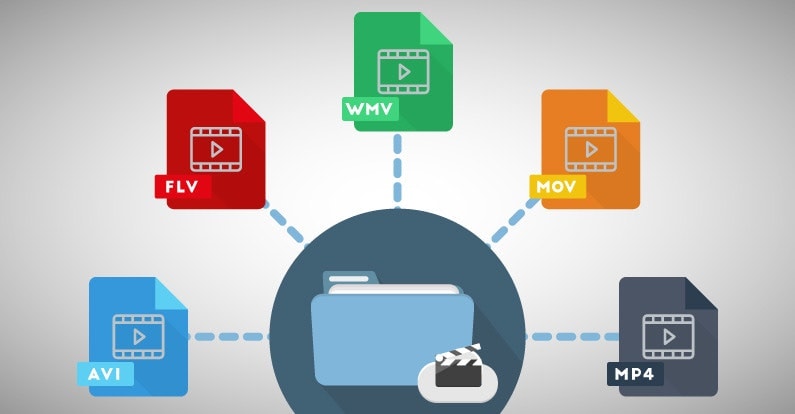
Yes, there are many alternatives to MP4, including AVI, MKV, MOV, and WMV, to name a few. Each format has its strengths and is suited for particular applications or platforms. While MP4 is versatile and widely accepted, sometimes specific situations or needs might make another format more suitable.
“Variety’s the very spice of life, That gives it all its flavor.” – William Cowper

How can I ensure the best quality when converting to MP4?

When converting to MP4, it’s essential to use high-quality source files and avoid excessive compression. Using a reliable converter that allows for customization of settings can help users optimize quality and file size as per their needs.
“Do not squander time, for that’s the stuff life is made of.” – Benjamin Franklin

Why are MP4 files sometimes large?

While MP4 is known for its efficient compression, the file size can still become large, especially when dealing with lengthy videos or those with high resolution. The codecs used, bit rate, and the complexity of the content can all influence the final file size.
“Size does matter. But so does depth.” – Neil Strauss

Final Words

The MP4 format has revolutionized the way we consume multimedia content, providing a balance between quality and size. Its versatility ensures that it remains a top choice for many, from casual users to professionals. Understanding its strengths and potential limitations can help users make the most out of this influential format.



Free Download Mp4Gain
picture


Mp4Gain Main Window
picture


Mp4Gain Features
picture


Free Download Mp4Gain
picture

What is the Best Video Format for High Quality?

What is the Best Video Format for High Quality?

Best Video Format
Best Video Format
Best Video Format
Best Video Format


If you’re looking for the best video format for high quality, it’s important to understand the different formats available and their strengths and weaknesses. The best video format will depend on your intended use, whether it’s for streaming, editing, or playback on a specific device.

Best Video Formats for Streaming

Streaming video has become increasingly popular in recent years, with platforms like Netflix and YouTube dominating the market. To ensure the best quality streaming experience, the best video format is one that is optimized for streaming.

The most popular streaming video format is H.264, which is widely supported by most devices and platforms. It offers high-quality video compression with a relatively small file size, making it ideal for streaming. Another popular streaming format is VP9, which is used by YouTube and offers higher quality video at lower bitrates.

Best Video Formats for Editing

If you’re planning to edit your videos, it’s important to choose a format that will retain the highest quality of your footage. The best video formats for editing are those that support high bitrates and high color depths.

One of the most popular formats for editing is ProRes, which is a proprietary format developed by Apple. It offers high-quality compression and is widely supported by most editing software. Another popular format is DNxHD, which is supported by Avid editing software and offers high-quality compression for editing.

Best Video Formats for Playback on Specific Devices

If you’re planning to playback your videos on a specific device, it’s important to choose a format that is compatible with that device. Different devices support different video formats, so it’s important to do your research to ensure compatibility.

For example, if you’re planning to playback your videos on an iPhone or iPad, the best format is H.264, which is supported by Apple devices. If you’re planning to playback your videos on a Samsung device, the best format is MP4, which is widely supported by Android devices.

What about 4K and HDR?

If you’re looking to create or playback 4K or HDR videos, it’s important to choose a format that supports these features. The most popular format for 4K video is HEVC/H.265, which offers high-quality compression with a smaller file size compared to other formats.

For HDR video, the most popular formats are HDR10 and Dolby Vision, which offer improved color depth and contrast compared to standard video formats.

What is the Future of Video Formats?

As technology continues to advance, video formats are also evolving. One of the newest formats is AV1, which is developed by the Alliance for Open Media and offers high-quality compression with a smaller file size compared to other formats.

Another format on the horizon is MPEG-5 Part 1 (EVC), which offers improved compression for HDR video and is expected to become the standard for video compression in the future.

People Also Ask

What is the difference between a container and a codec?

A container is a file format that holds audio, video, and other data together in a single file. A codec is a software that compresses or decompresses audio or video data. The container format and the codec used can affect the quality and compatibility of your videos.

What is the difference between lossy and lossless compression?

Lossy compression is a method of compressing video or audio data by removing some of the data to reduce file size. Lossless compression, on the other hand, compresses the data without losing any information. Lossless compression is preferred for editing

Video File Formats: Everything You Need to Know

Video File Formats: Everything You Need to Know

Video File Formats
Video File Formats
Video File Formats
Video File Formats

Introduction

In the world of digital media, video file formats are an essential component of video production, storage, and distribution. Video file formats are used to compress and encode video data, allowing it to be stored and transmitted efficiently without losing quality.

There are many different video file formats available, each with its own advantages and disadvantages. In this article, we will explore some of the most common video file formats, their features, and their best use cases.

Types of Video File Formats

There are two main categories of video file formats: compressed and uncompressed. Compressed video file formats use various compression techniques to reduce the size of the video file, while uncompressed video file formats store the video data without compression.

Compressed Video File Formats

Here are some of the most commonly used compressed video file formats:

1. MPEG-4

MPEG-4 is a widely used video file format that is known for its high compression rate and ability to deliver high-quality video content. It is commonly used for streaming video content over the internet, as well as for mobile devices and video conferencing.

2. H.264

H.264 is a popular video file format that is known for its high compression rate and ability to deliver high-quality video content. It is commonly used for streaming video content over the internet, as well as for Blu-ray discs, HD DVD, and digital television.

3. AVI

AVI (Audio Video Interleave) is a popular video file format that was introduced by Microsoft in 1992. It is widely supported by most media players and is commonly used for storing video content on personal computers.

4. WMV

WMV (Windows Media Video) is a video file format developed by Microsoft. It is commonly used for streaming video content over the internet and for storing video content on personal computers.

Uncompressed Video File Formats

Here are some of the most commonly used uncompressed video file formats:

1. AVCHD

AVCHD (Advanced Video Coding High Definition) is a high-definition video file format that is commonly used for recording and storing high-quality video content. It is widely used by professional videographers and is compatible with most high-definition televisions.

2. RAW

RAW is an uncompressed video file format that is commonly used by professional videographers and filmmakers. It stores the raw data captured by the camera, allowing for maximum flexibility in post-production.

3. ProRes

ProRes is an uncompressed video file format developed by Apple. It is widely used in the film and television industry and is known for its ability to store high-quality video content without compression.

Choosing the Right Video File Format

Choosing the right video file format depends on the intended use of the video content. Here are some factors to consider when choosing a video file format:

  • The intended distribution method (e.g., streaming, physical media)
  • The required video quality
  • The amount of storage space available
  • The desired level of video compression
  • The compatibility with the intended playback device or software

Conclusion

Video file formats are a crucial aspect of video production and distribution. Choosing the right video file format can impact the quality, size, and compatibility of the video content. By understanding the different video file formats available and their best use cases, video producers can ensure that their content reaches the widest possible audience while maintaining its quality.

While there are many video file formats available, some of the most popular ones include MP4, AVI, MOV, and WMV. Each of these formats has its strengths and weaknesses, and it’s essential to understand their differences to choose the right one for your project.

MP4 is a widely used video file format that is compatible with most devices and platforms, making it an excellent choice for online video distribution. MP4 files are typically small in size, making them easy to upload and download, and they can contain high-quality video and audio.

AVI is an older video file format that was popular in the early days of digital video. While it’s less common today, AVI files can still be useful in certain situations. AVI files tend to be large, making them less suitable for online video distribution. However, they can contain high-quality video and are compatible with most video editing software.

MOV is a video file format developed by Apple for use on its devices and platforms. MOV files are typically high-quality and can contain multiple audio and video tracks, making them an excellent choice for video editing. However, MOV files can be large in size, and they may not be compatible with all devices and platforms.

WMV is a video file format developed by Microsoft for use on its devices and platforms. Like MOV files, WMV files can contain multiple audio and video tracks, making them an excellent choice for video editing. However, WMV files tend to be larger in size, and they may not be compatible with all devices and platforms.

When choosing a video file format, it’s also essential to consider the intended use of the video content. For example, if you’re creating a video for use on social media, you’ll want to choose a format that is compatible with the platform’s requirements. If you’re creating a video for use in a presentation, you’ll want to choose a format that is compatible with the presentation software you’ll be using.

In conclusion, video file formats play a critical role in video production and distribution. By understanding the different formats available and their best use cases, video producers can ensure that their content reaches the widest possible audience while maintaining its quality. Whether you’re creating a video for online distribution or a corporate presentation, choosing the right video file format can make all the difference in the success of your project.

Choosing the Best Video Format for Your Needs

Choosing the Best Video Format for Your Needs

Best Video Format
Best Video Format

When it comes to video content, choosing the right format is crucial to ensure that your viewers enjoy the best possible experience. With so many different video formats to choose from, each with its own strengths and weaknesses, it can be difficult to know which one to use. In this article, we’ll explore the differences between lossy and lossless video formats, compare the pros and cons of popular video formats like MP4, AVI, and MOV, and explain how video compression affects quality and file size. Finally, we’ll provide some tips on how to choose the right video format for your specific needs.

Best Video Format
Best Video Format

Understanding the Differences Between Lossy and Lossless Video Formats

Before we dive into the specifics of different video formats, it’s important to understand the basics of video compression. Video compression is the process of reducing the size of a video file without sacrificing too much quality. There are two types of video compression: lossy and lossless.

With lossy compression, data is removed from the video file in order to decrease its size. This results in a smaller file size, but the quality of the video is often compromised. Lossy compression is often used when a smaller file size is a priority, such as when uploading videos to the internet or sending them via email.

Lossless compression, on the other hand, maintains the quality of the video while reducing its size by removing any redundant data. However, this often results in a larger file size. Lossless compression is often used when high-quality video is essential, such as when creating a master copy for archiving or when working on a video project that requires the highest possible quality.

Comparing the Pros and Cons of Popular Video Formats

Now that we’ve covered the basics of video compression, let’s take a look at some of the most popular video formats and their pros and cons.

MP4

MP4 is a popular video format that uses lossy compression to strike a good balance between quality and file size. MP4 files can be played on a variety of devices and are widely supported across different platforms. They’re also ideal for uploading to the internet or sending via email due to their smaller file size. However, the quality of the video may suffer if the compression is set too high.

AVI

AVI is an older video format that uses lossless compression to ensure the highest possible quality. This format is often used when the quality of the video is of utmost importance, such as when creating a master copy for archiving. However, the trade-off is a larger file size, which can make AVI files difficult to work with or share.

MOV

MOV is a video format created by Apple that uses lossy compression to achieve a good balance between quality and file size. MOV files are often used in the film and television industry due to their high quality, but they can be difficult to work with on non-Apple devices. They’re also less widely supported on the web than other formats, such as MP4.

FLV

FLV is a video format that was popularized by Adobe Flash Player. FLV files are often used for streaming video on the web due to their small file size and ability to be played back in a web browser. However, the quality of the video may be lower than other formats, and the format itself is becoming less popular as Adobe discontinues support for Flash Player.

WMV

WMV is a video format created by Microsoft that uses lossy compression. It’s often used for streaming video online, as it provides a good balance of quality and file size. However, like MOV, WMV files can be difficult to work with on non-Microsoft devices.

How Does Video Compression Impact Quality and File Size?

As we’ve seen, video compression is essential for reducing file size and ensuring that videos can be easily shared or uploaded to the internet. However, the amount of compression used can have a significant impact on the quality of the video.

When a video is compressed, some of the data is removed in order to reduce the file size. The more data that is removed, the smaller the file size will be, but the quality of the video will suffer. If too much data is removed, the video may become pixelated or blurry, with visible artifacts or distortion.

The amount of compression used can also impact the “burstiness” or variety of the video file. A highly compressed video may have less variation in its color and contrast, which can make it appear less dynamic and engaging to viewers. On the other hand, a less compressed video may have more variation in its color and contrast, which can make it appear more vibrant and visually interesting.

What Video Format is Best for Streaming, Editing, and Archiving?

Now that we’ve covered the basics of video compression and explored some of the most popular video formats, let’s take a closer look at which format is best for specific use cases.

Streaming

For streaming video on the web, MP4 is often the best choice due to its small file size and wide compatibility with different devices and platforms. However, if high-quality video is essential, MOV may be a better choice, despite its limited support outside of Apple devices.

Editing

When it comes to editing video, lossless formats like AVI or MOV are often the best choice. These formats maintain the highest possible quality, which is important when making edits to the video. Once the editing is complete, the video can be exported to a more compressed format like MP4 for sharing or uploading to the internet.

Archiving

If you’re creating a master copy of a video for archiving purposes, a lossless format like AVI is often the best choice. This ensures that the highest possible quality is maintained, which is essential for long-term preservation. However, keep in mind that lossless formats often result in larger file sizes, which may be difficult to store or share.

Using Mp4Gain to Normalize Video Formats

No matter which video format you choose, it’s important to ensure that the audio is normalized to a consistent level. This is where Mp4Gain comes in. Mp4Gain is a tool that allows you to convert between the major video formats and normalize the audio to a consistent level.

By using Mp4Gain, you can ensure that your videos have a consistent level of audio, regardless of the format they were originally recorded in. This can be particularly helpful if you’re working with videos from different sources or if you’ve edited together multiple videos into one project.

Additionally, Mp4Gain can also be used to normalize the audio of music files, which can be especially helpful if you’re creating a playlist or if you’re a DJ who needs to ensure that all the tracks have a consistent volume.

Using Mp4Gain is easy. Simply download the software and choose the video or audio file that you want to normalize. Mp4Gain will automatically analyze the file and adjust the volume to a consistent level. You can then save the file in the format of your choice, with the normalized audio included.

Conclusion

When it comes to video formats, there’s no one-size-fits-all solution. The best format for your needs will depend on a variety of factors, including the intended use of the video, the devices and platforms it will be viewed on, and the desired balance of quality and file size.

However, by understanding the differences between lossy and lossless formats, comparing the pros and cons of popular video formats, and considering the impact of video compression on quality and file size, you can make an informed decision about which format to choose.

Regardless of the format you choose, it’s important to ensure that the audio is normalized to a consistent level. Mp4Gain is a powerful tool that can help you achieve this, while also allowing you to convert between the major video formats. By using Mp4Gain, you can ensure that your videos and audio files have a consistent level of audio, making them more enjoyable and professional.

So whether you’re a videographer, editor, or simply a video enthusiast, consider using Mp4Gain to take your videos to the next level.

Maximizing the Volume of MP4 Videos

Maximizing the Volume of MP4 Videos

Maximizing the Volume of MP4 Videos

Are you tired of straining to hear the audio in your MP4 videos? Low volume levels can greatly detract from the viewing experience, but thankfully, there is a solution to this problem: MP4Gain. This software allows you to easily increase the volume of your MP4 videos, making them more audible and enjoyable to watch.

Maximizing the Volume of MP4 Videos

How MP4Gain Works

MP4Gain is a volume normalization software that analyzes the audio of your MP4 video and adjusts it to a higher volume level without distorting the sound. This means that you can enjoy your videos at a comfortable volume without having to constantly adjust your device’s volume settings. Additionally, MP4Gain preserves the original audio quality of the video, so you won’t have to worry about any loss of sound quality.

Features of MP4Gain

MP4Gain offers a variety of features that make it a powerful tool for increasing the volume of your MP4 videos. Some of these features include:

  • Batch processing – MP4Gain allows you to process multiple videos at once, making it an efficient solution for those with a large collection of low-volume MP4 videos.
  • Easy to use – The user interface of MP4Gain is straightforward and easy to navigate, making it accessible for users of all skill levels.
  • Compatibility – MP4Gain is compatible with a wide range of video formats, including MP4, AVI, and MKV.

Step-by-Step Guide on Using MP4Gain

Using MP4Gain is simple and only takes a few steps:

  1. Download and install MP4Gain on your computer.
  2. Open the software and select the MP4 video that you want to increase the volume of.
  3. Select the “Normalize” option from the menu.
  4. Adjust the volume level to your desired setting.
  5. Hit the “Start” button to begin the normalization process.
  6. Once the process is complete, the newly normalized video will be saved in the same location as the original.

It’s that easy! With MP4Gain, you can have your low-volume MP4 videos sounding better in no time.

Conclusion

Low volume levels can greatly detract from the viewing experience, but MP4Gain offers a simple and efficient solution to this problem. With its ability to normalize volume levels without distorting sound quality and its easy-to-use interface, MP4Gain is the best solution for increasing the volume of your MP4 videos. Make sure to give it a try and you will be able to enjoy your videos without any audio problems again.

Advantages of mp4 video format

Advantages of mp4 video format

MP4 FORMAT

In this article, we will see the advantages of the MP4 format, which is designed for watching videos. We will also learn the processes of working with video recordings.

MP4

The MP4 format was developed in 1998, its purpose was focused on transferring files with video recording, as well as video over channels that have a low bandwidth, so it is very easy to download mp4 videos.

Why is MP4 good? Why did personal computer users like MP4 so much?

For starters, for a very small amount of weight of a video file, as well as a good quality recording for playback. If you transcode some cartoons from DVD to MP4 format, you will reduce the weight of the content, for example, from 5 gigabytes to 800 megabytes. This property has become the main feature of MP4, which is very popular when transferring video recordings over the Internet.

There are three types of application of this format:

• Interactive multimedia,
• Graphic applications
• Digital television.

I bet you are very interested to know what determines the quality of MP4 videos. I will say right away that there are many factors, and for convenience we will divide everything into three main categories: the quality of the original video, the settings to reduce the file size, and the characteristics of the personal computer.

• The main property is the quality of the source material, for example, the source, which has a low resolution, cannot be re-recorded in the MP4 format with a very significant quality increase at the end of the process.

• For settings that reduce file weight, it’s worth understanding: bit rate sizes, frames per second, and image stretch to enhance the image. It is very easy to find that with the lowest setting the file size will be minimal, but unfortunately the quality will be very poor.

• An important factor is the manufacturability of the computer on which the video is played. On poorly equipped personal computers, video deficiencies will be more noticeable than on an advanced computer.