Mp3 vs Flac: Which is Better?


Free Download Mp4Gain
picture

Mp3 vs Flac: Which is Better?
Mp3 vs Flac
Mp3 vs Flac
Mp3 vs Flac
Mp3 vs Flac

MP3 vs. FLAC: Understanding the Difference and Choosing the Best Audio Format

In the world of digital music, two audio formats have dominated the landscape for years: MP3 and FLAC. Each format has its own unique characteristics, advantages, and disadvantages, making it essential for music enthusiasts to understand the differences between them. This article delves into the comparison of MP3 and FLAC, aiming to shed light on which format might be the better choice for different scenarios.

MP3: The Pioneer of Digital Audio Compression

The MP3 format, short for “MPEG Audio Layer III,” revolutionized the way music was consumed and shared since its introduction in the 1990s. Its main advantage lies in its ability to significantly reduce the file size of audio tracks without compromising audio quality too severely. This compression is achieved by discarding some audio information that the human ear may not easily perceive. As a result, MP3 files are much smaller compared to the original CD-quality audio, making them easy to store and share.
However, this level of compression does come at a cost. Audiophiles and music purists argue that the removal of some audio data can result in a loss of sound fidelity, leading to a phenomenon known as “lossy” compression. While the difference in quality might not be noticeable to the average listener, those with a keen ear or listening on high-end audio equipment might discern a slight reduction in audio clarity.

FLAC: Uncompromising Audio Quality for Audiophiles

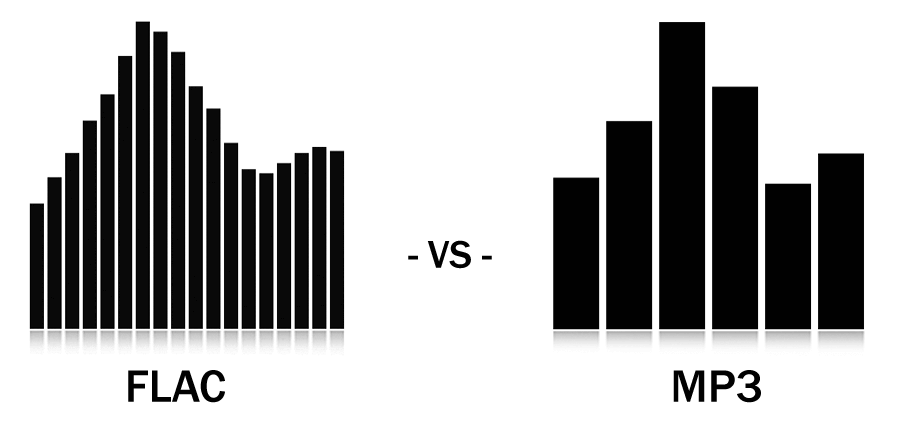
FLAC, short for “Free Lossless Audio Codec,” is the go-to format for audiophiles and music professionals seeking the highest level of audio quality. Unlike MP3, FLAC uses “lossless” compression, which retains all the original audio data during encoding. This means that no audio information is discarded, resulting in bit-for-bit identical sound quality to the source material, typically CD-quality audio.

The advantage of FLAC lies in its ability to offer pristine audio quality while maintaining a much smaller file size compared to uncompressed audio formats like WAV. This makes it an ideal choice for audiophiles who demand top-notch sound reproduction and a preference for archival purposes. However, due to the lack of audio data removal, FLAC files are considerably larger than MP3s, which can be a drawback for those with limited storage space or slower internet connections.

As J.R.R. Tolkien once said in “The Lord of the Rings,” “Not all those who wander are lost.” Similarly, in the realm of digital audio formats, not all users have the same requirements. Deciding between MP3 and FLAC ultimately depends on your individual needs, preferences, and listening habits. If you prioritize convenience, easy sharing, and reasonable audio quality, MP3 might suit your needs. On the other hand, if you’re an audiophile who values uncompromising sound fidelity and doesn’t mind the larger file sizes, FLAC could be the perfect fit.

In conclusion, the choice between MP3 and FLAC boils down to a trade-off between file size and audio quality. MP3 offers convenience and reasonable audio quality, making it an excellent choice for casual listeners, while FLAC delivers unparalleled sound fidelity for the most discerning ears. Regardless of your choice, both formats have significantly shaped the way we enjoy and consume music in the digital era. So, whether you’re on a road trip, at the gym, or relaxing at home, the right audio format will ensure you have a memorable musical experience.


Free Download Mp4Gain
picture


Mp4Gain Main Window
picture


Mp4Gain Features
picture


Free Download Mp4Gain
picture

The Anatomy of an MP3 File Header

The Anatomy of an MP3 File Header

MP3 File Header
MP3 File Header
MP3 File Header
MP3 File Header

In this section, we will delve into the intricate details of the MP3 file format’s header. The MP3 file header is a critical component that holds essential information about the audio file. It precedes the actual audio data and contains various parameters that influence the decoding process. Understanding the structure and significance of the MP3 file header is crucial for anyone dealing with audio compression and playback.

How does the MP3 file header impact audio quality?

The MP3 file header plays a vital role in determining the audio quality of an MP3 file. It holds crucial information about the audio, such as the bit rate, sample rate, and channel mode, which directly affect the compression and decompression processes. For instance, the bit rate represents the amount of audio data encoded per unit of time, and a higher bit rate generally results in better audio quality but larger file sizes. On the other hand, a lower bit rate reduces the file size but may lead to a loss of audio fidelity.

What are the key elements of an MP3 file header?

The MP3 file header consists of several key elements that provide essential information to the decoding software. Some of these elements include the sync word, version, layer, protection bit, bit rate index, sample rate index, padding bit, private bit, channel mode, and the mode extension. Each element serves a specific purpose and contributes to the accurate decoding of the audio data. Understanding these elements is essential for analyzing and manipulating MP3 files effectively.

Can manipulating the MP3 file header cause issues with playback?

While manipulating the MP3 file header can be done for various purposes, such as changing the bit rate or sample rate, it can also lead to playback issues if not done correctly. Altering critical parameters within the header may cause compatibility problems with different audio players and devices. It is essential to have a deep understanding of the file header’s structure and its impact on the decoding process to avoid playback issues and ensure a seamless audio experience.

Quoting a Movie on Digital Audio Compression

“In digital audio compression, as in life, we must strike a balance between size and quality. Much like a diamond, audio data can be cut and shaped to reveal its brilliance, but too much cutting might result in losing its essence.” – *The Sound Explorer*

Conclusion

In conclusion, understanding the intricacies of the MP3 file header is crucial for anyone working with digital audio and compression. The header contains vital information that impacts audio quality, file size, and compatibility with various devices and players. By comprehending the structure and significance of the MP3 file header, users can make informed decisions when encoding, decoding, or manipulating MP3 files. Striking the right balance between audio quality and file size ensures an optimal listening experience for music enthusiasts and audiophiles alike.

MP3 digital audio format

MP3 digital audio format

MP3 File Format

High-quality digitized audio requires a large amount of disk space.

mp3 file

Attempts to reduce the size of files using standard archivers (RAR, GZIP, etc.) do not generate significant gains due to the specificity of the sound data. However, it is possible to achieve a fairly significant level of compression of the audio information using special methods based on the analysis of the data structure and subsequent compression with some loss.

The real possibility of sound processing comparable in quality to existing analog examples did not appear until the late 1980s.

In 1988, the International Organization for Standardization (ISO) formed the MPEG (Moving Picture Experts Group) committee, whose main task is to develop standards for the encoding of moving pictures, sound and their combination. During the ten years of its existence, the committee has developed a series of norms on this subject. As a result, summarizing the extensive research in this area, several specific formats were recommended for storing data, which are excellent in quality of results and data flow.

There are currently three video storage standards: MPEG-1, MPEG-2, and MPEG-4.

Within the first two formats, there are also formats for storing audio information: Layer-1, Layer-2 and Layer-3. These three audio formats are defined for MPEG-1 and minor extensions are used in MPEG-2. The three formats are similar to each other, but use different levels of trade-off between compression and complexity.

Layer-1 is the simplest, it does not require significant compression costs, but it also provides a negligible compression ratio.

Layer-3 is the most time consuming and provides the best compression. Recently, this format has gained immense popularity. It is often called MP3. This name is associated with the extension of the audio files stored in this format.

The underlying idea behind all lossy audio compression techniques is to neglect the subtle details of the original sound that are beyond the reach of the human ear. Here several points can be highlighted.

Noise level . Sound compression is based on a simple fact: if a person is near a loud siren, they are unlikely to hear the conversation of the people who are nearby. And this happens not because a person pays close attention to a loud sound, but to a greater extent because the human ear actually misses out sounds that are in the same frequency range as a louder sound. This effect is called masking, it changes with the difference in volume and frequency of the sound.

The second point is the division of the audio frequency band into subbands, each of which is further processed separately. The encoding program extracts the loudest sounds in each band and uses this information to determine an acceptable noise level for that band. The best encoding programs also take into account the influence of adjacent bands. A very loud sound in one band can affect the masking effect and nearby bands.

Another point of the codification is the use of a psychoacoustic model based on the peculiarities of the human perception of sound. The compression used by this model is based on removing frequencies known to be inaudible, while more carefully preserving sounds that can be easily heard by the human ear. Unfortunately, there can be no exact mathematical formulas here.

The human perception of sound is a complex process, not fully understood, so the choice of compression methods is based on analyzing listening and comparing compressed sounds differently by teams of experts. But here there are practically limitless possibilities in the field of improving psychoacoustic models. Most of the existing algorithms to encode the human voice are based on the high predictability of said signal; Universal MPEG compression algorithms have tried to apply this technique with variable success.

Another compression technique is the use of so-called joint stereo. It is known that the human hearing aid can only determine the direction of the mid frequencies, the high and low sound, so to speak, separately from the source. This means that these background frequencies can be encoded into a mono signal. In addition to all this, compression uses the difference in the complexity of the flows in the channels.

Why mp3 is enough for you, but Lossless is not necessary

Why mp3 is enough for you, but Lossless is not necessary

mp3


Why mp3 is enough for you, but Lossless is not necessary
Did you finish the greenhouse? So you don’t need to lose, listen to high quality mp3.

MP3

Very often there are people who, in principle, despise compressed formats. You should not be guided by your opinion. The following mods that in the studio with a 90% probability will not hear the differences between compressed and uncompressed audio.

MP3 wasn’t invented just to reduce quality. It was developed by the Fraunchhofer Society, an association of applied research institutes in Germany. Later they came up with AAC, which could become the main compressed audio format … But it didn’t work.

Did you know that MP3 comes with variable (VBR) and constant (CBR) bit rate? The constant bit rate, due to the operation of the algorithm, is encoded each time as the first. Therefore, it can produce uneven quality, which means that not all sounds in this situation will be recorded in high quality.

Since MP3 has been around for a long time, it has many limitations. Bit width is 16-24 bits. The sample rate is represented by the following set of options: 8; 11,025; 12; sixteen; 22.05; 24; 32; 44.1; 48. The maximum bit rate does not exceed 320 kbps. The maximum number of channels is 2. But we are still talking about music, we still have to search for multi-channel recordings.

Now let’s see how MP3 is encoded. The illustration shows the time-frequency distribution of sound. Same recording: Audio CD, OGG file, MP3 well encoded. What we observe is that the pieces on the right and left almost completely coincide. This means that the MP3 file sounds almost the same as the original CD recording.

Human hearing and its limits – psychoacoustics

The fact is that the main task of the Fraunchhofer Society is the development of psychoacoustic models of human perception of sound. And here are many subtleties. The main thing is that we are not dolphins.

Second, there are certain restrictions on the number of sounds perceived simultaneously. A person cannot simultaneously hear more than 250 sounds of 24 ranges (in addition, the number of simultaneous sounds in the range is also quite small).

Third, the audible range is 16 Hz to 20 kHz and at the age of 60 it is reduced by almost half. Ideally, and during training (yes, you have to train it!).

All frequencies below 100 Hz are perceived not by the hearing cells, but … by the skin. Then the low waves are reflected in the ear canal; these waves are perceived as infrabass. (This is from the bone conduction area).
mp3_7_resize
Also, the number of cells that register acoustic waves is different for each one. But what is there? For each individual, their number in the right and left ear is different.

By the way, the perception of each ear is different. Change channels of your favorite song – get a new sound.

If you dig deeper, it turns out that each sound frequency is perceived only at a certain volume. When it is reached, the silence is replaced by a sharp and quite different sound. After that, a person can hear a lower sound of this frequency.

Digital audio formats: the MP3 phenomenon

Digital audio formats: the MP3 phenomenon

MP3 format

The MP3 music format (MPEG-1 Layer 3) is one of the most widely used digital audio formats in the world.

MP3 formatMP3 format : An Overview

It is compatible with all portable and stationary audio devices. In May 2017, the developers of the format announced his “death”. On April 23, 2017, the Technicolor and Fraunhofer IIS licensed commercial program was canceled: the last patent included in the program expired, making the format standard in the public domain.
Can we say that the days of the most popular format are numbered? MP3 development began in the late 1980s at the Fraunhofer Institute for Integrated Circuits (IIS). In 1987, the University of Erlangen-Nuremberg and Fraunhofer IIS teamed up to work on the EU147 EUREKA Digital Audio Broadcasting (DAB) project. The first result of the alliance’s work was the LC-ATC codec, which made it possible to encode stereo music in real time.

The next step was the development of an optimal frequency domain (OCF) coding algorithm, which already had some of the characteristics of the future MP3 codec. For the first time, it is possible to encode music in good quality at 64 kbps for a mono signal. OCF was the beginning of the path towards standardization MPEG (Moving Picture Expert): an organization, responsible for the development and implementation of international standards for the compression and transmission of digital video and audio content.

In 1989, MPEG received 14 proposals for the implementation of an audio coding standard, so participants were invited to combine their developments. This led to the emergence of four potential candidates, including MUSICAM from the Institute for Broadcasting Technology IRT and Philips and ASPEC (Adaptive Spectral Perceptual Entropy Coding), which is the result of further enhancements to the OCF Fraunhofer IIS in addition to contributions from the University of Hannover in collaboration with AT&T and Thomson.

After extensive testing, MPEG proposed combining MUSICAM and ASPEC to create a family of three encoding methods: Level 1: a low-complexity version of MUSICAM; level 2 – MUSICAM codec; Level 3 (later called MP3): based on ASPEC. Technical development of the MPEG-1 standard was completed in December 1991. In 1994, Fraunhofer IIS introduced the world’s first MP3 encoder, the L3enc, and in 1995 the Fraunhofer researchers unanimously accepted “.mp3” as the file extension for MPEG Layer 3 [1].

Thanks to the compression algorithm used in the MP3 audio format, the size of the data required to reproduce the recording and ensure the quality of sound reproduction is significantly reduced to 10-12 times the original, depending on the recording bit rate. . Bit rate refers to the encoding / decoding rate of a digital audio stream; sound quality improves with increasing bit rate. The MP3 format has the following bit rates: 32 kbps (very low quality, acceptable only for voice), 96 kbps, 128 kbps (medium quality), 160 kbps, 192 kbps, 256 kbps, 320 kbps (maximum optimal quality). The principle of the compression algorithm is as follows: during the compression process, the audio codecs analyze the signals, focusing on the audible fragments, which are saved for later playback or transmission.

This rules out sounds beyond the perception range of the human ear (20 to 20,000 Hz). That is why MP3 is called lossy. There are three ways to encode MP3 files: constant bit rate (CBR), variable bit rate (VBR), and medium bit rate (ABR). CBR is the default encryption mode. In this mode, the bit rate is constant for the entire file. This means that each part of the MP3 file uses the same number of bits. Regardless of the complexity of a piece of music, the encoder uses the same bit rate, so the quality of the final file is variable.

Complex parts will be of lower quality than simpler ones. The main advantage of this mode is that the size of the final files does not change and can be accurately predicted. When encoding in VBR mode, the user selects the desired quality on a scale of 9 (lowest quality, highest distortion) to 0 (highest quality / lowest distortion). The codec then tries to maintain a certain quality throughout the file by choosing the optimal number of bits for each part of the audio recording. The main advantage is the ability to specify the level of quality to be achieved, but the significant disadvantage is the unpredictability of the final file size.

What is an MP3 file?

We start with one of the most common files in the world of computing, that is, the one with the name MP3.

File Format Mp3

MP3 files have been around for years and that is why their development is so widespread.

But what does an MP3 file represent in practice?

Well, an audio file in general is a sequence of numbers obtained by sampling the analog signal.

MP3

This sampling then responds to some parameters that are the frequency, measured in Khz and the resolution that is instead expressed in Bit.

The MP3 file is the most compressed form of an audio file, so to speak.

At the end of the day, you have to understand that the MP3 file manages to eliminate all the superfluous parts of the digital file of the sequence and the final sampling, exploiting some imperfections of the human body to be able to give you a clear and clean melody.

However, on the other hand, the MP3 file considerably reduces the quality of the reproduced sounds.

In fact, all the different nuances of a given melody boil down to the bone.

An MP3 is small in size from the point of view of memory, it must be seen as a kind of concentrate that gives you an appreciable final result but not one hundred percent complete.

In the most extreme cases, an MP3 file can reduce the original sounds and nuances of the music or melody by up to 90%.

However, these formats are highly appreciated and used because in addition to being practical and straightforward, they are now compatible with any technological device.

This means that you can always carry them with you and any product you have will be able to read an MP3 file.

Mp3 format

MP3 (in full version Moving Picture Expert Group-1/2 Audio Layer 3) is a lossy audio compression algorithm, developed by the MPEG group, capable of drastically reducing the amount of data needed to store a sound, while still be a reproduction. acceptably faithful to the original uncompressed file.

Mp3 Format

Data compression is carried out by eliminating all those sounds that are not perceived by the human auditory system. In fact, recordings in wav format contain much more information than our ear is capable of distinguishing: by removing too much information, it is possible to obtain size reductions of more than 10 times (compared to uncompressed wav format).

Descargar MP3 Video Converter Pro 3.0f + Key Apk para Android 2020 3.0f  para Android

In practice, the mp3 format exploits the limits of our auditory system, limits that depend so much on the structure of our ear (not capable of perceiving frequencies above 20 kHz, but particularly sensitive to the intermediate range that goes from 700 Hz to around 6000 Hz) and the ways our brain perceives and interprets sounds. These perceptual limits are studied by psychoacoustics, a sector of psychology that deals with the perception of sounds.

A particularly important and exploited effect in mp3 compression is masking (masking), in which the perception (or less) of a sound is influenced by the presence of another sound. For example, conversation at a bus stop can become completely impossible if a noisy bus approaches: a weaker sound is “masked”, that is, made inaudible by the presence of a louder sound. Masking is all the more effective the closer the two sounds are to frequencies, since our auditory system is unable to discriminate sounds with very close frequencies.

As we have mentioned, mp3 compression is lossy type, that is, it causes irrecoverable data loss and consequently quality degradation. Mp3 encoding allows you to choose how much compression the compression should have, keeping in mind that higher compressions will always correspond to lower sound quality. The quality of mp3 compression is adjusted by a parameter called bitrate that specifies how many kbits the mp3 file should use for each second of recorded audio. There is also the possibility to vary the bit rate within a single mp3 file, using higher bit rates for some parts and lower bit rates for others (for example you can use a lower bit rate for the silent parts or that contain few instruments and use a higher bit rate for more complex parts).

The usable bit rate values ​​are many (from 8 to 320 kbit / s) but 128 kbit / s is considered a good compromise between compression and quality. Knowing the bit rate, it is easy to calculate the size of an mp3 file, since it is enough to multiply this value by the duration of the recording.

Advantages and disadvantages of MP3 technology.

In the internet age, MP3 has become a de facto standard for digital audio files. Napster’s popular peer-to-peer application allowed music lovers to exchange MP3 files so they could get songs without paying for it. This article is written to guarantee the pros and cons of MP3, to help you decide whether to convert your existing music files to MP3 in a different format or not.

mp3 advantages

Advantages of MP3

The advantage of MP3 is the high quality. The quality of an MP3 file is determined by the bit rate. Flow is measured in kilobits per second. The bit rate of an MP3 file can range from 8 kbps to 320 kbps. You should keep your songs at 160 kbps if you don’t really like them and don’t put them at the top of your list of mp3 players. Keep your songs at 192 kbps if you like them a bit. Use 256 kbps for the songs you like. And use 320 kbps for your all-time favorite songs. Regardless, even an 320kbps MP3 doesn’t sound as good as the song’s WAV file version. But a 320kbps MP3 takes up four times less space than a WAV file. To use an analogy, an MP3 file is a WAV file, which is a JPEG image of a BMP image.

Problems

The second advantage is that it can be played on many types of devices, such as CD players and Apple iPods. You can also play MP3 files with multimedia players such as Winamp, Windows Media Player or QuickTime. The third advantage of MP3 is ID3 tags. The ID3 tag of an MP3 file stores the artist name, song title, year, and genre. You can also create your own playlists.

Another advantage of MP3 is that encoding is simple. It is easy to rip audio CDs and burn as easily as regular MP3 CD-Rs. The encoding speed is also very fast, but it also depends on the speed of the CD player. Producing MP3 files takes very little time. You can use lossless audio compression if you have a lot of free disk space and lossy audio compression if you have little free disk space. The MP3 LAME encoders are free and open source, so that everyone can contribute to their development.

Another plus of MP3 is that the layout is simple. MP3 can be downloaded from HTTP or FTP sites. You can also distribute MP3 files through portable storage devices such as USB flash drives. You can also buy MP3s from online music stores such as iTunes and eMusic.

You can also use a server to distribute these files. Listening to it in MP3 uses an M3U playlist format such as (which means MP3 URL) or PLS. MP3 streaming is also used by internet radio stations. You can integrate MP3 streams with a Flash player. You may have different rates for dial-up and broadband connections. MP3 audio is not stored on your hard drive.

MP3 problems

A disadvantage of MP3 is that it takes up a lot of storage space. Since an MP3 file generally takes up to 5 megabytes (MB) of disk space, the number of files it can store is limited. Due to the relatively large size of an MP3 file, the slow file can also be downloaded if you have a slow internet connection.

Another problem is that the song can jump to random places. This happens especially if you have a slow computer and use multiple programs that load the processor at the same time. It is technically not free. You also need an MP3 decoder if you want to convert MP3 audio files to WAV format. The MP3 format has very little security available. For example, people who used the Morpheus file sharing service had their computers accessible to hackers.

Another limitation is that this file is not the best fidelity format for audio files. Other audio formats, such as Ogg Vorbis and Advanced Audio Coding (AAC), are superior in quality to MP3. AAC is the format used in the Apple iTunes player. However, MP3 is still the most popular audio format in the world.

The pros and cons of MP3, which I just mentioned will help you make a good decision before downloading music next time.

MP3: analysis of an MP3

Different formats are used on the internet to let you listen to music. We will choose the MP3 format here.

On this page you will find all the help you need to listen to music on the internet and understand how it works. We answer the questions: What is MP3? Do radios use MP3? Why the MP3? Are record companies afraid of MP3? Mp3 is legal? How to listen and find an MP3? What is the future of MP3? Is the future of free MP3 in danger?

mp3 format

What is MP3?

MP3 (Mpeg-1 Audio Layer 3) is a destructive or compressed file format for data loss. A song deletes all data that may not be heard by the human ear. It is defined by ISO / IEC standards IS 11172-3 and IS 13818-3 and is recommended by the MPEG (Moving Pictures Experts Group).

mp3

The advantage of this format is that it can achieve a high compression rate in the sound file (for example, wav extension) without affecting the sound quality. The difference between the original sound of a compact disc and the compressed one in MP3 is inaudible. The compression speed is 1/12 (or even more than once, but in this case the quality is palpable), the files thus obtained have a really reasonable size:

Do radios use MP3?

This format is similar to the MiniDisc concept, but unlike DAT, MP3 works by deleting data. It is good to know that almost all radios currently use this format. All tubes are stored on a server and programming of the songs to be broadcast is done by computer. When the time comes, the computer searches for sound files with the extension .MP3 on the server and a decompression card automatically converts them into classic CD-quality sound files that are broadcast over the air. Now we can say goodbye to the old days when we were looking for vinyl records in the archives. It is a revolution in the world of radio!

Why the MP3?

Thanks to Mp3 it is now possible to store more than a hundred songs or more than a dozen albums on one blank recordable CD. Not long ago, it was not possible to play MP3 files only on computers, because playback requires real-time decompression that is not compatible with current audio CD playback devices. But given the possibilities this new format offers, Mp3 is on the rise with the public and manufacturers of computers and hi-fi equipment. Diamond Multimedia, famous for its graphics cards, designed the first MP3 player called “Rio”, which is barely bigger than a calling card !!! It allows you to store about 60 minutes of CD quality MP3 in the mass memory and about 9 hours of music if you choose the lowest quality. But many other models come out today with increasing capacity and lower costs … A DVD player in the living room is now also available and suitable for MP3 playback. The advantage is that you can create your own music compilation (MP3s are downloaded from the computer to the portable player through the serial port. Therefore, the songs can come from different sources (such as audio CDs or the Internet).

Are record companies afraid of MP3?

The arrival of Mp3 on the international market is likely to scare record companies, who think their profession will deteriorate and will probably disappear! We know that the copies were already possible with the cassette, the mini-disc and the CD … But it is true that the web is becoming a real database of illegal MP3s. Most artists believe that MP3 is a new way to publicize their works, especially since they can reach a wider audience via the Internet. The solution would be to pay Mp3 on the world network, according to record companies. We still don’t know when, but it is planned. Obviously, this format is not designed to be copy-protected. Many safe formats of comparable quality to MP3, such as “Liquid Audio”, are already offered, but less known, their future may not be very promising. The MP3 format raises the copyright problem as it can be downloaded for free on the internet, so there is some panic on the part of the music industry.

What is an MP3 audio file and how does it work?

What is an MP3 audio file and how does it work?

MP3 is a method of compressing audio files that uses the MPEG standard to reduce the size from 10 to 12 while maintaining audio quality comparable to a CD. MP3 files are usually used to store a song or the entire CD and require very little hard disk space.

mp3 compression

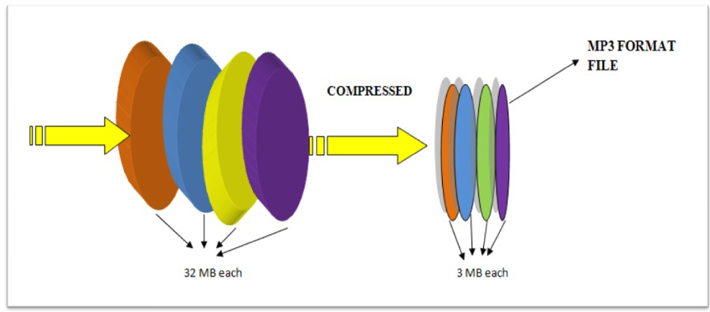
Because of the small file size, a computer can store hundreds or thousands of titles. Therefore, a 30 megabyte audio file recorded in uncompressed form from a CD is reduced to approximately 3 megabytes after “compressing” in MP3. When you download and play the MP3 file, it sounds almost like the original file. If you want, you can download an MP3 file, expand it to its original size, and then burn it to a recordable CD so that you can play it on a CD player.

All it does is toggle between different formats for easy downloading. MP3 compression works with a formula that, among other things, tries to eliminate some noise or frequencies that cannot be heard by the human ear. This method is commonly known as perceptual coding or psychoacoustic modeling. The remaining audio information is recorded spatially efficiently using the MDCT and FFT algorithms.

If we compare CD-quality digital audio, the compression achieved in an MP3 format is about 74%. For example, an MP3 file encoded at a constant bit rate of 128 kbit would produce a file that is approximately 10% the size of the original. For this reason, you can easily transfer a thousand songs in MP3 format to a USB stick, which would not be possible with songs in WAV format. Unfortunately, the benefits of this reduced file size come at a price. The quality of the MP3 title is not as good as the original due to the way the song is compressed.

The quality of an MP3 file depends on the so-called “sampling rate” or “bit rate”. MP3 bit rate The bit rate of an MP3 (or the sampling rate) refers to the amount of audio information (measured in Kb kilobits) that is played back per second. The higher the bit rate, the better the quality. Increasing the bit rate also increases the file size. The higher the quality, the less it can fit on the storage device.

There is a noticeable difference in the sound quality of MP3s with variable bit rates, especially when the file is played on a hi-fi audio system at high volume. If you compress MP3s yourself, it can be helpful to experiment with the bit rate to get better quality or more MP3 playback on your storage device. A good compromise between quality and file size is 192 kps. With this bit rate we get songs with a quality that is very similar to that of CD.

We can only tell the difference to a CD with high-quality headphones or hi-fi systems. On the other hand, if we want better quality, we should opt for FLAC files, ie an audio codec with lossless data compression, ie without loss of quality.