Audio Bitrate: What is the Bitrate of Music Part 3


Free Download Mp4Gain
picture

Audio Bitrate: What is the Bitrate of Music Part 3

Audio Bitrate
Audio Bitrate

How should bitrate be interpreted in an audio file?

Audio Bitrate
Audio Bitrate

That is, the higher the bitrate, the better the audio and video quality, but the larger the encoded file, the lower the bitrate, the situation is reversed. For example: encode audio and video at 500 Kbps. Where bps is bit 1K=1010=1024 b is bit (bit) s is second (second) p is per (per) So encoding with 500kbps means that audio data and video encoded need to use 500K bits per second to Indicates that the bit rate is used to represent the code rate of information transmitted in the baseband transmission system. The bit rate Rb refers to the number of binary bits transmitted per unit of time, and the unit is b/s. For example, the transmission code rate of a computer serial port is up to 115200b/s. The symbol rate or baud rate Rs refers to the number of modulation symbols transmitted per unit of time, that is, the information transmission rate of ternary and more than ternary digital code streams, and the unit is baud/s In M-ary modulation, bit The relationship between the rate Rb and the baud rate Rs is: Rb=Rslog2M In a word, the bit rate indicates the amount of data transmitted per second.

What is the proper bit rate for mp3 music files?
Bitrate is simply the number of bits per second transmitted by the media file and the unit is Kbp/s. The default bit rate of compressed MP3 files is 128 Kbp/s and the sound quality is similar to that of a CD. However, the bit rate of MP3 downloaded from the Internet is usually 192Kbp/s, the sound quality of 192Kbp/s is better than that of 128Kbp/s, and the space occupied by the file is not too large, so which is widely used. . However, if you want to get better sound quality, the bit rate should be higher than 320Kbp/s, and the sound quality can be really comparable to CD quality. However, the price you pay for doing this is that one song will take up about 10M of hard drive space. Generally speaking, the higher the bitrate, the better the sound quality, but it will take up more disk space.

What does “bitrate” mean in audio?
For example, 128kbps MP3 means that the amount of information per second is 128kb converted into bytes is 16KB 320kbps MP3, so the quality does not improve, on the contrary, it may decrease. There are also lossy compression formats such as MP3, wma, ogg .. These are lossy compression formats, which means that there will be loss in the compression process, but each compression algorithm is different, and the quality of the compressed sound is different. For example, when comparing the same bit rate, the sound quality of different formats is different. Hope it can help you.


Free Download Mp4Gain
picture


Mp4Gain Main Window
picture


Mp4Gain Features
picture


Free Download Mp4Gain
picture

Audio Bitrate: What is the Bitrate of Music Part 2

Audio Bitrate: What is the Bitrate of Music Part 2

Audio Bitrate
Audio Bitrate

What do sample rate and bit rate mean in a song?

Audio Bitrate
Audio Bitrate


Bit rate Bit rate refers to the sampling rate at which digital sound is converted from analog to digital format. The higher the sampling rate, the better the quality of the restored sound. The bit rate value is compared with the actual audio: 16 KBPS = phone sound quality 24 KBPS = increase phone sound quality, shortwave transmission, longwave transmission, European standard medium wave transmission 40 KBPS = American standard medium wave transmission 56 KBPS = voice 64 KBPS = voice boost (best bit rate for mobile phone ringtones) Setting value, the best mobile phone mono MP3 player setting value) 112 KBPS = FM radio stereo FM 128 KBPS = tape (best setting value of mobile phone stereo MP3 player, best setting value of low-end MP3 player) 160KBPS= HIFI HIFI (best setting for MP3 players mid- to high-end) 192KBPS=CD (best setting for high-end MP3 players) 256KBPS=Studio Music Studio (for music enthusiasts) The sample rate is when the analog signal is ca is converted to a digital signal The sampling rate is related to the quality of the sound. The higher the sample rate, the better the high-frequency restoration of the sound file. The following is the different quality corresponding to different sampling rates 1.11,025Hz The sound of this sampling rate is similar to the sound quality of AM radio 2.22,050Hz The sound of this sampling rate is similar to the sound quality of FM radio, but less than 3.32 000 Hz This sample The sound of this frequency is higher than the sound quality of FM broadcast 4.44 100 Hz The sound of this sampling frequency reaches the sound quality of the CD audio 5.48000 Hz Sound at this sampling rate reaches DAT audio sound quality 6.96000 Hz Sound at this sampling rate reaches DAT audio sound quality The higher the sampling rate sound quality of the DVD audio, the more disk space the final sound file will take up. Usually we can choose 44.1KHZ sampling rate.

Audio Bitrate: What is the bitrate of music

Audio Bitrate: What is the bitrate of music

Audio Bitrate
Audio Bitrate

Bit rate refers to the amount of binary data per unit of time after converting an analog sound signal to a digital sound signal.

Audio Bitrate
Audio Bitrate

The higher the bitrate, the better the sound quality (under the same encoding format, different formats cannot be compared). audio bitrate. Bit rate is a benchmark of digital music compression efficiency. Bit rate indicates the rate of the number of bits bps (bit per second, bits per second) transmitted in a unit of time (1 second). Kbps (in layman’s terms is 1000 bits per second) is usually used as the unit. The bit rate of digital music on the CD is 1411.2 kbps (i.e. to burn 1 second of CD music, 1411.2 × 1000 data bits are required), the high bit rate of the music file means that the data must be processed in a unit of time (1 second) The amount (BIT) is large, that is, the sound quality of the music file is good. However, when the BITRATE is high, the file size increases, which will occupy a large amount of memory capacity. ranges in this sense, most of them are 32-256 Kbps. Of course, the wider the index, the better, but 320 Kbps is the highest level for the moment.

Why can the difference in bitrate make it sound great (high, medium, low)?

Why can the difference in bitrate make it sound great (high, medium, low)?

Bit Depth vs. Bit Rate

Reply:
Just to make sure this is clear, let’s differentiate

BIT RATE BIT DEPTH

sample rate vs bit depth

as much as

Bit rate

how they relate to audio in the digital domain …

Sampling frequency:

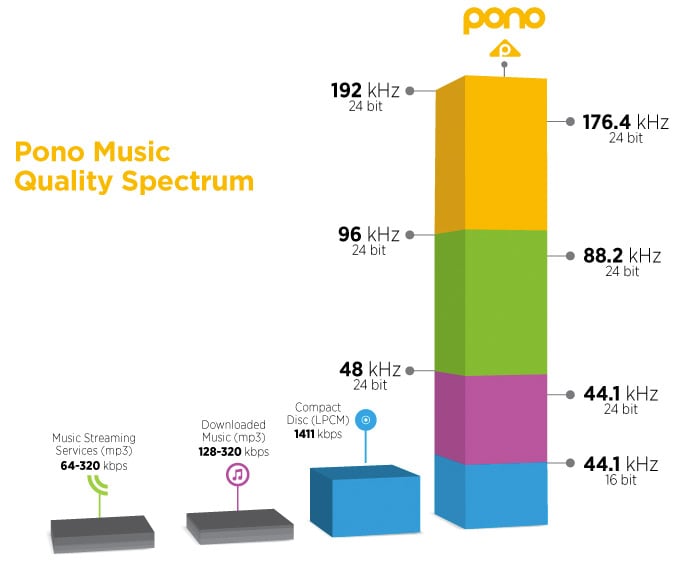
The sample rate is specified as a frequency (samples per second), for example, 44.1 kHz for CD. Other common values ​​are 48, 88.2, 96, 176.4, and 196 kHz, although some formats (such as DSD) have sample rates greater than 2.8 MHz. The sample rate indicates

how often the audio signal is measured

While some people view lower readings as a tiered bar graph, I prefer to view them as a child bitmap. If you take the outline of a horse and simplify it to 20 points so the child can connect, it’s not so much that you end up with steps (using straight and curved lines to connect 20 correctly spaced points can lead to a decent figure), but there won’t be without subtlety. Whereas with 200 (or 2000) points, you could approximate the wavy strands along the horse’s mane.

In audio, a lower sample rate does not make the sound “bad” (eg, fuzzy, fuzzy, or distorted), but rather limits the maximum frequency (pitch) that can be recorded / played back as intended.

Nyquist theorem formula

, The 44.1 kHz sampling rate was chosen for CD because it can record and play back frequencies up to 20 kHz. To record a spoken word (such as a speech, a sermon, or an audiobook), it would be difficult to detect a much lower sample rate, as the human voice has less and less harmonic information above 10 kHz.

Depth bits:

Considering that the sampling frequency determines how

often

audio signal is measured, bit depth indicates

scale accuracy

Since we are talking about digital audio, we describe this measurement scale in bits, where each bit is 0 or 1, and we concatenate a certain number of them to represent the value. When we have 8 bits, there are 256 possible numerical values, including zero. With 16 bits, there are 65,536 possible values. A 24-bit register can use 16,777,216 values.

When we convert analog audio to digital representation (A-to-D) and vice versa (D-to-A), we find interesting mathematical relationships. Each bit (digital) doubles the number of possible values ​​… And doubling the amplitude (approximately 4 times the power) of the sound wave (analog) corresponds to + 6 dB of loudness. Therefore, we can estimate the maximum dynamic range * of a digital recording at 6 dB / bit. Therefore, 8-bit recording has ~ 48 dB of dynamic range, 16-bit recording (such as a CD) has ~ 96 dB, and 24-bit recording has ~ 144 dB.

* For those of you unfamiliar with this term, dynamic range basically describes the difference between the quietest and loudest sound waves that can be recorded / played back. The CD has a difference of approximately 96 dB, which can be used to represent the most subtle pause compared to the incredibly loud burst of the cannon at Tchaikovsky’s climax.

1812 Overture

,

Three quick notes for those interested in delving into the rhythm …

There is a formula for the actual dynamic range of a digital recording that may differ slightly from the previous estimate, but it is a fairly minimal deviation, so an estimate of 6 dB / bit is what you normally see in quotes.
The latest 32-bit floating point representations combine a 24-bit number and an 8-bit exponent to represent many more possible values ​​than 24-bit registers. The dynamic range estimate is getting a bit dubious, but suffice it to say it’s well above 144 dB.
Using a lower bit depth, while you might think in terms of warp plugins with names like “bit-grinder”, doesn’t have to sound “bad” (eg fuzzy, fuzzy, or distorted), but just represents a reduced dynamic range. But since a 16-bit recording with a dynamic range of 96 dB (65,536 numerical values) cannot be represented in 8 bits (48 dB and 256 numerical values), to reduce the bit depth of the already digitized audio, a mathematical correction of the numbers down. (for example, 65535 becomes 255) using a compressor or limiter, which can cause the quietest recording bits to be lost so that the difference between soft and loud parts is <48 dB. Without such scheme, the transformation will cause clipping (numerical values ​​above the maximum),
Bit rate:

In digital audio, the bit rate is a measure of

how many bits are transmitted / processed per second

What is bitrate in a video? | Improve QUALITY

Video Bitrate

Bitrate is, without a doubt, one of the main characteristics that determine the quality of a video.

I’m glad you made it this far to continue learning about video. If you still don’t know about video or editing, remember that you can learn the basics with my video courses (among others).

bit rate

What is video bitrate?

The bitrate or bit rate is the amount of information per second that the video has. It is measured in megabits per second and is directly proportional to its quality.

Generally, we tend to confuse the size of the video with its quality, thinking that 4k size is the video that offers the highest quality. However, this is flatly incorrect.

A high bitrate offers quality: Size VS Quality

Continuing with the topic I was talking about, it is very common for videos with 4k (at least those from professional cameras) have a higher bitrate. This is what makes the video look better quality, mainly, regardless of whether the video is larger or smaller.

How do you notice the difference between a high bitrate and a less high one?

The bitrate tends to show significant differences not simply when recording, but when editing. As I have already told you, with a bitrate of 10-15 mbps / s (at 25 fps) you have more than enough for most jobs. However, and if you are very exquisite, you may want to use a higher bitrate to have more margin for error when correcting and color grading. By the way, if you are interested in learning about color correction and color grading, check out my course.

With a higher bitrate you will notice the following differences than with a lower one:

Sharpness increase.

Superior ability to edit color without the appearance of banding or other unwanted disturbances.
Greater file weight (the higher the bitrate, the larger the file occupies).
However, this is not to say that it will be noticeable for most jobs. If you work in events, I assure you that you will not have a problem.

Bitrate types

If you are one of those who want to know more about everything you study, you can stay and delve deeper with me.

There are two types of bitrate, the constant bitrate and the variable bitrate.

CBR: this is the bitrate that always, whatever is on the plane, the exact same transfer rate will be used. The good news is that a video recorded at a specific size and bitrate will always occupy the same amount. However, it is not the most efficient.
VBR: this is the variable bitrate, and it consists in that a different bitrate will be applied depending on the information that is being recorded. Obviously, if you are recording a super dark black background, you don’t need as much information as if you are recording a scene with a very wide color gamut and a histogram that is padded from blacks to whites. In this case, the bit transfer rate will vary according to the needs of what is being recorded. Of course, we will try to keep an average (the chosen one).
How to know the bitrate of a video, both on Windows and Mac?
I am going to explain to you, both for Windows and Mac, how to find out the bitrate that a video clip has. This is very good because you can see that a video loses quality the more compressed it is. And one of the ways to compress it is by lowering the bitrate.

Windows: right-click on the clip> properties> details tab> video section> total bit rate
Mac: you open the video with the quicktime player> while it is playing press cmd + I> data rate
It is important that you pay attention to whether this data is in kbps or in mbps, because the first is 1000 times less than the second (so that you take it into account in case you want to compare looking from two different computers).

When to compress a video by lowering its bitrate?

There are times when you have already finished editing the video and obviously want to compress it. For this I recommend that you learn about codecs and video formats.

Obviously when you compress the video you will lose quality (the bitrate will decrease). This, a priori, should not be noticed in excess if it is a good compression, since you will no longer edit that video.

Of course I am talking about compressing the final file, never the raw ones used to create the video. You always have to lower the bitrate or compress the final file (in case you want to compress) to avoid losing image quality.

Bit rate factor – how does it contribute to video quality?

Bit rate is a very important factor for good video quality. In the camera settings we now find more numbers next to the resolution. The one behind Mbps interests us more now. This is the information about the bit rate.

Video Bit Rate

This number indicates how much information is processed in the video per second. The higher this rate, the better the quality. Of course, the final file the camera produces will increase with the bit rate.

In this way, you can also calculate how much information is available for each frame, that is, each individual image. Suppose you are shooting with 25p and you have an available bit rate of 100 Mbps. That would mean that each image carries 4 Mbps of information. If you shot 50p at the same bit rate, it would only be 2 Mbps per image! The result would be a loss of image quality.

What Is Video Bitrate

Color depth factor – How does it contribute to video quality?

Bottom line: color depth is the maximum number of different color shades that a camera can display. Of course, the same applies to monitors, printers, televisions, etc.

The colors in general in our image consist of additive combinations of the three basic colors red, blue and green.

The gradations in each tone are again given in bits. Videos consist of pixels, that is, square image points. Each of these pixels carries with it certain color information. The higher the bit rate of the color depth, the more different shades of color each pixel can have.

The total number of color tones is calculated by adding 2 to the power of the number of bits; for an 8-bit camera, for example, that would be 256 colors per base color. Now you have to multiply the other two basic colors again to determine the total number of possible color tones. This means that an 8-bit sensor can display 28 * 28 * 28 colors. That’s over 16 million shades!

Thus, a 10-bit camera can display more than 1 billion colors, a 12-bit camera 68 billion colors, and a 14-bit camera even more than 4 billion color combinations.

Summary:

Many users are not fully aware of how bit rate influences video quality.
People usually see numbers next to the name of the format (Mp4, MOV, AVI) and do not know exactly what it is.

Here we have tried to explain that the higher the bit rate, the more colors.
Perhaps you think that speaking of so many millions of colors, and it is enough, but it is not like that. Actually reality has a practically infinite number of color gamut, so to capture it with realism, it is necessary to have as many colors as possible.

The difference between 16 and 24 bit depth

Analog / Digital Conversion

When you record a guitar into digital audio, the guitar’s analog signal is converted to digital signal for storage on your computer.

Since the analog signal can take an infinite number of values ​​while computers have limited capacity, it is sampled according to two parameters:

Sample Rate: This is the number of times per second when measuring an analog signal (often we are at 44,100 Hz, or 44,100 times per second)
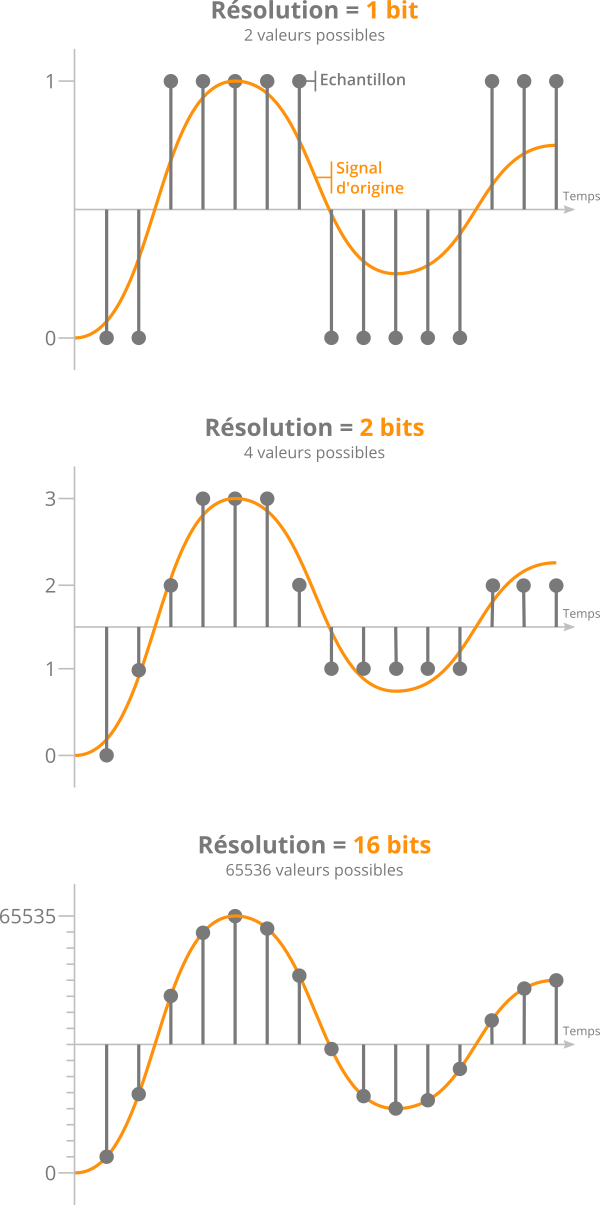
Resolution: defines the number of possible values ​​that the measured value can take and is measured in bits.
If its resolution is 1 bit, only two values ​​are possible: 0 and 1.

For each added resolution bit, the number of possible values ​​is multiplied by two:

2 bits = 4 values
3 bits = 8 values
16 bits = 65,536 values
24 bits = 16,777,216 values!
During recording, therefore, we will measure the incoming signal many times per second and complete this measurement according to the number of possible values.

Hypothetical example: Our resolution means that we can only store values ​​equal to 0 or 1. If the analog input signal is measured at 0.8, it will be rounded to 1. If it is measured at 0.2, then it will be rounded to 0.

Very simple, right?

As a result, the higher the resolution, the closer the recorded signal will be to the original signal. This is what you see in the following image:

bit depth

Effect of different bit resolutions on sampling precision

Also, one might think that 24-bit recording provides better quality than 16-bit. In fact, the resolution seems more accurate and the final signal more realistic.

However, this is not really what it should look like …

A history of noise

Previously, we saw that the values ​​measured from the original signal were rounded off during analog-to-digital conversion.

If we rebuild the signal to listen to it again once the values ​​have been rounded, we will notice that it is slightly different from the initial signal.

Quantization errors when sampling an audio sample

This phenomenon is called quantification error and it is inevitable.

If we isolate this error, we realize that it is actually noise, which is added to the signal.

If you increase the resolution (English bit depth) by adding precision bits, the error will be less, and therefore the noise will be less.

More precisely, for each bit added, the noise level is reduced by approximately -6 decibels (noise level = noise level).

In other words, for every 1 bit of resolution added, the dynamic range over which a signal can be correctly recorded increases by 6 dB.

Therefore, we deduce the following figures:

16 bit = 16 x 6 = 96 dB dynamic range
24 bit = 24 x 6 = 144 dB dynamic range
In the end, the only difference between 16 and 24 bits lies in the noise level. And therefore, in the dynamic range available for recording, “above” the noise level.

Bit depth, an important factor almost unknown

Bit depth, an important factor almost unknown

Very often we see people talking about topics that are important, like bitrate for example. Most of the time without understanding exactly what that means. Sometimes they even do trial and error and for various reasons it may be that the result they obtain is misleading, since they are not considering that modifying the bitrate without looking at the sample rate and the bit depth, is to act blindly and therefore the Results will always be misleading and we should not draw definitive conclusions from them.

We have detected that many people instead of giving a reading that allows them to understand what bitrate, sample rate or bit depth are, prefer to manipulate them without understanding them and, based on the result of one or two songs, they often reach conclusions. wrong about what is the right combination.

Bitrate

It is bitrate It is the amount of information that passes per second, that is, the amount of detail that an audio file can contain in a video. The bigger the bitrate means what will be passing more information per second; therefore the file will be bigger but it will contain more details, which will give it a higher quality. We will put an example to understand it very easily. Images that we have a great draftsman or painter and that we ask him to make a portrait of a person but we tell him that I can only use 5 colors and he cannot mix them.

As a result we will obtain practically a caricature and not a portrait itself. In other words, it will have less quality if we understand quality to be a faithful copy of the original.+

On the other hand, if that same painter asks you to make a portrait, but we stop using the entire color palette, you will be able to make a very realistic portrait, of very high quality, very faithful to the original.

Why did this happen? Because it contains much more information. There are many more shades. That explains exactly how bitrate affects the quality of a video or audio file.

Sample rate

When we record a video, for example, it is as if we were taking a series of photographs and then quickly saw them one after the other and that would give us the illusion of movement. In exactly the same way that cartoons worked in ancient times. Obviously if we only use three drawings per second the quality of the cartoon will be very low because you will see a series of jumps and not an action continues. If instead we use 24 drawings per second we will see a very high quality cartoon where we will seem to see an action continue without any Jump.

The sample rate is the number of samples per second that are taken to form a video or an audio file. Audio on a professional CD uses 44100 samples per second. If we lower that quantity we will notice a loss of quality and if we increase it to more than 44100 samples we will be able to obtain a very high quality HD.

Bit depth

The bit depth determines how many “steps” the curve or wave will contain that will contain our audio or video file. Obviously, the more steps the wave pattern has, it will be more faithful and, on the contrary, if it contains few steps, the wave pattern will be very rough.

So here we are understanding the importance of bit depth that for example in music affects even the dynamics of music. That is, how much can the volume of an instrument rise and fall in different passages. At different bit depth rates we will obtain different levels of decibels