Principle of mp3 and file format analysis. Part 2


Free Download Mp4Gain
picture

Principle of mp3 and file format analysis. Part 2
mp3

MP3 uses perceptual audio coding (Perceptual Audio Coding) this distortion algorithm.
mp3

The frequency range of sound perceived by the human ear is 20 Hz to 20 kHz. MP3 cuts out a lot of redundant signals and irrelevant signals. The encoder transforms the original sound into the frequency domain through a mixed filter bank and uses a psychoacoustic model. to estimate that it may be only The perceived noise level is quantized and converted to Huffman coding to form an MP3 bit stream. The decoder is much simpler, its task is to extract the sound signal from the encoded spectral line components through inverse quantization and inverse transformation. The MP3 encoding and decoding process is shown in Figure 1.
2.4 Modified Discrete Cosine Transform The cosine transform
Modified Discrete CT (MDCT) refers to converting a time-domain data set to frequency-domain data in order to know the changes in the time domain. MDCT is an enhancement of the DCT algorithm. The first fast algorithm is fast Fourier transform (FFT), but FFT has complex operations, MDCT are real operations, easy to program.
When compressing audio data, first divide the original sound data into fixed blocks, and then perform direct MDCT (direct MDCT) to convert the value of each block into MDCT 512 coefficients. The 512 coefficients are restored to the original sound data, and The original before and after sound data is inconsistent because redundant and irrelevant data is removed during the compression process. The FMDCT transformation formula is:
k=0, 1,
.
n0=(N/2+1)/2, X(n) is the time domain value, X(k) is the frequency domain value. If N takes 1024 points, it becomes 512 frequency domain values.
The IMDCT transformation formula is:

n=0, 1, …, N-1
MDCT itself does not compress data, it simply maps the signal to another domain, and quantization compresses the data. When bit allocation is done on the quantized transformed samples, the entire quantized block must be considered the smallest, which is called lossy compression.
3 File Format Analysis
MP3 MP3 file data is made up of multiple frames, and the frame is the smallest unit of the MP3 file. Each frame, in turn, consists of a frame header, additional information, and sound data. The playback time of each frame is 0.026 seconds and its duration varies with the bit rate. Some MP3 files have extra bytes at the end that contain description information for non-audio data.


Free Download Mp4Gain
picture


Mp4Gain Main Window
picture


Mp4Gain Features
picture


Free Download Mp4Gain
picture

Principle of mp3 and file format analysis.

Principle of mp3 and file format analysis.

Principle of mp3 and file format analysis

Principle of mp3 and file format analysis

Principle of mp3 and file format analysis

1. Introduction
With the rapid development of file compression technology, MP3 has become the most popular music format today. High-quality music spreads rapidly around the world with the arrangement of 0 and 1, which shakes people’s hearts. What is MP3? The full name of MP3 is MPEG Audio Layer 3, which is an efficient computer audio coding scheme. It converts audio files into smaller files with an .MP3 extension with a higher compression ratio, basically maintaining the sound quality of the original file. MP3 is part of the ISO/MPEG standard, which describes audio compression using a high-performance perceptual coding scheme. This standard has been continuously updated to meet the pursuit of “high quality and low quality”, and has now formed MPEG Layer 1, Layer 2, Layer 3 three audio encoding and decoding schemes. MPEG Layer 3 compression ratio can reach 1:10 to 1:12, 1M of MP3 file can be played for 1 minute and 1 minute of CD-quality WAV file (44100Hz, 16bit, dual channel, 60 seconds) occupies 10M space, so Calculated, the playing time of a 650M MP3 disc should be more than 10 hours, and the playing time of a CD of the same capacity is about 70 minutes. The advantage of MP3 is that the CD is incomparable.
2 Analysis of the principle of MP3
2.1 audio standard
MPEG MPEG (Moving Picture Experts Group) is a group of dynamic picture experts under ISO, the MPEG standard which makes it widely used in various multimedia. The MPEG standards include audio and video standards, of which the audio standards have been established as MPEG-1, MPEG-2, MPEG-2 AAC, and MPEG-4.
The MPEG-1 and MPEG-2 standards use the same family of audio codecs: Layer 1, 2, 3. A new feature of MPEG-2 is the use of low sample rate expansion to reduce the data stream, and another feature is multichannel expansion, which increases the number of main channels to 5. The MPEG-2 AAC (MPEG-2 Advanced Audio Coding) standard was released by Fraunhofer IIS and AT&T in 1997 to significantly reduce data traffic. The MDCT (Modified Discrete Cosine Transform) algorithm adopted by MPEG-2 AAC has a sampling frequency between 8KHz and 96KHz, the number of channels can be between 1-48.
The three layers of MPEG Audio Layer 1, 2, and 3 use the same filter bank, bitstream structure, and header information, and the sampling frequency is 32KHz, 44.1KHz, or 48KHz. Layer 1 is designed for DCC (Digital Compact Cassette) compressed digital tape, the data rate is 384kbps, Layer 2 has made a compromise between complexity and performance, and the data rate is reduced to 256kbps-192 kbps. Layer 3 is designed for low data traffic from the start, and the data traffic is 128Kbps-112Kbps. Layer 3 adds MDCT transformation to make its frequency resolution 18 times that of layer 2. Layer 3 also uses average information similar to MPEG video. Entropy Encoding reduces redundant information. The vast majority of MP3s use the MPEG-1 standard.
2.2 Purpose of audio compression
The MP3 format began in the mid-1980s, when the Fraunhofer Institute in Erlangen, Germany, dedicated itself to encoding high-quality, low-data-rate sound. Let’s look at an example: you want to sample a song you like that is about 4 minutes long, store it on a disk, sample it in CD-quality WAV format, at a sample rate of 44.1 kHz, that is, receive a value of 44100 per second, stereo, each sampled data is 16 bits (2 bytes), so the space this song occupies is:
44100 x 2 channels x 2 bytes x 60 seconds x 4 minutes = 40.4 MB
If you download this song from the Internet, assuming the transmission speed is 56 kbps, the download time is:
40.4x106x8/56x103x60=96 minutes
Even a 1M broadband network requires more than 5 minutes, it can be seen that audio compression is particularly important to reduce audio data storage space.
2.3 Encoding and decoding
MP3 MP3 audio compression consists of two parts: encoding and decoding. Encoding converts the data in a WAV file into a highly compressed bitstream, and decoding takes the bitstream and reconstructs it into a WAV file.

THE MOST COMMON FORMATS FOR MUSIC AND OTHER AUDIO FILES AND HOW THEY ARE RELATED TO EACH OTHER PART 2

THE MOST COMMON FORMATS FOR MUSIC AND OTHER AUDIO FILES AND HOW THEY ARE RELATED TO EACH OTHER PART 2

mUSIC fORMATS

AUDIO CONVERTER

Music Formats

With an audio converter the situation is even simpler. Programs of this type are specially designed to convert between audio formats quickly, without explicit user intervention. Unlike audio editors, converters, we can say, use batch mode, that is, they allow you to convert MP3 files in a single operation, for example, not a single copy, and make several pieces at once. Depending on the app’s function, there may be dozens or hundreds.

Audiobooks in MP3 format

Once again, the operation of such a package is simple. Just select the source material (usually it can be a completely different file type) and install the final format. Then press a special button to start the process, the output user gets all files of a certain type. Your save usually occurs in the folder set in the app’s default settings, but the save location can of course be changed by yourself. By the way, the same applies to basis functions, which will be used during the transformation. However, any program initially provides the user with a specific set of criteria to use with a specific type of audio file. They can also change.

The beauty of these apps is that they have a complete process that will automate as much as possible and do all the required processes without much time. However, if we use a music or audio editor, comparing them in terms of improving the same sound quality especially cannot be dispersed here.

MUSICAL ARRANGEMENT
This is another type of software, most of which have built-in editors for MP3, WAV, etc. In this sense, they work on a similar principle to audiorekatorami, but their abilities are slightly broader.

Convert to MP3 format

First of all, it deals with the fact that the entire composition can consist of fragments of different types (MP3, MIDI, WAV, OGG, VST-library or DX-tool, etc. D.). After recording all sound tracks, for example mixing and mastering with virtual synthesizers or prescription parties, the resulting files can be saved in the desired format. Mostly it is an MP3 or WAV, or the program’s project file. In some applications, there is also a recording function to disk. Do you want an audio CD? No problem! In addition to the audio editor, it may take a few minutes to perform the necessary operations and get the tracks on the output disc in CDA format.

If we talk about the benefits of this type of application, it is obvious that only a few formats of the same union, and then saving or exporting to some of the most common are its greatest advantages. Also, you need to pay attention to the fact that the very overlay effect or change of any track parameters happens in real time, that is, the result will not necessarily wait; can be heard immediately by turning some knobs, for example. , or another option. Of course, this is only a small part of what packages are capable of.

HOW SHOULD I USE IT?
Finally, we come to the question of choosing the software to use with the MP3 format, or any other sound to record to. As is clear, normal listening to music or audiobooks is enough and a humble player (software or “iron”), or more commonly a DVD player.

Converting files to other formats, so to speak, in a hurry, is the perfect audio converter. However, if the output needs to achieve crystal clear sound quality, or even convert one file type to another, it is indispensable without powerful dedicated software. Of course, this requires ordering more, and without any experience, time to get the same high-quality MP3 files as the first time and you can’t get. However, with at least some in-depth study from audio editors, let alone professional music studios, the results will exceed everyone’s expectations.

THE MOST COMMON FORMATS FOR MUSIC AND OTHER AUDIO FILES, AND HOW THEY ARE RELATED TO EACH OTHER

THE MOST COMMON FORMATS FOR MUSIC AND OTHER AUDIO FILES, AND HOW THEY ARE RELATED TO EACH OTHER

Music Formats


And for the direct competitors of the universal MP3 format, they can count on a lot today.

Music Formats

Due to continuing inconsistencies in home storage of the WAV format, it was eventually discontinued. But for professional studios, he says, the basics of the job. Especially when recording live vocals or instruments. Just convert the recorded material from WAV to MP3 at the final stage.

music format

However, music can be represented in some other popular formats nowadays. For example, many times (especially the Internet) they use these data types like OGG, AIFF, AMR, etc. But the real competitor of MP3 has become the newest and best audio FLAC etc. Of course, for MP3 you can convert all parameters to the maximum, but the playback quality of FLAC represents much higher. Also, it is a single file and the separation occurs directly on the track due to the player or startup software. In other words, listeners see each track individually, but can switch between playback tracks. For the MP3 format, this also seems possible to merge multiple tracks through it, thus creating a single file. But here it is in this version fast switching between tracks will not be possible (normal fast forward should be used, that’s all).

However, not everything is bad. The fact that music or audiobooks are all popular formats today allows them to be easily converted, even keeping the original parameters of the audio material. Based on this, and for sound processing and conversion and audio editors, almost all programs call converters. Any program of this type (MP3 editor or converter) detects the original and final type of audio files, is unambiguous and can produce direct and reverse transformations. Let’s explain this specific example.

WAVE THEORY AUDIO EDITOR FOR MP3 FILES
Many types of software are used in audio processing today. First, look at the narrow application of so-called audio editors. The most prominent representatives of these can be called giants Sony Audio Forge, Sintrillium Cool Editing Pro, which was later acquired by Adobe and renamed Audition, Acoustica Mixcraft, ACID Pro and many others.

mp3 editor

The principle on which they operate is that, for convenience, all MP3 audio programs have a typical waveform, as originally used for WAV files. This method determines the appearance and opportunity enough to edit any type of conventional audio material in WAV format. Other than that, the fact that you can do basic copy, cut, paste, etc. E., it’s just a matter of getting the frequency characteristics and bitrate changes, not to mention using a lot of extra effects that plug into VSTs via DirectX or a generic host bridge studio thing.

In its simplest form, the conversion can be done using the standard file menu, which contains the line “Save As…” (Save As…) or the export function present in MP3 format. Thus, all the process is reduced to just the final selection of the format (MP3 here as an example) and activation of the recording mode. In this case the conversion will be done automatically saving the current configuration parameters and the frequency characteristics. I don’t like the original version? ?Nothing is easier than changing the format to MP3, pre-specified with higher settings. However, one thing needs to be considered here: if the raw material is of such poor quality that special remediation or even professional tools will not work for audio it is necessary to use Repairs here, the intervention of various filters, etc. D. For the layman, it will cause great difficulties.

As is clear, there is absolutely no difference between the audiobooks we are dealing with: MP3, music or just recorded voice or noise. By the way, audiobooks are supposed to have a much lower sound quality by default. This is understandable, since the file has to take up minimal space and, in general, the perceived sound characteristics of speech are not that important. Finally, is this a professional recording of a particular set of albums?

However, if you use some standard operations, even without specific knowledge, it’s fine to achieve good results, especially since there are such built-in templates, based on any application for specific operations. Of course, it will be very difficult for the first time to achieve a perfect sound, but if you study the plan and understand how it works, it will work like clockwork, and as a result, it will take a lot of time.

MP3 finally goes into the public domain

MP3 finally goes into the public domain

mp3

Open Source

Mp3 Public Domain

Perhaps many did not think so, but the mp3 standard so well known to all had problems with the purity of patents. On April 23, 2017, the last patents expired and the format was finally free. Technicolor has officially stopped collecting royalties from manufacturers of software and embedded solutions.

License

Although hardware mp3 decoding is built into all other coffee machines, until recently its use in commercial projects required royalties from the developer: Fraunhofer Society. In 2005 alone, the amount paid was one hundred million euros. Most of the patents became invalid in the European Union in 2012. However, some of them continued to operate in the United States due to peculiarities of local law. What does this news bring to the community? At least now it will be possible to compile Gentoo and listen to music at the same time immediately on the base distribution. Many distributions will be able to provide support for the standard to the main repository. Now, for example, Ubuntu itself requires the installation of non-free components from a separate Ubuntu Restricted Extras meta-package to support mp3.

Bourbon vanilla vs vanillin

How does this standard, which has been the main standard in this area for 24 years, despite many more advanced free options? mp3 is in many ways similar in principle to its cousin in the photo world: JPEG. Due to the imperfection of our hearing aid and the peculiarities of psychoacoustics, it is possible to “discard” those parts of the audio spectrum that do not make a significant contribution to the musical pattern. In particular, in the illustration above, you can see how the amount of information encoded in the high-frequency region increases.

High frequencies are often sacrificed for the sake of preserving detail in the lower region – vocals, most instruments (thanks for the comment, KorDen32). Standard values ​​of cutoff frequencies for the lame encoder:

CBR 096 kbps: 14000 – 15000 Hz;
CBR 112 kbps: 15000-15600 Hz;
CBR 128 kbps: 16000 – 16500 Hz;
CBR 160 kbps: 16500-17500 Hz;
CBR 192 kbps: 18000-18700 Hz;
CBR 224 kbps: 19000-19400 Hz;
CBR 256 kbps: 19500-19700 Hz;
CBR 320 kbps: 20,000 – 21,000 Hz.

The method can be compared to the creativity of flavor chemists. You’ve probably noticed that strawberry gum is very conventionally strawberry, and there isn’t enough lemon in synthetic lemon tea. Any natural flavoring composition contains dozens and even hundreds of chemical compounds. But the main core generally creates only a very limited amount. So, for example, vanillin defines most of the aroma of natural vanilla, and if you don’t appreciate the subtle nuances too much, the remaining components can be neglected. mp3 uses the same principles, removing insignificant portions of the spectrum. Most people cannot tell the lossless formats by ear from the normally encoded 320kbps mp3s, which saves a lot of space when storing your media library.

Audio Coding: Secrets Revealed Part 2

Audio Coding: Secrets Revealed Part 2

Bit Depth

Bit depth

audio encoding

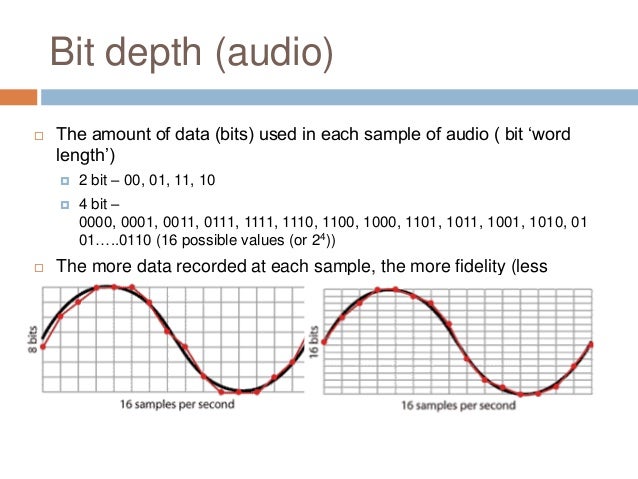
Along with the sample rate, there is the bit depth or depth of the sound. Bit depth is the number of bits of digital information to encode each sample. Simply put, the bit depth determines the “accuracy” of the input signal measurement. The larger the digit capacity, the smaller the error will be for each individual conversion from the magnitude of an electrical signal to a number and vice versa. With the smallest possible bit depth, there are only two options for measuring sound accuracy: 0 for full silence and 1 for full sound. If the bit width is 8 (16), then by measuring the input signal, 2 8 = 256 (2 16 = 65,536) different values ​​can be obtained.

Bit depth is fixed in the PCM codec, but for codecs that assume compression (eg MP3 and AAC), this parameter is calculated during encoding and may vary from sample to sample.

Bitrate
Bit rate is an indicator of the amount of information that one second of sound encodes. The higher it is, the less distortion and the closer the encoded composition is to the original. For linear PCM, the bit rate is very easy to calculate.

bitrate = sample rate × bit depth × channels

For systems like the Epiphan Pearl Mini that encode 16-bit (16-bit) linear PCM, this calculation can be used to determine how much additional bandwidth the PCM audio might require. For example, for stereo (two channels), the signal is digitized at 44.1 kHz at 16 bits and the bit rate is calculated as follows:

44.1 kHz × 16 bit × 2 = 1411.2 kbps

Meanwhile, audio compression algorithms like AAC and MP3 have fewer bits to transmit the signal (that’s their purpose), so they use low bit rates. Typically, the values ​​are in the range of 96 kbps to 320 kbps. For these codecs, the higher the bit rate you choose, the more audio bits you get per sample and the better the sound quality.

Sample rate, bit depth and bit rates in real life.
Audio CDs, one of the most popular early inventions for the general public for storing digital audio, used 44.1 kHz (20 Hz – 20 kHz, human ear range) and 16 bits. These values ​​were chosen to be able to save as much audio as possible to disk with good sound quality.

When video was added to audio and DVD and then Blu-ray discs came along, a new standard was created. DVD and Blu-Ray recordings typically use 48 kHz (stereo) or 96 kHz (5.1 surround) linear PCM format and 24-bit depth. These settings have been selected as ideal for keeping audio in sync with video while obtaining the best possible quality using the additional available disk space.

Our recommendations
CDs, DVDs, and Blu-Ray discs all have one goal: to provide the consumer with a high-quality playback engine. The goal of all developments was to provide high-quality audio and video without worrying about file size (if only it could fit on disk). Such quality could be provided by linear PCM.

In contrast, mobile media and streaming media have a completely different goal: to use the lowest bit rate, as low as possible, while still being sufficient to maintain acceptable quality for the listener. Compression algorithms are best suited for this task. You can follow the same principles for your records.

When recording audio from a video …
In case the record is used for the next on-ra-ki-bot, choose the 48 kHz PCM codec and the maximum bit depth (16 or 24) to provide the best audio quality. We recommend these parameters for Epiphan Pearl Mini.

When streaming audio from video …
With streaming or recording for later translation, good sound can be obtained with less bandwidth, using MP3 or AAC codecs with a frequency of 44.1 kHz and a bit rate of 128 kbit / s or higher. These parameters ensure that the sound is good enough without affecting the quality of the transmission.

Audio encoding: secrets revealed

Audio encoding: secrets revealed

Audio Encoding

Audio settings for video capture and transmission.

audio and video encoding

As people directly related to the AV sphere, we constantly talk about audio coding and audio codecs, but what is it? An audio codec is essentially a device or algorithm that can encode and decode a digital audio signal.

In practice, the audio waves that travel through the air are continuous analog signals. The signals are converted to digital form by a device called an analog-to-digital converter (ADC), and the reverse converter is called a digital-to-analog converter (DAC). The codec lies between these two functions and it is he who allows you to adjust some important parameters for the successful capture, recording and transmission of an audio signal: the codec algorithm, the sampling frequency, the bit width and the speed of the audio signal. data.

The three most popular audio codecs are Pulse-Code Modulation (PCM), MP3, and Advanced Audio Coding (AAC). The choice of codec determines the compression rate and the recording quality. PCM is a codec used by computers, CDs, digital phones, and sometimes SACD. The PCM signal source is sampled at regular intervals, and each sample is the digital amplitude of the analog signal. PCM is the simplest option for digitizing an analog signal.

With the correct parameters, this digitized signal can be completely converted back to analog without any loss. But this codec, which provides an almost complete identity with the original audio, is unfortunately not very cheap, which translates into very large file sizes, and such files are not suitable for streaming. We recommend using PCM to record digital images for your sources or when doing audio post-processing.

Fortunately, we always have the option of choosing a different codec that can compress digital data (rather than PCM) based on some helpful observations on the behavior of sound waves. But in this case, you have to make a compromise: all alternative algorithms are associated with “losses”, since it is impossible to completely restore the original signal, but nevertheless the result is still so good that most users will not be able to to catch the difference.

MP3 is an audio encoding format that uses a digital data compression algorithm that allows you to save the audio signal in smaller files. The MP3 codec is the most used by users to record and store music files. We recommend using MP3 to stream audio content as it requires less network bandwidth.

AAC is a newer audio encoding algorithm that is the successor to MP3. AAC has become the standard for MPEG-2 and MPEG-4 formats. In fact, this is also a digital data compression codec, but with less quality loss than MP3 when encoded with the same bit rate. We recommend using this codec for online streaming.

Sampling frequency (kHz, kHz)
Sample rate (or sample rate): the frequency with which the signal is digitized, stored, processed, or converted from analog to digital. Time sampling means that the signal is represented by several of its samples (samples) taken at regular intervals.

Measured in hertz (Hz, Hz) or kilohertz (kHz, kHz,) 1 kHz equals 1000 Hz. For example, 44,100 samples per second can be labeled 44,100 Hz or 44.1 kHz. The selected sample rate will determine the maximum playback frequency and, as follows from Kotelnikov’s theorem, to fully restore the original signal, the sample rate must be twice the highest frequency in the signal spectrum.

As you know, the human ear is capable of picking up frequencies between 20 Hz and 20 kHz. Given these parameters and the values ​​shown in the table below, you can understand why 44.1 kHz was chosen as the sampling frequency for CD and is still considered a very good frequency for recording.

There are several reasons for choosing a higher sample rate, although it may seem like a waste of time and effort to reproduce sound outside the range of human hearing. At the same time, 44.1 – 48 kHz will suffice for the average listener for a high-quality solution to most problems.

Audio encoding and processing

Audio encoding and processing

Encoding

Sound information.

ENCODING

Sound is a wave that travels through air, water, or other medium with a continuously changing intensity and frequency.

A person perceives sound waves (air vibrations) with the help of hearing in the form of sound of different volume and pitch. The higher the intensity of the sound wave, the louder the sound, the higher the frequency of the wave, the higher the pitch of the sound

The human ear perceives sound at a frequency of 20 vibrations per second (low sound) to 20,000 vibrations per second (high sound).

A person can perceive sound in a wide range of intensities, in which the maximum intensity is 10 14 times greater than the minimum (one hundred thousand billion times). A special unit “decibel” (dbl) is used to measure the volume of sound (Table 5.1). Decreasing or increasing the volume of the sound by 10 dB corresponds to a decrease or increase in the intensity of the sound by 10 times.

Table 5.1. Sound volume
Sonar Volume in decibels
Lower limit of human ear sensitivity 0
Whisper of Leaves 10
Conversation 60
Horn 90
Jet engine 120
Pain threshold 140
Sound time sampling. For a computer to process sound, a continuous audio signal must be converted to a discrete digital form using time sampling. A continuous sound wave is divided into separate small time sections, for each section a certain value of sound intensity is set.

Therefore, the continuous dependence of the loudness of the sound at time A (t) is replaced by a discrete sequence of loudness levels.

Sampling frequency.

A microphone connected to the sound card is used to record analog sound and convert it to digital format. The quality of the digital sound obtained depends on the number of measurements of the sound volume level per unit time, that is, the sampling frequency. The more measurements that are made in 1 second (the higher the sampling frequency), the more accurately the “ladder” of the digital audio signal repeats the curve of the dialogue signal.

The audio sample rate is the number of measurements of the volume of a sound in one second.

The audio sample rate can range from 8000 to 48000 sound volume measurements per second.

Audio encoding depth. Each “step” is assigned a specific value for the volume level of the sound. Loudness levels of sound can be viewed as a set of possible states N, for which a certain amount of information is needed to encode, which is called audio encoding depth.

Audio encoding depth is the amount of information required to encode the discrete volume levels of digital audio.

If the known encoding depth, the number of digital audio volume levels can be calculated using the formula N = 2 I. Let the sound encoding depth be 16 bit, then the number of sound volume levels is:

N = 2 I = 2 16 = 65 536.

During the encoding process, each sound volume level is assigned its own 16-bit binary code, the smallest sound level will correspond to the code 0000000000000000 and the highest, 1111111111111111.

The quality of digitized sound. The higher the sound sampling frequency and depth, the better the digitized sound will sound. The lowest quality of digitized sound, corresponding to the quality of telephone communication, is obtained at a sampling rate of 8000 times per second, a sampling rate of 8 bits, and by recording an audio track (“mono” mode). The highest quality digitized audio, corresponding to the quality of an audio CD, is achieved with a sampling rate of 48,000 times per second, a sampling rate of 16 bits, and the recording of two audio tracks (“stereo” mode ).

It should be remembered that the higher the quality of the digital sound, the greater the volume of information in the audio file. It is possible to estimate the information volume of a digital stereo sound file with a duration of 1 second with an average sound quality (16 bits, 24,000 measurements per second). To do this, the encoding depth must be multiplied by the number of measurements in 1 second and multiplied by 2 (stereo sound):

16 bits × 24,000 × 2 = 768,000 bits = 96,000 bytes = 93.75 KB.

Audio Coding: Secrets Revealed – Part 2

Audio Coding: Secrets Revealed – Part 2

AUDIO ENCODING

Audio settings for video capture and transmission.

AUDIO ENCODING

Sampling frequency (kHz, kHz)
Sample rate (or sample rate): the frequency with which the signal is digitized, stored, processed, or converted from analog to digital. Time sampling means that the signal is represented by several of its samples (samples) taken at regular intervals.

Measured in hertz (Hz, Hz) or kilohertz (kHz, kHz,) 1 kHz equals 1000 Hz. For example, 44,100 samples per second can be labeled 44,100 Hz or 44.1 kHz. The selected sample rate will determine the maximum playback frequency and, as follows from Kotelnikov’s theorem, to fully restore the original signal, the sample rate must be twice the highest frequency in the signal spectrum.

As you know, the human ear is capable of picking up frequencies between 20 Hz and 20 kHz. Given these parameters and the values ​​shown in the table below, you can understand why 44.1 kHz was chosen as the sampling frequency for CD and is still considered a very good frequency for recording.

There are several reasons for choosing a higher sample rate, although it may seem like a waste of time and effort to reproduce sound outside the range of the human ear. At the same time, 44.1 – 48 kHz will suffice for the average listener for a high-quality solution to most problems.

Bit depth
Along with the sample rate, there is the bit depth or depth of sound. Bit depth is the number of bits of digital information to encode each sample. Simply put, the bit depth determines the “accuracy” of the input signal measurement. The larger the digit capacity, the smaller the error for each individual conversion from the magnitude of an electrical signal to a number and vice versa. With the smallest possible bit depth, there are only two options for measuring sound accuracy: 0 for full silence and 1 for full sound. If the bit width is 8 (16), then by measuring the input signal, 2 8 = 256 (2 16 = 65,536) different values ​​can be obtained.

Bit depth is fixed in the PCM codec, but for codecs that assume compression (eg MP3 and AAC), this parameter is calculated during encoding and may vary from sample to sample.

Bitrate
Bit rate is an indicator of the amount of information that one second of sound encodes. The higher it is, the less distortion and the closer the encoded composition is to the original. For linear PCM, the bit rate is very easy to calculate.

bitrate = sample rate × bit depth × channels

For systems such as the Epiphan Pearl Mini that encode 16-bit (16-bit) linear PCM, this calculation can be used to determine how much additional bandwidth the PCM audio might require. For example, for stereo (two channels), the signal is digitized at 44.1 kHz at 16 bits and the bit rate is calculated as follows:

44.1 kHz × 16 bit × 2 = 1411.2 kbps

Meanwhile, audio compression algorithms like AAC and MP3 have fewer bits to transmit the signal (that’s their purpose), so they use low bit rates. Typically, the values ​​are in the range of 96 kbps to 320 kbps. For these codecs, the higher the bit rate you choose, the more audio bits you get per sample and the better the sound quality.

Sample rate, bit depth and bit rates in real life.
Audio CDs, one of the most popular early inventions for the general public for storing digital audio, used 44.1 kHz (20 Hz – 20 kHz, human ear range) and 16 bits. These values ​​were chosen to be able to save as much audio as possible to disk with good sound quality.

When video was added to audio and DVD and then Blu-ray discs came along, a new standard was created. DVD and Blu-Ray recordings typically use 48 kHz (stereo) or 96 kHz (5.1 surround) linear PCM format and 24-bit depth. These settings have been chosen as ideal for keeping the audio in sync with the video while obtaining the best possible quality using additional available disk space.

Our recommendations
CDs, DVDs, and Blu-Ray discs all have one goal: to provide the consumer with a high-quality playback engine. The goal of all developments was to provide high-quality audio and video without worrying about file size (if only it could fit on disk). Such quality could be provided by linear PCM.

By contrast, mobile media and streaming media have a completely different goal: to use the lowest bit rate possible, while still being sufficient to maintain acceptable quality for the listener.

Audio encoding: secrets revealed

Audio encoding: secrets revealed

audio encoding

Audio settings for video capture and transmission.

AUDIO ENCODING

As people directly related to the AV sphere, we constantly talk about audio coding and audio codecs, but what is it? An audio codec is essentially a device or algorithm that can encode and decode a digital audio signal.

In practice, the audio waves that travel through the air are continuous analog signals. The signals are converted to digital form by a device called an analog-to-digital converter (ADC), and the reverse converter is called a digital-to-analog converter (DAC). The codec lies between these two functions and it is he who allows you to adjust some important parameters for the successful capture, recording and transmission of an audio signal: the codec algorithm, the sampling frequency, the bit width and the speed of the audio signal. data.

The three most popular audio codecs are Pulse-Code Modulation (PCM), MP3, and Advanced Audio Coding (AAC). The choice of codec determines the compression rate and the recording quality. PCM is a codec used by computers, CDs, digital phones, and sometimes SACD. The PCM signal source is sampled at regular intervals, and each sample is the digital amplitude of the analog signal. PCM is the simplest option for digitizing an analog signal.

With the correct parameters, this digitized signal can be completely converted back to analog without any loss. But this codec, which provides an almost complete identity with the original audio, is unfortunately not very cheap, which results in very large file sizes, and such files are not suitable for streaming. We recommend using PCM to record digital images for your sources or when doing audio post-processing.

Fortunately, we always have the option of choosing a different codec that can compress digital data (rather than PCM) based on some helpful observations on the behavior of sound waves. But in this case, you have to make a compromise: all alternative algorithms are associated with “losses”, since it is impossible to completely restore the original signal, but nevertheless the result is still so good that most users will not be able to to catch the difference.

MP3 is an audio encoding format that uses a digital data compression algorithm that allows you to save the audio signal in smaller files. The MP3 codec is the most used by users to record and store music files. We recommend using MP3 to stream audio content as it requires less network bandwidth.

AAC is a newer audio encoding algorithm that is the successor to MP3. AAC has become the standard for the MPEG-2 and MPEG-4 formats. In fact, this is also a digital data compression codec, but with less quality loss than MP3 when encoded with the same bit rate. We recommend using this codec for online streaming.