Audio compression formats


Free Download Mp4Gain
picture

Audio compression formats
Audio Compression Formats

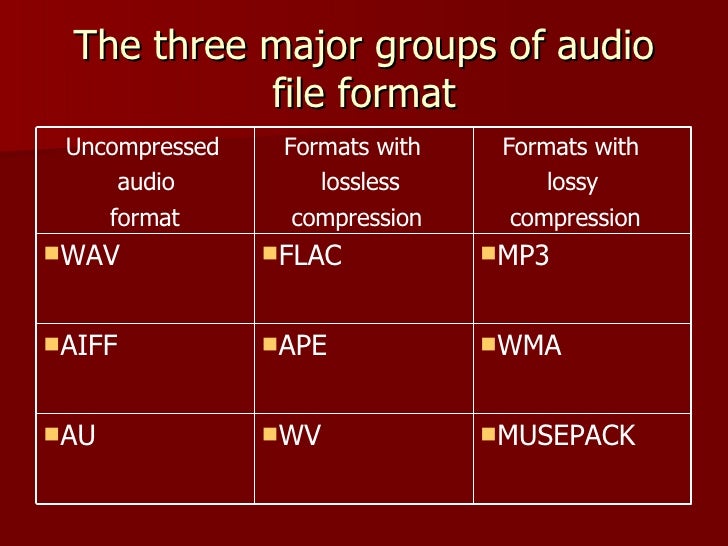
Now there are many audio compression formats that were originally developed for a computer, but later migrated to home appliances. Some of them are outdated and practically unused, some have appeared recently and have not had time to occupy their niche yet. Here I will focus only on the lossy compression formats that allow you to achieve the highest degree of compression of the audio data. What does “lossy compression” mean? Only after encoding from a .wav file to a compressed format, and then re-encoding from a compressed format to a .wav file, the original file and the final file will be different. Maybe not for the better.

audio compression formats

The compressed audio format means that there is practically no change in sound quality, despite the decrease in file size by several times. How do you manage to achieve such a result? The science of psychoacoustics answers this. The human brain is designed in such a way that we do not notice the whisper of books in the background of a conversation, although on a computer, with close listening, we can track this sound. So it turns out that it looks like it is, but it looks like it isn’t …

The combination of conventional data compression methods and the knowledge of what information is perceived by our brain and what is not, allows you to achieve a music compression ratio of up to 10 times with an acceptable sound quality. Below I have provided a brief overview of the most common and well-known music file compression formats that could be used to create a home music collection.

MP3
MPEG 1 Layer III (less often MPEG 2 Layer III), also sometimes called by people as incompetent MPEG 3 (this format does not exist), has been for many years the only association with the phrase “computer music” for many users. Developed in the late 1980s, the format, which allowed music to be compressed up to 10 times without a catastrophic loss of quality, quickly took root in home computers.

The optimal compression bit rate is approximately 192 Kb / s. Although everyone’s ears are different: someone distinguishes distortions better, someone worse. A decent minimum is 128 Kb / s. It is possible to use a variable bit rate. That is, at the moment when the range of sound frequencies is small, the bit rate decreases, and when many things sound at the same time, then, on the contrary, it increases. A constant bit rate greater than 320 Kb / s is often excessive and causes a loss of space. Also, the MP3 file includes a specific area header Id3 tag. Contains basic information about the file. There are 2 different versions of this tag. The second, consequently, is more extensive, but nothing revolutionary has been added. The sound quality of an MP3 file can vary greatly depending on the selected encoder and player.

MPEGplus / Musepack (MP + / MPC / MPP)
This encoder is similar in principle to MPEG Layer II (MP2), but uses a more advanced algorithm. Unlike most modern codecs, the goal of the creators of Musepack was not at all to achieve the highest possible quality at low bit rates. The format is best displayed at medium and high bit rates (typical file bit rate is usually in the 160-180 Kb / s range). A superb psychoacoustic model that uses VBR encoding for excellent sound quality. As a result, the codec performs better than most of its competitors at similar bit rates. The quality of the files obtained when compressed in MPC significantly exceeds the quality of similar MP3 files. One of the serious shortcomings of the current version of Musepack is the limitation of the file format: 44 kHz, 16 bit, stereo, which makes it inapplicable, for example, to compress audio tracks for DVD movies. If MP3 compatibility is not too important to you and you want the highest quality from the final file, choosing Musepack may be the ideal solution. Using this format is a real alternative to using lossless compression to encode music from CDs for those who are already disappointed with the possibilities of the MP3 format. and it is desirable that the quality of the final file is as high as possible, choosing Musepack may be the ideal solution. Using this format is a real alternative to using lossless compression to encode music from CDs for those who are already disappointed with the possibilities of the MP3 format. and it is desirable that the quality of the final file is as high as possible, choosing Musepack may be the ideal solution.


Free Download Mp4Gain
picture


Mp4Gain Main Window
picture


Mp4Gain Features
picture


Free Download Mp4Gain
picture

Audio encoding and processing

Audio encoding and processing

Audio processing

Sound information. Sound is a wave that travels through air, water, or other medium with a continuously changing intensity and frequency.

Audio processing

A person perceives sound waves (air vibrations) with the help of hearing in the form of sound of different volume and pitch. The higher the intensity of the sound wave, the louder the sound, the higher the frequency of the wave, the higher the pitch of the sound

The human ear perceives sound at a frequency of 20 vibrations per second (low sound) to 20,000 vibrations per second (high sound).

A person can perceive sound in a wide range of intensities, in which the maximum intensity is 10 14 times greater than the minimum (one hundred thousand billion times). To measure the volume of sound, a special unit “decibel” (dbl) is used (Table 5.1). Decreasing or increasing the sound volume by 10 dB corresponds to a decrease or increase in sound intensity by 10 times.

Table 5.1. Sound volume
Sound Volume in decibels
Lower limit of human ear sensitivity 0
Leaf whisper ten
Conversation 60
Horn 90
Jet engine 120
Pain threshold 140
Sound time sampling. In order for a computer to process sound, a continuous audio signal must be converted to a discrete digital form using time sampling. A continuous sound wave is divided into separate small time sections, for each section a certain value of sound intensity is set.

Therefore, the continuous dependence of the loudness of the sound at time A (t) is replaced by a discrete sequence of loudness levels. On the graph, this appears to replace a smooth curve with a sequence of “steps”

Sampling frequency. A microphone connected to the sound card is used to record analog sound and convert it to digital format. The quality of the digital sound obtained depends on the number of measurements of the sound volume level per unit of time, that is, the sampling frequency. The more measurements that are made in 1 second (the higher the sampling frequency), the more accurately the “ladder” of the digital audio signal repeats the curve of the dialogue signal.

Audio sample rate is the number of audio volume measurements in one second.

The audio sample rate can vary between 8000 and 48000 sound volume measurements per second.

Audio encoding depth. Each “step” is assigned a specific value for the sound volume level. Loudness levels of sound can be viewed as a set of possible states N, for which a certain amount of information I is required, which is called audio coding depth.

Audio encoding depth is the amount of information required to encode the discrete volume levels of digital audio.

If the known encoding depth, the number of digital audio volume levels can be calculated using the formula N = 2 I. Let the audio encoding depth be 16 bit, then the number of sound volume levels is:

N = 2 I = 2 16 = 65 536.

During the encoding process, each sound volume level is assigned its own 16-bit binary code, the lowest sound level will correspond to the code 0000000000000000 and the highest – 1111111111111111.

The quality of digitized sound. The higher the sampling frequency and depth of the sound, the better the sound of the digitized sound. The lowest quality of digitized sound, corresponding to the quality of telephone communication, is obtained at a sampling rate of 8000 times per second, a sampling rate of 8 bits, and by recording an audio track (“mono” mode). The highest quality of digitized sound, corresponding to the quality of an audio CD, is achieved with a sampling rate of 48,000 times per second, a sampling rate of 16 bits and the recording of two audio tracks (stereo mode) .

It should be remembered that the higher the quality of the digital sound, the greater the volume of information in the audio file. It is possible to estimate the volume of information of a digital stereo sound file with a duration of 1 second with an average sound quality (16 bits, 24,000 measurements per second). To do this, the encoding depth must be multiplied by the number of measurements in 1 second and multiplied by 2 (stereo sound):

16 bits × 24,000 × 2 = 768,000 bits = 96,000 bytes = 93.75 KB.

Sound editors. Sound editors allow you not only to record and play sound, but also to edit it.

Audio encoding: secrets revealed

Audio encoding: secrets revealed

audio encoding

Audio settings for video capture and transmission.
As people directly connected to the AV sphere, we constantly talk about audio coding and audio codecs, but what is it? An audio codec is essentially a device or algorithm that can encode and decode a digital audio signal.

Audio Encoding

In practice, the audio waves that are transmitted over the air are continuous analog signals. Signals are converted to digital format by a device called an analog-to-digital converter (ADC), and the reverse conversion device is a digital-to-analog converter (DAC). The codec is between these two functions and it is he who allows you to adjust some important parameters for the successful capture, recording and transmission of an audio signal: codec algorithm, sample rate, bit depth and data rate.

The three most popular audio codecs are Pulse-Code Modulation (PCM), MP3, and Advanced Audio Coding (AAC). The choice of codec determines the compression rate and the recording quality. PCM is a codec used by computers, CDs, digital phones, and sometimes SACD. The source of the PCM signal is sampled at regular intervals and each sample is the digital amplitude of the analog signal. PCM is the simplest option for digitizing an analog signal.

With the correct parameters, this digitized signal can be completely converted back to analog without any loss. Unfortunately, this codec, which provides almost complete identity with the original audio, is not very cheap, which results in large files, and these files are not suitable for streaming. We recommend using PCM to record digital images for your sources or when doing audio post-processing.

Fortunately, we always have the option of choosing a different codec that can compress digital data (rather than PCM) based on some helpful observations on the behavior of sound waves. But in this case, you have to make a compromise: all alternative algorithms are associated with “losses”, since it is impossible to completely restore the original signal, but nevertheless the result is so good that most users will not be able to notice the difference.

MP3 is an audio encoding format that uses a digital data compression algorithm that allows you to save the audio signal in smaller files. The MP3 codec is the most used by users to record and store music files. We recommend using MP3 to stream audio content as it requires less network bandwidth.

AAC is a newer audio encoding algorithm that is the successor to MP3. AAC has become the standard for MPEG-2 and MPEG-4 formats. In fact, this is also a digital data compression codec, but with less quality loss than MP3 when encoded with the same bit rate. We recommend using this codec for online streaming.

Sampling frequency (kHz, kHz)
Sample rate (or sample rate): the frequency with which the signal is digitized, stored, processed or converted from analog to digital. Time sampling means that the signal is represented by a number of its samples (samples) taken at regular intervals.

Measured in hertz (Hz, Hz) or kilohertz (kHz, kHz,) 1 kHz equals 1000 Hz. For example, 44,100 samples per second can be labeled 44,100 Hz or 44.1 kHz. The selected sample rate will determine the maximum playback frequency and, as follows from Kotelnikov’s theorem, to fully restore the original signal, the sample rate must be twice the highest frequency in the signal spectrum.

As you know, the human ear is capable of picking up frequencies between 20 Hz and 20 kHz. Given these parameters and the values ​​shown in the table below, you can understand why 44.1 kHz was chosen as the sampling frequency for CD and is still considered a very good frequency for recording.

There are several reasons for choosing a higher sample rate, although it may seem like a waste of time and effort to reproduce sound outside the range of human hearing. At the same time, 44.1 – 48 kHz will suffice for the average listener for a high-quality solution to most problems.

Bit depth
Along with the sample rate, there is the bit depth or depth of the sound. Bit depth is the number of bits of digital information to encode each sample. Simply put, bit depth determines the “accuracy” of the input signal measurement. The larger the digit capacity, the smaller the error for each individual conversion from the magnitude of an electrical signal to a number and vice versa.