What are the most popular audio formats?


Free Download Mp4Gain
picture

What are the most popular audio formats?

There are dozens of audio files that we can use to convert a song, but the really useful ones can be counted on the fingers of one hand.

losseless

When we think of an audio file, most of us immediately think of MP3. Without a doubt, it’s one of the most popular audio formats, but it’s not the only one. Let’s see what are the most popular audio formats and what are the differences in use. And we have to choose that according to our needs.

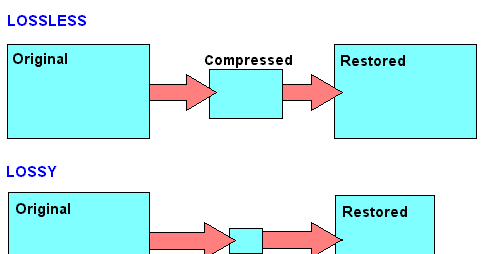
There are different categories of audio files. First we defined the formats as uncompressed. The word itself defines this section of the file. In this case, the recorded sound waves are actually converted into a digital format without further processing. What does it all mean? In files that are very difficult to save and take up a lot of space. In order to simplify the storage of audio files and to reduce the load, formats with lossy data compression were created. These sacrifice some quality in favor of the small storage space required.
losseless

To fix this error, which represents the loss of quality in favor of file size, compressed audio formats were created without loss of data. Obviously, they’re not small files like lossy compression, but they’re still smaller than uncompressed. However, it must be said that these types of formats are only widespread in certain cases.

PCM

PCM is the most common and widely used audio format on CDs and DVDs that we have at home. It is the faithful conversion of analog audio into a digital file. It is no coincidence that it is an uncompressed audio format. Remember that analog sounds exist as waveforms. In order to convert a sound wave into digital bits, the sound must be sampled and recorded at certain intervals.

WAV

WAV stands for Waveform Audio File Format (previously it was also called Audio for Windows, now it is no longer). It is a standard developed by Microsoft and IBM in 1991. WAV files can contain compressed and uncompressed audio formats. In most cases, however, they are used for uncompressed people. Although it was developed for Windows, it can also be safely opened on a Mac.

MP3

This is without a doubt the most popular audio format. It was released in 1993 and over the years its success has increased thanks to the combination with the pieces of music. Why are they used so often? Quite simply, these are lossy compressed files, and the generated files are so small that users can create a music library without taking up too much space. And the quality? It is much lower than other formats, but the human ear doesn’t always manage to notice the difference significantly. MP3 is also a universal file. It can be found on smartphones, computers, smart TVs, tablets and many other electronic devices.

WMA

WMA stands for Windows Media Audio. It was first published in 1999 and has gone through several developments since then, always keeping the same name. As you can easily guess, it is an audio format created by Microsoft. It was developed to replace MP3s. Unfortunately, there are very few platforms that support this, so the MP3 mastery has never been compromised.

OGG

OGG is not a real compression audio format. We can define it as a multi-purpose multimedia container. It can contain all types of audio formats, but is often used to contain Vorbis files. It is one of the best performing files to reduce size without losing quality.

FLAC

FLAC stands for Free Codec Lossless Audio. It is a lossless, compressed format that was created in 2001. A FLAC file can be compressed to 60% of its original size without minimal loss of sound quality. It is also an open source format. Because of this, it is compatible with most programs and devices. It is the best quality alternative to MP3.


Free Download Mp4Gain
picture


Mp4Gain Main Window
picture


Mp4Gain Features
picture


Free Download Mp4Gain
picture

Digital Music: A Quick Guide to Having the Best Lossless Files

Digital Music: A Quick Guide to Having the Best Lossless Files

Digital Music

Surely changing our music from one side to the other, from an analog format to a digital one or even music already stored in digital format on a compact disc towards one for use on mobile devices, would result in a loss of sound quality that would exceed convenience and comfort.

This has been the main vision of people who care about sound quality, since the concept of digital music files was born. A reference generated by the common use of highly compressed lossy formats such as MP3.

wHowever, it is an opinion that simply “cannot take any more water.” Yes, popular formats like MP3 and AAC sacrifice some quality to keep file sizes small, but the emergence of lossless digital audio formats that are capable of preserving every piece of information from a CD recording means that a ripped file It may sound indistinguishable from the original.

You may still be wondering why you should spend precious time ripping up your CD collection. It’s all about convenience: a lossless digital music collection saves shelf space, is easy to move and to back up; for larger collections, it also makes locating individual songs and albums much easier and faster. You can also access a digital music library from multiple sources simultaneously, for example, from multiple network music players located in different rooms in your home.

Additionally, thanks to higher quality file acquisitions with popular streaming and download sites like B&W Society of Sound, higher quality music files can now be accessed as part of a subscription-based model without taking up space valuable on shelves – or even the attic – with physical means.

On the hardware side, storage devices like NAS and external hard drives offer huge amounts of space at ever lower prices. And with increasingly better and less expensive, widely available high-quality DACs, computers now offer excellent reproduction and can be easily connected to your existing hi-fi system, either wired or wireless.

When streaming or ripping discs, the file format option may seem complicated by too many options. This is what we think of the main formats that can be the salvation of true audio enthusiasts:

FLAC

Free Lossless Audio Codec is a popular choice for many audiophiles. Like MP3 and AAC, FLAC is compressed to keep file sizes relatively small, but unlike those formats, it is lossless and therefore – in theory – indistinguishable from the quality of a CD. In theory. Audio from CD converted to FLAC will typically shrink about 50 percent from its original size; a typical three-minute song on a CD will take up 30-40MB of space, while a ripped FLAC version of that song results in 15-20MB.

FLAC supports metadata (artist and song information can be embedded in the file and artwork can be referenced by the file) and will be played on a wide variety of software and hardware. Crucially for many, it is currently not compatible with Apple products like iTunes or the iPhone.

However, there are downsides to FLAC from an audiophile perspective and a lot of that comes during encoding and decompressing the file for playback. Because FLAC is unzipped on the fly, the sound quality is highly dependent on the software you are using to do that. Therefore, although it is theoretically lossless, there are still barriers to overcome when listening to the music contained in FLAC.

Apple Lossless

As you might guess from the name, Apple Lossless Audio Codec (or ALAC) was developed by Apple and works with company products like iTunes, iPod and iPhone (as well as supported by a number of other computers and players on software); If you are an avid user of the Apple team, it will be very attractive to you. However, like FLAC, this format is compressed, and files ripped from a CD are typically around 40-60 percent of their original size. Furthermore, ALAC suffers from the same decoding problems as FLAC.

AIFF

AIFF is a lossless format, but also without compression. While this means that it takes up as much space as the source file when ripping from a CD, it also avoids any compression issues, making it the ideal file for people who are concerned about sound quality.

Files without compression, lossless and lossy formats

Files without compression, with compression but without loss and with compression and with loss … what does that mean?

There is currently a huge confusion in most people about audio formats and that is why we are going to give an explanation that is as simple and clear as possible so that most of the people who read can understand enough to be able to make decisions about it. .

We will not try to get into technicalities or knowledge What are for specialists or connoisseurs or programmers, such as those who developed the mp4gain, but rather we will talk about general concepts at the beginner level but that can allow a correct understanding of the matter.

So the first thing we must understand is that the quality of an audio file depends on the amount of details it contains and for it to contain many details, it takes up a lot of space on the hard disk.

We could say that there are three groups of audio file formats:

– audio formats that do not have compression such as WAV, AIFF, etc.

– formats that compress audio but do not have a loss of information. FLAC, MPEG-4 SSL, WAV PACK, etc.

– There are also the formats that the audio compresses but that do have a loss of information, for example MP3, Ogg, HERE, ETCÉTERA

Now let’s clarify what it means that some formats do have compression but do not have loss of information while others also have compression but do have loss of information.

The formats that are compressed but have no loss of information what they do is something very similar to zip the file. In other words, they simply compress.

The original information but they do not discard anything, therefore when unzipping the file the original file is obtained again that had all the details and therefore is of very high quality.

On the other hand there are files such as MP3 that are compressed but also to achieve greater compression what they do is that they get rid of some part of the information. For example, those frequencies that are not audible to the human ear also get rid of that information that is redundant and they also use the method called masking which part of the idea that a sound that is very loud and is very forward It will be able to mask other sounds and the human brain will not perceive those other sounds. Therefore, according to this theory, they can get rid of these sounds that have been masked and the file will sound more or less the same to the human ear.

This concept of sound masking was one of the great milestones that made MP3 become so popular because it could compress files a lot, at a time when disk space was not superfluous, and yet they sounded pretty good to that ear. era and those people.

Also the programs that made the normalization of the audio volume, achieved results that at that time sounded good, but at this time the listening ear as a has become much more demanding and sophisticated. And so we need much more modern normalizers with much more algorithms. more powerful like mp4gain.

Compressed audio with loss

Compressed audio with loss

Today we will analyze the audio files that have a loss of quality. Because digital audio files can be divided into two classes, those that are compressed suffer a loss of quality and those that have not had any loss.
The difference We will see later but for now we will be clear that each of the formats offers a different quality according to the algorithm that has been used to compress the music in order to save space on the hard disk.
Some definitely discard information which is normally sought to be inaudible information for the human ear or to be repetitive information, so even when information is discarded, quality is not lost.

Compressed digital sound files fall into two categories: those that have suffered lossy compression and those that have not.

Loss compression means that an algorithm that uses a smaller amount of information has been used. The resulting file differs from the original.

MP3 or MPEG1 Audio Layer 3

It is the most widespread and used compression format, in its various variants. The loss of information that involves the mp3 format passes (almost) unnoticed to the human ear.

An mp3 file can occupy up to 15 times less than its original while retaining high quality. This is why the standard for streaming is considered and is the most suitable type of file for use on the internet and for portable media.

WMA or Windows Media Audio

WMA is the Microsoft audio compression format. It was designed for playback with the Windows Media Player program.

WMA is the direct competitor in mp3 quality and compression with the difference that it adds author information. Its extension is * .wma.

Recently, Microsoft has developed a variant of the WMA format with compression, but without loss.

OGG Vorbis

Ogg Vorbis is a container format developed in open source, freely distributed and without a patent. This is the biggest difference with the rest of compressed audio files.

Files in this format have a high quality and can be played on almost any device. Its use is much less widespread than the previous ones, although, in some cases, it gives better results.

Its use is patent free. Therefore, many media players, such as the popular VLC, include Ogg codecs that, on the other hand, can be freely downloaded from the Xiph.org website. Its extension is * .ogg.