Understanding Video Bitrates and Codecs

Understanding Video Bitrates and Codecs

Video Bitrates and Codecs

Video bitrate and codec are two important concepts that every video creator should understand. In this article, I will explain what they are, how they work together, and how to choose the right settings for your videos.

What is Video Bitrate?

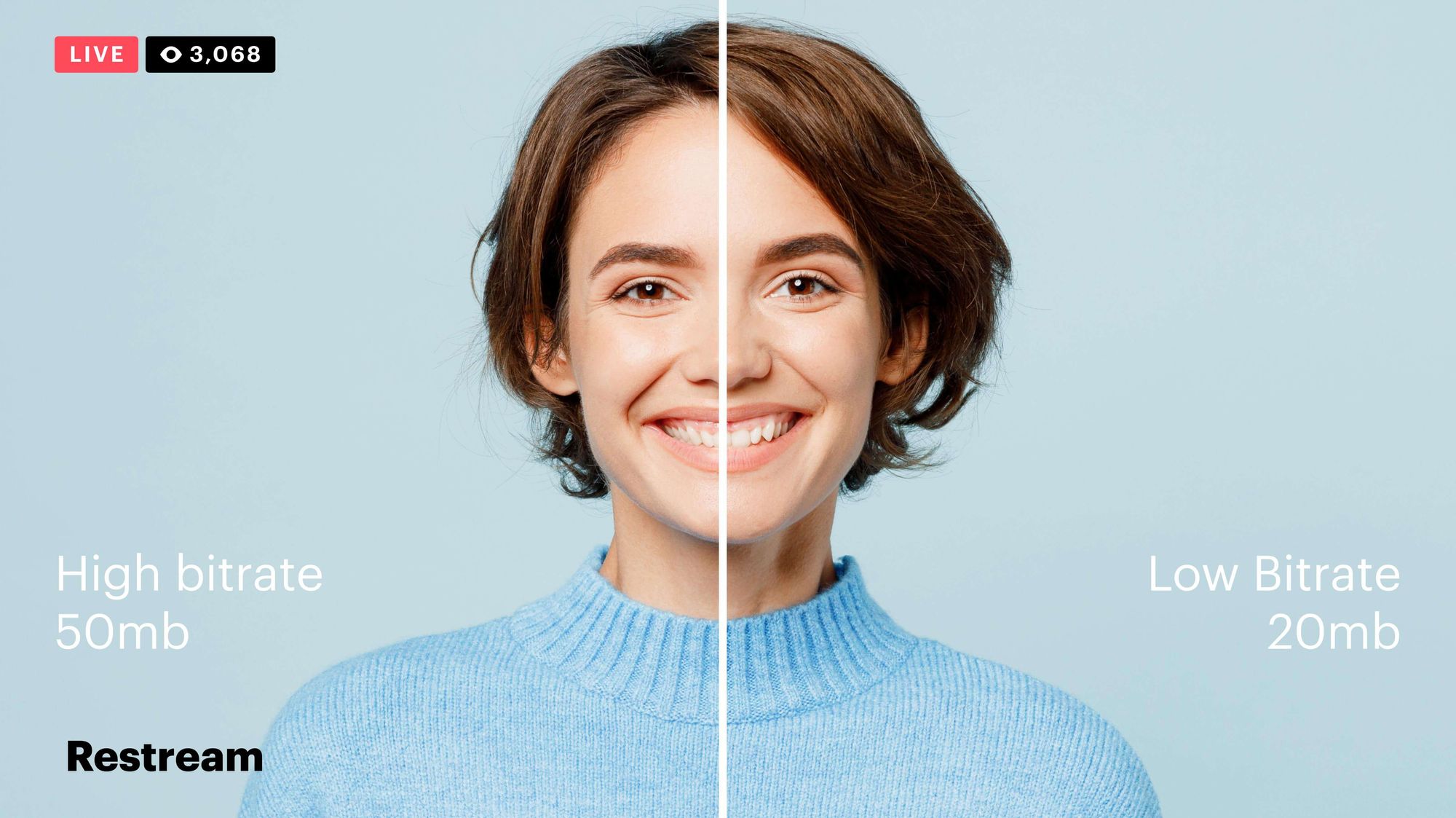
Video bitrate is the amount of data that is encoded per second in a video file. It is measured in bits per second (bps), or kilobits per second (kbps) or megabits per second (Mbps).

The higher the bitrate, the more data is encoded, and the higher the quality of the video will be. However, a higher bitrate also means a larger file size.

What is a Video Codec?

A video codec is a software program that compresses and decompresses video data. It is responsible for encoding the video data into a format that can be stored or streamed, and then decoding it back into its original form when it is played back.

There are many different video codecs available, each with its own strengths and weaknesses. Some of the most popular video codecs include:

H.264: This is the most widely used video codec. It is a lossy codec, which means that some data is lost during the compression process. However, H.264 is very efficient, and it can produce high-quality video with a relatively small file size.
H.265: This is a newer codec that is designed to be more efficient than H.264. It can produce the same quality of video with a smaller file size.
VP9: This is a free and open-source video codec that is developed by Google. It is similar to H.265 in terms of efficiency, but it is not as widely supported.

How Do Bitrate and Codecs Work Together?

Bitrate and codec work together to determine the quality and file size of a video. The higher the bitrate, the more data is encoded, and the higher the quality of the video will be. However, a higher bitrate also means a larger file size.

The codec determines how the video data is compressed. Some codecs are more efficient than others, and they can produce the same quality of video with a smaller file size.

How to Choose the Right Bitrate and Codec for Your Videos

The right bitrate and codec for your videos will depend on a number of factors, including:

The intended use of the video. If you are uploading your video to YouTube, you will need to choose a bitrate that is compatible with YouTube’s streaming requirements.
The target audience. If you are creating a video for mobile devices, you will need to choose a lower bitrate than if you are creating a video for high-definition televisions.
The file size. If you are limited by the file size, you will need to choose a lower bitrate.

Final Words About Video Bitrates and Codecs

Video bitrate and codec are two important concepts that every video creator should understand. By understanding how they work together, you can choose the right settings for your videos to ensure that they are both high quality and have a reasonable file size.

I hope this article has been helpful. If you have any questions, please feel free to leave a comment below.

Bonus Tips

If you are not sure what bitrate or codec to use, you can always start with a high bitrate and then lower it until you find a balance between quality and file size that you are happy with.
You can use a video bitrate calculator to help you determine the right bitrate for your videos.
There are many different video codecs available, so it is important to do some research to find the best codec for your needs.

Exploring Audio Bitrates: Technical Deep Dive

Exploring Audio Bitrates: Technical Deep Dive

Audio Bitrates
Audio Bitrates
Audio Bitrates
Audio Bitrates

In this article, we will explore the technical aspects of audio bitrates. We will discuss what a bitrate is, how it affects audio quality, and how to choose the right bitrate for your needs.

What is a bitrate?

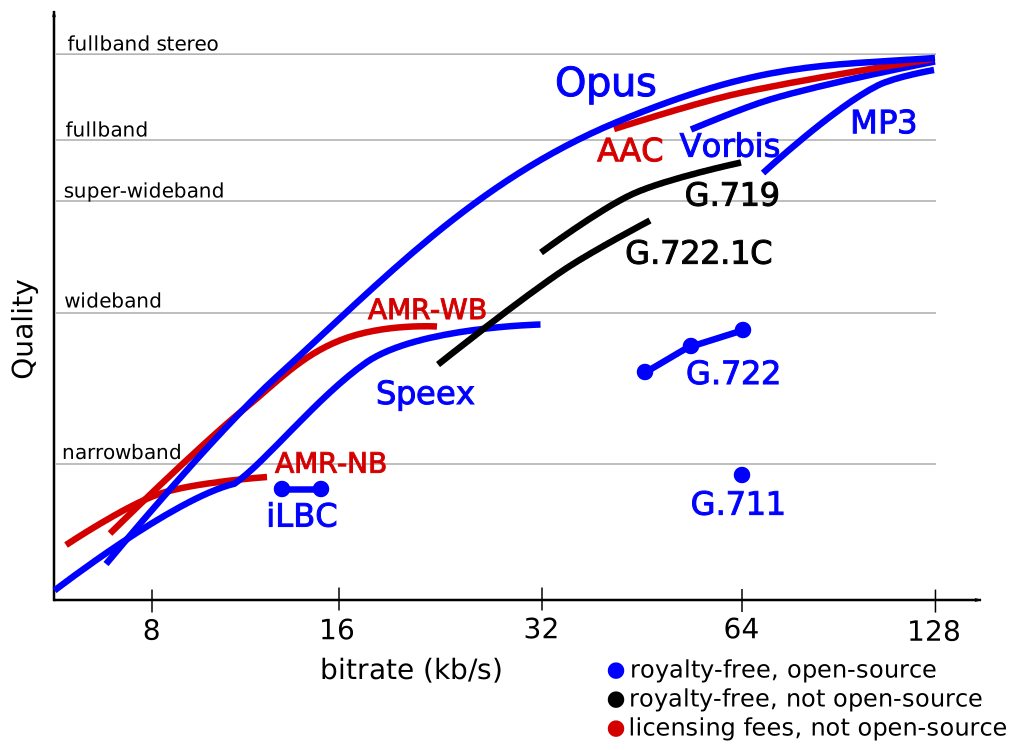
A bitrate is the number of bits per second that are used to encode an audio file. The higher the bitrate, the more data is used to encode the file, and the higher the quality of the audio will be. However, higher bitrates also result in larger file sizes.

How does bitrate affect audio quality?

Bitrate affects audio quality by determining how much data is used to represent the original sound waves. Higher bitrates allow for more data to be used, which results in more accurate representations of the original sound waves. This results in better audio quality, such as increased clarity and reduced noise.

How to choose the right bitrate

The right bitrate for you will depend on a number of factors, including:

  • The type of audio you are listening to. For example, music and speech have different requirements.
  • The quality of your audio equipment. Higher-quality equipment can reproduce higher bitrates without introducing any noticeable distortion.
  • Your personal preferences. Some people may prefer the sound of higher bitrates, while others may not notice a difference.

General bitrate recommendations

Here are some general bitrate recommendations for different types of audio:

  • Speech: 32 kbps to 96 kbps
  • Music: 128 kbps to 320 kbps
  • High-quality audio: 256 kbps to 512 kbps or higher

It is important to note that these are just general recommendations. The best way to determine the right bitrate for you is to experiment and see what sounds best to your ears.

Final words about audio bitrates

Audio bitrate is an important factor to consider when choosing an audio file format or when setting up an audio streaming service. By understanding how bitrate affects audio quality, you can choose the right bitrate for your needs and get the best possible listening experience.


Mp4Gain

Mp4Gain

The Science of Audio Encoding: Technical Aspects

The Science of Audio Encoding: Technical Aspects

The Science of Audio Encoding

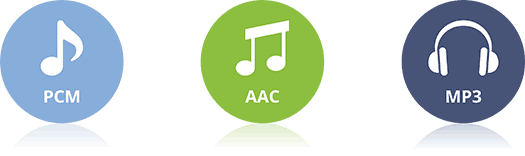
Audio encoding is the process of converting analog sound into digital data. This data can then be stored or transmitted in a variety of formats, such as WAV, MP3, or AAC.

There are two main types of audio encoding: lossless and lossy. Lossless encoding preserves all of the original sound data, resulting in high-quality audio but large file sizes. Lossy encoding removes some of the original sound data, resulting in smaller file sizes but lower sound quality.

The process of audio encoding can be divided into three main steps: sampling, quantization, and compression.

Sampling

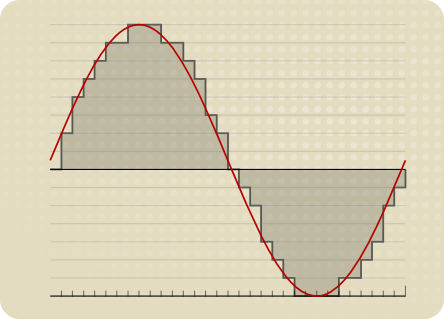
The first step in audio encoding is sampling. In this step, the analog sound signal is converted into a series of discrete values. The number of times per second that the sound signal is sampled is called the sample rate. Higher sample rates result in more accurate representations of the original sound signal, but they also result in larger file sizes.

Quantization

The second step in audio encoding is quantization. In this step, each sample value is rounded to the nearest integer value. The number of bits used to represent each sample value is called the bit depth. Higher bit depths result in more accurate representations of the original sound signal, but they also result in larger file sizes.

Compression

The third and final step in audio encoding is compression. In this step, the digital audio data is compressed to reduce its file size. There are a number of different compression algorithms that can be used, each with its own advantages and disadvantages.

The most common compression algorithms for audio encoding are:

  • MP3: MP3 is a lossy compression algorithm that is widely used for storing and transferring audio files. MP3 files are typically much smaller than WAV files, while still providing good sound quality.
  • AAC: AAC is another lossy compression algorithm that offers better sound quality than MP3. AAC files are typically slightly larger than MP3 files, but they offer a noticeable improvement in sound quality.
  • FLAC: FLAC is a lossless compression algorithm that offers similar sound quality to WAV, but with much smaller file sizes. FLAC files are a good choice for people who want the best possible sound quality without sacrificing file size.

Final Words

Audio encoding is a complex process that involves converting analog sound into digital data. The quality of the audio that is encoded can be affected by a number of factors, including the sample rate, bit depth, and compression of the audio file.

If you are looking for the best possible sound quality, you should use a lossless audio format such as WAV or FLAC. However, if you need to store or transfer audio files over a network, you should use a lossy audio format such as MP3 or AAC.

Decoding Audio Formats: Technical Aspects Explored

Decoding Audio Formats: Technical Aspects Explored

Decoding Audio Formats

In this article, we will explore the technical aspects of decoding audio formats. We will discuss the different types of audio formats, the process of decoding audio, and the factors that affect audio quality.

Types of Audio Formats

There are many different types of audio formats, each with its own advantages and disadvantages. Some of the most common audio formats include:

  • WAV: WAV is a lossless audio format, which means that it does not lose any data when it is converted from one format to another. WAV files are typically larger than other audio formats, but they offer the best possible sound quality.
  • MP3: MP3 is a lossy audio format, which means that some data is lost when it is converted from one format to another. MP3 files are much smaller than WAV files, which makes them ideal for storing and transferring audio files.
  • AAC: AAC is another lossy audio format that offers better sound quality than MP3. AAC files are typically slightly larger than MP3 files, but they offer a noticeable improvement in sound quality.
  • FLAC: FLAC is another lossless audio format that offers similar sound quality to WAV, but with much smaller file sizes. FLAC files are a good choice for people who want the best possible sound quality without sacrificing file size.

The Process of Decoding Audio

When an audio file is played, it must first be decoded. Decoding is the process of converting the digital data in the audio file into sound waves that can be heard by the human ear.

The process of decoding audio typically involves the following steps:

  1. The audio file is read from the storage device.
  2. The digital data in the audio file is converted into an analog signal.
  3. The analog signal is amplified and sent to a speaker.
  4. The speaker converts the analog signal into sound waves that can be heard by the human ear.

Factors That Affect Audio Quality

There are a number of factors that can affect the quality of audio that is decoded from an audio file. Some of the most important factors include:

  • Sample rate: The sample rate is the number of times per second that the audio data is sampled. Higher sample rates result in better sound quality, but they also result in larger file sizes.
  • Bit depth: The bit depth is the number of bits used to represent each sample of audio data. Higher bit depths result in better sound quality, but they also result in larger file sizes.
  • Compression: Audio files can be compressed to reduce their file size. However, compression can also reduce sound quality.

Final Words

Decoding audio is a complex process that involves converting digital data into sound waves that can be heard by the human ear. The quality of the audio that is decoded can be affected by a number of factors, including the sample rate, bit depth, and compression of the audio file.

If you are looking for the best possible sound quality, you should use a lossless audio format such as WAV or FLAC. However, if you need to store or transfer audio files over a network, you should use a lossy audio format such as MP3 or AAC.

MP3: Hybrid Transform Coding and Transform Domain Filtering

MP3: Hybrid Transform Coding and Transform Domain Filtering

MP3: Hybrid Transform Coding and Transform Domain Filtering

Introduction

MP3 is a popular digital audio format that uses a variety of techniques to compress audio data. One of the most important techniques used in MP3 is hybrid transform coding. Hybrid transform coding is a combination of two different transform coding techniques: the Discrete Cosine Transform (DCT) and the Modified Discrete Cosine Transform (MDCT).

Discrete Cosine Transform (DCT)

The DCT is a lossless transform coding technique. This means that the original audio data can be perfectly reconstructed from the compressed data. The DCT works by converting the audio data from the time domain to the frequency domain. In the frequency domain, the audio data is represented by a series of coefficients. These coefficients represent the amplitude and frequency of the different frequencies that make up the audio signal.

Modified Discrete Cosine Transform (MDCT)

The MDCT is a lossy transform coding technique. This means that the original audio data cannot be perfectly reconstructed from the compressed data. The MDCT works by dividing the audio signal into smaller time windows. The DCT is then applied to each time window. This results in a series of coefficients for each time window. These coefficients are then compressed using a variety of techniques, such as Huffman coding.

Hybrid Transform Coding

Hybrid transform coding combines the DCT and MDCT to achieve a high compression ratio while maintaining good audio quality. The DCT is used to compress the audio data in the frequency domain. The MDCT is used to divide the audio signal into smaller time windows. This allows the DCT to be applied to each time window without introducing any artifacts.

Benefits of Hybrid Transform Coding

Hybrid transform coding has several benefits, including:

  • High compression ratio: Hybrid transform coding can achieve a high compression ratio without sacrificing audio quality.
  • Good audio quality: Hybrid transform coding can maintain good audio quality even at high compression ratios.
  • Efficient: Hybrid transform coding is an efficient method of compressing audio data.

Drawbacks of Hybrid Transform Coding

Hybrid transform coding has a few drawbacks, including:

  • Lossy compression: Hybrid transform coding is a lossy compression technique. This means that the original audio data cannot be perfectly reconstructed from the compressed data.
  • Complexity: Hybrid transform coding is a complex algorithm. This can make it difficult to implement and use.

Conclusion

Hybrid transform coding is a powerful technique for compressing audio data. It is used in a variety of applications, including MP3. Hybrid transform coding has several benefits, including high compression ratio, good audio quality, and efficiency. However, it is also a lossy compression technique and can be complex to implement.

Frequently Asked Questions

What are the different types of transform coding?

There are two main types of transform coding: lossless and lossy. Lossless transform coding techniques can perfectly reconstruct the original audio data from the compressed data. Lossy transform coding techniques cannot perfectly reconstruct the original audio data from the compressed data.

What is the difference between the DCT and the MDCT?

The DCT is a lossless transform coding technique, while the MDCT is a lossy transform coding technique. The DCT works by converting the audio data from the time domain to the frequency domain. The MDCT works by dividing the audio signal into smaller time windows and then applying the DCT to each time window.

What are some of the other applications of hybrid transform coding?

Hybrid transform coding is used in a variety of applications, including:

  • Audio compression: Hybrid transform coding is used in a variety of audio compression formats, including MP3, AAC, and WMA.
  • Video compression: Hybrid transform coding is used in a variety of video compression formats, including MPEG-2, MPEG-4, and H.264.
  • Speech recognition: Hybrid transform coding is used in speech recognition systems to convert audio signals into text.

MP3: Huffman Tables and Variable Length Coding

MP3: Huffman Tables and Variable Length Coding

MP3: Huffman Tables and Variable Length Coding
MP3: Huffman Tables and Variable Length Coding)
MP3: Huffman Tables and Variable Length Coding

What is Huffman Coding?

Huffman coding is a lossless data compression algorithm. It works by assigning shorter codes to more frequently occurring symbols and longer codes to less frequently occurring symbols. This allows the data to be represented in a more compact form without losing any information.

How does Huffman Coding work?

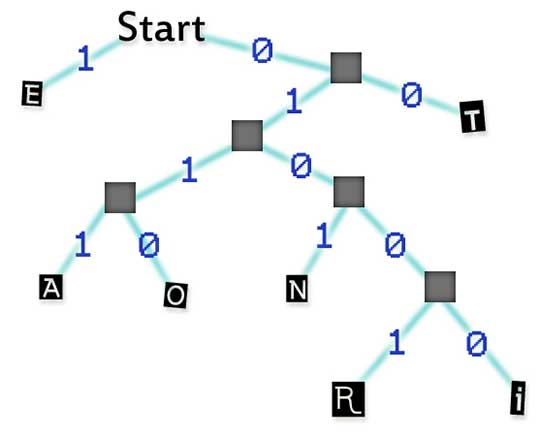
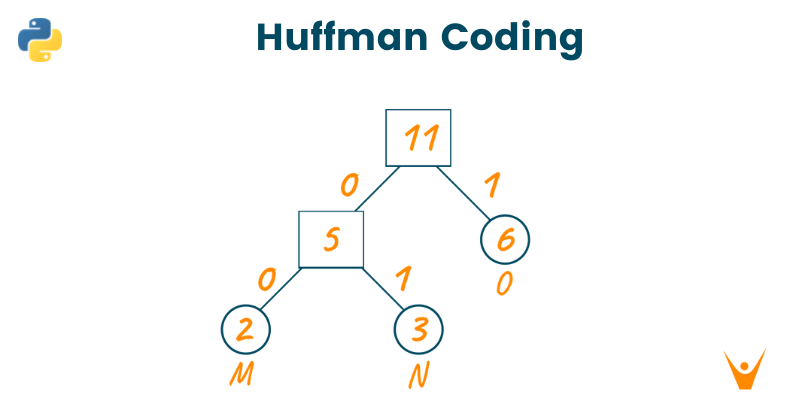
Huffman coding works by creating a Huffman tree. A Huffman tree is a binary tree where each node represents a symbol and the weight of each node represents the probability of that symbol occurring. The leaves of the tree represent the symbols themselves, and the internal nodes represent the combinations of symbols.

To encode a message, the encoder starts at the root of the tree and follows the path down to the leaf node that represents the symbol that is being encoded. The number of bits that are used to represent the symbol is the number of edges that are on the path from the root to the leaf node.

To decode a message, the decoder starts at the root of the tree and follows the path down to a leaf node. The symbol that is represented by the leaf node is the symbol that is being decoded.

How is Huffman Coding used in MP3?

Huffman coding is used in MP3 to compress audio data. The audio data is first converted into a sequence of numbers that represent the amplitude of the sound waves. These numbers are then compressed using Huffman coding.

The Huffman tables for MP3 are created by analyzing the frequency of occurrence of different numbers in the audio data. The more frequently a number occurs, the shorter its code will be. This allows the audio data to be compressed significantly without losing any information.

What are the benefits of using Huffman Coding?

Huffman coding has several benefits, including:

  • It is a lossless compression algorithm, which means that the original data can be reconstructed perfectly from the compressed data.
  • It is very efficient, and can achieve high compression ratios.
  • It is relatively simple to implement.

What are the drawbacks of using Huffman Coding?

Huffman coding has a few drawbacks, including:

  • It can be slow for compressing large amounts of data.
  • It requires a table to be created for each type of data that is being compressed.

Conclusion

Huffman coding is a powerful lossless data compression algorithm that is used in a variety of applications, including MP3. It is efficient and relatively simple to implement, but it can be slow for compressing large amounts of data.

Pulse Code Modulation

Digital Audio: Pulse Code Modulation (PCM) Variants

Pulse Code Modulation

Pulse Code Modulation


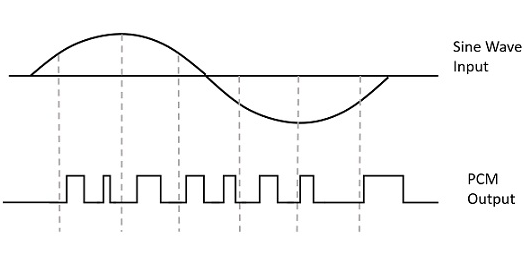
Pulse-code modulation (PCM) is a method of representing an analog signal as a sequence of numbers. It is the most common method of storing and transmitting digital audio.

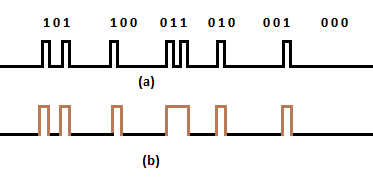
PCM works by sampling the analog signal at a regular interval. The amplitude of the signal at each sample is then converted to a number. The number of samples per second is called the sampling rate. The higher the sampling rate, the more accurately the analog signal can be represented.

Once the analog signal has been sampled, it can be stored or transmitted as a digital signal. The digital signal can then be converted back to an analog signal by a process called decoding.

There are many different variants of PCM. Some of the most common variants include:

  • Linear PCM (LPCM): This is the most basic form of PCM. In LPCM, the numbers that represent the samples are stored in a linear fashion.
  • Differential PCM (DPCM): In DPCM, the numbers that represent the samples are stored in a differential fashion. This means that only the difference between the current sample and the previous sample is stored.
  • Adaptive delta modulation (ADM): ADM is a type of DPCM that uses a feedback loop to adjust the quantization step size. This allows ADM to achieve better noise performance than DPCM.
  • Pulse-density modulation (PDM): PDM is a type of PCM that uses pulses to represent the samples. PDM is often used in digital audio applications where low power consumption is important.

PCM is a versatile and efficient method of representing digital audio. It is the most common method of storing and transmitting digital audio, and it is used in a wide variety of applications, including CD players, MP3 players, and digital audio workstations.

Here are some additional details about the different variants of PCM:

Linear PCM (LPCM)

LPCM is the most basic form of PCM. In LPCM, the numbers that represent the samples are stored in a linear fashion. This means that the number for each sample is stored directly, without any compression.

LPCM is the most accurate form of PCM, but it is also the most bandwidth-intensive. This is because each sample must be stored as a separate number.

Differential PCM (DPCM)

DPCM is a type of PCM that uses a differential encoding scheme. In DPCM, only the difference between the current sample and the previous sample is stored. This allows DPCM to achieve better compression than LPCM, at the expense of some accuracy.

DPCM is often used in applications where bandwidth is limited, such as voice communications.

Adaptive delta modulation (ADM)

ADM is a type of DPCM that uses a feedback loop to adjust the quantization step size. This allows ADM to achieve better noise performance than DPCM.

ADM is often used in applications where high-quality audio is required, such as music production.

Pulse-density modulation (PDM)

PDM is a type of PCM that uses pulses to represent the samples. In PDM, the amplitude of the signal is represented by the width of the pulses.

PDM is often used in digital audio applications where low power consumption is important. This is because PDM can be implemented using very simple circuitry.

MP3 Format: Joint Stereo and Stereo Modes

MP3 Format: Joint Stereo and Stereo Modes

MP3 Format: Joint Stereo and Stereo Modes

MP3 is a popular audio format that uses lossy compression to reduce the size of audio files without sacrificing too much quality. There are two main modes for encoding MP3 files: stereo and joint stereo.

Stereo mode stores separate left and right channels, which can be used to play different signals on each separate channel. This is the default mode for most MP3 encoders.

Joint stereo mode mixes the left and right channels into a single channel, and then encodes the difference between the two channels. This can result in smaller file sizes, but it can also reduce the sound quality.

The best mode to use depends on the type of audio you are encoding. If you are encoding music, then stereo mode is usually the best choice. However, if you are encoding speech or other audio that does not need to be reproduced in stereo, then joint stereo mode can be a good option.

Here are some additional details about each mode:

Stereo mode

  • Pros:
    • Provides a more immersive listening experience
    • Can be used to play different signals on each separate channel
  • Cons:
    • Can result in larger file sizes

Joint stereo mode

  • Pros:
    • Can result in smaller file sizes
    • Can be used to encode audio that does not need to be reproduced in stereo
  • Cons:
    • Can reduce the sound quality

Personal experience

I have used both stereo and joint stereo mode for encoding MP3 files. I have found that stereo mode is the best choice for music, as it provides a more immersive listening experience. However, I have also found that joint stereo mode can be a good option for speech or other audio that does not need to be reproduced in stereo.

For example, I recently encoded a lecture that I gave. I used joint stereo mode, and the resulting file size was much smaller than if I had used stereo mode. The sound quality was still good, and the audience was able to understand me without any problems.

Conclusion

The best mode to use for encoding MP3 files depends on the type of audio you are encoding. If you are encoding music, then stereo mode is usually the best choice. However, if you are encoding speech or other audio that does not need to be reproduced in stereo, then joint stereo mode can be a good option.

Here are some additional tips for encoding MP3 files:

  • Use a high-quality audio source. The quality of the input audio will have a big impact on the quality of the output audio.
  • Use a high bitrate. A higher bitrate will result in a larger file size, but it will also result in better sound quality.
  • Experiment with different settings. There are many different settings that can affect the quality of the output audio. Experiment with different settings to find the ones that work best for you.