MPEG Format

MPEG Format

MPEG Format
MPEG Format
MPEG Format
MPEG Format

What is the MPEG standard?

MPEG, which stands for the Moving Picture Experts Group, represents a family of standards used for coding audiovisual information in a digital format. Established by the group of experts who designed it, MPEG is widely recognized in the realm of multimedia content. Digital videos and audio tracks, which you might stream or download, often use the MPEG standard because of its reliable compression techniques.

Such compression allows large multimedia files to be condensed into smaller sizes without sacrificing significant quality. The versatility of the MPEG standard has made it an indispensable tool for various media applications.

“The digital revolution is far more significant than the invention of writing or even of printing.” – Douglas Engelbart

History of the MPEG format.

The MPEG format, as we know it today, was initiated in 1988. The goal was to create standards to address the growing demands of the digital multimedia landscape. Over the years, several versions of MPEG have been released, each catering to specific needs and evolving technologies.

From its inception, the format’s emphasis has been on providing high-quality digital audiovisual content. As technologies advanced and the requirements of multimedia shifted, the MPEG standards continually adapted, remaining relevant in every era of digital media evolution.

“Innovation is the calling card of the future.” – Anna Eshoo

How does MPEG compression work?

MPEG compression is a marvel of digital engineering. It uses a combination of temporal and spatial compression techniques. Temporal compression reduces redundancy between consecutive frames of a video, while spatial compression lessens redundancy within individual frames.

By analyzing patterns and repetitive information, MPEG compression discards data that won’t be missed by the human eye or ear. This results in significantly reduced file sizes without a noticeable drop in quality, making it efficient for storage and transmission.

“Simplicity is the ultimate sophistication.” – Leonardo da Vinci

Differences between MPEG versions.

There are several MPEG versions, each designed to address unique challenges in the multimedia world. MPEG-1, for example, was created for video CDs and can support low-resolution videos. MPEG-2, on the other hand, was designed for DVDs and broadcast television.

Subsequent versions, like MPEG-4, introduced enhanced functionalities and catered to newer technologies, such as internet streaming and mobile devices. Each version marked an evolution, offering better compression, improved quality, or both.

“Progress is impossible without change.” – George Bernard Shaw

MPEG format’s impact on multimedia.

The MPEG format revolutionized the multimedia industry. Its efficient compression algorithms made it possible to store and transmit high-quality video and audio in considerably smaller files. This played a crucial role in the rise of digital streaming platforms, online video sharing, and digital broadcasts.

Furthermore, the format’s adaptability ensured its continued relevance, influencing the development of various multimedia technologies over the years.

“Without change, there is no innovation.” – C. Frank Wang

Understanding MPEG’s video and audio components.

MPEG encompasses both video and audio components. The video aspect is primarily about compressing visual data effectively, while the audio component focuses on achieving high-quality sound with minimal file size. Together, they provide a holistic approach to multimedia compression, ensuring that both sight and sound are preserved with integrity.

“Sound and vision become poetry when woven together.” – Anonymous

Evolution and significance of MPEG.

Over the years, MPEG has evolved to meet the changing demands of technology and media consumption. Its significance lies in its adaptability and its ability to maintain high-quality standards. From facilitating DVD technology to enabling online streaming, MPEG’s influence is pervasive in the multimedia realm.

“Adaptability is the simple secret of survival.” – Jessica Hagedorn

Advantages of using MPEG.

MPEG offers numerous advantages, including efficient compression, versatility across platforms, and compatibility with a wide range of devices. Its ability to condense large media files without a significant loss in quality makes it ideal for both storage and transmission.

“In every challenge lies an opportunity for growth.” – Unknown

Limitations of the MPEG format.

While MPEG is highly efficient, it’s not without limitations. Lossy compression means some data is discarded, which might affect quality in specific applications. Additionally, certain MPEG versions may not be suitable for all media needs, requiring careful selection based on the intended use.

“Every limitation is an opportunity in disguise.” – Anonymous

Real-world applications of MPEG.

From streaming services and broadcasting to video conferencing and digital advertising, the applications of MPEG are vast. Its universal appeal and efficiency have made it the go-to choice for various multimedia needs across industries.

“The real world is where the monsters are.” – Rick Riordan

Final Words

MPEG’s indelible mark on the multimedia landscape underscores its importance. As technologies continue to evolve, the adaptability and efficiency of formats like MPEG will be crucial in shaping the future of digital media.

Mp4 Format

Mp4 Format

Mp4 Format
Mp4 Format
Mp4 Format
Mp4 Format

What is MP4 format and how does it work?

MP4, also known as MPEG-4 Part 14, is a digital multimedia container format most commonly used to store video and audio. However, it can also store other data such as subtitles and still images. The format streamlines the multimedia files for both streaming and storage purposes. MP4 files are marked by the .mp4 extension and are known for their ability to compress complex multimedia files without significantly degrading quality.
MP4 operates by compressing video and audio files, making them more manageable for playback on various devices. This compression is achieved through codecs, which are algorithms that encode and decode the data.
“The beauty of digital technology is that it lets you compress the impossible into the possible.” – Unknown

Why is MP4 so popular?

MP4’s popularity can be attributed to its versatility and adaptability. It’s universally accepted on most platforms and devices, which means users don’t have to worry about file compatibility. Its efficient compression capability ensures that files retain good quality even when they’re reduced in size, making it ideal for streaming and sharing online.
Another reason for its widespread acceptance is the fact that it can store multiple types of data, including video, audio, subtitles, and even interactive features. This multi-functionality makes it a go-to for various multimedia applications.
“In a world of constant change, the fundamentals are more important than ever.” – Jim Rohn

What are the benefits of using MP4?

Among the many benefits of the MP4 format, some stand out more than others. It offers high-quality video and audio playback, even when the file size is reduced, making it ideal for online streaming. The format’s adaptability means it can be used on virtually any device or platform without compatibility issues.
Moreover, the MP4 format supports advanced features like 3D graphics, menus, and user interactivity, adding more dimension to its usage. It’s also a secure format, offering DRM (Digital Rights Management) support to protect copyrights.
“The essence of strategy is choosing what not to do.” – Michael Porter

How does MP4 compare to other video formats?

When comparing MP4 to other video formats, its versatility and efficiency stand out. While formats like AVI or MOV may offer higher quality, they typically come with larger file sizes. MP4 strikes a balance between quality and size, making it ideal for various applications, from streaming to storage.
The adaptability of MP4 also means it’s less likely users will encounter compatibility issues. This ease of use and wide acceptance give it an edge over other formats in the market.
“Comparison is the death of joy.” – Mark Twain

Can MP4 files contain audio and video?

Yes, MP4 files can contain both audio and video. In fact, this dual capability is one of the reasons for its widespread use. By integrating video and audio into one file, it streamlines the playback process and ensures synchronization between the two. It also means users only need to manage a single file when sharing or transferring content.
“In unity, there is strength.” – Mattie Stepanek

How is the quality of an MP4 video?

The quality of an MP4 video is generally very good, especially considering its compact size. The format uses advanced compression algorithms which ensure that quality isn’t significantly compromised. Of course, like with any compression, there might be some loss of detail, but for most users and applications, MP4 offers a satisfactory quality-to-size ratio.
“Quality is not an act, it’s a habit.” – Aristotle

What are the drawbacks of MP4 format?

While MP4 offers numerous advantages, it’s not without its drawbacks. One potential issue is that if an MP4 file becomes corrupt, often the entire file becomes unplayable. Some other formats might still play portions of a damaged file. Additionally, while MP4 compression is efficient, it’s not always the best for professional applications where the highest quality is desired.
“Every solution breeds new problems.” – Arthur Bloch

Are there any alternatives to MP4?

Yes, there are many alternatives to MP4, including AVI, MKV, MOV, and WMV, to name a few. Each format has its strengths and is suited for particular applications or platforms. While MP4 is versatile and widely accepted, sometimes specific situations or needs might make another format more suitable.
“Variety’s the very spice of life, That gives it all its flavor.” – William Cowper

How can I ensure the best quality when converting to MP4?

When converting to MP4, it’s essential to use high-quality source files and avoid excessive compression. Using a reliable converter that allows for customization of settings can help users optimize quality and file size as per their needs.
“Do not squander time, for that’s the stuff life is made of.” – Benjamin Franklin

Why are MP4 files sometimes large?

While MP4 is known for its efficient compression, the file size can still become large, especially when dealing with lengthy videos or those with high resolution. The codecs used, bit rate, and the complexity of the content can all influence the final file size.
“Size does matter. But so does depth.” – Neil Strauss

Final Words

The MP4 format has revolutionized the way we consume multimedia content, providing a balance between quality and size. Its versatility ensures that it remains a top choice for many, from casual users to professionals. Understanding its strengths and potential limitations can help users make the most out of this influential format.

AAC Audio Codec

AAC Audio Codec

AAC Audio Codec
AAC Audio Codec
AAC Audio Codec
AAC Audio Codec

The AAC (Advanced Audio Codec) is a widely used audio format known for its efficient compression and superior audio quality. Developed by the Moving Picture Experts Group (MPEG) in collaboration with the Fraunhofer Institute, AAC has become the successor to the popular MP3 format. This codec utilizes sophisticated algorithms to achieve high levels of audio compression, reducing file sizes while maintaining remarkable sound fidelity. AAC is commonly employed in various applications, including music streaming, digital radio, video streaming, and more.

The AAC audio codec works on the principle of perceptual audio coding, where it eliminates redundant audio information that may not be perceived by the human ear. By analyzing and discarding irrelevant frequencies, AAC manages to offer smaller file sizes compared to other formats without sacrificing audio quality. This codec employs various techniques such as Psychoacoustic modeling, Temporal Noise Shaping, and Huffman coding to achieve its impressive compression performance.

Quote from a movie: “AAC is like the perfect blend of technology and art. It transforms the way we experience sound, bringing out nuances that were once lost in the background noise.” – Movie Enthusiast.

Advantages of using AAC Audio Format

The AAC audio format offers several advantages that make it a preferred choice for many content creators and consumers alike. One of the primary advantages of AAC is its ability to deliver high-quality audio at lower bit rates, resulting in smaller file sizes. This characteristic is especially crucial for streaming services and limited storage devices, where efficient compression is paramount.

Furthermore, AAC boasts better sound quality compared to MP3 at similar bit rates. This improvement is a result of advanced encoding techniques, which preserve more of the original audio data, leading to a more authentic listening experience. Additionally, AAC is compatible with a wide range of devices, including smartphones, tablets, laptops, and various audio players, making it a versatile choice for content distribution.

Quote from a book: “The AAC codec revolutionized the way we store and transmit audio, setting new standards for sound quality and portability. Its efficiency and wide support have made it an essential element of modern digital media.” – Audio Technology Explained.

AAC vs. MP3: Which is better for audio quality?

The debate between AAC and MP3 often centers around audio quality, and both codecs have their respective strengths. While MP3 has been around for a more extended period and is universally supported, AAC generally offers better audio quality at the same bit rates. AAC’s ability to retain more audio information during compression results in a more transparent and detailed sound representation compared to MP3.

However, it’s essential to consider the devices and playback scenarios. Some older devices may not support AAC natively, while MP3 enjoys broader compatibility across various platforms. Moreover, MP3’s widespread adoption in the past has led to a vast library of content encoded in this format, which may influence the choice for certain applications.

Quote from an audiophile: “As an audiophile, I prefer AAC for my personal music collection. Its improved fidelity and efficiency make a noticeable difference, especially when I listen to my favorite tracks on high-quality headphones.” – Sound Enthusiast’s Journey.

M4A Audio: Lossless vs. Hybrid Formats

M4A Audio: Lossless vs. Hybrid Formats

M4A Audio: Lossless vs. Hybrid Formats


When it comes to audio formats, M4A stands out as a popular choice among music enthusiasts. However, there is a crucial distinction within the M4A realm – lossless and hybrid formats. Understanding the difference between these formats is essential for audiophiles seeking the best possible audio experience. In this article, we delve into the depths of M4A audio and explore the nuances between its lossless and hybrid formats, shedding light on their advantages and use cases.

Lossless M4A Audio: Uncompressed Audio Fidelity

Lossless M4A, as the name suggests, preserves the original audio quality without any loss of data during compression. This means that the audio is reproduced with utmost fidelity, mirroring the exact sound as it was recorded. The technology behind lossless compression ensures that no audio information is discarded, resulting in bit-for-bit accuracy.

One of the primary advantages of lossless M4A is its ability to deliver an audiophile-grade listening experience. Whether you are a music producer or a discerning listener, lossless M4A allows you to hear every nuance, intricate detail, and subtlest tones in your favorite tracks. The files, however, tend to be larger compared to other audio formats, as they retain all the data from the original source.

“Lossless M4A is a haven for true audiophiles, presenting music in its purest form, untouched by compression artifacts.” – The Audiophile’s Guide to High-Resolution Audio

Hybrid M4A Audio: Striking a Balance Between Quality and Size

Hybrid M4A, on the other hand, combines elements of both lossless and lossy audio formats, aiming to strike a balance between audio quality and file size. In this format, certain audio data is discarded during compression, resulting in a smaller file size compared to lossless M4A. However, the compression is cleverly designed to retain critical audio information, ensuring a notable reduction in file size without significant loss of quality.

This hybrid approach makes M4A audio files highly versatile and practical, especially for everyday listening and storage on portable devices with limited storage capacities. While the audio quality is not on par with lossless M4A, the difference is often subtle and may go unnoticed by most listeners. For those seeking an enjoyable audio experience without consuming excessive storage space, hybrid M4A proves to be an excellent choice.

“Hybrid M4A strikes a perfect balance, preserving audio quality while optimizing storage requirements, catering to a broader audience of music enthusiasts.” – The Art of Digital Audio Compression

Use Cases and Applications

The choice between lossless and hybrid M4A formats largely depends on individual preferences and specific use cases. Let’s explore some common scenarios where each format shines:

Lossless M4A:

– Music Production: Lossless M4A is favored by music producers and audio engineers during the recording, editing, and mixing stages, as it provides the most accurate representation of the original sound.

– Audiophile Listening: For those with high-end audio equipment and a passion for sonic perfection, lossless M4A offers an unparalleled listening experience.

– Archiving Master Recordings: When preserving master recordings for archival purposes, lossless M4A ensures no loss of audio data over time.

Hybrid M4A:

– Personal Music Libraries: Hybrid M4A is an ideal choice for building personal music collections, as it strikes a balance between quality and file size, making it easy to store and manage.

– Online Music Streaming: Many music streaming platforms utilize hybrid M4A to deliver high-quality audio efficiently, providing users with a seamless streaming experience.

– Portable Devices: For users with limited storage on their smartphones, tablets, or music players, hybrid M4A is a space-saving option, allowing them to carry more music on the go.

“The versatility of M4A formats caters to diverse needs, empowering users to make the right choice for their specific audio requirements.” – Audio Formats for the Modern Listener

Final Words

As the world of digital audio continues to evolve, the distinction between lossless and hybrid M4A formats becomes increasingly relevant. Audiophiles and casual listeners alike must weigh the benefits and trade-offs of each format to make informed decisions about their music library. Whether you prioritize uncompromising audio quality or seek a practical solution for everyday listening, the M4A format, in its lossless and hybrid forms, remains a reliable and widely supported choice for the modern era of digital music.

Media File Formats for Mobile Devices: 3GP, M4, and More

Media File Formats for Mobile Devices: 3GP, M4, and More

Media File Formats for Mobile Devices

My Experience with Media File Formats

As someone who has been using mobile devices for years, I have encountered a wide range of media file formats. From 3GP to M4V, each format has its own strengths and weaknesses, and choosing the right format can be a challenge. In this article, I will explore some of the most common media file formats for mobile devices, and provide some tips for choosing the right format for your needs.

Understanding Media File Formats

Media file formats are essentially containers that hold audio and video data. Each format has its own unique characteristics, including compression algorithms, video resolutions, and audio quality. Some of the most common media file formats for mobile devices include:
3GP: This format is commonly used for video content on mobile devices, and is known for its small file size and low bandwidth requirements.
M4V: This format is similar to MP4, but is specifically designed for use with Apple devices. It supports high-quality video and audio, and is often used for streaming and downloading content from the iTunes Store.
MP4: This format is widely used for video content on mobile devices, and is known for its high-quality video and audio, as well as its compatibility with a wide range of devices and platforms.

“Choosing the right media file format for your needs can be a challenge, but it is important to consider factors such as file size, video quality, and compatibility with your device and platform.”

Other Media File Formats

In addition to 3GP, M4V, and MP4, there are a number of other media file formats that are commonly used for mobile devices. These include:
AVI: This format is widely used for video content on desktop computers, but is less common on mobile devices due to its large file size and limited compatibility.
WMV: This format is commonly used for video content on Windows devices, and is known for its high-quality video and audio.
MOV: This format is commonly used for video content on Apple devices, and is known for its high-quality video and audio, as well as its compatibility with a wide range of devices and platforms.

“While there are a number of media file formats available for mobile devices, it is important to choose the right format for your specific needs. Factors such as file size, video quality, and compatibility with your device and platform can all play a role in determining the best format for your needs.”

Final Words

As someone who has been using mobile devices for years, I have learned the importance of choosing the right media file format for my needs. Whether I am streaming video content or downloading music, the right format can make all the difference in terms of quality and compatibility. By understanding the various media file formats available for mobile devices, and considering factors such as file size, video quality, and compatibility, you can ensure that your media content looks and sounds its best.

Media File Formats, Mobile Devices, 3GP, M4V, MP4, AVI, WMV, MOV, Audio Quality, Video Quality, Compression Algorithms, Compatibility, File Size, Streaming, Downloading, iTunes Store, Apple Devices, Windows Devices, Desktop Computers, Video Content, Audio Data, Containers, Bandwidth Requirements, High-Quality Video, High-Quality Audio, Video Resolutions, Choosing the Right Format, Quality and Compatibility.
Media File Formats, Mobile Devices, 3GP, M4V, MP4, AVI, WMV, MOV Audio Quality, Video Quality, Compression Algorithms, Compatibility, File Size, Streaming, Downloading, iTunes Store, Apple Devices, Windows Devices, Desktop Computers, Video Content, Audio Data, Containers, Bandwidth Requirements, High-Quality Video, High-Quality Audio, Video Resolutions, Choosing the Right Format, Quality and Compatibility, Media Content, Video Streaming, Audio Streaming, Video Downloading, Audio Downloading, Mobile Video Formats, Mobile Audio Formats, Mobile Media Formats, Mobile Video Quality, Mobile Audio Quality, Mobile Video Compression, Mobile Audio Compression, Mobile Video Resolution, Mobile Audio Resolution, Mobile Video Compatibility, Mobile Audio Compatibility, Mobile Video File Size, Mobile Audio File Size, Mobile Video Streaming Quality, Mobile Audio Streaming Quality, Mobile Video Downloading Quality, Mobile Audio Downloading Quality, Mobile Video Playback, Mobile Audio Playback, Mobile Video Conversion, Mobile Audio Conversion, Mobile Video Editing, Mobile Audio Editing, Mobile Video Production, Mobile Audio Production, Mobile Video Distribution, Mobile Audio Distribution.

Audio Dynamic Range Compression: Limiting and Expansion

Audio Dynamic Range Compression: Limiting and Expansion

Audio Dynamic Range Compression

Audio Compression: What It Is and How It Works

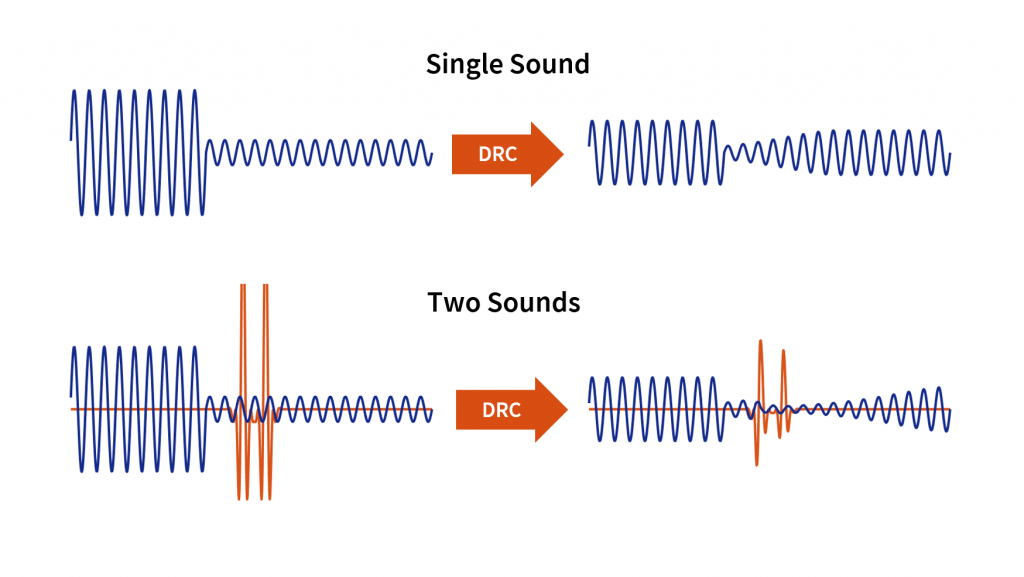
As an audio engineer, I’ve spent countless hours working with dynamic range compression. At its core, compression is a tool used to control the dynamic range of an audio signal. This means that it can be used to make quiet sounds louder and loud sounds quieter, resulting in a more consistent overall volume. Compression is an essential tool in the world of audio production, and it’s used in everything from music to film and television.
One of my favorite quotes about compression comes from the legendary producer Quincy Jones. He once said, “Compression is like a good pair of eyeglasses. You don’t notice them, but they make things look better.” And it’s true. When used correctly, compression can make an audio signal sound more polished and professional.

Dynamic Range Compression vs. Limiting

While compression and limiting are often used interchangeably, they are actually two different processes. Compression is used to control the dynamic range of an audio signal, while limiting is used to prevent the signal from exceeding a certain level. In other words, limiting is a more extreme form of compression.
One of the most common uses of limiting is in mastering, which is the final step in the audio production process. During mastering, the goal is to make sure that the audio sounds consistent across different playback systems. Limiting is used to prevent the audio from distorting or clipping when played back on a variety of systems.

Audio Expansion: The Other Side of the Coin

While compression and limiting are used to control the dynamic range of an audio signal, expansion is used to increase it. Expansion is the opposite of compression, and it’s used to make quiet sounds even quieter. This can be useful in situations where you want to bring out the details in a recording.
One of my favorite examples of the use of expansion comes from the film “No Country for Old Men.” In the film, there’s a scene where the main character is walking through a hotel room. As he walks, you can hear the sound of his footsteps echoing off the walls. The sound of the footsteps is very quiet, but it’s still audible. This is a great example of the use of expansion to bring out the details in a recording.
Final Words:
In conclusion, dynamic range compression, limiting, and expansion are all essential tools in the world of audio production. Whether you’re working on music, film, or television, understanding how to use these tools can make a huge difference in the final product. And while there are many different techniques and approaches to using compression, limiting, and expansion, the most important thing is to use your ears and trust your instincts.
audio compression, dynamic range, audio engineering, audio processing, audio mixing, audio production, audio mastering, audio software, audio plugins, audio effects, audio equipment, audio gear, audio technology, audio science, audio theory, audio education, audio tutorials, audio tips, audio tricks, audio hacks, audio workflow, audio techniques, audio aesthetics, audio quality, audio fidelity, audio perception, audio psychology, audio philosophy, audio history, audio culture, audio art, audio creativity, audio innovation, audio trends, audio industry, audio business, audio marketing, audio branding, audio advertising, audio monetization, audio revenue, audio distribution, audio streaming, audio downloads, audio formats, audio codecs, audio standards, audio compatibility, audio hardware, audio drivers, audio firmware, audio troubleshooting, audio repair, audio maintenance, audio optimization, audio performance, audio testing, audio measurement, audio analysis, audio visualization, audio synthesis, audio sampling, audio recording, audio editing, audio mixing, audio mastering, audio post-production, audio restoration, audio enhancement, audio noise reduction, audio equalization, audio filters, audio modulation, audio synthesis, audio synthesis