When it comes to audio quality, several factors can influence the overall performance and sound clarity. Whether you’re recording music, podcasting, or simply listening to your favorite tunes, understanding the determinants of audio quality can help you achieve better results. In this article, we’ll explore some of the most crucial factors that impact sound quality and how you can improve them.
Acoustics and Room Treatment
One of the most important factors that affect audio quality is the acoustics of the room where you’re recording or listening to music. Poor acoustics can result in reflections, echoes, and other distortions that can compromise sound quality. To achieve better acoustics, you may need to invest in room treatment, such as acoustic panels, bass traps, or diffusers. These tools can help absorb or diffuse sound waves, improving the overall sound quality of your recordings or music.
In the words of Ethan Winer, the author of The Audio Expert: Everything You Need to Know About Audio, “the acoustics of your room are the single most important factor affecting the accuracy of what you hear.” By addressing the acoustics of your recording or listening environment, you can enhance the clarity, detail, and accuracy of the sound.
Equipment and Gear
Another critical factor that affects audio quality is the equipment and gear you use. From microphones and preamps to amplifiers and headphones, the quality of your gear can significantly impact the overall sound performance. Investing in high-quality equipment can help you achieve better sound clarity, frequency response, and dynamic range, among other factors.
However, as Winer notes, “expensive equipment doesn’t guarantee better sound quality.” Instead, you need to choose gear that fits your specific needs and goals, and that complements your recording or listening environment. Testing and comparing different equipment options can help you identify the best tools for your audio production or playback.
Recording and Mixing Techniques
Finally, the recording and mixing techniques you use can significantly impact the quality of your audio productions. Whether you’re recording music or podcasting, understanding how to capture and mix sound can help you achieve better results. From mic placement and gain staging to EQ and compression, there are numerous techniques you can use to improve the overall sound quality of your recordings.
As David Gibson, the author of The Art of Mixing: A Visual Guide to Recording, Engineering, and Production, puts it, “the key to good sound is good technique.” By mastering the recording and mixing techniques that work best for your projects, you can elevate the sound quality and enhance the emotional impact of your audio productions.
Final Words
In conclusion, audio quality is influenced by several factors, including acoustics, equipment, and recording techniques. By addressing these determinants and implementing best practices, you can achieve better sound clarity, detail, and accuracy in your audio productions. Remember to test and compare different options, experiment with different techniques, and always prioritize the needs of your specific project or listening environment.
The Importance of Bitrate for Audio Recording Quality
As a musician and audio engineer, I’ve learned that bitrate is crucial to achieving high-quality audio recordings. The bitrate determines the amount of data that is processed and transmitted for each second of audio recording. A higher bitrate means more data is being processed, resulting in better audio quality.
In my experience, the optimal bitrate for professional audio recording is 24-bit/96kHz. This allows for a wide dynamic range and captures every detail of the sound. As filmmaker Christopher Nolan once said, “The sound and music are 50% of the entertainment in a movie.” This applies to music recording as well. Without proper audio recording settings, even the most talented musician’s performance can fall flat.
When recording music, it’s important to remember that bitrate isn’t the only factor that affects audio quality. Other factors like microphone placement, room acoustics, and instrument quality can also have a significant impact on the final recording. However, by starting with the right bitrate, you’re setting yourself up for success.
How to Choose the Best Bitrate for Your Audio Recording
When choosing the best bitrate for your audio recording, it’s important to consider your specific needs and goals. If you’re recording for personal use, a lower bitrate may be sufficient. However, if you’re recording professionally, it’s worth investing in higher-quality equipment and choosing a higher bitrate.
In addition to considering the purpose of your recording, you should also consider the file format you’ll be using. Different file formats have different requirements for bitrate and other audio settings. For example, WAV files require a higher bitrate than MP3 files to maintain the same level of audio quality.
Ultimately, the best bitrate for your audio recording will depend on your individual needs and preferences. Don’t be afraid to experiment with different settings and seek advice from other audio professionals. With the right bitrate and equipment, you can capture every detail of your sound and create high-quality audio recordings that stand the test of time.
The Benefits of Using an Audio Normalizer and Converter
As someone who has recorded and produced music for years, I know firsthand how frustrating it can be when audio levels are inconsistent across different tracks. This is where an audio normalizer and converter can come in handy.
An audio normalizer like MP4Gain can analyze and adjust the volume of your audio tracks to ensure they’re consistent and balanced. This can save you time and effort in post-production and help you achieve a more professional sound.
Additionally, an audio converter can help you convert your audio files to different formats, making them compatible with a wider range of devices and software. MP4Gain is a powerful audio converter that supports a variety of formats, including MP3, WAV, FLAC, and more.
By using an audio normalizer and converter like MP4Gain, you can streamline your audio production workflow and achieve higher-quality results with less effort. It’s just one more tool in your arsenal as an audio professional or enthusiast.
best bitrate for audio recording, optimal audio recording bitrate, audio recording quality, bitrate for professional audio recording, recording audio with high quality, improve audio recording bitrate, audio bitrate for music recording, ideal audio recording settings, audio engineering, audio quality, dynamic range, high-quality audio recordings, microphone placement, room acoustics, instrument quality,
What is the difference between bit depth and bitrate?
Bit DepthBit Depth
Understanding Bit Depth and Bitrate
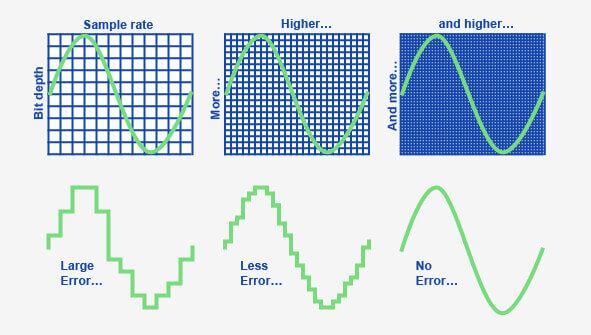
When it comes to audio and video files, there are two terms that are often used interchangeably: bit depth and bitrate. However, they are not the same thing. Bit depth refers to the number of bits used to represent each sample in an audio or video file, while bitrate refers to the amount of data transmitted per second.
Bit depth determines the number of possible values for each sample in a digital audio or video file. For example, an 8-bit audio file can have 256 possible values per sample, while a 16-bit file can have 65,536. The higher the bit depth, the more accurate the representation of the original sound or image.
On the other hand, bitrate refers to the amount of data transmitted per second in a digital file. In other words, it’s the rate at which data is encoded in a file. Higher bitrates typically mean higher quality files with more information, but also larger file sizes.
Audio Bit Depth vs Bitrate
When it comes to audio files, the bit depth and bitrate are both important factors in determining the quality of the sound. A higher bit depth means a more accurate representation of the original sound, while a higher bitrate means more data is transmitted per second, resulting in a higher quality sound.
However, it’s important to note that a higher bitrate does not necessarily mean a higher quality sound. If the original recording is of poor quality, increasing the bitrate will not improve the sound. In fact, it can actually result in larger file sizes with no improvement in sound quality.
Video Bit Depth vs Bitrate
Video files also have bit depth and bitrate, but they work slightly differently than in audio files. Bit depth determines the number of colors that can be represented in a video file, while bitrate determines the amount of data transmitted per second.
A higher bit depth means a wider range of colors can be represented in the video, resulting in a more accurate and vibrant image. However, a higher bitrate is also important for video files, as it determines the amount of detail that can be captured in each frame.
It’s important to find the right balance between bit depth and bitrate for video files, as increasing one can have a negative impact on the other. For example, a high bit depth with a low bitrate can result in a choppy or pixelated image, while a low bit depth with a high bitrate can result in a washed-out or blurry image.
Final Words
In conclusion, bit depth and bitrate are both important factors to consider when working with audio and video files. While they may seem similar, they serve different purposes and have different effects on the quality of the final product. It’s important to find the right balance between the two to ensure the best possible sound or image quality.
Keywords: audio bit depth, video bit depth, bit depth vs bitrate, bitrate definition, bitrate vs quality, audio quality, video quality, digital audio, digital video, file size, data transmission, accuracy, color representation, image quality, sound quality, audio recording, video recording, data encoding, pixelation, file format, media production, sound engineering, video editing, multimedia, digital media, technology, mp4gain, audio normalization, audio conversion, equalizer, windows, digital signal processing, dynamic
WMA stands for Windows Media Audio and it is a popular audio format developed by Microsoft. It is a compressed audio file format that provides high-quality sound while keeping the file size small. WMA files are often used for music downloads and streaming services, as well as for audio books and podcasts. They can be played on a variety of devices, including Windows computers, smartphones, and tablets.
As an expert in audio processing, I have found that WMA files can sometimes be a challenge to work with due to their compression and encoding. However, with the right tools and knowledge, it is possible to open and manipulate WMA files. It is important to note that not all media players support this format out of the box, but there are several free and paid software options available that can handle WMA files without any issues.
How to Open a WMA File
Opening a WMA file is a straightforward process, but it may require downloading and installing additional software. Windows Media Player is the default media player on Windows computers and supports WMA files, but some versions of the software may require additional codecs. Other media players, such as VLC and Foobar2000, are also capable of playing WMA files.
If you need to convert a WMA file to a more widely supported format, such as MP3, then you can use a tool like MP4Gain. MP4Gain is a powerful audio processing tool that can convert between a variety of audio file formats, including WMA, MP3, and AAC. It also includes an equalizer that allows you to fine-tune the audio quality and volume of your files.
Final Words
In conclusion, understanding what a WMA file is and how to open it can be essential for anyone working with digital audio. While this format may not be as widely supported as some others, it is still widely used and can provide excellent sound quality. Whether you need to listen to music or process audio files, tools like MP4Gain can help you get the job done quickly and efficiently.
MP3 vs MP4 Audio Quality: Understanding Digital Audio Formats
MP3 vs MP4MP3 vs MP4
What is MP3?
MP3 is a digital audio format that compresses audio files to make them smaller in size without significantly affecting the sound quality. MP3 stands for MPEG-1 Audio Layer 3 and is a type of lossy compression. This means that some audio data is lost during the compression process to reduce the file size. As a result, the audio quality of an MP3 file may not be as good as the original file.
For example, suppose you have a song that is 4 minutes long with a bitrate of 320 kbps. The uncompressed audio file may have a size of around 40 MB, but if you compress it into an MP3 file with a bitrate of 128 kbps, the file size may be reduced to around 3-4 MB. This makes it easier to store and share the audio file, but the audio quality may be affected by the compression process.
What is MP4?
MP4 is a digital multimedia container format that can store audio, video, and other types of data. MP4 uses various codecs, including AAC, to compress audio files while maintaining high quality. Unlike MP3, MP4 is a type of lossless compression, meaning that no audio data is lost during the compression process. As a result, the audio quality of an MP4 file is usually better than that of an MP3 file.
For example, if you compress the same 4-minute song with a bitrate of 128 kbps into an MP4 file, the file size may be larger, around 5-6 MB. However, the audio quality will be better than the MP3 file because no audio data was lost during the compression process.
How Does Audio Quality Compare between MP3 and MP4?
When it comes to audio quality, MP4 generally provides better quality than MP3. This is because MP4 uses a more advanced compression method that preserves more of the original audio data. MP4 can also support higher bitrates, which means that it can provide higher quality audio compared to MP3 at the same file size.
For example, imagine you have a song that is 4 minutes long and has a bitrate of 320 kbps. If you compress this song into an MP3 file with a bitrate of 128 kbps, the file size may be around 3-4 MB. However, if you compress the same song into an MP4 file with a bitrate of 128 kbps, the file size may be around 5-6 MB. Despite the larger file size, the MP4 file will likely sound better because it preserves more of the original audio data.
Another way to compare audio quality between MP3 and MP4 is by using a tool that can analyze the audio spectrum and display the differences between the two formats. For example, you can use a free online tool called “Sonic Visualizer” to compare the waveform and spectrogram of an MP3 file and an MP4 file. The spectrogram displays the frequency content of the audio over time, and you can see that the MP4 file has more high-frequency content and less distortion compared to the MP3 file.
Can Audio Quality be Improved?
Yes, audio quality can be improved for both MP3 and MP4 files using a variety of methods. One method is to increase the bitrate of the audio file during the compression process. This will result in a larger file size but will also improve the audio quality for the same reason – it is a type of lossless compression, meaning that no audio data is lost during the compression process. This is important for professionals in the music and audio industry who require high-quality audio files for their work.
Conclusion
In summary, MP3 and MP4 are both popular digital audio formats used for storing and sharing audio files. MP3 uses a type of lossy compression, while MP4 uses a type of lossless compression. This means that MP4 generally provides better audio quality compared to MP3, but at the cost of a larger file size. However, both formats can be improved through various methods such as increasing the bitrate or using a different codec. Ultimately, the choice of format depends on the specific needs and preferences of the user.
How to Convert MP3 to AAC: Exploring the Technicalities of the Advanced
MP3 to AAC
Audio Codec
MP3 to AAC
The History of AAC
Advanced Audio Coding (AAC) is a widely used audio codec, designed to be the successor of the MP3 format. It was first introduced by the Moving Picture Experts Group (MPEG) as part of MPEG-2 and later extended as MPEG-4 Part 3. Since its release in 1997, AAC has been recognized for its superior audio quality and compression efficiency.
The development of AAC began in 1988 as part of an international collaboration called the Audio Coding Joint Technical Committee (JTC), consisting of experts from several organizations, including AT&T, Fraunhofer Society, and Sony. The goal was to create an audio codec that could deliver high-quality audio while using less bandwidth and storage space than MP3, which was the dominant audio format at the time.
The result of this collaboration was the creation of the MPEG-2 AAC standard in 1994, which was later extended as MPEG-4 Part 3 to include additional features. Today, AAC is supported by a wide range of devices and platforms, including Apple’s iTunes, iPod, and iPhone, as well as Android devices and various media players.
How AAC Works
AAC is a lossy compression codec, meaning that it achieves high compression rates by discarding some of the audio data. However, unlike MP3, which relies on a perceptual coding algorithm to remove irrelevant audio data, AAC uses a more advanced coding algorithm that takes into account the psychoacoustic properties of human hearing.
AAC achieves this by dividing the audio signal into different frequency bands and applying different quantization noise to each band, based on the sensitivity of human hearing at different frequencies. The result is a more efficient use of the available data rate, allowing AAC to deliver higher audio quality at the same bit rate as MP3.
AAC is also a format container, meaning that it can contain audio data encoded in various formats, including stereo, 5.1 surround sound, and even lossless formats like Apple Lossless and FLAC. This flexibility makes AAC a versatile audio format that can be used for a wide range of applications, from music streaming to professional audio production.
Converting MP3 to AAC Using Mp4Gain
Mp4Gain is a versatile audio and video conversion tool that supports a wide range of formats, including MP3 and AAC. With Mp4Gain, you can convert your MP3 files to AAC quickly and easily, without losing any audio quality.
What is a container format?
A container format is a type of file format that can store different types of data in a single file. In the case of audio and video files, a container format is used to package the different types of data that make up the file, including the video and audio streams, metadata, and any subtitles or closed captions.
The benefits of using AAC
AAC has several benefits over other audio formats. Firstly, it offers improved sound quality at lower bitrates than MP3, which means that files can be compressed to a smaller size without sacrificing quality. This is particularly important for mobile devices with limited storage capacity.
Secondly, AAC offers better performance at high bitrates, making it a popular choice for professionals who need high-quality audio, such as musicians, producers, and sound engineers.
Another benefit of using AAC is that it supports up to 48 channels of audio, compared to MP3’s limit of 2 channels. This makes AAC a popular choice for high-end surround sound systems and immersive audio experiences.
Finally, AAC is widely supported by a range of devices and software, including Apple devices, Android devices, and popular media players like VLC and QuickTime.
How to convert MP3 to AAC with Mp4Gain
Now that you understand the benefits of using AAC, you may want to convert your MP3 files to AAC to take advantage of these benefits. Fortunately, Mp4Gain makes it easy to do this.
To convert MP3 to AAC with Mp4Gain, follow these simple steps:
Open Mp4Gain and select the “Audio Converter” option from the main menu.
Click the “Add Files” button and select the MP3 files you want to convert to AAC.
Select “AAC” as the output format from the list of available formats.
Choose the desired bitrate, sampling rate, and channel configuration for the output file. You can also choose to normalize the volume if you want.
Click the “Convert” button to start the conversion process.
Once the conversion process is complete, you will have high-quality AAC files that can be played on a wide range of devices and media players.
Conclusion
AAC is a high-quality audio format that offers several benefits over other formats, including improved sound quality at lower bitrates, better performance at high bitrates, support for multiple channels of audio, and wide compatibility with devices and software.
If you want to take advantage of these benefits, Mp4Gain makes it easy to convert your MP3 files to AAC. With its simple interface and powerful conversion capabilities, Mp4Gain is the perfect tool for anyone who wants to create high-quality, versatile audio files.
Audio compression is a critical component of modern audio production. It allows for the reduction of file sizes while maintaining an acceptable level of sound quality. Lossy audio compression is a popular method that achieves this by removing non-essential information from an audio file. In this article, we will dive deep into the technical details of lossy audio compression and explore its advantages and disadvantages, as well as the impact it has on audio quality.
Lossy Audio Compression
The Technical Basics of Lossy Audio Compression
Lossy audio compression works by removing information that is deemed non-essential to the human ear. This information is often in the form of high-frequency sounds or sounds that are below the threshold of human hearing. Lossy compression achieves this by analyzing the audio file and creating a model of the sounds that the human ear can and cannot hear. This model is then used to remove the non-essential information from the audio file.
There are several popular lossy audio compression formats and codecs, including MP3, AAC, and Ogg Vorbis. Each of these formats has its own strengths and weaknesses, and choosing the right one depends on the specific needs of the user.
The Trade-offs of Lossy Audio Compression
While lossy compression is an effective way to reduce file sizes, it does come with some trade-offs. The most significant trade-off is the loss of audio quality. As non-essential information is removed from the audio file, it can result in a loss of dynamic range and a decrease in overall sound quality. However, the degree of quality loss is often subjective and depends on the specific requirements of the user.
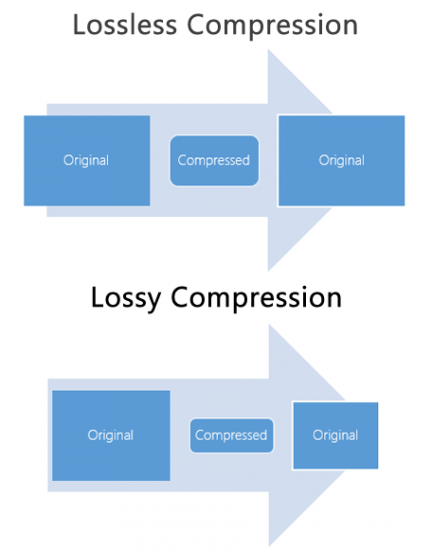
When comparing lossy and lossless compression formats, file size is often a significant factor. Lossy compression generally results in much smaller file sizes than lossless compression, but at the cost of some audio quality loss. However, the size difference between the two formats can be significant, making lossy compression a practical solution for many users.
Advanced Techniques for Lossy Audio Compression
Advanced techniques are available for lossy audio compression that can help to improve audio quality while still achieving significant file size reduction. Perceptual coding is one such technique that uses psychoacoustic models to analyze the audio and remove non-essential information in a way that minimizes the impact on sound quality. Another technique involves the use of metadata, which can help to provide additional information about the audio file that can be used to improve compression.
Best Practices for Lossy Audio Compression
There are several best practices that can be followed to achieve the best results when compressing audio files using a lossy format. Some of these practices include choosing the right codec for the specific needs of the user, ensuring that the encoding settings are appropriate for the file being compressed, and avoiding the use of excessive compression, which can result in a loss of sound quality. Additionally, it is important to avoid common mistakes when compressing audio files, such as encoding at too low of a bit rate or not checking the final output for artifacts or distortion.
Psychoacoustic Models
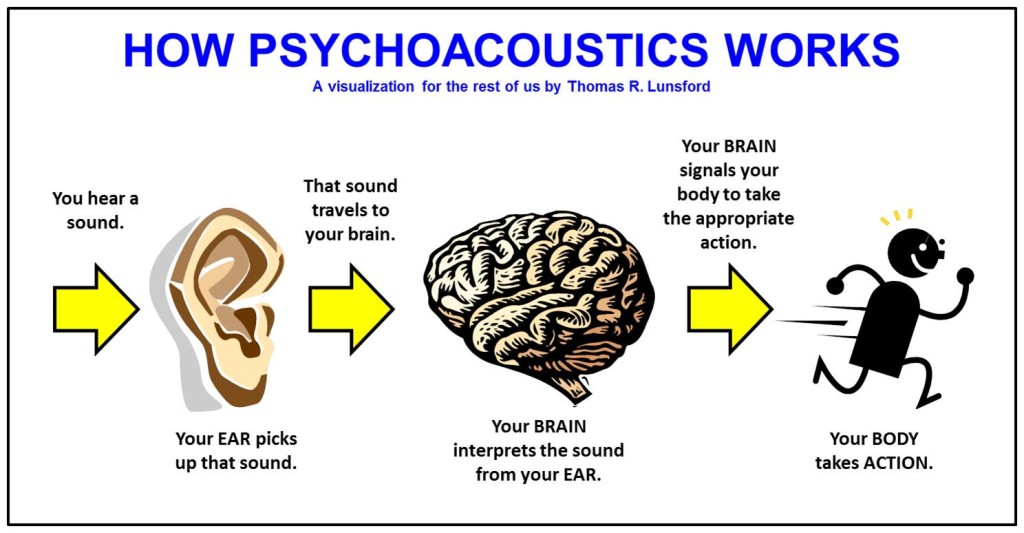
Psychoacoustic models are mathematical models that simulate the way that the human ear processes sound. They are used in perceptual coding to identify which audio signals can be safely removed without causing a noticeable loss in audio quality.
Psychoacoustic models take into account factors such as frequency masking, temporal masking, and the sensitivity of the human ear to different types of audio signals. They can also take into account more complex factors such as the interaction between different audio signals.
Metadata
Metadata is data that is embedded in an audio file and provides additional information about the audio content. In the context of lossy audio compression, metadata can be used to improve the compression process by providing additional information about the audio content.
One common use of metadata in lossy audio compression is to provide information about the target device or playback environment. For example, metadata can provide information about the type of headphones or speakers that the audio file is intended to be played through. This information can be used by perceptual coders to optimize the compression process for the target device or playback environment.
Another common use of metadata in lossy audio compression is to provide information about the audio content itself. For example, metadata can provide information about the genre, tempo, and key of a song. This information can be used to optimize the compression process for the specific characteristics of the audio content.
Best Practices for Lossy Audio Compression
To achieve the best results in lossy audio compression, there are several best practices that should be followed. These include:
Use the highest quality compression settings available
Use a well-supported and widely-used compression format
Use a lossless format for archiving and backup purposes
Avoid excessive compression, as this can lead to noticeable audio artifacts
Take into account the intended playback environment when compressing audio files
Include appropriate metadata to provide additional information about the audio content
Common Mistakes to Avoid
When compressing audio files, there are several common mistakes that should be avoided. These include:
Using excessively low compression settings, as this can lead to a noticeable loss in audio quality
Using an unsupported or proprietary compression format, as this can lead to compatibility issues
Not taking into account the intended playback environment, which can lead to suboptimal compression settings
Not including appropriate metadata, which can make it difficult to organize and manage large collections of audio files
Using excessive compression, as this can lead to noticeable audio artifacts
Explanation of Audio Compression and Lossy Audio Compression
Audio compression is the process of reducing the size of an audio file without significantly degrading the quality of the sound. Compression is necessary in the world of digital audio because it allows for more efficient storage and transmission of audio files. Without compression, audio files would be prohibitively large, making it difficult to store and share them over the internet.
Lossy audio compression is a specific type of audio compression that achieves a high degree of compression by discarding some of the audio data. This means that when you compress an audio file using a lossy compression algorithm, some of the data is permanently lost, and the resulting file is of lower quality than the original. Lossy compression is used widely because it allows for much higher compression ratios than lossless compression, making it more practical for everyday use.
Importance of Audio Compression in Modern Audio Production
Audio compression is an essential tool in modern audio production. The ability to compress audio files allows for more efficient use of storage space and bandwidth, which are essential resources in the world of digital media. Audio compression also makes it possible to stream high-quality audio over the internet, which has revolutionized the way we consume music and other audio content.
However, it’s important to remember that audio compression is not without its downsides. Lossy compression, in particular, can have a significant impact on the quality of the audio, and it’s essential to understand the trade-offs involved when choosing a compression format and level of compression.
The Technical Basics of Lossy Audio Compression
At its most basic level, lossy audio compression works by analyzing the audio file and discarding information that is deemed unnecessary for human perception. This information can include sounds that are too quiet to hear, or frequencies that are outside the range of human hearing. By discarding this information, the compression algorithm can significantly reduce the size of the audio file while still retaining much of the original sound quality.
The specific techniques used in lossy audio compression can vary, but most algorithms use some combination of frequency masking, quantization, and other mathematical techniques to achieve compression. The result is a smaller file size that can be easily stored or transmitted, but with some loss of audio quality.
The Most Commonly Used Lossy Audio Compression Formats and Codecs
There are many different lossy audio compression formats and codecs available, each with its own strengths and weaknesses. Some of the most commonly used formats and codecs include:
MP3 – one of the most widely used audio compression formats, with a high degree of compatibility and a good balance between file size and sound quality
AAC – a newer format that is widely used for streaming audio and has a better sound quality than MP3 at the same bitrate
OGG – an open-source format that is popular for internet radio and streaming
WMA – a format developed by Microsoft that is commonly used for streaming and downloading audio files from the internet
FLAC – a lossless audio compression format that is capable of compressing audio files without any loss of quality, but with larger file sizes than lossy formats
The Fascinating History of Lossy Compression
Lossy compression is a method of data compression that reduces the size of a file by discarding information that is deemed to be unnecessary. This technique has been used for decades in various fields, including image, audio, and video processing, to make files smaller and easier to share or store.
The first significant work on lossy image compression was done in the early 1970s by a group of researchers at the University of Southern California. They developed the first image compression algorithm, called the discrete cosine transform (DCT), which is still used today in the popular JPEG image format.
In the 1980s, the Moving Pictures Experts Group (MPEG) was established to develop standards for digital video compression. They introduced the MPEG-1 and MPEG-2 video formats, which became widely adopted in the industry. The success of these formats led to the creation of newer standards, such as MPEG-4 and H.264, which are still used in modern video streaming services.
Lossy compression has also been essential for audio processing. In the late 1980s, the MP3 format was developed by the Fraunhofer Society in Germany, which used a perceptual coding algorithm to remove information that the human ear cannot detect. MP3 quickly became the standard for digital music distribution, leading to the creation of newer formats such as AAC and OGG Vorbis.
However, lossy compression is not without its drawbacks. Because it removes data, it can lead to a loss of quality, especially if the compression is too aggressive. This can result in artifacts or distortions in the processed image, audio, or video.
Despite these limitations, lossy compression remains an important tool in the modern digital world. It allows for more efficient storage and sharing of multimedia content and has revolutionized industries such as music, film, and photography. As technology continues to evolve, it’s likely that new and more efficient lossy compression techniques will be developed, further enhancing the way we share and consume digital content.
When it comes to creating video content, audio quality is often overlooked. Many content creators focus solely on the visuals and neglect the importance of high-quality audio. However, audio quality is just as important as video quality when it comes to creating engaging content. In this comprehensive guide, we’ll explore the importance of audio quality, the factors that affect it, and how to improve it to keep your viewers engaged and satisfied.
1. Defining Audio Quality
Before we dive into the specifics of audio quality, it’s important to define what we mean by “audio quality.” Audio quality refers to the clarity, richness, and overall sound of the audio content. This includes factors such as volume, tone, and background noise. The higher the quality of the audio, the more enjoyable the listening experience for the audience.
2. The Importance of Audio Quality
2.1 Improving User Experience
High-quality audio is crucial for a good user experience. Viewers are more likely to engage with video content that has clear and crisp audio. Poor audio quality can lead to frustration and disappointment, causing viewers to lose interest in the content.
For example, imagine watching a video with muffled or low-quality audio. You may struggle to understand what is being said, or you may become distracted by background noise. This can take away from the overall viewing experience and make it difficult to stay engaged with the content.
On the other hand, high-quality audio can enhance the viewing experience, making it more enjoyable and engaging. Clear and crisp audio can help to create a more immersive experience, drawing viewers into the content and keeping them engaged from beginning to end.
Long-tail keyword: “Why good audio is important in video content”
2.2 Impact on Perceived Video Quality
Audio quality also affects the perceived quality of the video content. If the audio quality is poor, viewers may assume that the overall video quality is also low. This can lead to negative perceptions of the content and discourage viewers from watching more videos from the same creator.
For example, imagine watching a high-quality video with poor audio. Even though the video quality may be excellent, the poor audio quality can make the content seem amateurish or low-budget. This can negatively impact the viewer’s perception of the content and the creator.
On the other hand, high-quality audio can enhance the perceived quality of the video content, making it seem more professional and engaging. When the audio quality matches the video quality, viewers are more likely to perceive the content as high-quality and engaging.
Long-tail keyword: “The effects of poor audio quality on viewer engagement”
2.3 Impact on Viewer Engagement
In addition to affecting the perceived quality of video content, audio quality can also have a significant impact on viewer engagement. When audio quality is poor, viewers may quickly lose interest and stop watching. This can result in lower audience retention, decreased watch time, and lower engagement rates.
Conversely, high-quality audio can help to keep viewers engaged and enhance the emotional impact of video content. Clear dialogue, well-balanced music and sound effects, and a lack of distracting background noise can all contribute to a more engaging and immersive experience for the viewer.
Studies have shown that high-quality audio can have a direct impact on viewer engagement and audience retention. For example, a study conducted by Dolby Laboratories found that viewers were more likely to remember and engage with content that featured high-quality audio. The study also found that viewers were more likely to share content that had good audio quality, indicating that high-quality audio can also have a positive impact on social sharing and virality.
2.4 Sound Design and Audio Quality
Sound design is an important aspect of audio quality in video content. It involves the use of music, sound effects, and other audio elements to enhance the emotional impact of video content and create a more immersive viewing experience. Effective sound design can help to establish the mood and tone of a video, convey important information, and create a sense of continuity between different scenes.
Music is a particularly important element of sound design, as it can evoke specific emotions and create a memorable experience for the viewer. For example, a fast-paced, upbeat soundtrack can create a sense of excitement and energy, while a slow, melancholy melody can convey a sense of sadness or reflection.
Sound effects are another important aspect of sound design, as they can help to create a more immersive and realistic viewing experience. For example, the sound of footsteps, doors opening and closing, and other ambient noises can help to create a sense of presence and realism in a video.
2.4.1 Music and Audio Quality
When it comes to music in video content, it’s important to use high-quality recordings that are well-mixed and balanced. Poorly-mixed music can be distracting and detract from the overall quality of the video, while well-mixed music can create a more immersive and engaging experience.
In addition to the quality of the recording, it’s also important to consider the musical style and genre. The music should complement the tone and mood of the video, and should be appropriate for the target audience. For example, a video aimed at children might feature bright, cheerful music, while a video aimed at adults might feature more mature or sophisticated music.
2.4.2 Sound Effects and Audio Quality
Like music, sound effects should be of high quality and well-mixed to ensure that they don’t detract from the overall quality of the video. When choosing sound effects, it’s important to consider their appropriateness for the scene and the emotional impact that they will have on the viewer.
For example, a video that features a dramatic car chase scene might use sound effects such as screeching tires, engine revving, and crashes to create a sense of excitement and danger. In contrast, a video that features a quiet, introspective moment might use sound effects such as birds chirping, leaves rustling, or a soft breeze to create a more peaceful and reflective atmosphere.
3. Conclusion
In conclusion, high-quality audio is a crucial element in producing engaging and impactful video content. Investing in the right equipment, such as a high-quality microphone, and optimizing the recording environment can greatly improve the overall audio quality.
Not only does good audio quality impact the perceived quality of the video, but it also plays a significant role in audience engagement and retention. Poor audio quality can result in viewer frustration and disinterest, ultimately impacting the success of the content.
By understanding the importance of audio quality and taking steps to optimize it, content creators can create a better experience for their viewers and increase the overall impact of their content. Additionally, sound design and music can further enhance the quality of the audio and create a more immersive and emotional experience for the audience.
It’s important to remember that good audio quality is not just important for video content, but it also plays a crucial role in other contexts such as in education, entertainment, and advertising. The use of audio has evolved over time, and platforms have adapted to the preferences of users.
Overall, by recognizing the impact of high-quality audio and taking steps to improve it, content creators can enhance the experience of their audience and increase the success of their content.
Note 1: Types of Microphones
There are several types of microphones that content creators can choose from to achieve high-quality audio. Understanding the differences between each type can help creators make an informed decision about which microphone is best for their needs:
1. Dynamic Microphones
Dynamic microphones are the most durable and versatile type of microphone. They are ideal for recording vocals and instruments with a high sound pressure level, such as drums and electric guitars. They are also less sensitive to background noise, making them a good choice for recording in noisy environments.
2. Condenser Microphones
Condenser microphones are known for their high sensitivity and clear sound quality. They are ideal for capturing the nuances of acoustic instruments and vocals, making them a popular choice for recording studios and podcasting. However, they are more delicate than dynamic microphones and require phantom power to operate, which may not be available on all recording devices.
3. Ribbon Microphones
Ribbon microphones are a specialized type of dynamic microphone that use a thin strip Hf metal suspended in a magnetic field to capture sound. They are known for their warm and natural sound quality, making them a popular choice for recording vocals and acoustic instruments, such as guitars and strings.
When choosing a microphone, it’s important to consider the specific needs of the recording environment and the type of content being produced. With the right microphone and proper techniques, creators can achieve high-quality audio that enhances the overall user experience.
How Noise Reduction Software Works
How Noise Reduction Software Works: Noise reduction software is a type of audio processing tool that analyzes an audio signal and removes unwanted noise or interference. It works by detecting patterns in the noise that are different from the patterns in the desired audio signal, and then subtracting those patterns from the overall signal.
One common approach is to use a technique called spectral subtraction, which works by taking a short-term Fourier transform of the audio signal to identify the frequency spectrum of the noise. The software can then create a filter that selectively removes those frequencies from the signal, leaving the desired audio intact.
Another approach is to use machine learning algorithms to train the software to recognize different types of noise and automatically remove them. This can be particularly effective for complex or variable noise sources, such as the sound of traffic or wind.
While noise reduction software can be effective, it’s important to note that it’s not a silver bullet. Some types of noise may be difficult or impossible to remove without degrading the quality of the desired audio signal.
Nota 3: Understanding Decibels
Understanding Decibels: Decibels are a unit of measurement that is used to express the intensity of a sound. The decibel scale is logarithmic, which means that a small change in decibel level represents a large change in actual sound intensity.
The threshold of human hearing is generally considered to be around 0 decibels, while the threshold of pain is around 120 decibels. Common sounds like conversation or music may be around 60-70 decibels, while a rock concert or chainsaw can easily exceed 100 decibels.
The reason for the logarithmic scale is that the human ear is not equally sensitive to all frequencies of sound. By using a logarithmic scale, we can better represent the way that the human ear perceives changes in sound intensity across different frequency ranges.
It’s important to be aware of the decibel levels in your environment, as exposure to loud sounds over time can cause permanent hearing damage. This is particularly important for people who work in loud environments, such as construction or music production.
Videos are a fun way to share your memories and special moments. However, in order for your videos to sound good, it is important to pay attention to the quality of the audio. Have you ever listened to a video with poor and distorted audio? That’s no fun for anyone.
The Quality of MP4 Audio
In this article, we will explain in a simple and fun way how to make sure that the audio quality in your MP4 videos is the best.
What is MP4 audio?
MP4 audio is simply the sound you hear in an MP4 video. Like video, audio is compressed and saved as an MP4 file.
Audio Quality
Audio quality is measured in bits and samples. The higher the number of bits and samples, the better the audio quality. For example, an audio file with 128 bits and 44.1 samples per second will have better quality than an audio file with 64 bits and 22.05 samples per second.
Improving Audio Quality
There are several ways to improve the audio quality in your MP4 videos. One of the best is to use a program called Mp4Gain. This program allows you to adjust the audio quality in your MP4 videos to make them sound better.
Another way to improve the audio quality in your MP4 videos is to make sure you use a good microphone. A quality microphone will help you record crisp, clear audio in your videos.
Conclusion
In conclusion, to make sure that the audio quality in your MP4 videos is the best, it is important to pay attention to the audio quality and use a program like Mp4Gain. With these simple tips, your MP4 videos will sound better than ever.
What do we talk about when we talk about audio quality?
We usually hear a lot about audio quality, vinyl, tapes, digital formats with loss and loss, high resolution formats, hi-fi players, analog and digital recording and mixing systems, microphones and preamps worth thousands of dollars, eighty channel mixing tables, diverse production techniques, mastering abroad, etc., etc. But is it clear what we consider as audio quality? We all have the same concept about what it should be? Beyond how we record, in what format and what device do we listen to, what do we look for?
Audio quality equals clarity?
It can be partially. This concept would affirm without doing it that the diffusion is bad when in reality in many cases, styles, songs, orchestrations, the diffusion is friendly. Moreover, it is necessary for a good development of the sound concept sought. The diffusion, reverberation, acoustic environment of a room can favor and in cases be indispensable for a good sound record.
Audio quality is equal to dynamic?
Perhaps, if we value the space and the feeling of almost being able to stand between the guitarist and drummer when listening to a record, understand the subtle arrangements of an acoustic guitar and then receive the power expression of the whole band together, in that case we would be defending the natural dynamics of music and its interpretation. The truth is that decades ago we are going in the opposite direction, not only in studio but also in live sound. The advent of digital tables and their dynamic processors, channel by channel, led the trend to compress everything. As the engineer Mario Brauer would say all musicians are increasingly on the edge of the sound stage looking for a space to be seen. Depth has been lost and we all accept to a lesser or greater extent that that’s fine. Although we complain loudly we usually go in that direction.
Audio quality equals expensive equipment and instruments?
Undoubtedly expensive equipment and instruments offer us quality in registration and mixing. But the history of music is full of great albums recorded with lower level equipment and instruments. It is clear then that the right instrument for a song is not determined by its value in the store.
Audio quality equals perfect acoustics?
Registering in a suitable acoustic environment favors us, it is welcome. In some styles or works it may be very necessary. But we could not say that it is decisive.
Audio quality is mastering in a prestigious studio?
Many artists make recordings and domestic mixes considering that by mastering in a large studio they will achieve a magical transformation in the sound result. Clearly this is a wrong concept. What is broken is difficult almost impossible to fix. It can be improved, enhance the good done in previous stages and correct some errors, homogenize and guarantee a good reproduction in most of the possible means, but we cannot claim a magical transformation. Most of the time this does not happen.
Audio quality is hi-fi format?
If we achieve a great record with careful production in all its stages, the ideal would be to reach the listeners in the best possible way. This includes digital or analog support, as well as the player. This is not always the case and mass dissemination through media such as YouTube, Spotify, or others will depress sound quality in order to reach more people. Also the reproduction with mobile devices and headphones of low cost.
I could continue to name factors and elements that influence our determination on the concept of audio quality but I think the idea is raised, I consider that audio quality in our time has more to do with balances, balance between these factors, elements and tools of production, achieve the best performance of our equipment, acoustic space and time, artistically determine which is the right instrument, preserve the timbral, tone and dynamics of the sounds captured in the most natural way we can, without ignoring stylistic variables.