Bit Depth in Audio


Free Download Mp4Gain
picture

Bit Depth in Audio

Bit Depth in Audio
Bit Depth in Audio
Bit Depth in Audio
Bit Depth in Audio

Audio Bit Depth Explained

Audio bit depth refers to the number of bits used to represent the amplitude of an audio signal at each sample point. In simpler terms, it determines the dynamic range of digital audio. A higher bit depth allows for a more detailed representation of sound, capturing subtle nuances and minimizing quantization noise.
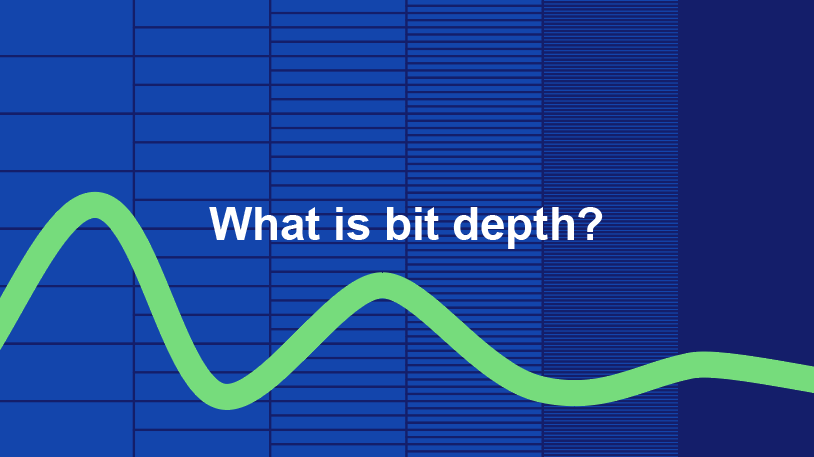
Imagine bit depth as a measurement of how finely audio is divided into individual steps. For instance, a 16-bit audio recording has 65,536 possible amplitude levels, while a 24-bit recording offers a staggering 16,777,216 levels. This increased granularity results in smoother, more accurate sound reproduction.

Understanding Bit Depth in Audio

To grasp the significance of bit depth, consider it as the shades of color in a painting. A higher bit depth provides a broader palette of colors, allowing for a more accurate depiction of the original image. Similarly, in audio, a greater bit depth captures a wider range of volume levels, preserving the subtleties of a musical performance or the nuances of a voice.
In practical terms, when you listen to music or a podcast, a higher bit depth ensures that you can hear the softest whispers and the loudest drum hits without distortion or loss of detail. It’s like having a more precise lens to view the sonic landscape.

Audio Resolution and Bit Depth

Bit depth and audio resolution are closely linked. Audio resolution refers to the level of detail and accuracy in an audio recording. Bit depth plays a pivotal role in determining this resolution. Think of it as the difference between watching a video in standard definition versus high definition. A higher bit depth offers a more lifelike and faithful representation of sound.
When recording or listening to music, you’ll often encounter terms like “16-bit” or “24-bit.” These numbers indicate the bit depth of the audio, with 24-bit audio being the gold standard for high-quality recordings. It’s akin to having a sharper, more detailed image in photography.

Now, let’s explore more facets of bit depth in audio.

Importance of Bit Depth in Sound

Bit depth is paramount in the world of sound because it directly impacts audio fidelity and the ability to reproduce music or voice accurately. It ensures that every subtle nuance, from the softest piano notes to the powerful guitar riffs, is faithfully captured and played back with precision.
Consider this: when recording a classical piano performance, the pianist’s delicate touch on the keys is as vital as the thunderous crescendos. A higher bit depth preserves the intricate dynamics, making you feel as if you are sitting in the concert hall, immersed in the music.

Bit depth is the foundation of audio quality, and understanding its role can help you appreciate the importance of using higher bit depths in audio production and playback.

How Bit Depth Affects Audio Quality

The impact of bit depth on audio quality is akin to the role of paint quality in a masterpiece. Just as a skilled artist requires high-quality pigments for a vivid painting, audio engineers rely on a greater bit depth for lifelike and rich audio recordings.
A lower bit depth might result in noticeable “stepping” or quantization noise, especially in quiet passages of a recording. This noise can be distracting and diminish the overall listening experience. On the other hand, a higher bit depth provides a smooth, natural curve to the audio waveform, minimizing these artifacts and delivering pristine sound.

Consider your favorite music track—the artist’s emotions, the resonance of instruments, and the atmosphere of the recording venue. All these subtleties are better preserved and conveyed through higher bit depth, elevating your listening experience to a new level.

Bit Depth in Digital Audio

In the digital realm, bit depth plays a pivotal role in the accuracy of audio representation. Think of it as pixels in a high-resolution photograph; more pixels mean finer details. Similarly, a higher bit depth translates to a more accurate depiction of sound.
In applications like digital audio workstations (DAWs) and music players, you often have the option to choose between different bit depths for your audio projects. Opting for a higher bit depth can lead to more professional-sounding results, particularly in the realms of music production, film scoring, and sound design.

Bit Depth vs. Sample Rate

While bit depth and sample rate are both critical aspects of digital audio, they serve different purposes. Bit depth determines the accuracy of amplitude representation, while sample rate governs how often the audio waveform is sampled per second.
Picture bit depth as the color depth in a photograph and sample rate as the frames per second in a video. A higher bit depth allows for greater tonal accuracy, while a higher sample rate captures more audio snapshots per second, preserving high-frequency content.

In many scenarios, a balanced approach between bit depth and sample rate is essential to achieve optimal audio quality. The synergy between these two factors ensures that audio recordings faithfully capture the richness and subtleties of the original source.

Bit Depth in Music Production

For music producers, bit depth is a critical consideration when working on audio projects. It influences the quality of sound recordings and the ability to manipulate audio during the production process.
When mixing and mastering music, a higher bit depth provides ample headroom for processing audio without introducing artifacts or degrading quality. This allows producers to apply effects, equalization, and compression with greater precision.

Additionally, when releasing music, opting for a higher bit depth ensures that your audience experiences the full depth and nuance of your compositions, whether they’re listening through high-end headphones or a powerful sound system.

16-Bit vs. 24-Bit Audio

The choice between 16-bit and 24-bit audio often arises when considering audio quality and storage requirements. A 16-bit audio file occupies less space compared to a 24-bit file, but it also has limitations in capturing subtle audio details.
16-bit audio is akin to a compact camera with limited resolution, suitable for casual snapshots. In contrast, 24-bit audio offers the quality of a professional DSLR camera, capturing a broader dynamic range and preserving the finer nuances of sound.

When deciding between the two, it’s essential to consider the specific use case. For audiophiles, professional audio production, and high-end sound systems, 24-bit audio is the preferred choice for its ability to deliver an immersive and faithful listening experience.

Bit Depth for Audio Recording

In the realm of audio recording, selecting the appropriate bit depth is a pivotal decision. It directly affects the quality and flexibility of the recorded material, whether you’re tracking vocals, instruments, or ambient sounds.
Recording at a higher bit depth, such as 24-bit, provides audio engineers with a safety net during the recording process. It allows them to capture a wide dynamic range without the risk of clipping or distortion. This is particularly valuable when dealing with unpredictable elements in live recordings or capturing the subtleties of acoustic instruments.

In essence, bit depth choice during audio recording is like choosing the canvas size for a painting. A larger canvas provides more room for creativity and detail, and a higher bit depth offers greater sonic canvas for audio professionals.

Final Words

In the realm of audio, bit depth serves as the bedrock of quality and fidelity. It determines how faithfully sound is captured, preserved, and reproduced. Understanding the importance of bit depth allows you to appreciate the nuances in your favorite music, the clarity in podcasts, and the immersive soundscapes in movies.
Whether you’re an aspiring musician, an audio engineer, or simply a passionate listener, recognizing the role of bit depth in audio enriches your experience. It’s the difference between seeing the world in black and white and experiencing it in full color.

So, the next time you enjoy your favorite song or immerse yourself in a cinematic adventure, remember that bit depth is the silent hero behind the scenes, ensuring that every sonic detail reaches your ears with precision and clarity.


Free Download Mp4Gain
picture


Mp4Gain Main Window
picture


Mp4Gain Features
picture


Free Download Mp4Gain
picture

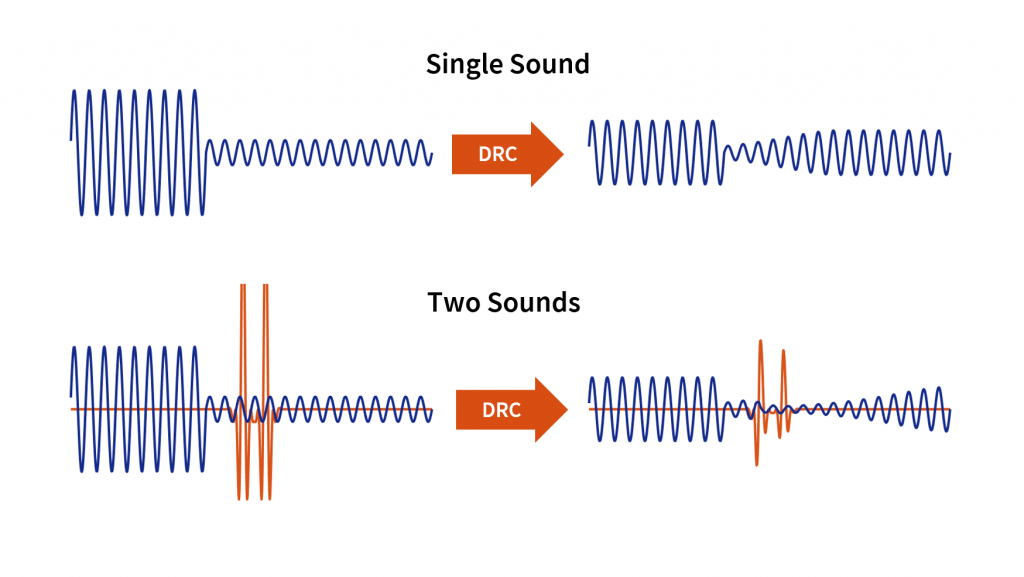
Audio Dynamic Range Compression: Limiting and Expansion

Audio Dynamic Range Compression: Limiting and Expansion

Audio Dynamic Range Compression

Audio Compression: What It Is and How It Works

As an audio engineer, I’ve spent countless hours working with dynamic range compression. At its core, compression is a tool used to control the dynamic range of an audio signal. This means that it can be used to make quiet sounds louder and loud sounds quieter, resulting in a more consistent overall volume. Compression is an essential tool in the world of audio production, and it’s used in everything from music to film and television.
One of my favorite quotes about compression comes from the legendary producer Quincy Jones. He once said, “Compression is like a good pair of eyeglasses. You don’t notice them, but they make things look better.” And it’s true. When used correctly, compression can make an audio signal sound more polished and professional.

Dynamic Range Compression vs. Limiting

While compression and limiting are often used interchangeably, they are actually two different processes. Compression is used to control the dynamic range of an audio signal, while limiting is used to prevent the signal from exceeding a certain level. In other words, limiting is a more extreme form of compression.
One of the most common uses of limiting is in mastering, which is the final step in the audio production process. During mastering, the goal is to make sure that the audio sounds consistent across different playback systems. Limiting is used to prevent the audio from distorting or clipping when played back on a variety of systems.

Audio Expansion: The Other Side of the Coin

While compression and limiting are used to control the dynamic range of an audio signal, expansion is used to increase it. Expansion is the opposite of compression, and it’s used to make quiet sounds even quieter. This can be useful in situations where you want to bring out the details in a recording.
One of my favorite examples of the use of expansion comes from the film “No Country for Old Men.” In the film, there’s a scene where the main character is walking through a hotel room. As he walks, you can hear the sound of his footsteps echoing off the walls. The sound of the footsteps is very quiet, but it’s still audible. This is a great example of the use of expansion to bring out the details in a recording.
Final Words:
In conclusion, dynamic range compression, limiting, and expansion are all essential tools in the world of audio production. Whether you’re working on music, film, or television, understanding how to use these tools can make a huge difference in the final product. And while there are many different techniques and approaches to using compression, limiting, and expansion, the most important thing is to use your ears and trust your instincts.
audio compression, dynamic range, audio engineering, audio processing, audio mixing, audio production, audio mastering, audio software, audio plugins, audio effects, audio equipment, audio gear, audio technology, audio science, audio theory, audio education, audio tutorials, audio tips, audio tricks, audio hacks, audio workflow, audio techniques, audio aesthetics, audio quality, audio fidelity, audio perception, audio psychology, audio philosophy, audio history, audio culture, audio art, audio creativity, audio innovation, audio trends, audio industry, audio business, audio marketing, audio branding, audio advertising, audio monetization, audio revenue, audio distribution, audio streaming, audio downloads, audio formats, audio codecs, audio standards, audio compatibility, audio hardware, audio drivers, audio firmware, audio troubleshooting, audio repair, audio maintenance, audio optimization, audio performance, audio testing, audio measurement, audio analysis, audio visualization, audio synthesis, audio sampling, audio recording, audio editing, audio mixing, audio mastering, audio post-production, audio restoration, audio enhancement, audio noise reduction, audio equalization, audio filters, audio modulation, audio synthesis, audio synthesis

Digital Audio Interfaces

Digital Audio Interfaces: MIDI vs. USB

Digital Audio Interfaces

Digital Audio Interfaces

Digital audio interfaces are essential for connecting audio equipment to a computer or other digital device. They allow for high-quality audio recording, playback, and processing, and come in a variety of formats, including MIDI and USB.
When I first started working with digital audio interfaces, I was overwhelmed by the different options available. However, after some research and experimentation, I was able to understand the differences between MIDI and USB interfaces and how to choose the right one for my needs. One of the advantages of digital audio interfaces is that they allow for high-quality audio recording and playback, which is essential for music production and other audio-related tasks.
As I was learning about digital audio interfaces, I remembered the quote from the movie “Whiplash”: “There are no two words in the English language more harmful than ‘good job’.” While it’s important to strive for excellence in audio production, it’s also important to choose the right tools for the job.

MIDI vs. USB

MIDI and USB are two common digital audio interface formats. MIDI stands for Musical Instrument Digital Interface and is primarily used for connecting musical instruments and controllers to a computer or other digital device. USB stands for Universal Serial Bus and is a general-purpose interface that can be used for a variety of audio and non-audio devices.
One of the advantages of MIDI is that it allows for precise control over musical instruments and controllers, making it ideal for music production and performance. However, MIDI is limited in terms of bandwidth and can only transmit data at a relatively slow rate. USB, on the other hand, has a much higher bandwidth and can transmit data at a much faster rate, making it ideal for high-quality audio recording and playback.
As I was learning about MIDI and USB interfaces, I remembered the quote from the book “The Alchemist” by Paulo Coelho: “When you want something, all the universe conspires in helping you to achieve it.” Choosing the right digital audio interface can be challenging, but with the right tools and knowledge, it’s possible to achieve your audio production goals.

Final Words

Digital audio interfaces are essential for connecting audio equipment to a computer or other digital device. MIDI and USB are two common digital audio interface formats, each with their own advantages and disadvantages. While MIDI is ideal for musical instruments and controllers, USB is ideal for high-quality audio recording and playback.
At MP4Gain, we understand the importance of audio quality and file size. Our software is designed to normalize and convert audio files to the most popular formats, with an integrated equalizer for fine-tuning the audio. If you’re looking for a solution to your audio needs, give MP4Gain a try.
Digital audio interfaces, MIDI vs. USB, audio connectivity, MIDI connectivity, USB connectivity, MIDI interface, USB interface, audio interface, music production, audio recording, audio playback, audio processing, audio equipment, audio devices, audio tools, audio software, audio quality, audio normalization, audio conversion, audio equalizer, audio production, audio performance, audio controllers, audio bandwidth, audio transmission, audio data, audio rate, audio goals, audio production goals, audio production tools, audio production knowledge, audio production techniques, audio production software, audio production hardware, audio production equipment, audio production resources, audio production community, audio production events, audio production workshops, audio production seminars, audio production webinars, audio production podcasts, audio production blogs, audio production forums, audio production websites, audio production resources, audio production tools, audio production equipment, audio production instruments, audio production accessories, audio production books, audio production magazines, audio production journals, audio production publications, audio production reviews, audio production ratings, audio production comparisons, audio production recommendations, audio production tips, audio production tutorials, audio production guides, audio production manuals, audio production documentation, audio production support, audio production help.

Huffman Decoding Algorithm

MP3 Decoding: Huffman Decoding Algorithm

Huffman Decoding Algorithm

MP3 Decoding

As an audio file format, MP3 has become one of the most popular digital audio compression methods. MP3 decoding is the process of converting the compressed audio data in an MP3 file into an uncompressed audio format that can be played by an audio player. Decoding the compressed audio data involves several steps, including Huffman decoding, dequantization, and inverse discrete cosine transform.
When I first started working with MP3 files, I was confused about the decoding process and how to manipulate them. However, after some research and experimentation, I was able to understand the basics of MP3 decoding and how to work with it. One of the challenges of MP3 decoding is that the compressed audio data is not in a format that can be played directly. Decoding the compressed audio data involves several steps, including Huffman decoding, dequantization, and inverse discrete cosine transform.
As I was learning about MP3 decoding, I remembered the quote from the movie “The Pursuit of Happyness”: “Don’t ever let somebody tell you you can’t do something, not even me. Alright? You dream, you gotta protect it. People can’t do something themselves, they wanna tell you you can’t do it. If you want something, go get it. Period.”

Huffman Decoding Algorithm

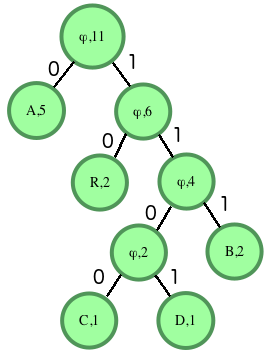
Huffman decoding is a key step in MP3 decoding. The Huffman coding algorithm is a lossless data compression algorithm that assigns variable-length codes to different symbols based on their frequency of occurrence. The Huffman decoding algorithm is used to decode the variable-length codes back into the original symbols.
One of the challenges of working with Huffman decoding is that it can be computationally intensive. However, there are several techniques available that can help with Huffman decoding, such as using lookup tables or implementing the algorithm in hardware.
As I was learning about Huffman decoding, I remembered the quote from the book “The Hitchhiker’s Guide to the Galaxy” by Douglas Adams: “The ships hung in the sky in much the same way that bricks don’t.” Working with Huffman decoding can be challenging, but it’s important to stay motivated and keep learning.

Final Words

Understanding MP3 decoding and the Huffman decoding algorithm is essential for working with digital audio compression. Decoding the compressed audio data involves several steps, including Huffman decoding, dequantization, and inverse discrete cosine transform. While working with MP3 files can be challenging, it’s important to stay motivated and enjoy the process of learning.
At MP4Gain, we understand the importance of audio quality and file size. Our software is designed to normalize and convert audio files to the most popular formats, with an integrated equalizer for fine-tuning the audio. If you’re looking for a solution to your audio needs, give MP4Gain a try.
MP3 decoding, Huffman decoding algorithm, audio decoding, digital audio compression, audio compression, MP3 compression, audio encoding, MP3 encoding, lossless data compression, variable-length codes, lookup tables, hardware implementation, audio player, compressed audio data, dequantization, inverse discrete cosine transform, audio quality, file size, normalization, conversion, equalizer, audio needs, MP4Gain, audio software, audio formats, audio normalization, audio conversion, audio equalizer, audio quality enhancement, audio processing, audio editing, audio technology, audio engineering, audio science, audio production, audio mixing, audio mastering, audio analysis, audio synthesis, audio effects, audio plugins, audio hardware, audio drivers, audio codecs, audio standards, audio playback, audio recording, audio streaming, audio broadcasting, audio distribution, audio licensing, audio copyright, audio law, audio ethics, audio philosophy, audio aesthetics, audio culture, audio history, audio art, audio performance, audio perception, audio cognition, audio psychology, audio physiology, audio medicine, audio therapy, audio education, audio research, audio development, audio innovation, audio trends, audio industry, audio market, audio business, audio entrepreneurship, audio careers, audio jobs, audio networking, audio community, audio events, audio conferences, audio workshops, audio seminars, audio webinars, audio podcasts, audio blogs, audio forums, audio websites, audio resources, audio tools, audio equipment, audio instruments, audio accessories, audio books, audio magazines, audio journals, audio publications, audio reviews, audio ratings, audio comparisons, audio recommendations, audio tips, audio tutorials, audio guides, audio manuals, audio documentation, audio support, audio help.

MP3 File Structure

MP3 File Structure

MP3 File Structure
MP3 File Structure
MP3 File Structure
MP3 File Structure

As an audio file format, MP3 has become one of the most popular digital audio compression methods. The MP3 file structure consists of header and data blocks. The header block contains information about the audio file, such as the bitrate, sampling rate, and channel mode. The data block contains the compressed audio data.

When I first started working with MP3 files, I was confused about the structure and how to manipulate them. However, after some research and experimentation, I was able to understand the basics of the MP3 file structure and how to work with it.

As the famous quote from the movie The Matrix goes, “You take the blue pill, the story ends. You wake up in your bed and believe whatever you want to believe. You take the red pill, you stay in Wonderland, and I show you how deep the rabbit hole goes.” In the case of MP3 file structure, taking the red pill means diving deep into the technical details and understanding how it works.

Header Blocks

The header block is the first part of an MP3 file. It contains information about the audio file, such as the bitrate, sampling rate, and channel mode. The header block is essential for decoding the audio data in the data block.

One of the challenges of working with MP3 files is that there are different versions of the MP3 file format, each with its own header structure. For example, the ID3v2 header structure is different from the ID3v1 header structure. Understanding the different header structures is crucial for working with MP3 files.

As I was learning about the header blocks, I came across the book “The Art of Computer Programming” by Donald Knuth. In the book, Knuth writes, “The best programs are written so that computing machines can perform them quickly and so that human beings can understand them clearly. A programmer is ideally an essayist who works with traditional aesthetic and literary forms as well as mathematical concepts, to communicate the way that an algorithm works and to convince a reader that the results will be correct.”

Data Blocks

The data block contains the compressed audio data. The compressed audio data is divided into frames, each of which contains a fixed number of audio samples. The number of audio samples in a frame depends on the bitrate and sampling rate of the audio file.

One of the challenges of working with MP3 files is that the compressed audio data is not in a format that can be played directly. The compressed audio data needs to be decoded before it can be played. Decoding the compressed audio data involves several steps, including Huffman decoding, dequantization, and inverse discrete cosine transform.

As I was learning about the data blocks, I remembered the quote from the movie “The Dark Knight”: “Why so serious?” Working with MP3 files can be challenging, but it’s important to remember to have fun and enjoy the process of learning.

Bitrate Calculation

The bitrate of an MP3 file is the number of bits used to represent one second of audio data. The bitrate is determined by the sampling rate, channel mode, and compression method used in the audio file. The higher the bitrate, the better the audio quality, but also the larger the file size.

Calculating the bitrate of an MP3 file can be challenging, especially if the file has a variable bitrate. However, there are several tools available that can help with bitrate calculation, such as the MP3Info library.

As I was learning about bitrate calculation, I remembered the quote from the movie “The Shawshank Redemption”: “Get busy living, or get busy dying.” Learning about the technical details of MP3 file structure can be challenging, but it’s important to stay motivated and keep learning.

Final Words

Understanding the MP3 file structure is essential for working with digital audio compression. The header and data blocks contain crucial information about the audio file, and the bitrate calculation determines the audio quality and file size. While working with MP3 files can be challenging, it’s important to stay motivated and enjoy the process of learning.

At MP4Gain, we understand the importance of audio quality and file size. Our software is designed to normalize and convert audio files to the most popular formats, with an integrated equalizer for fine-tuning the audio. If you’re looking for a solution to your audio needs, give MP4Gain a try.

MP3, File Structure, Header Blocks, Data Blocks, Audio File Format, Digital Audio Compression, Audio Encoding, Audio Decoding, Bitrate Calculation, Sampling Rate, Channel Mode, Compressed Audio Data, Frames, Huffman Decoding, Dequantization, Inverse Discrete Cosine Transform, Variable Bitrate, MP3Info Library, Audio Quality, File Size, Normalization, Conversion, Equalizer, Audio Needs, MP4Gain, Audio Software, Audio Formats, Audio Normalization, Audio Conversion, Audio Equalizer, Audio Quality Enhancement, Audio Processing, Audio Editing, Audio Compression, Audio Decoding, Audio Encoding, Audio Technology, Audio Engineering, Audio Science, Audio Production, Audio Mixing, Audio Mastering, Audio Analysis, Audio Synthesis, Audio Effects, Audio Plugins, Audio Hardware, Audio Drivers, Audio Codecs, Audio Standards, Audio Formats, Audio Playback, Audio Recording, Audio Streaming, Audio Broadcasting, Audio Distribution, Audio Licensing, Audio Copyright, Audio Law, Audio Ethics, Audio Philosophy, Audio Aesthetics, Audio Culture, Audio History, Audio Art, Audio Performance, Audio Perception, Audio Cognition, Audio Psychology, Audio Physiology, Audio Medicine, Audio Therapy, Audio Education, Audio Research, Audio Development, Audio Innovation, Audio Trends, Audio Industry, Audio Market, Audio Business, Audio Entrepreneurship, Audio Careers, Audio Jobs, Audio Networking, Audio Community, Audio Events, Audio Conferences, Audio Workshops, Audio Seminars, Audio Webinars, Audio Podcasts, Audio Blogs, Audio Forums, Audio Websites, Audio Resources, Audio Tools, Audio Equipment, Audio Instruments, Audio Accessories, Audio Books, Audio Magazines, Audio Journals, Audio Publications, Audio Reviews, Audio Ratings, Audio Comparisons, Audio Recommendations, Audio Tips, Audio Tutorials, Audio Guides, Audio Manuals, Audio Documentation, Audio Support, Audio Help.

Audio Expansion

How Understanding Audio Expansion Can Improve Your Music Production

Audio Expansion
Audio Expansion
Audio Expansion
Audio Expansion

What is Audio Expansion and How Does it Work?

As a music producer, understanding the concept of audio expansion is crucial to achieving the desired sound quality in your productions. Audio expansion, also known as upward expansion, is a dynamic audio processing technique that increases the gain of a signal when it is below a certain threshold level. This technique is used to increase the dynamic range of a signal by amplifying only the quieter parts, resulting in a more natural and transparent sound.
To put it simply, audio expansion is like a reverse compressor. While a compressor reduces the dynamic range of a signal by reducing the gain of louder parts, an expander increases the dynamic range by amplifying quieter parts. According to Roey Izhaki in “Mixing Audio,” “expansion is a powerful tool that can significantly enhance a mix, giving it a lively and open sound.”

How to Use Audio Expansion in Your Music Production

To use audio expansion effectively, you first need to set the threshold level. The threshold is the level at which the expander starts to increase the gain. The higher the threshold, the less effect the expander will have. You also need to set the ratio, which determines the amount of gain increase when the signal falls below the threshold level. The ratio is expressed in decibels and can range from 1.5:1 to 10:1 or higher.
One important thing to keep in mind is that audio expansion should be used sparingly. Overuse can result in an unnatural and exaggerated sound. It is recommended to use a gentle ratio and adjust the threshold level to suit the dynamics of the source material.

The Benefits of Audio Expansion in Music Production

Using audio expansion in your music production can result in a more natural and transparent sound. It can also help to improve the overall dynamic range of your mix, making it sound more open and spacious. By selectively amplifying the quieter parts of a signal, you can bring out subtle details and nuances that may have been masked by louder elements.
As an audio engineer, I have found that audio expansion can be particularly useful when working with vocals or acoustic instruments. By gently expanding the dynamics, you can help to preserve the natural character of the performance and avoid the artificial sound that can result from heavy compression.

In the words of Roey Izhaki, “expansion can be a great tool to help you achieve your sonic goals.” With careful use and experimentation, audio expansion can be a powerful technique to enhance your music production.

Final Words:
In conclusion, understanding audio expansion is an important skill for any music producer. By using this dynamic processing technique, you can improve the sound quality and dynamic range of your productions. Remember to use audio expansion sparingly and experiment with different settings to find the best results for your mix.

audio dynamics, dynamic processing, audio processing, music production, sound quality, mixing techniques, signal processing, dynamic range, compression, mastering, mixing, audio engineering, audio effects, audio plugins, VST plugins, audio editing, audio software, DAW, audio mixing, audio mastering, audio normalization, audio EQ, audio filters, audio enhancement, audio post-production, audio mastering services, audio production tips, audio recording, audio editing software, audio effects plugins, audio frequency, audio volume, audio levels, audio peak, audio clipping, audio restoration, audio quality, audio improvement,

What is a signal-to-noise ratio in audio?

What is a signal-to-noise ratio in audio?

signal-to-noise ratio audio

Understanding the Basics of Audio Quality

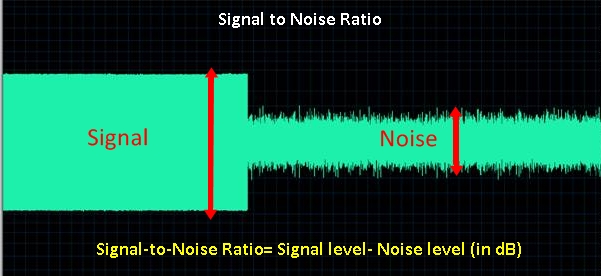
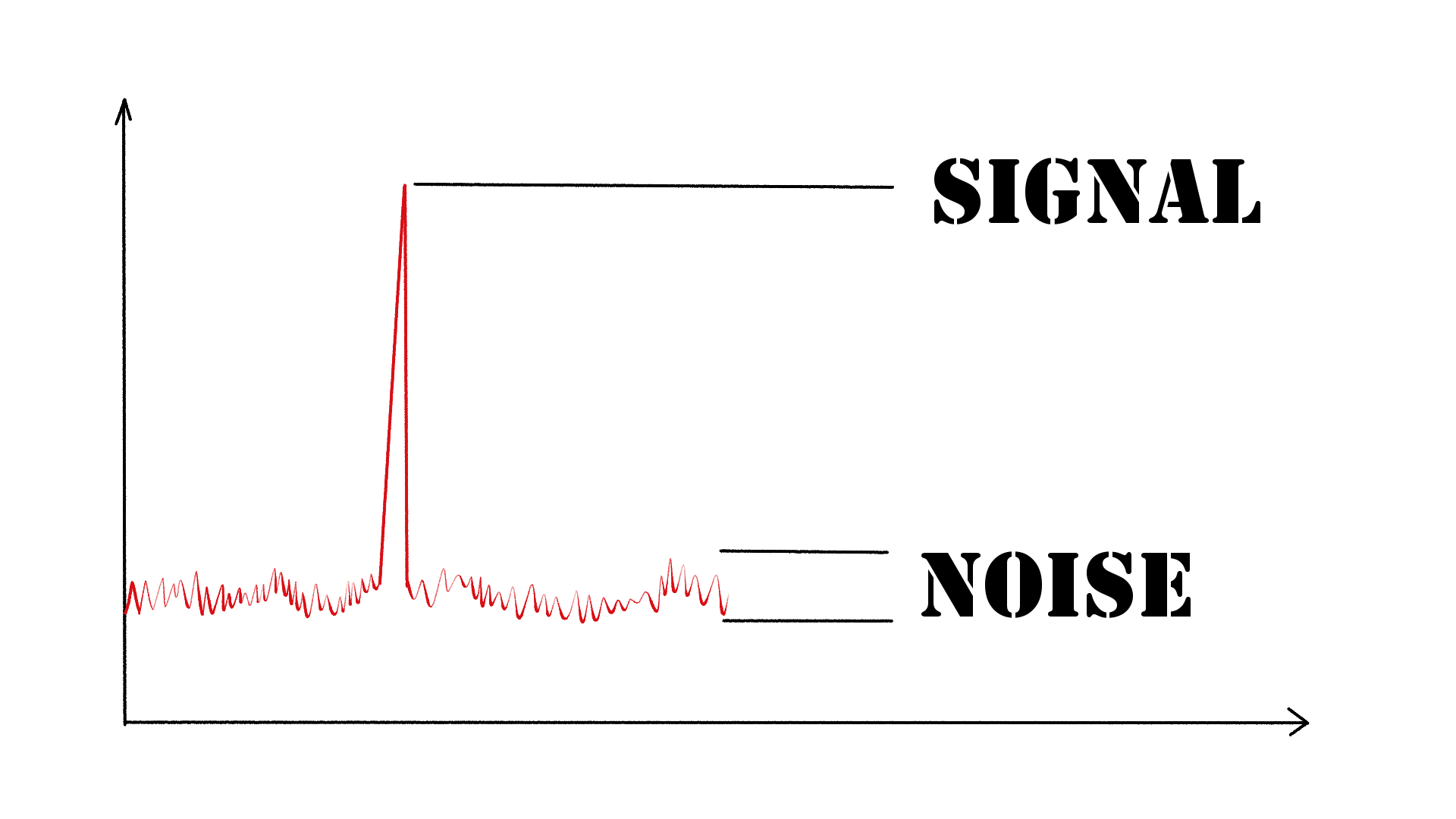
As an audio engineer, I have come across many questions about audio quality, and one of the most common ones is “What is a signal-to-noise ratio in audio?” In simple terms, the signal-to-noise ratio (SNR) is the difference between the desired audio signal and the background noise. A high SNR means that the desired signal is much stronger than the noise, resulting in better audio quality.
When it comes to audio quality, there are many factors to consider, such as audio processing, normalization, compression, dynamics, and distortion. Each of these factors can affect the SNR and, therefore, the overall audio quality. For example, audio normalization can help to increase the SNR by adjusting the volume levels of the audio signal, while audio compression can reduce the dynamic range of the audio signal, resulting in a more consistent SNR.

The Importance of Audio Normalization

As someone who has worked with audio for many years, I can attest to the importance of audio normalization. Normalization is the process of adjusting the volume levels of an audio signal to a standard level, which can help to improve the SNR and overall audio quality.
One of the benefits of audio normalization is that it can help to prevent distortion in the audio signal. When an audio signal is too loud, it can cause distortion, which can be heard as a buzzing or crackling sound. By normalizing the audio signal, you can ensure that it is at a safe and consistent volume level, which can help to prevent distortion and improve the overall audio quality.

The Role of Audio Compression in Audio Quality

Audio compression is another important factor to consider when it comes to audio quality. Compression is the process of reducing the dynamic range of an audio signal, which can help to make it sound more consistent and balanced.
One of the benefits of audio compression is that it can help to improve the SNR by reducing the background noise in the audio signal. However, it is important to use compression carefully, as too much compression can result in a loss of detail and dynamics in the audio signal. As with all aspects of audio engineering, finding the right balance is key to achieving the best possible audio quality.
Final Words:
In conclusion, understanding the basics of audio quality is essential for anyone working with audio. Whether you are an audio engineer, musician, or just someone who enjoys listening to music, knowing about factors such as SNR, normalization, compression, dynamics, and distortion can help you to achieve the best possible audio quality. And if you are looking for a solution to improve your audio quality, consider using mp4gain, a powerful and easy-to-use audio normalizer and converter that can help you to achieve consistent and high-quality audio.

audio quality, signal-to-noise ratio, audio engineering, audio processing, audio normalization, audio compression, audio dynamics, audio distortion, audio editing, audio software, audio plugins, audio effects, audio mixing, audio mastering, audio recording, audio equipment, audio cables, audio interfaces, audio monitors, audio speakers, audio headphones, audio formats, mp3, mp4, wav, flac, aac, ogg, audio bitrate, audio frequency, audio spectrum, audio waveform, audio visualization, audio analysis, audio restoration, audio repair, audio enhancement, audio improvement, audio tips, audio tricks, audio tutorials, audio guides, audio blogs, audio forums, audio community, audio enthusiasts, audio professionals, music production, sound design, sound effects, soundtracks, soundscapes, sound libraries, sound samples, soundfonts, sound packs, sound kits, sound engineering, sound recording, sound mixing, sound mastering, sound equipment, sound cables, sound interfaces, sound monitors, sound speakers, sound headphones, sound formats, sound bitrate, sound frequency, sound spectrum, sound waveform, sound visualization, sound analysis, sound restoration, sound repair, sound enhancement, sound improvement, sound tips, sound tricks, sound tutorials, sound guides, sound blogs, sound forums, sound community, sound enthusiasts, sound professionals.

How can I prevent aliasing and harmonic distortion in audio?

How can I prevent aliasing and harmonic distortion in audio?

Digital Audio Aliasing


Digital Audio Aliasing


Introduction

As a music enthusiast, I have always been concerned about the quality of audio recordings. Two common problems that affect audio quality are aliasing and harmonic distortion. Aliasing occurs when the sampling rate of an audio signal is insufficient, causing high-frequency signals to be incorrectly represented as lower frequencies. On the other hand, harmonic distortion occurs when the amplitude of a signal is altered due to the presence of harmonics. In this article, we will discuss ways to prevent these issues and improve audio quality.

What is aliasing and how to prevent it?

Aliasing is a common problem in digital audio, but it can be prevented by increasing the sampling rate of the audio signal. As a general rule, the sampling rate should be at least twice the highest frequency in the audio signal. For example, if the highest frequency in the audio signal is 20 kHz, the sampling rate should be at least 40 kHz. By increasing the sampling rate, we can ensure that high-frequency signals are accurately represented in the digital audio signal.

My personal experience

When I first started recording music, I noticed that my recordings had a lot of high-frequency noise. After doing some research, I realized that this was due to aliasing. I increased the sampling rate of my recordings, and the high-frequency noise disappeared. Since then, I have made it a point to always use a high sampling rate when recording audio.

What is harmonic distortion and how to reduce it?

Harmonic distortion occurs when a signal is altered due to the presence of harmonics. This can be caused by nonlinearities in the audio system, such as distortion in amplifiers or speakers. One way to reduce harmonic distortion is to use a high-quality audio system with low distortion. Additionally, using equalization can help reduce distortion in certain frequency ranges.

Quote from a book

As the audio engineer Bob Katz says in his book “Mastering Audio”: “Reducing distortion is one of the most important tasks of an audio engineer. Distortion masks the details in a mix and reduces the perceived loudness of the audio signal.”

Improving audio quality

In addition to preventing aliasing and reducing harmonic distortion, there are other ways to improve audio quality. One way is to use a high-quality audio codec when encoding audio files. Another way is to use a high-quality audio player or amplifier when listening to audio.

My personal opinion

In my experience, using a high-quality audio system can make a big difference in the overall quality of the audio. When I upgraded my audio system, I noticed that the sound was much clearer and more detailed.

Conclusion

Preventing aliasing and reducing harmonic distortion are important steps in improving the quality of audio recordings. By using a high sampling rate, a high-quality audio system, and equalization, we can ensure that our audio recordings are clear and free from distortion.

Final words

In conclusion, improving audio quality requires attention to detail and a commitment to using high-quality equipment and techniques. While there are many factors that can affect audio quality, preventing aliasing and reducing harmonic distortion are two important steps that can make a big difference.


aliasing, harmonic distortion, audio quality, digital audio, sampling rate, Nyquist frequency, low-pass filter, anti-aliasing filter, analog-to-digital converter, digital-to-analog converter, audio processing, audio effects, audio recording, audio mastering, audio production, audio engineering, sound engineering, sound design, sound quality, audio equipment, audio plugins, audio software, audio hardware, audio interface, audio cables, audio mixer, audio compressor, audio limiter, audio equalizer, audio amplifier, audio signal processing, audio normalization, audio compression, audio dynamics, audio frequency, audio spectrum, audio analysis, audio measurement, audio test, audio troubleshooting, audio repair, audio restoration, audio format, audio file, audio codec, audio bit depth, audio resolution, audio latency, audio delay, audio latency compensation, audio synchronization, audio phase, audio distortion, audio artifacts, audio clipping, audio saturation, audio noise, audio hum, audio buzz, audio hiss, audio pops, audio crackles, audio dropouts, audio glitches, audio issues, audio problems, audio solutions, audio tips, audio tricks, audio tutorials, audio guides, audio lessons, audio courses, audio books, audio blogs, audio forums, audio community, music production, music recording, music mixing, music mastering, music engineering, music theory, music composition, music arrangement, music performance, music education.