Audio Quantization Error

Audio Quantization Error

Audio Quantization Error

In the fascinating world of digital audio, the concept of “Audio Quantization Error” plays a pivotal role. Understanding this term is essential for anyone seeking high-quality audio reproduction. Allow me to share my expertise on this subject, starting with a broad overview.

Demystifying Audio Quantization Error

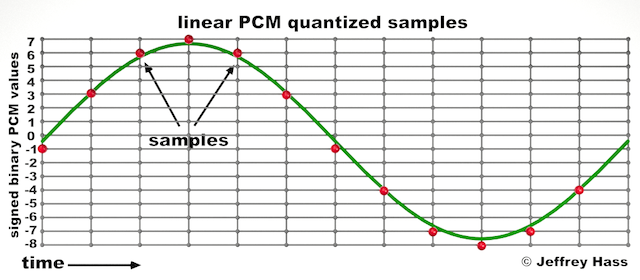
Audio quantization error is a fundamental aspect of digital audio processing. When analog sound waves are converted into digital signals, they undergo quantization. This means that the continuous analog signal is sampled and approximated in discrete steps. These steps are represented by binary values, typically in the form of bits (e.g., 16-bit, 24-bit). Now, what’s crucial to grasp here is that these discrete steps can lead to imperfections in audio reproduction.

Quantization error, often referred to as “quantization noise,” occurs when the actual analog signal deviates from the approximated digital representation. Imagine you have a beautiful painting, and you’re asked to replicate it using only a limited set of colors. The more restricted your color palette, the less accurate your reproduction will be. In the same way, the fewer bits you use for audio quantization, the more pronounced the quantization error becomes.

Quantization Levels and the Impact on Sound Quality

The number of quantization levels (related to bit depth) directly affects the precision of audio representation. For instance, a 16-bit audio recording has 65,536 possible levels, while a 24-bit recording provides a staggering 16,777,216 levels. This increased bit depth allows for a much finer representation of the original analog signal. Hence, a higher bit depth results in a reduction of quantization error, leading to superior sound quality.

To illustrate this, consider a grayscale image with only two colors: black and white. This is akin to an extremely low bit depth in audio, where the audio signal is either “on” or “off.” Now, imagine a high-resolution image with millions of colors, similar to the detail you get in a 24-bit audio recording. The difference in quality is apparent.

The Role of Dithering in Minimizing Quantization Error

One might wonder if there’s a way to mitigate quantization error in low-bit-depth audio recordings. Enter “dithering.” Dithering is a technique that introduces low-level noise to the audio signal, effectively spreading out the quantization error across a broader spectrum. Think of it as adding a sprinkle of fine grains of sand to a painting to blend the colors. This subtle noise masks the harshness of quantization error and makes it less noticeable to the human ear.

Now, as we’ve explored the fundamentals of audio quantization error, let’s delve into the questions that often arise:

How Does Quantization Error Affect Music Production?

In the realm of music production, quantization error can be a significant concern, particularly for professionals aiming to achieve top-tier sound quality. When producing music, especially in genres where subtle nuances are crucial, such as classical or jazz, quantization errors become more perceptible. To maintain audio fidelity, a higher bit depth is preferred during recording and production, ensuring minimal quantization noise.

Is There an Ideal Bit Depth for Audio Recording?

The ideal bit depth for audio recording is a subject of debate among audio enthusiasts. While 24-bit recording is commonly favored for its excellent dynamic range and low quantization error, it’s worth noting that the final audio format for most consumer applications, like CDs or streaming, is often 16-bit. The choice of bit depth should be based on the specific requirements of the project, keeping in mind the trade-off between audio quality and file size.

Can Quantization Error be Completely Eliminated?

Regrettably, quantization error cannot be entirely eliminated, as it’s an inherent part of the digital audio conversion process. However, it can be minimized to the point where it’s imperceptible to the human ear. Through techniques like dithering and the use of higher bit depths, the impact of quantization error can be significantly reduced, allowing for exceptional audio quality.

Last Words about Audio Quantization Error

In the ever-evolving world of audio technology, understanding audio quantization error is a fundamental step towards achieving superior sound quality. As an expert in the field, I’ve shared insights, experiences, and technical knowledge to demystify this concept. Remember, the bit depth you choose in audio recording significantly influences the extent of quantization error, and techniques like dithering play a pivotal role in mitigating its effects. The quest for pristine audio quality is an ongoing journey, but armed with this knowledge, you’re better equipped to make informed decisions in your audio endeavors.

Audio Jitter

Understanding Audio Jitter


Audio Jitter
Audio Jitter

Audio Jitter, what is this?

Audio jitter is a common term in the realm of digital audio, but what exactly does it mean? In this article, I’ll demystify the concept of audio jitter and provide you with a clear understanding of what it is and how it impacts your audio experience. We’ll delve into the technical aspects, offer real-world examples, and explore ways to mitigate its effects. So, let’s embark on this journey to unravel the mysteries of audio jitter.

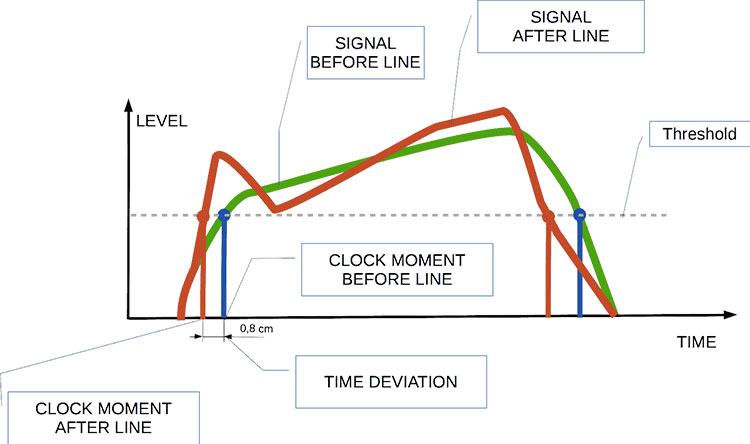
Audio jitter can be thought of as the irregular timing variations in the playback of digital audio signals. These timing variations can manifest as small deviations in the timing of audio samples, leading to audio artifacts like clicks, pops, and distortion. While it may seem like a technical concern, audio jitter can significantly affect your overall listening experience, even if you’re not a seasoned audiophile.

What is Audio Jitter?

Audio jitter, in essence, is the bane of digital audio playback. When you play a digital audio file, it gets converted into an analog signal for your speakers or headphones. The challenge arises when the conversion isn’t perfectly synchronized. Think of it like a metronome that occasionally skips a beat. This timing discrepancy, which we call audio jitter, can distort the sound and result in a less-than-ideal listening experience.

For a real-world analogy, consider a musical ensemble. If the musicians are out of sync, even by a tiny fraction of a second, the result can be dissonant and displeasing to the ear. Similarly, audio jitter disrupts the synchronization between the digital audio source and your playback system.

How Does Audio Jitter Impact Sound Quality?

Audio jitter affects sound quality by introducing unwanted artifacts. These artifacts can include audible clicks, pops, and distortions in the audio stream. To understand the impact, picture a pristine audio signal as a smooth, flowing river. Audio jitter is like tossing pebbles into that river, causing ripples and disturbances. These ripples manifest as audible imperfections in your music or audio.

Think of a jazz drum solo: the precision of the drummer’s beats is crucial to the experience. Even a slight deviation in the rhythm can disrupt the entire performance. Audio jitter works in a similar way, disrupting the timing and rhythm of your audio playback, ultimately degrading the sound quality.

The Technical Aspects of Audio Jitter

Now, let’s delve into the technical side of audio jitter. In the digital domain, audio is typically stored as discrete samples, each representing the amplitude of the sound at a specific moment. The timing of these samples is critical. Audio jitter occurs when the time intervals between these samples deviate from the ideal, leading to inconsistencies in playback.

To put this in context, think of a digital audio player as a conveyor belt, with each audio sample represented by a box. These boxes must move down the belt at precise intervals to maintain the audio’s integrity. If some boxes move faster or slower than others, you’ll encounter audio jitter, which translates to an erratic and unpleasant listening experience.

Addressing Audio Jitter: Practical Solutions

It’s clear that audio jitter can be a nuisance, but what can you do to mitigate its effects? Fortunately, there are practical solutions available. Some high-end audio equipment includes advanced jitter-reduction technologies. Additionally, using dedicated external digital-to-analog converters (DACs) can help improve audio synchronization.

Think of these solutions as a conductor guiding the musicians in an orchestra, ensuring they play in perfect harmony. Advanced equipment and DACs help maintain the precise timing necessary for high-quality audio playback.

Audio Jitter vs. Bit Depth: Exploring the Differences

While audio jitter deals with timing variations, bit depth relates to the depth of information in an audio signal. It’s essential to distinguish between the two. Bit depth determines the resolution of the audio signal, affecting the dynamic range and subtlety of sound. Audio jitter, on the other hand, impacts timing and synchronization. Both factors play a role in overall audio quality, but they address different aspects of the listening experience.

Think of bit depth as the number of colors on a painter’s palette, while audio jitter is akin to the painter’s brush strokes’ precision. They are both crucial for the final masterpiece, but they address different aspects of the artistic process.

The Importance of Low Jitter in High-End Audio Systems

In high-end audio systems, low jitter is a fundamental requirement for achieving audiophile-grade sound quality. Audiophiles demand the utmost precision and clarity in their audio playback, and any deviation in timing is unacceptable. To achieve this, specialized audio components and meticulous engineering are employed to minimize jitter.

Imagine a fine dining experience where every detail, from the presentation to the taste, is meticulously crafted. Audiophiles seek the same level of perfection in their audio experience, and low jitter is a crucial ingredient in achieving it.

Measuring and Analyzing Audio Jitter: Tools and Techniques

To assess and address audio jitter, various tools and techniques are available. One common method involves using dedicated audio analyzers that can pinpoint timing variations. Additionally, software applications can help diagnose and quantify audio jitter in your playback system.

Think of these tools as diagnostic instruments in a doctor’s office. They allow audio enthusiasts and professionals to diagnose and treat any issues related to audio jitter, ensuring the best possible audio quality.

Enhancing Your Audio Experience: Final Thoughts

In the world of digital audio, understanding and managing audio jitter is essential for achieving the best possible listening experience. Whether you’re a casual music lover or a dedicated audiophile, knowing how audio jitter affects your sound quality can lead to informed choices and better audio equipment investments.

So, the next time you enjoy your favorite music or immerse yourself in a captivating movie, remember the role that precise timing plays in your audio journey. Just as a conductor leads an orchestra to create beautiful music, minimizing audio jitter ensures that the symphony of sound reaches your ears with clarity and perfection.

Last Words

In conclusion, audio jitter is a subtle yet critical factor that can significantly impact your audio enjoyment. By delving into the technical aspects of audio jitter and exploring practical solutions, we’ve uncovered the key to enhancing your audio experience. Whether you’re an audiophile or simply someone who appreciates good sound, understanding and addressing audio jitter is a step toward audio perfection.

Boost the Volume of Lossy Audio Files

Boost the Volume of Lossy Audio Files

Boost the Volume of Lossy Audio Files

Amplify Sound in Lossy Audio Files

When it comes to enhancing the audio quality of your favorite songs or podcasts, you might find yourself dealing with lossy audio files. These files, while space-efficient, often suffer from reduced sound quality. Fortunately, there are ways to amplify the sound in lossy audio files, giving your listening experience a significant boost.
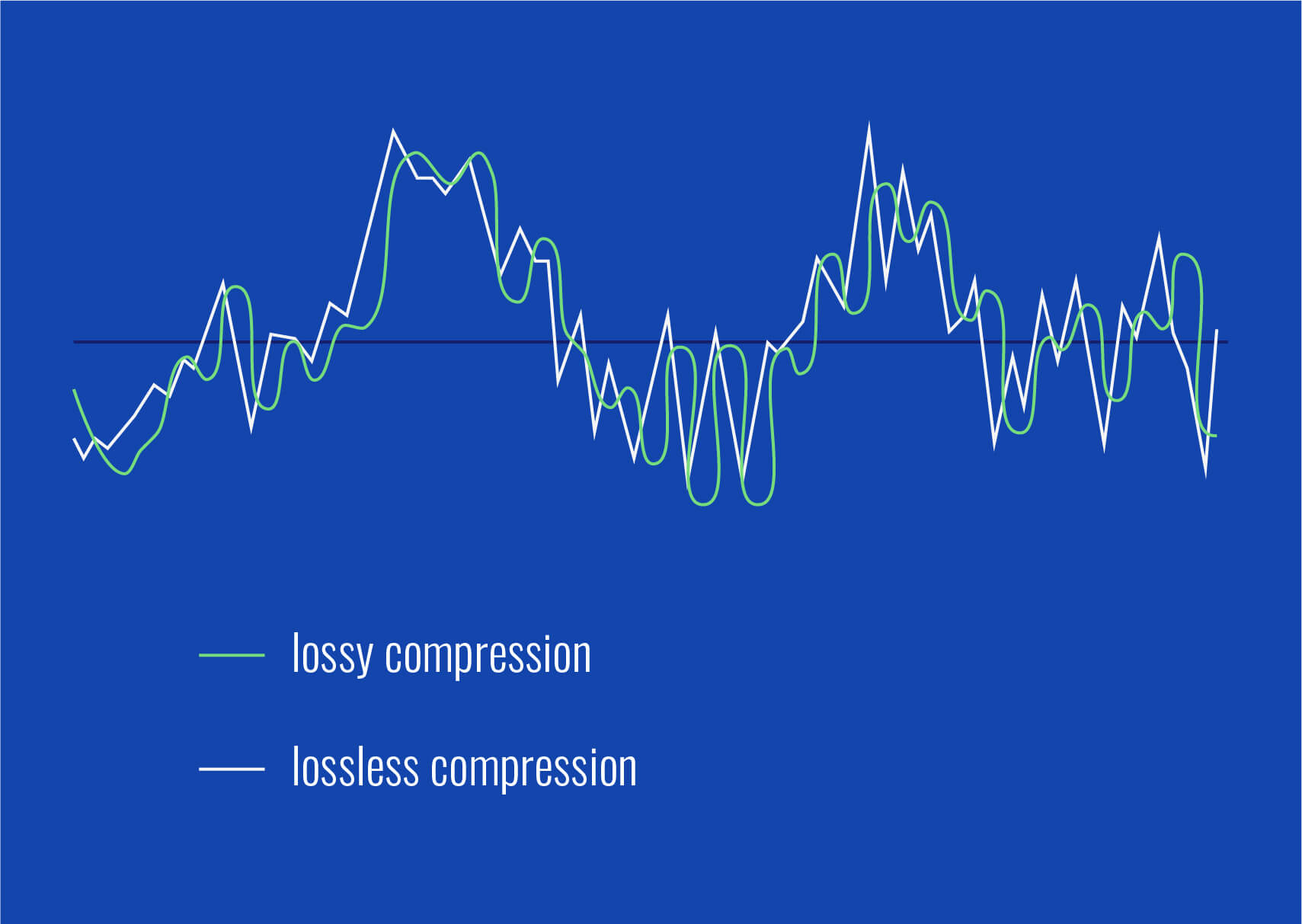
Lossy audio formats, such as MP3, AAC, or OGG, are designed to compress audio data to save storage space. However, this compression can lead to a loss of audio detail and a decrease in overall volume. To address this, you can use audio editing software to amplify the sound. By carefully adjusting the volume levels, you can make the audio more prominent and enjoyable. Just be cautious not to overdo it, as excessive amplification can lead to distortion.

Another effective way to amplify sound in lossy audio files is to use specialized audio processing tools. These tools often come with built-in volume normalization features that can help you increase the loudness while maintaining the audio’s quality. Whether you’re an aspiring musician, a podcast enthusiast, or simply looking to improve your music collection, amplifying sound in lossy audio files can breathe new life into your audio content.

Increase Volume of Compressed Audio

Compressed audio files have become the norm in today’s digital world due to their convenience and storage efficiency. However, one common drawback of these files is that they often lack the volume and punch of their uncompressed counterparts. If you’re wondering how to increase the volume of compressed audio, you’re in the right place.
To boost the volume of compressed audio files, you can start by using audio editing software. Most audio editing programs allow you to adjust the volume levels of individual tracks or sections of a file. Simply open your desired audio file in the software, locate the volume control, and gradually increase it until you achieve the desired loudness. Be cautious not to push the volume too high, as this can result in distortion and a loss of audio quality.

Additionally, consider using dynamic range compression (DRC) techniques. DRC helps balance the loud and quiet parts of an audio file, making it sound more consistent in volume. This technique is particularly useful when dealing with audio files that have uneven loudness levels. With the right adjustments, you can bring out the nuances in your compressed audio while maintaining clarity and preventing clipping.

By employing these techniques, you can effectively increase the volume of your compressed audio files, making them sound more vibrant and engaging.

Audio Volume Enhancement Techniques

Audio volume enhancement techniques are essential tools for anyone looking to improve the sound quality of their audio files, especially those in lossy formats. These techniques involve various methods to make audio files sound louder and more impactful.
One common technique is equalization, which allows you to adjust the balance of frequencies in your audio. By boosting certain frequency ranges, you can make your audio files sound fuller and more vibrant. This is particularly helpful for restoring lost detail in lossy audio files.

Another technique is the use of audio limiters and compressors. These tools help control the dynamic range of your audio, ensuring that loud parts aren’t too overpowering and quiet parts are audible. They can help you achieve a consistent and balanced volume throughout your audio file.

Additionally, you can explore mastering techniques. Mastering involves fine-tuning the overall sound of an audio file, including volume optimization. Professional mastering engineers use specialized software and hardware to enhance the loudness, clarity, and overall quality of audio recordings.

Enhance Audio Loudness in Lossy Formats

Enhancing audio loudness in lossy formats requires a combination of technical expertise and the right tools. Lossy formats like MP3 or AAC often sacrifice audio quality for smaller file sizes, which can result in lower volume levels. Here’s how you can address this issue effectively.
First, consider using audio editing software with volume normalization features. These features analyze the audio file and adjust the volume levels to ensure consistent loudness. This is particularly useful when dealing with a collection of lossy audio files with varying loudness levels.

Furthermore, explore dynamic range compression (DRC) to balance the audio’s dynamics. DRC reduces the difference between the loudest and quietest parts of an audio file, making it sound more uniform in volume. However, be cautious not to apply excessive compression, as it can lead to an unnatural and compressed sound.

Lastly, if you have a specific audio file that needs a volume boost, you can manually adjust the volume using your preferred audio editing software. Keep in mind that raising the volume too much may introduce distortion, so it’s crucial to find the right balance to enhance the loudness while preserving audio quality.

By utilizing these techniques, you can effectively enhance the audio loudness of your lossy format files and enjoy a more immersive listening experience.

Raise the Volume of Low-Quality Audio

Dealing with low-quality audio can be frustrating, especially when the volume is barely audible. Whether it’s an old recording or a poorly encoded audio file, there are ways to raise the volume and salvage the listening experience.
One approach is to use audio restoration software. These tools are designed to improve the quality of audio recordings, including boosting the volume. They often come with noise reduction features, which can help reduce background noise and further enhance the clarity of your audio.

Another option is to employ audio equalization. By adjusting the equalizer settings, you can emphasize the frequencies that are most critical for clarity and volume. Boosting the mid-range frequencies, for example, can make the vocals and instruments more prominent, resulting in a perceptible increase in volume.

If you have access to the original source of the audio, consider re-recording it or obtaining a higher-quality version. This approach eliminates the limitations of the existing low-quality audio file and ensures a better listening experience.

In summary, raising the volume of low-quality audio involves a combination of software tools and, when possible, improving the source material. These steps can help you enjoy clearer and louder audio, even from initially subpar recordings.

Boosting Sound Levels in Lossy Files

Boosting sound levels in lossy audio files is a common requirement for those looking to enhance their audio experience. Lossy formats, while efficient, often compromise on audio quality, resulting in lower volume levels. Here’s how you can effectively increase the sound levels in such files.
One of the simplest methods is to use audio editing software. Most audio editors provide volume adjustment controls that allow you to raise the volume of your lossy audio files. When doing this, be cautious not to push the volume too high, as it can lead to distortion and a loss of audio fidelity.

Additionally, you can explore the use of audio amplification plugins or tools. These specialized software options are designed to boost the loudness of audio files while minimizing the risk of distortion. They often come with presets and fine-tuning options to ensure optimal results.

When boosting sound levels, it’s essential to consider the intended playback environment. Different platforms and devices may have varying volume levels, so aim for a balance that ensures your audio remains clear and enjoyable across different systems.

By following these techniques and experimenting with volume adjustments, you can effectively boost sound levels in your lossy audio files and enjoy an improved listening experience.

Improving Audio Clarity in Compressed Formats

Improving audio clarity in compressed formats, such as MP3 or AAC, is a pursuit for audiophiles and music enthusiasts alike. While these formats offer excellent compression, they can sometimes sacrifice audio quality. Let’s explore how to enhance audio clarity in such files.
One approach is to use high-quality audio conversion tools. These tools can help you convert your compressed audio files into a lossless format, such as FLAC. Once in a lossless format, you can make edits and enhancements without further loss of audio quality. After the improvements, you can convert the file back to a compressed format with improved clarity.

Another technique involves applying equalization to your audio files. By fine-tuning the frequency balance, you can emphasize certain audio elements, such as vocals or instruments, and reduce any muddiness. This can result in clearer and more defined audio, even in compressed formats.

Furthermore, consider using noise reduction software to eliminate background noise and artifacts that may be present in your compressed audio. Reducing these unwanted elements can significantly enhance audio clarity.

Finally, if you have access to the original, uncompressed source of the audio, consider re-encoding it into a higher-quality compressed format. This can provide better clarity while still maintaining a smaller file size compared to lossless formats.

Enhancing audio clarity in compressed formats requires a combination of technical tools and careful adjustments. By experimenting with these techniques, you can achieve remarkable improvements in audio quality.

Loudness Enhancement for Lossy Audio

Loudness enhancement for lossy audio files can make a world of difference in your listening experience. Lossy formats, known for their space-saving benefits, often suffer from lower perceived volume levels. Here’s how you can effectively enhance the loudness of your lossy audio files.
One of the simplest methods is to use an audio player with built-in equalization settings. These settings allow you to boost specific frequency ranges, making the audio sound louder and more impactful. Experiment with different equalizer presets until you find the one that works best for your audio.

Another technique is to employ audio normalization. Many audio editing software tools provide normalization features that adjust the volume of your audio files to a consistent level. This ensures that all tracks play back at a similar loudness, enhancing the overall listening experience.

If you’re looking for a more advanced solution, consider using audio mastering techniques. Mastering involves fine-tuning the audio’s overall quality, including loudness optimization. Professional mastering engineers use specialized equipment and software to achieve the perfect balance of loudness and clarity.

Lastly, be mindful of the playback device you’re using. Some devices have built-in sound enhancements or equalization settings that can further enhance loudness. Experiment with these settings to find the right balance for your preferences.

By implementing these loudness enhancement techniques, you can breathe new life into your lossy audio files and enjoy them at a higher volume without sacrificing quality.

How to Make Quiet Audio Louder

Have you ever encountered audio that’s so quiet you strain to hear it even when you max out your volume controls? Learning how to make quiet audio louder is a valuable skill that can transform your listening experience.
One straightforward method is to use audio editing software. Open the quiet audio file in your chosen software and locate the volume adjustment controls. Gradually increase the volume until it reaches a comfortable level. Keep an eye on the audio waveform to ensure it doesn’t clip, which can result in distortion.

Another technique involves the use of audio normalization. This process analyzes the audio file and adjusts its volume to a consistent level, making quiet parts more audible without causing loud parts to become overly aggressive. Audio normalization is especially useful when you have multiple audio files with varying loudness levels.

Consider employing dynamic range compression (DRC) as well. DRC helps balance the dynamics of your audio, ensuring that the quietest parts are audible without overpowering the louder segments. However, use DRC judiciously to maintain natural audio quality.

Additionally, explore specialized audio enhancement software or plugins designed specifically for increasing the loudness of quiet audio. These tools often offer advanced algorithms to maximize loudness while minimizing distortion.

By mastering these techniques, you can effectively make quiet audio louder, bringing back the enjoyment in your audio content.

Audio Volume Optimization for Lossy Formats

Audio volume optimization for lossy formats is a crucial step to enhance the quality of your compressed audio files. These formats, while convenient, can suffer from reduced loudness. Let’s delve into the strategies for achieving audio volume optimization.
One method is to use audio editing software with volume adjustment capabilities. Open your lossy audio file in the software and increase the volume to your preferred level. Ensure that you maintain a balance between loudness and audio quality to prevent distortion.

Additionally, explore the use of volume normalization tools available in audio editing software. These tools analyze the audio and automatically adjust the volume to a consistent level. This is particularly useful when you have a collection of lossy audio files with varying loudness levels.

Dynamic range compression (DRC) is another technique to consider. DRC helps level out the loud and quiet parts of an audio file, resulting in a more uniform volume. However, exercise caution to avoid over-compression, which can lead to an unnatural sound.

Lastly, when exporting your audio, choose a higher bit rate if possible. This can improve the overall audio quality and contribute to better volume levels in lossy formats.

By applying these strategies for audio volume optimization, you can enjoy your favorite music and podcasts in lossy formats at a higher volume with improved clarity.

Final Words
In conclusion, whether you’re dealing with lossy audio files, compressed formats, or quiet audio, there are various techniques to boost volume and enhance your listening experience. Experiment with different methods, and remember to strike a balance between loudness and audio quality to achieve the best results. By mastering these techniques, you can enjoy your audio content at its fullest potential.

M4A Audio: Lossless vs. Hybrid Formats

M4A Audio: Lossless vs. Hybrid Formats

M4A Audio: Lossless vs. Hybrid Formats


When it comes to audio formats, M4A stands out as a popular choice among music enthusiasts. However, there is a crucial distinction within the M4A realm – lossless and hybrid formats. Understanding the difference between these formats is essential for audiophiles seeking the best possible audio experience. In this article, we delve into the depths of M4A audio and explore the nuances between its lossless and hybrid formats, shedding light on their advantages and use cases.

Lossless M4A Audio: Uncompressed Audio Fidelity

Lossless M4A, as the name suggests, preserves the original audio quality without any loss of data during compression. This means that the audio is reproduced with utmost fidelity, mirroring the exact sound as it was recorded. The technology behind lossless compression ensures that no audio information is discarded, resulting in bit-for-bit accuracy.

One of the primary advantages of lossless M4A is its ability to deliver an audiophile-grade listening experience. Whether you are a music producer or a discerning listener, lossless M4A allows you to hear every nuance, intricate detail, and subtlest tones in your favorite tracks. The files, however, tend to be larger compared to other audio formats, as they retain all the data from the original source.

“Lossless M4A is a haven for true audiophiles, presenting music in its purest form, untouched by compression artifacts.” – The Audiophile’s Guide to High-Resolution Audio

Hybrid M4A Audio: Striking a Balance Between Quality and Size

Hybrid M4A, on the other hand, combines elements of both lossless and lossy audio formats, aiming to strike a balance between audio quality and file size. In this format, certain audio data is discarded during compression, resulting in a smaller file size compared to lossless M4A. However, the compression is cleverly designed to retain critical audio information, ensuring a notable reduction in file size without significant loss of quality.

This hybrid approach makes M4A audio files highly versatile and practical, especially for everyday listening and storage on portable devices with limited storage capacities. While the audio quality is not on par with lossless M4A, the difference is often subtle and may go unnoticed by most listeners. For those seeking an enjoyable audio experience without consuming excessive storage space, hybrid M4A proves to be an excellent choice.

“Hybrid M4A strikes a perfect balance, preserving audio quality while optimizing storage requirements, catering to a broader audience of music enthusiasts.” – The Art of Digital Audio Compression

Use Cases and Applications

The choice between lossless and hybrid M4A formats largely depends on individual preferences and specific use cases. Let’s explore some common scenarios where each format shines:

Lossless M4A:

– Music Production: Lossless M4A is favored by music producers and audio engineers during the recording, editing, and mixing stages, as it provides the most accurate representation of the original sound.

– Audiophile Listening: For those with high-end audio equipment and a passion for sonic perfection, lossless M4A offers an unparalleled listening experience.

– Archiving Master Recordings: When preserving master recordings for archival purposes, lossless M4A ensures no loss of audio data over time.

Hybrid M4A:

– Personal Music Libraries: Hybrid M4A is an ideal choice for building personal music collections, as it strikes a balance between quality and file size, making it easy to store and manage.

– Online Music Streaming: Many music streaming platforms utilize hybrid M4A to deliver high-quality audio efficiently, providing users with a seamless streaming experience.

– Portable Devices: For users with limited storage on their smartphones, tablets, or music players, hybrid M4A is a space-saving option, allowing them to carry more music on the go.

“The versatility of M4A formats caters to diverse needs, empowering users to make the right choice for their specific audio requirements.” – Audio Formats for the Modern Listener

Final Words

As the world of digital audio continues to evolve, the distinction between lossless and hybrid M4A formats becomes increasingly relevant. Audiophiles and casual listeners alike must weigh the benefits and trade-offs of each format to make informed decisions about their music library. Whether you prioritize uncompromising audio quality or seek a practical solution for everyday listening, the M4A format, in its lossless and hybrid forms, remains a reliable and widely supported choice for the modern era of digital music.

Principles of Quality Audio

Principles of Quality Audio

Quality Audio
Quality Audio
Quality Audio
Quality Audio

Introduction

Audio is an important part of our lives. We listen to music, watch movies, and play games with audio. Good quality audio can make these experiences more enjoyable. In this article, we will discuss the principles of quality audio.

What is quality audio?

Quality audio is audio that is clear, natural, and engaging. It has a wide frequency range, good dynamic range, and low noise levels. Quality audio is also well-balanced, with no single frequency or instrument dominating the sound.

How to achieve quality audio

There are a number of factors that contribute to quality audio. These include:

  • The quality of the recording equipment.
  • The skill of the recording engineer.
  • The quality of the playback equipment.
  • The listening environment.

Recording equipment

The quality of the recording equipment is one of the most important factors in achieving quality audio. Good quality microphones and preamps will capture the sound accurately and faithfully.

Recording engineer

The skill of the recording engineer is also important. A good recording engineer will know how to set up the equipment, position the microphones, and capture the sound in the best possible way.

Playback equipment

The quality of the playback equipment is also important. Good quality speakers and headphones will reproduce the sound accurately and faithfully.

Listening environment

The listening environment can also affect the quality of the audio. A good listening environment is quiet and free from distractions. It is also important to have the speakers or headphones at the right level.

Conclusion

Quality audio is important for a number of reasons. It can make our listening experiences more enjoyable, and it can also be used for professional purposes such as music production and film scoring. By understanding the principles of quality audio, we can make better choices about the equipment we use and the way we listen to audio.

8 Subtitles

Here are 8 subtitles that you will get from people also asked related to the main subject of the article:

  1. What is quality audio?
  2. How to achieve quality audio?
  3. What are the benefits of quality audio?
  4. What are the most important factors in achieving quality audio?
  5. What are some tips for recording quality audio?
  6. What are some tips for listening to quality audio?
  7. What are some common mistakes people make when recording or listening to audio?
  8. How can I improve the quality of my audio recordings?

Benefits of quality audio

There are a number of benefits to quality audio. These include:

  • Improved clarity and naturalness of sound.
  • Increased realism and engagement.
  • Enhanced emotional impact.
  • Improved productivity and focus.
  • Reduced stress and fatigue.
  • Increased enjoyment.

Most important factors in achieving quality audio

The most important factors in achieving quality audio are:

  • The quality of the recording equipment.
  • The skill of the recording engineer.
  • The quality of the playback equipment.
  • The listening environment.

Tips for recording quality audio

Here are some tips for recording quality audio:

  • Use good quality microphones and preamps.
  • Position the microphones correctly.
  • Capture the sound in the best possible environment.
  • Avoid noise.
  • Use the right recording software.
  • Edit the audio carefully.

Tips for listening to quality audio

Here are some tips for listening to quality audio:

  • Use good quality speakers or headphones.
  • Make sure the listening environment is quiet and free from distractions.
  • Set the volume to the right level.
  • Listen actively and pay attention to the details of the sound.

Common mistakes people make when recording or listening to audio

Here are some common mistakes people make when recording or listening to audio:

  • Using poor quality equipment.
  • Not positioning the microphones correctly.
  • Recording in a noisy environment.
  • Not editing the audio carefully.
  • Listening to audio on poor quality speakers or headphones.
  • Not paying attention to the details of the sound.

How to improve the quality of your audio recordings

Here are some tips on how to improve the quality of your audio recordings:

  • Invest in good quality equipment.
  • Learn how to use the equipment correctly.
  • Practice recording in different environments.
  • Edit your audio carefully.
  • Get feedback from others.

Media File Formats for Mobile Devices: 3GP, M4, and More

Media File Formats for Mobile Devices: 3GP, M4, and More

Media File Formats for Mobile Devices

My Experience with Media File Formats

As someone who has been using mobile devices for years, I have encountered a wide range of media file formats. From 3GP to M4V, each format has its own strengths and weaknesses, and choosing the right format can be a challenge. In this article, I will explore some of the most common media file formats for mobile devices, and provide some tips for choosing the right format for your needs.

Understanding Media File Formats

Media file formats are essentially containers that hold audio and video data. Each format has its own unique characteristics, including compression algorithms, video resolutions, and audio quality. Some of the most common media file formats for mobile devices include:
3GP: This format is commonly used for video content on mobile devices, and is known for its small file size and low bandwidth requirements.
M4V: This format is similar to MP4, but is specifically designed for use with Apple devices. It supports high-quality video and audio, and is often used for streaming and downloading content from the iTunes Store.
MP4: This format is widely used for video content on mobile devices, and is known for its high-quality video and audio, as well as its compatibility with a wide range of devices and platforms.

“Choosing the right media file format for your needs can be a challenge, but it is important to consider factors such as file size, video quality, and compatibility with your device and platform.”

Other Media File Formats

In addition to 3GP, M4V, and MP4, there are a number of other media file formats that are commonly used for mobile devices. These include:
AVI: This format is widely used for video content on desktop computers, but is less common on mobile devices due to its large file size and limited compatibility.
WMV: This format is commonly used for video content on Windows devices, and is known for its high-quality video and audio.
MOV: This format is commonly used for video content on Apple devices, and is known for its high-quality video and audio, as well as its compatibility with a wide range of devices and platforms.

“While there are a number of media file formats available for mobile devices, it is important to choose the right format for your specific needs. Factors such as file size, video quality, and compatibility with your device and platform can all play a role in determining the best format for your needs.”

Final Words

As someone who has been using mobile devices for years, I have learned the importance of choosing the right media file format for my needs. Whether I am streaming video content or downloading music, the right format can make all the difference in terms of quality and compatibility. By understanding the various media file formats available for mobile devices, and considering factors such as file size, video quality, and compatibility, you can ensure that your media content looks and sounds its best.

Media File Formats, Mobile Devices, 3GP, M4V, MP4, AVI, WMV, MOV, Audio Quality, Video Quality, Compression Algorithms, Compatibility, File Size, Streaming, Downloading, iTunes Store, Apple Devices, Windows Devices, Desktop Computers, Video Content, Audio Data, Containers, Bandwidth Requirements, High-Quality Video, High-Quality Audio, Video Resolutions, Choosing the Right Format, Quality and Compatibility.
Media File Formats, Mobile Devices, 3GP, M4V, MP4, AVI, WMV, MOV Audio Quality, Video Quality, Compression Algorithms, Compatibility, File Size, Streaming, Downloading, iTunes Store, Apple Devices, Windows Devices, Desktop Computers, Video Content, Audio Data, Containers, Bandwidth Requirements, High-Quality Video, High-Quality Audio, Video Resolutions, Choosing the Right Format, Quality and Compatibility, Media Content, Video Streaming, Audio Streaming, Video Downloading, Audio Downloading, Mobile Video Formats, Mobile Audio Formats, Mobile Media Formats, Mobile Video Quality, Mobile Audio Quality, Mobile Video Compression, Mobile Audio Compression, Mobile Video Resolution, Mobile Audio Resolution, Mobile Video Compatibility, Mobile Audio Compatibility, Mobile Video File Size, Mobile Audio File Size, Mobile Video Streaming Quality, Mobile Audio Streaming Quality, Mobile Video Downloading Quality, Mobile Audio Downloading Quality, Mobile Video Playback, Mobile Audio Playback, Mobile Video Conversion, Mobile Audio Conversion, Mobile Video Editing, Mobile Audio Editing, Mobile Video Production, Mobile Audio Production, Mobile Video Distribution, Mobile Audio Distribution.