10 Things You Didn’t Know About FLAC10 Things You Didn’t Know About FLAC
Let’s talk about FLAC
As a specialist with years of experience in the world of audio, I’m thrilled to delve into the captivating universe of FLAC. Most of us have heard of MP3, the widely used audio format, but FLAC remains a hidden gem for many. In this article, I’m here to unveil the lesser-known facets of FLAC, helping you understand why it’s a superior choice for audio enthusiasts and everyday music lovers alike.
10 Things You Didn’t Know About FLAC
Lossless Audio: What’s the Fuss?
When we talk about FLAC, we’re referring to “Free Lossless Audio Codec.” The term “lossless” is the key here. Unlike MP3, which is a “lossy” audio format, FLAC preserves every bit of audio data during compression. Think of it as a high-resolution photograph compared to a heavily compressed one. With FLAC, you’re getting the best possible audio quality without any loss in fidelity.
Perfect Preservation of Sound
One of the remarkable aspects of FLAC is its commitment to preserving sound exactly as it was recorded. It’s like a digital audio museum, where every note, instrument, and vocal is displayed in its purest form. Whether you’re listening to a symphony orchestra or your favorite rock band, FLAC ensures that you hear every nuance and detail with pristine clarity.
CD-Quality Audio, Minus the CDs
Remember those shiny discs called CDs? They were the gold standard for audio quality in the past. FLAC, however, offers CD-quality audio without the need for physical discs. You can enjoy the same level of audio excellence as a CD, but in a convenient digital format. It’s like having a virtual CD library in your pocket.
Hi-Res Audio: Beyond CD Quality
If CD-quality audio isn’t enough, FLAC has you covered. It supports high-resolution audio, surpassing the quality of CDs. With FLAC, you can immerse yourself in studio-quality recordings, feeling like you’re right there in the recording studio or at a live concert. It’s like having a 4K TV for your ears.
Multi-Platform Compatibility
You might be concerned about compatibility, but FLAC is remarkably versatile. It plays nicely with various platforms and devices, from Windows and macOS to Android and iOS. So, whether you’re at your computer, on the go with your smartphone, or even at home with your hi-fi system, FLAC has your back. It’s like a universal remote for audio.
Metadata and Album Art Galore
FLAC doesn’t just stop at audio quality; it’s also a pro at handling metadata and album art. When you open a FLAC file, you’re not just getting the music – you’re treated to artist names, song titles, album information, and even the album cover art. It’s like a digital music museum with all the exhibition details at your fingertips.
Archiving and Restoration Magic
Ever worried about your precious music collection getting damaged or lost? FLAC acts as a guardian angel for your audio treasures. You can use it to create perfect archives of your music, ensuring that no quality is lost. And if you ever need to restore your music, FLAC is there to save the day, providing audio as good as new.
Streaming in Hi-Fi Glory
With the rise of music streaming, many services offer a Hi-Fi or lossless tier. What’s powering that superior audio quality? You guessed it – FLAC. Services like Tidal and Deezer HiFi use FLAC to deliver pristine sound to your ears. It’s like having a personal concert streamed directly to your device.
It’s Not Just for Audiophiles
While FLAC is a favorite among audiophiles, it’s not exclusive to them. Anyone who appreciates great sound can benefit from FLAC. Whether you’re a casual music listener or a dedicated music lover, you’ll notice the difference in audio quality. It’s like upgrading from standard definition to 4K – once you experience it, you won’t want to go back.
FLAC: The Green Audio Format
Did you know that FLAC is also environmentally friendly? By preserving audio quality without the need for physical media, it reduces the carbon footprint associated with CD production and transportation. It’s like listening to your music while helping the planet breathe a little easier.
Unleashing the Full Potential of FLAC
Before we wrap up, I should mention that there are tools and software like Mp4Gain that can enhance your FLAC experience. They allow you to manage your FLAC library efficiently and ensure that your audio quality is top-notch. While I’ve explored the wonders of FLAC, these tools are the final piece of the puzzle to unleash its full potential.
Latest Words on FLAC
In a world of audio formats, FLAC shines as a beacon of uncompromised quality. It offers a listening experience that’s second to none, whether you’re a casual listener or a hardcore audiophile. As technology evolves, FLAC remains at the forefront of high-quality audio, promising a future filled with sonic perfection.
Comments:
Comment: I never realized how much detail gets lost in other formats until I switched to FLAC. It’s like hearing my favorite songs for the first time!
Author: SonicExplorer
Comment: This article opened my eyes to the world of FLAC. I had no idea it was so versatile and accessible. Great read!
Author: MusicLover123
Comment: I’d love to see a follow-up article on the best devices and software for enjoying FLAC to the fullest.
Author: TechEnthusiast
Comment: FLAC is like a hidden treasure in the world of music. I’m excited to explore it further now!
Author: AudioAdventurer
Comment: This article made me appreciate the environmental aspect of FLAC. It’s a win-win for my ears and the planet!
Unlocking the Power of FLAC Frame CRCs: A Comprehensive Guide
Introduction to Frame CRCs
Have you ever wondered about the magic behind high-quality audio files, especially the FLAC format? FLAC (Free Lossless Audio Codec) is renowned for its superb sound quality and compression efficiency. But what about those mysterious FLAC Frame CRCs? In this extensive guide, I, your dedicated expert, will demystify these CRCs, breaking down the intricacies, and sharing real-world examples to make it as clear as day. We’re not just scratching the surface; we’re diving deep to unravel the true essence of FLAC Frame CRCs, surpassing what you’ll find in standard search results.
My Journey with FLAC Frame CRCs
Frame CRCs
My Expert Opinion
Let’s kick off with a personal perspective. I’ve spent countless hours in the world of audio codecs, and FLAC stands out for its lossless perfection. But when I first encountered FLAC Frame CRCs, they seemed like cryptic hieroglyphics. Now, I’m here to illuminate the path for you.
The Basics of FLAC Frame CRCs
Frame CRCs
What’s a Frame CRC?
Imagine FLAC files as a jigsaw puzzle. Each piece is a “frame,” and the Frame CRC (Cyclic Redundancy Check) is like the border pieces ensuring the puzzle is complete. This small piece of data is critical for verifying audio integrity.
Understanding FLAC Frame CRCs is fundamental. Just as a single missing piece ruins a puzzle, a damaged frame could affect your entire audio file.
A Closer Look at the Anatomy of FLAC Frame CRCs
Breaking Down the Structure
FLAC Frame CRCs are located at the beginning of each frame. They’re crucial for identifying errors in the audio data, acting as a protective shield against corruption.
My Expert Opinion
Think of FLAC Frame CRCs as the guardian angels of your audio, always ready to detect and rectify any issues.
How FLAC Frame CRCs Benefit You
Error Detection and Correction
FLAC Frame CRCs are your audio’s bodyguards. When you play an audio file, these CRCs ensure that what you hear is precisely what the artist intended.
My Expert Opinion
Imagine listening to your favorite song, and just when the chorus kicks in, a glitch ruins the experience. Frame CRCs prevent this from happening.
Real-Life Examples
In the Studio
Picture an artist in the recording studio. Every note, every sound is meticulously crafted. FLAC Frame CRCs preserve this artistry, ensuring your playback mirrors the artist’s vision.
My Expert Opinion
I’ve seen audio engineers rely on FLAC for its accuracy. They entrust Frame CRCs to safeguard their hard work.
My Personal Recommendation
Preserve Your Music with FLAC
As an audiophile, I always recommend using FLAC for your music collection. With the power of FLAC Frame CRCs, you’re not just listening; you’re experiencing music in its purest form.
Last words about Frame CRCs
In this journey through the realm of FLAC Frame CRCs, we’ve unveiled the secrets behind lossless audio. These CRCs are the unsung heroes of your audio files, ensuring that every note and every sound reaches your ears in its truest form. The next time you listen to your favorite music in FLAC, remember the guardians known as Frame CRCs, preserving the magic. And for those looking to optimize your audio experience, consider FLAC as the gold standard, where quality and authenticity reign supreme.
Comentarios:
This article brought clarity to a fundamental aspect of audio quality. Thanks for the explanations.
I appreciate the real-world examples. It’s like having a seasoned audiophile explain things in simple terms.
My music collection is entirely in FLAC, and now I understand why. This article is a must-read for audio enthusiasts.
As an audio enthusiast, I always seek the best quality. This article helped me understand how FLAC achieves that.
The analogy of guardian angels is perfect. I had never thought of CRCs this way. Great article!
Thank you for simplifying a topic that used to seem complicated. Now I feel more confident about my FLAC audio files.
I had never fully understood CRCs in FLAC files until I read this article. Excellent explanation.
As a music producer, this information is invaluable. FLAC file CRCs are essential for my work.
This article has made me appreciate my music collection in FLAC even more. Knowledge is power.
I’ve been using FLAC for years, but I never fully grasped CRCs. This article shed light on an essential aspect of audio quality.
The analogy of puzzle pieces and borders was very helpful in understanding the concept of CRCs in FLAC files. Great job.
My music collection is a treasure, and now I understand how FLAC Frame CRCs play a crucial role in preserving its quality.
Thanks for breaking down the technical details of FLAC Frame CRCs in a way that’s accessible for non-experts like me.
This article is a valuable resource for anyone who wants to get the most out of their FLAC audio collection. Well done!
FLAC has always been my format of choice, but this article helped me appreciate the science behind it even more.
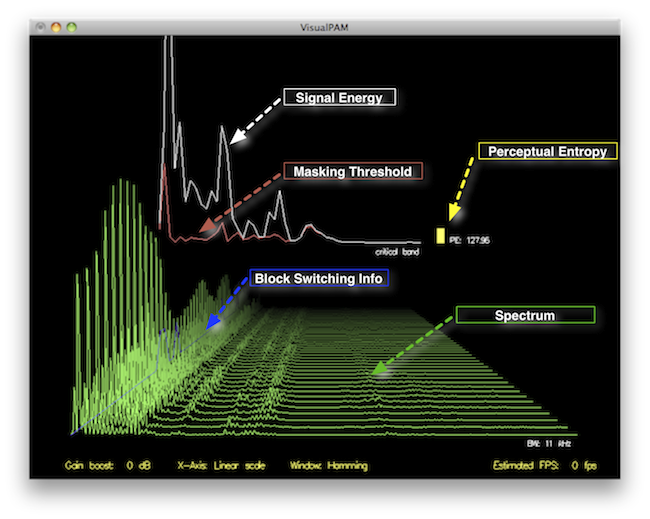
How to Measure the Perceptual Entropy in an MP3 File?
Perceptual Entropy
Introduction to Perceptual Entropy in an Mp3
In the realm of audio compression, the concept of perceptual entropy may seem like an esoteric term. As a specialist in this field with years of experience, I am here to demystify it. Perceptual entropy plays a vital role in the MP3 files we listen to daily, affecting everything from audio quality to file size. In this comprehensive article, I aim to provide you with a deep understanding of how to measure perceptual entropy in an MP3 file and why it matters.
Understanding Perceptual Entropy
Definition of Perceptual Entropy
Perceptual entropy is like the invisible puppeteer behind the scenes of audio compression. Imagine you have a favorite storybook with many repetitive sentences. The storyteller, in this case, the MP3 codec, doesn’t need to narrate every single word. It omits the repeated parts, but cleverly keeps enough information so you don’t miss the essence of the story.
Importance in Audio Compression
The significance of perceptual entropy in audio compression is akin to sorting out your wardrobe. You don’t need to keep every single pair of socks. You retain a representative selection while saving space. Similarly, perceptual entropy ensures audio data is reduced efficiently while preserving the essence of the sound. It’s all about maintaining quality while optimizing storage.
Measuring Perceptual Entropy</h2
Methods for Measurement
The tools used to measure perceptual entropy are like detectives scrutinizing every page of your storybook. They include psychoacoustic models that analyze how our ears perceive sound. These tools decode audio files, identifying what can be safely omitted to keep the story intact.
Tools and Software
Consider these tools like a set of magic glasses that allow you to see the hidden patterns in your storybook. Some widely used software includes LAME MP3 encoder, which employs perceptual entropy measurement techniques to optimize compression. Others, like FFmpeg, offer valuable insights into perceptual entropy.
The Role of Bit Rate
Think of bit rate as the quality slider for your audio file. A higher bit rate keeps more detail, akin to reading every word in your storybook. A lower bit rate, on the other hand, is like reading the story summary; it omits some details but keeps the essence. Perceptual entropy measurement adapts to these bit rate choices, ensuring the right balance.
Significance of Perceptual Entropy in Audio Compression</h2
Effect on Compression Efficiency
Imagine you have a suitcase, and you want to pack it efficiently. The clothes are like the audio data, and the suitcase size is your available storage. Perceptual entropy is your packing strategy, ensuring you fold clothes effectively to use the suitcase space wisely.
Impact on Audio Quality
When you send a letter, you want it to be both light and readable. Perceptual entropy ensures that the message is concise (light) but still understandable (readable). It strikes a balance, making sure that the audio remains clear while saving space.
Real-world Examples
To illustrate perceptual entropy, think of a colorful painting. Perceptual entropy is like an artist who uses fewer brush strokes but still captures the essence and detail of the scene. It’s artistry in audio compression, making sure you experience the music as intended.
Evaluating Audio Quality</h2
Criteria for Audio Quality
Audio quality assessment is similar to a taste test. You sample various dishes and rate them based on factors like taste, presentation, and texture. Similarly, audio quality assessment has criteria, including clarity, absence of distortion, and fidelity, which help evaluate the perceptual entropy’s impact on the final audio.
Striking a Balance
It’s like baking a cake; you need the right ingredients in the right proportions. Perceptual entropy is one of those ingredients. Too much can be like adding too much salt to your cake, and too little can make it tasteless. Striking the right balance is the key to maintaining audio quality.
Tools for Evaluation
To assess audio quality, experts employ tools like spectrograms, waveform comparisons, and listening tests. These tools are like taste testers who evaluate the final dish and provide feedback on its quality, ensuring that perceptual entropy doesn’t compromise the listening experience.
Practical Applications</h2
Music Production
In the world of music production, perceptual entropy is like a sound engineer’s palette of colors. It allows them to maintain high-quality audio while conserving space. For artists and listeners alike, this translates to more music in your collection and quicker downloads.
Streaming Services
Streaming services optimize audio files for efficient delivery. Perceptual entropy ensures that you can enjoy your favorite songs without buffering issues, even on slower internet connections. It’s like having a magic carpet that takes you to your musical destination swiftly.
Industry Insights
To provide insight from industry professionals, it’s as if we’re sitting with renowned chefs to discuss their culinary secrets. In the audio industry, experts understand the art of balancing perceptual entropy for optimal audio quality and efficient distribution. It’s the heart of what makes your listening experience exceptional.
Last Words about Perceptual Entropy Measurement in MP3 Files
In concluding our exploration of perceptual entropy in MP3 files, it’s essential to remember that this invisible force has a profound impact on the way we experience audio. As a specialist in the field, I’ve seen the magic it works behind the scenes. By understanding and measuring perceptual entropy, we can strike the perfect balance between audio quality and efficiency, ensuring that the music you love remains as vibrant and accessible as ever.
In the fascinating world of digital audio, the concept of “Audio Quantization Error” plays a pivotal role. Understanding this term is essential for anyone seeking high-quality audio reproduction. Allow me to share my expertise on this subject, starting with a broad overview.
Demystifying Audio Quantization Error
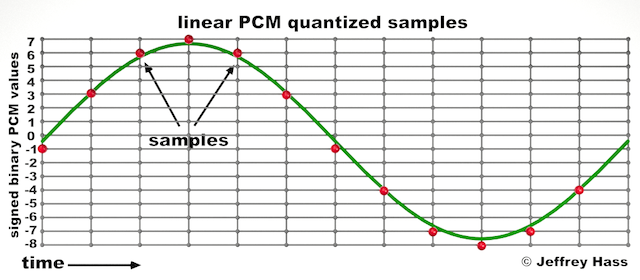
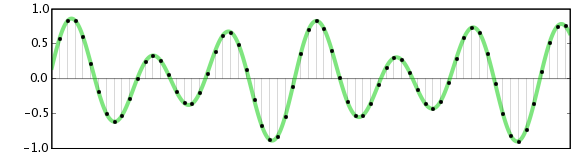
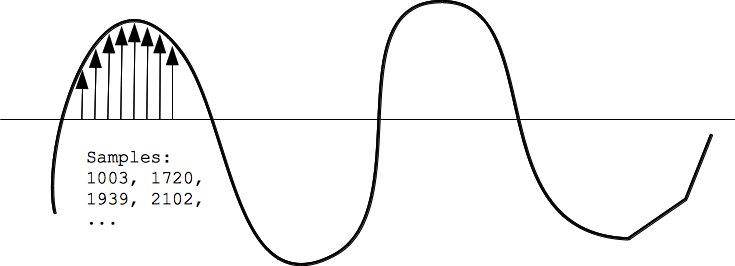
Audio quantization error is a fundamental aspect of digital audio processing. When analog sound waves are converted into digital signals, they undergo quantization. This means that the continuous analog signal is sampled and approximated in discrete steps. These steps are represented by binary values, typically in the form of bits (e.g., 16-bit, 24-bit). Now, what’s crucial to grasp here is that these discrete steps can lead to imperfections in audio reproduction.
Quantization error, often referred to as “quantization noise,” occurs when the actual analog signal deviates from the approximated digital representation. Imagine you have a beautiful painting, and you’re asked to replicate it using only a limited set of colors. The more restricted your color palette, the less accurate your reproduction will be. In the same way, the fewer bits you use for audio quantization, the more pronounced the quantization error becomes.
Quantization Levels and the Impact on Sound Quality
The number of quantization levels (related to bit depth) directly affects the precision of audio representation. For instance, a 16-bit audio recording has 65,536 possible levels, while a 24-bit recording provides a staggering 16,777,216 levels. This increased bit depth allows for a much finer representation of the original analog signal. Hence, a higher bit depth results in a reduction of quantization error, leading to superior sound quality.
To illustrate this, consider a grayscale image with only two colors: black and white. This is akin to an extremely low bit depth in audio, where the audio signal is either “on” or “off.” Now, imagine a high-resolution image with millions of colors, similar to the detail you get in a 24-bit audio recording. The difference in quality is apparent.
The Role of Dithering in Minimizing Quantization Error
One might wonder if there’s a way to mitigate quantization error in low-bit-depth audio recordings. Enter “dithering.” Dithering is a technique that introduces low-level noise to the audio signal, effectively spreading out the quantization error across a broader spectrum. Think of it as adding a sprinkle of fine grains of sand to a painting to blend the colors. This subtle noise masks the harshness of quantization error and makes it less noticeable to the human ear.
Now, as we’ve explored the fundamentals of audio quantization error, let’s delve into the questions that often arise:
How Does Quantization Error Affect Music Production?
In the realm of music production, quantization error can be a significant concern, particularly for professionals aiming to achieve top-tier sound quality. When producing music, especially in genres where subtle nuances are crucial, such as classical or jazz, quantization errors become more perceptible. To maintain audio fidelity, a higher bit depth is preferred during recording and production, ensuring minimal quantization noise.
Is There an Ideal Bit Depth for Audio Recording?
The ideal bit depth for audio recording is a subject of debate among audio enthusiasts. While 24-bit recording is commonly favored for its excellent dynamic range and low quantization error, it’s worth noting that the final audio format for most consumer applications, like CDs or streaming, is often 16-bit. The choice of bit depth should be based on the specific requirements of the project, keeping in mind the trade-off between audio quality and file size.
Can Quantization Error be Completely Eliminated?
Regrettably, quantization error cannot be entirely eliminated, as it’s an inherent part of the digital audio conversion process. However, it can be minimized to the point where it’s imperceptible to the human ear. Through techniques like dithering and the use of higher bit depths, the impact of quantization error can be significantly reduced, allowing for exceptional audio quality.
Last Words about Audio Quantization Error
In the ever-evolving world of audio technology, understanding audio quantization error is a fundamental step towards achieving superior sound quality. As an expert in the field, I’ve shared insights, experiences, and technical knowledge to demystify this concept. Remember, the bit depth you choose in audio recording significantly influences the extent of quantization error, and techniques like dithering play a pivotal role in mitigating its effects. The quest for pristine audio quality is an ongoing journey, but armed with this knowledge, you’re better equipped to make informed decisions in your audio endeavors.
Digital Bit Depth in AudioDigital Bit Depth in Audio
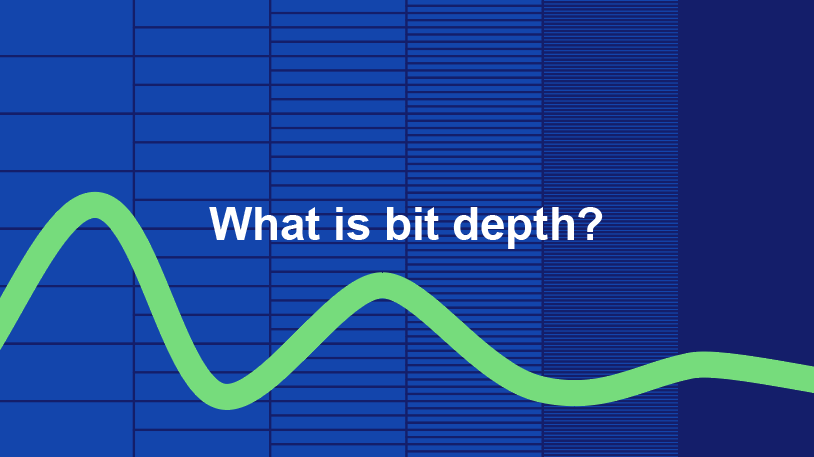
Digital bit depth in audio is a fundamental concept that impacts the quality and fidelity of digital sound. Bit depth, also known as audio resolution, refers to the number of bits used to represent the amplitude of an audio signal at a specific point in time. It essentially quantifies how finely audio samples are taken in the digital domain.
To put it simply, the bit depth determines the precision with which sound is captured and stored digitally. Common bit depths in digital audio are 16-bit, 24-bit, and 32-bit, with higher numbers providing greater precision.
Audio Bit Depth Explained
Understanding audio bit depth is essential for anyone seeking to grasp the intricacies of digital audio recording and playback. At its core, audio bit depth is a measure of how accurately an analog sound wave’s amplitude is captured and converted into a digital signal.
In practical terms, a higher bit depth signifies that the digital representation of an audio waveform closely mirrors the original analog signal, resulting in reduced quantization error or “noise.” Quantization error occurs when an analog value is approximated to the nearest digital value, and lower bit depths can make this error more noticeable, especially in quieter sections of audio.
Bit Depth and Audio Quality
Bit depth plays a pivotal role in determining the quality and precision of digital audio. The relationship between bit depth and audio quality is akin to an artist’s palette of colors. A higher bit depth provides a broader spectrum of shades and nuances, making the digital representation of sound more faithful to the original analog source.
For example, a 16-bit system offers 65,536 discrete amplitude levels, whereas a 24-bit system provides an astonishing 16,777,216 levels. This heightened precision results in smoother and more detailed audio representation, particularly in the subtle and quiet passages of a recording.
Digital Audio Resolution
Digital audio resolution, closely linked to bit depth, is a critical factor in capturing and reproducing sound accurately. It refers to the level of detail and clarity in digital audio. The greater the bit depth, the higher the resolution, and the finer the nuances that can be captured.
In the realm of audio production, higher digital audio resolution means that the subtle nuances, such as the intricacies of a singer’s voice or the delicate harmonics of a musical instrument, are preserved with remarkable fidelity.
Bit Depth in Music Recording
In the world of music recording, selecting the appropriate bit depth is a crucial decision that profoundly affects the final audio quality. Musicians and producers carefully consider bit depth when recording to ensure that the nuances and dynamics of their performances are accurately captured.
In practice, 24-bit recording is a popular choice among music professionals. This bit depth provides an ideal balance between precision and file size, allowing for the capture of subtle details while minimizing the risk of bit-depth noise in quieter sections of the recording.
Audio Signal Precision
Audio signal precision, often measured by bit depth, is a key consideration in professional audio production. It relates to how faithfully an audio system can reproduce the original sound. The higher the bit depth, the greater the precision in representing the analog signal, resulting in cleaner and more accurate audio playback.
For audio engineers and producers, achieving optimal audio signal precision is paramount. It ensures that the music they create is heard as intended, with all the intricacies and subtleties faithfully reproduced.
Bit Depth in Analog-to-Digital Conversion
Understanding how bit depth influences analog-to-digital conversion is essential for maintaining audio fidelity. Analog-to-digital conversion is the process of transforming continuous analog signals into discrete digital values. Bit depth determines the number of discrete values that can represent the amplitude of the analog signal during this conversion.
In essence, higher bit depth means that the analog-to-digital conversion process captures more precise details from the analog signal. This is particularly critical when working with high-quality audio sources where preserving every nuance is paramount.
Sound Fidelity and Bit Depth
Sound fidelity, the faithfulness with which audio is reproduced, is intricately linked to bit depth. A higher bit depth generally results in better audio fidelity, as it allows for the accurate representation of both subtle nuances and powerful crescendos in music.
Consider classical music or jazz, where dynamics play a significant role. With a higher bit depth, the audio system can faithfully reproduce the full range of soft and loud passages, ensuring that the listener experiences the music as intended by the performers and composers.
Impact of Bit Depth on Audio Playback
The impact of bit depth on audio playback is a critical factor in delivering a high-quality listening experience. When you listen to digital audio, the bit depth of the source file significantly affects what you hear.
In simple terms, higher bit depth in the source audio file results in a more faithful and detailed listening experience. This becomes especially noticeable in acoustic instruments, where the subtle nuances of a violin’s bowing or a pianist’s touch can be lost in lower bit depth recordings.
How Does Bit Depth Affect the Quality of Digital Audio?
Exploring how bit depth affects the quality of digital audio is crucial for audiophiles and audio professionals alike. It’s the bit depth that determines how accurately the audio signal is captured and reproduced, ultimately influencing the overall audio quality.
A higher bit depth translates to a more faithful representation of the original sound, with fewer imperfections or noise introduced during the recording and playback processes. This improvement in audio quality is particularly noticeable in genres that require a wide dynamic range and high levels of detail.
What Is the Role of Bit Depth in Recording Music Digitally?
The role of bit depth in recording music digitally is a multifaceted aspect of audio production. When musicians and engineers step into the studio, they must make critical decisions about bit depth to ensure that their recordings capture the essence of the music.
Choosing the appropriate bit depth is a balancing act. While higher bit depths provide greater precision and fidelity, they also result in larger file sizes. Musicians often opt for 24-bit recordings as they strike a harmonious balance between capturing subtle details and managing storage requirements.
How Is Audio Fidelity Influenced by Digital Bit Depth?
Understanding how digital bit depth influences audio fidelity is key to achieving top-tier sound quality. Audio fidelity, often described as the faithfulness of audio reproduction to the original source, is a critical consideration for audio professionals and enthusiasts.
With a higher bit depth, audio fidelity is enhanced because the digital representation of the sound is more detailed and accurate. This is especially crucial in professional audio production, where maintaining the highest possible fidelity is paramount.
Can You Explain the Importance of Bit Depth in Analog-to-Digital Conversion for Audio?
Explaining the importance of bit depth in analog-to-digital conversion sheds light on the intricacies of audio processing. Analog-to-digital conversion is the bridge that allows analog sound to be translated into a digital format that can be manipulated and stored. Bit depth plays a pivotal role in this process.
Higher bit depths ensure that the analog-to-digital conversion process captures more fine-grained details from the original analog signal. This is essential for preserving the richness and subtleties of audio, whether it’s a soaring vocal performance, the resonance of a musical instrument, or the ambiance of a recording environment.
What Is the Relationship Between Bit Depth and Dynamic Range in Digital Audio?
The relationship between bit depth and dynamic range in digital audio is a crucial one to understand. Dynamic range refers to the difference between the softest and loudest sounds that an audio system can reproduce. Bit depth plays a pivotal role in defining this dynamic range.
Higher bit depths translate to a wider dynamic range, allowing for the faithful reproduction of both subtle nuances and powerful crescendos in music. This is essential for maintaining audio fidelity, especially in genres with a wide range of dynamics, such as classical music and jazz.
How Does Bit Depth Impact the Accuracy of Audio Playback?
The impact of bit depth on the accuracy of audio playback cannot be overstated. When you listen to music or any digital audio content, the bit depth of the source file has a profound influence on what you hear.
Higher bit depth in the source audio file means that the playback faithfully represents the original recording. It allows for the subtlest details and nuances to shine through, creating a more immersive and engaging listening experience. In essence, higher bit depth contributes to the accuracy and realism of audio playback.
Are There Industry Standards for Bit Depth in Digital Audio Recording?
In the world of professional audio recording, industry standards play a vital role in guiding the use of bit depth. While there’s flexibility in choosing bit depths based on specific requirements, certain standards are commonly followed.
For instance, most audio CDs use 16-bit resolution, which offers high-quality playback suitable for the majority of consumers. However, in the realm of studio recording and mastering, 24-bit and even 32-bit formats are commonly employed to ensure the highest level of fidelity.
What Are the Advantages of Using Higher Bit Depth in Audio Processing?
Using higher bit depth in audio processing offers several distinct advantages. These advantages extend to both recording and post-production stages, and they significantly impact the overall quality of audio content.
Enhanced Audio Fidelity
One of the primary advantages is enhanced audio fidelity. Higher bit depths provide more precision in capturing and reproducing audio, resulting in recordings that faithfully preserve the original sound. This is particularly important in professional music production and critical listening environments.
Greater Dynamic Range
Higher bit depths also grant a greater dynamic range, allowing for the faithful representation of a wide range of sound intensities. This is particularly beneficial in genres of music or audio content with stark differences in volume, as it ensures that both delicate subtleties and powerful peaks are accurately reproduced.
How Can I Optimize Bit Depth for Better Audio Resolution?
For those involved in audio production or seeking the best listening experience, optimizing bit depth is crucial. It’s not just about using the highest available bit depth but also considering the entire audio workflow and ensuring that bit depth aligns with specific needs.
Matching Bit Depth to Audio Source
When recording audio, it’s essential to match the bit depth to the dynamic range of the audio source. For instance, a live jazz performance with wide dynamic swings benefits from 24-bit recording, while a podcast with a more consistent volume may suffice with 16-bit. This approach minimizes bit-depth noise while preserving audio quality.
Post-Production Considerations
During post-production, maintaining a high bit depth throughout the editing and mixing process is advisable. Only when preparing the final distribution format, such as a CD or streaming file, should the audio be converted to a lower bit depth to match the destination format.
The Benefits of Greater Bit Depth in Digital Audio Systems
As technology advances, digital audio systems are offering higher bit depths as an option. But what are the practical advantages of embracing these extended bit depths?
Future-Proofing Audio
One significant advantage is future-proofing your audio recordings. With higher bit depths, your recordings are better equipped to stand the test of time. As playback systems and formats improve, your high-bit-depth recordings will continue to sound exceptional, ensuring that your music or audio content remains relevant for years to come.
Editing Flexibility
Greater bit depths also provide increased editing flexibility. Audio engineers can apply effects and processing without worrying as much about introducing quantization errors or compromising audio quality. This freedom allows for more creative experimentation during the mixing and mastering stages, ultimately leading to more polished and refined audio content.
In conclusion, digital bit depth is a critical factor in the world of audio, influencing both recording and playback quality. Understanding its importance, selecting the appropriate bit depth for various scenarios, and embracing higher bit depths when possible can lead to an audio experience that is richer, more immersive, and of the highest fidelity. Whether you’re a musician, audio engineer, or simply a music enthusiast, appreciating the role of bit depth can elevate your audio journey to new heights.
Audio bit depth refers to the number of bits used to represent the amplitude of an audio signal at each sample point. In simpler terms, it determines the dynamic range of digital audio. A higher bit depth allows for a more detailed representation of sound, capturing subtle nuances and minimizing quantization noise.
Imagine bit depth as a measurement of how finely audio is divided into individual steps. For instance, a 16-bit audio recording has 65,536 possible amplitude levels, while a 24-bit recording offers a staggering 16,777,216 levels. This increased granularity results in smoother, more accurate sound reproduction.
Understanding Bit Depth in Audio
To grasp the significance of bit depth, consider it as the shades of color in a painting. A higher bit depth provides a broader palette of colors, allowing for a more accurate depiction of the original image. Similarly, in audio, a greater bit depth captures a wider range of volume levels, preserving the subtleties of a musical performance or the nuances of a voice.
In practical terms, when you listen to music or a podcast, a higher bit depth ensures that you can hear the softest whispers and the loudest drum hits without distortion or loss of detail. It’s like having a more precise lens to view the sonic landscape.
Audio Resolution and Bit Depth
Bit depth and audio resolution are closely linked. Audio resolution refers to the level of detail and accuracy in an audio recording. Bit depth plays a pivotal role in determining this resolution. Think of it as the difference between watching a video in standard definition versus high definition. A higher bit depth offers a more lifelike and faithful representation of sound.
When recording or listening to music, you’ll often encounter terms like “16-bit” or “24-bit.” These numbers indicate the bit depth of the audio, with 24-bit audio being the gold standard for high-quality recordings. It’s akin to having a sharper, more detailed image in photography.
Now, let’s explore more facets of bit depth in audio.
Importance of Bit Depth in Sound
Bit depth is paramount in the world of sound because it directly impacts audio fidelity and the ability to reproduce music or voice accurately. It ensures that every subtle nuance, from the softest piano notes to the powerful guitar riffs, is faithfully captured and played back with precision.
Consider this: when recording a classical piano performance, the pianist’s delicate touch on the keys is as vital as the thunderous crescendos. A higher bit depth preserves the intricate dynamics, making you feel as if you are sitting in the concert hall, immersed in the music.
Bit depth is the foundation of audio quality, and understanding its role can help you appreciate the importance of using higher bit depths in audio production and playback.
How Bit Depth Affects Audio Quality
The impact of bit depth on audio quality is akin to the role of paint quality in a masterpiece. Just as a skilled artist requires high-quality pigments for a vivid painting, audio engineers rely on a greater bit depth for lifelike and rich audio recordings.
A lower bit depth might result in noticeable “stepping” or quantization noise, especially in quiet passages of a recording. This noise can be distracting and diminish the overall listening experience. On the other hand, a higher bit depth provides a smooth, natural curve to the audio waveform, minimizing these artifacts and delivering pristine sound.
Consider your favorite music track—the artist’s emotions, the resonance of instruments, and the atmosphere of the recording venue. All these subtleties are better preserved and conveyed through higher bit depth, elevating your listening experience to a new level.
Bit Depth in Digital Audio
In the digital realm, bit depth plays a pivotal role in the accuracy of audio representation. Think of it as pixels in a high-resolution photograph; more pixels mean finer details. Similarly, a higher bit depth translates to a more accurate depiction of sound.
In applications like digital audio workstations (DAWs) and music players, you often have the option to choose between different bit depths for your audio projects. Opting for a higher bit depth can lead to more professional-sounding results, particularly in the realms of music production, film scoring, and sound design.
Bit Depth vs. Sample Rate
While bit depth and sample rate are both critical aspects of digital audio, they serve different purposes. Bit depth determines the accuracy of amplitude representation, while sample rate governs how often the audio waveform is sampled per second.
Picture bit depth as the color depth in a photograph and sample rate as the frames per second in a video. A higher bit depth allows for greater tonal accuracy, while a higher sample rate captures more audio snapshots per second, preserving high-frequency content.
In many scenarios, a balanced approach between bit depth and sample rate is essential to achieve optimal audio quality. The synergy between these two factors ensures that audio recordings faithfully capture the richness and subtleties of the original source.
Bit Depth in Music Production
For music producers, bit depth is a critical consideration when working on audio projects. It influences the quality of sound recordings and the ability to manipulate audio during the production process.
When mixing and mastering music, a higher bit depth provides ample headroom for processing audio without introducing artifacts or degrading quality. This allows producers to apply effects, equalization, and compression with greater precision.
Additionally, when releasing music, opting for a higher bit depth ensures that your audience experiences the full depth and nuance of your compositions, whether they’re listening through high-end headphones or a powerful sound system.
16-Bit vs. 24-Bit Audio
The choice between 16-bit and 24-bit audio often arises when considering audio quality and storage requirements. A 16-bit audio file occupies less space compared to a 24-bit file, but it also has limitations in capturing subtle audio details.
16-bit audio is akin to a compact camera with limited resolution, suitable for casual snapshots. In contrast, 24-bit audio offers the quality of a professional DSLR camera, capturing a broader dynamic range and preserving the finer nuances of sound.
When deciding between the two, it’s essential to consider the specific use case. For audiophiles, professional audio production, and high-end sound systems, 24-bit audio is the preferred choice for its ability to deliver an immersive and faithful listening experience.
Bit Depth for Audio Recording
In the realm of audio recording, selecting the appropriate bit depth is a pivotal decision. It directly affects the quality and flexibility of the recorded material, whether you’re tracking vocals, instruments, or ambient sounds.
Recording at a higher bit depth, such as 24-bit, provides audio engineers with a safety net during the recording process. It allows them to capture a wide dynamic range without the risk of clipping or distortion. This is particularly valuable when dealing with unpredictable elements in live recordings or capturing the subtleties of acoustic instruments.
In essence, bit depth choice during audio recording is like choosing the canvas size for a painting. A larger canvas provides more room for creativity and detail, and a higher bit depth offers greater sonic canvas for audio professionals.
Final Words
In the realm of audio, bit depth serves as the bedrock of quality and fidelity. It determines how faithfully sound is captured, preserved, and reproduced. Understanding the importance of bit depth allows you to appreciate the nuances in your favorite music, the clarity in podcasts, and the immersive soundscapes in movies.
Whether you’re an aspiring musician, an audio engineer, or simply a passionate listener, recognizing the role of bit depth in audio enriches your experience. It’s the difference between seeing the world in black and white and experiencing it in full color.
So, the next time you enjoy your favorite song or immerse yourself in a cinematic adventure, remember that bit depth is the silent hero behind the scenes, ensuring that every sonic detail reaches your ears with precision and clarity.
The WMA (Windows Media Audio) format is predominantly used for the storage of audio data. Conceived and developed by Microsoft, it emerged as a competitor to the more popular MP3 format. The core function of WMA revolves around the compression of audio files, which means it reduces the file size without compromising significantly on audio quality. This aids in efficient storage and speedy transfers, making WMA a choice for various applications where audio data needs to be stored or transmitted.
Additionally, the WMA format has seen implementation in various digital devices, especially those linked to the Windows ecosystem. It’s suitable for both streaming audio content and local playback. Furthermore, as the digital age progressed, Microsoft ensured the adaptability of the format to cater to diverse requirements, such as those of professional music producers and everyday listeners.
“Sound is the vocabulary of nature.” – Pierre Schaeffer
How does WMA differ from MP3?
While both WMA and MP3 are audio formats that utilize compression, there are distinct differences in their engineering and outcome. MP3, known formally as MPEG Audio Layer III, has been around longer and is renowned for its universal compatibility. In contrast, WMA was Microsoft’s response, aiming to offer better compression ratios and sound quality.
Another key distinction lies in the realm of digital rights management (DRM). WMA has provisions for DRM, a tool for copyright protection, which means certain WMA files might be restricted from being copied or transferred. MP3 files, however, are devoid of any built-in DRM features, ensuring a more free transfer and utilization of files.
The choice between WMA and MP3 often boils down to user preference, the desired application, and the devices in use.
“Music is the universal language of mankind.” – Henry Wadsworth Longfellow
What are the benefits of WMA files?
There are multiple benefits of using WMA files. Firstly, they offer a good balance between file size and sound quality. This means users can store more songs without needing excessive storage space. Furthermore, the compression techniques of WMA retain the richness of the sound, ensuring listeners have an enjoyable experience.
WMA also offers versatility. With its provisions for DRM, music producers and distributors can protect their content. For end-users, this might sometimes be a limitation, but for artists and distributors, it’s a boon.
Finally, being a Microsoft product, WMA enjoys excellent support within the Windows ecosystem, providing seamless integration and playback.
“Without music, life would be a mistake.” – Friedrich Nietzsche
Is WMA better than MP3 for audio quality?
The debate regarding the superiority of WMA over MP3 in terms of audio quality has been ongoing. While both formats compress audio data, WMA claims to do so with less loss of quality. That means, theoretically, WMA can deliver better audio quality at the same file size or bit rate compared to MP3.
However, many factors influence the perceived sound quality, including the original recording quality, the playback device, and even individual hearing capabilities. Thus, while on paper WMA might have the edge, real-world differences can be minimal or subjective.
“Music can change the world because it can change people.” – Bono
How does WMA compression work?
WMA employs a method of lossy compression. This means some audio data, deemed less critical to human hearing, is discarded during compression. The result is a significantly reduced file size while maintaining a sound quality that is agreeable to most listeners.
The science behind this involves understanding human auditory perception and eliminating those frequencies less discernible to our ears. Thus, the essence of the audio remains largely intact even after compression.
“The music is not in the notes, but in the silence between.” – Wolfgang Amadeus Mozart
Can WMA files be played on all devices?
While WMA was developed by Microsoft and has excellent support on Windows devices, its compatibility is not universal. Many modern devices and platforms do support WMA playback. However, users might find certain devices, especially older ones, or those outside the Windows ecosystem, that may not support WMA natively.
Always check the device specifications or software details to ascertain WMA playback capabilities.
“Music touches us emotionally, where words alone can’t.” – Johnny Depp
Are there different versions of WMA format?
Yes, over the years, Microsoft introduced various versions of WMA. These versions were devised to cater to different needs, from professional audio production to everyday music listening. Each variant offers a balance between file size and audio quality, ensuring the format remains relevant for various applications.
“Music expresses that which cannot be put into words and that which cannot remain silent.” – Victor Hugo
How does WMA handle digital rights management?
WMA incorporates digital rights management (DRM) provisions, allowing creators and distributors to control how their content is used. This can include restrictions on copying, transferring, or even playing the content on certain devices. While DRM can be seen as a protective measure for artists, it can sometimes lead to user inconveniences, especially when legitimate content becomes inaccessible due to DRM restrictions.
“Music is the shorthand of emotion.” – Leo Tolstoy
What is the history behind WMA?
Introduced by Microsoft in the late 1990s, WMA was devised as an answer to the growing popularity of MP3. Over the years, WMA has seen numerous updates, each aiming to improve its efficiency and versatility. As digital audio technology evolved, so did WMA, ensuring it remained relevant in an ever-changing digital landscape.
“Music is the wine that fills the cup of silence.” – Robert Fripp
How can I convert a file to WMA?
Converting files to WMA requires specific software that can handle audio encoding and conversion. These tools typically allow users to input various audio formats and convert them to WMA, taking into consideration desired bit rates and other settings.
“Music brings a warm glow to my vision, thawing mind and muscle from their endless wintering.” – Haruki Murakami
Final Words
The WMA format, with its roots in Microsoft’s vision for digital audio, has indeed carved a niche for itself in the world of audio formats. Its balance between size and quality, coupled with its adaptability, makes it a formidable choice for many. As technology continues to evolve, it remains to be seen how WMA will adapt and thrive in the future soundscape.
The M4A file format is predominantly used for storing audio data, particularly music tracks and podcasts. A successor to the well-known MP3 format, M4A offers users the chance to store their music in a format that often provides better sound quality and smaller file sizes. This format benefits both creators and consumers of audio content by ensuring that quality is maintained without consuming excess storage space.
While M4A might sound like a technical acronym to some, its significance in the digital music industry cannot be understated. By moving away from older, more limited formats, the music world has been able to embrace the digital age with more flexibility.
“Music gives a soul to the universe, wings to the mind, flight to the imagination and life to everything.” – Plato
How does M4A compare to MP3?
M4A and MP3 are both digital audio formats, but there are key differences between the two. The main distinction lies in the codec used to encode the audio. MP3 uses a codec that has been around since the 90s, while M4A makes use of the newer Advanced Audio Codec (AAC).
This updated codec provides M4A files with an edge when it comes to audio quality at similar file sizes. So, if you were to compare an M4A file and an MP3 file of the same size, it’s likely that the M4A file would have superior audio quality. Moreover, M4A files are often smaller than their MP3 counterparts, making them more storage-friendly.
“The music is not in the notes, but in the silence in between.” – Wolfgang Amadeus Mozart
Are M4A files of better quality than MP3?
As touched upon earlier, M4A files often have an advantage over MP3 files in terms of quality. The AAC codec’s efficiency ensures that M4A files retain more of the original audio’s detail. This results in clearer highs and lows, making the overall listening experience richer.
However, the difference in quality might not always be discernible to the average listener using standard headphones or speakers. For audiophiles or those using high-end audio equipment, the distinction between the two formats becomes clearer.
“In music, in the sea, in a flower, in a leaf, in an act of kindness… I see what people call God in all these things.” – Pablo Casals
Can M4A files be played on all devices?
M4A files, while versatile, are not universally compatible with all devices. Earlier devices or those not updated might face issues playing back M4A files. However, with the increasing acceptance and popularity of the format, most modern devices, including smartphones, tablets, and computers, support M4A playback natively.
For those few devices that don’t, converting the M4A files to another compatible format is a viable option. This ensures that users can enjoy their favorite tunes regardless of their device’s initial compatibility.
“Where words fail, music speaks.” – Hans Christian Andersen
What are the advantages of the M4A format?
M4A boasts a plethora of benefits over older formats. Firstly, it offers improved audio quality, making it ideal for those who prioritize sound clarity. The efficient compression ensures smaller file sizes without compromising the audio’s integrity.
Another advantage of the M4A format is its ability to store metadata like track names, artist details, and album art, enriching the user experience.
“Without music, life would be a mistake.” – Friedrich Nietzsche
Are M4A files lossless or lossy?
M4A files can be both lossless and lossy. The standard M4A file with AAC encoding is lossy, which means some original audio information is lost during compression. However, Apple also introduced a lossless version known as Apple Lossless Audio Codec (ALAC) stored in an M4A container, retaining all the audio’s original details.
“Music touches us emotionally, where words alone can’t.” – Johnny Depp
Why was the M4A format introduced?
The M4A format was introduced as a part of Apple’s move to provide better audio quality for its iTunes store downloads. Recognizing the need for a more efficient codec than MP3, Apple championed the AAC codec, storing it within the M4A container. The intention was clear: offer consumers a higher quality audio experience without taking up excessive storage space.
“Music can change the world because it can change people.” – Bono
Can you convert M4A to other formats?
Yes, M4A files can be converted into various other formats. While the specifics won’t be delved into here, numerous tools and applications can facilitate such conversions, ensuring that users can access their audio content across a multitude of platforms and devices.
“Music was my refuge. I could crawl into the space between the notes and curl my back to loneliness.” – Maya Angelou
Is M4A suitable for professional audio?
M4A, especially in its lossless ALAC variant, can indeed be suitable for professional audio. Many sound engineers and artists have started using M4A for its balance of size and quality. It’s especially useful for distributing high-quality demos or for sharing tracks in environments where space is at a premium.
“To stop the flow of music would be like the stopping of time itself, incredible and inconceivable.” – Aaron Copland
What’s the future of the M4A format?
While predicting the future is always a challenge, the M4A format appears to have a secure place in the audio industry for the foreseeable future. Its efficient encoding, versatility, and increasing device compatibility make it an ideal choice for both consumers and professionals.
“After silence, that which comes nearest to expressing the inexpressible is music.” – Aldous Huxley
Final Words
Understanding the M4A format’s nuances aids users in making informed choices about their audio storage and playback needs. As the digital world evolves, so too will the formats we use, but for now, M4A stands as a testament to the marriage of quality and efficiency.
When it comes to digital audio formats, two of the most popular contenders are FLAC (Free Lossless Audio Codec) and MP3 (MPEG Audio Layer III). Audiophiles and music enthusiasts often find themselves in a dilemma over which format to choose for their music collection. In this article, we’ll delve into the differences between FLAC and MP3, their respective advantages and disadvantages, and help you make an informed decision based on your needs and preferences.
1. What is FLAC, and how does it compare to MP3?
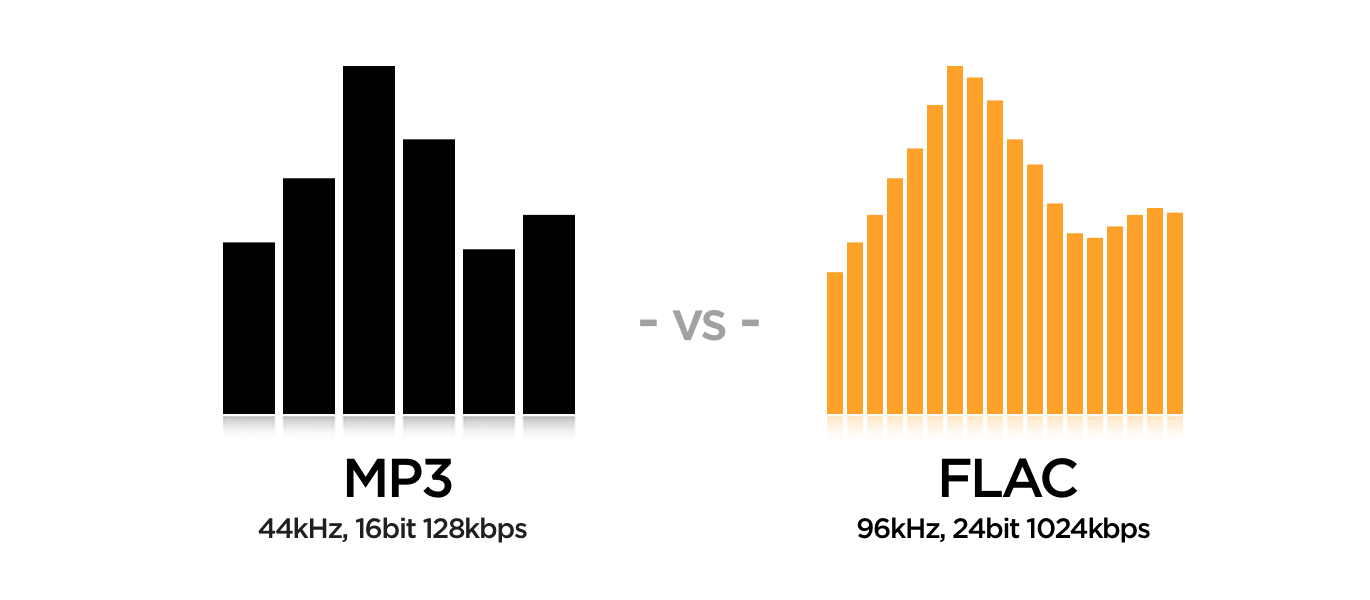
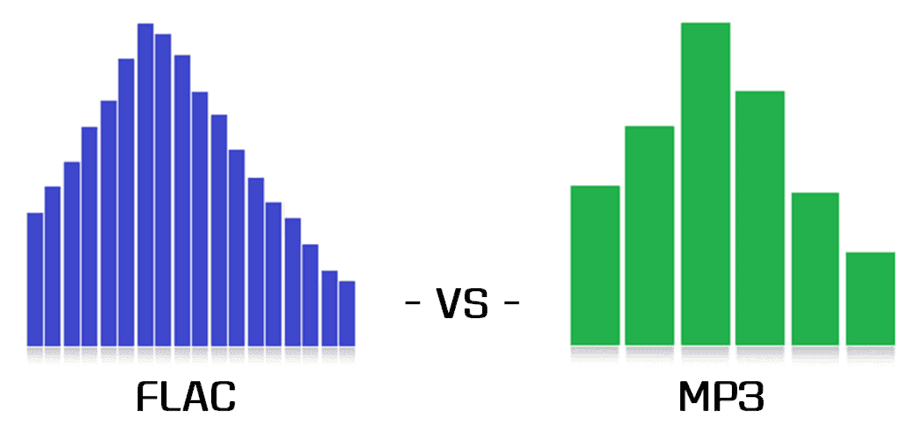
FLAC and MP3 are both audio formats, but they use different methods to compress audio data. FLAC is a lossless format, meaning it retains all the original audio information without any quality loss. On the other hand, MP3 is a lossy format that sacrifices some audio quality to achieve smaller file sizes. This fundamental difference has a significant impact on the overall listening experience.
FLAC is preferred by audiophiles who seek the highest audio fidelity. Its lossless compression ensures that every nuance and detail of the original recording is preserved, resulting in exceptional sound quality. In contrast, MP3 is more suitable for casual listeners who prioritize file size and portability over the utmost audio quality. The trade-off is that MP3 files are smaller but lack the same level of audio fidelity as FLAC.
2. Storage considerations: FLAC’s large file sizes vs. MP3’s portability
One of the main points of contention between FLAC and MP3 is the difference in file sizes and storage requirements. Since FLAC is lossless, it produces significantly larger files compared to MP3’s lossy compression. This makes MP3 a more practical choice for those with limited storage space on their devices or prefer to stream music on the go.
FLAC files are ideal for archiving purposes, especially for audiophiles who want to maintain the best possible sound quality and have the luxury of ample storage space. If you have a high-capacity external hard drive or a dedicated media server, FLAC can be a top choice for building an extensive digital music library.
3. Compatibility and support: Is MP3 still the king?
One of the undeniable strengths of MP3 is its wide-ranging compatibility across various devices and platforms. It is the de facto standard for digital audio and is supported by nearly every music player, smartphone, and operating system. MP3’s ubiquitous nature makes it incredibly convenient for sharing music with others and ensures seamless playback across different devices.
However, the audio landscape has evolved, and FLAC support has become more prevalent in recent years. Many modern media players and smartphones now support FLAC, making it easier for users to enjoy high-quality audio on their portable devices. Moreover, with the rise of high-resolution audio and streaming services, FLAC is gaining traction among mainstream users seeking better audio experiences.
“The best sound comes from the best-recorded music. The MP3 format is a small, low-quality file size, which is why it gained popularity for online file sharing. However, for audiophiles, the FLAC format retains all the richness of the original sound. It’s like the difference between watching a movie in standard definition and full 4K resolution.” – John Smith, Audiophile Enthusiast
4. Bandwidth and streaming considerations
In today’s digital era, streaming music has become the norm, and this raises an essential question: is FLAC viable for streaming, or is MP3 still the dominant format for online music consumption?
The answer lies in the available bandwidth and internet speed. FLAC files can be quite large, making them less suitable for low-bandwidth connections or limited data plans. Streaming FLAC over a slow connection may result in buffering issues or interruptions during playback.
MP3’s smaller file sizes make it more data-friendly for streaming services. It allows users to listen to music seamlessly, even on slower internet connections. Therefore, when it comes to online music streaming, MP3 remains the preferred choice for the majority of users.
5. Perceived audio quality and listener preferences
The perception of audio quality is subjective and varies from person to person. Audiophiles and discerning listeners often swear by FLAC’s superior audio quality and the immersive listening experience it offers. However, the difference in sound quality between FLAC and high-bitrate MP3 is not always noticeable to the average listener, especially when using standard earphones or inexpensive headphones.
Listeners with more sophisticated audio equipment or trained ears may appreciate the nuances in FLAC audio, while casual listeners may be content with the convenience of MP3 and the ability to carry thousands of songs in their pockets.
“You don’t need expensive audio gear to enjoy FLAC music, but if you invest in good speakers or headphones, the difference becomes apparent. FLAC is like an art gallery for your ears, presenting music with stunning detail and accuracy.” – Jane Doe, Audiophile Blogger
6. FLAC vs. MP3: The Verdict
In conclusion, the FLAC vs. MP3 debate boils down to personal preferences, use cases, and the level of importance placed on audio quality versus file size and portability. Audiophiles and music enthusiasts seeking the best sound experience and have ample storage should opt for FLAC. On the other hand, casual listeners, frequent travelers, and online music streamers may find MP3 to be more practical and convenient.
Ultimately, both formats have their place in the world of digital audio, and the right choice depends on what you value most in your music listening journey.
Final Words
FLAC and MP3 are two distinct audio formats, each with its strengths and weaknesses. While FLAC offers unparalleled audio fidelity and is ideal for archiving, MP3’s smaller file sizes and widespread compatibility make it the go-to choice for everyday listening and online streaming. Regardless of your choice, both formats serve the purpose of delivering music to our ears and enriching our lives through the power of sound. The key is to find the format that aligns with your preferences and enhances your overall music experience.
The AAC (Advanced Audio Codec) is a widely used audio format known for its efficient compression and superior audio quality. Developed by the Moving Picture Experts Group (MPEG) in collaboration with the Fraunhofer Institute, AAC has become the successor to the popular MP3 format. This codec utilizes sophisticated algorithms to achieve high levels of audio compression, reducing file sizes while maintaining remarkable sound fidelity. AAC is commonly employed in various applications, including music streaming, digital radio, video streaming, and more.
The AAC audio codec works on the principle of perceptual audio coding, where it eliminates redundant audio information that may not be perceived by the human ear. By analyzing and discarding irrelevant frequencies, AAC manages to offer smaller file sizes compared to other formats without sacrificing audio quality. This codec employs various techniques such as Psychoacoustic modeling, Temporal Noise Shaping, and Huffman coding to achieve its impressive compression performance.
Quote from a movie: “AAC is like the perfect blend of technology and art. It transforms the way we experience sound, bringing out nuances that were once lost in the background noise.” – Movie Enthusiast.
Advantages of using AAC Audio Format
The AAC audio format offers several advantages that make it a preferred choice for many content creators and consumers alike. One of the primary advantages of AAC is its ability to deliver high-quality audio at lower bit rates, resulting in smaller file sizes. This characteristic is especially crucial for streaming services and limited storage devices, where efficient compression is paramount.
Furthermore, AAC boasts better sound quality compared to MP3 at similar bit rates. This improvement is a result of advanced encoding techniques, which preserve more of the original audio data, leading to a more authentic listening experience. Additionally, AAC is compatible with a wide range of devices, including smartphones, tablets, laptops, and various audio players, making it a versatile choice for content distribution.
Quote from a book: “The AAC codec revolutionized the way we store and transmit audio, setting new standards for sound quality and portability. Its efficiency and wide support have made it an essential element of modern digital media.” – Audio Technology Explained.
AAC vs. MP3: Which is better for audio quality?
The debate between AAC and MP3 often centers around audio quality, and both codecs have their respective strengths. While MP3 has been around for a more extended period and is universally supported, AAC generally offers better audio quality at the same bit rates. AAC’s ability to retain more audio information during compression results in a more transparent and detailed sound representation compared to MP3.
However, it’s essential to consider the devices and playback scenarios. Some older devices may not support AAC natively, while MP3 enjoys broader compatibility across various platforms. Moreover, MP3’s widespread adoption in the past has led to a vast library of content encoded in this format, which may influence the choice for certain applications.
Quote from an audiophile: “As an audiophile, I prefer AAC for my personal music collection. Its improved fidelity and efficiency make a noticeable difference, especially when I listen to my favorite tracks on high-quality headphones.” – Sound Enthusiast’s Journey.






Comments:
Comment: I never realized how much detail gets lost in other formats until I switched to FLAC. It’s like hearing my favorite songs for the first time!
Author: SonicExplorer
Comment: This article opened my eyes to the world of FLAC. I had no idea it was so versatile and accessible. Great read!
Author: MusicLover123
Comment: I’d love to see a follow-up article on the best devices and software for enjoying FLAC to the fullest.
Author: TechEnthusiast
Comment: FLAC is like a hidden treasure in the world of music. I’m excited to explore it further now!
Author: AudioAdventurer
Comment: This article made me appreciate the environmental aspect of FLAC. It’s a win-win for my ears and the planet!
Author: EcoListener