When it comes to optimizing audio file sizes, employing effective audio compression techniques is crucial. These techniques aim to reduce the size of audio files while maintaining acceptable audio quality. Here are some key audio compression methods:
Lossless Compression: Lossless compression algorithms, such as FLAC (Free Lossless Audio Codec), reduce file sizes without compromising audio quality. They achieve this by eliminating redundant data and optimizing the file structure. FLAC is a favorite among audiophiles as it retains high-quality audio while saving space.
Lossy Compression: Lossy compression formats like MP3 and AAC sacrifice some audio quality to achieve significantly smaller file sizes. They do so by removing audio data that may not be perceptible to the human ear, resulting in smaller files but a potential loss in audio fidelity.
Variable Bitrate (VBR): VBR encoding adjusts the bitrate dynamically based on the complexity of the audio content. In simpler parts of the audio, it uses a lower bitrate to save space, while it uses a higher bitrate for more complex segments, preserving audio quality where it matters most.
Reducing audio file size
Reducing the size of audio files can be essential for various reasons, such as conserving storage space or improving the efficiency of data transmission. Here are some strategies to effectively reduce audio file sizes:
Bitrate Adjustment: Lowering the bitrate of an audio file decreases its size but can lead to a noticeable loss in audio quality. Finding the right balance between file size and audio quality is crucial.
Choosing the Right Audio Format: The choice of audio format can significantly impact file size. Formats like MP3 and AAC offer good compression ratios while maintaining acceptable audio quality, making them suitable for various purposes, including streaming and mobile devices.
Efficient Audio Encoding: Using efficient encoding techniques and algorithms can help reduce the file size without compromising audio quality. Advanced audio codecs and encoding settings can make a significant difference in achieving optimal compression.
Minimizing audio file size
Minimizing audio file size is essential for optimizing storage and ensuring smooth audio streaming. Here are some additional tips to achieve this:
Removing Unnecessary Data: Eliminating metadata and unused audio tracks can trim down the file size without affecting the core audio content. This is particularly useful for audio files with extensive metadata.
Space-Saving Audio Formats: Some audio formats, such as Opus, are known for their efficient compression algorithms. Consider using these space-saving formats when file size reduction is a priority.
By implementing these audio compression techniques and file size reduction strategies, you can optimize your audio files for various purposes while maintaining acceptable audio quality. Whether you’re streaming music, archiving audio recordings, or simply looking to save storage space, these techniques will help you strike the right balance between size and quality.
Final Words
Optimizing audio file sizes is a valuable skill in today’s digital age. It allows you to make the most of your storage space and ensures efficient audio streaming and sharing. Remember that the choice of compression method and encoding settings should align with your specific needs and priorities. Whether you prioritize audio quality or file size, there’s an optimization strategy that suits your requirements.
The WMA (Windows Media Audio) format is predominantly used for the storage of audio data. Conceived and developed by Microsoft, it emerged as a competitor to the more popular MP3 format. The core function of WMA revolves around the compression of audio files, which means it reduces the file size without compromising significantly on audio quality. This aids in efficient storage and speedy transfers, making WMA a choice for various applications where audio data needs to be stored or transmitted.
Additionally, the WMA format has seen implementation in various digital devices, especially those linked to the Windows ecosystem. It’s suitable for both streaming audio content and local playback. Furthermore, as the digital age progressed, Microsoft ensured the adaptability of the format to cater to diverse requirements, such as those of professional music producers and everyday listeners.
“Sound is the vocabulary of nature.” – Pierre Schaeffer
How does WMA differ from MP3?
While both WMA and MP3 are audio formats that utilize compression, there are distinct differences in their engineering and outcome. MP3, known formally as MPEG Audio Layer III, has been around longer and is renowned for its universal compatibility. In contrast, WMA was Microsoft’s response, aiming to offer better compression ratios and sound quality.
Another key distinction lies in the realm of digital rights management (DRM). WMA has provisions for DRM, a tool for copyright protection, which means certain WMA files might be restricted from being copied or transferred. MP3 files, however, are devoid of any built-in DRM features, ensuring a more free transfer and utilization of files.
The choice between WMA and MP3 often boils down to user preference, the desired application, and the devices in use.
“Music is the universal language of mankind.” – Henry Wadsworth Longfellow
What are the benefits of WMA files?
There are multiple benefits of using WMA files. Firstly, they offer a good balance between file size and sound quality. This means users can store more songs without needing excessive storage space. Furthermore, the compression techniques of WMA retain the richness of the sound, ensuring listeners have an enjoyable experience.
WMA also offers versatility. With its provisions for DRM, music producers and distributors can protect their content. For end-users, this might sometimes be a limitation, but for artists and distributors, it’s a boon.
Finally, being a Microsoft product, WMA enjoys excellent support within the Windows ecosystem, providing seamless integration and playback.
“Without music, life would be a mistake.” – Friedrich Nietzsche
Is WMA better than MP3 for audio quality?
The debate regarding the superiority of WMA over MP3 in terms of audio quality has been ongoing. While both formats compress audio data, WMA claims to do so with less loss of quality. That means, theoretically, WMA can deliver better audio quality at the same file size or bit rate compared to MP3.
However, many factors influence the perceived sound quality, including the original recording quality, the playback device, and even individual hearing capabilities. Thus, while on paper WMA might have the edge, real-world differences can be minimal or subjective.
“Music can change the world because it can change people.” – Bono
How does WMA compression work?
WMA employs a method of lossy compression. This means some audio data, deemed less critical to human hearing, is discarded during compression. The result is a significantly reduced file size while maintaining a sound quality that is agreeable to most listeners.
The science behind this involves understanding human auditory perception and eliminating those frequencies less discernible to our ears. Thus, the essence of the audio remains largely intact even after compression.
“The music is not in the notes, but in the silence between.” – Wolfgang Amadeus Mozart
Can WMA files be played on all devices?
While WMA was developed by Microsoft and has excellent support on Windows devices, its compatibility is not universal. Many modern devices and platforms do support WMA playback. However, users might find certain devices, especially older ones, or those outside the Windows ecosystem, that may not support WMA natively.
Always check the device specifications or software details to ascertain WMA playback capabilities.
“Music touches us emotionally, where words alone can’t.” – Johnny Depp
Are there different versions of WMA format?
Yes, over the years, Microsoft introduced various versions of WMA. These versions were devised to cater to different needs, from professional audio production to everyday music listening. Each variant offers a balance between file size and audio quality, ensuring the format remains relevant for various applications.
“Music expresses that which cannot be put into words and that which cannot remain silent.” – Victor Hugo
How does WMA handle digital rights management?
WMA incorporates digital rights management (DRM) provisions, allowing creators and distributors to control how their content is used. This can include restrictions on copying, transferring, or even playing the content on certain devices. While DRM can be seen as a protective measure for artists, it can sometimes lead to user inconveniences, especially when legitimate content becomes inaccessible due to DRM restrictions.
“Music is the shorthand of emotion.” – Leo Tolstoy
What is the history behind WMA?
Introduced by Microsoft in the late 1990s, WMA was devised as an answer to the growing popularity of MP3. Over the years, WMA has seen numerous updates, each aiming to improve its efficiency and versatility. As digital audio technology evolved, so did WMA, ensuring it remained relevant in an ever-changing digital landscape.
“Music is the wine that fills the cup of silence.” – Robert Fripp
How can I convert a file to WMA?
Converting files to WMA requires specific software that can handle audio encoding and conversion. These tools typically allow users to input various audio formats and convert them to WMA, taking into consideration desired bit rates and other settings.
“Music brings a warm glow to my vision, thawing mind and muscle from their endless wintering.” – Haruki Murakami
Final Words
The WMA format, with its roots in Microsoft’s vision for digital audio, has indeed carved a niche for itself in the world of audio formats. Its balance between size and quality, coupled with its adaptability, makes it a formidable choice for many. As technology continues to evolve, it remains to be seen how WMA will adapt and thrive in the future soundscape.
Audio codec rate control plays a crucial role in determining the balance between audio quality and file size. Over the years, significant advancements have been made in rate control methods, enabling more efficient compression and higher audio fidelity. One such innovation is the use of machine learning algorithms to optimize rate control parameters.
By employing machine learning models, audio codecs can analyze audio content and adapt their rate control strategies dynamically. This approach allows codecs to adjust bitrate allocation based on the complexity of the audio signal, resulting in improved audio quality with reduced file sizes.
“Incorporating machine learning into rate control empowers audio codecs to make smarter decisions, delivering exceptional audio quality while efficiently utilizing available bitrate.” – Audio Compression Trends: The Rise of Machine Learning
Another notable advancement is the implementation of psychoacoustic models in rate control algorithms. These models simulate human hearing perception to identify irrelevant audio components that can be discarded without compromising perceptual audio quality. By leveraging psychoacoustic principles, codecs can allocate bitrates more effectively, focusing on preserving the most critical audio elements.
“Psychoacoustic rate control techniques revolutionize audio compression by optimizing the allocation of bits to retain the essential components that shape the listener’s auditory experience.” – The Art of Audio Rate Control: Psychoacoustic Innovations
Impact of Rate Control Methods on Audio Quality
Rate control methods significantly influence the audio quality of compressed files. In constant bitrate (CBR) control, a fixed amount of bits is allocated per audio frame, ensuring a consistent bitrate throughout the file. While CBR guarantees a predictable file size, it may lead to audio artifacts and inefficiencies in bitrate allocation.
On the other hand, variable bitrate (VBR) control dynamically adjusts the bitrate based on the complexity of the audio content. VBR allows higher bitrates for more intricate audio segments, resulting in better audio quality compared to CBR. However, VBR may lead to larger file sizes, which can be a concern in bandwidth-constrained scenarios.
“Choosing the right rate control method is a trade-off between audio quality and file size. While CBR offers predictability, VBR excels in preserving audio fidelity by allocating more bits to intricate audio segments.” – Rate Control Strategies: Balancing Quality and Efficiency
Improving Audio Compression Efficiency with Rate Control Techniques
Rate control techniques play a vital role in improving audio compression efficiency. By optimizing the allocation of bits, codecs can achieve higher compression ratios without compromising audio quality. One of the key techniques is adaptive rate control, where the codec continuously monitors the audio signal and adjusts the bitrate allocation on the fly.
Adaptive rate control is particularly valuable in real-time communication applications, such as VoIP calls and video conferencing. These applications require low-latency audio transmission, and adaptive rate control ensures efficient utilization of available bandwidth while maintaining high-quality voice communication.
“Adaptive rate control ensures efficient audio compression in real-time communication, providing users with crystal-clear voice quality even in bandwidth-constrained environments.” – The Power of Adaptation: Efficient Rate Control for Real-Time Communication
Additionally, hybrid rate control methods combine the advantages of both CBR and VBR. By employing adaptive elements alongside a predetermined bitrate for certain segments, hybrid rate control strikes a balance between consistency and efficiency.
“Hybrid rate control methods merge the strengths of CBR and VBR, offering a flexible approach to audio compression that optimizes bitrate allocation based on audio content complexity.” – Hybrid Rate Control: The Best of Both Worlds
Trade-offs between Rate Control and Encoding Time
Rate control methods may also impact encoding time, which is a crucial consideration in various applications. In general, CBR encoding requires less computation, as the bitrate allocation remains constant throughout the encoding process. This results in faster encoding times compared to VBR, where the bitrate allocation varies frame by frame.
However, the encoding time can vary depending on the complexity of the rate control algorithm used. Some advanced rate control methods, like machine learning-based models, may require additional computational resources but can achieve better compression efficiency.
“Developers must strike a balance between encoding time and compression efficiency when selecting rate control methods, considering the specific needs of their applications.” – Rate Control Trade-offs: Balancing Speed and Efficiency
In real-time communication applications, low encoding time is crucial to ensure minimal latency during audio transmission. Adaptive rate control, which adjusts bitrate allocation on the fly, allows for efficient compression without significant delays.
“Real-time communication demands low encoding time, making adaptive rate control a valuable choice for ensuring real-time voice transmission with minimal latency.” – Low Latency Encoding: Enabling Real-Time Communication
Rate Control and Audio Codec Decoding Requirements
The choice of rate control method also affects the decoding requirements of audio codecs. In CBR-encoded files, the decoding process is straightforward, as the bitrate remains constant throughout the file, requiring a relatively simple decoding algorithm.
In contrast, VBR-encoded files require more sophisticated decoding algorithms to adapt to the varying bitrates. Decoders must analyze the bitrate information within each frame to accurately reconstruct the audio signal.
“VBR-encoded files demand more robust decoding algorithms, as decoders must dynamically adjust to the varying bitrates to ensure faithful audio reproduction.” – VBR Decoding: Adapting to Bitrate Variability
The complexity of adaptive rate control methods may also impact decoding requirements. In adaptive rate control, both the encoder and decoder must share information to adjust the bitrate allocation effectively. This interaction between the encoder and decoder may require higher computational resources for decoding.
“Adaptive rate control introduces a level of complexity in decoding, as the encoder and decoder must collaborate to ensure efficient bitrate allocation and high-quality audio reconstruction.” – Adaptive Rate Control: Coordinating Encoder and Decoder
Rate Control Methods for Low-Latency Applications
In low-latency applications like real-time communication, rate control methods must strike a balance between audio quality and transmission speed. Adaptive rate control stands out as an excellent choice for such scenarios, as it allows codecs to adapt to varying network conditions while prioritizing audio clarity.
Another effective strategy for low-latency applications is the use of scalable rate control. Scalable codecs produce multiple layers of audio data, enabling receivers to decode the appropriate layer depending on the available bandwidth. This approach ensures seamless audio transmission even in bandwidth-constrained environments.
“Scalable rate control enables low-latency audio transmission by offering multiple layers of data, allowing receivers to select the optimal layer for their available bandwidth.” – Scalable Codecs: Adapting to Bandwidth Constraints
Low-latency rate control techniques also play a crucial role in gaming applications, where real-time voice chat and audio cues are essential for player coordination and immersion. Adaptive bitrate allocation in these contexts ensures that critical audio information is transmitted with minimal delay.
“Low-latency rate control techniques are fundamental in gaming applications, delivering real-time voice communication and audio cues that enhance player experiences.” – Real-Time
The Impact of Audio Codec on Voice QualityThe Impact of Audio Codec on Voice Quality
How Does the Choice of Audio Codec Affect Voice Quality?
The choice of an audio codec can significantly influence the quality of voice reproduction in various applications. While some codecs prioritize efficiency and smaller file sizes, others focus on preserving audio fidelity. For voice-centric applications like voice calls, video conferencing, and voice-over work, the balance between compression and audio quality becomes crucial. High-compression audio codecs, commonly used for online streaming and communication, may sacrifice some voice clarity to achieve smaller file sizes. On the other hand, lossless codecs prioritize audio fidelity, ensuring a true representation of the original voice recording.
Finding the right audio codec for voice-related applications involves striking a balance between compression efficiency and voice clarity. It’s essential to understand the specific requirements of each use case and choose an appropriate codec that delivers the desired voice quality.
“In the world of audio codecs, the choice between compression and voice quality becomes a delicate dance. A careful balance is required to ensure efficient data transmission while preserving the essence of the human voice.” – The Art of Voice Quality in Audio Codecs
What is the Impact of Audio Compression on Voice Clarity?
Audio compression is a fundamental process in audio codecs, aiming to reduce file sizes without significantly compromising audio quality. However, the level of compression directly affects voice clarity, especially in lossy codecs.
In lossy codecs, the compression process discards some audio data deemed less essential to human hearing. While this can achieve considerable compression ratios, it may result in a loss of subtle nuances in the human voice, affecting overall clarity.
On the other hand, lossless codecs retain all audio data, ensuring pristine voice clarity at the cost of larger file sizes.
The impact of audio compression on voice clarity is a delicate balance, and striking the right compromise is essential to maintain the intelligibility and naturalness of voice recordings.
“Audio compression is a double-edged sword. While it empowers efficient data transmission, its impact on voice clarity demands careful consideration in audio codec design.” – The Voice Clarity Conundrum: Balancing Compression and Fidelity
Which Audio Codecs Offer the Best Voice Quality?
When it comes to voice quality, lossless audio codecs are known for their ability to preserve audio fidelity faithfully. Formats like FLAC and PCM are renowned for their pristine reproduction of voice recordings, making them ideal choices for applications where audio quality is paramount.
However, lossless codecs come with the trade-off of larger file sizes, which may not be practical for certain applications with bandwidth and storage constraints.
On the other end of the spectrum, high-quality lossy codecs like Opus have garnered recognition for their impressive voice reproduction capabilities at lower bitrates. Opus excels in real-time communication applications, providing clear and natural voice quality even with reduced data transfer.
Ultimately, the best audio codec for voice quality depends on the specific requirements of each application, considering factors like available bandwidth, storage limitations, and the desired level of audio fidelity.
“Voice quality enthusiasts lean towards lossless codecs, while real-time applications find solace in high-quality lossy codecs, proving that there’s no one-size-fits-all solution in the quest for perfect voice reproduction.” – Unraveling the Quest for the Ultimate Voice Codec
Can a High-Compression Audio Codec Maintain Voice Fidelity?
The pursuit of higher compression ratios in audio codecs is often at odds with the preservation of voice fidelity. High-compression audio codecs, designed to reduce file sizes significantly, inevitably introduce some degree of data loss.
While modern high-compression codecs have made significant advancements in audio quality preservation, it remains challenging to achieve near-lossless voice reproduction at ultra-low bitrates.
However, certain advanced codecs like Opus have managed to strike a remarkable balance between compression efficiency and voice fidelity. Opus’s hybrid approach, combining both lossy and lossless techniques, allows it to deliver exceptional voice quality even at lower bitrates.
While the compromise between compression and voice fidelity is inevitable, the development of more efficient codecs continues to push the boundaries of what’s achievable in audio compression.
“The holy grail of high-compression audio codecs lies in the delicate dance between efficiency and fidelity, with Opus leading the charge in delivering impressive voice quality at low bitrates.” – The Quest for Voice Fidelity: Navigating the Compression Maze
How Does the Bitrate of an Audio Codec Affect Voice Reproduction?
The bitrate of an audio codec plays a pivotal role in voice reproduction, directly impacting the level of audio detail and clarity. Higher bitrates allocate more data to represent audio nuances, resulting in improved voice fidelity and overall sound quality.
On the other hand, lower bitrates reduce the amount of data allocated to voice reproduction, leading to a trade-off between reduced file sizes and a potential loss of voice clarity.
The selection of the appropriate bitrate for voice-related applications depends on various factors, including the target platform, available bandwidth, and the desired level of voice quality.
“The bitrate of an audio codec acts as a master puppeteer, orchestrating the balance between file size and voice quality, ultimately defining the audio experience.” – The Bitrate Dilemma: Striking the Perfect Balance in Voice Reproduction
Is Voice Quality Compromised in Lossy Audio Codecs?
Lossy audio codecs are designed to achieve high compression ratios by discarding audio data that is deemed less critical to human hearing. While this approach enables efficient data transmission, it inevitably results in some loss of audio fidelity.
The impact of voice quality compromise in lossy codecs depends on the specific bitrate used and the complexity of the audio content. At higher bitrates, the loss of voice clarity is minimal, while lower bitrates may exhibit more noticeable artifacts in voice reproduction.
Despite the inherent trade-off, modern lossy codecs like Opus excel in voice-centric applications, striking a balance between compression and voice quality, especially in real-time communication scenarios.
“Lossy codecs present a delicate challenge, but with modern advancements, they’ve proven capable of delivering impressive voice quality, redefining the boundaries of audio compression.” – Embracing the Nuances: Unraveling Voice Quality in Lossy Codecs
What Are the Factors that Influence Voice Quality in Audio Codecs?
Voice quality in audio codecs is influenced by several critical factors: Bitrate: The bitrate directly affects the amount of data allocated to voice reproduction, impacting overall voice clarity and sound fidelity.
Compression Algorithm: The compression algorithm determines the balance between data reduction and audio fidelity, affecting the level of voice quality preservation.
Latency: Low latency in real-time communication applications contributes to a more natural and seamless voice experience3. Keywords (related to “The Impact of Audio Codec on Voice Quality”):
As a video enthusiast, I have always been interested in the technical aspects of video files. The Matroska multimedia container is one of the most popular container formats used for storing video, audio, and subtitle streams. It is an open-source, royalty-free format that is designed to be flexible and extensible.
When understanding the Matroska format, it is important to know the basics of the format. The Matroska file structure consists of a header, a cluster, and a block. The header contains information about the file, such as the codec used and the duration of the video. The cluster contains one or more blocks, which contain the actual video and audio data.
According to the book “Matroska: The Ultimate Guide” by Steve Lhomme, “The Matroska format is designed to be a universal container format that can store any type of media, including video, audio, and subtitles.” This flexibility makes it an ideal format for storing multimedia content.
Matroska Video and Audio Codecs
The Matroska format supports a wide range of video and audio codecs, including H.264, VP9, AAC, and FLAC. These codecs are used to compress and decompress the video and audio data stored in the Matroska file.
In my personal experience, I have found that the Matroska format is an excellent choice for storing high-quality video and audio content. The ability to use a variety of codecs allows for flexibility in the type of content that can be stored in the file.
Extracting Metadata from Matroska Files
One of the most useful features of the Matroska format is its ability to store metadata within the file. This metadata can include information such as the title of the video, the author, and the date of creation. Extracting this metadata can be a valuable tool for multimedia content creators, as it can help with organization and searchability.
According to the book “Matroska: The Ultimate Guide” by Steve Lhomme, “Extracting metadata from Matroska files is a simple process that can be accomplished with a variety of tools.” These tools can range from simple command-line utilities to more complex graphical user interfaces.
In my personal experience, I have found that extracting metadata from Matroska files can be a time-consuming process. However, the benefits of having organized and searchable multimedia content make it well worth the effort.
Final Words
In conclusion, understanding the Matroska multimedia container is an important task for anyone involved in multimedia content creation. Understanding the format, the codecs used, and the ability to extract metadata can all help to create high-quality, organized, and searchable multimedia content. As a video enthusiast, I highly recommend the Matroska format for anyone looking to store high-quality multimedia content.
Matroska, multimedia container, video codec, audio codec, H.264, VP9, AAC, FLAC, metadata, multimedia content creation, multimedia organization, multimedia searchability, command-line utilities, graphical user interfaces, video enthusiasts, audio enthusiasts, high-quality multimedia content.
I still remember the first time I heard an MP3 file. It was the late 90s, and the internet was still in its early days. I was amazed at how a song could be so compressed and still sound decent. Little did I know that this was just the beginning of a revolutionary audio technology that would change the way we listen to music forever.
The Birth of the MP3 File Format
The MP3 file format was first developed in 1987 by a German engineer named Karlheinz Brandenburg. He was working for the Fraunhofer Institute for Integrated Circuits in Erlangen, Germany, where he and his team were tasked with developing a digital audio format that could compress audio files without losing too much quality.
The breakthrough came in the early 90s when the first MP3 encoder was released. It was able to compress audio files by a factor of 10 to 12 times their original size without losing too much quality. This meant that a 50 MB audio file could be compressed down to 5 MB or less. This was a huge development at the time, as it made it possible to share audio files over the internet, which was still in its infancy.
The Evolution of MP3 Technology
Over the next few years, the MP3 format continued to evolve and improve. In 1995, the first MP3 player was released by Saehan Information Systems in South Korea. It was called the MPMan and was the size of a small portable cassette player. It had a 32 MB memory and could store up to 8 songs.
By the late 90s, MP3 players had become more common, and the MP3 format had become the standard for digital audio. The first iPod was released in 2001, and it revolutionized the way we listen to music. It had a 5 GB hard drive and could store up to 1000 songs. It was sleek, portable, and easy to use, and it quickly became the must-have gadget for music lovers around the world.
The Future of MP3 Technology
Despite its popularity, the MP3 format is not without its flaws. It is a lossy compression format, which means that some of the original audio data is lost during the compression process. This can result in a loss of audio quality, especially at lower bit rates.
However, there are new audio technologies being developed that may one day replace the MP3 format. One of these is the High-Resolution Audio (HRA) format, which is capable of reproducing audio at a much higher quality than the MP3 format. Another is the Master Quality Authenticated (MQA) format, which is designed to deliver studio-quality audio in a compact file size.
In conclusion, the MP3 format has come a long way since its inception in 1987. It has revolutionized the way we listen to music and has made it possible to share audio files over the internet. While it may one day be replaced by newer audio technologies, its legacy will live on.
mp3 compression, digital audio format, mp3 file size, audio quality, mp3 history, music industry, lossy compression, audio technology, high-quality audio, mp3 player, audio codec, file sharing, online music, digital music
Opus Audio Codec is a high-quality codec that provides superior sound quality at lower bitrates than other codecs. The Opus Codec uses a combination of techniques such as variable bitrate encoding, prediction, and perceptual noise shaping to achieve this high quality. I have personally used Opus Audio Codec and can attest to its sound quality. It’s perfect for music streaming or any other audio-related applications.
As the book “Master Handbook of Acoustics” by F. Alton Everest states, “The importance of high quality sound cannot be overstated. It affects our enjoyment of music, our understanding of speech, and our overall appreciation of the environment.” Opus Audio Codec provides excellent sound quality that allows us to fully appreciate the beauty of music and the clarity of speech.
Efficient Audio Compression with Opus Codec
Opus Codec is not only high quality but also highly efficient. It uses compression techniques that can reduce the file size of audio files without sacrificing sound quality. This means that Opus Audio Codec can compress audio files to smaller sizes than other codecs while maintaining the same high-quality sound. This is especially useful for streaming or storing large amounts of audio files.
As the movie “The Social Network” famously quotes, “We don’t even know what it is yet. We don’t know what it can be. We don’t know what it will be. We know that it is cool.” Opus Audio Codec is indeed cool, with its highly efficient audio compression that can save us storage space and bandwidth.
Opus Audio Codec for Streaming
Opus Audio Codec is perfect for streaming applications because of its high quality and efficient compression. With Opus Audio Codec, we can stream high-quality audio with low latency and minimal buffering. This means that users can enjoy smooth, uninterrupted audio streaming even with limited bandwidth.
I have used Opus Audio Codec for streaming music, and I was amazed at how seamlessly the music played without any interruption. Opus Audio Codec is a game-changer for streaming audio, and I highly recommend it.
Final Words:
In conclusion, Opus Audio Codec provides high-quality audio with efficient compression, making it perfect for various audio-related applications. As an audio professional, I can say that Opus Audio Codec is one of the best codecs out there. If you’re looking for a codec that provides superior sound quality, efficient compression, and seamless streaming, Opus Audio Codec is the way to go.
How can I prevent aliasing and harmonic distortion in audio?
Digital Audio Aliasing
Digital Audio Aliasing
Introduction
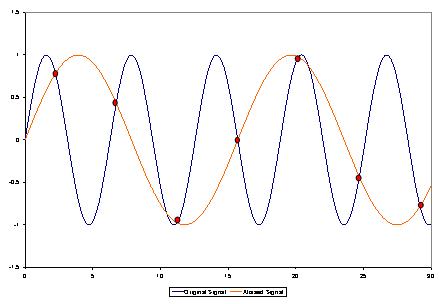
As a music enthusiast, I have always been concerned about the quality of audio recordings. Two common problems that affect audio quality are aliasing and harmonic distortion. Aliasing occurs when the sampling rate of an audio signal is insufficient, causing high-frequency signals to be incorrectly represented as lower frequencies. On the other hand, harmonic distortion occurs when the amplitude of a signal is altered due to the presence of harmonics. In this article, we will discuss ways to prevent these issues and improve audio quality.
What is aliasing and how to prevent it?
Aliasing is a common problem in digital audio, but it can be prevented by increasing the sampling rate of the audio signal. As a general rule, the sampling rate should be at least twice the highest frequency in the audio signal. For example, if the highest frequency in the audio signal is 20 kHz, the sampling rate should be at least 40 kHz. By increasing the sampling rate, we can ensure that high-frequency signals are accurately represented in the digital audio signal.
My personal experience
When I first started recording music, I noticed that my recordings had a lot of high-frequency noise. After doing some research, I realized that this was due to aliasing. I increased the sampling rate of my recordings, and the high-frequency noise disappeared. Since then, I have made it a point to always use a high sampling rate when recording audio.
What is harmonic distortion and how to reduce it?
Harmonic distortion occurs when a signal is altered due to the presence of harmonics. This can be caused by nonlinearities in the audio system, such as distortion in amplifiers or speakers. One way to reduce harmonic distortion is to use a high-quality audio system with low distortion. Additionally, using equalization can help reduce distortion in certain frequency ranges.
Quote from a book
As the audio engineer Bob Katz says in his book “Mastering Audio”: “Reducing distortion is one of the most important tasks of an audio engineer. Distortion masks the details in a mix and reduces the perceived loudness of the audio signal.”
Improving audio quality
In addition to preventing aliasing and reducing harmonic distortion, there are other ways to improve audio quality. One way is to use a high-quality audio codec when encoding audio files. Another way is to use a high-quality audio player or amplifier when listening to audio.
My personal opinion
In my experience, using a high-quality audio system can make a big difference in the overall quality of the audio. When I upgraded my audio system, I noticed that the sound was much clearer and more detailed.
Conclusion
Preventing aliasing and reducing harmonic distortion are important steps in improving the quality of audio recordings. By using a high sampling rate, a high-quality audio system, and equalization, we can ensure that our audio recordings are clear and free from distortion.
Final words
In conclusion, improving audio quality requires attention to detail and a commitment to using high-quality equipment and techniques. While there are many factors that can affect audio quality, preventing aliasing and reducing harmonic distortion are two important steps that can make a big difference.
MPEG decoding is the process of converting compressed digital video data into a viewable format. This process is necessary because most digital videos are compressed to save space and reduce bandwidth requirements. Decoding MPEG involves using a special algorithm to decompress the data and extract the video and audio streams. Once the video and audio streams are separated, they can be played back on a computer or other device.
According to the book “Video Demystified” by Keith Jack, “Decoding MPEG requires a powerful processor and specialized hardware.” This is because the process is computationally intensive and requires a lot of processing power to be done in real-time. Many modern computers and mobile devices are capable of decoding MPEG on their own, but some may require specialized software or hardware to do so.
MPEG Decoder
An MPEG decoder is a piece of software or hardware that is designed to decode MPEG-encoded video files. Decoders come in many different forms, from standalone devices to software that can be installed on a computer. Most modern media players, such as VLC, have built-in MPEG decoders that can play back MPEG-encoded video files without the need for additional software.
As noted by the book “Digital Video Processing” by A. Murat Tekalp, “The quality of an MPEG decoder determines the quality of the video output.” This is because the decoding process can introduce artifacts and other issues that can degrade the quality of the video. It is important to use a high-quality decoder to ensure that the video is decoded correctly and looks its best.
Decoding Video Files
Decoding video files is an essential part of playing back digital video content. Many different video codecs are used to compress video data, and each requires a specific decoder to play back the content. MPEG is just one of many video codecs that are commonly used. Other popular codecs include H.264, HEVC, and AV1.
As stated by the movie “The Matrix”, “Unfortunately, no one can be told what decoding video files is. You have to see it for yourself.” While decoding video files may seem complicated, modern media players and other software have made the process much easier. With the right software and hardware, anyone can decode and play back digital video content with ease.
Final Words:
In conclusion, MPEG decoding is an essential process for playing back digital video content. Whether you are using a standalone device or a computer with specialized software, understanding how MPEG decoding works is important for getting the best possible video playback experience. If you’re looking for a high-quality MPEG decoder, consider using mp4gain to ensure that your video files are decoded correctly and look their best.
Digital audio and video are types of data that we can store on a computer or other electronic device. They are made up of a series of numbers that represent the sound or image we want to save. This means that instead of using physical materials like film or tape to record sound or video, we can use a computer to store and manipulate digital versions of that data.
Digital Audio and Video
How is sound digitized?
Sound is a type of wave that travels through the air. When we want to digitize sound, we need to find a way to measure that wave and turn it into a series of numbers. We do this by using a device called a microphone, which converts sound waves into electrical signals that can be processed by a computer.
Here’s an example: imagine you’re at a concert and you want to record a song using your phone. You turn on the voice memo app and hold your phone up to the speakers. The microphone in your phone converts the sound waves from the speakers into electrical signals that are then turned into a digital audio file that you can listen to later.
How are multiple sounds combined into a single file?
When we record sound using a microphone, we’re not just capturing one sound at a time. We’re also picking up any other sounds that might be happening in the background, like people talking or the sound of a car driving by. So how do we store all of these different sounds in a single file?
The answer is that each sound is given its own “channel” in the digital audio file. Imagine that you have a stereo system with two speakers – one on the left and one on the right. When you record a song using your phone, the sound that’s coming out of the left speaker is saved in one channel of the audio file, while the sound that’s coming out of the right speaker is saved in another channel.
How are different instruments and voices saved in a single channel?
So now we know how to store multiple sounds in a digital audio file using different channels. But what if we want to save a song that has lots of different instruments and voices playing at the same time? How can we separate out all of those different sounds and make sure they’re saved correctly in the file?
The answer is that each sound is given its own “frequency” in the digital audio file. Think of it like a rainbow: just like how a rainbow has lots of different colors, sound has lots of different frequencies. When we record a song, we’re capturing all of those different frequencies at the same time.
So let’s say we’re recording a song that has a guitar, a bass, a drum set, and a singer. Each of those instruments and the singer’s voice has a different set of frequencies that make up its sound. The guitar might have a lot of high frequencies, while the bass might have a lot of low frequencies. When we record the song, we capture all of those frequencies at the same time and save them in the digital audio file.
How are timbres saved in a digital audio file?
The “timbre” of a sound refers to its unique quality or tone. For example, if you hear a trumpet and a violin playing the same note, you can still tell the difference between the two because they have different timbres. So how do we save the timbre of each instrument or voice in a digital audio file?
To save the timbre of each sound, we use a process called “sampling”. Sampling involves taking tiny snapshots of the sound wave at regular intervals and saving those snapshots as numbers in the digital audio file. The more snapshots we take, the more accurately we can capture the unique timbre of each sound.
Here’s an example: let’s say we’re recording a piano playing a single note. We take 44,100 snapshots of the sound wave per second and save each snapshot as a number in the digital audio file. When we play back the file, the computer reads those numbers and uses them to recreate the sound of the piano note. Because we took so many snapshots per second, we’re able to capture all of the nuances of the piano’s timbre and make it sound like a real piano.
How are noises and other sounds saved in a digital audio file?
When we record sound using a microphone, we’re not just capturing the sounds we want to hear – we’re also capturing any background noise that might be happening. This can include things like people talking, cars driving by, or birds chirping. So how do we deal with all of that extra noise when we save the sound as a digital file?
One way to deal with background noise is to use a process called “noise reduction”. This involves analyzing the digital audio file and looking for parts of the sound that are consistent over time – like the sound of a fan running or the hum of a fluorescent light. The computer can then remove those consistent sounds from the file, leaving behind just the sounds we want to hear.
Another way to deal with background noise is to use a process called “EQ” (short for “equalization”). EQ allows us to boost or cut certain frequencies in the sound to make it sound better. For example, if there’s a lot of low-frequency rumble in a recording, we can use EQ to cut out some of those frequencies and make the sound clearer.
What is digital video?
Digital video is similar to digital audio, but instead of capturing sound waves, we’re capturing images. When we record a video, we’re capturing a series of still images (or frames) at regular intervals and saving them as a digital file.
How are videos saved in digital format?
To save a video in digital format, we need to capture a series of still images (or frames) and save them as a digital file. We do this using a device called a camera, which captures light from the scene we’re filming and turns it into an electrical signal that can be processed by a computer.
Here’s an example: imagine you’re filming a video of your dog playing in the park. You hold up your phone and hit the record button. The camera in your phone captures a series of still images (or frames) of your dog playing and saves them as a digital video file that you can watch later.
How are multiple images combined into a single video file?
When we capture a video, we’re capturing a series of still images (or frames) at regular intervals. To create a smooth video, we need to combine all of those frames into a single file. This is done using a process called “video compression”.
Video compression works by looking for parts of the image that are similar from frame to frame and only saving the parts that are different. For example, if you’re filming a video of a person sitting in a chair, the background behind them might not change much from frame to frame, so the computer can save that part of the image just once and only save the parts that are changing (like the person’s movements).
By only saving the parts of the image that are changing, we’re able to save space and create smaller video files that are easier to store and share. However, too much compression can make the video look blurry or pixelated. So, it’s important to find a balance between file size and video quality when compressing videos.
How do we add sound to a digital video file?
To add sound to a digital video file, we use a process called “audio syncing”. Audio syncing involves combining the digital audio file (which we learned about earlier) with the digital video file so that the sound matches up with the images.
Here’s an example: let’s say you’re filming a concert and you want to create a video of one of the songs. You record the video using your camera and the audio using a separate recording device. When you go to edit the video, you import both the digital audio file and the digital video file into your editing software. Then, you use audio syncing to line up the audio with the video so that the sound matches up with the images.
Conclusion
In conclusion, digital audio and video are complex subjects, but they can be explained in a way that a 6-year-old can understand. Digital audio involves converting sound waves into numbers that can be saved in a digital file. We use sampling to capture the unique timbre of each sound, and we use noise reduction and EQ to deal with background noise. Digital video involves capturing a series of still images (or frames) and saving them as a digital file. We use video compression to combine those frames into a single file and audio syncing to add sound to the video. By understanding these concepts, we can appreciate the technology behind the digital media that we enjoy every day.