MP3 vs Opus Comparison


Free Download Mp4Gain
picture

MP3 vs Opus Comparison

MP3 vs Opus Comparison

Let’s Talk About MP3 vs Opus

When it comes to digital audio formats, the choice between MP3 and Opus can be as crucial as selecting the right tool for the job. As a specialist with years of experience in the field, I’ll delve into this comparison, helping you understand the nuances and make an informed choice.

MP3 vs Opus Comparison

MP3 (MPEG Audio Layer III): The Audio Legacy

Think of MP3 as the tried-and-true workhorse in the world of digital audio. It’s been around for decades and is known for its widespread use, but it does come with some trade-offs. Let’s explore its strengths and weaknesses.

MP3’s Ubiquity

MP3 is like the classic turntable of digital audio. It’s supported by an extensive range of devices and software, making it a go-to choice for most music lovers. Its ubiquity is its strength, but there’s more to this story.

Compression and File Size

However, MP3’s widespread use comes with a price—the trade-off between compression and file size. Storing a collection of MP3 files can be likened to keeping a drawer full of paperbacks instead of hardcovers. It’s a matter of compromise.

Opus: The Modern Marvel

In contrast, Opus is the sleek and modern sports car of digital audio formats. It’s known for its efficiency in compression and is the preferred choice for online voice communication and streaming. Let’s take a closer look at what makes Opus stand out.

Efficiency in Compression

Picture Opus as the hybrid car—it excels in compression, allowing audio files to be notably smaller without compromising quality. Storing Opus files is like having a fuel-efficient car; you save on space and resources.

Streaming and Online Voice Communication

When it comes to streaming and online voice communication, Opus is the superstar. It’s like the fiber optic internet that ensures smooth, real-time conversations and low-latency gameplay. Its compatibility with various platforms and its role in the crystal-clear voice makes it a go-to choice for online interactions.

Quality and Versatility

Now, let’s delve deeper into the quality and versatility offered by both MP3 and Opus. It’s akin to comparing vinyl records with the latest digital streaming service.

Audio Quality and Compatibility

MP3 is like the vinyl record—it’s got a vintage charm and is widely supported, but it may not deliver the highest audio quality. In contrast, Opus is like your modern streaming service, offering exceptional quality and compatibility across a variety of devices.

Audio Editing and Post-Production

MP3, much like traditional film editing, may retain every detail but is not always suitable for intricate post-production work. Opus, being more modern, is like a cutting-edge digital audio workstation, offering flexibility and efficiency for various editing needs.

Real-Life Example: Music Streaming Services

Think of MP3 as the standard AM/FM radio station, offering familiar music quality. Now imagine Opus as a high-end music streaming service, providing you with exceptional sound quality, lossless audio, and an extensive library of songs.

Device Compatibility and Playback

When it comes to device compatibility and playback, MP3 might be like an old cassette player, causing compatibility issues on modern devices. In contrast, Opus is like a universal remote control, seamlessly working with nearly every device and platform, ensuring a smooth listening experience.

Support for Special Features

Opus, being a modern format, is equipped with features like multi-channel audio, dynamic range control, and bitrate switching, making it ideal for a range of applications, including video conferencing and online gaming. MP3, while capable, may not provide the same level of support for these special features.

Conclusion: Making the Right Choice

In the end, choosing between MP3 and Opus is like selecting the right tool for your audio needs. Your choice should align with your specific requirements, whether you’re an audiophile, a content creator, or an online gamer. Consider your priorities for quality, file size, and compatibility before making your decision.

Comments:

(Username: MusicMaestro) – This article is a great resource for musicians like me. Opus seems promising for streaming high-quality music.

(Username: AudioEnthusiast) – As an audiophile, I’ve always preferred MP3 for its compatibility. But Opus is making me reconsider my choices.

(Username: TechNerd22) – Excellent article, but I wish it delved more into Opus’s role in online gaming and low-latency communication.

(Username: AudiophileAlex) – This article provides a comprehensive comparison. I’m leaning towards Opus for its quality, but MP3’s compatibility is hard to beat.

(Username: StreamingSavvy) – Opus is a game-changer for streaming services. The difference in audio quality is remarkable.


Free Download Mp4Gain
picture


Mp4Gain Main Window
picture


Mp4Gain Features
picture


Free Download Mp4Gain
picture

How to Address Issues Related to MP3 Frame Synchronization

How to Address Issues Related to MP3 Frame Synchronization


Let’s Talk About MP3 Frame Synchronization

As a specialist with extensive experience in the field of audio compression and synchronization, I understand the importance of addressing issues related to MP3 frame synchronization. MP3 is a widely used audio format, and its proper synchronization is crucial to ensuring the seamless playback of audio files. In this comprehensive guide, we will explore the intricacies of MP3 frame synchronization, common problems that arise, and effective solutions to tackle these issues.

The Basics of MP3 Frame Synchronization

To comprehend MP3 frame synchronization, think of an audio file as a puzzle composed of numerous pieces. Each piece represents an MP3 frame, and these frames must fit together perfectly to create a seamless audio experience. Just like putting together a jigsaw puzzle, when even one piece is misplaced, the entire picture can become distorted.

In the world of MP3, a frame is a fundamental unit of audio data, typically consisting of 1152 samples. These frames are aligned in a specific sequence to form an audio stream. If the frames aren’t synchronized correctly, you may experience audio artifacts, dropouts, or even complete audio distortion during playback. This can be particularly frustrating, akin to listening to a scratched vinyl record that skips and distorts the music you love.

Common Issues with MP3 Frame Synchronization

Let’s delve deeper into some of the common issues that plague MP3 frame synchronization:

1. Jitter and Timing Mismatches

One of the main culprits behind synchronization issues is jitter. Imagine trying to put together a puzzle where the pieces keep changing size and shape. Jitter in MP3 files can lead to timing mismatches between frames, causing audio playback to be out of sync. This often results in the unpleasant experience of hearing voices or instruments that seem slightly off, akin to watching a movie with poorly dubbed audio.

2. Bitstream Errors

MP3 frames have headers with crucial information about the audio data they contain. Bitstream errors, such as corrupted headers, can disrupt frame synchronization. It’s like trying to read a book with pages missing or scrambled. Without the correct headers, your audio player may struggle to interpret the audio data, leading to distortion or silence.

3. Frame Loss and Overlapping

Frame loss occurs when an MP3 player encounters difficulty in processing frames, leading to skipped frames during playback. Overlapping, on the other hand, results from frames being duplicated or played out of order. Both issues disrupt the seamless flow of audio, creating a disjointed listening experience similar to a scratched CD that repeats or skips segments.

Effective Solutions to MP3 Frame Synchronization Issues

Now that we understand the common problems related to MP3 frame synchronization, let’s explore effective solutions to address these issues:

1. Error Detection and Correction

To combat bitstream errors, specialized software can be used to detect and correct these issues. Just as spell checkers help fix typos in text, error detection and correction tools can repair damaged MP3 frames, ensuring smoother playback. Think of it as having a grammar tool that corrects your writing errors automatically.

2. Buffering and Jitter Control

Buffering and jitter control mechanisms can be applied to manage timing mismatches caused by jitter. This is similar to using shock absorbers in a car to ensure a smooth ride even on bumpy roads. These mechanisms help maintain a consistent flow of audio data, reducing synchronization issues.

3. Redundancy and Frame Reordering

For addressing frame loss and overlapping, redundancy and frame reordering techniques can be employed. Redundancy adds extra information to frames, reducing the impact of lost frames, while frame reordering ensures frames are played in the correct sequence. Picture this as a backup plan that ensures you don’t lose the plot when a few pages of your book are missing.

Latest Words on MP3 Frame Synchronization

In the ever-evolving world of audio technology, MP3 frame synchronization remains a critical aspect. As a specialist, my experience has taught me that understanding the intricacies of MP3 frame synchronization is vital to enjoy a seamless audio experience. By addressing issues related to synchronization, you can ensure that your favorite songs, podcasts, or audiobooks are played without interruptions, just like a well-preserved vinyl record or a pristine novel.

Comments:

Comment 1: Hey, great article! I’ve had my fair share of MP3 synchronization issues, and your explanations with real-life comparisons were super helpful. Thanks!

Comment 2: This article is alright, but I was hoping for more in-depth technical details about MP3 synchronization. Can you provide more advanced information?

Comment 3: I had no idea about these synchronization problems in MP3 files. Your article opened my eyes. Now I know why my music sometimes sounds weird.

Comment 4: I wish you’d talked more about the software solutions for MP3 synchronization. What tools can I use to fix these issues?

Comment 5: Your comparison to puzzles and books really made the concepts clear. I appreciate how approachable you’ve made this topic.

Comment 6: Great job on breaking down the complex topic of MP3 synchronization! Your real-life examples made it easy to grasp.

Comment 7: I agree with Comment 2; I wanted more technical details too. Can you elaborate on the error correction methods?

Comment 8: This article needs a bit more depth. I’m still a bit confused about how buffering works in MP3 synchronization.

Comment 9: Kudos to the author for simplifying a complex topic. It’s nice to have a resource that makes audio tech accessible to everyone.

Comment 10: I had no idea MP3s could be so finicky. Your article was an eye-opener. I’ll be more patient with my music now.

Audio Quantization Error

Audio Quantization Error

Audio Quantization Error

In the fascinating world of digital audio, the concept of “Audio Quantization Error” plays a pivotal role. Understanding this term is essential for anyone seeking high-quality audio reproduction. Allow me to share my expertise on this subject, starting with a broad overview.

Demystifying Audio Quantization Error

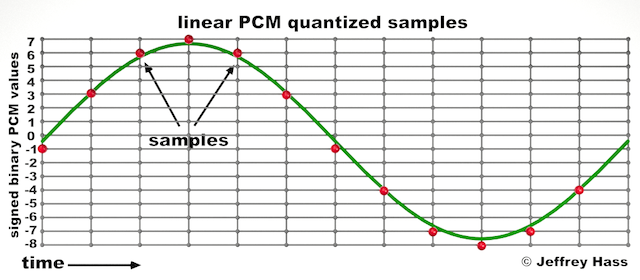
Audio quantization error is a fundamental aspect of digital audio processing. When analog sound waves are converted into digital signals, they undergo quantization. This means that the continuous analog signal is sampled and approximated in discrete steps. These steps are represented by binary values, typically in the form of bits (e.g., 16-bit, 24-bit). Now, what’s crucial to grasp here is that these discrete steps can lead to imperfections in audio reproduction.

Quantization error, often referred to as “quantization noise,” occurs when the actual analog signal deviates from the approximated digital representation. Imagine you have a beautiful painting, and you’re asked to replicate it using only a limited set of colors. The more restricted your color palette, the less accurate your reproduction will be. In the same way, the fewer bits you use for audio quantization, the more pronounced the quantization error becomes.

Quantization Levels and the Impact on Sound Quality

The number of quantization levels (related to bit depth) directly affects the precision of audio representation. For instance, a 16-bit audio recording has 65,536 possible levels, while a 24-bit recording provides a staggering 16,777,216 levels. This increased bit depth allows for a much finer representation of the original analog signal. Hence, a higher bit depth results in a reduction of quantization error, leading to superior sound quality.

To illustrate this, consider a grayscale image with only two colors: black and white. This is akin to an extremely low bit depth in audio, where the audio signal is either “on” or “off.” Now, imagine a high-resolution image with millions of colors, similar to the detail you get in a 24-bit audio recording. The difference in quality is apparent.

The Role of Dithering in Minimizing Quantization Error

One might wonder if there’s a way to mitigate quantization error in low-bit-depth audio recordings. Enter “dithering.” Dithering is a technique that introduces low-level noise to the audio signal, effectively spreading out the quantization error across a broader spectrum. Think of it as adding a sprinkle of fine grains of sand to a painting to blend the colors. This subtle noise masks the harshness of quantization error and makes it less noticeable to the human ear.

Now, as we’ve explored the fundamentals of audio quantization error, let’s delve into the questions that often arise:

How Does Quantization Error Affect Music Production?

In the realm of music production, quantization error can be a significant concern, particularly for professionals aiming to achieve top-tier sound quality. When producing music, especially in genres where subtle nuances are crucial, such as classical or jazz, quantization errors become more perceptible. To maintain audio fidelity, a higher bit depth is preferred during recording and production, ensuring minimal quantization noise.

Is There an Ideal Bit Depth for Audio Recording?

The ideal bit depth for audio recording is a subject of debate among audio enthusiasts. While 24-bit recording is commonly favored for its excellent dynamic range and low quantization error, it’s worth noting that the final audio format for most consumer applications, like CDs or streaming, is often 16-bit. The choice of bit depth should be based on the specific requirements of the project, keeping in mind the trade-off between audio quality and file size.

Can Quantization Error be Completely Eliminated?

Regrettably, quantization error cannot be entirely eliminated, as it’s an inherent part of the digital audio conversion process. However, it can be minimized to the point where it’s imperceptible to the human ear. Through techniques like dithering and the use of higher bit depths, the impact of quantization error can be significantly reduced, allowing for exceptional audio quality.

Last Words about Audio Quantization Error

In the ever-evolving world of audio technology, understanding audio quantization error is a fundamental step towards achieving superior sound quality. As an expert in the field, I’ve shared insights, experiences, and technical knowledge to demystify this concept. Remember, the bit depth you choose in audio recording significantly influences the extent of quantization error, and techniques like dithering play a pivotal role in mitigating its effects. The quest for pristine audio quality is an ongoing journey, but armed with this knowledge, you’re better equipped to make informed decisions in your audio endeavors.

Audio Channel Remapping

Audio Channel Remapping


Audio Channel Remapping

Audio channel remapping is a powerful technique that allows you to reconfigure how audio signals are distributed across different speakers or channels in a sound system. This process is essential in the world of audio engineering, as it can significantly impact the quality of sound output in various applications. In this article, I will delve into the intricacies of audio channel remapping, providing you with a comprehensive understanding of the subject and addressing related questions that you might have.

The Basics of Audio Channel Remapping

To start, audio channel remapping involves the alteration of audio signals to achieve specific spatial audio effects or to adapt to various playback configurations. It’s commonly used in home theaters, surround sound setups, and even in professional audio production. Imagine you have a 5.1 surround sound system, and you want to enjoy a movie that’s mixed in 7.1 surround. Audio channel remapping can help redistribute the audio elements to your available channels, delivering an immersive experience.

Consider this scenario: You’re watching a high-octane action scene in a movie, and the sound of a car approaching from behind should be heard from the rear speakers. With audio channel remapping, the sound can be dynamically redirected to the appropriate speakers, creating a more realistic and engaging audio experience.

Remapping Audio Channels in Software

One of the most common questions related to audio channel remapping is, “How do I remap audio channels in software?” This is a crucial aspect, as software solutions offer a flexible way to adjust audio channel assignments. Various audio editing and playback software tools, such as Adobe Audition or VLC Media Player, allow you to remap channels to your liking.

For instance, you can change the default audio channel mapping for a video in VLC. By going to Tools > Preferences > Audio, you can set your preferred audio output configuration, effectively remapping the channels based on your sound system’s setup. This level of customization empowers you to optimize your audio experience for any media.

Enhancing Surround Sound with Audio Channel Remapping

Now, let’s address the question of whether audio channel remapping can improve surround sound. The answer is a resounding yes. By reallocating audio channels effectively, you can enhance the immersion of your surround sound setup. Let’s return to the example of a 5.1 system playing 7.1 content. Audio channel remapping allows you to adapt the audio so that you don’t miss out on any details. You can make sure that the dialogue remains clear from the center speaker, while ambient sounds and effects are distributed to the appropriate channels, delivering a more enveloping experience.

The Benefits of Audio Channel Remapping

Finally, let’s explore the benefits of audio channel remapping. This technique not only caters to home theater enthusiasts but also holds significance in the realm of professional audio production. It enables sound engineers to optimize audio for various playback scenarios, ensuring that the intended impact is achieved. In summary, audio channel remapping offers the following advantages:

Customization: You can adapt audio to your specific speaker configuration.
Enhanced Immersion: It improves surround sound experiences.
Compatibility: Allows you to enjoy diverse audio content on your system.
Last Words about Audio Channel Remapping

In conclusion, audio channel remapping is a valuable tool for audio enthusiasts and professionals alike. With the ability to customize audio distribution, enhance surround sound, and achieve compatibility with various audio formats, it plays a vital role in delivering an exceptional auditory experience. I hope this article has provided you with valuable insights into the world of audio channel remapping and its applications.

Audio Phase

Audio Phase: Unraveling the Mysteries of Sound

Audio Phase
Audio Phase

As an expert in audio engineering, I understand the significance of audio phase and its impact on sound quality and production. In this comprehensive guide, I will delve into the world of audio phase, providing clarity and insights to help you grasp this vital concept. Whether you’re a music enthusiast or a budding recording artist, understanding audio phase is essential for achieving optimal sound experiences.

Demystifying Audio Phase

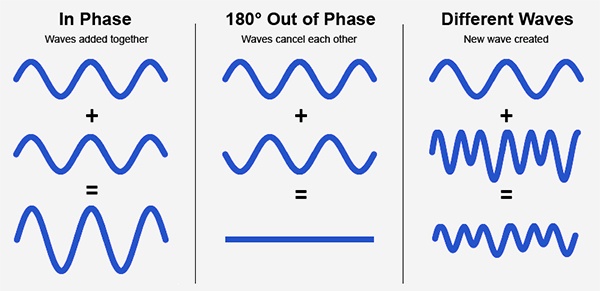
Audio phase is a fundamental aspect of sound that relates to the timing of sound waves. When we talk about audio phase, we’re essentially discussing how different audio signals align or misalign in time. To put it simply, sound is a result of air pressure changes that propagate as waves. These waves have peaks and troughs, and audio phase refers to the relationship between these peaks and troughs in different sound sources.

Think of audio phase as a group of musicians playing in perfect harmony. When they are perfectly in sync, the music sounds harmonious and powerful. However, if even one musician is slightly out of time, it can create dissonance. Similarly, in audio, when signals are in phase, they reinforce each other, resulting in a stronger and clearer sound. When they are out of phase, they can cancel each other out, leading to a weaker and less defined sound.

Audio Phase in Music Production

Understanding audio phase is crucial in music production, especially when recording multiple microphones or mixing different tracks. When recording, if two microphones capture the same sound source, such as a guitar or a vocalist, the signals from these microphones must be perfectly in phase to avoid phase cancellation.

Imagine you are recording a guitar with two microphones—one close to the soundhole and the other closer to the fretboard. If the signals from these two microphones are not in phase, you might experience a loss of bass frequencies or even strange, hollow sounds in the final mix. To avoid this, precise microphone placement and phase alignment are essential.

Correcting Audio Phase Issues

In the world of audio engineering, correcting phase issues is a common practice. Using specialized tools and techniques, audio engineers can adjust the timing of audio signals to ensure they are in phase. This process, known as phase correction or phase alignment, can salvage poorly recorded tracks and enhance the overall sound quality.

Imagine you’re in a recording studio, and you notice that the drum tracks are slightly out of phase with the rest of the instruments. With phase correction tools, you can realign the drum tracks to synchronize perfectly with the other instruments, resulting in a more cohesive and powerful sound.

Audio Phase and Sound Quality: Key Considerations

Now, let’s address some common questions related to audio phase:

How Does Audio Phase Affect Sound Quality?

Audio phase has a direct impact on sound quality. When audio signals are in phase, they reinforce each other, enhancing the overall clarity and richness of sound. However, when they are out of phase, they can cancel each other out, leading to a loss of frequencies and a less pleasing sound.

What Are the Common Phase Issues in Music Production?

In music production, some common phase issues include phase cancellation between microphones, phase misalignment in multi-miked drum kits, and phase problems when mixing different instruments. Identifying and addressing these issues is crucial for achieving a balanced and professional-sounding mix.

How Can I Prevent Phase Issues When Recording?

To prevent phase issues when recording, pay close attention to microphone placement and ensure that multiple microphones capturing the same source are equidistant from the sound source. Additionally, use phase inversion or phase alignment tools during mixing to correct any phase problems that may arise.

Audio Phase: A Symphony of Sound Precision

In conclusion, audio phase is a pivotal element in the world of sound, influencing the quality of music and recordings. Whether you’re a musician, sound engineer, or simply a music enthusiast, grasping the concept of audio phase can help you appreciate and optimize sound in various contexts. Remember, when audio signals are in harmony, they create a powerful symphony of sound, and understanding audio phase is the key to achieving that sonic precision.

Last Words

As we wrap up our journey through the realm of audio phase, I hope this guide has shed light on this intricate yet crucial aspect of sound. Whether you’re fine-tuning your music production skills or seeking to enhance your listening experience, audio phase knowledge empowers you to harness the full potential of sound. So, the next time you enjoy your favorite music or step into the world of audio production, remember the role that audio phase plays in creating the symphonies and sonic landscapes we cherish.

Audio Convolution

Exploring Audio Convolution: Unraveling the Sound Transformation

Audio Convolution
Audio Convolution

Audio convolution is a fascinating concept that lies at the heart of many audio processing techniques and technologies. In this article, I will provide a comprehensive overview of audio convolution, its applications, and its role in shaping the world of sound.

Understanding Audio Convolution

Audio convolution is a mathematical operation that combines two audio signals to produce a third, resulting in a unique and transformative effect on sound. It operates by taking each sample of one audio signal and “mixing” it with corresponding samples of another, resulting in a new audio signal that carries the characteristics of both. This process is fundamental in various audio applications, ranging from music production to acoustic modeling and sound synthesis.

Applications of Audio Convolution

Audio convolution finds its use in a plethora of applications, each harnessing its power in distinct ways:

Reverberation: Convolution reverb is a widely used technique to recreate the natural acoustics of different spaces. By convolving an impulse response (representing a specific space’s acoustic characteristics) with an audio signal, you can make it sound as if it was recorded in that space.

Sound Design: Audio engineers use convolution to apply complex and unique effects to audio. This includes simulating vintage hardware, creating immersive audio environments for video games, or adding character to music tracks.

Room Acoustics Analysis: In architectural acoustics, convolution helps simulate how sound behaves in various spaces. This is crucial for designing concert halls, theaters, and recording studios to achieve desired acoustic properties.

FAQ Audio Convolution

What is Impulse Response in Audio Convolution?

Impulse response is a key element in audio convolution. It represents the way a system responds to an idealized impulse signal, which is a brief and infinitely loud sound. In audio convolution, an impulse response characterizes the unique acoustic properties of a space or the effect you want to apply. By convolving this impulse response with audio, you can emulate the sound of that space or effect.

How Does Audio Convolution Enhance Sound Quality?

Audio convolution enhances sound quality by allowing you to apply realistic acoustic properties, effects, and spatial characteristics to audio signals. This means you can make recorded music sound like it’s played in a concert hall or add rich textures to audio recordings. By accurately capturing and reproducing these aspects, convolution contributes to more immersive and high-fidelity sound experiences.

What Tools Are Used for Audio Convolution?

Several software tools and plugins are available for audio convolution. Digital audio workstations (DAWs) often include convolution reverb plugins, which make it easy to apply convolution to audio tracks. Additionally, standalone convolution processors and libraries offer flexibility in creating custom convolution effects and simulations

Sound Transformation with Audio Convolution

Audio convolution serves as a powerful tool for sound transformation. By convolving audio signals with various impulse responses and effects, you can shape and mold sound in countless creative ways. Whether you’re a music producer looking to craft unique textures or a sound designer pushing the boundaries of audio creativity, audio convolution opens up a world of sonic possibilities.

Real-Time Audio Convolution Processing

Real-time audio convolution processing has become increasingly accessible, thanks to advancements in computing power and software development. Musicians and live sound engineers can now apply convolution effects in real time, enhancing the quality and depth of live performances. This technology has revolutionized the way we experience sound in concerts and events.

Audio Convolution vs. Traditional Sound Processing

Audio convolution stands apart from traditional sound processing methods. While traditional techniques like equalization and compression modify audio in predefined ways, convolution offers a more flexible and adaptive approach. It allows you to replicate real-world sonic environments or create entirely novel soundscapes, making it a valuable addition to the audio engineer’s toolbox.

Last Words

In the ever-evolving realm of audio, the concept of audio convolution remains a potent force for creativity and realism. Whether you’re seeking to recreate the grandeur of a concert hall, craft cinematic soundscapes, or explore new sonic frontiers, audio convolution empowers you to transform sound in ways limited only by your imagination.

Audio Impulse Response

Audio Impulse Response

Understanding Audio Impulse Response: Exploring the World of Sound

Audio Impulse Response

Audio Impulse Response, often referred to as IR, is a critical concept in the world of audio engineering and sound reproduction. It plays a fundamental role in shaping the sound quality of various audio systems, from your home theater setup to professional recording studios. In this article, we will delve into the fascinating realm of Audio Impulse Response, exploring its significance, applications, and the technical intricacies that make it an indispensable tool for audio enthusiasts and professionals alike.

What Is Audio Impulse Response?

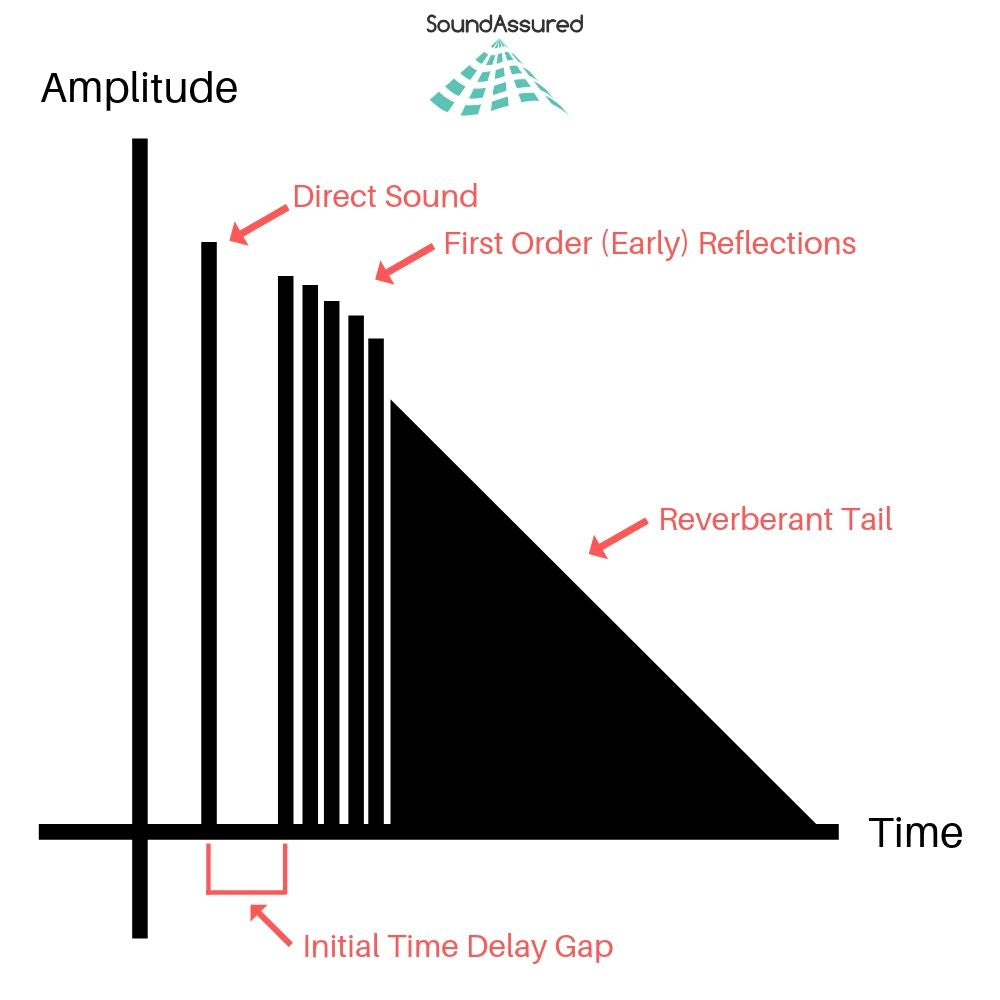
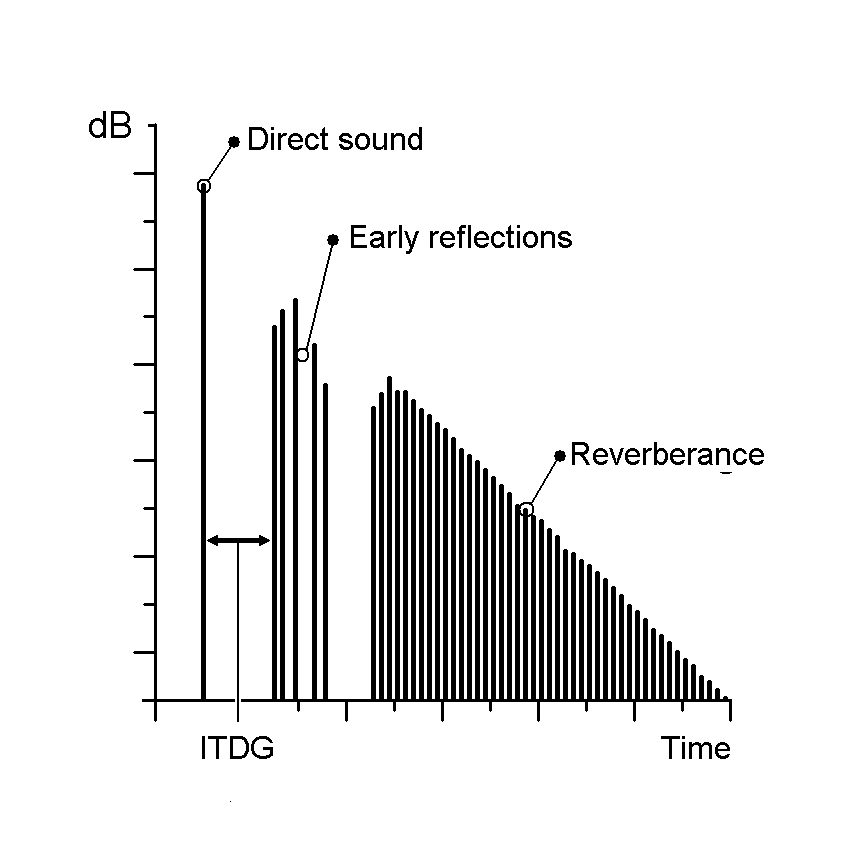
Audio Impulse Response, in its simplest form, is a mathematical description of how a system or device responds to an impulse or a short burst of sound. Think of it as the fingerprint of an audio system or space; it characterizes how that system interacts with sound. When you clap your hands in a room, the way the sound reverberates, bounces off walls, and eventually fades away is precisely what Audio Impulse Response quantifies.

Applications in Real-Life Scenarios

To illustrate its importance in real-life scenarios, consider a concert hall. Audio engineers use Impulse Response to understand how the hall reflects and diffuses sound. By analyzing the hall’s impulse response, they can optimize the placement of microphones and speakers, ensuring that the audience experiences the best possible sound quality.

Similarly, in the realm of home audio, IR plays a pivotal role. When you set up a home theater system, the IR of your room and equipment helps determine the ideal speaker placement and configuration for immersive surround sound.

The Technical Aspects

Now, let’s delve into the technical aspects. Audio Impulse Response is typically represented as a graph, where the x-axis represents time, and the y-axis represents amplitude. This graph shows how a system responds to an impulse over a certain period.

Understanding this graph allows audio engineers to manipulate and optimize audio systems effectively. For example, they can use IR data to simulate different acoustic environments. If you want your living room to sound like a concert hall, you can apply an IR profile that mimics the hall’s characteristics.

Exploring Further: Common Questions

How is Audio Impulse Response Measured?

Measuring Audio Impulse Response involves sending a precisely calibrated audio signal into a system and recording how the system responds. This is typically done using specialized equipment such as a sweep generator and a microphone. The recorded data is then processed to generate the IR graph, which reveals the system’s behavior.

Can Audio Impulse Response Be Altered?

Yes, Audio Impulse Response can be altered to achieve specific audio effects. Digital signal processing techniques allow audio engineers to modify the IR of a system. For example, you can apply reverb to make a recording sound like it was made in a cathedral or add echo for a spacious effect.

What’s the Connection Between IR and Speaker Design?

Speaker design relies heavily on understanding IR. Speaker manufacturers use IR data to design speakers that produce the desired sound characteristics. By fine-tuning the shape of the speaker cone and other components based on IR analysis, they can create speakers with optimal sound quality.

Keywords with Identical Search Intent

1. Acoustic Response Analysis

Acoustic Response Analysis is a related concept to Audio Impulse Response, focusing on the analysis of sound behavior in acoustic spaces. It is essential for designing concert halls, recording studios, and even home theaters.

2. Sound System Optimization

Sound System Optimization involves using Audio Impulse Response to fine-tune audio systems for the best possible sound quality. This applies to both professional setups and home audio systems.

3. Room Acoustics Enhancement

Improving Room Acoustics is a common goal in audio engineering. Understanding the IR of a room helps in enhancing acoustics through sound-absorbing materials, diffusers, and speaker placement.

4. Virtual Acoustic Modeling

Virtual Acoustic Modeling utilizes Audio Impulse Response data to simulate different acoustic environments in virtual or augmented reality applications. This is valuable for architectural acoustics and immersive audio experiences.

Last Words

In conclusion, Audio Impulse Response is a multifaceted concept that underpins much of the audio engineering world. From concert halls to your home audio setup, it influences how we experience sound in various environments. By grasping its technical intricacies and applications, you can gain a deeper appreciation for the magic that happens behind the scenes, making our audio experiences truly exceptional. So, the next time you enjoy a movie, concert, or even a phone call, remember that Audio Impulse Response is playing a crucial role in delivering that pristine sound to your ears.

Audio Transients

Exploring Audio Transients: The Heartbeat of Sound

Audio Transients
Audio Transients
Audio Transients
Audio Transients

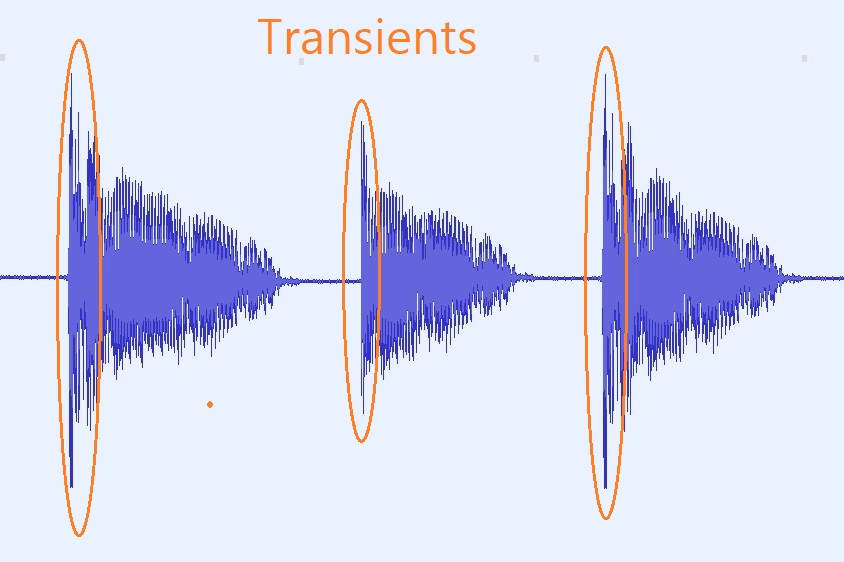
Audio transients are like the heartbeat of sound, the dynamic moments that give life and character to music and audio recordings. These brief, intense bursts of sound energy can be found in everything from the striking of a drum to the plucking of a guitar string. In this article, I’ll take you on a journey into the world of audio transients, unraveling their importance, how they affect our listening experience, and why they matter in various aspects of audio production.

Unveiling Audio Transients: The Basics

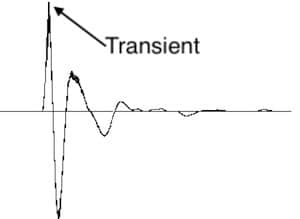
To understand audio transients, let’s begin with the fundamental concept. A transient is a sudden, short-lived spike in audio signal amplitude. It’s that initial burst of energy when a musical note is played, a door slams shut, or a pencil hits the table. Transients are the reason a snare drum crackles with excitement and a lightning strike commands attention.

Think of audio transients as the punctuation marks in a sentence. They emphasize and give context to the sound that follows. Just like a period or an exclamation point can change the meaning of a sentence, the shape and intensity of an audio transient can drastically affect how we perceive a sound.

People Also Asked: Answering Your Curiosities

Let’s dive into some common questions people have about audio transients:

How Do Audio Transients Impact Music?

Audio transients are the pulse of music. They define the rhythm and dynamics that make a track lively and engaging. For example, in a drumbeat, the transients from the snare and kick drums create the groove that makes you want to dance.

Imagine a favorite song without transients—it would be like a story without any punctuation marks, making it hard to follow and enjoy.

Can Audio Transients Be Controlled?

Yes, they can! Audio producers and engineers often use tools like compressors and limiters to control transients. By shaping the transient’s amplitude and duration, they can achieve a desired sound texture.

Think of it as adjusting the force with which a hammer strikes a nail. Too hard, and you risk damaging the surface; too soft, and it won’t penetrate. Engineers find that sweet spot to shape the sound precisely.

What Is Peak vs. RMS in Audio Transients?

Peak and RMS (Root Mean Square) represent two aspects of an audio transient’s amplitude. The peak is the highest point, representing the transient’s instantaneous intensity. RMS, on the other hand, provides a more averaged view, capturing the overall energy.

Picture a heartbeat monitor. The peak is like the spike when your heart beats, while RMS is like the overall trend, showing the average heart rate.

Keywords with Identical Search Intent

Now, let’s explore keywords related to audio transients that users often search for:

Transient Shaping Techniques: Crafting Audio Dynamics

Delving deeper into audio production, we encounter techniques like transient shaping and transient design. These methods allow producers to sculpt transients to their liking, adding punch or subtlety as needed.

Consider transient shaping as sculpting clay. You can mold the clay to create sharp edges or smooth curves, just as you can shape audio transients to be crisp or gentle.

Audio Transients in Live Sound: A Vital Element

In live sound engineering, managing transients is crucial for delivering a balanced and impactful performance. Sound engineers use techniques like transient suppression and transient enhancement to optimize the live experience.

Imagine a live concert as a massive puzzle. Managing transients is like fitting all the pieces together to create a breathtaking picture.

Mastering Transients in Audio Recording

Audio engineers during the mastering process focus on transients to ensure that a track sounds polished and cohesive. Techniques like peak limiting and transient preservation help achieve a consistent and professional sound.

Think of mastering as the final touch-up on a painting. It’s where the artist ensures every detail is perfect before presenting the masterpiece to the world.

Last Words

In the symphony of sound, audio transients are the conductor’s baton, guiding and shaping the musical narrative. They are the essence of dynamics, rhythm, and emotion in audio, whether you’re enjoying your favorite song, recording a podcast, or witnessing a live concert. Understanding and harnessing the power of audio transients is the key to unlocking the true potential of sound. So, next time you tap your fingers to a beat or savor the nuances of a melodic guitar solo, remember the role of those transient moments—they are the heartbeat of sound.

Nyquist Theorem

Understanding the Nyquist Theorem

Nyquist Theorem
Nyquist Theorem
Nyquist Theorem
Nyquist Theorem


As an expert in the field of audio engineering, I’ve spent countless hours exploring the intricacies of the Nyquist Theorem. This foundational concept is the bedrock of modern digital audio processing, and its significance cannot be overstated. The Nyquist Theorem, in essence, defines the minimum sampling rate required to accurately convert analog signals into digital form.

Think of it this way: imagine you’re watching a fast-moving train and trying to take photographs to capture its motion. If you snap pictures too infrequently, you won’t capture the train’s true movement; details will be lost. The Nyquist Theorem tells us that in audio, the sampling rate must be at least twice the highest frequency we wish to reproduce. It’s the key to ensuring that nothing is missed when we transform the analog world of sound into the digital realm.

Now, let’s explore this concept further. Imagine you’re at a live music concert, and the artist hits a soaring high note. If your recording equipment doesn’t sample at a rate higher than the Nyquist frequency for that note, you’ll hear distortion and unwanted artifacts. Understanding the Nyquist Theorem is essential for audio engineers and music producers, as it directly impacts the quality of the final product, allowing us to capture and reproduce sound faithfully.

Applying Nyquist in Audio Recording

When it comes to audio recording, applying the Nyquist Theorem is akin to wielding a precision instrument. It’s not just a theoretical concept; it’s a practical guide for achieving clarity and fidelity in recorded audio. Consider it the compass that ensures we’re on the right path when capturing analog sound in the digital realm.

Imagine you’re recording a vocal performance. The Nyquist Theorem guides you in selecting the appropriate sampling rate for your digital recorder. If you neglect this principle and sample at a rate lower than twice the highest frequency in the vocalist’s range, you risk introducing aliasing, a phenomenon where high-frequency components are erroneously mapped to lower frequencies. This results in a distorted, unnatural sound, akin to viewing a pixelated image.

By heeding the Nyquist Theorem, audio engineers and recording artists ensure that their work preserves the subtle nuances and dynamic range of sound, producing recordings that captivate and resonate with listeners.

The Significance of Nyquist Frequency

Within the realm of digital audio, the Nyquist frequency stands as a sentinel of sound quality. Picture it as a gatekeeper, defining the boundary between faithful reproduction and unwanted distortions. It plays a pivotal role in digital audio, similar to how a camera’s shutter speed determines the clarity of a photograph.

Let’s delve into this further: suppose you’re designing an audio system. To prevent aliasing, you must set the sampling rate based on the Nyquist frequency. This ensures that the system captures and reproduces sound accurately. It’s analogous to building a bridge with a weight limit to ensure safety. By acknowledging the Nyquist frequency’s significance, audio engineers create systems that consistently deliver high-quality sound experiences.

Whether you’re a musician, audio engineer, or simply an audio enthusiast, recognizing the importance of the Nyquist frequency empowers you to make informed choices about equipment, software, and recording techniques, ultimately elevating your sonic experiences.

High Sampling Rates and Audio Quality

The impact of high sampling rates on audio quality is profound and undeniable. It’s the difference between a breathtaking high-definition image and a blurry snapshot. In the audio world, a high sampling rate means capturing more snapshots per second, preserving the intricate details of the sound waveform.

Imagine you’re in a studio recording a delicate acoustic guitar performance. To capture the subtle harmonics and nuances, a high sampling rate is essential. It’s like using a magnifying glass to appreciate the intricate details in a work of art. Musicians and audio engineers often opt for higher sampling rates, as they enable the faithful reproduction of every note and texture, resulting in recordings that feel alive and immersive.

Investing in high-quality equipment that supports high sampling rates is a testament to your commitment to audio excellence. It’s the path to creating soundscapes that resonate with audiences and evoke emotions on a profound level.

Avoiding Aliasing in Digital Audio

Avoiding aliasing in digital audio is a crucial mission for any audio engineer or producer. Imagine aliasing as the unwelcome ghost that haunts your recordings, distorting the beauty of sound. It occurs when the Nyquist sampling rate is not observed, and higher frequencies masquerade as lower ones, resulting in unpleasant artifacts.

Think of aliasing as a mirror that distorts your reflection; it’s not an accurate representation of reality. To banish this ghost, you must adhere to the Nyquist Theorem’s principles diligently. Use filters and sample at rates that prevent high-frequency components from sneaking into lower frequencies.

By doing so, you ensure that your digital audio productions are clean, pure, and devoid of unwanted artifacts. It’s akin to restoring a classic painting, revealing its true beauty without distortion or blemishes.

Last Words


“In the world of audio, the Nyquist Theorem is our guiding star. It empowers us to capture the magic of sound faithfully. Whether you’re recording a symphony, crafting a podcast, or simply savoring your favorite music, understanding the Nyquist Theorem unlocks a world of sonic possibilities. Let it be your compass in the realm of audio excellence.” — William Kindall, Audio Expert


Newest Audio Codecs

Newest Audio Codecs: Unlocking the Future of Sound

Newest Audio Codecs
Newest Audio Codecs
Newest Audio Codecs
Newest Audio Codecs

As an audio expert, I’m excited to delve into the world of the newest audio codecs, which are transforming how we experience sound. These cutting-edge technologies have the power to shape the audio landscape, and I’m here to share my insights and experiences.

Audio Compression Techniques

Let’s start by discussing the backbone of these newest audio codecs – audio compression techniques. Imagine audio compression as the art of creating a perfectly crafted miniature sculpture of a grand masterpiece. In the world of audio codecs, this process involves reducing the size of audio files while preserving exceptional sound quality.

One of the most prominent techniques used in these codecs is Perceptual Audio Coding, which is similar to how our brain focuses on essential details in a complex image. Perceptual audio coding identifies and retains the most crucial elements of an audio signal while discarding less perceptible information. This allows for significant file size reduction without compromising the listening experience.

Another fascinating approach is Audio Spatial Coding, which can be likened to creating a 3D model of a real-world object. Audio spatial coding focuses on reproducing sound in a three-dimensional space, offering a more immersive listening experience. It’s often used in applications like virtual reality and gaming to provide users with an unparalleled sense of presence.

These techniques are pivotal in the development of the newest audio codecs. By employing innovative compression methods, these codecs can deliver audio that is not only compact but also stunningly clear, making them ideal for a wide range of applications, from streaming high-fidelity music to enhancing the realism of virtual environments.

Bitrate in Audio Streaming

Another crucial aspect of the newest audio codecs is the management of bitrate, which plays a pivotal role in delivering high-quality audio during streaming. Picture bitrate as the flow rate of a pristine river. In the context of audio streaming, it represents the rate at which audio data is transmitted from the source to your device. The higher the bitrate, the more data can be transmitted per second, resulting in superior audio quality.

Consider a scenario where you’re streaming your favorite song online. If the codec employs a low bitrate, it’s akin to a narrow river with a sluggish flow. You receive the audio data slowly, leading to a compromised listening experience. In contrast, a high bitrate is like a wide river with a swift current, delivering an abundance of data per second and ensuring that every note and nuance reaches your ears in exceptional detail.

The newest audio codecs excel in optimizing bitrate dynamically. It’s as if they have a smart water flow controller, adjusting the flow rate based on your internet connection’s capabilities. This dynamic management ensures that you enjoy a seamless audio streaming experience, even on limited bandwidth, without sacrificing audio quality.

Understanding Audio Masking in Psychoacoustics

Now, let’s shift our focus to the intriguing world of audio masking in psychoacoustics. This area of study is like deciphering the mysteries of the mind’s inner workings when it comes to sound perception. Understanding audio masking is fundamental for the newest audio codecs as it helps them allocate resources effectively.

Psychoacoustic Principles

Psychoacoustic principles are the cornerstone of audio masking. Think of it as understanding how our brain prioritizes and filters sounds, much like how we pay attention to a conversation in a noisy room. Auditory masking is a central concept in this field, similar to how a louder conversation can drown out a quieter one in a crowded space. This phenomenon occurs when a louder sound, known as the “masker,” makes it challenging to perceive a quieter sound, known as the “masked” sound.

Frequency masking is another key concept. It’s akin to trying to distinguish one instrument in a symphony when they are all playing together. Certain frequencies can mask or conceal others, making it crucial to allocate resources wisely when encoding audio. The newest audio codecs leverage psychoacoustic principles to ensure that the most critical audio information remains perceptible while optimizing file size by discarding less crucial data.

Audio Compression Algorithms

To truly grasp the capabilities of the newest audio codecs, we must delve into the intricate world of audio compression algorithms. These algorithms are like the secret recipes behind our favorite dishes, combining mathematical prowess and encoding techniques to achieve the perfect balance of quality and file size reduction.

One such algorithm is the Modified Discrete Cosine Transform (MDCT), which breaks down audio signals into smaller, manageable components, much like solving a complex puzzle piece by piece. The MDCT is the foundation of codecs like AAC and Opus, known for their exceptional audio quality and efficiency.

Additionally, variable bitrate (VBR) encoding is a crucial technique, like adjusting your car’s speed to navigate varying road conditions. VBR encoding allocates more bits to complex audio segments and fewer bits to simpler ones, ensuring consistent audio quality across the entire file. This approach is instrumental in preserving high-quality audio, even in the presence of psychoacoustic masking effects.

In conclusion, the newest audio codecs are a testament to the remarkable progress in the field of audio technology. With advanced compression techniques, dynamic bitrate management, and a deep understanding of psychoacoustic principles, these codecs are shaping the future of how we experience sound. Whether you’re a music enthusiast, a gamer, or a professional in the audio industry, these codecs are set to provide you with audio experiences that are nothing short of extraordinary. So, as we journey into this exciting soundscape, remember that the newest audio codecs are your gateway to a world of unparalleled sonic delight.