M4A Joint Stereo Coding Methods


Free Download Mp4Gain
picture

M4A Joint Stereo Coding Methods
M4A Joint Stereo Coding Methods

M4A Joint Stereo Coding Methods

Let’s talk about M4A Joint Stereo Coding Methods

As an expert in audio encoding and decoding techniques, I’m here to delve into the intricate world of M4A joint stereo coding methods. If you’ve ever wondered how your favorite tunes maintain their high quality while taking up minimal storage space, you’re in the right place. M4A, a popular audio format known for its efficiency and quality, employs joint stereo coding to compress audio files without sacrificing fidelity. In this article, I’ll explore the nuances of M4A joint stereo coding methods, offering insights and examples to demystify this essential aspect of audio compression.

Understanding Joint Stereo Coding

To grasp M4A joint stereo coding methods, it’s crucial to understand the concept of joint stereo itself. Unlike traditional stereo encoding, which treats the left and right channels separately, joint stereo coding analyzes both channels to identify similarities and differences. By exploiting redundancies between channels, joint stereo coding achieves higher compression ratios without compromising audio quality. Imagine a Venn diagram where the overlapping area represents shared information between the left and right channels, while the unique sections capture channel-specific nuances. Joint stereo coding optimally utilizes this overlap to reduce file size while preserving audio fidelity.

Benefits of Joint Stereo Coding:

  • Enhanced Compression Efficiency
  • Preservation of Stereo Imaging
  • Reduced File Size
  • Maintained Audio Quality

Joint stereo coding offers a myriad of benefits, including enhanced compression efficiency and preserved stereo imaging. By analyzing inter-channel correlations, this method significantly reduces redundancy, leading to smaller file sizes without perceptible loss in quality. Moreover, joint stereo coding maintains the spatial characteristics of stereo audio, ensuring that listeners experience immersive soundscapes akin to the original recording.

M4A Implementation of Joint Stereo Coding

In the realm of M4A audio files, joint stereo coding plays a pivotal role in achieving optimal compression while upholding audio fidelity. M4A, a container format developed by Apple, commonly utilizes Advanced Audio Coding (AAC) as its underlying codec. AAC employs joint stereo coding as a fundamental technique for compressing stereo audio streams efficiently. Within the M4A framework, joint stereo coding is seamlessly integrated into the AAC encoding process, ensuring that compressed audio maintains high quality across various playback devices.

Optimization Techniques:

  • Intensity Stereo Coding
  • Mid/Side Stereo Processing
  • Adaptive Bit Allocation
  • Transient Detection

M4A joint stereo coding methods incorporate sophisticated optimization techniques to maximize compression efficiency while preserving audio fidelity. Intensity stereo coding, for instance, leverages perceptual masking to allocate fewer bits to imperceptible audio components, further reducing file size without compromising quality. Additionally, mid/side stereo processing enables efficient encoding of spatial audio information, enhancing stereo imaging in compressed files. Adaptive bit allocation dynamically allocates bits based on the complexity of audio content, ensuring optimal utilization of available bitrate resources. Transient detection algorithms identify abrupt changes in audio signals, optimizing coding strategies to maintain transient accuracy in compressed files.

Advanced Applications and Future Developments

As technology evolves, so do the methods and algorithms used in M4A joint stereo coding. Advanced applications, such as parametric stereo and spatial audio coding, push the boundaries of compression efficiency and audio quality. Parametric stereo techniques extract spatial parameters from monaural signals, enabling immersive stereo reproduction at low bitrates. Spatial audio coding algorithms, on the other hand, facilitate the transmission of multi-channel audio with minimal data overhead, catering to the growing demand for immersive audio experiences.

Emerging Trends:

  • Object-Based Audio Coding
  • Enhanced Parametric Coding
  • Virtual Surround Sound
  • Perceptual Audio Coding

Looking ahead, the field of M4A joint stereo coding is poised for further innovation, driven by emerging trends such as object-based audio coding and enhanced parametric coding. Object-based audio enables dynamic rendering of audio objects in a virtual sound field, offering unprecedented flexibility in content creation and playback. Enhanced parametric coding techniques refine spatial parameters to achieve more efficient compression and higher fidelity reproduction. Virtual surround sound technologies simulate multi-channel audio environments using stereo playback systems, delivering immersive experiences without the need for elaborate speaker setups. Perceptual audio coding methodologies continue to evolve, leveraging psychoacoustic principles to optimize compression algorithms for human perception.

Latest words on M4A Joint Stereo Coding Methods

In conclusion, M4A joint stereo coding methods represent a cornerstone of modern audio compression, balancing efficiency with quality to deliver immersive listening experiences across diverse platforms. By harnessing inter-channel redundancies and employing sophisticated optimization techniques, M4A achieves remarkable compression ratios without compromising stereo imaging or transient accuracy. As technology progresses, the evolution of joint stereo coding promises even greater efficiency and fidelity, paving the way for immersive audio experiences in the digital age.

Comments:

This article was really informative! I never knew how M4A compression worked until now. Can’t wait to try out some of these techniques myself.

Great breakdown of M4A joint stereo coding methods! I’ve been using M4A files for years, but I had no idea about the intricacies behind the compression. Thanks for shedding light on this!

I found this article helpful, but I wish there was more discussion on the future developments of M4A joint stereo coding. Still, it’s a great overview of the topic!

As someone who works with audio files regularly, I appreciate the depth of information provided in this article. It’s clear that the author is knowledgeable about the subject matter.

This article has inspired me to explore M4A joint stereo coding further. I’m excited to see how these techniques can improve my audio projects!

Wow, I had no idea there were so many optimization techniques involved in M4A joint stereo coding. This article has definitely expanded my understanding of audio compression.

Excellent article! I’ve been looking for resources on M4A joint stereo coding, and this surpassed my expectations. Keep up the good work!

It’s refreshing to come across an article that dives deep into the technical aspects of M4A joint stereo coding. I feel more confident in my understanding of audio compression now.

I’m impressed by the clarity and coherence of this article. Complex topics like joint stereo coding can be daunting, but the author breaks it down in a way that’s easy to understand.

This article provided a comprehensive overview of M4A joint stereo coding methods. I particularly appreciated the insights into emerging trends and future developments. Well done!

As a music enthusiast, I found this article incredibly enlightening. It’s amazing to learn about the technology behind audio compression and how it impacts our listening experience. Kudos to the author!

I stumbled upon this article while researching M4A joint stereo coding, and I’m glad I did. The explanations are clear, and the examples provided make complex concepts easier to grasp. Thank you!

This article has given me a newfound appreciation for the intricacies of audio compression. The author’s expertise shines through, making it an engaging and informative read. Looking forward to more content like this!

Great article! I’ve always been curious about how M4A compression works, and this article answered all my questions. I’ll definitely be sharing this with my friends who are into audio engineering.


Free Download Mp4Gain
picture


Mp4Gain Main Window
picture


Mp4Gain Features
picture


Free Download Mp4Gain
picture

MP3 vs Opus Comparison

MP3 vs Opus Comparison

MP3 vs Opus Comparison

Let’s Talk About MP3 vs Opus

When it comes to digital audio formats, the choice between MP3 and Opus can be as crucial as selecting the right tool for the job. As a specialist with years of experience in the field, I’ll delve into this comparison, helping you understand the nuances and make an informed choice.

MP3 vs Opus Comparison

MP3 (MPEG Audio Layer III): The Audio Legacy

Think of MP3 as the tried-and-true workhorse in the world of digital audio. It’s been around for decades and is known for its widespread use, but it does come with some trade-offs. Let’s explore its strengths and weaknesses.

MP3’s Ubiquity

MP3 is like the classic turntable of digital audio. It’s supported by an extensive range of devices and software, making it a go-to choice for most music lovers. Its ubiquity is its strength, but there’s more to this story.

Compression and File Size

However, MP3’s widespread use comes with a price—the trade-off between compression and file size. Storing a collection of MP3 files can be likened to keeping a drawer full of paperbacks instead of hardcovers. It’s a matter of compromise.

Opus: The Modern Marvel

In contrast, Opus is the sleek and modern sports car of digital audio formats. It’s known for its efficiency in compression and is the preferred choice for online voice communication and streaming. Let’s take a closer look at what makes Opus stand out.

Efficiency in Compression

Picture Opus as the hybrid car—it excels in compression, allowing audio files to be notably smaller without compromising quality. Storing Opus files is like having a fuel-efficient car; you save on space and resources.

Streaming and Online Voice Communication

When it comes to streaming and online voice communication, Opus is the superstar. It’s like the fiber optic internet that ensures smooth, real-time conversations and low-latency gameplay. Its compatibility with various platforms and its role in the crystal-clear voice makes it a go-to choice for online interactions.

Quality and Versatility

Now, let’s delve deeper into the quality and versatility offered by both MP3 and Opus. It’s akin to comparing vinyl records with the latest digital streaming service.

Audio Quality and Compatibility

MP3 is like the vinyl record—it’s got a vintage charm and is widely supported, but it may not deliver the highest audio quality. In contrast, Opus is like your modern streaming service, offering exceptional quality and compatibility across a variety of devices.

Audio Editing and Post-Production

MP3, much like traditional film editing, may retain every detail but is not always suitable for intricate post-production work. Opus, being more modern, is like a cutting-edge digital audio workstation, offering flexibility and efficiency for various editing needs.

Real-Life Example: Music Streaming Services

Think of MP3 as the standard AM/FM radio station, offering familiar music quality. Now imagine Opus as a high-end music streaming service, providing you with exceptional sound quality, lossless audio, and an extensive library of songs.

Device Compatibility and Playback

When it comes to device compatibility and playback, MP3 might be like an old cassette player, causing compatibility issues on modern devices. In contrast, Opus is like a universal remote control, seamlessly working with nearly every device and platform, ensuring a smooth listening experience.

Support for Special Features

Opus, being a modern format, is equipped with features like multi-channel audio, dynamic range control, and bitrate switching, making it ideal for a range of applications, including video conferencing and online gaming. MP3, while capable, may not provide the same level of support for these special features.

Conclusion: Making the Right Choice

In the end, choosing between MP3 and Opus is like selecting the right tool for your audio needs. Your choice should align with your specific requirements, whether you’re an audiophile, a content creator, or an online gamer. Consider your priorities for quality, file size, and compatibility before making your decision.

Comments:

(Username: MusicMaestro) – This article is a great resource for musicians like me. Opus seems promising for streaming high-quality music.

(Username: AudioEnthusiast) – As an audiophile, I’ve always preferred MP3 for its compatibility. But Opus is making me reconsider my choices.

(Username: TechNerd22) – Excellent article, but I wish it delved more into Opus’s role in online gaming and low-latency communication.

(Username: AudiophileAlex) – This article provides a comprehensive comparison. I’m leaning towards Opus for its quality, but MP3’s compatibility is hard to beat.

(Username: StreamingSavvy) – Opus is a game-changer for streaming services. The difference in audio quality is remarkable.

What are the differences between so many sound formats?

What are the differences between so many sound formats?

sound formats

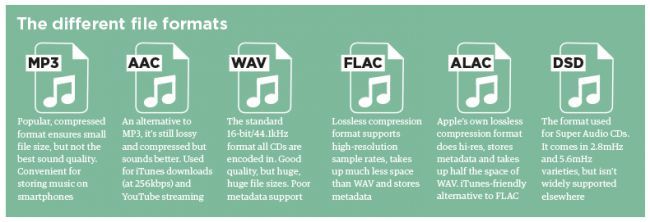
The fact is that, in the vast majority of cases, the sound is stored in “compressed” form, since one minute of uncompressed composition occupies about 10 MB on the hard disk. On the one hand, this seems not to be much, but on the other, if you are a music lover and your collection consists of several hundred or even thousands of songs, then it is clear that the sound must be compressed to reduce the space it occupies in electronic media.

sound formats

Various special algorithms are used to compress music files, which subsequently determine the structure and presentation of the audio data, or so-called digital audio file formats. All audio formats can be divided into three groups: uncompressed audio formats, lossless compression, and lossy compression.

No compression
One of the most widespread formats related to this type is the well-known WAV. The sound of files with this extension is stored without compression or changes. It is true that much more space is required to store uncompressed files and therefore WAV is more widely used only in professional audio and video applications, where the sound should not have a loss of quality before processing. Keeping ordinary musical compositions in this form is unwarranted waste.

To play WAV files, you do not need any special software, as all media players understand this format, including the standard Windows Media audio player built into the Windows system.

Another format used to store uncompressed audio that is worth mentioning is Apple’s development called AIFF (Audio Interchange File Format). As you may have guessed, it is most commonly used on Macintosh computers running Mac OS X.

Lossless compression (lossless)
Lossless compression algorithms for audio files work on the principle of conventional file cabinets. They do not provide the highest level of compression (40 to 60%), while they have virtually no effect on sound quality. It is also worth noting that in this case, the encrypted data can be fully restored to its original form. Therefore, the use of lossless compression is most often used in cases where it is important to preserve the identity of the compressed data with respect to the original.

The most popular audio formats in this group are FLAC (Free Lossless Audio Codec), APE (Monkey’s Audio), WMA (Windows Media Lossless), and ALAC (Apple Lossless Audio Codec). Each has its own pros and cons. For example, the APE codec offers slightly better compression gains, while FLAC is more common. In general, all true music lovers store their music collections in lossless formats, since they do not remove any data from the audio stream and files created with these codecs can be listened to even on high-quality stereos.

To play lossless compressed formats, as a rule, third-party players (except WMA) are used, such as MPlayer, foobar, AIMP, Winamp, VLC and others, since all the necessary codecs are already built into them. Another option is to separately install an additional codec pack (for example, K-Lite), after which you can listen to files in lossless format from almost any audio player.

Lossy compression
This is the most popular group of algorithms that provides the maximum audio compression ratio (up to 10 times or more). However, unlike previous formats, the audio file loses quality here, and how much depends directly on the degree of compression.

To determine the quality of digitized sound, the most commonly used indicator is bit rate: the rate of the audio stream obtained after compression and measured in kilobits per second (kbps). As we already said, on average a minute of uncompressed audio takes around 10MB, which corresponds to an audio stream of around 1400 kbps. After lossy encoding, its bit rate can drop to 56 kbps. At the same time, it should be noted that to preserve natural sound, the throughput should be at least 192 or 256 kbps. If the bit rate of the transmission is 320 kbps or more, the difference in sound for most people between compressed and uncompressed audio practically disappears.

The most popular format here is definitely the famous and beloved MP3, developed by specialists from the famous MPEG (Moving Picture Experts Group).

Sound compression. MP3 audio compression

Audio compression (audio compression) is the type of data compression, encoding used to reduce the volume of audio files or to reduce bandwidth for audio transmission. Sound file compression algorithms are implemented in computer programs called audio codecs. The invention of special compression algorithms for audio data is motivated by the fact that general compression algorithms are inefficient for working with sound and make it impossible to work in real time.

Audio compression

As in the general case, lossless sound compression is differentiated, making it possible to restore the original data without distortion and lossy compression, where such recovery is impossible. Lossy compression algorithms provide a high degree of compression, for example, an audio CD cannot contain more than one hour of “uncompressed” music, with lossless compression, the CD can store almost 2 hours of music and with compression with an average bit rate of 7 to 10 hours.

Audio compression

Lossless compression

The complexity of lossless compression is that recordings are extremely complex in structure. One of the compression methods is to search for samples and their repeats, but this method is not effective for more chaotic data, such as digitized sound or photographs. Interestingly, if computer generated graphics are much easier to compress without loss, synthesized sound will have no advantage in this regard. This is because even computer generated sound generally has a very complex shape, which is a difficult task to invent an algorithm.

Another complication is that the sound generally changes very quickly and this is also the reason why ordered byte sequences appear very rarely.

The most common lossless compression formats are:
Lossless Audio Codec (FLAC), Apple Lossless, MPEG-4 ALS, Monkey’s Audio and TTA.

Lossy compression

Lossy compression is extremely widespread. In addition to computer programs, lossy compression is used in the transmission of audio to DVD, television and digital radio and in the transmission of media on the Internet.

An innovation in this compression method was the use of psychoacoustics to detect sound components that are not perceived by the human ear. An example is the high frequencies, which are perceived only when the energy is sufficient, or the silent sounds that occur simultaneously or immediately after the loud sounds and, therefore, are masked by them; these sound components can be transmitted with less precision, or not at all.

For masking, the time sequence signal of the amplitude samples is converted into a sound spectrum sequence in which each component of the spectrum is encoded separately. To implement this conversion, fast Fourier transformation methods, MDCT, quadrature mirror filters or others are used. The total amount of information during this recoding remains unchanged. Compression in a given frequency domain may consist of the fact that masked or zero components are not stored or encoded at a lower resolution. For example, components with frequencies up to 200 Hz and over 14 kHz can be encoded with 4-bit resolution, while components in the mid-range can be encoded with 16 bits. The result of this operation will be encoded with an average bit depth of 8 bits, but the result will be much better than when the entire frequency range is encoded with an 8 bit depth. However, it is obvious that the low resolution transcoded fragments of the spectrum can no longer be restored exactly and are therefore lost forever.
The main parameter of lossy compression is the bit rate, which determines the degree of compression of the file and, consequently, the quality. Distinguish compression with a constant bit rate (Eng. Constant Bit Rate – CBR), Variable Bit Rate (Eng. Variable Bit Rate – VBR) and Average Bit Rate (Esp. Average Bit Rate – ABR).

The most common lossy compression formats are: AAC, ADPCM, ATRAC, Dolby AC-3, MP2, MP3, Musepack Ogg Vorbis, WMA and others.