Multimedia Formats: Understanding the Different Types

What are Multimedia Formats?
Multimedia formats are digital file types that can contain different types of media such as text, audio, video, and images. These files can be played on various multimedia devices, including computers, smartphones, and tablets. Multimedia formats are used for a variety of purposes such as entertainment, education, and communication.
The Different Types of Multimedia Formats
There are various types of multimedia formats, each with its own advantages and disadvantages. Some of the most common multimedia formats include:
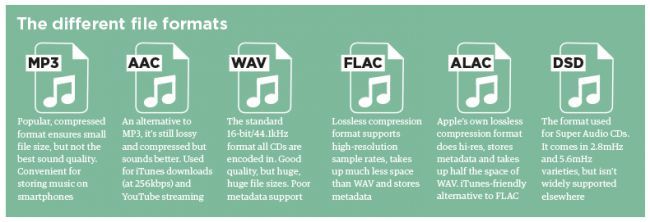
- Audio Formats: Audio formats are used to store sound recordings. Some of the most common audio formats include MP3, AAC, FLAC, and WAV.
- Video Formats: Video formats are used to store video recordings. Some of the most common video formats include AVI, MP4, MOV, and WMV.
- Image Formats: Image formats are used to store digital images. Some of the most common image formats include JPEG, PNG, and GIF.
- Document Formats: Document formats are used to store text-based documents. Some of the most common document formats include PDF, DOC, and TXT.
- Interactive Formats: Interactive formats are used to create multimedia presentations and games. Some of the most common interactive formats include Flash and HTML5.
What are the Advantages of Different Multimedia Formats?
Different multimedia formats offer different advantages. For example, MP3 is a popular audio format because it is small in size and can be played on most devices. On the other hand, FLAC is a lossless audio format that offers higher quality sound but takes up more storage space. Similarly, AVI is a popular video format because it can be played on most devices, while MOV is a high-quality video format that is often used for professional video editing.
What are the Disadvantages of Different Multimedia Formats?
Different multimedia formats also have their own disadvantages. For example, some formats may not be supported by certain devices, which can make it difficult to play them. Additionally, some formats may take up a lot of storage space, which can be a problem for devices with limited storage capacity.
How do Multimedia Formats Impact File Size?
The file size of a multimedia file is determined by various factors such as the duration, resolution, and bitrate of the file. For example, a high-quality video with a long duration will have a larger file size compared to a low-quality video with a short duration. Similarly, a high-quality audio file with a high bitrate will have a larger file size compared to a low-quality audio file with a low bitrate.
What is the Role of Codecs in Multimedia Formats?
Codecs are used to compress and decompress multimedia files. Without codecs, multimedia files would take up a lot of storage space and would be difficult to transmit over the internet. Codecs can be used to compress files while maintaining the quality of the media, or to reduce the quality of the media while minimizing the file size.
What is the Difference between Lossy and Lossless Compression?
Lossy compression is a type of compression that permanently removes some of the data from a multimedia file to reduce its size. This can result in a loss of quality in the media. Lossless compression, on the other hand, compresses files without permanently removing any data, which means that the quality of the media remains the same.
What are Some Common Audio Codecs?
There are a number of different audio codecs that are commonly used to encode digital audio files. Here are a few of the most common:
- MP3: This is perhaps the most well-known and widely used audio codec. MP3 files use lossy compression to reduce file size while maintaining reasonable sound quality.
- FLAC: This codec uses lossless compression, meaning that it is able to compress audio files without sacrificing any of the original audio data. As a result, FLAC files are typically larger than MP3 files but offer higher quality sound.
- Ogg Vorbis: This is a relatively new codec that uses a combination of lossy and lossless compression to achieve high-quality sound while maintaining a small file size. Ogg Vorbis files are often used for online streaming and broadcasting.
- M4A: This is a codec that is commonly used by Apple for its iTunes music store. M4A files can use either lossy or lossless compression and are often used for streaming music on mobile devices.
- WAV: This is an uncompressed audio format that is commonly used in professional audio production. WAV files offer high quality sound but are also very large in size.
What Are Some Common Video Codecs?
In addition to audio codecs, there are also a number of video codecs that are commonly used to encode digital video files. Here are a few of the most common:
- MPEG-4: This is a popular codec that is widely used for streaming video online. MPEG-4 files can use either lossy or lossless compression and offer a good balance between file size and video quality.
- H.264: This codec is used for high-definition video and is commonly used for streaming video online, as well as for Blu-ray discs and other high-quality video formats.
- WebM: This is an open-source video codec that is designed for use on the web. WebM files are typically smaller than other video codecs while still offering high-quality video playback.
- AVI: This is an older video codec that is still commonly used today. AVI files offer high-quality video playback but can be quite large in size.
- WMV: This is a video codec that is commonly used on Windows-based systems. WMV files offer good video quality but can be somewhat restricted in terms of compatibility with other devices and software platforms.
How Do You Choose the Right Codec?
Choosing the right codec for your digital media files can be a bit tricky, as there are many factors to consider. Some of the most important factors to consider when choosing a codec include the intended use of the file, the quality of the original source material, the available storage space, and the compatibility of the file with different devices and software platforms.
When it comes to audio codecs, for example, you may want to choose a lossy codec like MP3 if you are creating a file for online streaming or sharing, as this will help to keep the file size small while still maintaining good sound quality. On the other hand, if you are creating a file for professional audio production or for archiving purposes, you may want to choose a lossless codec like FLAC or WAV, as this will ensure that none of the original audio data is lost during compression.