Audio Transients and Attack Time


Free Download Mp4Gain
picture

Audio Transients and Attack Time

Audio Transients
Audio Transients
Audio Transients
Audio Transients

Introduction

As a sound engineer, I have always been fascinated by the science of audio dynamics. One of the most important aspects of audio dynamics is the concept of transients and attack time. In this article, we will explore the topic of audio transients and attack time and how they affect the sound quality of audio recordings.

What are Audio Transients?

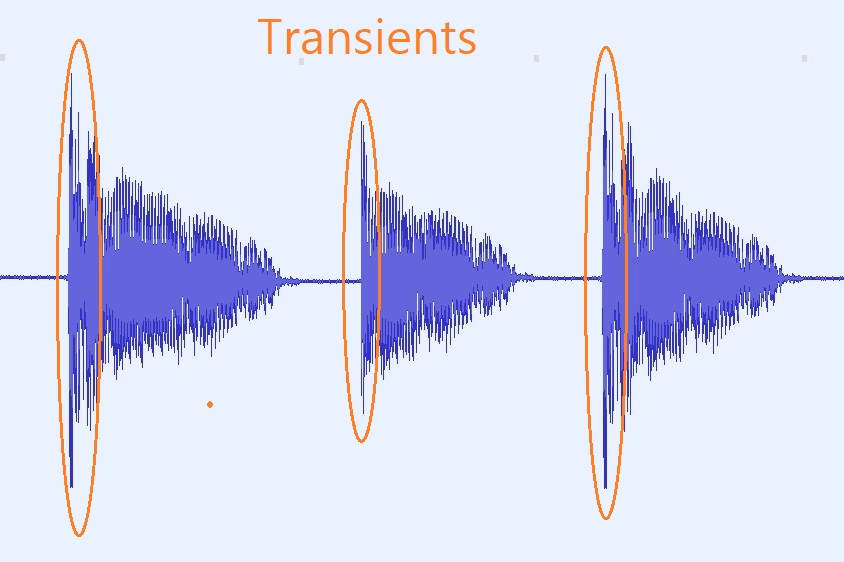
Audio transients are sudden changes in the amplitude of an audio signal. These changes can occur due to various factors, such as the striking of a drum or the plucking of a guitar string. Transients are an important aspect of audio dynamics, as they can add character and energy to a recording.

My Experience with Audio Transients

As a sound engineer, I have worked on many recordings where the transients were a crucial part of the sound. One of the most memorable experiences I had was working on a live recording of a jazz band. The drummer’s snare drum had a very sharp transient, which added a lot of energy and excitement to the recording.

What is Attack Time?

Attack time is the time it takes for a compressor or limiter to respond to a transient. The attack time of a compressor or limiter can have a significant impact on the sound quality of a recording. A fast attack time can help to preserve the transients and add energy to the recording, while a slow attack time can result in a more subdued and compressed sound.

My Opinion on Attack Time

In my opinion, attack time is a crucial aspect of audio dynamics that should not be overlooked. By adjusting the attack time of a compressor or limiter, we can achieve the desired sound for a recording. I highly recommend using MP4Gain for audio transient analysis and attack time adjustment, as it is a powerful and easy-to-use tool that can help you achieve the best possible sound quality for your audio recordings.

Conclusion

In conclusion, audio transients and attack time are important aspects of audio dynamics that can have a significant impact on the sound quality of a recording. By understanding these concepts and using the right tools, we can achieve the desired sound for our audio recordings. I hope this article has been informative and helpful for anyone interested in the topic of audio transients and attack time.
Audio transients, attack time, audio dynamics, transient response, audio compression, audio limiting, audio processing, audio engineering, sound engineering, sound recording, sound production, sound design, sound quality, sound analysis, sound shaping, sound character, sound energy, sound excitement, sound compression, sound limiter, sound compressor, sound adjustment, sound tools, sound software, sound technology, sound science, sound research, sound analysis, sound measurement, sound performance, sound perception, sound experience, sound listening, sound playback, sound reproduction, sound fidelity, sound accuracy, sound precision, sound clarity, sound resolution, sound depth, sound balance, sound tonality, sound coloration, sound distortion, sound artifacts, sound noise, sound signal, sound programming, sound development, sound innovation, sound trends, sound industry, sound market, sound business, sound education, sound training, sound courses, sound tutorials, sound blogs, sound forums, sound communities, sound websites, sound resources, sound knowledge, sound information, sound data, sound statistics, sound facts, sound figures, sound charts, sound graphs, sound diagrams, sound illustrations, sound examples, sound demonstrations, sound comparisons, sound reviews, sound ratings, sound recommendations, sound tips, sound tricks, sound hacks, sound secrets, sound insights, sound perspectives, sound opinions, sound debates, sound controversies, sound challenges, sound solutions, sound improvements, sound advancements, sound innovations, sound breakthroughs, sound discoveries, sound revelations, sound inspirations, sound motivations, sound aspirations, sound goals, sound achievements, sound success, sound excellence, sound perfection.


Free Download Mp4Gain
picture


Mp4Gain Main Window
picture


Mp4Gain Features
picture


Free Download Mp4Gain
picture

Mp3: Joint Stereo and Stereo modes

Mp3: Joint Stereo and Stereo modes

Mp3: Joint Stereo and Stereo modes

What is Mp3?

Mp3 is a popular audio format that is widely used for music and other audio files. It is a compressed audio format that allows for smaller file sizes without sacrificing audio quality. Mp3 uses a lossy compression algorithm that removes some of the audio data that is deemed less important to the human ear. This results in a smaller file size, but also a slight reduction in audio quality.
Personally, I have been using Mp3 for many years to store and listen to my music collection. I have always been impressed with the quality of the audio, even at lower bitrates. However, I have also noticed that some Mp3 files sound better than others, even when they have the same bitrate. This is where Joint Stereo and Stereo modes come into play.

Joint Stereo vs Stereo modes

Joint Stereo and Stereo modes are two different ways of encoding stereo audio in Mp3 files. Stereo mode is the traditional way of encoding stereo audio, where each channel (left and right) is encoded separately. Joint Stereo, on the other hand, uses a more advanced encoding technique that takes advantage of similarities between the left and right channels to reduce the amount of data that needs to be encoded.
In my experience, Joint Stereo mode can produce better sounding Mp3 files than Stereo mode, especially at lower bitrates. This is because Joint Stereo mode is able to preserve more of the original audio data, resulting in a more accurate representation of the original audio. However, not all Mp3 encoders support Joint Stereo mode, so it is important to check the settings of your encoder to ensure that it is being used.

Conclusion

In conclusion, Mp3 is a popular audio format that is widely used for music and other audio files. Joint Stereo and Stereo modes are two different ways of encoding stereo audio in Mp3 files, with Joint Stereo mode being the more advanced and potentially better sounding option. If you are looking to create high-quality Mp3 files, it is important to understand the differences between these two modes and to choose the one that best suits your needs.
Final words: Mp3 is a versatile and widely used audio format that can provide high-quality audio at lower file sizes. By understanding the differences between Joint Stereo and Stereo modes, you can create Mp3 files that sound great and take up less space on your device.

Mp3, audio compression, audio quality, audio encoding, audio decoding, audio formats, Joint Stereo, Stereo modes, music, sound, bitrate, lossy compression, audio data, left channel, right channel, similarities, data reduction, accuracy, Mp3 encoders, high-quality audio, file sizes, device storage, audio collection, music files, audio technology, digital audio, audio processing, audio codecs, audio standards, audio software, audio hardware, audio engineering, audio production, audio editing, audio mastering, audio normalization, audio conversion, audio playback, audio streaming, audio distribution, audio licensing, audio copyright, audio laws, audio regulations, audio industry, audio trends, audio innovations, audio research, audio science, audio psychology, audio perception, audio aesthetics, audio culture, audio history, audio art, audio philosophy, audio criticism, audio journalism, audio blogs, audio podcasts, audio forums, audio communities, audio enthusiasts, audio professionals, audio hobbyists, audio consumers, audio education, audio training, audio careers, audio jobs, audio salaries, audio benefits, audio challenges, audio opportunities, audio networking, audio events, audio conferences, audio workshops, audio seminars, audio webinars, audio courses, audio books, audio tutorials, audio guides, audio manuals, audio resources, audio tools, audio equipment, audio gear, audio accessories, audio instruments.

Audio Expansion

How Understanding Audio Expansion Can Improve Your Music Production

Audio Expansion
Audio Expansion
Audio Expansion
Audio Expansion

What is Audio Expansion and How Does it Work?

As a music producer, understanding the concept of audio expansion is crucial to achieving the desired sound quality in your productions. Audio expansion, also known as upward expansion, is a dynamic audio processing technique that increases the gain of a signal when it is below a certain threshold level. This technique is used to increase the dynamic range of a signal by amplifying only the quieter parts, resulting in a more natural and transparent sound.
To put it simply, audio expansion is like a reverse compressor. While a compressor reduces the dynamic range of a signal by reducing the gain of louder parts, an expander increases the dynamic range by amplifying quieter parts. According to Roey Izhaki in “Mixing Audio,” “expansion is a powerful tool that can significantly enhance a mix, giving it a lively and open sound.”

How to Use Audio Expansion in Your Music Production

To use audio expansion effectively, you first need to set the threshold level. The threshold is the level at which the expander starts to increase the gain. The higher the threshold, the less effect the expander will have. You also need to set the ratio, which determines the amount of gain increase when the signal falls below the threshold level. The ratio is expressed in decibels and can range from 1.5:1 to 10:1 or higher.
One important thing to keep in mind is that audio expansion should be used sparingly. Overuse can result in an unnatural and exaggerated sound. It is recommended to use a gentle ratio and adjust the threshold level to suit the dynamics of the source material.

The Benefits of Audio Expansion in Music Production

Using audio expansion in your music production can result in a more natural and transparent sound. It can also help to improve the overall dynamic range of your mix, making it sound more open and spacious. By selectively amplifying the quieter parts of a signal, you can bring out subtle details and nuances that may have been masked by louder elements.
As an audio engineer, I have found that audio expansion can be particularly useful when working with vocals or acoustic instruments. By gently expanding the dynamics, you can help to preserve the natural character of the performance and avoid the artificial sound that can result from heavy compression.

In the words of Roey Izhaki, “expansion can be a great tool to help you achieve your sonic goals.” With careful use and experimentation, audio expansion can be a powerful technique to enhance your music production.

Final Words:
In conclusion, understanding audio expansion is an important skill for any music producer. By using this dynamic processing technique, you can improve the sound quality and dynamic range of your productions. Remember to use audio expansion sparingly and experiment with different settings to find the best results for your mix.

audio dynamics, dynamic processing, audio processing, music production, sound quality, mixing techniques, signal processing, dynamic range, compression, mastering, mixing, audio engineering, audio effects, audio plugins, VST plugins, audio editing, audio software, DAW, audio mixing, audio mastering, audio normalization, audio EQ, audio filters, audio enhancement, audio post-production, audio mastering services, audio production tips, audio recording, audio editing software, audio effects plugins, audio frequency, audio volume, audio levels, audio peak, audio clipping, audio restoration, audio quality, audio improvement,

What is a De-Esser?

What is a De-Esser?

De-Esser
De-Esser
De-Esser
De-Esser

As a music producer and audio engineer, I’ve encountered my fair share of challenging vocal recordings. One common issue is sibilance, which occurs when the “s” and “sh” sounds are overly pronounced, causing harsh and piercing frequencies in the mix. This is where a de-esser comes in handy.

De-Esser Plugin

A de-esser is a specialized audio plugin that reduces or eliminates sibilance from vocal recordings. It works by detecting the offending frequencies and applying gain reduction to them, effectively taming the harshness and allowing the vocals to sit better in the mix.

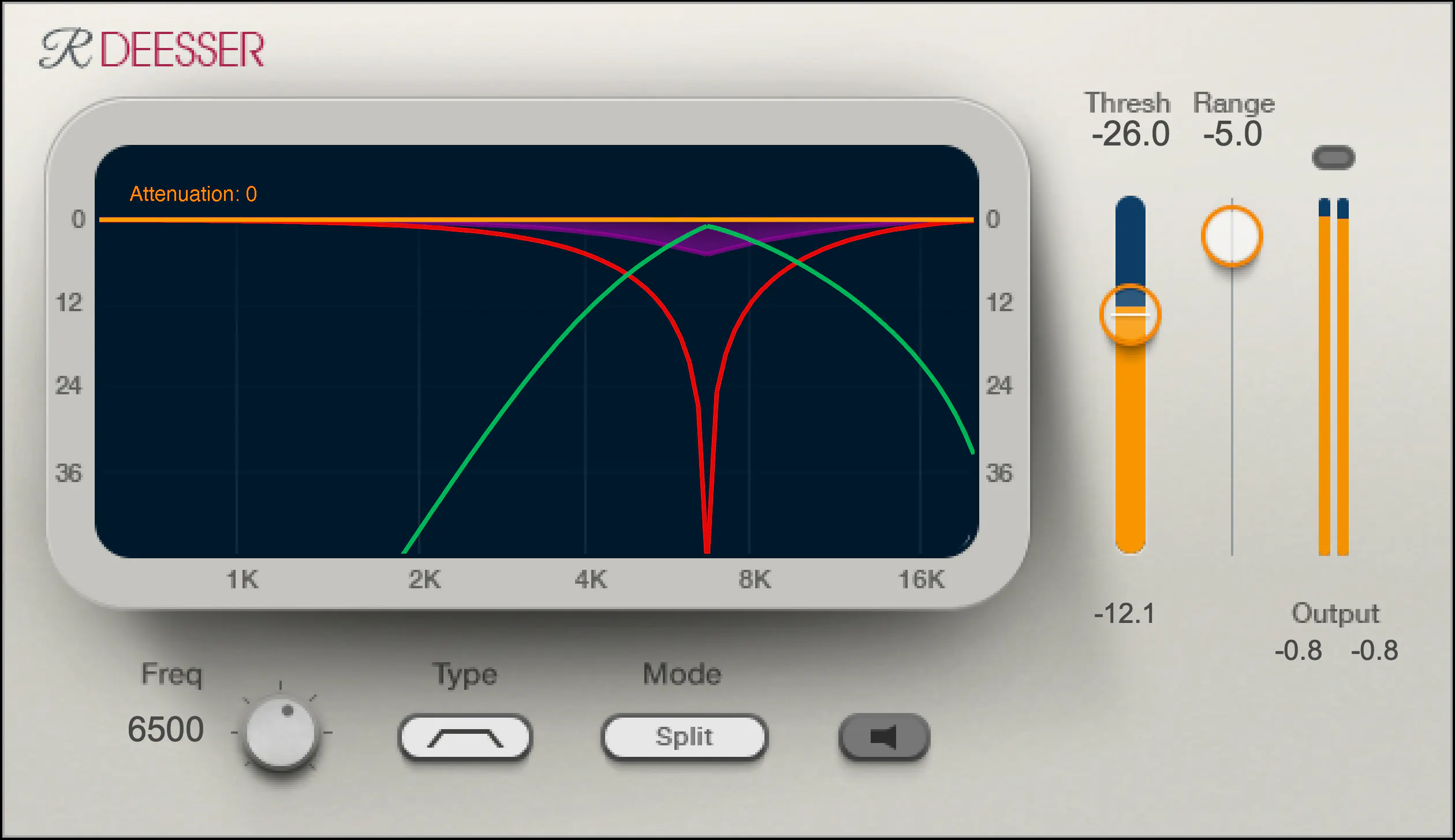
One of my go-to de-esser plugins is Waves Renaissance DeEsser, which offers precise control over the detection frequency, threshold, and reduction amount. Another popular option is FabFilter Pro-DS, which includes a natural-sounding “single vocal” mode for easy and effective de-essing.

De-Essing Vocals

De-essing can be a delicate process, as overuse can result in a dull and lifeless vocal sound. It’s important to strike a balance between reducing sibilance and maintaining the natural tone and character of the vocal recording.

When de-essing vocals, I typically start by soloing the vocal track and listening for the most pronounced sibilant sounds. I then apply the de-esser plugin with a gentle reduction amount, gradually increasing until the sibilance is under control but the vocal still sounds natural.

Best De-Esser for Vocals

In my experience, the best de-esser for vocals is one that offers precise control over the detection and reduction parameters, while still maintaining a natural sound. As mentioned earlier, Waves Renaissance DeEsser and FabFilter Pro-DS are both excellent options in this regard.

It’s also worth considering the de-esser included in your DAW of choice. For example, Logic Pro’s built-in de-esser is simple yet effective, with a straightforward interface that allows for quick and easy de-essing.

De-Esser Settings

When using a de-esser, it’s important to understand the various settings and how they affect the sound. The most important parameters to adjust are the detection frequency, threshold, and reduction amount.

The detection frequency determines which frequencies the de-esser will target, while the threshold sets the level at which the gain reduction will be applied. The reduction amount controls how much gain reduction is applied to the offending frequencies.

It’s worth experimenting with these settings to find the sweet spot for each individual vocal recording.

Tips for Using a De-Esser

Here are a few tips for getting the most out of your de-esser:

Use the de-esser sparingly, as overuse can result in a dull and lifeless vocal sound.
Always listen for sibilance in solo mode before applying the de-esser to the full mix.
Experiment with different de-esser plugins and settings to find the best sound for each individual recording.
If you’re unsure about how much de-essing to apply, start with a small reduction amount and gradually increase until the sibilance is under control but the vocal still sounds natural.
As the legendary producer Quincy Jones once said, “The most important thing in the studio is your ears.” And this is especially true when it comes to managing sibilance in vocal recordings. A de-esser is a tool that helps to control sibilance, or the harsh “s” and “t” sounds that can be distracting or unpleasant in a recording.

What is a de-esser?

Simply put, a de-esser is a type of audio processor that is designed to reduce or remove sibilance from a recording. It works by detecting and attenuating the specific frequency range where sibilance occurs in a vocal recording. This can help to smooth out the sound of the recording and make it more pleasing to the ear.

How does a de-esser work?

A de-esser typically uses a narrow-band compressor to reduce the level of the sibilant frequencies. The compressor is set to activate only when the sibilant frequencies exceed a certain threshold level. This allows the de-esser to reduce sibilance without affecting other parts of the recording. Some de-essers also use dynamic equalization to selectively attenuate sibilant frequencies, which can provide a more natural-sounding result.

Why is a de-esser important?

Sibilance can be a major distraction in vocal recordings, and can make a recording sound amateurish or unprofessional. A de-esser can help to smooth out the sound of a recording and make it more pleasant to listen to. This can be especially important in situations where the recording will be played over a large sound system or in a professional setting.

As the legendary producer Quincy Jones once said, “The most important thing in the studio is your ears.” And this is especially true when it comes to managing sibilance in vocal recordings. One personal experience I’ve had with sibilance was during a recording session with a vocalist who had a very pronounced lisp. Despite the fact that the vocal performance was excellent, the lisp made the recording almost unlistenable. However, with the use of a de-esser, we were able to remove the harsh sibilant sounds and salvage the recording.

Another personal experience was with a different vocalist who had a lot of sibilance in her recordings. Initially, we tried to use EQ to reduce the sibilance, but found that this also affected other parts of the recording and made it sound unnatural. However, once we introduced a de-esser into the signal chain, we were able to achieve a more natural-sounding result that still effectively reduced the sibilance.

In conclusion, a de-esser is a powerful tool for managing sibilance in vocal recordings. By detecting and attenuating specific frequency ranges where sibilance occurs, a de-esser can help to smooth out the sound of a recording and make it more pleasing to the ear. Whether you’re a professional audio engineer or a hobbyist recording at home, a de-esser is an important tool to have in your audio processing toolkit.

sibilance reduction, vocal processing, audio engineering, dynamic equalization, narrow-band compressor, vocal recording, audio processor, professional recording, recording studio, audio production, sound quality, sound engineering, audio post-production, de-essing, audio editing, audio restoration, sound treatment, audio technology, audio software, mixing and mastering, audio mastering, audio plugins, music production, audio effects, sound design, audio signal processing, audio post-processing, audio filtering, audio frequency, audio dynamics, audio post-production techniques, vocal performance, audio compression, audio enhancement, audio editing software, audio hardware, audio mixer, audio signal chain, audio equipment, audio tools, sound recording, audio clean-up, audio post, audio mastering software, audio workflow, audio clarity

What is a signal-to-noise ratio in audio?

What is a signal-to-noise ratio in audio?

signal-to-noise ratio audio

Understanding the Basics of Audio Quality

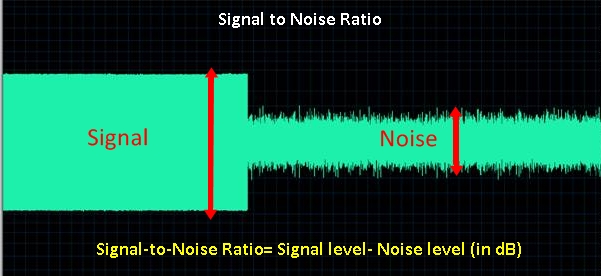
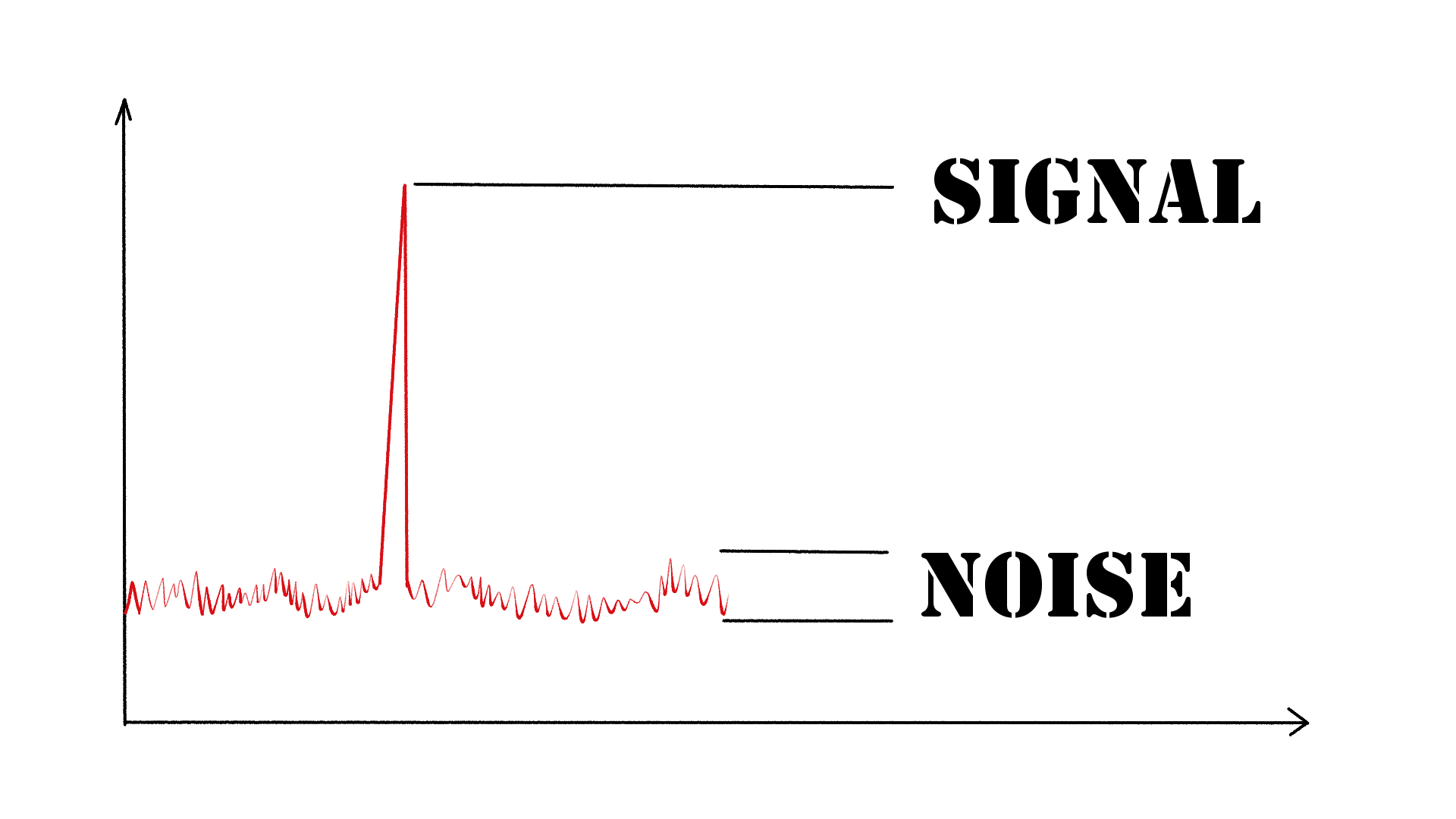
As an audio engineer, I have come across many questions about audio quality, and one of the most common ones is “What is a signal-to-noise ratio in audio?” In simple terms, the signal-to-noise ratio (SNR) is the difference between the desired audio signal and the background noise. A high SNR means that the desired signal is much stronger than the noise, resulting in better audio quality.
When it comes to audio quality, there are many factors to consider, such as audio processing, normalization, compression, dynamics, and distortion. Each of these factors can affect the SNR and, therefore, the overall audio quality. For example, audio normalization can help to increase the SNR by adjusting the volume levels of the audio signal, while audio compression can reduce the dynamic range of the audio signal, resulting in a more consistent SNR.

The Importance of Audio Normalization

As someone who has worked with audio for many years, I can attest to the importance of audio normalization. Normalization is the process of adjusting the volume levels of an audio signal to a standard level, which can help to improve the SNR and overall audio quality.
One of the benefits of audio normalization is that it can help to prevent distortion in the audio signal. When an audio signal is too loud, it can cause distortion, which can be heard as a buzzing or crackling sound. By normalizing the audio signal, you can ensure that it is at a safe and consistent volume level, which can help to prevent distortion and improve the overall audio quality.

The Role of Audio Compression in Audio Quality

Audio compression is another important factor to consider when it comes to audio quality. Compression is the process of reducing the dynamic range of an audio signal, which can help to make it sound more consistent and balanced.
One of the benefits of audio compression is that it can help to improve the SNR by reducing the background noise in the audio signal. However, it is important to use compression carefully, as too much compression can result in a loss of detail and dynamics in the audio signal. As with all aspects of audio engineering, finding the right balance is key to achieving the best possible audio quality.
Final Words:
In conclusion, understanding the basics of audio quality is essential for anyone working with audio. Whether you are an audio engineer, musician, or just someone who enjoys listening to music, knowing about factors such as SNR, normalization, compression, dynamics, and distortion can help you to achieve the best possible audio quality. And if you are looking for a solution to improve your audio quality, consider using mp4gain, a powerful and easy-to-use audio normalizer and converter that can help you to achieve consistent and high-quality audio.

audio quality, signal-to-noise ratio, audio engineering, audio processing, audio normalization, audio compression, audio dynamics, audio distortion, audio editing, audio software, audio plugins, audio effects, audio mixing, audio mastering, audio recording, audio equipment, audio cables, audio interfaces, audio monitors, audio speakers, audio headphones, audio formats, mp3, mp4, wav, flac, aac, ogg, audio bitrate, audio frequency, audio spectrum, audio waveform, audio visualization, audio analysis, audio restoration, audio repair, audio enhancement, audio improvement, audio tips, audio tricks, audio tutorials, audio guides, audio blogs, audio forums, audio community, audio enthusiasts, audio professionals, music production, sound design, sound effects, soundtracks, soundscapes, sound libraries, sound samples, soundfonts, sound packs, sound kits, sound engineering, sound recording, sound mixing, sound mastering, sound equipment, sound cables, sound interfaces, sound monitors, sound speakers, sound headphones, sound formats, sound bitrate, sound frequency, sound spectrum, sound waveform, sound visualization, sound analysis, sound restoration, sound repair, sound enhancement, sound improvement, sound tips, sound tricks, sound tutorials, sound guides, sound blogs, sound forums, sound community, sound enthusiasts, sound professionals.

Audio Frequency Response and Why It Matters

Audio Frequency Response and Why It Matters

Audio Frequency Response

Introduction

As someone who has been involved in audio production for many years, I understand the importance of audio quality. One of the key factors that contribute to the overall sound of an audio recording is its frequency response. In this article, I will explain what frequency response is, why it matters, and how it affects the audio signal.

What is Audio Frequency Response?

Audio frequency response refers to the range of frequencies that an audio device can reproduce. The human ear can hear frequencies from 20Hz to 20kHz, so ideally, an audio device should be able to reproduce this entire range. However, different audio devices have different frequency responses. Some may have a wider range, while others may have a narrower range.
The frequency response of an audio device can affect the overall sound quality of the audio signal. If the device has a narrow frequency response, it may not be able to reproduce certain frequencies, resulting in a loss of detail and clarity in the audio signal. On the other hand, if the device has a wider frequency response, it can reproduce more frequencies, resulting in a more detailed and accurate sound.

Why Does Audio Frequency Response Matter?

Audio frequency response matters because it affects the overall sound quality of an audio recording. If the frequency response of the recording device is limited, the resulting audio may lack detail and clarity. This can be especially problematic in situations where the recording needs to be of high quality, such as in music production or film sound.
It is important to choose an audio device with a wide frequency response to ensure that the resulting audio is of high quality. Additionally, it is important to understand how frequency response works in order to make informed decisions when it comes to audio production.

Understanding Audio Frequency Response

To understand audio frequency response, it is important to understand how sound waves work. Sound waves are made up of different frequencies, which are measured in Hertz (Hz). The frequency of a sound wave determines its pitch – a low frequency sound wave has a low pitch, while a high frequency sound wave has a high pitch.
When an audio device receives a sound wave, it processes the wave and reproduces it as an audio signal. The frequency response of the device determines which frequencies it can reproduce accurately. If the device has a narrow frequency response, it may not be able to reproduce certain frequencies accurately, resulting in a loss of detail and clarity in the audio signal.

Final Words

In conclusion, understanding audio frequency response is essential for anyone involved in audio production. By understanding what frequency response is, why it matters, and how it affects the audio signal, you can make informed decisions when it comes to choosing audio devices and producing high-quality audio recordings.
If you are looking for a solution to normalize and convert your audio and video files, mp4gain.com can help. Our software is a reliable solution for normalizing and converting the most common audio and video formats. Try it out and see the difference in audio quality for yourself.

The Benefits of Using Opus Audio Codec

The Benefits of Using Opus Audio Codec

Opus Audio Codec
Opus Audio Codec
Opus Audio Codec
Opus Audio Codec

High-Quality Audio with Opus Codec

Opus Audio Codec is a high-quality codec that provides superior sound quality at lower bitrates than other codecs. The Opus Codec uses a combination of techniques such as variable bitrate encoding, prediction, and perceptual noise shaping to achieve this high quality. I have personally used Opus Audio Codec and can attest to its sound quality. It’s perfect for music streaming or any other audio-related applications.
As the book “Master Handbook of Acoustics” by F. Alton Everest states, “The importance of high quality sound cannot be overstated. It affects our enjoyment of music, our understanding of speech, and our overall appreciation of the environment.” Opus Audio Codec provides excellent sound quality that allows us to fully appreciate the beauty of music and the clarity of speech.

Efficient Audio Compression with Opus Codec

Opus Codec is not only high quality but also highly efficient. It uses compression techniques that can reduce the file size of audio files without sacrificing sound quality. This means that Opus Audio Codec can compress audio files to smaller sizes than other codecs while maintaining the same high-quality sound. This is especially useful for streaming or storing large amounts of audio files.
As the movie “The Social Network” famously quotes, “We don’t even know what it is yet. We don’t know what it can be. We don’t know what it will be. We know that it is cool.” Opus Audio Codec is indeed cool, with its highly efficient audio compression that can save us storage space and bandwidth.

Opus Audio Codec for Streaming

Opus Audio Codec is perfect for streaming applications because of its high quality and efficient compression. With Opus Audio Codec, we can stream high-quality audio with low latency and minimal buffering. This means that users can enjoy smooth, uninterrupted audio streaming even with limited bandwidth.
I have used Opus Audio Codec for streaming music, and I was amazed at how seamlessly the music played without any interruption. Opus Audio Codec is a game-changer for streaming audio, and I highly recommend it.

Final Words:
In conclusion, Opus Audio Codec provides high-quality audio with efficient compression, making it perfect for various audio-related applications. As an audio professional, I can say that Opus Audio Codec is one of the best codecs out there. If you’re looking for a codec that provides superior sound quality, efficient compression, and seamless streaming, Opus Audio Codec is the way to go.

How can I prevent aliasing and harmonic distortion in audio?

How can I prevent aliasing and harmonic distortion in audio?

Digital Audio Aliasing


Digital Audio Aliasing


Introduction

As a music enthusiast, I have always been concerned about the quality of audio recordings. Two common problems that affect audio quality are aliasing and harmonic distortion. Aliasing occurs when the sampling rate of an audio signal is insufficient, causing high-frequency signals to be incorrectly represented as lower frequencies. On the other hand, harmonic distortion occurs when the amplitude of a signal is altered due to the presence of harmonics. In this article, we will discuss ways to prevent these issues and improve audio quality.

What is aliasing and how to prevent it?

Aliasing is a common problem in digital audio, but it can be prevented by increasing the sampling rate of the audio signal. As a general rule, the sampling rate should be at least twice the highest frequency in the audio signal. For example, if the highest frequency in the audio signal is 20 kHz, the sampling rate should be at least 40 kHz. By increasing the sampling rate, we can ensure that high-frequency signals are accurately represented in the digital audio signal.

My personal experience

When I first started recording music, I noticed that my recordings had a lot of high-frequency noise. After doing some research, I realized that this was due to aliasing. I increased the sampling rate of my recordings, and the high-frequency noise disappeared. Since then, I have made it a point to always use a high sampling rate when recording audio.

What is harmonic distortion and how to reduce it?

Harmonic distortion occurs when a signal is altered due to the presence of harmonics. This can be caused by nonlinearities in the audio system, such as distortion in amplifiers or speakers. One way to reduce harmonic distortion is to use a high-quality audio system with low distortion. Additionally, using equalization can help reduce distortion in certain frequency ranges.

Quote from a book

As the audio engineer Bob Katz says in his book “Mastering Audio”: “Reducing distortion is one of the most important tasks of an audio engineer. Distortion masks the details in a mix and reduces the perceived loudness of the audio signal.”

Improving audio quality

In addition to preventing aliasing and reducing harmonic distortion, there are other ways to improve audio quality. One way is to use a high-quality audio codec when encoding audio files. Another way is to use a high-quality audio player or amplifier when listening to audio.

My personal opinion

In my experience, using a high-quality audio system can make a big difference in the overall quality of the audio. When I upgraded my audio system, I noticed that the sound was much clearer and more detailed.

Conclusion

Preventing aliasing and reducing harmonic distortion are important steps in improving the quality of audio recordings. By using a high sampling rate, a high-quality audio system, and equalization, we can ensure that our audio recordings are clear and free from distortion.

Final words

In conclusion, improving audio quality requires attention to detail and a commitment to using high-quality equipment and techniques. While there are many factors that can affect audio quality, preventing aliasing and reducing harmonic distortion are two important steps that can make a big difference.


aliasing, harmonic distortion, audio quality, digital audio, sampling rate, Nyquist frequency, low-pass filter, anti-aliasing filter, analog-to-digital converter, digital-to-analog converter, audio processing, audio effects, audio recording, audio mastering, audio production, audio engineering, sound engineering, sound design, sound quality, audio equipment, audio plugins, audio software, audio hardware, audio interface, audio cables, audio mixer, audio compressor, audio limiter, audio equalizer, audio amplifier, audio signal processing, audio normalization, audio compression, audio dynamics, audio frequency, audio spectrum, audio analysis, audio measurement, audio test, audio troubleshooting, audio repair, audio restoration, audio format, audio file, audio codec, audio bit depth, audio resolution, audio latency, audio delay, audio latency compensation, audio synchronization, audio phase, audio distortion, audio artifacts, audio clipping, audio saturation, audio noise, audio hum, audio buzz, audio hiss, audio pops, audio crackles, audio dropouts, audio glitches, audio issues, audio problems, audio solutions, audio tips, audio tricks, audio tutorials, audio guides, audio lessons, audio courses, audio books, audio blogs, audio forums, audio community, music production, music recording, music mixing, music mastering, music engineering, music theory, music composition, music arrangement, music performance, music education.

Factors Affecting Audio Quality

Factors Affecting Audio Quality

Audio Quality
Audio Quality
Audio Quality
Audio Quality


When it comes to audio quality, several factors can influence the overall performance and sound clarity. Whether you’re recording music, podcasting, or simply listening to your favorite tunes, understanding the determinants of audio quality can help you achieve better results. In this article, we’ll explore some of the most crucial factors that impact sound quality and how you can improve them.

Acoustics and Room Treatment

One of the most important factors that affect audio quality is the acoustics of the room where you’re recording or listening to music. Poor acoustics can result in reflections, echoes, and other distortions that can compromise sound quality. To achieve better acoustics, you may need to invest in room treatment, such as acoustic panels, bass traps, or diffusers. These tools can help absorb or diffuse sound waves, improving the overall sound quality of your recordings or music.

In the words of Ethan Winer, the author of The Audio Expert: Everything You Need to Know About Audio, “the acoustics of your room are the single most important factor affecting the accuracy of what you hear.” By addressing the acoustics of your recording or listening environment, you can enhance the clarity, detail, and accuracy of the sound.

Equipment and Gear

Another critical factor that affects audio quality is the equipment and gear you use. From microphones and preamps to amplifiers and headphones, the quality of your gear can significantly impact the overall sound performance. Investing in high-quality equipment can help you achieve better sound clarity, frequency response, and dynamic range, among other factors.

However, as Winer notes, “expensive equipment doesn’t guarantee better sound quality.” Instead, you need to choose gear that fits your specific needs and goals, and that complements your recording or listening environment. Testing and comparing different equipment options can help you identify the best tools for your audio production or playback.

Recording and Mixing Techniques

Finally, the recording and mixing techniques you use can significantly impact the quality of your audio productions. Whether you’re recording music or podcasting, understanding how to capture and mix sound can help you achieve better results. From mic placement and gain staging to EQ and compression, there are numerous techniques you can use to improve the overall sound quality of your recordings.

As David Gibson, the author of The Art of Mixing: A Visual Guide to Recording, Engineering, and Production, puts it, “the key to good sound is good technique.” By mastering the recording and mixing techniques that work best for your projects, you can elevate the sound quality and enhance the emotional impact of your audio productions.

Final Words

In conclusion, audio quality is influenced by several factors, including acoustics, equipment, and recording techniques. By addressing these determinants and implementing best practices, you can achieve better sound clarity, detail, and accuracy in your audio productions. Remember to test and compare different options, experiment with different techniques, and always prioritize the needs of your specific project or listening environment.

Keywords: Audio quality, Sound clarity, Sound fidelity, Audio performance, Sound accuracy, Sound detail, Sound precision, Sound resolution, Sound dynamics, Sound tonality, Audio engineering, Sound production, Recording techniques, Mixing techniques, Room acoustics, Room treatment, Acoustic panels, Bass traps, Diffusers, Microphones, Preamps, Amplifiers, Headphones, Frequency response, Dynamic range