MP3 vs Opus Comparison


Free Download Mp4Gain
picture

MP3 vs Opus Comparison

MP3 vs Opus Comparison

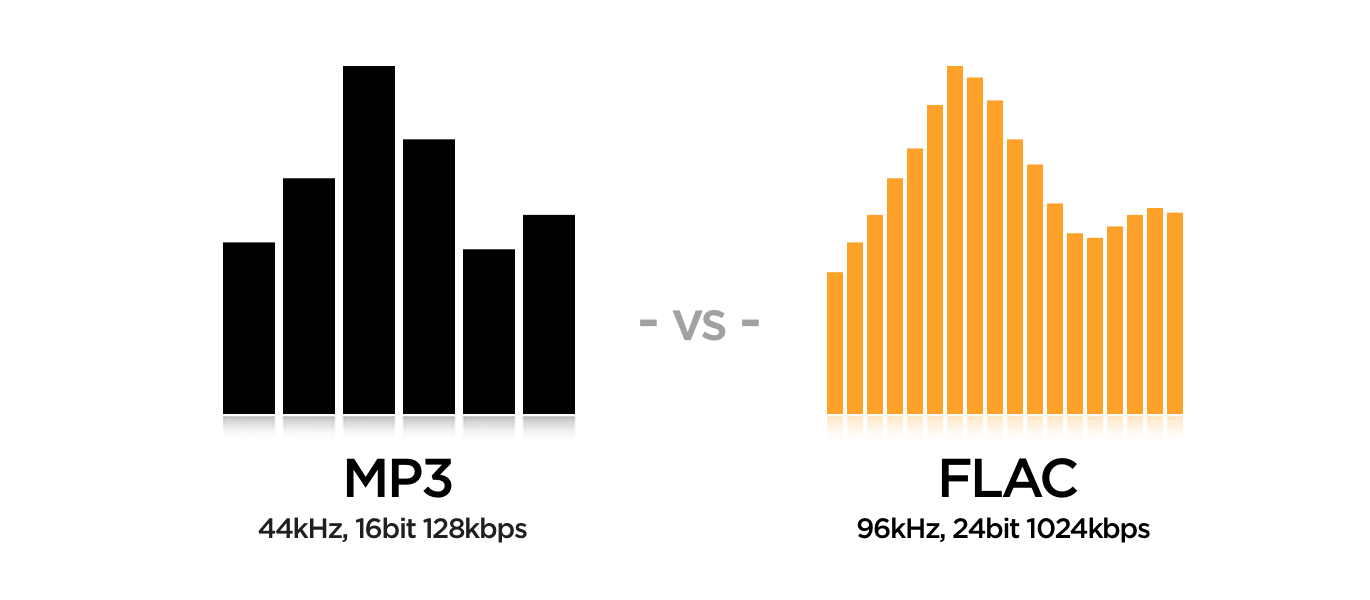
Let’s Talk About MP3 vs Opus

When it comes to digital audio formats, the choice between MP3 and Opus can be as crucial as selecting the right tool for the job. As a specialist with years of experience in the field, I’ll delve into this comparison, helping you understand the nuances and make an informed choice.

MP3 vs Opus Comparison

MP3 (MPEG Audio Layer III): The Audio Legacy

Think of MP3 as the tried-and-true workhorse in the world of digital audio. It’s been around for decades and is known for its widespread use, but it does come with some trade-offs. Let’s explore its strengths and weaknesses.

MP3’s Ubiquity

MP3 is like the classic turntable of digital audio. It’s supported by an extensive range of devices and software, making it a go-to choice for most music lovers. Its ubiquity is its strength, but there’s more to this story.

Compression and File Size

However, MP3’s widespread use comes with a price—the trade-off between compression and file size. Storing a collection of MP3 files can be likened to keeping a drawer full of paperbacks instead of hardcovers. It’s a matter of compromise.

Opus: The Modern Marvel

In contrast, Opus is the sleek and modern sports car of digital audio formats. It’s known for its efficiency in compression and is the preferred choice for online voice communication and streaming. Let’s take a closer look at what makes Opus stand out.

Efficiency in Compression

Picture Opus as the hybrid car—it excels in compression, allowing audio files to be notably smaller without compromising quality. Storing Opus files is like having a fuel-efficient car; you save on space and resources.

Streaming and Online Voice Communication

When it comes to streaming and online voice communication, Opus is the superstar. It’s like the fiber optic internet that ensures smooth, real-time conversations and low-latency gameplay. Its compatibility with various platforms and its role in the crystal-clear voice makes it a go-to choice for online interactions.

Quality and Versatility

Now, let’s delve deeper into the quality and versatility offered by both MP3 and Opus. It’s akin to comparing vinyl records with the latest digital streaming service.

Audio Quality and Compatibility

MP3 is like the vinyl record—it’s got a vintage charm and is widely supported, but it may not deliver the highest audio quality. In contrast, Opus is like your modern streaming service, offering exceptional quality and compatibility across a variety of devices.

Audio Editing and Post-Production

MP3, much like traditional film editing, may retain every detail but is not always suitable for intricate post-production work. Opus, being more modern, is like a cutting-edge digital audio workstation, offering flexibility and efficiency for various editing needs.

Real-Life Example: Music Streaming Services

Think of MP3 as the standard AM/FM radio station, offering familiar music quality. Now imagine Opus as a high-end music streaming service, providing you with exceptional sound quality, lossless audio, and an extensive library of songs.

Device Compatibility and Playback

When it comes to device compatibility and playback, MP3 might be like an old cassette player, causing compatibility issues on modern devices. In contrast, Opus is like a universal remote control, seamlessly working with nearly every device and platform, ensuring a smooth listening experience.

Support for Special Features

Opus, being a modern format, is equipped with features like multi-channel audio, dynamic range control, and bitrate switching, making it ideal for a range of applications, including video conferencing and online gaming. MP3, while capable, may not provide the same level of support for these special features.

Conclusion: Making the Right Choice

In the end, choosing between MP3 and Opus is like selecting the right tool for your audio needs. Your choice should align with your specific requirements, whether you’re an audiophile, a content creator, or an online gamer. Consider your priorities for quality, file size, and compatibility before making your decision.

Comments:

(Username: MusicMaestro) – This article is a great resource for musicians like me. Opus seems promising for streaming high-quality music.

(Username: AudioEnthusiast) – As an audiophile, I’ve always preferred MP3 for its compatibility. But Opus is making me reconsider my choices.

(Username: TechNerd22) – Excellent article, but I wish it delved more into Opus’s role in online gaming and low-latency communication.

(Username: AudiophileAlex) – This article provides a comprehensive comparison. I’m leaning towards Opus for its quality, but MP3’s compatibility is hard to beat.

(Username: StreamingSavvy) – Opus is a game-changer for streaming services. The difference in audio quality is remarkable.


Free Download Mp4Gain
picture


Mp4Gain Main Window
picture


Mp4Gain Features
picture


Free Download Mp4Gain
picture

How to Address Issues Related to MP3 Frame Synchronization

How to Address Issues Related to MP3 Frame Synchronization


Let’s Talk About MP3 Frame Synchronization

As a specialist with extensive experience in the field of audio compression and synchronization, I understand the importance of addressing issues related to MP3 frame synchronization. MP3 is a widely used audio format, and its proper synchronization is crucial to ensuring the seamless playback of audio files. In this comprehensive guide, we will explore the intricacies of MP3 frame synchronization, common problems that arise, and effective solutions to tackle these issues.

The Basics of MP3 Frame Synchronization

To comprehend MP3 frame synchronization, think of an audio file as a puzzle composed of numerous pieces. Each piece represents an MP3 frame, and these frames must fit together perfectly to create a seamless audio experience. Just like putting together a jigsaw puzzle, when even one piece is misplaced, the entire picture can become distorted.

In the world of MP3, a frame is a fundamental unit of audio data, typically consisting of 1152 samples. These frames are aligned in a specific sequence to form an audio stream. If the frames aren’t synchronized correctly, you may experience audio artifacts, dropouts, or even complete audio distortion during playback. This can be particularly frustrating, akin to listening to a scratched vinyl record that skips and distorts the music you love.

Common Issues with MP3 Frame Synchronization

Let’s delve deeper into some of the common issues that plague MP3 frame synchronization:

1. Jitter and Timing Mismatches

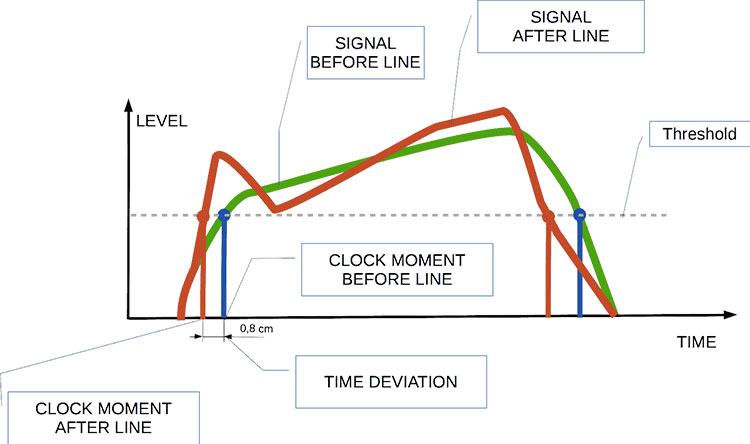
One of the main culprits behind synchronization issues is jitter. Imagine trying to put together a puzzle where the pieces keep changing size and shape. Jitter in MP3 files can lead to timing mismatches between frames, causing audio playback to be out of sync. This often results in the unpleasant experience of hearing voices or instruments that seem slightly off, akin to watching a movie with poorly dubbed audio.

2. Bitstream Errors

MP3 frames have headers with crucial information about the audio data they contain. Bitstream errors, such as corrupted headers, can disrupt frame synchronization. It’s like trying to read a book with pages missing or scrambled. Without the correct headers, your audio player may struggle to interpret the audio data, leading to distortion or silence.

3. Frame Loss and Overlapping

Frame loss occurs when an MP3 player encounters difficulty in processing frames, leading to skipped frames during playback. Overlapping, on the other hand, results from frames being duplicated or played out of order. Both issues disrupt the seamless flow of audio, creating a disjointed listening experience similar to a scratched CD that repeats or skips segments.

Effective Solutions to MP3 Frame Synchronization Issues

Now that we understand the common problems related to MP3 frame synchronization, let’s explore effective solutions to address these issues:

1. Error Detection and Correction

To combat bitstream errors, specialized software can be used to detect and correct these issues. Just as spell checkers help fix typos in text, error detection and correction tools can repair damaged MP3 frames, ensuring smoother playback. Think of it as having a grammar tool that corrects your writing errors automatically.

2. Buffering and Jitter Control

Buffering and jitter control mechanisms can be applied to manage timing mismatches caused by jitter. This is similar to using shock absorbers in a car to ensure a smooth ride even on bumpy roads. These mechanisms help maintain a consistent flow of audio data, reducing synchronization issues.

3. Redundancy and Frame Reordering

For addressing frame loss and overlapping, redundancy and frame reordering techniques can be employed. Redundancy adds extra information to frames, reducing the impact of lost frames, while frame reordering ensures frames are played in the correct sequence. Picture this as a backup plan that ensures you don’t lose the plot when a few pages of your book are missing.

Latest Words on MP3 Frame Synchronization

In the ever-evolving world of audio technology, MP3 frame synchronization remains a critical aspect. As a specialist, my experience has taught me that understanding the intricacies of MP3 frame synchronization is vital to enjoy a seamless audio experience. By addressing issues related to synchronization, you can ensure that your favorite songs, podcasts, or audiobooks are played without interruptions, just like a well-preserved vinyl record or a pristine novel.

Comments:

Comment 1: Hey, great article! I’ve had my fair share of MP3 synchronization issues, and your explanations with real-life comparisons were super helpful. Thanks!

Comment 2: This article is alright, but I was hoping for more in-depth technical details about MP3 synchronization. Can you provide more advanced information?

Comment 3: I had no idea about these synchronization problems in MP3 files. Your article opened my eyes. Now I know why my music sometimes sounds weird.

Comment 4: I wish you’d talked more about the software solutions for MP3 synchronization. What tools can I use to fix these issues?

Comment 5: Your comparison to puzzles and books really made the concepts clear. I appreciate how approachable you’ve made this topic.

Comment 6: Great job on breaking down the complex topic of MP3 synchronization! Your real-life examples made it easy to grasp.

Comment 7: I agree with Comment 2; I wanted more technical details too. Can you elaborate on the error correction methods?

Comment 8: This article needs a bit more depth. I’m still a bit confused about how buffering works in MP3 synchronization.

Comment 9: Kudos to the author for simplifying a complex topic. It’s nice to have a resource that makes audio tech accessible to everyone.

Comment 10: I had no idea MP3s could be so finicky. Your article was an eye-opener. I’ll be more patient with my music now.

Audio Jitter

Understanding Audio Jitter


Audio Jitter
Audio Jitter

Audio Jitter, what is this?

Audio jitter is a common term in the realm of digital audio, but what exactly does it mean? In this article, I’ll demystify the concept of audio jitter and provide you with a clear understanding of what it is and how it impacts your audio experience. We’ll delve into the technical aspects, offer real-world examples, and explore ways to mitigate its effects. So, let’s embark on this journey to unravel the mysteries of audio jitter.

Audio jitter can be thought of as the irregular timing variations in the playback of digital audio signals. These timing variations can manifest as small deviations in the timing of audio samples, leading to audio artifacts like clicks, pops, and distortion. While it may seem like a technical concern, audio jitter can significantly affect your overall listening experience, even if you’re not a seasoned audiophile.

What is Audio Jitter?

Audio jitter, in essence, is the bane of digital audio playback. When you play a digital audio file, it gets converted into an analog signal for your speakers or headphones. The challenge arises when the conversion isn’t perfectly synchronized. Think of it like a metronome that occasionally skips a beat. This timing discrepancy, which we call audio jitter, can distort the sound and result in a less-than-ideal listening experience.

For a real-world analogy, consider a musical ensemble. If the musicians are out of sync, even by a tiny fraction of a second, the result can be dissonant and displeasing to the ear. Similarly, audio jitter disrupts the synchronization between the digital audio source and your playback system.

How Does Audio Jitter Impact Sound Quality?

Audio jitter affects sound quality by introducing unwanted artifacts. These artifacts can include audible clicks, pops, and distortions in the audio stream. To understand the impact, picture a pristine audio signal as a smooth, flowing river. Audio jitter is like tossing pebbles into that river, causing ripples and disturbances. These ripples manifest as audible imperfections in your music or audio.

Think of a jazz drum solo: the precision of the drummer’s beats is crucial to the experience. Even a slight deviation in the rhythm can disrupt the entire performance. Audio jitter works in a similar way, disrupting the timing and rhythm of your audio playback, ultimately degrading the sound quality.

The Technical Aspects of Audio Jitter

Now, let’s delve into the technical side of audio jitter. In the digital domain, audio is typically stored as discrete samples, each representing the amplitude of the sound at a specific moment. The timing of these samples is critical. Audio jitter occurs when the time intervals between these samples deviate from the ideal, leading to inconsistencies in playback.

To put this in context, think of a digital audio player as a conveyor belt, with each audio sample represented by a box. These boxes must move down the belt at precise intervals to maintain the audio’s integrity. If some boxes move faster or slower than others, you’ll encounter audio jitter, which translates to an erratic and unpleasant listening experience.

Addressing Audio Jitter: Practical Solutions

It’s clear that audio jitter can be a nuisance, but what can you do to mitigate its effects? Fortunately, there are practical solutions available. Some high-end audio equipment includes advanced jitter-reduction technologies. Additionally, using dedicated external digital-to-analog converters (DACs) can help improve audio synchronization.

Think of these solutions as a conductor guiding the musicians in an orchestra, ensuring they play in perfect harmony. Advanced equipment and DACs help maintain the precise timing necessary for high-quality audio playback.

Audio Jitter vs. Bit Depth: Exploring the Differences

While audio jitter deals with timing variations, bit depth relates to the depth of information in an audio signal. It’s essential to distinguish between the two. Bit depth determines the resolution of the audio signal, affecting the dynamic range and subtlety of sound. Audio jitter, on the other hand, impacts timing and synchronization. Both factors play a role in overall audio quality, but they address different aspects of the listening experience.

Think of bit depth as the number of colors on a painter’s palette, while audio jitter is akin to the painter’s brush strokes’ precision. They are both crucial for the final masterpiece, but they address different aspects of the artistic process.

The Importance of Low Jitter in High-End Audio Systems

In high-end audio systems, low jitter is a fundamental requirement for achieving audiophile-grade sound quality. Audiophiles demand the utmost precision and clarity in their audio playback, and any deviation in timing is unacceptable. To achieve this, specialized audio components and meticulous engineering are employed to minimize jitter.

Imagine a fine dining experience where every detail, from the presentation to the taste, is meticulously crafted. Audiophiles seek the same level of perfection in their audio experience, and low jitter is a crucial ingredient in achieving it.

Measuring and Analyzing Audio Jitter: Tools and Techniques

To assess and address audio jitter, various tools and techniques are available. One common method involves using dedicated audio analyzers that can pinpoint timing variations. Additionally, software applications can help diagnose and quantify audio jitter in your playback system.

Think of these tools as diagnostic instruments in a doctor’s office. They allow audio enthusiasts and professionals to diagnose and treat any issues related to audio jitter, ensuring the best possible audio quality.

Enhancing Your Audio Experience: Final Thoughts

In the world of digital audio, understanding and managing audio jitter is essential for achieving the best possible listening experience. Whether you’re a casual music lover or a dedicated audiophile, knowing how audio jitter affects your sound quality can lead to informed choices and better audio equipment investments.

So, the next time you enjoy your favorite music or immerse yourself in a captivating movie, remember the role that precise timing plays in your audio journey. Just as a conductor leads an orchestra to create beautiful music, minimizing audio jitter ensures that the symphony of sound reaches your ears with clarity and perfection.

Last Words

In conclusion, audio jitter is a subtle yet critical factor that can significantly impact your audio enjoyment. By delving into the technical aspects of audio jitter and exploring practical solutions, we’ve uncovered the key to enhancing your audio experience. Whether you’re an audiophile or simply someone who appreciates good sound, understanding and addressing audio jitter is a step toward audio perfection.

Audio Buffering

Audio Buffering: Ensuring Smooth Sound Playback

Audio Buffering
Audio Buffering

In today’s digital age, audio buffering is a crucial aspect of delivering seamless sound experiences across various devices and platforms. Whether you’re streaming music, participating in online meetings, or playing video games, audio buffering plays a significant role in ensuring that you hear clear and uninterrupted audio. In this article, I, as an expert in audio technology, will delve into the world of audio buffering, providing insights, explanations, and practical examples to help you understand its importance and how it works.

Understanding Audio Buffering

Audio buffering is like having a reservoir of sound data ready to be played, ensuring a continuous and smooth listening experience. When you’re watching a movie online or streaming music, the data is delivered in small packets called audio samples. These samples are stored temporarily in a buffer before they are played through your speakers or headphones. The buffer acts as a safeguard against interruptions, allowing your device to compensate for any delays in data transmission.

Imagine your audio buffer as a water tank in your home. The water continuously flows into the tank, and you use water from the tank as needed. If there’s a momentary disruption in the water supply, you can still use water from the tank without noticing the interruption. Similarly, audio buffering ensures that even if there are network fluctuations or data transfer delays, your audio playback remains uninterrupted.

How Audio Buffering Works

Let’s dive a bit deeper into how audio buffering functions. When you start streaming audio, your device begins to fill the audio buffer with small chunks of sound data. These chunks are usually a fraction of a second in duration, but they are filled continuously as you listen. The buffer size and management depend on the software or hardware you’re using.

Think of it as a conveyor belt in a factory. The audio samples are like products on the conveyor belt, and the buffer is the storage area where they temporarily wait before being delivered to your ears. If there’s a hiccup in the production line (e.g., a network lag), the buffer ensures that there’s still enough audio data ready for playback.

The Importance of Buffer Size

Now, let’s discuss the significance of buffer size. The size of the audio buffer affects the delay you experience while listening to audio. A larger buffer can store more data, which reduces the chances of audio dropouts but may introduce some delay. Conversely, a smaller buffer reduces delay but may result in more interruptions if there are data hiccups.

Imagine driving a car on a busy highway. A larger buffer is like keeping a safe distance from the car in front of you, reducing the risk of sudden stops. In contrast, a smaller buffer is like tailgating, which might get you to your destination faster but increases the chances of abrupt stops. Finding the right buffer size depends on the context; for live streaming or online gaming, low latency is crucial, while for offline playback, a larger buffer can ensure smoother playback.

Now, let’s explore some common questions related to audio buffering:

Why Do I Hear Audio Glitches During Online Calls?

Online calls, such as video conferences or VoIP calls, require real-time audio communication. In such scenarios, a small audio buffer is preferred to minimize latency. However, if you hear audio glitches during online calls, it could be due to network issues, insufficient bandwidth, or software problems. Ensuring a stable internet connection and using reliable communication software can help mitigate these glitches.

How Can I Optimize Audio Buffering for Gaming?

Gaming demands both low latency and high audio quality. To optimize audio buffering for gaming, you can tweak the buffer settings in your game or audio software to find the right balance between delay and audio smoothness. Additionally, using a gaming-specific headset with low latency features can enhance your gaming experience.

What Is the Impact of Buffer Size on Music Streaming?

When streaming music, a larger buffer can provide a smoother listening experience, especially in areas with unreliable internet connections. However, it may introduce a slight delay when you start playback. To strike the right balance, music streaming services often adjust buffer sizes dynamically based on network conditions.

How Does Buffering Affect Podcast Playback?

Podcast playback typically involves downloading the entire episode before listening. In this case, buffering isn’t as critical because the audio is preloaded. However, some podcast apps may use small buffers to ensure seamless playback even if your internet connection briefly drops.

Buffering for Video: A Multifaceted Approach

When it comes to video streaming, audio buffering is just one piece of the puzzle. Video and audio synchronization, network performance, and device capabilities also play crucial roles in delivering a smooth viewing experience. The buffer size for video often differs from that of audio to ensure synchronization and minimize lag.

Buffering: The Bridge to Seamless Audio

In conclusion, audio buffering is the unsung hero behind smooth sound playback in our digital lives. Whether you’re binge-watching your favorite series, engaging in a video call, or immersed in a gaming session, understanding how audio buffering works can enhance your overall audio experience. Buffer size and optimization depend on the context, but they all aim to ensure that you hear what you want, when you want it, without interruptions. So, the next time you enjoy your favorite audio content, remember that audio buffering is there, silently working to provide you with a flawless experience.

Last Words

In the realm of audio technology, audio buffering stands as a critical component that often goes unnoticed. It bridges the gap between data transmission and your ears, making sure that your audio experience remains uninterrupted and enjoyable. As an expert in the field, I’ve shared insights and knowledge to demystify audio buffering, helping you grasp its significance and impact on your daily digital interactions. So, the next time you encounter seamless audio playback, you’ll have a deeper appreciation for the role played by this essential technology.

Nyquist Theorem

Understanding the Nyquist Theorem

Nyquist Theorem
Nyquist Theorem
Nyquist Theorem
Nyquist Theorem


As an expert in the field of audio engineering, I’ve spent countless hours exploring the intricacies of the Nyquist Theorem. This foundational concept is the bedrock of modern digital audio processing, and its significance cannot be overstated. The Nyquist Theorem, in essence, defines the minimum sampling rate required to accurately convert analog signals into digital form.

Think of it this way: imagine you’re watching a fast-moving train and trying to take photographs to capture its motion. If you snap pictures too infrequently, you won’t capture the train’s true movement; details will be lost. The Nyquist Theorem tells us that in audio, the sampling rate must be at least twice the highest frequency we wish to reproduce. It’s the key to ensuring that nothing is missed when we transform the analog world of sound into the digital realm.

Now, let’s explore this concept further. Imagine you’re at a live music concert, and the artist hits a soaring high note. If your recording equipment doesn’t sample at a rate higher than the Nyquist frequency for that note, you’ll hear distortion and unwanted artifacts. Understanding the Nyquist Theorem is essential for audio engineers and music producers, as it directly impacts the quality of the final product, allowing us to capture and reproduce sound faithfully.

Applying Nyquist in Audio Recording

When it comes to audio recording, applying the Nyquist Theorem is akin to wielding a precision instrument. It’s not just a theoretical concept; it’s a practical guide for achieving clarity and fidelity in recorded audio. Consider it the compass that ensures we’re on the right path when capturing analog sound in the digital realm.

Imagine you’re recording a vocal performance. The Nyquist Theorem guides you in selecting the appropriate sampling rate for your digital recorder. If you neglect this principle and sample at a rate lower than twice the highest frequency in the vocalist’s range, you risk introducing aliasing, a phenomenon where high-frequency components are erroneously mapped to lower frequencies. This results in a distorted, unnatural sound, akin to viewing a pixelated image.

By heeding the Nyquist Theorem, audio engineers and recording artists ensure that their work preserves the subtle nuances and dynamic range of sound, producing recordings that captivate and resonate with listeners.

The Significance of Nyquist Frequency

Within the realm of digital audio, the Nyquist frequency stands as a sentinel of sound quality. Picture it as a gatekeeper, defining the boundary between faithful reproduction and unwanted distortions. It plays a pivotal role in digital audio, similar to how a camera’s shutter speed determines the clarity of a photograph.

Let’s delve into this further: suppose you’re designing an audio system. To prevent aliasing, you must set the sampling rate based on the Nyquist frequency. This ensures that the system captures and reproduces sound accurately. It’s analogous to building a bridge with a weight limit to ensure safety. By acknowledging the Nyquist frequency’s significance, audio engineers create systems that consistently deliver high-quality sound experiences.

Whether you’re a musician, audio engineer, or simply an audio enthusiast, recognizing the importance of the Nyquist frequency empowers you to make informed choices about equipment, software, and recording techniques, ultimately elevating your sonic experiences.

High Sampling Rates and Audio Quality

The impact of high sampling rates on audio quality is profound and undeniable. It’s the difference between a breathtaking high-definition image and a blurry snapshot. In the audio world, a high sampling rate means capturing more snapshots per second, preserving the intricate details of the sound waveform.

Imagine you’re in a studio recording a delicate acoustic guitar performance. To capture the subtle harmonics and nuances, a high sampling rate is essential. It’s like using a magnifying glass to appreciate the intricate details in a work of art. Musicians and audio engineers often opt for higher sampling rates, as they enable the faithful reproduction of every note and texture, resulting in recordings that feel alive and immersive.

Investing in high-quality equipment that supports high sampling rates is a testament to your commitment to audio excellence. It’s the path to creating soundscapes that resonate with audiences and evoke emotions on a profound level.

Avoiding Aliasing in Digital Audio

Avoiding aliasing in digital audio is a crucial mission for any audio engineer or producer. Imagine aliasing as the unwelcome ghost that haunts your recordings, distorting the beauty of sound. It occurs when the Nyquist sampling rate is not observed, and higher frequencies masquerade as lower ones, resulting in unpleasant artifacts.

Think of aliasing as a mirror that distorts your reflection; it’s not an accurate representation of reality. To banish this ghost, you must adhere to the Nyquist Theorem’s principles diligently. Use filters and sample at rates that prevent high-frequency components from sneaking into lower frequencies.

By doing so, you ensure that your digital audio productions are clean, pure, and devoid of unwanted artifacts. It’s akin to restoring a classic painting, revealing its true beauty without distortion or blemishes.

Last Words


“In the world of audio, the Nyquist Theorem is our guiding star. It empowers us to capture the magic of sound faithfully. Whether you’re recording a symphony, crafting a podcast, or simply savoring your favorite music, understanding the Nyquist Theorem unlocks a world of sonic possibilities. Let it be your compass in the realm of audio excellence.” — William Kindall, Audio Expert


AAC Format

AAC Format

AAC Format
AAC Format
AAC Format
AAC Format

What is AAC Format?

The Advanced Audio Codec, commonly abbreviated as ACC, is a standardized digital audio compression scheme. It has been designed to achieve better sound quality than MP3 at similar bit rates. Born out of the necessity to enhance audio quality in the era of digital technology, ACC has since become a prominent format in various multimedia applications.
Every format has its unique attributes, and ACC stands out for its efficiency and versatility. Its architecture allows it to retain more sound detail, thereby promising richer audio experiences.

Audio formats play a crucial role in defining the essence of digital media. Choosing the right format can determine the balance between quality and size, a factor paramount to the digital age.
“In the realm of sound, ACC shines bright amidst the myriad of formats.” – The Sound Almanac

Benefits of using ACC audio.

The superiority of ACC over some other traditional formats lies in its myriad advantages. Firstly, it offers a wider frequency range, meaning listeners can hear more details in both the low and high ends of the audio spectrum.
Moreover, it provides a more efficient compression algorithm, allowing for smaller file sizes without sacrificing quality. This makes ACC an excellent choice for streaming services and other platforms where bandwidth and storage are of concern.

Lastly, ACC’s adaptability ensures it can be used across various platforms, ensuring consistent audio quality regardless of the device.
“A great audio format is like a symphony; it brings out the best in every note.” – Digital Media Chronicles

How does AAC compare to MP3?

When one draws a comparison between ACC and MP3, the former often comes out on top in terms of technical prowess. While MP3 revolutionized the music industry in the 90s, ACC has taken the reins in the 21st century by providing enhanced audio clarity.
A key distinction lies in their bit rates. ACC can deliver similar or even better quality than MP3 at a reduced bit rate, making it more efficient and versatile.

However, it’s essential to understand that while ACC might hold technical advantages, MP3’s widespread adoption ensures its presence in most audio applications.
“While MP3 paved the way, ACC refined the path.” – Echoes of the Digital Age

Historical background of AAC format.

Delving into the history, ACC was introduced in 1997 as part of the MPEG-2 standard. Designed to be the successor of MP3, its development was driven by the goal of surpassing the existing audio formats in quality and efficiency.
Throughout its journey, ACC has undergone various enhancements. Each iteration aimed at refining its performance, making it a stalwart in the realm of digital audio.

Today, it stands as a testament to the advancements in audio technology, bridging the past and the present.
“History isn’t just about dates; it’s about innovation, especially in the digital world.” – Auditory Odyssey

Technical specifications of AAC.

ACC’s brilliance is underscored by its technical underpinnings. It supports up to 48 channels, as opposed to MP3’s two channels. Additionally, it boasts a wider frequency range, extending from 8Hz to 96kHz.
Its sampling rates and enhanced compression algorithms ensure a superior audio experience, setting ACC apart from its counterparts.

It’s these technical attributes that allow ACC to retain audio fidelity even at lower bit rates, a hallmark of its design.
“In technology, the devil is in the details, and ACC mastered them all.” – The Digital Revolution

How is AAC used in the modern era?

Today, ACC is ubiquitous. From streaming services to podcasts, its presence can be felt across various multimedia platforms. Its efficiency makes it ideal for applications where bandwidth is paramount, ensuring listeners receive top-tier audio quality.
Moreover, as devices evolve, ACC’s adaptability ensures its seamless integration, cementing its position in the digital realm.

The digital landscape is ever-evolving, and ACC continues to remain at its forefront, owing to its versatility and excellence.
“Modern challenges require modern solutions, and ACC is the answer to today’s audio challenges.” – Tales of the Technological Era

What devices support AAC playback?

Most modern devices, ranging from smartphones to home entertainment systems, support ACC playback. Its widespread acceptance is a testament to its superiority and the industry’s confidence in its capabilities.
Manufacturers realize the importance of sound quality for consumers. By incorporating ACC compatibility, they ensure that listeners get the best audio experience possible, regardless of the device they use.

As technology marches forward, the list of devices that support ACC is only expected to grow.
“In a world filled with noise, it’s the clarity of ACC that shines through.” – Rhythms of the Modern World

Future prospects of AAC technology.

The trajectory of ACC appears promising. As audio requirements become more demanding and listeners more discerning, AAC’s attributes position it as the format of the future.
Developments in audio technology might bring about new formats, but the foundational principles of ACC will likely remain relevant. Its adaptability ensures it can evolve with the times, making it a lasting presence in the audio world.
“The future is but a canvas, and ACC has already painted its masterpiece.” – Soundscapes of Tomorrow

Is AAC the best audio format?

While it’s tempting to label AAC as the best, it’s essential to understand that the “best” is subjective. AAC holds undeniable advantages in terms of efficiency and quality. However, the right format often depends on specific use cases and personal preferences.
That said, in many scenarios, ACC does emerge as the top contender, balancing quality with efficiency like few other formats can.
“Perfection isn’t an end but a journey, and ACC’s journey is nothing short of remarkable.” – The Audio Anthology

Potential drawbacks of AAC.

No technology is without its shortcomings. Some critics argue that while AAC is efficient, it may not always deliver the best quality for audiophiles at higher bit rates compared to other lossless formats.
Additionally, older devices might not support ACC, leading to compatibility issues.

Despite these drawbacks, AAC’s merits often outweigh its limitations, making it a favorite in many applications.
“Every coin has two sides, but it’s the shine that often catches the eye.” – Digital Dilemmas

Final words

The AAC format, with its rich history and technical brilliance, stands as a beacon in the realm of audio technology. Its journey from its inception to its widespread adoption today underscores its significance. As we continue to evolve in the digital age, ACC’s role in shaping our auditory experiences cannot be overstated.