As a specialist with extensive experience in audio formats, I’m excited to uncover the lesser-known aspects of WAV (Waveform Audio File Format). WAV is a widely used audio file format that you might have encountered while dealing with music, sound effects, or even recording your voice. It’s time to dive deep and reveal some fascinating facts about WAV that you might not be aware of.
10 Things You Didn’t Know About WAV
The Origin of WAV
WAV, also known as “WAVE,” was developed by Microsoft and IBM in 1991. Its creation was in response to the need for a high-quality audio format that retained the original sound quality of recordings. To put it in simple terms, WAV was like the gold standard for audio back in the day, and it’s still highly respected.
Lossless Compression
One of the most remarkable features of WAV is its lossless compression. Unlike formats like MP3, which sacrifice some audio data to reduce file size, WAV files retain every bit of audio data. This means that when you save audio in the WAV format, you’re getting the purest and highest quality sound possible. It’s like having a perfectly preserved, timeless masterpiece.
Uncompressed and High Quality
Every time you record a sound or song and save it as a WAV file, you’re preserving the original, uncompressed audio quality. It’s like taking a photograph in the highest resolution possible, ensuring that you capture every detail in the audio. WAV is to audio what a 4K TV is to video – every detail is crystal clear.
No Data Loss in WAV
When you convert audio from one format to another, like WAV to MP3, you might lose some data, and the sound quality can degrade. However, if you always work with WAV files, you won’t experience this loss. It’s like making a copy of your favorite book without any missing pages. Your audio remains unaltered, just the way it was meant to be.
WAV’s Universal Compatibility
WAV files are universally compatible, which means you can play them on virtually any audio player, software, or device. Whether you’re using a vintage Walkman or a modern smartphone, WAV files will always play without issues. Think of it as a universal key that opens every audio door.
Let’s Explore More About WAV
Studio Recording Standard
If you’ve ever been inside a recording studio, you’ll know that they often use WAV as the primary format. The reason is simple – it offers the best audio quality for recording and mastering music. It’s like using the finest artist’s canvas for creating a masterpiece. WAV sets the stage for musical excellence.
CD-Quality Audio
If you’re a fan of audio CDs, you’ll be pleased to know that the audio on CDs is often stored in the WAV format. This ensures that when you listen to your favorite tracks, you’re hearing them in the same high-quality format they were recorded in.
Large File Sizes
One drawback of WAV files is their size. Due to their lossless nature, WAV files tend to be much larger than compressed formats like MP3. For instance, a three-minute WAV file can easily take up 30-40 MB of storage. So, they might not be the best choice for devices with limited storage.
Ideal for Editing
WAV’s uncompressed nature makes it perfect for audio editing. Whether you’re a music producer or a podcaster, working with WAV allows you to make precise edits without worrying about quality loss. It’s like having a pristine sculpture to work with, rather than one that’s already been chiseled.
Notable Alternatives
While WAV is fantastic, there are alternatives like FLAC (Free Lossless Audio Codec) and AIFF (Audio Interchange File Format) that also offer lossless audio. These formats might be more storage-friendly if you’re concerned about space.
Latest Words on WAV
In conclusion, WAV is a powerhouse in the audio world, known for its exceptional audio quality and compatibility. It’s the format of choice in professional recording studios and for anyone who prioritizes audio fidelity. Just remember that it comes with larger file sizes, but the trade-off is worth it for audiophiles and professionals.
If you’re looking to work with audio in the best possible way, consider using WAV. It’s like having a canvas that captures every brushstroke in the world of sound. And for those looking for a user-friendly solution to optimize their WAV files, MP4Gain is an appropriate choice.
Comments:
I had no idea about the history of WAV! Thanks for sharing, this article is a gem!
I always wondered why WAV files were so big, now I know! This article clarified a lot for me.
WAV is my go-to format for recording music. It’s like working with a raw diamond – pure and unaltered.
Can you provide more details on the alternatives like FLAC and AIFF? I’m curious to learn more about them.
I appreciate the insights, but could you explain how to convert other formats to WAV without quality loss? That would be very helpful.
Great article! I’ve been using WAV files for my podcast, and the quality is outstanding. It’s worth the storage space.
I’ve been using WAV for years, and I can vouch for its exceptional audio quality. It’s like having a high-definition audio experience.
WAV’s compatibility is a lifesaver. It’s like a universal remote for audio files, always works like a charm.
I didn’t know that CDs used WAV format. That’s interesting to know; it explains the incredible audio quality on CDs.
The comparison to a raw diamond is spot on. WAV files truly capture the essence of sound without any loss.
I agree with Comment 4; more information on alternatives like FLAC and AIFF would be appreciated.
Thanks for this informative article! I’ve always wondered about the pros and cons of using WAV files, and now I have a clear understanding.
This article should be the go-to guide for anyone working with audio. It provides valuable insights that are hard to find elsewhere.
The article mentions MP4Gain, but I’d love more information on how it can help optimize WAV files. Can you elaborate on that?
Unlocking the Power of FLAC Frame CRCs: A Comprehensive Guide
Introduction to Frame CRCs
Have you ever wondered about the magic behind high-quality audio files, especially the FLAC format? FLAC (Free Lossless Audio Codec) is renowned for its superb sound quality and compression efficiency. But what about those mysterious FLAC Frame CRCs? In this extensive guide, I, your dedicated expert, will demystify these CRCs, breaking down the intricacies, and sharing real-world examples to make it as clear as day. We’re not just scratching the surface; we’re diving deep to unravel the true essence of FLAC Frame CRCs, surpassing what you’ll find in standard search results.
My Journey with FLAC Frame CRCs
Frame CRCs
My Expert Opinion
Let’s kick off with a personal perspective. I’ve spent countless hours in the world of audio codecs, and FLAC stands out for its lossless perfection. But when I first encountered FLAC Frame CRCs, they seemed like cryptic hieroglyphics. Now, I’m here to illuminate the path for you.
The Basics of FLAC Frame CRCs
Frame CRCs
What’s a Frame CRC?
Imagine FLAC files as a jigsaw puzzle. Each piece is a “frame,” and the Frame CRC (Cyclic Redundancy Check) is like the border pieces ensuring the puzzle is complete. This small piece of data is critical for verifying audio integrity.
Understanding FLAC Frame CRCs is fundamental. Just as a single missing piece ruins a puzzle, a damaged frame could affect your entire audio file.
A Closer Look at the Anatomy of FLAC Frame CRCs
Breaking Down the Structure
FLAC Frame CRCs are located at the beginning of each frame. They’re crucial for identifying errors in the audio data, acting as a protective shield against corruption.
My Expert Opinion
Think of FLAC Frame CRCs as the guardian angels of your audio, always ready to detect and rectify any issues.
How FLAC Frame CRCs Benefit You
Error Detection and Correction
FLAC Frame CRCs are your audio’s bodyguards. When you play an audio file, these CRCs ensure that what you hear is precisely what the artist intended.
My Expert Opinion
Imagine listening to your favorite song, and just when the chorus kicks in, a glitch ruins the experience. Frame CRCs prevent this from happening.
Real-Life Examples
In the Studio
Picture an artist in the recording studio. Every note, every sound is meticulously crafted. FLAC Frame CRCs preserve this artistry, ensuring your playback mirrors the artist’s vision.
My Expert Opinion
I’ve seen audio engineers rely on FLAC for its accuracy. They entrust Frame CRCs to safeguard their hard work.
My Personal Recommendation
Preserve Your Music with FLAC
As an audiophile, I always recommend using FLAC for your music collection. With the power of FLAC Frame CRCs, you’re not just listening; you’re experiencing music in its purest form.
Last words about Frame CRCs
In this journey through the realm of FLAC Frame CRCs, we’ve unveiled the secrets behind lossless audio. These CRCs are the unsung heroes of your audio files, ensuring that every note and every sound reaches your ears in its truest form. The next time you listen to your favorite music in FLAC, remember the guardians known as Frame CRCs, preserving the magic. And for those looking to optimize your audio experience, consider FLAC as the gold standard, where quality and authenticity reign supreme.
Comentarios:
This article brought clarity to a fundamental aspect of audio quality. Thanks for the explanations.
I appreciate the real-world examples. It’s like having a seasoned audiophile explain things in simple terms.
My music collection is entirely in FLAC, and now I understand why. This article is a must-read for audio enthusiasts.
As an audio enthusiast, I always seek the best quality. This article helped me understand how FLAC achieves that.
The analogy of guardian angels is perfect. I had never thought of CRCs this way. Great article!
Thank you for simplifying a topic that used to seem complicated. Now I feel more confident about my FLAC audio files.
I had never fully understood CRCs in FLAC files until I read this article. Excellent explanation.
As a music producer, this information is invaluable. FLAC file CRCs are essential for my work.
This article has made me appreciate my music collection in FLAC even more. Knowledge is power.
I’ve been using FLAC for years, but I never fully grasped CRCs. This article shed light on an essential aspect of audio quality.
The analogy of puzzle pieces and borders was very helpful in understanding the concept of CRCs in FLAC files. Great job.
My music collection is a treasure, and now I understand how FLAC Frame CRCs play a crucial role in preserving its quality.
Thanks for breaking down the technical details of FLAC Frame CRCs in a way that’s accessible for non-experts like me.
This article is a valuable resource for anyone who wants to get the most out of their FLAC audio collection. Well done!
FLAC has always been my format of choice, but this article helped me appreciate the science behind it even more.
Audio channel remapping is a powerful technique that allows you to reconfigure how audio signals are distributed across different speakers or channels in a sound system. This process is essential in the world of audio engineering, as it can significantly impact the quality of sound output in various applications. In this article, I will delve into the intricacies of audio channel remapping, providing you with a comprehensive understanding of the subject and addressing related questions that you might have.
The Basics of Audio Channel Remapping
To start, audio channel remapping involves the alteration of audio signals to achieve specific spatial audio effects or to adapt to various playback configurations. It’s commonly used in home theaters, surround sound setups, and even in professional audio production. Imagine you have a 5.1 surround sound system, and you want to enjoy a movie that’s mixed in 7.1 surround. Audio channel remapping can help redistribute the audio elements to your available channels, delivering an immersive experience.
Consider this scenario: You’re watching a high-octane action scene in a movie, and the sound of a car approaching from behind should be heard from the rear speakers. With audio channel remapping, the sound can be dynamically redirected to the appropriate speakers, creating a more realistic and engaging audio experience.
Remapping Audio Channels in Software
One of the most common questions related to audio channel remapping is, “How do I remap audio channels in software?” This is a crucial aspect, as software solutions offer a flexible way to adjust audio channel assignments. Various audio editing and playback software tools, such as Adobe Audition or VLC Media Player, allow you to remap channels to your liking.
For instance, you can change the default audio channel mapping for a video in VLC. By going to Tools > Preferences > Audio, you can set your preferred audio output configuration, effectively remapping the channels based on your sound system’s setup. This level of customization empowers you to optimize your audio experience for any media.
Enhancing Surround Sound with Audio Channel Remapping
Now, let’s address the question of whether audio channel remapping can improve surround sound. The answer is a resounding yes. By reallocating audio channels effectively, you can enhance the immersion of your surround sound setup. Let’s return to the example of a 5.1 system playing 7.1 content. Audio channel remapping allows you to adapt the audio so that you don’t miss out on any details. You can make sure that the dialogue remains clear from the center speaker, while ambient sounds and effects are distributed to the appropriate channels, delivering a more enveloping experience.
The Benefits of Audio Channel Remapping
Finally, let’s explore the benefits of audio channel remapping. This technique not only caters to home theater enthusiasts but also holds significance in the realm of professional audio production. It enables sound engineers to optimize audio for various playback scenarios, ensuring that the intended impact is achieved. In summary, audio channel remapping offers the following advantages:
Customization: You can adapt audio to your specific speaker configuration.
Enhanced Immersion: It improves surround sound experiences.
Compatibility: Allows you to enjoy diverse audio content on your system.
Last Words about Audio Channel Remapping
In conclusion, audio channel remapping is a valuable tool for audio enthusiasts and professionals alike. With the ability to customize audio distribution, enhance surround sound, and achieve compatibility with various audio formats, it plays a vital role in delivering an exceptional auditory experience. I hope this article has provided you with valuable insights into the world of audio channel remapping and its applications.
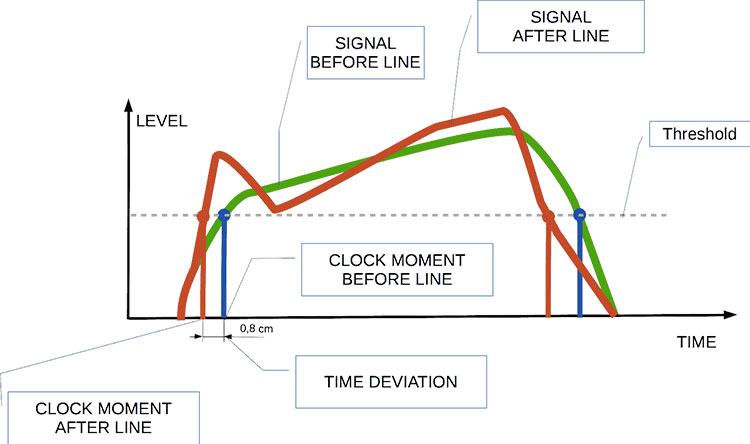
Audio jitter is a common term in the realm of digital audio, but what exactly does it mean? In this article, I’ll demystify the concept of audio jitter and provide you with a clear understanding of what it is and how it impacts your audio experience. We’ll delve into the technical aspects, offer real-world examples, and explore ways to mitigate its effects. So, let’s embark on this journey to unravel the mysteries of audio jitter.
Audio jitter can be thought of as the irregular timing variations in the playback of digital audio signals. These timing variations can manifest as small deviations in the timing of audio samples, leading to audio artifacts like clicks, pops, and distortion. While it may seem like a technical concern, audio jitter can significantly affect your overall listening experience, even if you’re not a seasoned audiophile.
What is Audio Jitter?
Audio jitter, in essence, is the bane of digital audio playback. When you play a digital audio file, it gets converted into an analog signal for your speakers or headphones. The challenge arises when the conversion isn’t perfectly synchronized. Think of it like a metronome that occasionally skips a beat. This timing discrepancy, which we call audio jitter, can distort the sound and result in a less-than-ideal listening experience.
For a real-world analogy, consider a musical ensemble. If the musicians are out of sync, even by a tiny fraction of a second, the result can be dissonant and displeasing to the ear. Similarly, audio jitter disrupts the synchronization between the digital audio source and your playback system.
How Does Audio Jitter Impact Sound Quality?
Audio jitter affects sound quality by introducing unwanted artifacts. These artifacts can include audible clicks, pops, and distortions in the audio stream. To understand the impact, picture a pristine audio signal as a smooth, flowing river. Audio jitter is like tossing pebbles into that river, causing ripples and disturbances. These ripples manifest as audible imperfections in your music or audio.
Think of a jazz drum solo: the precision of the drummer’s beats is crucial to the experience. Even a slight deviation in the rhythm can disrupt the entire performance. Audio jitter works in a similar way, disrupting the timing and rhythm of your audio playback, ultimately degrading the sound quality.
The Technical Aspects of Audio Jitter
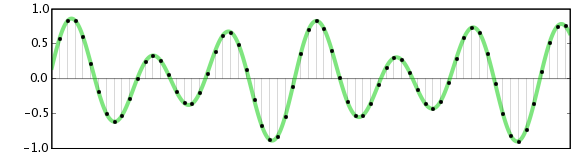
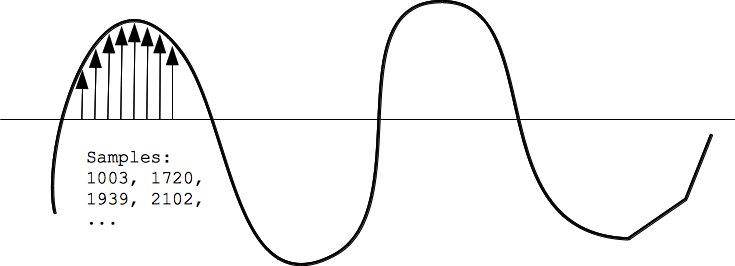
Now, let’s delve into the technical side of audio jitter. In the digital domain, audio is typically stored as discrete samples, each representing the amplitude of the sound at a specific moment. The timing of these samples is critical. Audio jitter occurs when the time intervals between these samples deviate from the ideal, leading to inconsistencies in playback.
To put this in context, think of a digital audio player as a conveyor belt, with each audio sample represented by a box. These boxes must move down the belt at precise intervals to maintain the audio’s integrity. If some boxes move faster or slower than others, you’ll encounter audio jitter, which translates to an erratic and unpleasant listening experience.
Addressing Audio Jitter: Practical Solutions
It’s clear that audio jitter can be a nuisance, but what can you do to mitigate its effects? Fortunately, there are practical solutions available. Some high-end audio equipment includes advanced jitter-reduction technologies. Additionally, using dedicated external digital-to-analog converters (DACs) can help improve audio synchronization.
Think of these solutions as a conductor guiding the musicians in an orchestra, ensuring they play in perfect harmony. Advanced equipment and DACs help maintain the precise timing necessary for high-quality audio playback.
Audio Jitter vs. Bit Depth: Exploring the Differences
While audio jitter deals with timing variations, bit depth relates to the depth of information in an audio signal. It’s essential to distinguish between the two. Bit depth determines the resolution of the audio signal, affecting the dynamic range and subtlety of sound. Audio jitter, on the other hand, impacts timing and synchronization. Both factors play a role in overall audio quality, but they address different aspects of the listening experience.
Think of bit depth as the number of colors on a painter’s palette, while audio jitter is akin to the painter’s brush strokes’ precision. They are both crucial for the final masterpiece, but they address different aspects of the artistic process.
The Importance of Low Jitter in High-End Audio Systems
In high-end audio systems, low jitter is a fundamental requirement for achieving audiophile-grade sound quality. Audiophiles demand the utmost precision and clarity in their audio playback, and any deviation in timing is unacceptable. To achieve this, specialized audio components and meticulous engineering are employed to minimize jitter.
Imagine a fine dining experience where every detail, from the presentation to the taste, is meticulously crafted. Audiophiles seek the same level of perfection in their audio experience, and low jitter is a crucial ingredient in achieving it.
Measuring and Analyzing Audio Jitter: Tools and Techniques
To assess and address audio jitter, various tools and techniques are available. One common method involves using dedicated audio analyzers that can pinpoint timing variations. Additionally, software applications can help diagnose and quantify audio jitter in your playback system.
Think of these tools as diagnostic instruments in a doctor’s office. They allow audio enthusiasts and professionals to diagnose and treat any issues related to audio jitter, ensuring the best possible audio quality.
Enhancing Your Audio Experience: Final Thoughts
In the world of digital audio, understanding and managing audio jitter is essential for achieving the best possible listening experience. Whether you’re a casual music lover or a dedicated audiophile, knowing how audio jitter affects your sound quality can lead to informed choices and better audio equipment investments.
So, the next time you enjoy your favorite music or immerse yourself in a captivating movie, remember the role that precise timing plays in your audio journey. Just as a conductor leads an orchestra to create beautiful music, minimizing audio jitter ensures that the symphony of sound reaches your ears with clarity and perfection.
Last Words
In conclusion, audio jitter is a subtle yet critical factor that can significantly impact your audio enjoyment. By delving into the technical aspects of audio jitter and exploring practical solutions, we’ve uncovered the key to enhancing your audio experience. Whether you’re an audiophile or simply someone who appreciates good sound, understanding and addressing audio jitter is a step toward audio perfection.
Understanding Audio Impulse Response: Exploring the World of Sound
Audio Impulse ResponseAudio Impulse Response
Audio Impulse Response, often referred to as IR, is a critical concept in the world of audio engineering and sound reproduction. It plays a fundamental role in shaping the sound quality of various audio systems, from your home theater setup to professional recording studios. In this article, we will delve into the fascinating realm of Audio Impulse Response, exploring its significance, applications, and the technical intricacies that make it an indispensable tool for audio enthusiasts and professionals alike.
What Is Audio Impulse Response?
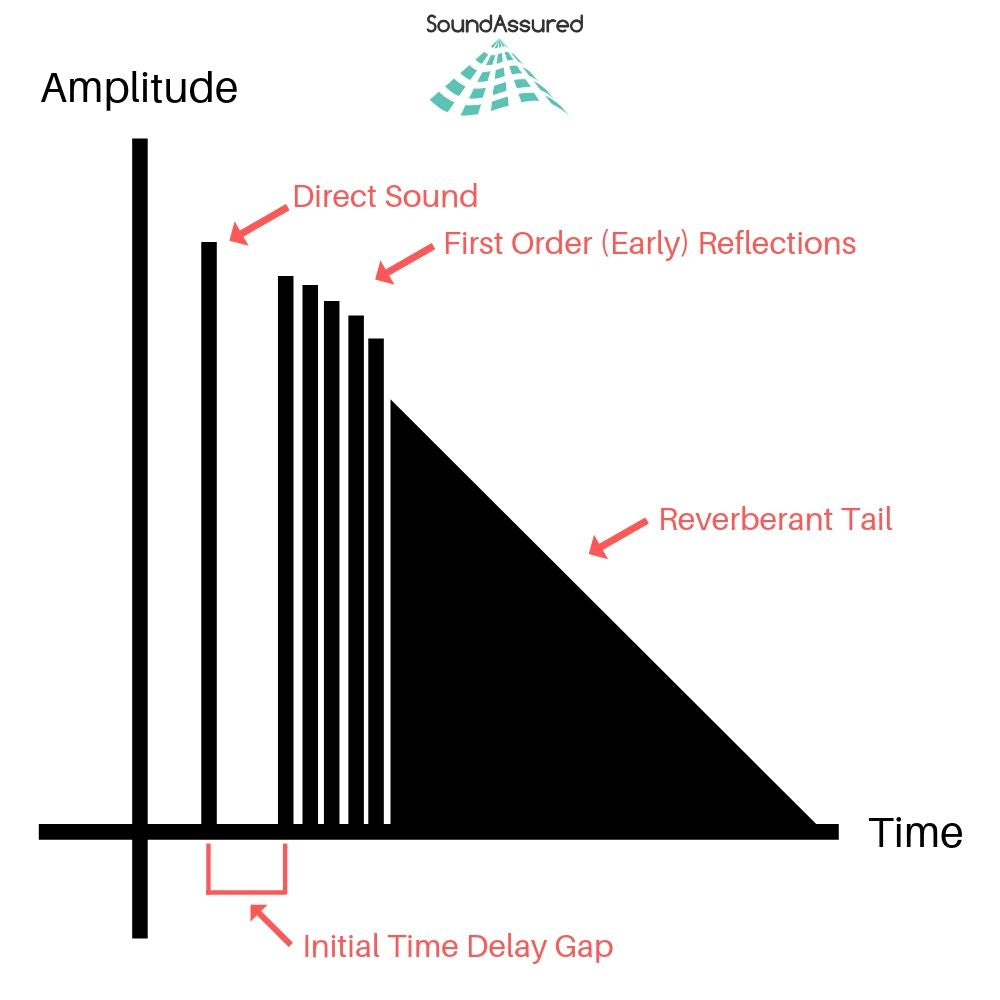
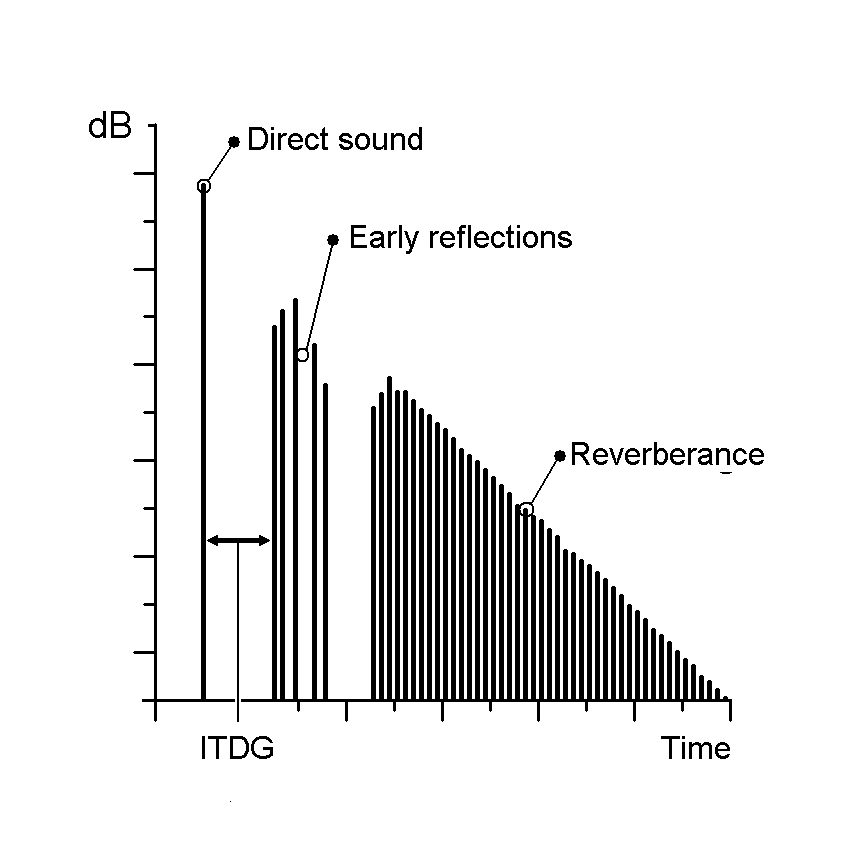
Audio Impulse Response, in its simplest form, is a mathematical description of how a system or device responds to an impulse or a short burst of sound. Think of it as the fingerprint of an audio system or space; it characterizes how that system interacts with sound. When you clap your hands in a room, the way the sound reverberates, bounces off walls, and eventually fades away is precisely what Audio Impulse Response quantifies.
Applications in Real-Life Scenarios
To illustrate its importance in real-life scenarios, consider a concert hall. Audio engineers use Impulse Response to understand how the hall reflects and diffuses sound. By analyzing the hall’s impulse response, they can optimize the placement of microphones and speakers, ensuring that the audience experiences the best possible sound quality.
Similarly, in the realm of home audio, IR plays a pivotal role. When you set up a home theater system, the IR of your room and equipment helps determine the ideal speaker placement and configuration for immersive surround sound.
The Technical Aspects
Now, let’s delve into the technical aspects. Audio Impulse Response is typically represented as a graph, where the x-axis represents time, and the y-axis represents amplitude. This graph shows how a system responds to an impulse over a certain period.
Understanding this graph allows audio engineers to manipulate and optimize audio systems effectively. For example, they can use IR data to simulate different acoustic environments. If you want your living room to sound like a concert hall, you can apply an IR profile that mimics the hall’s characteristics.
Exploring Further: Common Questions
How is Audio Impulse Response Measured?
Measuring Audio Impulse Response involves sending a precisely calibrated audio signal into a system and recording how the system responds. This is typically done using specialized equipment such as a sweep generator and a microphone. The recorded data is then processed to generate the IR graph, which reveals the system’s behavior.
Can Audio Impulse Response Be Altered?
Yes, Audio Impulse Response can be altered to achieve specific audio effects. Digital signal processing techniques allow audio engineers to modify the IR of a system. For example, you can apply reverb to make a recording sound like it was made in a cathedral or add echo for a spacious effect.
What’s the Connection Between IR and Speaker Design?
Speaker design relies heavily on understanding IR. Speaker manufacturers use IR data to design speakers that produce the desired sound characteristics. By fine-tuning the shape of the speaker cone and other components based on IR analysis, they can create speakers with optimal sound quality.
Keywords with Identical Search Intent
1. Acoustic Response Analysis
Acoustic Response Analysis is a related concept to Audio Impulse Response, focusing on the analysis of sound behavior in acoustic spaces. It is essential for designing concert halls, recording studios, and even home theaters.
2. Sound System Optimization
Sound System Optimization involves using Audio Impulse Response to fine-tune audio systems for the best possible sound quality. This applies to both professional setups and home audio systems.
3. Room Acoustics Enhancement
Improving Room Acoustics is a common goal in audio engineering. Understanding the IR of a room helps in enhancing acoustics through sound-absorbing materials, diffusers, and speaker placement.
4. Virtual Acoustic Modeling
Virtual Acoustic Modeling utilizes Audio Impulse Response data to simulate different acoustic environments in virtual or augmented reality applications. This is valuable for architectural acoustics and immersive audio experiences.
Last Words
In conclusion, Audio Impulse Response is a multifaceted concept that underpins much of the audio engineering world. From concert halls to your home audio setup, it influences how we experience sound in various environments. By grasping its technical intricacies and applications, you can gain a deeper appreciation for the magic that happens behind the scenes, making our audio experiences truly exceptional. So, the next time you enjoy a movie, concert, or even a phone call, remember that Audio Impulse Response is playing a crucial role in delivering that pristine sound to your ears.
Exploring Audio Transients: The Heartbeat of Sound
Audio TransientsAudio Transients
Audio transients are like the heartbeat of sound, the dynamic moments that give life and character to music and audio recordings. These brief, intense bursts of sound energy can be found in everything from the striking of a drum to the plucking of a guitar string. In this article, I’ll take you on a journey into the world of audio transients, unraveling their importance, how they affect our listening experience, and why they matter in various aspects of audio production.
Unveiling Audio Transients: The Basics
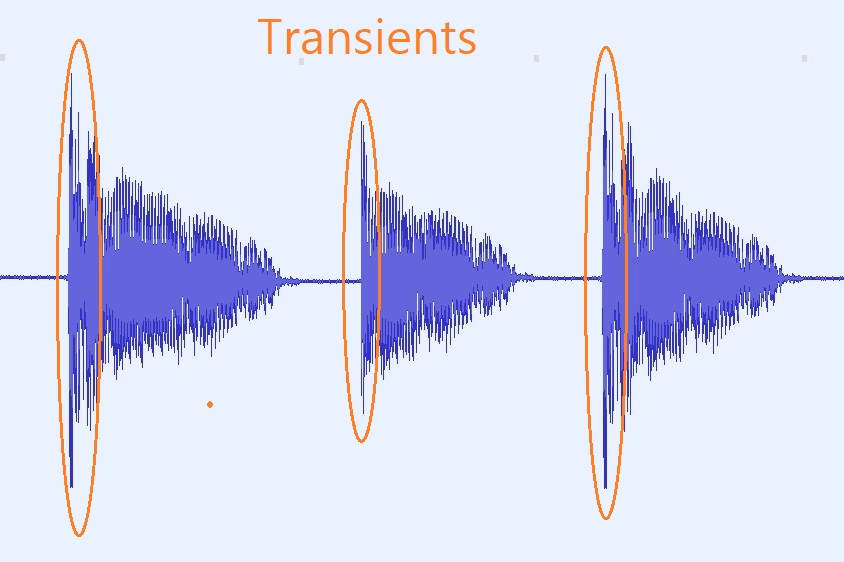
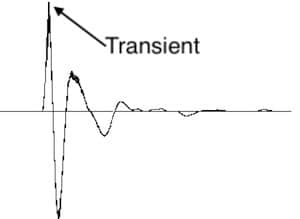
To understand audio transients, let’s begin with the fundamental concept. A transient is a sudden, short-lived spike in audio signal amplitude. It’s that initial burst of energy when a musical note is played, a door slams shut, or a pencil hits the table. Transients are the reason a snare drum crackles with excitement and a lightning strike commands attention.
Think of audio transients as the punctuation marks in a sentence. They emphasize and give context to the sound that follows. Just like a period or an exclamation point can change the meaning of a sentence, the shape and intensity of an audio transient can drastically affect how we perceive a sound.
People Also Asked: Answering Your Curiosities
Let’s dive into some common questions people have about audio transients:
How Do Audio Transients Impact Music?
Audio transients are the pulse of music. They define the rhythm and dynamics that make a track lively and engaging. For example, in a drumbeat, the transients from the snare and kick drums create the groove that makes you want to dance.
Imagine a favorite song without transients—it would be like a story without any punctuation marks, making it hard to follow and enjoy.
Can Audio Transients Be Controlled?
Yes, they can! Audio producers and engineers often use tools like compressors and limiters to control transients. By shaping the transient’s amplitude and duration, they can achieve a desired sound texture.
Think of it as adjusting the force with which a hammer strikes a nail. Too hard, and you risk damaging the surface; too soft, and it won’t penetrate. Engineers find that sweet spot to shape the sound precisely.
What Is Peak vs. RMS in Audio Transients?
Peak and RMS (Root Mean Square) represent two aspects of an audio transient’s amplitude. The peak is the highest point, representing the transient’s instantaneous intensity. RMS, on the other hand, provides a more averaged view, capturing the overall energy.
Picture a heartbeat monitor. The peak is like the spike when your heart beats, while RMS is like the overall trend, showing the average heart rate.
Keywords with Identical Search Intent
Now, let’s explore keywords related to audio transients that users often search for:
Delving deeper into audio production, we encounter techniques like transient shaping and transient design. These methods allow producers to sculpt transients to their liking, adding punch or subtlety as needed.
Consider transient shaping as sculpting clay. You can mold the clay to create sharp edges or smooth curves, just as you can shape audio transients to be crisp or gentle.
Audio Transients in Live Sound: A Vital Element
In live sound engineering, managing transients is crucial for delivering a balanced and impactful performance. Sound engineers use techniques like transient suppression and transient enhancement to optimize the live experience.
Imagine a live concert as a massive puzzle. Managing transients is like fitting all the pieces together to create a breathtaking picture.
Mastering Transients in Audio Recording
Audio engineers during the mastering process focus on transients to ensure that a track sounds polished and cohesive. Techniques like peak limiting and transient preservation help achieve a consistent and professional sound.
Think of mastering as the final touch-up on a painting. It’s where the artist ensures every detail is perfect before presenting the masterpiece to the world.
Last Words
In the symphony of sound, audio transients are the conductor’s baton, guiding and shaping the musical narrative. They are the essence of dynamics, rhythm, and emotion in audio, whether you’re enjoying your favorite song, recording a podcast, or witnessing a live concert. Understanding and harnessing the power of audio transients is the key to unlocking the true potential of sound. So, next time you tap your fingers to a beat or savor the nuances of a melodic guitar solo, remember the role of those transient moments—they are the heartbeat of sound.
Digital Bit Depth in AudioDigital Bit Depth in Audio
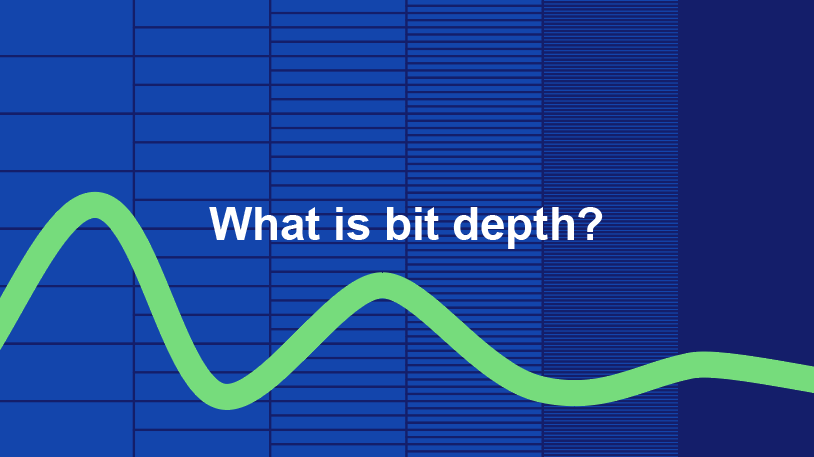
Digital bit depth in audio is a fundamental concept that impacts the quality and fidelity of digital sound. Bit depth, also known as audio resolution, refers to the number of bits used to represent the amplitude of an audio signal at a specific point in time. It essentially quantifies how finely audio samples are taken in the digital domain.
To put it simply, the bit depth determines the precision with which sound is captured and stored digitally. Common bit depths in digital audio are 16-bit, 24-bit, and 32-bit, with higher numbers providing greater precision.
Audio Bit Depth Explained
Understanding audio bit depth is essential for anyone seeking to grasp the intricacies of digital audio recording and playback. At its core, audio bit depth is a measure of how accurately an analog sound wave’s amplitude is captured and converted into a digital signal.
In practical terms, a higher bit depth signifies that the digital representation of an audio waveform closely mirrors the original analog signal, resulting in reduced quantization error or “noise.” Quantization error occurs when an analog value is approximated to the nearest digital value, and lower bit depths can make this error more noticeable, especially in quieter sections of audio.
Bit Depth and Audio Quality
Bit depth plays a pivotal role in determining the quality and precision of digital audio. The relationship between bit depth and audio quality is akin to an artist’s palette of colors. A higher bit depth provides a broader spectrum of shades and nuances, making the digital representation of sound more faithful to the original analog source.
For example, a 16-bit system offers 65,536 discrete amplitude levels, whereas a 24-bit system provides an astonishing 16,777,216 levels. This heightened precision results in smoother and more detailed audio representation, particularly in the subtle and quiet passages of a recording.
Digital Audio Resolution
Digital audio resolution, closely linked to bit depth, is a critical factor in capturing and reproducing sound accurately. It refers to the level of detail and clarity in digital audio. The greater the bit depth, the higher the resolution, and the finer the nuances that can be captured.
In the realm of audio production, higher digital audio resolution means that the subtle nuances, such as the intricacies of a singer’s voice or the delicate harmonics of a musical instrument, are preserved with remarkable fidelity.
Bit Depth in Music Recording
In the world of music recording, selecting the appropriate bit depth is a crucial decision that profoundly affects the final audio quality. Musicians and producers carefully consider bit depth when recording to ensure that the nuances and dynamics of their performances are accurately captured.
In practice, 24-bit recording is a popular choice among music professionals. This bit depth provides an ideal balance between precision and file size, allowing for the capture of subtle details while minimizing the risk of bit-depth noise in quieter sections of the recording.
Audio Signal Precision
Audio signal precision, often measured by bit depth, is a key consideration in professional audio production. It relates to how faithfully an audio system can reproduce the original sound. The higher the bit depth, the greater the precision in representing the analog signal, resulting in cleaner and more accurate audio playback.
For audio engineers and producers, achieving optimal audio signal precision is paramount. It ensures that the music they create is heard as intended, with all the intricacies and subtleties faithfully reproduced.
Bit Depth in Analog-to-Digital Conversion
Understanding how bit depth influences analog-to-digital conversion is essential for maintaining audio fidelity. Analog-to-digital conversion is the process of transforming continuous analog signals into discrete digital values. Bit depth determines the number of discrete values that can represent the amplitude of the analog signal during this conversion.
In essence, higher bit depth means that the analog-to-digital conversion process captures more precise details from the analog signal. This is particularly critical when working with high-quality audio sources where preserving every nuance is paramount.
Sound Fidelity and Bit Depth
Sound fidelity, the faithfulness with which audio is reproduced, is intricately linked to bit depth. A higher bit depth generally results in better audio fidelity, as it allows for the accurate representation of both subtle nuances and powerful crescendos in music.
Consider classical music or jazz, where dynamics play a significant role. With a higher bit depth, the audio system can faithfully reproduce the full range of soft and loud passages, ensuring that the listener experiences the music as intended by the performers and composers.
Impact of Bit Depth on Audio Playback
The impact of bit depth on audio playback is a critical factor in delivering a high-quality listening experience. When you listen to digital audio, the bit depth of the source file significantly affects what you hear.
In simple terms, higher bit depth in the source audio file results in a more faithful and detailed listening experience. This becomes especially noticeable in acoustic instruments, where the subtle nuances of a violin’s bowing or a pianist’s touch can be lost in lower bit depth recordings.
How Does Bit Depth Affect the Quality of Digital Audio?
Exploring how bit depth affects the quality of digital audio is crucial for audiophiles and audio professionals alike. It’s the bit depth that determines how accurately the audio signal is captured and reproduced, ultimately influencing the overall audio quality.
A higher bit depth translates to a more faithful representation of the original sound, with fewer imperfections or noise introduced during the recording and playback processes. This improvement in audio quality is particularly noticeable in genres that require a wide dynamic range and high levels of detail.
What Is the Role of Bit Depth in Recording Music Digitally?
The role of bit depth in recording music digitally is a multifaceted aspect of audio production. When musicians and engineers step into the studio, they must make critical decisions about bit depth to ensure that their recordings capture the essence of the music.
Choosing the appropriate bit depth is a balancing act. While higher bit depths provide greater precision and fidelity, they also result in larger file sizes. Musicians often opt for 24-bit recordings as they strike a harmonious balance between capturing subtle details and managing storage requirements.
How Is Audio Fidelity Influenced by Digital Bit Depth?
Understanding how digital bit depth influences audio fidelity is key to achieving top-tier sound quality. Audio fidelity, often described as the faithfulness of audio reproduction to the original source, is a critical consideration for audio professionals and enthusiasts.
With a higher bit depth, audio fidelity is enhanced because the digital representation of the sound is more detailed and accurate. This is especially crucial in professional audio production, where maintaining the highest possible fidelity is paramount.
Can You Explain the Importance of Bit Depth in Analog-to-Digital Conversion for Audio?
Explaining the importance of bit depth in analog-to-digital conversion sheds light on the intricacies of audio processing. Analog-to-digital conversion is the bridge that allows analog sound to be translated into a digital format that can be manipulated and stored. Bit depth plays a pivotal role in this process.
Higher bit depths ensure that the analog-to-digital conversion process captures more fine-grained details from the original analog signal. This is essential for preserving the richness and subtleties of audio, whether it’s a soaring vocal performance, the resonance of a musical instrument, or the ambiance of a recording environment.
What Is the Relationship Between Bit Depth and Dynamic Range in Digital Audio?
The relationship between bit depth and dynamic range in digital audio is a crucial one to understand. Dynamic range refers to the difference between the softest and loudest sounds that an audio system can reproduce. Bit depth plays a pivotal role in defining this dynamic range.
Higher bit depths translate to a wider dynamic range, allowing for the faithful reproduction of both subtle nuances and powerful crescendos in music. This is essential for maintaining audio fidelity, especially in genres with a wide range of dynamics, such as classical music and jazz.
How Does Bit Depth Impact the Accuracy of Audio Playback?
The impact of bit depth on the accuracy of audio playback cannot be overstated. When you listen to music or any digital audio content, the bit depth of the source file has a profound influence on what you hear.
Higher bit depth in the source audio file means that the playback faithfully represents the original recording. It allows for the subtlest details and nuances to shine through, creating a more immersive and engaging listening experience. In essence, higher bit depth contributes to the accuracy and realism of audio playback.
Are There Industry Standards for Bit Depth in Digital Audio Recording?
In the world of professional audio recording, industry standards play a vital role in guiding the use of bit depth. While there’s flexibility in choosing bit depths based on specific requirements, certain standards are commonly followed.
For instance, most audio CDs use 16-bit resolution, which offers high-quality playback suitable for the majority of consumers. However, in the realm of studio recording and mastering, 24-bit and even 32-bit formats are commonly employed to ensure the highest level of fidelity.
What Are the Advantages of Using Higher Bit Depth in Audio Processing?
Using higher bit depth in audio processing offers several distinct advantages. These advantages extend to both recording and post-production stages, and they significantly impact the overall quality of audio content.
Enhanced Audio Fidelity
One of the primary advantages is enhanced audio fidelity. Higher bit depths provide more precision in capturing and reproducing audio, resulting in recordings that faithfully preserve the original sound. This is particularly important in professional music production and critical listening environments.
Greater Dynamic Range
Higher bit depths also grant a greater dynamic range, allowing for the faithful representation of a wide range of sound intensities. This is particularly beneficial in genres of music or audio content with stark differences in volume, as it ensures that both delicate subtleties and powerful peaks are accurately reproduced.
How Can I Optimize Bit Depth for Better Audio Resolution?
For those involved in audio production or seeking the best listening experience, optimizing bit depth is crucial. It’s not just about using the highest available bit depth but also considering the entire audio workflow and ensuring that bit depth aligns with specific needs.
Matching Bit Depth to Audio Source
When recording audio, it’s essential to match the bit depth to the dynamic range of the audio source. For instance, a live jazz performance with wide dynamic swings benefits from 24-bit recording, while a podcast with a more consistent volume may suffice with 16-bit. This approach minimizes bit-depth noise while preserving audio quality.
Post-Production Considerations
During post-production, maintaining a high bit depth throughout the editing and mixing process is advisable. Only when preparing the final distribution format, such as a CD or streaming file, should the audio be converted to a lower bit depth to match the destination format.
The Benefits of Greater Bit Depth in Digital Audio Systems
As technology advances, digital audio systems are offering higher bit depths as an option. But what are the practical advantages of embracing these extended bit depths?
Future-Proofing Audio
One significant advantage is future-proofing your audio recordings. With higher bit depths, your recordings are better equipped to stand the test of time. As playback systems and formats improve, your high-bit-depth recordings will continue to sound exceptional, ensuring that your music or audio content remains relevant for years to come.
Editing Flexibility
Greater bit depths also provide increased editing flexibility. Audio engineers can apply effects and processing without worrying as much about introducing quantization errors or compromising audio quality. This freedom allows for more creative experimentation during the mixing and mastering stages, ultimately leading to more polished and refined audio content.
In conclusion, digital bit depth is a critical factor in the world of audio, influencing both recording and playback quality. Understanding its importance, selecting the appropriate bit depth for various scenarios, and embracing higher bit depths when possible can lead to an audio experience that is richer, more immersive, and of the highest fidelity. Whether you’re a musician, audio engineer, or simply a music enthusiast, appreciating the role of bit depth can elevate your audio journey to new heights.
Audio bit depth refers to the number of bits used to represent the amplitude of an audio signal at each sample point. In simpler terms, it determines the dynamic range of digital audio. A higher bit depth allows for a more detailed representation of sound, capturing subtle nuances and minimizing quantization noise.
Imagine bit depth as a measurement of how finely audio is divided into individual steps. For instance, a 16-bit audio recording has 65,536 possible amplitude levels, while a 24-bit recording offers a staggering 16,777,216 levels. This increased granularity results in smoother, more accurate sound reproduction.
Understanding Bit Depth in Audio
To grasp the significance of bit depth, consider it as the shades of color in a painting. A higher bit depth provides a broader palette of colors, allowing for a more accurate depiction of the original image. Similarly, in audio, a greater bit depth captures a wider range of volume levels, preserving the subtleties of a musical performance or the nuances of a voice.
In practical terms, when you listen to music or a podcast, a higher bit depth ensures that you can hear the softest whispers and the loudest drum hits without distortion or loss of detail. It’s like having a more precise lens to view the sonic landscape.
Audio Resolution and Bit Depth
Bit depth and audio resolution are closely linked. Audio resolution refers to the level of detail and accuracy in an audio recording. Bit depth plays a pivotal role in determining this resolution. Think of it as the difference between watching a video in standard definition versus high definition. A higher bit depth offers a more lifelike and faithful representation of sound.
When recording or listening to music, you’ll often encounter terms like “16-bit” or “24-bit.” These numbers indicate the bit depth of the audio, with 24-bit audio being the gold standard for high-quality recordings. It’s akin to having a sharper, more detailed image in photography.
Now, let’s explore more facets of bit depth in audio.
Importance of Bit Depth in Sound
Bit depth is paramount in the world of sound because it directly impacts audio fidelity and the ability to reproduce music or voice accurately. It ensures that every subtle nuance, from the softest piano notes to the powerful guitar riffs, is faithfully captured and played back with precision.
Consider this: when recording a classical piano performance, the pianist’s delicate touch on the keys is as vital as the thunderous crescendos. A higher bit depth preserves the intricate dynamics, making you feel as if you are sitting in the concert hall, immersed in the music.
Bit depth is the foundation of audio quality, and understanding its role can help you appreciate the importance of using higher bit depths in audio production and playback.
How Bit Depth Affects Audio Quality
The impact of bit depth on audio quality is akin to the role of paint quality in a masterpiece. Just as a skilled artist requires high-quality pigments for a vivid painting, audio engineers rely on a greater bit depth for lifelike and rich audio recordings.
A lower bit depth might result in noticeable “stepping” or quantization noise, especially in quiet passages of a recording. This noise can be distracting and diminish the overall listening experience. On the other hand, a higher bit depth provides a smooth, natural curve to the audio waveform, minimizing these artifacts and delivering pristine sound.
Consider your favorite music track—the artist’s emotions, the resonance of instruments, and the atmosphere of the recording venue. All these subtleties are better preserved and conveyed through higher bit depth, elevating your listening experience to a new level.
Bit Depth in Digital Audio
In the digital realm, bit depth plays a pivotal role in the accuracy of audio representation. Think of it as pixels in a high-resolution photograph; more pixels mean finer details. Similarly, a higher bit depth translates to a more accurate depiction of sound.
In applications like digital audio workstations (DAWs) and music players, you often have the option to choose between different bit depths for your audio projects. Opting for a higher bit depth can lead to more professional-sounding results, particularly in the realms of music production, film scoring, and sound design.
Bit Depth vs. Sample Rate
While bit depth and sample rate are both critical aspects of digital audio, they serve different purposes. Bit depth determines the accuracy of amplitude representation, while sample rate governs how often the audio waveform is sampled per second.
Picture bit depth as the color depth in a photograph and sample rate as the frames per second in a video. A higher bit depth allows for greater tonal accuracy, while a higher sample rate captures more audio snapshots per second, preserving high-frequency content.
In many scenarios, a balanced approach between bit depth and sample rate is essential to achieve optimal audio quality. The synergy between these two factors ensures that audio recordings faithfully capture the richness and subtleties of the original source.
Bit Depth in Music Production
For music producers, bit depth is a critical consideration when working on audio projects. It influences the quality of sound recordings and the ability to manipulate audio during the production process.
When mixing and mastering music, a higher bit depth provides ample headroom for processing audio without introducing artifacts or degrading quality. This allows producers to apply effects, equalization, and compression with greater precision.
Additionally, when releasing music, opting for a higher bit depth ensures that your audience experiences the full depth and nuance of your compositions, whether they’re listening through high-end headphones or a powerful sound system.
16-Bit vs. 24-Bit Audio
The choice between 16-bit and 24-bit audio often arises when considering audio quality and storage requirements. A 16-bit audio file occupies less space compared to a 24-bit file, but it also has limitations in capturing subtle audio details.
16-bit audio is akin to a compact camera with limited resolution, suitable for casual snapshots. In contrast, 24-bit audio offers the quality of a professional DSLR camera, capturing a broader dynamic range and preserving the finer nuances of sound.
When deciding between the two, it’s essential to consider the specific use case. For audiophiles, professional audio production, and high-end sound systems, 24-bit audio is the preferred choice for its ability to deliver an immersive and faithful listening experience.
Bit Depth for Audio Recording
In the realm of audio recording, selecting the appropriate bit depth is a pivotal decision. It directly affects the quality and flexibility of the recorded material, whether you’re tracking vocals, instruments, or ambient sounds.
Recording at a higher bit depth, such as 24-bit, provides audio engineers with a safety net during the recording process. It allows them to capture a wide dynamic range without the risk of clipping or distortion. This is particularly valuable when dealing with unpredictable elements in live recordings or capturing the subtleties of acoustic instruments.
In essence, bit depth choice during audio recording is like choosing the canvas size for a painting. A larger canvas provides more room for creativity and detail, and a higher bit depth offers greater sonic canvas for audio professionals.
Final Words
In the realm of audio, bit depth serves as the bedrock of quality and fidelity. It determines how faithfully sound is captured, preserved, and reproduced. Understanding the importance of bit depth allows you to appreciate the nuances in your favorite music, the clarity in podcasts, and the immersive soundscapes in movies.
Whether you’re an aspiring musician, an audio engineer, or simply a passionate listener, recognizing the role of bit depth in audio enriches your experience. It’s the difference between seeing the world in black and white and experiencing it in full color.
So, the next time you enjoy your favorite song or immerse yourself in a cinematic adventure, remember that bit depth is the silent hero behind the scenes, ensuring that every sonic detail reaches your ears with precision and clarity.
Mp3: Joint Stereo and Stereo modesMp3: Joint Stereo and Stereo modes
What is Mp3?
Mp3 is a popular audio format that is widely used for music and other audio files. It is a compressed audio format that allows for smaller file sizes without sacrificing audio quality. Mp3 uses a lossy compression algorithm that removes some of the audio data that is deemed less important to the human ear. This results in a smaller file size, but also a slight reduction in audio quality.
Personally, I have been using Mp3 for many years to store and listen to my music collection. I have always been impressed with the quality of the audio, even at lower bitrates. However, I have also noticed that some Mp3 files sound better than others, even when they have the same bitrate. This is where Joint Stereo and Stereo modes come into play.
Joint Stereo vs Stereo modes
Joint Stereo and Stereo modes are two different ways of encoding stereo audio in Mp3 files. Stereo mode is the traditional way of encoding stereo audio, where each channel (left and right) is encoded separately. Joint Stereo, on the other hand, uses a more advanced encoding technique that takes advantage of similarities between the left and right channels to reduce the amount of data that needs to be encoded.
In my experience, Joint Stereo mode can produce better sounding Mp3 files than Stereo mode, especially at lower bitrates. This is because Joint Stereo mode is able to preserve more of the original audio data, resulting in a more accurate representation of the original audio. However, not all Mp3 encoders support Joint Stereo mode, so it is important to check the settings of your encoder to ensure that it is being used.
Conclusion
In conclusion, Mp3 is a popular audio format that is widely used for music and other audio files. Joint Stereo and Stereo modes are two different ways of encoding stereo audio in Mp3 files, with Joint Stereo mode being the more advanced and potentially better sounding option. If you are looking to create high-quality Mp3 files, it is important to understand the differences between these two modes and to choose the one that best suits your needs.
Final words: Mp3 is a versatile and widely used audio format that can provide high-quality audio at lower file sizes. By understanding the differences between Joint Stereo and Stereo modes, you can create Mp3 files that sound great and take up less space on your device.
signal-to-noise ratio audiosignal-to-noise ratio audio
Understanding the Basics of Audio Quality
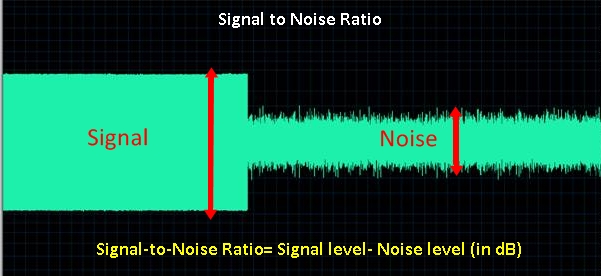
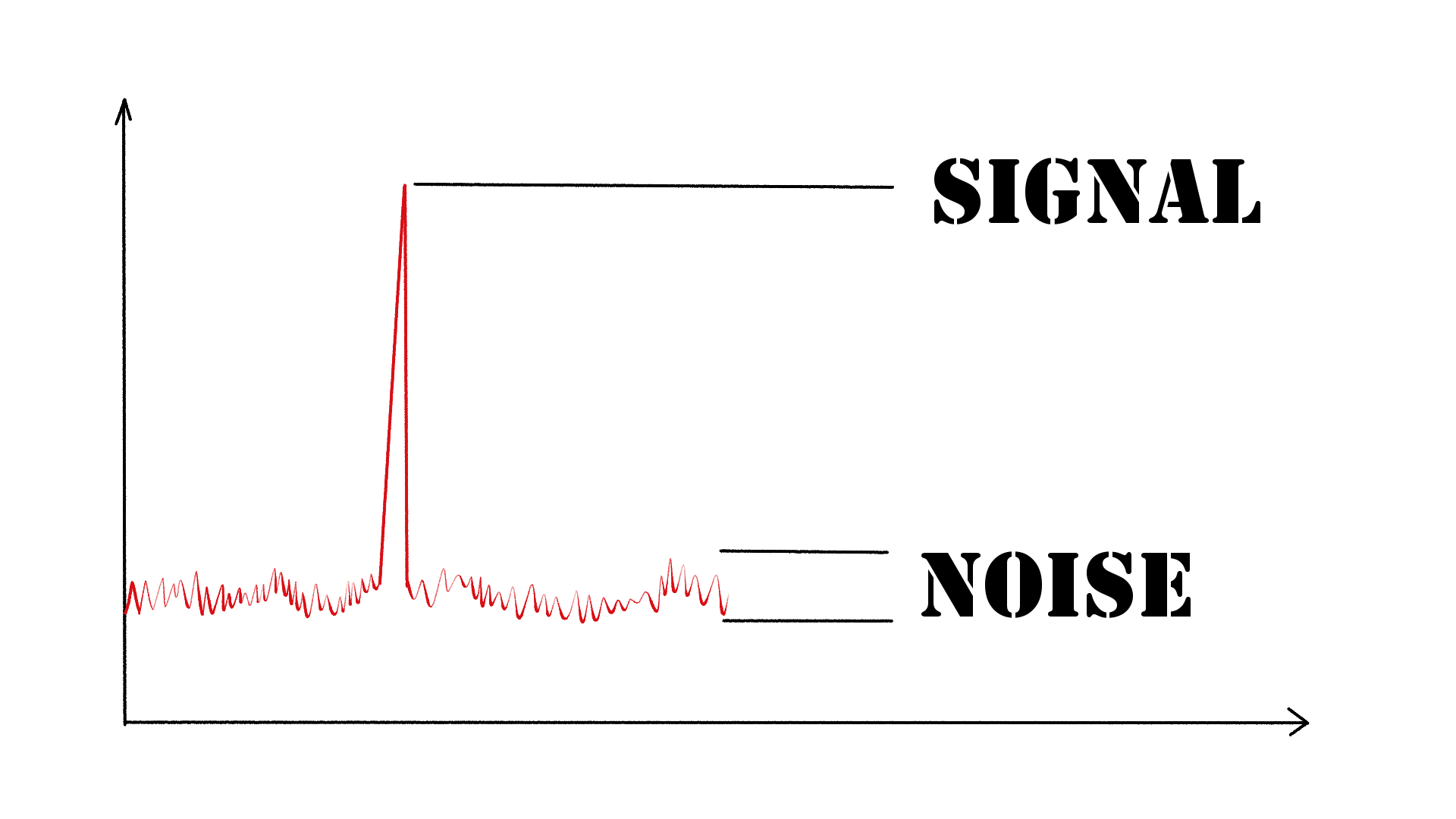
As an audio engineer, I have come across many questions about audio quality, and one of the most common ones is “What is a signal-to-noise ratio in audio?” In simple terms, the signal-to-noise ratio (SNR) is the difference between the desired audio signal and the background noise. A high SNR means that the desired signal is much stronger than the noise, resulting in better audio quality.
When it comes to audio quality, there are many factors to consider, such as audio processing, normalization, compression, dynamics, and distortion. Each of these factors can affect the SNR and, therefore, the overall audio quality. For example, audio normalization can help to increase the SNR by adjusting the volume levels of the audio signal, while audio compression can reduce the dynamic range of the audio signal, resulting in a more consistent SNR.
The Importance of Audio Normalization
As someone who has worked with audio for many years, I can attest to the importance of audio normalization. Normalization is the process of adjusting the volume levels of an audio signal to a standard level, which can help to improve the SNR and overall audio quality.
One of the benefits of audio normalization is that it can help to prevent distortion in the audio signal. When an audio signal is too loud, it can cause distortion, which can be heard as a buzzing or crackling sound. By normalizing the audio signal, you can ensure that it is at a safe and consistent volume level, which can help to prevent distortion and improve the overall audio quality.
The Role of Audio Compression in Audio Quality
Audio compression is another important factor to consider when it comes to audio quality. Compression is the process of reducing the dynamic range of an audio signal, which can help to make it sound more consistent and balanced.
One of the benefits of audio compression is that it can help to improve the SNR by reducing the background noise in the audio signal. However, it is important to use compression carefully, as too much compression can result in a loss of detail and dynamics in the audio signal. As with all aspects of audio engineering, finding the right balance is key to achieving the best possible audio quality.
Final Words:
In conclusion, understanding the basics of audio quality is essential for anyone working with audio. Whether you are an audio engineer, musician, or just someone who enjoys listening to music, knowing about factors such as SNR, normalization, compression, dynamics, and distortion can help you to achieve the best possible audio quality. And if you are looking for a solution to improve your audio quality, consider using mp4gain, a powerful and easy-to-use audio normalizer and converter that can help you to achieve consistent and high-quality audio.




Comments:
I had no idea about the history of WAV! Thanks for sharing, this article is a gem!
I always wondered why WAV files were so big, now I know! This article clarified a lot for me.
WAV is my go-to format for recording music. It’s like working with a raw diamond – pure and unaltered.
Can you provide more details on the alternatives like FLAC and AIFF? I’m curious to learn more about them.
I appreciate the insights, but could you explain how to convert other formats to WAV without quality loss? That would be very helpful.
Great article! I’ve been using WAV files for my podcast, and the quality is outstanding. It’s worth the storage space.
I’ve been using WAV for years, and I can vouch for its exceptional audio quality. It’s like having a high-definition audio experience.
WAV’s compatibility is a lifesaver. It’s like a universal remote for audio files, always works like a charm.
I didn’t know that CDs used WAV format. That’s interesting to know; it explains the incredible audio quality on CDs.
The comparison to a raw diamond is spot on. WAV files truly capture the essence of sound without any loss.
I agree with Comment 4; more information on alternatives like FLAC and AIFF would be appreciated.
Thanks for this informative article! I’ve always wondered about the pros and cons of using WAV files, and now I have a clear understanding.
This article should be the go-to guide for anyone working with audio. It provides valuable insights that are hard to find elsewhere.
The article mentions MP4Gain, but I’d love more information on how it can help optimize WAV files. Can you elaborate on that?