Let’s talk about MP3 Error Resilience in Noisy Environments
As an audio engineering specialist, I’ve encountered challenges related to maintaining audio quality in adverse conditions. In this article, we’ll explore the intricacies of MP3 error resilience, its importance, underlying mechanisms, and practical implications for audio playback in noisy environments.
Understanding MP3 Error Resilience
In noisy environments, MP3 files are susceptible to errors that degrade audio quality due to network congestion, electromagnetic interference, or hardware limitations. Despite its widespread use, MP3 lacks built-in error detection and correction mechanisms, making it vulnerable to data loss or corruption.
The Importance of Error Resilience
Preservation of Audio Quality: Errors in MP3 files can manifest as audible artifacts such as clicks or pops, detracting from the listening experience.
Robustness in Transmission: Error-resilient MP3 encoding techniques mitigate data loss during transmission, ensuring reliable playback.
Compatibility with Legacy Devices: Many legacy devices lack advanced error correction, necessitating error-resilient MP3 encoding for compatibility.
Enhancing MP3 Error Resilience
Various encoding techniques and playback strategies can improve error resilience in MP3 files.
Forward Error Correction (FEC)
Embedded Redundancy: FEC algorithms introduce redundant data into MP3 files for error detection and correction.
Reed-Solomon Coding: FEC schemes like Reed-Solomon coding add parity check symbols to MP3 frames for error recovery.
Bitstream Parsers and Sync Detection
Robust Parsing: Advanced parsers recover from synchronization errors in MP3 streams, ensuring uninterrupted playback.
Header Verification: Parsers verify header information in MP3 frames to detect and discard corrupted data.
Noise Reduction Techniques
Adaptive Filtering: Algorithms analyze audio signals in real-time, suppressing background noise for clearer playback.
Spectral Subtraction: Methods estimate and subtract noise components from MP3 audio, improving signal-to-noise ratio.
Latest words on MP3 Error Resilience in Noisy Environments
By understanding MP3 error resilience mechanisms and implementing robust encoding and playback strategies, we can ensure optimal audio quality in challenging environments.
Comments:
This article sheds light on the crucial aspect of MP3 error resilience. I appreciate the clear explanations and practical advice provided.
– SoundEnthusiast99
MP3 error resilience is a topic often overlooked but essential for maintaining audio quality. Thanks for addressing it comprehensively!
– MusicMan123
As an audio professional, I found this article informative and insightful. Understanding MP3 error resilience is crucial for delivering high-quality audio experiences.
Unlocking the Mysteries of M4A Channel Configuration
In this comprehensive guide, we delve deep into the intricacies of M4A channel configuration, providing invaluable insights into its importance, optimization techniques, and practical applications. Let’s unravel the mysteries together and unlock the full potential of M4A audio files.
Understanding M4A Channels
Embark on a journey to understand the fundamentals of M4A channel configuration. From mono to stereo and beyond, explore how channels influence audio perception and playback experience. Discover the significance of channel mapping and its impact on audio spatialization.
Exploring Mono vs. Stereo
Delve into the differences between mono and stereo configurations, uncovering their unique characteristics and suitability for various audio scenarios. Learn how mono channels consolidate audio signals, while stereo channels create immersive soundscapes.
Definition and characteristics of mono and stereo channels
Advantages and limitations of mono and stereo configurations
Real-life examples illustrating the use of mono and stereo channels
Optimizing Surround Sound Configurations
Take your audio experience to the next level with surround sound configurations. Explore the intricacies of multi-channel setups, including 5.1 and 7.1 surround sound, and their applications in home theaters, gaming, and immersive audio experiences.
Overview of surround sound configurations
Installation and setup tips for optimal surround sound performance
Real-world examples showcasing the immersive capabilities of surround sound
Practical Applications of M4A Channel Configuration
Uncover the practical implications of M4A channel configuration across various industries and domains. From music production to multimedia entertainment, explore how channel mapping influences audio quality, compatibility, and user experience.
Enhancing Audio Production Workflows
Gain insights into how M4A channel configuration enhances audio production workflows. Discover how audio engineers leverage channel mapping to achieve spatial depth, clarity, and realism in their recordings.
Best practices for channel configuration in music production
Tools and techniques for efficient channel mapping
Case studies highlighting successful audio production projects
Delivering Immersive Multimedia Experiences
Explore the role of M4A channel configuration in delivering immersive multimedia experiences. From cinematic soundtracks to virtual reality applications, understand how optimized channel mapping enhances audio immersion and engagement.
Integration of M4A channel configuration in multimedia content creation
Impact of channel mapping on user engagement and satisfaction
Case studies demonstrating the effectiveness of immersive audio experiences
Latest Words on M4A Channel Configuration
In conclusion, M4A channel configuration is a critical aspect of audio engineering and multimedia content creation. By understanding its nuances and optimizing channel mapping techniques, professionals can elevate audio quality and deliver immersive experiences across various platforms and industries.
Comments:
This article provided invaluable insights into M4A channel configuration, shedding light on its importance and practical applications. I’m excited to apply these techniques to my audio projects!
– AudioEnthusiast123
As someone new to audio production, I found this guide to be incredibly informative and easy to understand. The explanations were clear, and the examples helped clarify complex concepts. Thank you!
– MusicNovice456
I appreciated the focus on practical applications and real-world examples throughout the article. It made the information more relatable and actionable. Looking forward to more content like this!
– SoundPro789
While the article provided a good overview, I wish it had delved deeper into specific audio editing software and techniques for optimizing channel configuration. Overall, a helpful resource!
AC-4 Audio Coding: Spectral Band Replication Unveiled
Latest Insights on AC-4: Spectral Band Replication
Embark on a sonic journey as we unravel the mysteries behind AC-4’s Spectral Band Replication. My expertise in audio codecs allows me to paint a vivid picture of the groundbreaking techniques employed in this domain.
Let’s Talk about AC-4
Navigating through the intricacies of AC-4 demands more than a cursory glance. Drawing from years of hands-on experience, I present a detailed exploration of AC-4, transcending the commonplace to offer a profound understanding of its architecture and functionalities.
Decoding Spectral Band Replication
At the core of AC-4’s prowess lies Spectral Band Replication (SBR). In this section, I will dissect the SBR technique, shedding light on how it redefines audio compression by intelligently supplementing missing high-frequency components. Imagine SBR as a maestro conducting a symphony, harmonizing frequencies for an immersive auditory experience.
Realizing the Potential: AC-4 in Action
Transitioning from technicalities to real-world scenarios, envision a live concert where AC-4’s SBR…
As a specialist with years of experience in audio technology, I understand the importance of delving into the intricacies of bit depth in MP3 files. When we discuss bit depth, we’re essentially exploring the level of detail in the digital representation of audio. Imagine it like a coloring book – the higher the bit depth, the more colors (details) we have to paint with.
Unveiling the Basics of Bit Depth
In the realm of digital audio, bit depth refers to the number of bits used to represent each sample of audio. Higher bit depth means more bits per sample, providing a finer resolution for representing the audio signal. To put it simply, it’s like having a high-definition image versus a standard one.
Why Bit Depth Matters in MP3 Files
When it comes to MP3 files, the compression process involves discarding some audio data to reduce file size. This is where the impact of bit depth becomes crucial. Higher bit depth before compression ensures that even after some data is discarded, the remaining information maintains a higher level of fidelity.
Navigating the Myths and Realities
There’s a common misconception that higher bit depth always results in better audio quality. While this holds true in the uncompressed domain, the story changes when we enter the realm of compressed formats like MP3. In reality, the improvements in audio quality might not be as noticeable to the average listener, especially in scenarios where storage space is a significant consideration.
Beyond the Numbers: Practical Implications
Let’s bring this discussion closer to real-life scenarios. Consider a scenario where you’re streaming your favorite music on a portable device with limited storage. The bit depth of the original audio file might not be as critical in this context because the compression algorithm of the MP3 format focuses on removing imperceptible details.
In my experience, users often prioritize the convenience of having more songs on their devices over the marginal gains in audio quality associated with higher bit depth in compressed formats.
Latest Words on Bit Depth in MP3 Files
As technology advances, discussions around bit depth continue to evolve. Recent studies indicate that, in practical scenarios, the human ear might not discern significant differences beyond a certain bit depth when dealing with MP3 files. This challenges the conventional wisdom and prompts us to question whether chasing higher bit depths in compressed formats is truly worth the effort.
The Art of Balancing Quality and Storage
In the quest for optimal audio quality, users often grapple with the dilemma of balancing quality and storage. Higher bit depths demand more storage space, and in an era where portable devices dominate, finding the sweet spot becomes crucial. It’s akin to choosing between a spacious but heavy backpack and a compact, lightweight one for a hiking trip.
Decoding the Technical Jargon
Before delving deeper into the technicalities, let’s decode some jargon often associated with bit depth – dynamic range. In simple terms, dynamic range represents the difference between the softest and loudest sounds in an audio recording. Higher bit depths theoretically offer a wider dynamic range, allowing for a more nuanced and detailed audio experience.
The Human Factor: Can We Perceive the Difference?
In the pursuit of technical excellence, we must consider the limitations of our own perception. The human ear, while remarkable, may not perceive the subtle nuances beyond a certain threshold. Imagine trying to distinguish between fifty shades of a color – at some point, the differences become indistinguishable to the naked eye.
Practical Tips for Audiophiles
For the audiophiles seeking the best of both worlds – quality and efficiency – here are some practical tips. Focus on higher bit depths for your original, uncompressed audio files. When it comes to storage-friendly formats like MP3, strike a balance by considering a moderate bit depth that suits your listening preferences.
Considerations for Choosing Bit Depth:
Your preference for audio quality versus storage space.
The type of audio equipment you use – high-end systems may benefit more from higher bit depths.
The genres of music you most frequently listen to – intricate classical compositions may benefit more than simple, repetitive beats.
Let’s Talk Practical: My Personal Setup
In my own audio setup, I’ve found that a bit depth of 16 to 24 bits works seamlessly for my collection of diverse music genres. Whether I’m enjoying the subtle nuances of jazz or the energetic beats of rock, this range strikes a balance between preserving quality and optimizing storage.
The Future Horizon of Bit Depth in Audio
As we look to the future, technological advancements may bring new possibilities in the realm of bit depth. Researchers are exploring innovative approaches to audio compression that aim to deliver exceptional quality without the need for massive storage. It’s akin to the anticipation of a new generation of smartphones promising better features in a sleeker design.
Exploring Uncharted Territories: 32-Bit Depth and Beyond
While the current landscape primarily revolves around bit depths of 16 to 24 bits, there’s a whisper of excitement in the audio community about the potential of higher bit depths, such as 32-bit audio. This uncharted territory promises even more detailed and nuanced audio experiences, akin to transitioning from standard to 4K resolution in the visual realm.
The Unique Value Proposition of 32-Bit Audio
In my exploration of 32-bit audio, I’ve encountered a unique value proposition. The heightened bit depth allows for an unprecedented level of detail, especially in complex musical arrangements. It’s like upgrading from a blurry photograph to one with crystal-clear clarity, revealing nuances you didn’t know existed.
The Appropriate Bit Depth: A Personalized Choice
In the end, the appropriate bit depth becomes a deeply personalized choice. It’s about aligning technical considerations with your listening preferences, device capabilities, and the practicality of storage. It’s akin to selecting the right lens for a camera – a wide-angle for capturing expansive landscapes or a macro lens for intricate details.
Latest Words on Bit Depth in MP3 Files
As we navigate through the latest developments in the world of bit depth, it’s crucial to stay informed. Technological advancements may introduce new paradigms, and it’s essential for enthusiasts and casual listeners alike to adapt to these changes. The audio landscape, much like a melody, evolves, and our understanding of bit depth plays a pivotal role in this symphony.
Let’s Explore Your Bit Depth Journey
Before concluding our exploration of bit depth in MP3 files, let’s consider your journey. Reflect on your unique preferences, the genres that resonate with you, and the devices through which you experience the magic of sound. It’s not just about the numbers; it’s about the emotions that music evokes and the immersive experiences that technology facilitates.
Unlocking the Full Potential: A Brief Mention of Mp4Gain
In optimizing your audio experience, tools like Mp4Gain can play a role. While we’ve delved into the nuances of bit depth, Mp4Gain offers a comprehensive solution for managing audio files. From normalization to equalization, it ensures your audio retains its brilliance across different devices. Consider it as the final touch to your personalized audio journey.
Comments:
Great insights into bit depth! I never knew it could impact my music this much. – MusicEnthusiast
Would love more details on 32-bit audio and its compatibility. – TechCurious
Finally, someone explained bit depth in a way I can understand. Kudos! – CuriousListener
This article left me wanting more! Can we expect a follow-up on evolving audio technologies? – FutureListener
Thanks for the practical tips. Adjusting my bit depth preferences now! – AudioExplorer
Bit depth always confused me, but this article clarified it beautifully. – ConfusedListener
Could you address the impact of bit depth on streaming services? – StreamingEnthusiast
More real-life examples like the backpack analogy, please! – AnalogiesRule
Great job on simplifying a complex topic. Excited for what’s next! – TechSimplifier
My audio setup needed a bit depth upgrade! Thanks for the guidance. – AudioUpgradeSeeker
When it comes to digital audio formats, the choice between MP3 and Opus can be as crucial as selecting the right tool for the job. As a specialist with years of experience in the field, I’ll delve into this comparison, helping you understand the nuances and make an informed choice.
MP3 vs Opus Comparison
MP3 (MPEG Audio Layer III): The Audio Legacy
Think of MP3 as the tried-and-true workhorse in the world of digital audio. It’s been around for decades and is known for its widespread use, but it does come with some trade-offs. Let’s explore its strengths and weaknesses.
MP3’s Ubiquity
MP3 is like the classic turntable of digital audio. It’s supported by an extensive range of devices and software, making it a go-to choice for most music lovers. Its ubiquity is its strength, but there’s more to this story.
Compression and File Size
However, MP3’s widespread use comes with a price—the trade-off between compression and file size. Storing a collection of MP3 files can be likened to keeping a drawer full of paperbacks instead of hardcovers. It’s a matter of compromise.
Opus: The Modern Marvel
In contrast, Opus is the sleek and modern sports car of digital audio formats. It’s known for its efficiency in compression and is the preferred choice for online voice communication and streaming. Let’s take a closer look at what makes Opus stand out.
Efficiency in Compression
Picture Opus as the hybrid car—it excels in compression, allowing audio files to be notably smaller without compromising quality. Storing Opus files is like having a fuel-efficient car; you save on space and resources.
Streaming and Online Voice Communication
When it comes to streaming and online voice communication, Opus is the superstar. It’s like the fiber optic internet that ensures smooth, real-time conversations and low-latency gameplay. Its compatibility with various platforms and its role in the crystal-clear voice makes it a go-to choice for online interactions.
Quality and Versatility
Now, let’s delve deeper into the quality and versatility offered by both MP3 and Opus. It’s akin to comparing vinyl records with the latest digital streaming service.
Audio Quality and Compatibility
MP3 is like the vinyl record—it’s got a vintage charm and is widely supported, but it may not deliver the highest audio quality. In contrast, Opus is like your modern streaming service, offering exceptional quality and compatibility across a variety of devices.
Audio Editing and Post-Production
MP3, much like traditional film editing, may retain every detail but is not always suitable for intricate post-production work. Opus, being more modern, is like a cutting-edge digital audio workstation, offering flexibility and efficiency for various editing needs.
Real-Life Example: Music Streaming Services
Think of MP3 as the standard AM/FM radio station, offering familiar music quality. Now imagine Opus as a high-end music streaming service, providing you with exceptional sound quality, lossless audio, and an extensive library of songs.
Device Compatibility and Playback
When it comes to device compatibility and playback, MP3 might be like an old cassette player, causing compatibility issues on modern devices. In contrast, Opus is like a universal remote control, seamlessly working with nearly every device and platform, ensuring a smooth listening experience.
Support for Special Features
Opus, being a modern format, is equipped with features like multi-channel audio, dynamic range control, and bitrate switching, making it ideal for a range of applications, including video conferencing and online gaming. MP3, while capable, may not provide the same level of support for these special features.
Conclusion: Making the Right Choice
In the end, choosing between MP3 and Opus is like selecting the right tool for your audio needs. Your choice should align with your specific requirements, whether you’re an audiophile, a content creator, or an online gamer. Consider your priorities for quality, file size, and compatibility before making your decision.
Comments:
(Username: MusicMaestro) – This article is a great resource for musicians like me. Opus seems promising for streaming high-quality music.
(Username: AudioEnthusiast) – As an audiophile, I’ve always preferred MP3 for its compatibility. But Opus is making me reconsider my choices.
(Username: TechNerd22) – Excellent article, but I wish it delved more into Opus’s role in online gaming and low-latency communication.
(Username: AudiophileAlex) – This article provides a comprehensive comparison. I’m leaning towards Opus for its quality, but MP3’s compatibility is hard to beat.
(Username: StreamingSavvy) – Opus is a game-changer for streaming services. The difference in audio quality is remarkable.
As a specialist with extensive experience in audio technology, I’m here to unravel the mysteries of Flac encoding for you. If you’ve ever wondered about the best way to preserve audio quality without sacrificing storage space, you’re in the right place. Flac, which stands for Free Lossless Audio Codec, is the audiophile’s best friend when it comes to audio compression. In this comprehensive article, we’ll delve deep into the world of Flac encoding, addressing your search intent directly and providing you with a wealth of knowledge and real-life examples to make the journey enjoyable and educational.
What Is Flac Encoding?
Before we dive into the intricacies of Flac encoding, let’s start with the basics. Flac is a lossless audio compression format, which means it reduces file size without compromising the original audio quality. This is in contrast to lossy compression formats like MP3, which discard some audio data to achieve smaller file sizes. Flac, on the other hand, retains every bit of the audio information, ensuring that what you hear is as close to the original recording as possible.
Imagine you have a favorite painting, and you want to make a copy to hang in a smaller room. With lossy compression, it’s like making a photocopy of the painting, but the copy loses some details and colors. Flac encoding, on the other hand, is like having a professional artist recreate the painting on a smaller canvas while preserving all the nuances and details. The result is a beautiful, high-fidelity reproduction.
Flac vs. Other Audio Formats
To truly appreciate Flac encoding, it’s essential to compare it with other audio formats. The most popular alternative to Flac is the MP3 format. MP3 is well-known for its widespread use, but it’s a lossy format. This means that during compression, some audio data is discarded to achieve smaller file sizes. The result is a compromise between file size and audio quality.
Let’s put this into perspective: If you were to store your favorite songs on a mobile device, a lossy format like MP3 might be suitable. It’s like having a collection of smaller, convenient-to-carry reproductions of famous paintings. However, if you want to archive your audio collection or create a master copy for your home theater, Flac encoding is the equivalent of preserving the original artwork in all its glory.
The Magic of Lossless Compression
One of the remarkable features of Flac encoding is its lossless nature. It achieves this through a clever algorithm that compresses audio data without losing any of the information. Think of it as a magician’s trick – a skilled magician can fit a deck of cards into a small box without removing any cards. Flac is like that magician, making your audio files smaller while keeping every musical note intact.
The beauty of lossless compression becomes evident when you’re dealing with vast audio libraries. Let’s say you have a music collection that takes up hundreds of gigabytes in its raw, uncompressed form. Flac encoding allows you to shrink that collection significantly, saving precious storage space. This is akin to having a magical bag that can hold many more items than it seems possible, yet you can retrieve each one intact whenever you need it.
Compatibility and Versatility
Flac encoding offers the best of both worlds: high-quality audio and compatibility. While some older devices may not support Flac natively, there are numerous apps and software tools available that can decode Flac files for playback. So, even if you have a mix of old and new devices, you can enjoy your music library without compromise.
Consider this scenario: You have a vast collection of unique musical instruments, and you want to play them on different types of stages. Flac encoding ensures that your instruments sound just as vibrant and authentic in a small jazz club as they do in a grand concert hall. It’s like having an ensemble of versatile musicians who can adapt to any setting without losing their precision and flair.
Preservation of Metadata
Flac doesn’t just preserve the audio quality; it also ensures that all the associated metadata, such as artist names, album titles, and track information, remains intact. This is crucial for those who want a well-organized music library. Think of your music collection as a vast library, and the metadata as the catalog that helps you quickly find the book you want to read. Flac encoding ensures that the catalog is meticulously maintained, so you can easily locate your favorite songs.
Flac Encoding: The Audiophile’s Dream
Now, let’s talk about why Flac encoding is often dubbed the “audiophile’s choice.” Audiophiles are individuals who have a deep appreciation for high-fidelity sound and are willing to invest in quality equipment to enjoy the best audio experience. For them, Flac is the gold standard because it delivers audio in its purest form, maintaining every subtle detail and nuance.
Imagine you’re a wine connoisseur, and you’re savoring a rare vintage. Flac encoding is like enjoying that wine in a crystal-clear glass that enhances the aroma, taste, and color, allowing you to fully appreciate the wine’s complexity. This level of detail is what sets Flac apart and makes it the preferred choice for those who demand nothing but the best in audio quality.
Flac Encoding in the Real World
To understand Flac encoding better, let’s look at some real-world examples. Consider a music producer working on a new album. They want to ensure that the final mix and master sound precisely as intended. Flac encoding is their best friend in this scenario. It allows them to store and share high-quality audio files with collaborators and record labels, ensuring that every note and sound effect is preserved.
Now, picture yourself as a car enthusiast who’s invested in a high-end sound system for your vehicle. You want to experience your favorite music with the utmost clarity while cruising down the highway. Flac-encoded audio files provide the closest experience to having a live concert in your car. You hear every instrument, every vocal, and every beat in perfect harmony, just as the artist intended.
Practical Steps for Using Flac Encoding
If you’re eager to embrace Flac encoding for your own audio needs, there are some practical steps to consider:
1. Choosing the Right Software
Look for audio players that support Flac. Download Mp4Gain to convert or encode to FLAC.
2. Converting Existing Audio
If you have a vast collection of audio files in other formats, consider converting them to Flac to enjoy the benefits of lossless compression.
3. Organizing Your Library
Make sure to maintain the metadata of your Flac files for easy access and organization.
4. Backing Up Your Collection
As your Flac-encoded library grows, consider creating backup copies to protect your valuable audio assets.
5. Enjoying the Experience
Once your library is set up, sit back, and savor the audio quality that Flac encoding brings to your music collection.
Latest Words on Flac Encoding
In conclusion, Flac encoding is a true audiophile’s choice when it comes to preserving audio quality while minimizing storage space. This lossless compression format is like having a magical preservation method for your music, keeping it pristine and unaltered. Whether you’re a music producer striving for perfection or a car enthusiast seeking the ultimate audio experience, Flac is your gateway to auditory bliss. Don’t hesitate to explore this world of high-fidelity sound and unlock the full potential of your audio collection with Flac encoding.
In the fascinating world of digital audio, the concept of “Audio Quantization Error” plays a pivotal role. Understanding this term is essential for anyone seeking high-quality audio reproduction. Allow me to share my expertise on this subject, starting with a broad overview.
Demystifying Audio Quantization Error
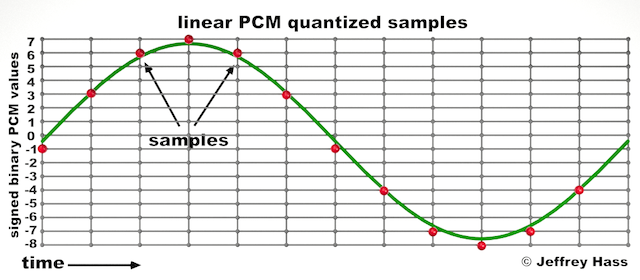
Audio quantization error is a fundamental aspect of digital audio processing. When analog sound waves are converted into digital signals, they undergo quantization. This means that the continuous analog signal is sampled and approximated in discrete steps. These steps are represented by binary values, typically in the form of bits (e.g., 16-bit, 24-bit). Now, what’s crucial to grasp here is that these discrete steps can lead to imperfections in audio reproduction.
Quantization error, often referred to as “quantization noise,” occurs when the actual analog signal deviates from the approximated digital representation. Imagine you have a beautiful painting, and you’re asked to replicate it using only a limited set of colors. The more restricted your color palette, the less accurate your reproduction will be. In the same way, the fewer bits you use for audio quantization, the more pronounced the quantization error becomes.
Quantization Levels and the Impact on Sound Quality
The number of quantization levels (related to bit depth) directly affects the precision of audio representation. For instance, a 16-bit audio recording has 65,536 possible levels, while a 24-bit recording provides a staggering 16,777,216 levels. This increased bit depth allows for a much finer representation of the original analog signal. Hence, a higher bit depth results in a reduction of quantization error, leading to superior sound quality.
To illustrate this, consider a grayscale image with only two colors: black and white. This is akin to an extremely low bit depth in audio, where the audio signal is either “on” or “off.” Now, imagine a high-resolution image with millions of colors, similar to the detail you get in a 24-bit audio recording. The difference in quality is apparent.
The Role of Dithering in Minimizing Quantization Error
One might wonder if there’s a way to mitigate quantization error in low-bit-depth audio recordings. Enter “dithering.” Dithering is a technique that introduces low-level noise to the audio signal, effectively spreading out the quantization error across a broader spectrum. Think of it as adding a sprinkle of fine grains of sand to a painting to blend the colors. This subtle noise masks the harshness of quantization error and makes it less noticeable to the human ear.
Now, as we’ve explored the fundamentals of audio quantization error, let’s delve into the questions that often arise:
How Does Quantization Error Affect Music Production?
In the realm of music production, quantization error can be a significant concern, particularly for professionals aiming to achieve top-tier sound quality. When producing music, especially in genres where subtle nuances are crucial, such as classical or jazz, quantization errors become more perceptible. To maintain audio fidelity, a higher bit depth is preferred during recording and production, ensuring minimal quantization noise.
Is There an Ideal Bit Depth for Audio Recording?
The ideal bit depth for audio recording is a subject of debate among audio enthusiasts. While 24-bit recording is commonly favored for its excellent dynamic range and low quantization error, it’s worth noting that the final audio format for most consumer applications, like CDs or streaming, is often 16-bit. The choice of bit depth should be based on the specific requirements of the project, keeping in mind the trade-off between audio quality and file size.
Can Quantization Error be Completely Eliminated?
Regrettably, quantization error cannot be entirely eliminated, as it’s an inherent part of the digital audio conversion process. However, it can be minimized to the point where it’s imperceptible to the human ear. Through techniques like dithering and the use of higher bit depths, the impact of quantization error can be significantly reduced, allowing for exceptional audio quality.
Last Words about Audio Quantization Error
In the ever-evolving world of audio technology, understanding audio quantization error is a fundamental step towards achieving superior sound quality. As an expert in the field, I’ve shared insights, experiences, and technical knowledge to demystify this concept. Remember, the bit depth you choose in audio recording significantly influences the extent of quantization error, and techniques like dithering play a pivotal role in mitigating its effects. The quest for pristine audio quality is an ongoing journey, but armed with this knowledge, you’re better equipped to make informed decisions in your audio endeavors.
Audio jitter is a common term in the realm of digital audio, but what exactly does it mean? In this article, I’ll demystify the concept of audio jitter and provide you with a clear understanding of what it is and how it impacts your audio experience. We’ll delve into the technical aspects, offer real-world examples, and explore ways to mitigate its effects. So, let’s embark on this journey to unravel the mysteries of audio jitter.
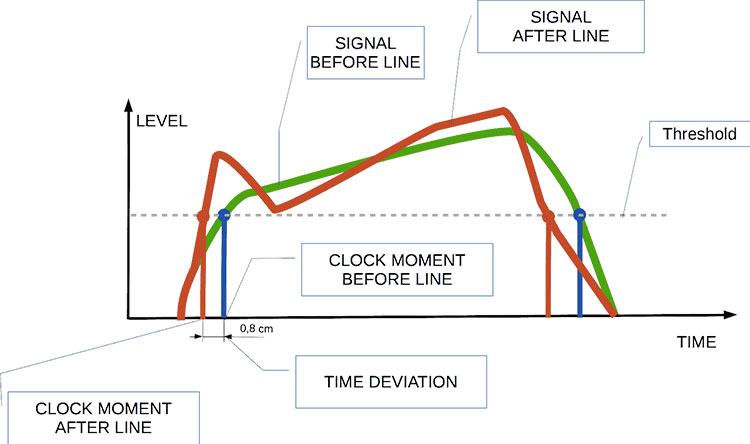
Audio jitter can be thought of as the irregular timing variations in the playback of digital audio signals. These timing variations can manifest as small deviations in the timing of audio samples, leading to audio artifacts like clicks, pops, and distortion. While it may seem like a technical concern, audio jitter can significantly affect your overall listening experience, even if you’re not a seasoned audiophile.
What is Audio Jitter?
Audio jitter, in essence, is the bane of digital audio playback. When you play a digital audio file, it gets converted into an analog signal for your speakers or headphones. The challenge arises when the conversion isn’t perfectly synchronized. Think of it like a metronome that occasionally skips a beat. This timing discrepancy, which we call audio jitter, can distort the sound and result in a less-than-ideal listening experience.
For a real-world analogy, consider a musical ensemble. If the musicians are out of sync, even by a tiny fraction of a second, the result can be dissonant and displeasing to the ear. Similarly, audio jitter disrupts the synchronization between the digital audio source and your playback system.
How Does Audio Jitter Impact Sound Quality?
Audio jitter affects sound quality by introducing unwanted artifacts. These artifacts can include audible clicks, pops, and distortions in the audio stream. To understand the impact, picture a pristine audio signal as a smooth, flowing river. Audio jitter is like tossing pebbles into that river, causing ripples and disturbances. These ripples manifest as audible imperfections in your music or audio.
Think of a jazz drum solo: the precision of the drummer’s beats is crucial to the experience. Even a slight deviation in the rhythm can disrupt the entire performance. Audio jitter works in a similar way, disrupting the timing and rhythm of your audio playback, ultimately degrading the sound quality.
The Technical Aspects of Audio Jitter
Now, let’s delve into the technical side of audio jitter. In the digital domain, audio is typically stored as discrete samples, each representing the amplitude of the sound at a specific moment. The timing of these samples is critical. Audio jitter occurs when the time intervals between these samples deviate from the ideal, leading to inconsistencies in playback.
To put this in context, think of a digital audio player as a conveyor belt, with each audio sample represented by a box. These boxes must move down the belt at precise intervals to maintain the audio’s integrity. If some boxes move faster or slower than others, you’ll encounter audio jitter, which translates to an erratic and unpleasant listening experience.
Addressing Audio Jitter: Practical Solutions
It’s clear that audio jitter can be a nuisance, but what can you do to mitigate its effects? Fortunately, there are practical solutions available. Some high-end audio equipment includes advanced jitter-reduction technologies. Additionally, using dedicated external digital-to-analog converters (DACs) can help improve audio synchronization.
Think of these solutions as a conductor guiding the musicians in an orchestra, ensuring they play in perfect harmony. Advanced equipment and DACs help maintain the precise timing necessary for high-quality audio playback.
Audio Jitter vs. Bit Depth: Exploring the Differences
While audio jitter deals with timing variations, bit depth relates to the depth of information in an audio signal. It’s essential to distinguish between the two. Bit depth determines the resolution of the audio signal, affecting the dynamic range and subtlety of sound. Audio jitter, on the other hand, impacts timing and synchronization. Both factors play a role in overall audio quality, but they address different aspects of the listening experience.
Think of bit depth as the number of colors on a painter’s palette, while audio jitter is akin to the painter’s brush strokes’ precision. They are both crucial for the final masterpiece, but they address different aspects of the artistic process.
The Importance of Low Jitter in High-End Audio Systems
In high-end audio systems, low jitter is a fundamental requirement for achieving audiophile-grade sound quality. Audiophiles demand the utmost precision and clarity in their audio playback, and any deviation in timing is unacceptable. To achieve this, specialized audio components and meticulous engineering are employed to minimize jitter.
Imagine a fine dining experience where every detail, from the presentation to the taste, is meticulously crafted. Audiophiles seek the same level of perfection in their audio experience, and low jitter is a crucial ingredient in achieving it.
Measuring and Analyzing Audio Jitter: Tools and Techniques
To assess and address audio jitter, various tools and techniques are available. One common method involves using dedicated audio analyzers that can pinpoint timing variations. Additionally, software applications can help diagnose and quantify audio jitter in your playback system.
Think of these tools as diagnostic instruments in a doctor’s office. They allow audio enthusiasts and professionals to diagnose and treat any issues related to audio jitter, ensuring the best possible audio quality.
Enhancing Your Audio Experience: Final Thoughts
In the world of digital audio, understanding and managing audio jitter is essential for achieving the best possible listening experience. Whether you’re a casual music lover or a dedicated audiophile, knowing how audio jitter affects your sound quality can lead to informed choices and better audio equipment investments.
So, the next time you enjoy your favorite music or immerse yourself in a captivating movie, remember the role that precise timing plays in your audio journey. Just as a conductor leads an orchestra to create beautiful music, minimizing audio jitter ensures that the symphony of sound reaches your ears with clarity and perfection.
Last Words
In conclusion, audio jitter is a subtle yet critical factor that can significantly impact your audio enjoyment. By delving into the technical aspects of audio jitter and exploring practical solutions, we’ve uncovered the key to enhancing your audio experience. Whether you’re an audiophile or simply someone who appreciates good sound, understanding and addressing audio jitter is a step toward audio perfection.
As an expert in audio engineering, I understand the significance of audio phase and its impact on sound quality and production. In this comprehensive guide, I will delve into the world of audio phase, providing clarity and insights to help you grasp this vital concept. Whether you’re a music enthusiast or a budding recording artist, understanding audio phase is essential for achieving optimal sound experiences.
Demystifying Audio Phase
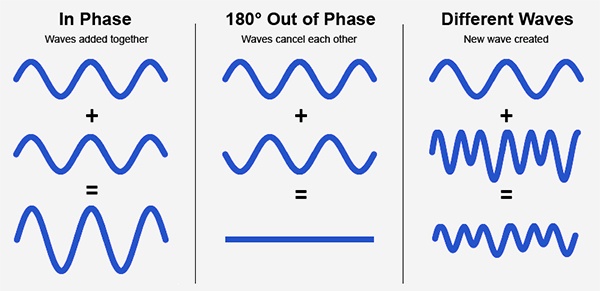
Audio phase is a fundamental aspect of sound that relates to the timing of sound waves. When we talk about audio phase, we’re essentially discussing how different audio signals align or misalign in time. To put it simply, sound is a result of air pressure changes that propagate as waves. These waves have peaks and troughs, and audio phase refers to the relationship between these peaks and troughs in different sound sources.
Think of audio phase as a group of musicians playing in perfect harmony. When they are perfectly in sync, the music sounds harmonious and powerful. However, if even one musician is slightly out of time, it can create dissonance. Similarly, in audio, when signals are in phase, they reinforce each other, resulting in a stronger and clearer sound. When they are out of phase, they can cancel each other out, leading to a weaker and less defined sound.
Audio Phase in Music Production
Understanding audio phase is crucial in music production, especially when recording multiple microphones or mixing different tracks. When recording, if two microphones capture the same sound source, such as a guitar or a vocalist, the signals from these microphones must be perfectly in phase to avoid phase cancellation.
Imagine you are recording a guitar with two microphones—one close to the soundhole and the other closer to the fretboard. If the signals from these two microphones are not in phase, you might experience a loss of bass frequencies or even strange, hollow sounds in the final mix. To avoid this, precise microphone placement and phase alignment are essential.
Correcting Audio Phase Issues
In the world of audio engineering, correcting phase issues is a common practice. Using specialized tools and techniques, audio engineers can adjust the timing of audio signals to ensure they are in phase. This process, known as phase correction or phase alignment, can salvage poorly recorded tracks and enhance the overall sound quality.
Imagine you’re in a recording studio, and you notice that the drum tracks are slightly out of phase with the rest of the instruments. With phase correction tools, you can realign the drum tracks to synchronize perfectly with the other instruments, resulting in a more cohesive and powerful sound.
Audio Phase and Sound Quality: Key Considerations
Now, let’s address some common questions related to audio phase:
How Does Audio Phase Affect Sound Quality?
Audio phase has a direct impact on sound quality. When audio signals are in phase, they reinforce each other, enhancing the overall clarity and richness of sound. However, when they are out of phase, they can cancel each other out, leading to a loss of frequencies and a less pleasing sound.
What Are the Common Phase Issues in Music Production?
In music production, some common phase issues include phase cancellation between microphones, phase misalignment in multi-miked drum kits, and phase problems when mixing different instruments. Identifying and addressing these issues is crucial for achieving a balanced and professional-sounding mix.
How Can I Prevent Phase Issues When Recording?
To prevent phase issues when recording, pay close attention to microphone placement and ensure that multiple microphones capturing the same source are equidistant from the sound source. Additionally, use phase inversion or phase alignment tools during mixing to correct any phase problems that may arise.
Audio Phase: A Symphony of Sound Precision
In conclusion, audio phase is a pivotal element in the world of sound, influencing the quality of music and recordings. Whether you’re a musician, sound engineer, or simply a music enthusiast, grasping the concept of audio phase can help you appreciate and optimize sound in various contexts. Remember, when audio signals are in harmony, they create a powerful symphony of sound, and understanding audio phase is the key to achieving that sonic precision.
Last Words
As we wrap up our journey through the realm of audio phase, I hope this guide has shed light on this intricate yet crucial aspect of sound. Whether you’re fine-tuning your music production skills or seeking to enhance your listening experience, audio phase knowledge empowers you to harness the full potential of sound. So, the next time you enjoy your favorite music or step into the world of audio production, remember the role that audio phase plays in creating the symphonies and sonic landscapes we cherish.
Audio Clipping: Understanding, Causes, and Solutions
Audio Clipping
Introduction to Audio Clipping
Audio clipping is a common issue that can significantly impact the quality of your sound recordings. As an audio expert, I’ll provide you with insights, explanations, and practical solutions to help you understand and tackle this problem. Whether you’re a podcaster, musician, or simply someone who wants to improve their audio quality, this article will guide you through the nuances of audio clipping.
Audio clipping occurs when the amplitude of an audio signal exceeds the maximum level that can be accurately represented. When this happens, the signal is cut off or “clipped,” resulting in distorted and unpleasant sound. It’s essential to address this issue because clipped audio can be distracting and diminish the overall quality of your recordings.
What Causes Audio Clipping?
Audio clipping can be caused by various factors, but the most common ones include:
Overloading Input Levels: One of the primary reasons for audio clipping is setting input levels too high. When your microphone or audio input device records sound that is too loud, it can exceed the equipment’s capacity, leading to clipping. To avoid this, ensure your input levels are appropriately adjusted to prevent distortion.
Digital Clipping: In the digital realm, audio clipping occurs when the audio signal exceeds the maximum value that can be represented in the digital format. This can happen during recording, mixing, or mastering stages. It’s crucial to maintain headroom in your digital audio workflow to prevent digital clipping.
Amplification in Post-Processing: Amplifying an already clipped audio signal during post-processing can worsen the problem. It’s essential to identify and rectify clipped audio before applying any amplification or effects to your recordings.
How to Prevent and Fix Audio Clipping
Preventing and fixing audio clipping requires a combination of techniques and equipment adjustments. Here are some practical tips:
Proper Gain Staging: Maintain proper gain staging by setting input levels so that your audio signal is strong enough to capture the desired sound without overloading the equipment. This involves adjusting the gain on your microphone or audio interface.
Use a Pop Filter: A pop filter can help reduce sudden bursts of loud sound, such as plosives in vocal recordings. This can go a long way in preventing clipping at the source.
Monitor Levels: Continuously monitor your audio levels while recording to ensure they stay within the acceptable range. Use headphones or audio meters to keep an eye on the levels in real-time.
Why Is Audio Clipping Detrimental?
Audio clipping is detrimental because it compromises the quality and intelligibility of your recordings. When your audience hears distorted audio, it can be distracting and make it challenging to understand the content. In professional settings like music production, audio clipping can ruin an otherwise excellent recording.
Furthermore, addressing audio clipping is not just about improving sound quality; it’s also about preserving your equipment. Consistent clipping can damage microphones, speakers, and other audio gear over time, resulting in costly repairs or replacements.
Identical Search Intent Keywords
Now, let’s explore identical search intent keywords related to audio clipping:
Audio Clipping Prevention Techniques: Discover effective techniques to prevent audio clipping and maintain high-quality sound recordings.
Digital Audio Clipping Solutions: Learn how to deal with digital audio clipping issues and safeguard your recordings from distortion.
Microphone Gain Adjustment Tips: Gain insights into adjusting microphone gain levels to avoid audio clipping and capture pristine sound.
Real-Life Audio Clipping Examples: Explore real-life scenarios where audio clipping can occur, from live music performances to podcast recording sessions.
Last Words
In conclusion, understanding and addressing audio clipping is crucial for anyone working with audio recordings. By implementing proper gain staging, monitoring levels, and using tools like pop filters, you can significantly improve the quality of your audio. Remember that audio clipping not only affects the sound but also the longevity of your equipment. So, take the necessary steps to prevent and fix it, ensuring your audience enjoys distortion-free audio experiences.
As an audio expert with years of experience in the field, I’m confident that the information provided in this article will help you overcome audio clipping challenges and elevate the quality of your audio projects.





Comments:
This article sheds light on the crucial aspect of MP3 error resilience. I appreciate the clear explanations and practical advice provided.
– SoundEnthusiast99
MP3 error resilience is a topic often overlooked but essential for maintaining audio quality. Thanks for addressing it comprehensively!
– MusicMan123
As an audio professional, I found this article informative and insightful. Understanding MP3 error resilience is crucial for delivering high-quality audio experiences.
– AudioPro456