Analog Sound vs Digital Sound: Understanding the Differences

Analog Sound vs Digital Sound: Understanding the Differences

Analog & Digital Sound

Have you ever wondered why some music sounds better than others? It might have to do with the way the sound was recorded. There are two main ways to record sound: analog and digital. Let’s explore the differences between these two methods and why they affect the sound of your music.

Digital vs Analog Sound

Analog Sound

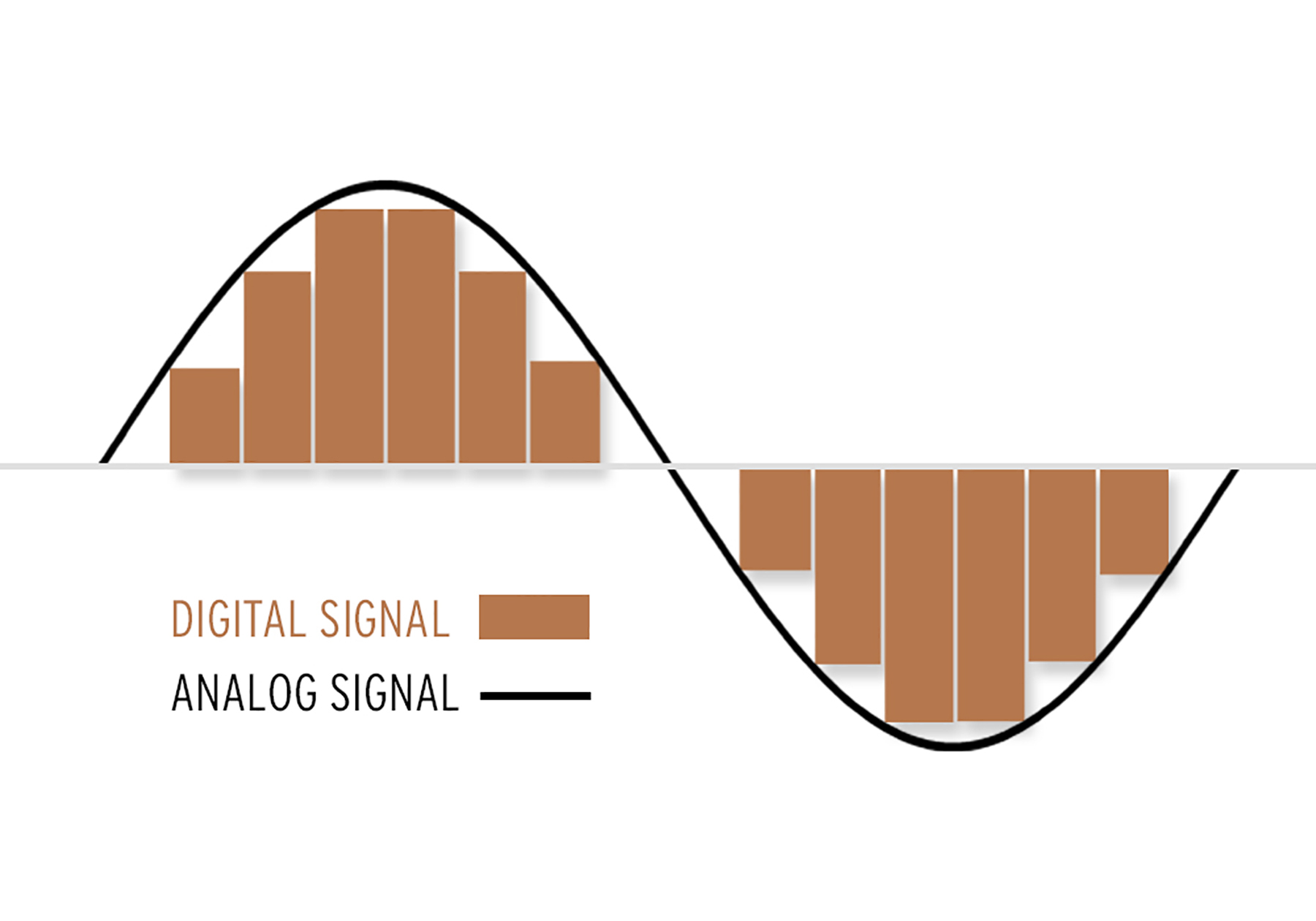
Analog sound is a continuous wave that is recorded on a physical medium such as a vinyl record or cassette tape. When you listen to an analog recording, the needle or tape head reads the wave and converts it into sound that you can hear through your speakers or headphones.

One of the benefits of analog sound is that it captures the natural warmth and richness of live music. This is because analog recording is a more direct representation of the sound waves. However, analog recordings are also more prone to wear and tear and can degrade over time, causing hisses, pops, and crackles in the sound.

Digital Sound

Digital sound, on the other hand, is recorded by converting the sound waves into a series of numbers that represent the amplitude and frequency of the wave. This digital representation of sound can then be stored on a computer or other digital device and played back at a later time.

One of the benefits of digital sound is that it is much more reliable and consistent than analog sound. Digital recordings are not subject to wear and tear like analog recordings and the sound quality remains unchanged over time. Additionally, digital sound can be easily edited and manipulated, making it possible to remove any unwanted noise or to enhance certain aspects of the sound.

The Differences in Sound Quality

Despite the many benefits of digital sound, some people argue that it does not have the same warmth and richness as analog sound. This is because digital sound is limited by the resolution of the recording, meaning that it cannot capture the full range of sound that an analog recording can.

Additionally, digital sound is often compressed to make it easier to store and transfer, which can result in a loss of sound quality. This is why some people prefer the sound of analog recordings, which they perceive as being more natural and musical.

Conclusion

In conclusion, the choice between analog and digital sound depends on your personal preferences and the way you listen to music. If you are looking for a more natural, warm sound, analog recordings might be the way to go. However, if you value convenience and reliability, digital sound is the way to go.

To get the best sound quality from your digital music files, it is important to use a high-quality software like Mp4Gain.

Which Audio Codec is Better?

Which Audio Codec is Better?

Audio Codec
Audio Codec

When it comes to audio, the codec is the magic behind the scenes that helps you hear your favorite songs and sounds. But have you ever wondered what makes one codec better than another? In this article, we’ll explore the world of audio codecs and find out which one is the best.

Audio Codec
Audio Codec

What is an audio codec?

An audio codec is a type of software that compresses and decompresses audio files. This process makes the audio smaller, so it can be easily stored and shared on your computer, phone, or online. When you want to listen to the audio, the codec decompresses it so you can hear it in its original quality.

Why are there different codecs?

Just like how you can choose between different types of ice cream flavors, there are different types of codecs because everyone has different tastes and preferences. Some codecs are better for music, while others are better for speech. Some are easy to use, while others are more complex. The choice of codec depends on the type of audio you want to compress, the size of the file, and the quality of the sound you want to preserve.

The most popular codecs

There are many different audio codecs out there, but here are some of the most popular ones:

  • MP3
  • AAC
  • FLAC
  • WAV

MP3

MP3 is one of the most popular codecs and has been around for over 20 years. It’s a great choice for music because it compresses audio files into smaller sizes while still preserving the quality of the sound. MP3 is also compatible with most devices and players, making it a convenient option for many people.

AAC

AAC stands for Advanced Audio Coding and is a newer codec that was developed by Apple. It’s commonly used by Apple devices, like the iPhone and iPad, and provides better sound quality than MP3 at a lower bit rate. AAC is also used by many online streaming services, like Spotify and Apple Music, to deliver high-quality audio to their users.

FLAC

FLAC stands for Free Lossless Audio Codec and is a popular option for audiophiles. This codec compresses audio files into smaller sizes without losing any quality, making it the perfect choice for people who want the best sound possible. The downside to FLAC is that it’s not as widely supported as MP3 and AAC, so you may need to use special software to play FLAC files on your device.

WAV

WAV is a common codec for professional audio and is often used in recording studios. It’s a lossless codec, which means it doesn’t compress audio files and preserves the original sound quality. However, WAV files are usually much larger than files compressed with other codecs, so they may take up a lot of space on your device.

Conclusion

In conclusion, the choice of codec depends on the type of audio you want to store and share, and your personal preferences. MP3 is a classic and widely supported option, while AAC offers better sound quality. FLAC is the perfect choice for audiophiles who want to preserve the original sound quality, and WAV is used in professional settings. To find the best solution for you, consider your needs and try out different codecs to see which one works best for you. And finally, if you want to enhance the audio quality of your files, you can use Mp4Gain to adjust the volume and improve the sound of your audio files.

It’s important to remember that the audio codec you choose will affect the size, quality, and compatibility of your audio files. So choose wisely, and enjoy the world of audio!

MP3 vs FLAC: Which audio format is better for you?

MP3 vs FLAC: Which audio format is better for you?

FLAC vs MP3
FLAC vs MP3

If you like listening to music, you’ve probably heard of the MP3 and FLAC formats. Both are popular, but which one is best for you?

FLAC vs. MP3
FLAC vs. MP3

What is the MP3 format?

MP3 is a very popular audio format used to compress music files. This means you can have more songs on your phone or computer without taking up a lot of storage space. Plus, it’s easy to play on most devices, including phones, computers, and MP3 players.

What is the FLAC format?

FLAC is a lossless audio format, which means that no audio quality is lost during compression. This means that you will hear the music exactly as it was recorded by the artists. FLAC is ideal for those who value audio quality and want to hear their music with maximum clarity and detail.

What is the difference between MP3 and FLAC?

The main difference between MP3 and FLAC is the audio quality. MP3 is a compressed format that may lose some audio quality during the process, while FLAC is a lossless format that maintains all of the original quality of the recording. Also, FLAC files are larger than MP3 files, which means you need more storage space to save them.

Which is best for you?

It depends on your personal needs and preferences. If you want more music on your device and don’t mind a slight drop in audio quality, then MP3 may be the best option for you. If you are a music enthusiast and want to hear your music with maximum clarity and detail, then FLAC is the perfect choice for you.

Mp4Gain is the ideal program to normalize and convert both formats because it is the software developed exactly for that purpose for most audio and video formats.

What is a video codec?

What is a video codec?

video codec
video codec

A codec is a program or device that encodes and decodes video. This means that it takes a video and compresses it into a smaller format so it can be streamed or stored more efficiently. Then, when you want to watch the video, the codec decodes it and plays it in its original format.

video codec
video codec

Why is a video codec important?

Video codecs are important because they make videos more accessible and easier to use. Without a codec, the videos would be too large to stream or store, which would mean that we would have to wait a long time to watch them or have a very large storage space to save them.

In addition, the codecs also make the videos look better. Some codecs use advanced techniques to compress the video without affecting its quality. This means that we can see sharp and clear videos, even when they are compressed to a smaller size.

Codecs are also important because they allow videos to be compatible with different devices and platforms. For example, if a video is encoded with a specific codec, it can be viewed on a computer, smartphone, smart TV, or game console without any problem.

What types of video codecs are there?

There are many different types of video codecs, but some of the most common are H.264, H.265, VP9, and AV1. Each codec has its own advantages and disadvantages, and some are better for certain uses than others.

For example, H.264 is a very popular codec used to compress high-definition video. It is a good option for most users as it is compatible with most devices and platforms. However, H.265 is a newer codec that is more efficient in terms of bandwidth and can offer improved video quality.

VP9 is an open source codec developed by Google that is used on some devices and platforms. AV1 is an open source codec developed by a coalition of technology companies and is a promising option for the future, offering more efficient compression and improved video quality.

It is important to note that not all codecs are created equal and some may require more processing power or bandwidth to function properly. Therefore, it is important to choose the correct codec for each situation.

Conclusion

In conclusion, a video codec is an essential program or device that allows you to compress and decode videos to make them more accessible and compatible. There are many different types of video codecs available, and it’s important to choose the one that’s best for each situation. Mp4Gain is an excellent solution for those looking to optimize and enhance their video experience.

What is MP3 psychoacoustics?

What is MP3 psychoacoustics?

MP3 psychoacoustics
MP3 psychoacoustics

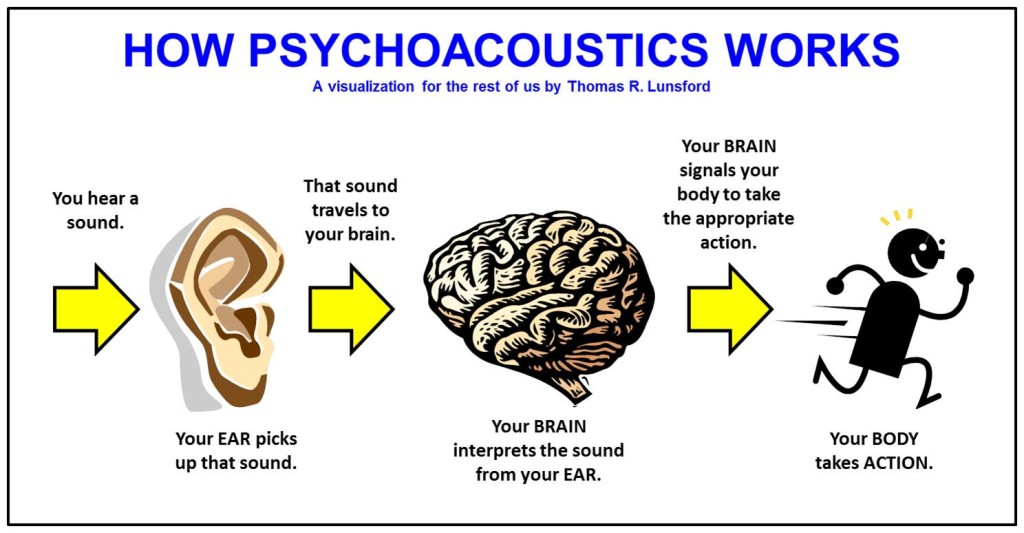
Psychoautics is an important part of the science that studies how we hear sound and how our brains process it. It is a combination of psychology and acoustics, and allows us to understand how people perceive sound and how this affects audio quality.

MP3 psychoacoustics
MP3 psychoacoustics

How is psychoacoustics related to MP3?

When we record or play audio in a digital format, such as MP3, the files are compressed to make them smaller. File compression is a process where some data is removed from the original audio to make it smaller. However, this data removal can also affect audio quality, and this is where psychoacoustics comes into play.

Psychoautics helps us understand which parts of audio are most important to our hearing and which are less important. This allows us to optimize the compression of audio files so that the sound quality is not affected excessively. In other words, psychoacoustics allow us to balance between sound quality and file size.

Why is psychoacoustics in MP3 important?

Psychoautics is important in MP3 because it allows us to create audio files that are smaller and easier to store and share, without sacrificing too much sound quality. This means that you can have your favorite songs on your phone or on your computer without having to worry about the space they take up.

In addition, psychoautics also allows us to improve the audio quality in portable devices, such as headphones or speakers, which often have limited sound quality. By understanding which parts of the audio are most important to our ears, we can optimize file compression for better sound quality on these devices.

The Importance of Bitrate in Digital Audio and Video

The Importance of Bitrate in Digital Audio and Video

The Importance of Bitrate in Digital Audio and Video

Have you ever watched a video that was all glitchy and the sound was all messed up? Or listened to a song and it sounded like it was being played on a scratched record? Well, that’s because of something called the bitrate.

The Importance of Bitrate in Digital Audio and Video

What is Bitrate?

Bitrate is the number of bits of information that are processed in a certain amount of time. In digital audio and video, it determines the quality of the sound and video. The higher the bitrate, the better the quality, and the more information is processed.

Why is Bitrate Important?

When you watch a video or listen to a song, the bitrate helps to determine the quality of the sound and video. The higher the bitrate, the more information is processed, and the better the quality. If the bitrate is low, then the quality will be poor and you might miss out on important details.

For example, if you’re watching a video of a concert and the bitrate is low, then you might not be able to hear the singer’s voice clearly or see the instruments being played. This can be really frustrating and ruin the whole experience for you.

How Does Bitrate Affect Digital Audio and Video?

Bitrate affects digital audio and video in several ways. For one, it affects the file size. If the bitrate is high, then the file size will be large, and if the bitrate is low, then the file size will be small.

Another way that bitrate affects digital audio and video is by affecting the quality. If the bitrate is high, then the quality will be good, and if the bitrate is low, then the quality will be poor. This can be especially noticeable when you’re watching a video with a lot of movement, like a sports game or a music video.

Finally, bitrate can also affect how long it takes to download or upload a video or audio file. If the bitrate is high, then it will take longer to download or upload, and if the bitrate is low, then it will take less time.

How to Choose the Right Bitrate for Your Digital Audio and Video

When it comes to choosing the right bitrate for your digital audio and video, there are a few things to keep in mind. First, think about what you’re using the video or audio for. If it’s for personal use, then a lower bitrate might be okay, but if it’s for professional use, then a higher bitrate is probably better.

Another thing to consider is the quality of the video or audio. If you want the best quality possible, then a higher bitrate is the way to go. But if you don’t need the best quality and just want something that’s good enough, then a lower bitrate might be fine.

Finally, think about the file size. If you don’t have a lot of storage space, then a lower bitrate might be a good choice, but if you have plenty of storage space, then a higher bitrate might be the way to go.

The Quality of MP4 Audio

The Quality of MP4 Audio

The Quality of MP4 Audio

Videos are a fun way to share your memories and special moments. However, in order for your videos to sound good, it is important to pay attention to the quality of the audio. Have you ever listened to a video with poor and distorted audio? That’s no fun for anyone.

The Quality of MP4 Audio

In this article, we will explain in a simple and fun way how to make sure that the audio quality in your MP4 videos is the best.

What is MP4 audio?

MP4 audio is simply the sound you hear in an MP4 video. Like video, audio is compressed and saved as an MP4 file.

Audio Quality

Audio quality is measured in bits and samples. The higher the number of bits and samples, the better the audio quality. For example, an audio file with 128 bits and 44.1 samples per second will have better quality than an audio file with 64 bits and 22.05 samples per second.

Improving Audio Quality

There are several ways to improve the audio quality in your MP4 videos. One of the best is to use a program called Mp4Gain. This program allows you to adjust the audio quality in your MP4 videos to make them sound better.

Another way to improve the audio quality in your MP4 videos is to make sure you use a good microphone. A quality microphone will help you record crisp, clear audio in your videos.

Conclusion

In conclusion, to make sure that the audio quality in your MP4 videos is the best, it is important to pay attention to the audio quality and use a program like Mp4Gain. With these simple tips, your MP4 videos will sound better than ever.

Maximizing MP4 Quality: A Guide to Enhancing Your Video Experience

Maximizing MP4 Quality: A Guide to Enhancing Your Video Experience

Maximizing MP4 Quality


MP4 is a popular video format that is widely used for a variety of purposes, such as online streaming, video editing, and even gaming. However, not all MP4 videos are created equal – some may have poor resolution, low frame rate, or other issues that can affect the overall quality of the video. In this article, we will explore various methods for maximizing the quality of your MP4 videos, from encoding settings to post-processing techniques.

Maximizing MP4 Quality

Optimizing Encoding Settings

One of the most important factors that determine the quality of an MP4 video is the way it is encoded. Encoding settings can affect the resolution, frame rate, bit rate, and other parameters of the video, and can have a significant impact on the final output. Here are some tips for optimizing your encoding settings:

  • Use a high resolution: A higher resolution video will generally have more detail and clarity than a lower resolution video. A resolution of 1080p or 4K is considered to be high quality.
  • Use a high frame rate: A higher frame rate can make the video look smoother and more fluid. A frame rate of 30 or 60 frames per second is considered to be high quality.
  • Use a high bit rate: A higher bit rate can result in a better quality video, but it will also increase the file size. A bit rate of 5000 kbps or higher is considered to be high quality.

It is also important to note that different types of videos may require different encoding settings. For example, an action movie may require a higher frame rate than a documentary, while a nature video may require a higher resolution than a music video.

Using Post-Processing Techniques

Encoding settings are not the only factor that determine the quality of an MP4 video – post-processing techniques can also be used to enhance the video further. Here are some popular post-processing techniques that can be used to improve the quality of an MP4 video:

  • Sharpening: Sharpening can be used to increase the detail and clarity of the video by enhancing the edges and textures of the image.
  • Noise reduction: Noise reduction can be used to reduce the amount of grain and speckling that can appear in a video, especially in low light conditions.
  • Colour correction: Colour correction can be used to adjust the hue, saturation, and brightness of the video to make it look more natural or stylized.

It is important to note that post-processing techniques should be used in moderation, as too much processing can result in an over-processed video that looks artificial or unnatural.

Conclusion

In this article, we have explored various methods for maximizing the quality of your MP4 videos, from encoding settings to post-processing techniques. By optimizing your encoding settings and using post-processing techniques, you can enhance the overall quality of your videos and create a better viewing experience for your audience. Mp4Gain is the best solution for this

Maximizing the Volume of MP4 Videos

Maximizing the Volume of MP4 Videos

Maximizing the Volume of MP4 Videos

Are you tired of straining to hear the audio in your MP4 videos? Low volume levels can greatly detract from the viewing experience, but thankfully, there is a solution to this problem: MP4Gain. This software allows you to easily increase the volume of your MP4 videos, making them more audible and enjoyable to watch.

Maximizing the Volume of MP4 Videos

How MP4Gain Works

MP4Gain is a volume normalization software that analyzes the audio of your MP4 video and adjusts it to a higher volume level without distorting the sound. This means that you can enjoy your videos at a comfortable volume without having to constantly adjust your device’s volume settings. Additionally, MP4Gain preserves the original audio quality of the video, so you won’t have to worry about any loss of sound quality.

Features of MP4Gain

MP4Gain offers a variety of features that make it a powerful tool for increasing the volume of your MP4 videos. Some of these features include:

  • Batch processing – MP4Gain allows you to process multiple videos at once, making it an efficient solution for those with a large collection of low-volume MP4 videos.
  • Easy to use – The user interface of MP4Gain is straightforward and easy to navigate, making it accessible for users of all skill levels.
  • Compatibility – MP4Gain is compatible with a wide range of video formats, including MP4, AVI, and MKV.

Step-by-Step Guide on Using MP4Gain

Using MP4Gain is simple and only takes a few steps:

  1. Download and install MP4Gain on your computer.
  2. Open the software and select the MP4 video that you want to increase the volume of.
  3. Select the “Normalize” option from the menu.
  4. Adjust the volume level to your desired setting.
  5. Hit the “Start” button to begin the normalization process.
  6. Once the process is complete, the newly normalized video will be saved in the same location as the original.

It’s that easy! With MP4Gain, you can have your low-volume MP4 videos sounding better in no time.

Conclusion

Low volume levels can greatly detract from the viewing experience, but MP4Gain offers a simple and efficient solution to this problem. With its ability to normalize volume levels without distorting sound quality and its easy-to-use interface, MP4Gain is the best solution for increasing the volume of your MP4 videos. Make sure to give it a try and you will be able to enjoy your videos without any audio problems again.