Handling Subband Filtering in the MP3 Audio Codec

Handling Subband Filtering in the MP3 Audio Codec

Subband Filtering
Subband Filtering

As a specialist with extensive experience in the world of audio technology, I’m excited to explore the intricate realm of subband filtering in the MP3 audio codec. In this article, I aim to provide you with a comprehensive understanding of this fascinating subject. Let’s embark on this journey to uncover the secrets behind the technology that powers your favorite music.

Let’s Talk About Subband Filtering

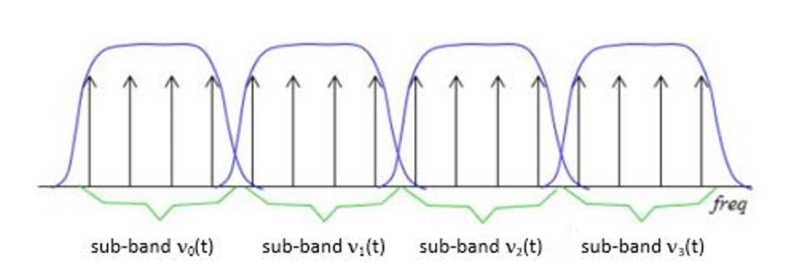
Subband filtering is a fundamental concept in the realm of audio coding. To put it simply, it’s a technique used to break down audio signals into smaller, more manageable parts. Think of it like a chef preparing ingredients before cooking a delicious meal. Each ingredient is a subband, and the chef’s task is to make sure they’re just right.

In the world of audio, subband filtering serves a crucial purpose. It helps us analyze and process audio data efficiently. When you listen to your favorite songs on your phone or computer, you may not realize that beneath the surface, subband filtering is at work, ensuring that the music reaches your ears in the best possible way.

Understanding the MP3 Audio Codec

Now, let’s talk about the MP3 audio codec. You might have heard of MP3 files – those are the ones you use to store and play your music. But what exactly is this codec thing? Well, it’s like the recipe for your favorite dish. It tells your device how to take the raw audio data and turn it into that familiar sound you love.

Why do we need codecs like MP3? Think of it this way: when you cook, you don’t want to carry around your entire kitchen to make a meal, right? You need a compact set of instructions (a recipe) to create a delicious dish. Similarly, the MP3 codec compresses audio data, making it smaller and easier to store and transmit, but without losing too much quality.

The Science Behind Subband Filtering

Now, let’s dive a bit deeper into the science of subband filtering. Imagine you’re trying to sort a big box of crayons. You decide to group them by color. Subband filtering does something similar – it groups different parts of the audio signal based on their frequencies.

It uses something called “filter banks” to do this. These are like magical sieves that separate the high-pitched sounds from the low-pitched ones. Just like your crayon groups, these “subbands” are easier to handle and process individually.

The Subband Filtering Process

So, how does subband filtering work in the MP3 codec? Let’s take a practical example: your favorite song. When you hit play, the audio signal is divided into many small chunks. Each of these chunks represents different parts of the music. The high notes might be in one chunk, and the low, thumping beats in another.

This division allows the MP3 codec to focus on the essential parts. It’s like when you’re reading a book – you don’t need to pay the same amount of attention to every word; you skim over the less important ones. Subband filtering helps the MP3 codec do something similar, paying more attention to the crucial parts and using less data for the less important bits.

The Role of Psychoacoustic Models

To make things even more efficient, the MP3 codec uses something called “psychoacoustic models.” These models are like having a good ear for music. Just like how you can tell which instruments are playing in a song, psychoacoustic models help the codec understand which parts of the music are more critical to our ears.

Imagine you’re listening to your favorite band live. Your brain naturally focuses on the lead singer’s voice and the melody. The background noise, like people chatting or the sound of cars passing by, is less important. Psychoacoustic models do something similar, helping the MP3 codec concentrate on the most important sounds while letting the less important ones fade into the background.

Efficiency and Data Reduction

Now, let’s talk about efficiency and data reduction. We all like fast and smooth experiences, right? The MP3 codec makes your music play quickly by reducing the amount of data it needs to process. It’s like having a super-organized backpack for a camping trip. You only carry what’s necessary, leaving the heavy and bulky stuff behind.

So, what does the codec do? It uses shorter codes for the most common sounds. In a song, the drumbeats or the lead singer’s voice are usually more frequent. They get shorter codes, making them quick to process. Less common sounds, like the subtle strumming of a guitar, get longer codes. This efficient system helps reduce the overall size of the audio file without sacrificing quality.

Quality vs. Compression

Of course, we all want our music to sound amazing. But there’s a balance to be struck – the quality of your music and the space it takes up. It’s like when you’re choosing video quality settings on a streaming platform. You want the best picture, but you also don’t want it to buffer forever.

The MP3 codec manages this balance. It compresses the audio data to save space while still delivering great sound. It’s like magic – it lets you store hundreds of songs on your phone without it getting too full, and they all still sound terrific.

Real-Life Applications

You might be wondering where subband filtering and the MP3 codec come into play in your daily life. Well, they’re everywhere! Think about streaming music on your phone, watching videos online, or even chatting on a video call. All of these rely on efficient audio coding techniques to make sure you hear what’s important while saving bandwidth.

Imagine you’re streaming your favorite cartoon online. Thanks to subband filtering and the MP3 codec, you get to enjoy clear dialogue and exciting music while the background noise from your neighbor’s lawnmower fades into the background.

Challenges and Future Developments

As technology keeps evolving, so does the world of audio coding. Challenges like making audio coding even more efficient and dealing with different devices are on the horizon. Just like how self-driving cars were a dream not too long ago, advancements in audio technology will continue to shape our lives.

In the coming years, we might see even better ways to balance quality and compression. It’s an exciting time for audio technology, and subband filtering will undoubtedly play a big role in making it even better.

Behind the Scenes: Creating an MP3

Have you ever wondered how an MP3 file is created? It’s a bit like following a recipe to cook a delicious meal. The audio data goes through a series of steps where subband filtering helps sort and organize it. Then, it’s compressed, much like simmering a sauce to concentrate the flavors.

Finally, the codec gives you a compact and tasty MP3 file that’s ready to be played. It’s a bit like cooking up your favorite dish – only in the world of sound.

In conclusion, subband filtering is like the chef’s secret technique for preparing an excellent meal. It’s the magic behind the MP3 codec, making your music sound fantastic while fitting in your device. So, next time you listen to your favorite song, remember the subbands and filters that make it

The Role of Huffman Tables in MP3 Bitstream Encoding

The Role of Huffman Tables in MP3 Bitstream Encoding


Huffman Tables
Huffman Tables

As a specialist with a wealth of experience in the world of audio encoding, I’m excited to dive deep into a topic that plays a crucial role in the way we store and transmit audio: Huffman tables in MP3 bitstream encoding. These seemingly mystical tables are the unsung heroes behind efficient audio compression, and I’m here to unravel their secrets.

Understanding MP3 Bitstream Encoding

**

Demystifying MP3 Bitstream

Let’s start with the basics. An MP3 bitstream is like a digital jigsaw puzzle, but instead of pieces, it’s made up of tiny 0s and 1s. Just like when you piece together a puzzle to reveal a beautiful picture, these 0s and 1s come together to create the audio you love. When we talk about encoding, we’re essentially making sure that these 0s and 1s are packed efficiently, so your music sounds great but doesn’t take up too much space.

**

The Art of Compression

Imagine you’re going on a trip, and you need to pack your suitcase. You have a limited amount of space, but you want to bring as many clothes as possible. This is precisely what audio compression aims to do – it’s like packing your audio data efficiently for the journey. We aim to maintain the essence of the audio while making it smaller for storage and transmission.

The Significance of Huffman Tables

**

Unveiling Huffman Tables

Now, let’s talk about Huffman tables. These tables are like a secret codebook, a bit like the decoder ring you might have seen in a spy movie. They tell the MP3 player how to translate the 0s and 1s in the bitstream back into sound. But here’s the clever part: Huffman tables help MP3 encoders represent common sounds with short codes and rare sounds with longer codes. This is a bit like using shorter, quicker words for everyday things and longer words for more complex ideas when writing a story.

**

Efficient Storage Explained

Picture your wardrobe, filled with clothes of all shapes and sizes. Some clothes you wear every day, while others are for special occasions. Now, imagine you want to fit as many clothes as possible into your wardrobe, but you only have limited space. This is precisely what Huffman tables do for audio data. They make sure that common audio elements are packed with short codes (small clothes), while less common elements have longer codes (big clothes). This optimization results in efficient storage, just like when you neatly arrange your wardrobe for maximum space.

Constructing Huffman Tables

**

The Building Blocks

Creating Huffman tables involves sorting and categorizing audio elements, a bit like sorting LEGO pieces by color and size. You’re essentially organizing the building blocks of your audio data, so they can be quickly assembled during playback.

**

Seeing Huffman Tables in Action

Think of Huffman tables as translators. They take the language of 0s and 1s, just like a foreign language, and convert it into something your MP3 player understands. Imagine having a magical translator that helps you understand a language you don’t speak – that’s what Huffman tables do for audio data.

Last Words about Huffman Tables in MP3 Bitstream Encoding

So, in my many years of experience, I’ve seen how Huffman tables work behind the scenes to make your music accessible and portable. They’re like the secret sauce

that keeps your audio both compact and high-quality. Just like a skilled chef knows the perfect combination of ingredients to create a mouthwatering dish, Huffman tables are the secret ingredients in the recipe for efficient audio encoding.

Lets talk about Huffman Tables in MP3 Bitstream Encoding

**

Answering User Questions

Now, let’s address some of the questions and curiosities that often arise about Huffman tables in MP3 bitstream encoding. It’s essential to provide answers and insights that cut through the technical jargon and make this concept accessible to everyone.

Why Do We Need Huffman Tables?

</h3
Think of Huffman tables as the storytellers of your audio. They decide how to convey the tale with the fewest words. Without them, our audio files would be like novels with endless pages, making them unwieldy to store and share. Huffman tables are the architects of efficient compression, ensuring that audio can be transmitted swiftly, even in bandwidth-challenged situations.

How Are Huffman Tables Created?

Creating Huffman tables is like preparing a recipe for a family dinner. Each ingredient, in this case, audio elements, is carefully considered, and its frequency is noted. Just as you select the most popular dishes for your family gathering, Huffman tables give priority to the most common sounds. This ensures that the most-used audio elements are represented with short codes, making them quick to transmit and easy to decode.

Can Huffman Tables Affect Audio Quality?

Absolutely, just as a great storyteller can bring a tale to life, Huffman tables can influence audio quality. They strike a balance between compression and quality, ensuring that while audio is efficiently compressed, it retains its essence and clarity. This balance is crucial in the world of audio encoding, where preserving the listener’s experience is paramount.

Are There Alternatives to Huffman Tables?

Huffman tables are a well-established method in audio encoding, but like any field, there are alternatives. Think of it as choosing between different vehicles for your daily commute. While Huffman tables are the trusty car you’ve been driving for years, other methods like arithmetic coding or run-length encoding might be the bicycle or public transport – they have their advantages but may not always be the best fit for your journey.

Why Is Understanding Huffman Tables Important?

Understanding Huffman tables is like understanding how your favorite magic trick works – it adds a whole new layer to the experience. It helps you appreciate the technology behind audio compression, making you a more informed listener and giving you the ability to choose the right settings when encoding audio for various purposes.

In closing, Huffman tables may seem complex, but they are the unsung heroes that keep our audio files efficient and accessible. Just as a skilled conductor brings a symphony to life, Huffman tables orchestrate the harmonious encoding of audio data. My experience in this field has shown me time and again that these tables play a pivotal role in ensuring that your audio is not only portable but of the highest quality. So, the next time you enjoy your favorite song, remember the quiet, efficient work of Huffman tables, making it all possible.

Perceptual Entropy in an MP3 File

How to Measure the Perceptual Entropy in an MP3 File?

Perceptual Entropy
Perceptual Entropy

Introduction to Perceptual Entropy in an Mp3

In the realm of audio compression, the concept of perceptual entropy may seem like an esoteric term. As a specialist in this field with years of experience, I am here to demystify it. Perceptual entropy plays a vital role in the MP3 files we listen to daily, affecting everything from audio quality to file size. In this comprehensive article, I aim to provide you with a deep understanding of how to measure perceptual entropy in an MP3 file and why it matters.

Understanding Perceptual Entropy

Definition of Perceptual Entropy

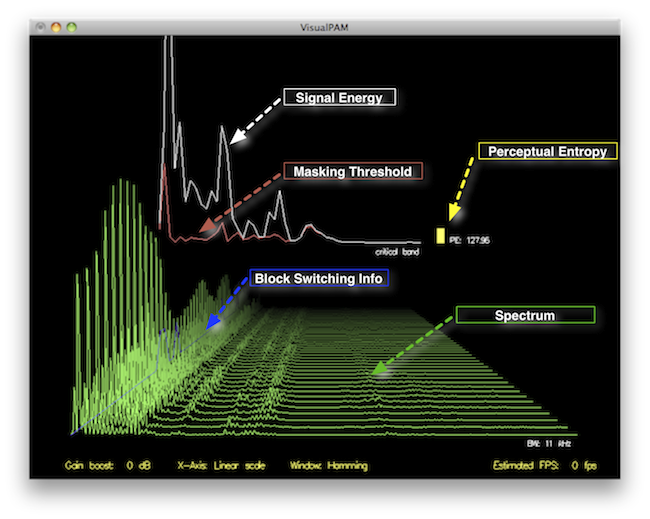
Perceptual entropy is like the invisible puppeteer behind the scenes of audio compression. Imagine you have a favorite storybook with many repetitive sentences. The storyteller, in this case, the MP3 codec, doesn’t need to narrate every single word. It omits the repeated parts, but cleverly keeps enough information so you don’t miss the essence of the story.

Importance in Audio Compression

The significance of perceptual entropy in audio compression is akin to sorting out your wardrobe. You don’t need to keep every single pair of socks. You retain a representative selection while saving space. Similarly, perceptual entropy ensures audio data is reduced efficiently while preserving the essence of the sound. It’s all about maintaining quality while optimizing storage.

Measuring Perceptual Entropy</h2

Methods for Measurement

The tools used to measure perceptual entropy are like detectives scrutinizing every page of your storybook. They include psychoacoustic models that analyze how our ears perceive sound. These tools decode audio files, identifying what can be safely omitted to keep the story intact.

Tools and Software

Consider these tools like a set of magic glasses that allow you to see the hidden patterns in your storybook. Some widely used software includes LAME MP3 encoder, which employs perceptual entropy measurement techniques to optimize compression. Others, like FFmpeg, offer valuable insights into perceptual entropy.

The Role of Bit Rate

Think of bit rate as the quality slider for your audio file. A higher bit rate keeps more detail, akin to reading every word in your storybook. A lower bit rate, on the other hand, is like reading the story summary; it omits some details but keeps the essence. Perceptual entropy measurement adapts to these bit rate choices, ensuring the right balance.

Significance of Perceptual Entropy in Audio Compression</h2

Effect on Compression Efficiency

Imagine you have a suitcase, and you want to pack it efficiently. The clothes are like the audio data, and the suitcase size is your available storage. Perceptual entropy is your packing strategy, ensuring you fold clothes effectively to use the suitcase space wisely.

Impact on Audio Quality

When you send a letter, you want it to be both light and readable. Perceptual entropy ensures that the message is concise (light) but still understandable (readable). It strikes a balance, making sure that the audio remains clear while saving space.

Real-world Examples

To illustrate perceptual entropy, think of a colorful painting. Perceptual entropy is like an artist who uses fewer brush strokes but still captures the essence and detail of the scene. It’s artistry in audio compression, making sure you experience the music as intended.

Evaluating Audio Quality</h2

Criteria for Audio Quality

Audio quality assessment is similar to a taste test. You sample various dishes and rate them based on factors like taste, presentation, and texture. Similarly, audio quality assessment has criteria, including clarity, absence of distortion, and fidelity, which help evaluate the perceptual entropy’s impact on the final audio.

Striking a Balance

It’s like baking a cake; you need the right ingredients in the right proportions. Perceptual entropy is one of those ingredients. Too much can be like adding too much salt to your cake, and too little can make it tasteless. Striking the right balance is the key to maintaining audio quality.

Tools for Evaluation

To assess audio quality, experts employ tools like spectrograms, waveform comparisons, and listening tests. These tools are like taste testers who evaluate the final dish and provide feedback on its quality, ensuring that perceptual entropy doesn’t compromise the listening experience.

Practical Applications</h2

Music Production

In the world of music production, perceptual entropy is like a sound engineer’s palette of colors. It allows them to maintain high-quality audio while conserving space. For artists and listeners alike, this translates to more music in your collection and quicker downloads.

Streaming Services

Streaming services optimize audio files for efficient delivery. Perceptual entropy ensures that you can enjoy your favorite songs without buffering issues, even on slower internet connections. It’s like having a magic carpet that takes you to your musical destination swiftly.

Industry Insights

To provide insight from industry professionals, it’s as if we’re sitting with renowned chefs to discuss their culinary secrets. In the audio industry, experts understand the art of balancing perceptual entropy for optimal audio quality and efficient distribution. It’s the heart of what makes your listening experience exceptional.

Last Words about Perceptual Entropy Measurement in MP3 Files

In concluding our exploration of perceptual entropy in MP3 files, it’s essential to remember that this invisible force has a profound impact on the way we experience audio. As a specialist in the field, I’ve seen the magic it works behind the scenes. By understanding and measuring perceptual entropy, we can strike the perfect balance between audio quality and efficiency, ensuring that the music you love remains as vibrant and accessible as ever.

Critical Bandwidths in MP3

Calculating Critical Bandwidths in MP3 Compression

Critical Bandwidths in MP3

As an expert in the realm of MP3 compression and audio technology, I’m here to unravel the intricate world of critical bandwidths in MP3 compression. Understanding this concept is pivotal in achieving optimal audio quality while minimizing file size. Let’s dive into the details and explore this fascinating topic.

What Are Critical Bandwidths in MP3 Compression?

Critical bandwidths, often referred to as critical bands, are a fundamental concept in the field of psychoacoustics. They relate to the way our ears perceive different frequencies and play a vital role in audio compression, particularly in the MP3 format. To put it simply, critical bandwidths represent the range of frequencies that our ears can distinguish and process.

Real-Life Example: Think of critical bandwidths as a set of buckets, each representing a range of frequencies. Our ears can only fill a limited number of buckets at once, and these buckets are wider for low frequencies and narrower for high frequencies.

MP3 compression exploits the knowledge of critical bandwidths to remove audio information that falls outside the range of human hearing. This selective approach allows for significant data reduction while retaining audio quality. It’s akin to trimming the fat while preserving the meat, resulting in a leaner audio file.

How Are Critical Bandwidths Determined?

Critical bandwidths are not fixed; they vary depending on the specific frequency and the environment in which the sound is heard. Psychoacoustic studies have led to the development of critical bandwidth curves, which provide a graphical representation of how our ears perceive different frequencies.

Real-Life Example: Imagine you’re in a noisy café, trying to listen to a conversation. Your ears focus on the frequency range of the voices while ignoring the surrounding noise. This selective attention is similar to how critical bandwidths work in audio compression.

In the context of MP3 compression, these critical bandwidth curves are used to determine which parts of the audio spectrum can be discarded without a noticeable impact on the listening experience. This fine-tuned approach ensures that the compression process is both efficient and transparent to our ears.

Balancing Compression and Quality

The art of MP3 compression lies in finding the delicate balance between reducing file size and maintaining audio quality. Critical bandwidths are a crucial tool in achieving this equilibrium. By identifying and preserving the most relevant audio information while discarding what falls outside the critical bandwidths, MP3 compression delivers impressive results.

Real-Life Example: Consider the act of watching a high-definition movie on your smartphone while saving data. The device adjusts the video quality based on the screen size and your internet speed, providing a smooth viewing experience without unnecessary data consumption. MP3 compression operates in a similar fashion, optimizing audio for digital consumption.

In essence, critical bandwidths in MP3 compression serve as a guide to ensure that the compression process is as imperceptible as possible to the human ear. By focusing on the audio information that matters most, we can enjoy high-quality audio experiences with smaller file sizes.

Last Words about Critical Bandwidths in MP3 Compression

In my journey through the realm of audio compression, I’ve come to appreciate the profound impact of critical bandwidths. These frequency ranges shape the way we perceive sound and play a pivotal role in the world of MP3 compression. By understanding this concept, we can navigate the intricacies of audio technology, striking a harmonious balance between quality and efficiency.

Audio Quantization Error

Audio Quantization Error

Audio Quantization Error

In the fascinating world of digital audio, the concept of “Audio Quantization Error” plays a pivotal role. Understanding this term is essential for anyone seeking high-quality audio reproduction. Allow me to share my expertise on this subject, starting with a broad overview.

Demystifying Audio Quantization Error

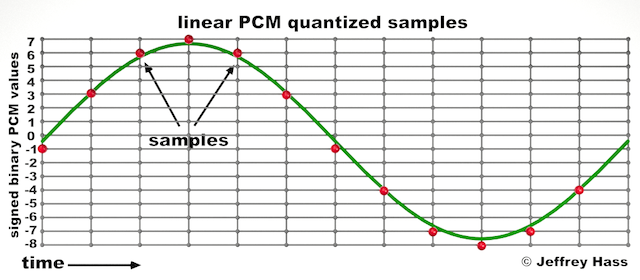
Audio quantization error is a fundamental aspect of digital audio processing. When analog sound waves are converted into digital signals, they undergo quantization. This means that the continuous analog signal is sampled and approximated in discrete steps. These steps are represented by binary values, typically in the form of bits (e.g., 16-bit, 24-bit). Now, what’s crucial to grasp here is that these discrete steps can lead to imperfections in audio reproduction.

Quantization error, often referred to as “quantization noise,” occurs when the actual analog signal deviates from the approximated digital representation. Imagine you have a beautiful painting, and you’re asked to replicate it using only a limited set of colors. The more restricted your color palette, the less accurate your reproduction will be. In the same way, the fewer bits you use for audio quantization, the more pronounced the quantization error becomes.

Quantization Levels and the Impact on Sound Quality

The number of quantization levels (related to bit depth) directly affects the precision of audio representation. For instance, a 16-bit audio recording has 65,536 possible levels, while a 24-bit recording provides a staggering 16,777,216 levels. This increased bit depth allows for a much finer representation of the original analog signal. Hence, a higher bit depth results in a reduction of quantization error, leading to superior sound quality.

To illustrate this, consider a grayscale image with only two colors: black and white. This is akin to an extremely low bit depth in audio, where the audio signal is either “on” or “off.” Now, imagine a high-resolution image with millions of colors, similar to the detail you get in a 24-bit audio recording. The difference in quality is apparent.

The Role of Dithering in Minimizing Quantization Error

One might wonder if there’s a way to mitigate quantization error in low-bit-depth audio recordings. Enter “dithering.” Dithering is a technique that introduces low-level noise to the audio signal, effectively spreading out the quantization error across a broader spectrum. Think of it as adding a sprinkle of fine grains of sand to a painting to blend the colors. This subtle noise masks the harshness of quantization error and makes it less noticeable to the human ear.

Now, as we’ve explored the fundamentals of audio quantization error, let’s delve into the questions that often arise:

How Does Quantization Error Affect Music Production?

In the realm of music production, quantization error can be a significant concern, particularly for professionals aiming to achieve top-tier sound quality. When producing music, especially in genres where subtle nuances are crucial, such as classical or jazz, quantization errors become more perceptible. To maintain audio fidelity, a higher bit depth is preferred during recording and production, ensuring minimal quantization noise.

Is There an Ideal Bit Depth for Audio Recording?

The ideal bit depth for audio recording is a subject of debate among audio enthusiasts. While 24-bit recording is commonly favored for its excellent dynamic range and low quantization error, it’s worth noting that the final audio format for most consumer applications, like CDs or streaming, is often 16-bit. The choice of bit depth should be based on the specific requirements of the project, keeping in mind the trade-off between audio quality and file size.

Can Quantization Error be Completely Eliminated?

Regrettably, quantization error cannot be entirely eliminated, as it’s an inherent part of the digital audio conversion process. However, it can be minimized to the point where it’s imperceptible to the human ear. Through techniques like dithering and the use of higher bit depths, the impact of quantization error can be significantly reduced, allowing for exceptional audio quality.

Last Words about Audio Quantization Error

In the ever-evolving world of audio technology, understanding audio quantization error is a fundamental step towards achieving superior sound quality. As an expert in the field, I’ve shared insights, experiences, and technical knowledge to demystify this concept. Remember, the bit depth you choose in audio recording significantly influences the extent of quantization error, and techniques like dithering play a pivotal role in mitigating its effects. The quest for pristine audio quality is an ongoing journey, but armed with this knowledge, you’re better equipped to make informed decisions in your audio endeavors.

Audio Channel Remapping

Audio Channel Remapping


Audio Channel Remapping

Audio channel remapping is a powerful technique that allows you to reconfigure how audio signals are distributed across different speakers or channels in a sound system. This process is essential in the world of audio engineering, as it can significantly impact the quality of sound output in various applications. In this article, I will delve into the intricacies of audio channel remapping, providing you with a comprehensive understanding of the subject and addressing related questions that you might have.

The Basics of Audio Channel Remapping

To start, audio channel remapping involves the alteration of audio signals to achieve specific spatial audio effects or to adapt to various playback configurations. It’s commonly used in home theaters, surround sound setups, and even in professional audio production. Imagine you have a 5.1 surround sound system, and you want to enjoy a movie that’s mixed in 7.1 surround. Audio channel remapping can help redistribute the audio elements to your available channels, delivering an immersive experience.

Consider this scenario: You’re watching a high-octane action scene in a movie, and the sound of a car approaching from behind should be heard from the rear speakers. With audio channel remapping, the sound can be dynamically redirected to the appropriate speakers, creating a more realistic and engaging audio experience.

Remapping Audio Channels in Software

One of the most common questions related to audio channel remapping is, “How do I remap audio channels in software?” This is a crucial aspect, as software solutions offer a flexible way to adjust audio channel assignments. Various audio editing and playback software tools, such as Adobe Audition or VLC Media Player, allow you to remap channels to your liking.

For instance, you can change the default audio channel mapping for a video in VLC. By going to Tools > Preferences > Audio, you can set your preferred audio output configuration, effectively remapping the channels based on your sound system’s setup. This level of customization empowers you to optimize your audio experience for any media.

Enhancing Surround Sound with Audio Channel Remapping

Now, let’s address the question of whether audio channel remapping can improve surround sound. The answer is a resounding yes. By reallocating audio channels effectively, you can enhance the immersion of your surround sound setup. Let’s return to the example of a 5.1 system playing 7.1 content. Audio channel remapping allows you to adapt the audio so that you don’t miss out on any details. You can make sure that the dialogue remains clear from the center speaker, while ambient sounds and effects are distributed to the appropriate channels, delivering a more enveloping experience.

The Benefits of Audio Channel Remapping

Finally, let’s explore the benefits of audio channel remapping. This technique not only caters to home theater enthusiasts but also holds significance in the realm of professional audio production. It enables sound engineers to optimize audio for various playback scenarios, ensuring that the intended impact is achieved. In summary, audio channel remapping offers the following advantages:

Customization: You can adapt audio to your specific speaker configuration.
Enhanced Immersion: It improves surround sound experiences.
Compatibility: Allows you to enjoy diverse audio content on your system.
Last Words about Audio Channel Remapping

In conclusion, audio channel remapping is a valuable tool for audio enthusiasts and professionals alike. With the ability to customize audio distribution, enhance surround sound, and achieve compatibility with various audio formats, it plays a vital role in delivering an exceptional auditory experience. I hope this article has provided you with valuable insights into the world of audio channel remapping and its applications.

Audio Jitter

Understanding Audio Jitter


Audio Jitter
Audio Jitter

Audio Jitter, what is this?

Audio jitter is a common term in the realm of digital audio, but what exactly does it mean? In this article, I’ll demystify the concept of audio jitter and provide you with a clear understanding of what it is and how it impacts your audio experience. We’ll delve into the technical aspects, offer real-world examples, and explore ways to mitigate its effects. So, let’s embark on this journey to unravel the mysteries of audio jitter.

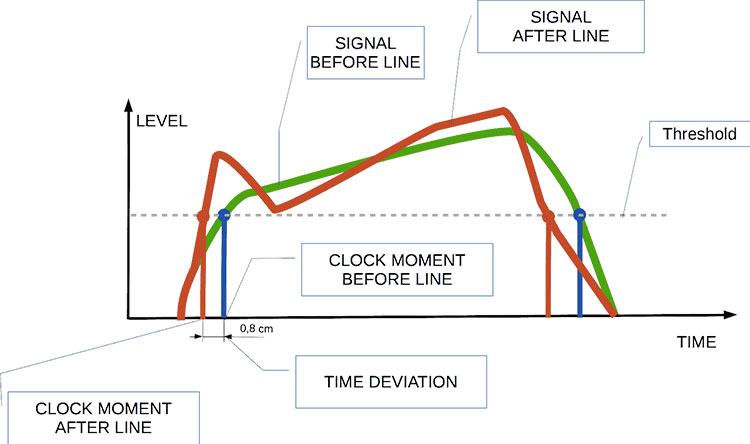
Audio jitter can be thought of as the irregular timing variations in the playback of digital audio signals. These timing variations can manifest as small deviations in the timing of audio samples, leading to audio artifacts like clicks, pops, and distortion. While it may seem like a technical concern, audio jitter can significantly affect your overall listening experience, even if you’re not a seasoned audiophile.

What is Audio Jitter?

Audio jitter, in essence, is the bane of digital audio playback. When you play a digital audio file, it gets converted into an analog signal for your speakers or headphones. The challenge arises when the conversion isn’t perfectly synchronized. Think of it like a metronome that occasionally skips a beat. This timing discrepancy, which we call audio jitter, can distort the sound and result in a less-than-ideal listening experience.

For a real-world analogy, consider a musical ensemble. If the musicians are out of sync, even by a tiny fraction of a second, the result can be dissonant and displeasing to the ear. Similarly, audio jitter disrupts the synchronization between the digital audio source and your playback system.

How Does Audio Jitter Impact Sound Quality?

Audio jitter affects sound quality by introducing unwanted artifacts. These artifacts can include audible clicks, pops, and distortions in the audio stream. To understand the impact, picture a pristine audio signal as a smooth, flowing river. Audio jitter is like tossing pebbles into that river, causing ripples and disturbances. These ripples manifest as audible imperfections in your music or audio.

Think of a jazz drum solo: the precision of the drummer’s beats is crucial to the experience. Even a slight deviation in the rhythm can disrupt the entire performance. Audio jitter works in a similar way, disrupting the timing and rhythm of your audio playback, ultimately degrading the sound quality.

The Technical Aspects of Audio Jitter

Now, let’s delve into the technical side of audio jitter. In the digital domain, audio is typically stored as discrete samples, each representing the amplitude of the sound at a specific moment. The timing of these samples is critical. Audio jitter occurs when the time intervals between these samples deviate from the ideal, leading to inconsistencies in playback.

To put this in context, think of a digital audio player as a conveyor belt, with each audio sample represented by a box. These boxes must move down the belt at precise intervals to maintain the audio’s integrity. If some boxes move faster or slower than others, you’ll encounter audio jitter, which translates to an erratic and unpleasant listening experience.

Addressing Audio Jitter: Practical Solutions

It’s clear that audio jitter can be a nuisance, but what can you do to mitigate its effects? Fortunately, there are practical solutions available. Some high-end audio equipment includes advanced jitter-reduction technologies. Additionally, using dedicated external digital-to-analog converters (DACs) can help improve audio synchronization.

Think of these solutions as a conductor guiding the musicians in an orchestra, ensuring they play in perfect harmony. Advanced equipment and DACs help maintain the precise timing necessary for high-quality audio playback.

Audio Jitter vs. Bit Depth: Exploring the Differences

While audio jitter deals with timing variations, bit depth relates to the depth of information in an audio signal. It’s essential to distinguish between the two. Bit depth determines the resolution of the audio signal, affecting the dynamic range and subtlety of sound. Audio jitter, on the other hand, impacts timing and synchronization. Both factors play a role in overall audio quality, but they address different aspects of the listening experience.

Think of bit depth as the number of colors on a painter’s palette, while audio jitter is akin to the painter’s brush strokes’ precision. They are both crucial for the final masterpiece, but they address different aspects of the artistic process.

The Importance of Low Jitter in High-End Audio Systems

In high-end audio systems, low jitter is a fundamental requirement for achieving audiophile-grade sound quality. Audiophiles demand the utmost precision and clarity in their audio playback, and any deviation in timing is unacceptable. To achieve this, specialized audio components and meticulous engineering are employed to minimize jitter.

Imagine a fine dining experience where every detail, from the presentation to the taste, is meticulously crafted. Audiophiles seek the same level of perfection in their audio experience, and low jitter is a crucial ingredient in achieving it.

Measuring and Analyzing Audio Jitter: Tools and Techniques

To assess and address audio jitter, various tools and techniques are available. One common method involves using dedicated audio analyzers that can pinpoint timing variations. Additionally, software applications can help diagnose and quantify audio jitter in your playback system.

Think of these tools as diagnostic instruments in a doctor’s office. They allow audio enthusiasts and professionals to diagnose and treat any issues related to audio jitter, ensuring the best possible audio quality.

Enhancing Your Audio Experience: Final Thoughts

In the world of digital audio, understanding and managing audio jitter is essential for achieving the best possible listening experience. Whether you’re a casual music lover or a dedicated audiophile, knowing how audio jitter affects your sound quality can lead to informed choices and better audio equipment investments.

So, the next time you enjoy your favorite music or immerse yourself in a captivating movie, remember the role that precise timing plays in your audio journey. Just as a conductor leads an orchestra to create beautiful music, minimizing audio jitter ensures that the symphony of sound reaches your ears with clarity and perfection.

Last Words

In conclusion, audio jitter is a subtle yet critical factor that can significantly impact your audio enjoyment. By delving into the technical aspects of audio jitter and exploring practical solutions, we’ve uncovered the key to enhancing your audio experience. Whether you’re an audiophile or simply someone who appreciates good sound, understanding and addressing audio jitter is a step toward audio perfection.

Audio Buffering

Audio Buffering: Ensuring Smooth Sound Playback

Audio Buffering
Audio Buffering

In today’s digital age, audio buffering is a crucial aspect of delivering seamless sound experiences across various devices and platforms. Whether you’re streaming music, participating in online meetings, or playing video games, audio buffering plays a significant role in ensuring that you hear clear and uninterrupted audio. In this article, I, as an expert in audio technology, will delve into the world of audio buffering, providing insights, explanations, and practical examples to help you understand its importance and how it works.

Understanding Audio Buffering

Audio buffering is like having a reservoir of sound data ready to be played, ensuring a continuous and smooth listening experience. When you’re watching a movie online or streaming music, the data is delivered in small packets called audio samples. These samples are stored temporarily in a buffer before they are played through your speakers or headphones. The buffer acts as a safeguard against interruptions, allowing your device to compensate for any delays in data transmission.

Imagine your audio buffer as a water tank in your home. The water continuously flows into the tank, and you use water from the tank as needed. If there’s a momentary disruption in the water supply, you can still use water from the tank without noticing the interruption. Similarly, audio buffering ensures that even if there are network fluctuations or data transfer delays, your audio playback remains uninterrupted.

How Audio Buffering Works

Let’s dive a bit deeper into how audio buffering functions. When you start streaming audio, your device begins to fill the audio buffer with small chunks of sound data. These chunks are usually a fraction of a second in duration, but they are filled continuously as you listen. The buffer size and management depend on the software or hardware you’re using.

Think of it as a conveyor belt in a factory. The audio samples are like products on the conveyor belt, and the buffer is the storage area where they temporarily wait before being delivered to your ears. If there’s a hiccup in the production line (e.g., a network lag), the buffer ensures that there’s still enough audio data ready for playback.

The Importance of Buffer Size

Now, let’s discuss the significance of buffer size. The size of the audio buffer affects the delay you experience while listening to audio. A larger buffer can store more data, which reduces the chances of audio dropouts but may introduce some delay. Conversely, a smaller buffer reduces delay but may result in more interruptions if there are data hiccups.

Imagine driving a car on a busy highway. A larger buffer is like keeping a safe distance from the car in front of you, reducing the risk of sudden stops. In contrast, a smaller buffer is like tailgating, which might get you to your destination faster but increases the chances of abrupt stops. Finding the right buffer size depends on the context; for live streaming or online gaming, low latency is crucial, while for offline playback, a larger buffer can ensure smoother playback.

Now, let’s explore some common questions related to audio buffering:

Why Do I Hear Audio Glitches During Online Calls?

Online calls, such as video conferences or VoIP calls, require real-time audio communication. In such scenarios, a small audio buffer is preferred to minimize latency. However, if you hear audio glitches during online calls, it could be due to network issues, insufficient bandwidth, or software problems. Ensuring a stable internet connection and using reliable communication software can help mitigate these glitches.

How Can I Optimize Audio Buffering for Gaming?

Gaming demands both low latency and high audio quality. To optimize audio buffering for gaming, you can tweak the buffer settings in your game or audio software to find the right balance between delay and audio smoothness. Additionally, using a gaming-specific headset with low latency features can enhance your gaming experience.

What Is the Impact of Buffer Size on Music Streaming?

When streaming music, a larger buffer can provide a smoother listening experience, especially in areas with unreliable internet connections. However, it may introduce a slight delay when you start playback. To strike the right balance, music streaming services often adjust buffer sizes dynamically based on network conditions.

How Does Buffering Affect Podcast Playback?

Podcast playback typically involves downloading the entire episode before listening. In this case, buffering isn’t as critical because the audio is preloaded. However, some podcast apps may use small buffers to ensure seamless playback even if your internet connection briefly drops.

Buffering for Video: A Multifaceted Approach

When it comes to video streaming, audio buffering is just one piece of the puzzle. Video and audio synchronization, network performance, and device capabilities also play crucial roles in delivering a smooth viewing experience. The buffer size for video often differs from that of audio to ensure synchronization and minimize lag.

Buffering: The Bridge to Seamless Audio

In conclusion, audio buffering is the unsung hero behind smooth sound playback in our digital lives. Whether you’re binge-watching your favorite series, engaging in a video call, or immersed in a gaming session, understanding how audio buffering works can enhance your overall audio experience. Buffer size and optimization depend on the context, but they all aim to ensure that you hear what you want, when you want it, without interruptions. So, the next time you enjoy your favorite audio content, remember that audio buffering is there, silently working to provide you with a flawless experience.

Last Words

In the realm of audio technology, audio buffering stands as a critical component that often goes unnoticed. It bridges the gap between data transmission and your ears, making sure that your audio experience remains uninterrupted and enjoyable. As an expert in the field, I’ve shared insights and knowledge to demystify audio buffering, helping you grasp its significance and impact on your daily digital interactions. So, the next time you encounter seamless audio playback, you’ll have a deeper appreciation for the role played by this essential technology.