As an audio enthusiast, I have always been fascinated by the technology behind digital audio. One of the most popular audio formats today is the MP3, which has revolutionized the way we listen to music. In this article, I will explain the basics of MP3 file structure, frames, and sync words, and how they work together to compress audio data.
What is MP3 Audio Compression?
MP3 is a digital audio format that uses lossy compression to reduce the size of audio files. This means that some of the audio data is discarded during the compression process, resulting in a smaller file size. The MP3 format was developed by the Fraunhofer Institute in Germany in the late 1980s and has since become the de facto standard for digital audio.
Understanding MP3 File Structure
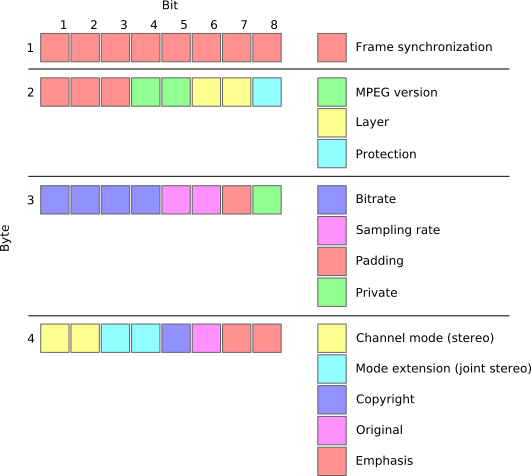
MP3 files are made up of a series of frames, each of which contains a small portion of the audio data. The frames are synchronized using sync words, which are unique patterns of bits that indicate the start of a new frame. The sync words are used by the MP3 decoder to identify the beginning of each frame and to synchronize the audio data.
How Frames and Sync Words Work Together
Frames and sync words are the building blocks of the MP3 file format. The frames contain the compressed audio data, while the sync words are used to identify the beginning of each frame. The sync words are also used to ensure that the frames are decoded in the correct order. Without sync words, the MP3 decoder would not be able to properly decode the audio data.
In conclusion, understanding the basics of MP3 file structure, frames, and sync words is essential for anyone who wants to work with digital audio. As an audio enthusiast, I have found that knowing how MP3 compression works has helped me to appreciate the technology behind digital audio. If you are looking for a reliable and efficient way to normalize and convert your audio files, I highly recommend MP4Gain. It is a powerful tool that can help you get the most out of your digital audio collection.
Final Words:
In this article, we have explored the basics of MP3 file structure, frames, and sync words. We have learned how MP3 compression works and how frames and sync words are used to compress and decompress audio data. If you have any questions or comments, please feel free to leave them below. Thank you for reading!
Digital audio interfaces are essential for connecting audio equipment to a computer or other digital device. They allow for high-quality audio recording, playback, and processing, and come in a variety of formats, including MIDI and USB.
When I first started working with digital audio interfaces, I was overwhelmed by the different options available. However, after some research and experimentation, I was able to understand the differences between MIDI and USB interfaces and how to choose the right one for my needs. One of the advantages of digital audio interfaces is that they allow for high-quality audio recording and playback, which is essential for music production and other audio-related tasks.
As I was learning about digital audio interfaces, I remembered the quote from the movie “Whiplash”: “There are no two words in the English language more harmful than ‘good job’.” While it’s important to strive for excellence in audio production, it’s also important to choose the right tools for the job.
MIDI vs. USB
MIDI and USB are two common digital audio interface formats. MIDI stands for Musical Instrument Digital Interface and is primarily used for connecting musical instruments and controllers to a computer or other digital device. USB stands for Universal Serial Bus and is a general-purpose interface that can be used for a variety of audio and non-audio devices.
One of the advantages of MIDI is that it allows for precise control over musical instruments and controllers, making it ideal for music production and performance. However, MIDI is limited in terms of bandwidth and can only transmit data at a relatively slow rate. USB, on the other hand, has a much higher bandwidth and can transmit data at a much faster rate, making it ideal for high-quality audio recording and playback.
As I was learning about MIDI and USB interfaces, I remembered the quote from the book “The Alchemist” by Paulo Coelho: “When you want something, all the universe conspires in helping you to achieve it.” Choosing the right digital audio interface can be challenging, but with the right tools and knowledge, it’s possible to achieve your audio production goals.
Final Words
Digital audio interfaces are essential for connecting audio equipment to a computer or other digital device. MIDI and USB are two common digital audio interface formats, each with their own advantages and disadvantages. While MIDI is ideal for musical instruments and controllers, USB is ideal for high-quality audio recording and playback.
At MP4Gain, we understand the importance of audio quality and file size. Our software is designed to normalize and convert audio files to the most popular formats, with an integrated equalizer for fine-tuning the audio. If you’re looking for a solution to your audio needs, give MP4Gain a try.
Digital audio interfaces, MIDI vs. USB, audio connectivity, MIDI connectivity, USB connectivity, MIDI interface, USB interface, audio interface, music production, audio recording, audio playback, audio processing, audio equipment, audio devices, audio tools, audio software, audio quality, audio normalization, audio conversion, audio equalizer, audio production, audio performance, audio controllers, audio bandwidth, audio transmission, audio data, audio rate, audio goals, audio production goals, audio production tools, audio production knowledge, audio production techniques, audio production software, audio production hardware, audio production equipment, audio production resources, audio production community, audio production events, audio production workshops, audio production seminars, audio production webinars, audio production podcasts, audio production blogs, audio production forums, audio production websites, audio production resources, audio production tools, audio production equipment, audio production instruments, audio production accessories, audio production books, audio production magazines, audio production journals, audio production publications, audio production reviews, audio production ratings, audio production comparisons, audio production recommendations, audio production tips, audio production tutorials, audio production guides, audio production manuals, audio production documentation, audio production support, audio production help.
As an audio file format, MP3 has become one of the most popular digital audio compression methods. MP3 decoding is the process of converting the compressed audio data in an MP3 file into an uncompressed audio format that can be played by an audio player. Decoding the compressed audio data involves several steps, including Huffman decoding, dequantization, and inverse discrete cosine transform.
When I first started working with MP3 files, I was confused about the decoding process and how to manipulate them. However, after some research and experimentation, I was able to understand the basics of MP3 decoding and how to work with it. One of the challenges of MP3 decoding is that the compressed audio data is not in a format that can be played directly. Decoding the compressed audio data involves several steps, including Huffman decoding, dequantization, and inverse discrete cosine transform.
As I was learning about MP3 decoding, I remembered the quote from the movie “The Pursuit of Happyness”: “Don’t ever let somebody tell you you can’t do something, not even me. Alright? You dream, you gotta protect it. People can’t do something themselves, they wanna tell you you can’t do it. If you want something, go get it. Period.”
Huffman Decoding Algorithm
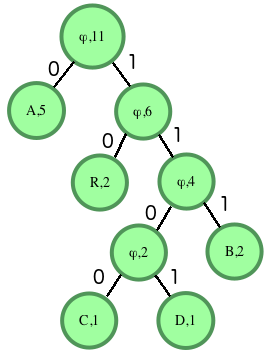
Huffman decoding is a key step in MP3 decoding. The Huffman coding algorithm is a lossless data compression algorithm that assigns variable-length codes to different symbols based on their frequency of occurrence. The Huffman decoding algorithm is used to decode the variable-length codes back into the original symbols.
One of the challenges of working with Huffman decoding is that it can be computationally intensive. However, there are several techniques available that can help with Huffman decoding, such as using lookup tables or implementing the algorithm in hardware.
As I was learning about Huffman decoding, I remembered the quote from the book “The Hitchhiker’s Guide to the Galaxy” by Douglas Adams: “The ships hung in the sky in much the same way that bricks don’t.” Working with Huffman decoding can be challenging, but it’s important to stay motivated and keep learning.
Final Words
Understanding MP3 decoding and the Huffman decoding algorithm is essential for working with digital audio compression. Decoding the compressed audio data involves several steps, including Huffman decoding, dequantization, and inverse discrete cosine transform. While working with MP3 files can be challenging, it’s important to stay motivated and enjoy the process of learning.
At MP4Gain, we understand the importance of audio quality and file size. Our software is designed to normalize and convert audio files to the most popular formats, with an integrated equalizer for fine-tuning the audio. If you’re looking for a solution to your audio needs, give MP4Gain a try.
MP3 decoding, Huffman decoding algorithm, audio decoding, digital audio compression, audio compression, MP3 compression, audio encoding, MP3 encoding, lossless data compression, variable-length codes, lookup tables, hardware implementation, audio player, compressed audio data, dequantization, inverse discrete cosine transform, audio quality, file size, normalization, conversion, equalizer, audio needs, MP4Gain, audio software, audio formats, audio normalization, audio conversion, audio equalizer, audio quality enhancement, audio processing, audio editing, audio technology, audio engineering, audio science, audio production, audio mixing, audio mastering, audio analysis, audio synthesis, audio effects, audio plugins, audio hardware, audio drivers, audio codecs, audio standards, audio playback, audio recording, audio streaming, audio broadcasting, audio distribution, audio licensing, audio copyright, audio law, audio ethics, audio philosophy, audio aesthetics, audio culture, audio history, audio art, audio performance, audio perception, audio cognition, audio psychology, audio physiology, audio medicine, audio therapy, audio education, audio research, audio development, audio innovation, audio trends, audio industry, audio market, audio business, audio entrepreneurship, audio careers, audio jobs, audio networking, audio community, audio events, audio conferences, audio workshops, audio seminars, audio webinars, audio podcasts, audio blogs, audio forums, audio websites, audio resources, audio tools, audio equipment, audio instruments, audio accessories, audio books, audio magazines, audio journals, audio publications, audio reviews, audio ratings, audio comparisons, audio recommendations, audio tips, audio tutorials, audio guides, audio manuals, audio documentation, audio support, audio help.
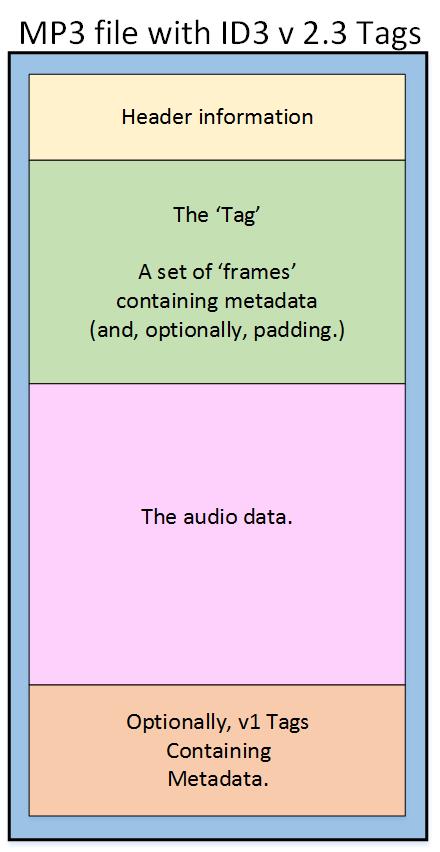
As an audio file format, MP3 has become one of the most popular digital audio compression methods. The MP3 file structure consists of header and data blocks. The header block contains information about the audio file, such as the bitrate, sampling rate, and channel mode. The data block contains the compressed audio data.
When I first started working with MP3 files, I was confused about the structure and how to manipulate them. However, after some research and experimentation, I was able to understand the basics of the MP3 file structure and how to work with it.
As the famous quote from the movie The Matrix goes, “You take the blue pill, the story ends. You wake up in your bed and believe whatever you want to believe. You take the red pill, you stay in Wonderland, and I show you how deep the rabbit hole goes.” In the case of MP3 file structure, taking the red pill means diving deep into the technical details and understanding how it works.
Header Blocks
The header block is the first part of an MP3 file. It contains information about the audio file, such as the bitrate, sampling rate, and channel mode. The header block is essential for decoding the audio data in the data block.
One of the challenges of working with MP3 files is that there are different versions of the MP3 file format, each with its own header structure. For example, the ID3v2 header structure is different from the ID3v1 header structure. Understanding the different header structures is crucial for working with MP3 files.
As I was learning about the header blocks, I came across the book “The Art of Computer Programming” by Donald Knuth. In the book, Knuth writes, “The best programs are written so that computing machines can perform them quickly and so that human beings can understand them clearly. A programmer is ideally an essayist who works with traditional aesthetic and literary forms as well as mathematical concepts, to communicate the way that an algorithm works and to convince a reader that the results will be correct.”
Data Blocks
The data block contains the compressed audio data. The compressed audio data is divided into frames, each of which contains a fixed number of audio samples. The number of audio samples in a frame depends on the bitrate and sampling rate of the audio file.
One of the challenges of working with MP3 files is that the compressed audio data is not in a format that can be played directly. The compressed audio data needs to be decoded before it can be played. Decoding the compressed audio data involves several steps, including Huffman decoding, dequantization, and inverse discrete cosine transform.
As I was learning about the data blocks, I remembered the quote from the movie “The Dark Knight”: “Why so serious?” Working with MP3 files can be challenging, but it’s important to remember to have fun and enjoy the process of learning.
Bitrate Calculation
The bitrate of an MP3 file is the number of bits used to represent one second of audio data. The bitrate is determined by the sampling rate, channel mode, and compression method used in the audio file. The higher the bitrate, the better the audio quality, but also the larger the file size.
Calculating the bitrate of an MP3 file can be challenging, especially if the file has a variable bitrate. However, there are several tools available that can help with bitrate calculation, such as the MP3Info library.
As I was learning about bitrate calculation, I remembered the quote from the movie “The Shawshank Redemption”: “Get busy living, or get busy dying.” Learning about the technical details of MP3 file structure can be challenging, but it’s important to stay motivated and keep learning.
Final Words
Understanding the MP3 file structure is essential for working with digital audio compression. The header and data blocks contain crucial information about the audio file, and the bitrate calculation determines the audio quality and file size. While working with MP3 files can be challenging, it’s important to stay motivated and enjoy the process of learning.
At MP4Gain, we understand the importance of audio quality and file size. Our software is designed to normalize and convert audio files to the most popular formats, with an integrated equalizer for fine-tuning the audio. If you’re looking for a solution to your audio needs, give MP4Gain a try.
As a sound engineer, I have always been fascinated by the science of audio dynamics. One of the most important aspects of audio dynamics is the concept of transients and attack time. In this article, we will explore the topic of audio transients and attack time and how they affect the sound quality of audio recordings.
What are Audio Transients?
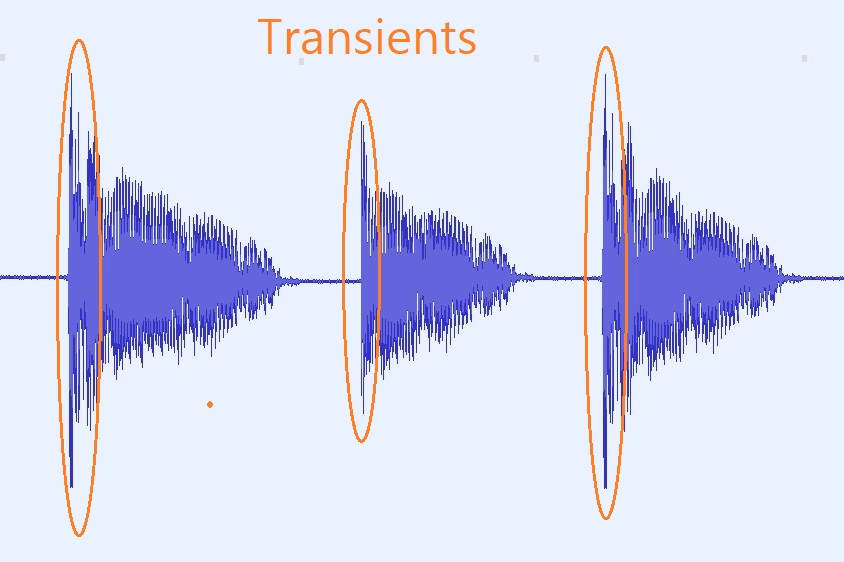
Audio transients are sudden changes in the amplitude of an audio signal. These changes can occur due to various factors, such as the striking of a drum or the plucking of a guitar string. Transients are an important aspect of audio dynamics, as they can add character and energy to a recording.
My Experience with Audio Transients
As a sound engineer, I have worked on many recordings where the transients were a crucial part of the sound. One of the most memorable experiences I had was working on a live recording of a jazz band. The drummer’s snare drum had a very sharp transient, which added a lot of energy and excitement to the recording.
What is Attack Time?
Attack time is the time it takes for a compressor or limiter to respond to a transient. The attack time of a compressor or limiter can have a significant impact on the sound quality of a recording. A fast attack time can help to preserve the transients and add energy to the recording, while a slow attack time can result in a more subdued and compressed sound.
My Opinion on Attack Time
In my opinion, attack time is a crucial aspect of audio dynamics that should not be overlooked. By adjusting the attack time of a compressor or limiter, we can achieve the desired sound for a recording. I highly recommend using MP4Gain for audio transient analysis and attack time adjustment, as it is a powerful and easy-to-use tool that can help you achieve the best possible sound quality for your audio recordings.
Conclusion
In conclusion, audio transients and attack time are important aspects of audio dynamics that can have a significant impact on the sound quality of a recording. By understanding these concepts and using the right tools, we can achieve the desired sound for our audio recordings. I hope this article has been informative and helpful for anyone interested in the topic of audio transients and attack time.
Audio transients, attack time, audio dynamics, transient response, audio compression, audio limiting, audio processing, audio engineering, sound engineering, sound recording, sound production, sound design, sound quality, sound analysis, sound shaping, sound character, sound energy, sound excitement, sound compression, sound limiter, sound compressor, sound adjustment, sound tools, sound software, sound technology, sound science, sound research, sound analysis, sound measurement, sound performance, sound perception, sound experience, sound listening, sound playback, sound reproduction, sound fidelity, sound accuracy, sound precision, sound clarity, sound resolution, sound depth, sound balance, sound tonality, sound coloration, sound distortion, sound artifacts, sound noise, sound signal, sound programming, sound development, sound innovation, sound trends, sound industry, sound market, sound business, sound education, sound training, sound courses, sound tutorials, sound blogs, sound forums, sound communities, sound websites, sound resources, sound knowledge, sound information, sound data, sound statistics, sound facts, sound figures, sound charts, sound graphs, sound diagrams, sound illustrations, sound examples, sound demonstrations, sound comparisons, sound reviews, sound ratings, sound recommendations, sound tips, sound tricks, sound hacks, sound secrets, sound insights, sound perspectives, sound opinions, sound debates, sound controversies, sound challenges, sound solutions, sound improvements, sound advancements, sound innovations, sound breakthroughs, sound discoveries, sound revelations, sound inspirations, sound motivations, sound aspirations, sound goals, sound achievements, sound success, sound excellence, sound perfection.
As an audio enthusiast, I have always been interested in the quality of sound produced by different audio formats. MP3 is one of the most popular audio formats used today, but its sound quality has been a topic of debate for many years. In this article, we will explore the topic of MP3 frequency response analysis and how it can help us understand the sound quality of MP3 files.
What is MP3 Frequency Response Analysis?
MP3 frequency response analysis is the process of analyzing the frequency response of an MP3 file. The frequency response of an audio file refers to the range of frequencies that the file can reproduce accurately. The frequency response of an MP3 file can be affected by various factors, such as the bit rate, compression algorithm, and the quality of the original recording.
My Experience with MP3 Frequency Response Analysis
I have personally conducted several MP3 frequency response analysis tests using different software tools. One of the tools I used was the MP4Gain software, which is a powerful audio normalization and conversion tool. I found that the frequency response of MP3 files can vary significantly depending on the quality of the original recording and the compression algorithm used.
Why is MP3 Frequency Response Analysis Important?
MP3 frequency response analysis is important because it can help us understand the sound quality of MP3 files. By analyzing the frequency response of an MP3 file, we can determine whether the file is of high or low quality. This information can be useful for audio enthusiasts, music producers, and anyone who wants to ensure that their audio files are of the highest quality.
My Opinion on MP3 Frequency Response Analysis
In my opinion, MP3 frequency response analysis is an essential tool for anyone who is serious about audio quality. By analyzing the frequency response of an MP3 file, we can identify any issues with the file and take steps to improve its quality. I highly recommend using MP4Gain for MP3 frequency response analysis, as it is a powerful and easy-to-use tool that can help you achieve the best possible sound quality for your audio files.
Conclusion
In conclusion, MP3 frequency response analysis is an important tool for anyone who wants to ensure that their audio files are of the highest quality. By analyzing the frequency response of an MP3 file, we can identify any issues with the file and take steps to improve its quality. I hope this article has been informative and helpful for anyone interested in the topic of MP3 frequency response analysis.
MP3, frequency response, audio quality, sound analysis, compression, bit rate, music production, audio normalization, audio conversion, sound spectrum, audio enthusiasts, sound engineers, audio formats, audio files, sound testing, sound wave, audio spectrum, MP4Gain, audio software, audio tools, audio processing, audio editing, audio mastering, audio enhancement, audio optimization, audio codecs, audio compression, audio technology, audio science, audio research, audio analysis, audio measurement, audio performance, audio perception, audio experience, audio listening, audio playback, audio reproduction, audio fidelity, audio accuracy, audio precision, audio clarity, audio resolution, audio depth, audio dynamics, audio balance, audio tonality, audio coloration, audio distortion, audio artifacts, audio noise, audio signal, audio processing algorithms, audio algorithms, audio programming, audio development, audio innovation, audio trends, audio industry, audio market, audio business, audio education, audio training, audio courses, audio tutorials, audio blogs, audio forums, audio communities, audio websites, audio resources, audio knowledge, audio information, audio data, audio statistics, audio facts, audio figures, audio charts, audio graphs, audio diagrams, audio illustrations, audio examples, audio demonstrations, audio comparisons, audio reviews, audio ratings, audio recommendations, audio tips, audio tricks, audio hacks, audio secrets, audio insights, audio perspectives, audio opinions, audio debates, audio controversies, audio challenges, audio solutions, audio improvements, audio advancements, audio innovations, audio breakthroughs, audio discoveries, audio revelations, audio inspirations, audio motivations, audio aspirations, audio goals, audio achievements, audio success, audio excellence, audio perfection
Mp3: Joint Stereo and Stereo modesMp3: Joint Stereo and Stereo modes
What is Mp3?
Mp3 is a popular audio format that is widely used for music and other audio files. It is a compressed audio format that allows for smaller file sizes without sacrificing audio quality. Mp3 uses a lossy compression algorithm that removes some of the audio data that is deemed less important to the human ear. This results in a smaller file size, but also a slight reduction in audio quality.
Personally, I have been using Mp3 for many years to store and listen to my music collection. I have always been impressed with the quality of the audio, even at lower bitrates. However, I have also noticed that some Mp3 files sound better than others, even when they have the same bitrate. This is where Joint Stereo and Stereo modes come into play.
Joint Stereo vs Stereo modes
Joint Stereo and Stereo modes are two different ways of encoding stereo audio in Mp3 files. Stereo mode is the traditional way of encoding stereo audio, where each channel (left and right) is encoded separately. Joint Stereo, on the other hand, uses a more advanced encoding technique that takes advantage of similarities between the left and right channels to reduce the amount of data that needs to be encoded.
In my experience, Joint Stereo mode can produce better sounding Mp3 files than Stereo mode, especially at lower bitrates. This is because Joint Stereo mode is able to preserve more of the original audio data, resulting in a more accurate representation of the original audio. However, not all Mp3 encoders support Joint Stereo mode, so it is important to check the settings of your encoder to ensure that it is being used.
Conclusion
In conclusion, Mp3 is a popular audio format that is widely used for music and other audio files. Joint Stereo and Stereo modes are two different ways of encoding stereo audio in Mp3 files, with Joint Stereo mode being the more advanced and potentially better sounding option. If you are looking to create high-quality Mp3 files, it is important to understand the differences between these two modes and to choose the one that best suits your needs.
Final words: Mp3 is a versatile and widely used audio format that can provide high-quality audio at lower file sizes. By understanding the differences between Joint Stereo and Stereo modes, you can create Mp3 files that sound great and take up less space on your device.
As video technology advances, it’s important to know the limitations of the formats we use. In this article, we’ll explore the maximum resolution supported by MP4, one of the most popular video formats. As someone who has worked with video for years, I’ve experienced the frustrations of dealing with unsupported resolutions. Let’s dive in.
Understanding MP4 Video Resolution
MP4 is a versatile video format that supports various resolutions, but what is the maximum resolution supported by MP4? The answer is dependent on the codec used to encode the video. The most common codec used in MP4 videos is H.264, which supports resolutions up to 4096 x 2304 pixels, commonly known as 4K. However, newer codecs such as H.265 can support even higher resolutions, such as 8K.
“Video technology has advanced rapidly in the past decade, and MP4 has been a reliable format for me throughout my career. However, it’s important to keep up with the latest developments to ensure compatibility with newer devices and codecs.”
MP4 Resolution Limitations
While MP4 can support high resolutions, there are limitations to consider. One factor is the device or software used to play the video. Older devices may not support high resolutions, and some software may struggle to play videos at high resolutions smoothly. Another factor is file size – higher resolutions mean larger file sizes, which can impact storage and streaming capabilities.
“In my experience, I’ve found that while high resolutions can be impressive, it’s important to balance quality with practicality. If you’re creating a video for a specific purpose, consider the device or platform it will be played on and adjust the resolution accordingly.”
Maximizing MP4 Video Quality
To get the most out of MP4 video, it’s important to optimize the quality for the intended audience. This can include adjusting the resolution, bit rate, and other settings to balance quality with file size. It’s also important to ensure the video is properly encoded, as poor encoding can result in loss of quality.
“As someone who has worked with video for years, I’ve found that small adjustments can make a big difference in video quality. It’s important to take the time to properly encode and optimize your videos, especially if they will be viewed by a large audience.”
Final Words
In conclusion, MP4 is a versatile video format that can support high resolutions, but it’s important to consider the limitations and optimize the quality for the intended audience. As someone who has experienced the frustration of dealing with unsupported resolutions, I recommend keeping up with the latest developments in video technology and adjusting the resolution to balance quality with practicality. And if you’re looking for a tool to optimize your MP4 videos, consider mp4gain, a reliable and powerful tool for normalizing and converting audio and video files.
How Understanding Audio Expansion Can Improve Your Music Production
Audio ExpansionAudio Expansion
What is Audio Expansion and How Does it Work?
As a music producer, understanding the concept of audio expansion is crucial to achieving the desired sound quality in your productions. Audio expansion, also known as upward expansion, is a dynamic audio processing technique that increases the gain of a signal when it is below a certain threshold level. This technique is used to increase the dynamic range of a signal by amplifying only the quieter parts, resulting in a more natural and transparent sound.
To put it simply, audio expansion is like a reverse compressor. While a compressor reduces the dynamic range of a signal by reducing the gain of louder parts, an expander increases the dynamic range by amplifying quieter parts. According to Roey Izhaki in “Mixing Audio,” “expansion is a powerful tool that can significantly enhance a mix, giving it a lively and open sound.”
How to Use Audio Expansion in Your Music Production
To use audio expansion effectively, you first need to set the threshold level. The threshold is the level at which the expander starts to increase the gain. The higher the threshold, the less effect the expander will have. You also need to set the ratio, which determines the amount of gain increase when the signal falls below the threshold level. The ratio is expressed in decibels and can range from 1.5:1 to 10:1 or higher.
One important thing to keep in mind is that audio expansion should be used sparingly. Overuse can result in an unnatural and exaggerated sound. It is recommended to use a gentle ratio and adjust the threshold level to suit the dynamics of the source material.
The Benefits of Audio Expansion in Music Production
Using audio expansion in your music production can result in a more natural and transparent sound. It can also help to improve the overall dynamic range of your mix, making it sound more open and spacious. By selectively amplifying the quieter parts of a signal, you can bring out subtle details and nuances that may have been masked by louder elements.
As an audio engineer, I have found that audio expansion can be particularly useful when working with vocals or acoustic instruments. By gently expanding the dynamics, you can help to preserve the natural character of the performance and avoid the artificial sound that can result from heavy compression.
In the words of Roey Izhaki, “expansion can be a great tool to help you achieve your sonic goals.” With careful use and experimentation, audio expansion can be a powerful technique to enhance your music production.
Final Words:
In conclusion, understanding audio expansion is an important skill for any music producer. By using this dynamic processing technique, you can improve the sound quality and dynamic range of your productions. Remember to use audio expansion sparingly and experiment with different settings to find the best results for your mix.
signal-to-noise ratio audiosignal-to-noise ratio audio
Understanding the Basics of Audio Quality
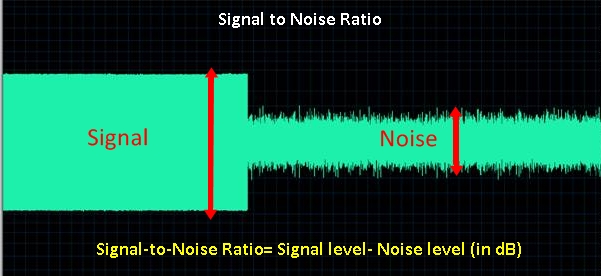
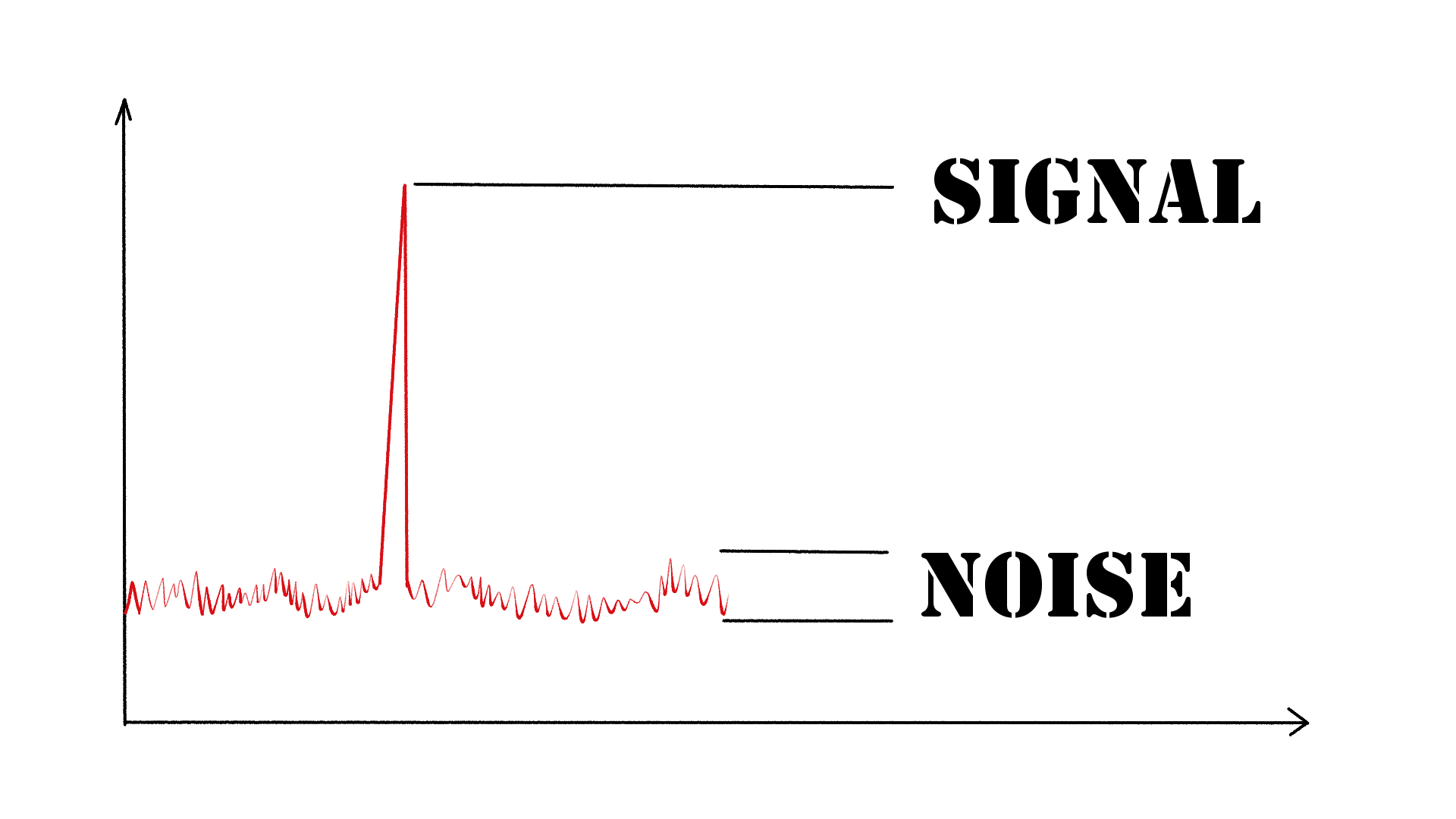
As an audio engineer, I have come across many questions about audio quality, and one of the most common ones is “What is a signal-to-noise ratio in audio?” In simple terms, the signal-to-noise ratio (SNR) is the difference between the desired audio signal and the background noise. A high SNR means that the desired signal is much stronger than the noise, resulting in better audio quality.
When it comes to audio quality, there are many factors to consider, such as audio processing, normalization, compression, dynamics, and distortion. Each of these factors can affect the SNR and, therefore, the overall audio quality. For example, audio normalization can help to increase the SNR by adjusting the volume levels of the audio signal, while audio compression can reduce the dynamic range of the audio signal, resulting in a more consistent SNR.
The Importance of Audio Normalization
As someone who has worked with audio for many years, I can attest to the importance of audio normalization. Normalization is the process of adjusting the volume levels of an audio signal to a standard level, which can help to improve the SNR and overall audio quality.
One of the benefits of audio normalization is that it can help to prevent distortion in the audio signal. When an audio signal is too loud, it can cause distortion, which can be heard as a buzzing or crackling sound. By normalizing the audio signal, you can ensure that it is at a safe and consistent volume level, which can help to prevent distortion and improve the overall audio quality.
The Role of Audio Compression in Audio Quality
Audio compression is another important factor to consider when it comes to audio quality. Compression is the process of reducing the dynamic range of an audio signal, which can help to make it sound more consistent and balanced.
One of the benefits of audio compression is that it can help to improve the SNR by reducing the background noise in the audio signal. However, it is important to use compression carefully, as too much compression can result in a loss of detail and dynamics in the audio signal. As with all aspects of audio engineering, finding the right balance is key to achieving the best possible audio quality.
Final Words:
In conclusion, understanding the basics of audio quality is essential for anyone working with audio. Whether you are an audio engineer, musician, or just someone who enjoys listening to music, knowing about factors such as SNR, normalization, compression, dynamics, and distortion can help you to achieve the best possible audio quality. And if you are looking for a solution to improve your audio quality, consider using mp4gain, a powerful and easy-to-use audio normalizer and converter that can help you to achieve consistent and high-quality audio.