Audio Transients

Exploring Audio Transients: The Heartbeat of Sound

Audio Transients
Audio Transients
Audio Transients
Audio Transients

Audio transients are like the heartbeat of sound, the dynamic moments that give life and character to music and audio recordings. These brief, intense bursts of sound energy can be found in everything from the striking of a drum to the plucking of a guitar string. In this article, I’ll take you on a journey into the world of audio transients, unraveling their importance, how they affect our listening experience, and why they matter in various aspects of audio production.

Unveiling Audio Transients: The Basics

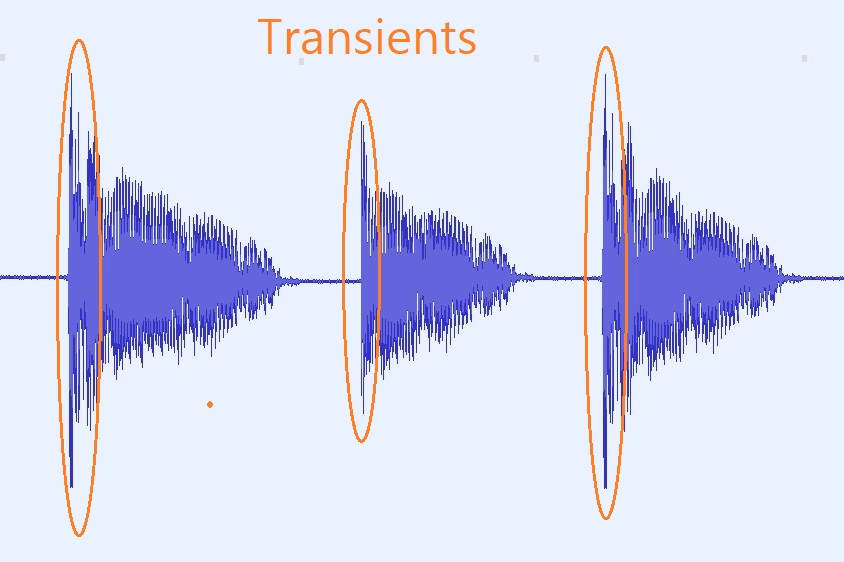
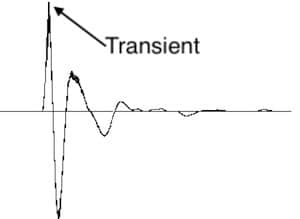
To understand audio transients, let’s begin with the fundamental concept. A transient is a sudden, short-lived spike in audio signal amplitude. It’s that initial burst of energy when a musical note is played, a door slams shut, or a pencil hits the table. Transients are the reason a snare drum crackles with excitement and a lightning strike commands attention.

Think of audio transients as the punctuation marks in a sentence. They emphasize and give context to the sound that follows. Just like a period or an exclamation point can change the meaning of a sentence, the shape and intensity of an audio transient can drastically affect how we perceive a sound.

People Also Asked: Answering Your Curiosities

Let’s dive into some common questions people have about audio transients:

How Do Audio Transients Impact Music?

Audio transients are the pulse of music. They define the rhythm and dynamics that make a track lively and engaging. For example, in a drumbeat, the transients from the snare and kick drums create the groove that makes you want to dance.

Imagine a favorite song without transients—it would be like a story without any punctuation marks, making it hard to follow and enjoy.

Can Audio Transients Be Controlled?

Yes, they can! Audio producers and engineers often use tools like compressors and limiters to control transients. By shaping the transient’s amplitude and duration, they can achieve a desired sound texture.

Think of it as adjusting the force with which a hammer strikes a nail. Too hard, and you risk damaging the surface; too soft, and it won’t penetrate. Engineers find that sweet spot to shape the sound precisely.

What Is Peak vs. RMS in Audio Transients?

Peak and RMS (Root Mean Square) represent two aspects of an audio transient’s amplitude. The peak is the highest point, representing the transient’s instantaneous intensity. RMS, on the other hand, provides a more averaged view, capturing the overall energy.

Picture a heartbeat monitor. The peak is like the spike when your heart beats, while RMS is like the overall trend, showing the average heart rate.

Keywords with Identical Search Intent

Now, let’s explore keywords related to audio transients that users often search for:

Transient Shaping Techniques: Crafting Audio Dynamics

Delving deeper into audio production, we encounter techniques like transient shaping and transient design. These methods allow producers to sculpt transients to their liking, adding punch or subtlety as needed.

Consider transient shaping as sculpting clay. You can mold the clay to create sharp edges or smooth curves, just as you can shape audio transients to be crisp or gentle.

Audio Transients in Live Sound: A Vital Element

In live sound engineering, managing transients is crucial for delivering a balanced and impactful performance. Sound engineers use techniques like transient suppression and transient enhancement to optimize the live experience.

Imagine a live concert as a massive puzzle. Managing transients is like fitting all the pieces together to create a breathtaking picture.

Mastering Transients in Audio Recording

Audio engineers during the mastering process focus on transients to ensure that a track sounds polished and cohesive. Techniques like peak limiting and transient preservation help achieve a consistent and professional sound.

Think of mastering as the final touch-up on a painting. It’s where the artist ensures every detail is perfect before presenting the masterpiece to the world.

Last Words

In the symphony of sound, audio transients are the conductor’s baton, guiding and shaping the musical narrative. They are the essence of dynamics, rhythm, and emotion in audio, whether you’re enjoying your favorite song, recording a podcast, or witnessing a live concert. Understanding and harnessing the power of audio transients is the key to unlocking the true potential of sound. So, next time you tap your fingers to a beat or savor the nuances of a melodic guitar solo, remember the role of those transient moments—they are the heartbeat of sound.

Wav Volume Booster

Wav Volume Booster

Wav Volume Booster
Wav Volume Booster
Wav Volume Booster
Wav Volume Booster


Amplify Your Audio: Wav Volume Booster

Are your favorite songs or podcasts sounding a bit lackluster? It happens to the best of us. Sometimes, you just need that extra oomph in your audio. That’s where a “Wav Volume Booster” comes into play.

Audio Amplification

Audio amplification, at its core, is about making your audio louder. It’s like giving your music or recordings a power-up, ensuring that every sound reaches your ears with greater intensity. Imagine listening to your favorite song, and every beat and note hits you with a more pronounced impact. That’s the magic of audio amplification.

Sound Enhancement

Sound enhancement is all about taking your audio experience to the next level. It’s like adding a touch of magic to your sound files. With a Wav Volume Booster, you can enhance the clarity and richness of your audio, making it more enjoyable to listen to. Whether you’re a music enthusiast, a podcaster, or a gamer, sound enhancement tools are your ticket to a more immersive experience. Mp4Gain is the best option.

Volume Boosting Tools

Volume boosting tools are essential for those moments when you need to turn up the volume. They allow you to increase the sound levels of your audio files without distorting them. It’s like having a control panel for your audio, where you can fine-tune the volume to your liking. These tools are especially handy when you’re dealing with soft-spoken dialogues in movies or videos.

Mp4Gain is the most advacend Volume Boosting tool.

Audio Wave Amplitude

Understanding audio wave amplitude is key to mastering the art of sound. When you boost the volume, you’re essentially making the audio waves taller. This increase in amplitude results in a louder sound. Think of it as stretching a rubber band – the more you stretch it, the louder the snap. It’s a fundamental concept in audio engineering, and it’s what powers the Wav Volume Booster.

Increasing Sound Levels

Sometimes, the default sound levels on your devices just don’t cut it. That’s when you need to take matters into your own hands and increase the sound levels. A Wav Volume Booster gives you the freedom to crank up the volume on your favorite music or videos, ensuring that nothing gets lost in the background noise.

Audio Enhancement Software

Audio enhancement software, like the Wav Volume Booster, is a game-changer for anyone who values high-quality sound. These tools are designed to refine and optimize audio, making it sound better than ever. Whether you’re an audiophile or just someone who enjoys good music, audio enhancement software Mp4Gain is a must-have in your toolkit.

Boosting Wav Files

Wav files are known for their excellent audio quality, but sometimes, you still want more. Boosting Wav files with a dedicated tool can take your audio to new heights. You’ll be amazed at how much clarity and depth you can add to your audio recordings, making them sound like they were professionally mastered.

Improving Audio Clarity

Clarity is the hallmark of great audio. No one wants to strain their ears trying to catch every word or note. With a Wav Volume Booster, you can improve the clarity of your audio, making it crystal clear even in noisy environments. It’s like having a personal audio engineer at your disposal.

Louder Sound Output

In a world filled with distractions, having a louder sound output can make all the difference. Whether you’re watching a movie with friends, gaming online, or simply enjoying your favorite tunes, a Wav Volume Booster ensures that your audio stands out. Say goodbye to constantly adjusting the volume – with a boost, your sound will be loud and clear.
Final Words:
So, there you have it – the world of Wav Volume Boosters and audio enhancement. These tools have the power to transform your audio experience, making it more immersive, enjoyable, and crystal clear. Whether you’re an audio enthusiast or just someone who loves a good beat, consider adding a Wav Volume Booster to your arsenal of audio gadgets.


Audio Dynamic Range Compression: Limiting and Expansion

Audio Dynamic Range Compression: Limiting and Expansion

Audio Dynamic Range Compression

Audio Compression: What It Is and How It Works

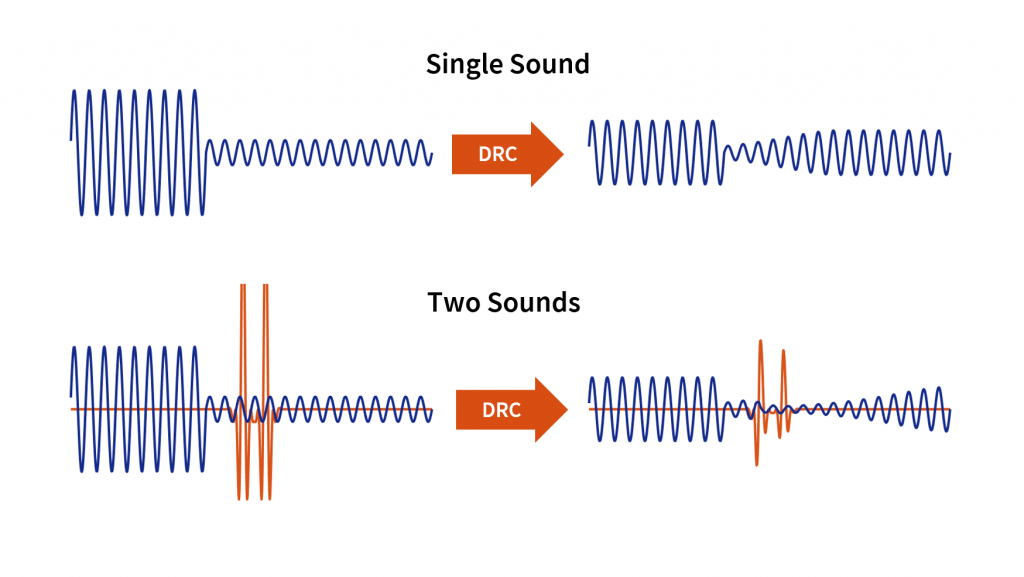
As an audio engineer, I’ve spent countless hours working with dynamic range compression. At its core, compression is a tool used to control the dynamic range of an audio signal. This means that it can be used to make quiet sounds louder and loud sounds quieter, resulting in a more consistent overall volume. Compression is an essential tool in the world of audio production, and it’s used in everything from music to film and television.
One of my favorite quotes about compression comes from the legendary producer Quincy Jones. He once said, “Compression is like a good pair of eyeglasses. You don’t notice them, but they make things look better.” And it’s true. When used correctly, compression can make an audio signal sound more polished and professional.

Dynamic Range Compression vs. Limiting

While compression and limiting are often used interchangeably, they are actually two different processes. Compression is used to control the dynamic range of an audio signal, while limiting is used to prevent the signal from exceeding a certain level. In other words, limiting is a more extreme form of compression.
One of the most common uses of limiting is in mastering, which is the final step in the audio production process. During mastering, the goal is to make sure that the audio sounds consistent across different playback systems. Limiting is used to prevent the audio from distorting or clipping when played back on a variety of systems.

Audio Expansion: The Other Side of the Coin

While compression and limiting are used to control the dynamic range of an audio signal, expansion is used to increase it. Expansion is the opposite of compression, and it’s used to make quiet sounds even quieter. This can be useful in situations where you want to bring out the details in a recording.
One of my favorite examples of the use of expansion comes from the film “No Country for Old Men.” In the film, there’s a scene where the main character is walking through a hotel room. As he walks, you can hear the sound of his footsteps echoing off the walls. The sound of the footsteps is very quiet, but it’s still audible. This is a great example of the use of expansion to bring out the details in a recording.
Final Words:
In conclusion, dynamic range compression, limiting, and expansion are all essential tools in the world of audio production. Whether you’re working on music, film, or television, understanding how to use these tools can make a huge difference in the final product. And while there are many different techniques and approaches to using compression, limiting, and expansion, the most important thing is to use your ears and trust your instincts.
audio compression, dynamic range, audio engineering, audio processing, audio mixing, audio production, audio mastering, audio software, audio plugins, audio effects, audio equipment, audio gear, audio technology, audio science, audio theory, audio education, audio tutorials, audio tips, audio tricks, audio hacks, audio workflow, audio techniques, audio aesthetics, audio quality, audio fidelity, audio perception, audio psychology, audio philosophy, audio history, audio culture, audio art, audio creativity, audio innovation, audio trends, audio industry, audio business, audio marketing, audio branding, audio advertising, audio monetization, audio revenue, audio distribution, audio streaming, audio downloads, audio formats, audio codecs, audio standards, audio compatibility, audio hardware, audio drivers, audio firmware, audio troubleshooting, audio repair, audio maintenance, audio optimization, audio performance, audio testing, audio measurement, audio analysis, audio visualization, audio synthesis, audio sampling, audio recording, audio editing, audio mixing, audio mastering, audio post-production, audio restoration, audio enhancement, audio noise reduction, audio equalization, audio filters, audio modulation, audio synthesis, audio synthesis

Huffman Decoding Algorithm

MP3 Decoding: Huffman Decoding Algorithm

Huffman Decoding Algorithm

MP3 Decoding

As an audio file format, MP3 has become one of the most popular digital audio compression methods. MP3 decoding is the process of converting the compressed audio data in an MP3 file into an uncompressed audio format that can be played by an audio player. Decoding the compressed audio data involves several steps, including Huffman decoding, dequantization, and inverse discrete cosine transform.
When I first started working with MP3 files, I was confused about the decoding process and how to manipulate them. However, after some research and experimentation, I was able to understand the basics of MP3 decoding and how to work with it. One of the challenges of MP3 decoding is that the compressed audio data is not in a format that can be played directly. Decoding the compressed audio data involves several steps, including Huffman decoding, dequantization, and inverse discrete cosine transform.
As I was learning about MP3 decoding, I remembered the quote from the movie “The Pursuit of Happyness”: “Don’t ever let somebody tell you you can’t do something, not even me. Alright? You dream, you gotta protect it. People can’t do something themselves, they wanna tell you you can’t do it. If you want something, go get it. Period.”

Huffman Decoding Algorithm

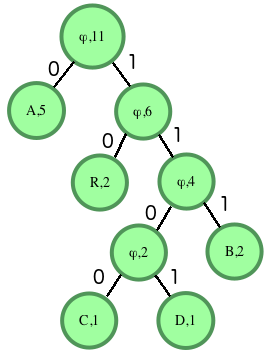
Huffman decoding is a key step in MP3 decoding. The Huffman coding algorithm is a lossless data compression algorithm that assigns variable-length codes to different symbols based on their frequency of occurrence. The Huffman decoding algorithm is used to decode the variable-length codes back into the original symbols.
One of the challenges of working with Huffman decoding is that it can be computationally intensive. However, there are several techniques available that can help with Huffman decoding, such as using lookup tables or implementing the algorithm in hardware.
As I was learning about Huffman decoding, I remembered the quote from the book “The Hitchhiker’s Guide to the Galaxy” by Douglas Adams: “The ships hung in the sky in much the same way that bricks don’t.” Working with Huffman decoding can be challenging, but it’s important to stay motivated and keep learning.

Final Words

Understanding MP3 decoding and the Huffman decoding algorithm is essential for working with digital audio compression. Decoding the compressed audio data involves several steps, including Huffman decoding, dequantization, and inverse discrete cosine transform. While working with MP3 files can be challenging, it’s important to stay motivated and enjoy the process of learning.
At MP4Gain, we understand the importance of audio quality and file size. Our software is designed to normalize and convert audio files to the most popular formats, with an integrated equalizer for fine-tuning the audio. If you’re looking for a solution to your audio needs, give MP4Gain a try.
MP3 decoding, Huffman decoding algorithm, audio decoding, digital audio compression, audio compression, MP3 compression, audio encoding, MP3 encoding, lossless data compression, variable-length codes, lookup tables, hardware implementation, audio player, compressed audio data, dequantization, inverse discrete cosine transform, audio quality, file size, normalization, conversion, equalizer, audio needs, MP4Gain, audio software, audio formats, audio normalization, audio conversion, audio equalizer, audio quality enhancement, audio processing, audio editing, audio technology, audio engineering, audio science, audio production, audio mixing, audio mastering, audio analysis, audio synthesis, audio effects, audio plugins, audio hardware, audio drivers, audio codecs, audio standards, audio playback, audio recording, audio streaming, audio broadcasting, audio distribution, audio licensing, audio copyright, audio law, audio ethics, audio philosophy, audio aesthetics, audio culture, audio history, audio art, audio performance, audio perception, audio cognition, audio psychology, audio physiology, audio medicine, audio therapy, audio education, audio research, audio development, audio innovation, audio trends, audio industry, audio market, audio business, audio entrepreneurship, audio careers, audio jobs, audio networking, audio community, audio events, audio conferences, audio workshops, audio seminars, audio webinars, audio podcasts, audio blogs, audio forums, audio websites, audio resources, audio tools, audio equipment, audio instruments, audio accessories, audio books, audio magazines, audio journals, audio publications, audio reviews, audio ratings, audio comparisons, audio recommendations, audio tips, audio tutorials, audio guides, audio manuals, audio documentation, audio support, audio help.

MP3 File Structure

MP3 File Structure

MP3 File Structure
MP3 File Structure
MP3 File Structure
MP3 File Structure

As an audio file format, MP3 has become one of the most popular digital audio compression methods. The MP3 file structure consists of header and data blocks. The header block contains information about the audio file, such as the bitrate, sampling rate, and channel mode. The data block contains the compressed audio data.

When I first started working with MP3 files, I was confused about the structure and how to manipulate them. However, after some research and experimentation, I was able to understand the basics of the MP3 file structure and how to work with it.

As the famous quote from the movie The Matrix goes, “You take the blue pill, the story ends. You wake up in your bed and believe whatever you want to believe. You take the red pill, you stay in Wonderland, and I show you how deep the rabbit hole goes.” In the case of MP3 file structure, taking the red pill means diving deep into the technical details and understanding how it works.

Header Blocks

The header block is the first part of an MP3 file. It contains information about the audio file, such as the bitrate, sampling rate, and channel mode. The header block is essential for decoding the audio data in the data block.

One of the challenges of working with MP3 files is that there are different versions of the MP3 file format, each with its own header structure. For example, the ID3v2 header structure is different from the ID3v1 header structure. Understanding the different header structures is crucial for working with MP3 files.

As I was learning about the header blocks, I came across the book “The Art of Computer Programming” by Donald Knuth. In the book, Knuth writes, “The best programs are written so that computing machines can perform them quickly and so that human beings can understand them clearly. A programmer is ideally an essayist who works with traditional aesthetic and literary forms as well as mathematical concepts, to communicate the way that an algorithm works and to convince a reader that the results will be correct.”

Data Blocks

The data block contains the compressed audio data. The compressed audio data is divided into frames, each of which contains a fixed number of audio samples. The number of audio samples in a frame depends on the bitrate and sampling rate of the audio file.

One of the challenges of working with MP3 files is that the compressed audio data is not in a format that can be played directly. The compressed audio data needs to be decoded before it can be played. Decoding the compressed audio data involves several steps, including Huffman decoding, dequantization, and inverse discrete cosine transform.

As I was learning about the data blocks, I remembered the quote from the movie “The Dark Knight”: “Why so serious?” Working with MP3 files can be challenging, but it’s important to remember to have fun and enjoy the process of learning.

Bitrate Calculation

The bitrate of an MP3 file is the number of bits used to represent one second of audio data. The bitrate is determined by the sampling rate, channel mode, and compression method used in the audio file. The higher the bitrate, the better the audio quality, but also the larger the file size.

Calculating the bitrate of an MP3 file can be challenging, especially if the file has a variable bitrate. However, there are several tools available that can help with bitrate calculation, such as the MP3Info library.

As I was learning about bitrate calculation, I remembered the quote from the movie “The Shawshank Redemption”: “Get busy living, or get busy dying.” Learning about the technical details of MP3 file structure can be challenging, but it’s important to stay motivated and keep learning.

Final Words

Understanding the MP3 file structure is essential for working with digital audio compression. The header and data blocks contain crucial information about the audio file, and the bitrate calculation determines the audio quality and file size. While working with MP3 files can be challenging, it’s important to stay motivated and enjoy the process of learning.

At MP4Gain, we understand the importance of audio quality and file size. Our software is designed to normalize and convert audio files to the most popular formats, with an integrated equalizer for fine-tuning the audio. If you’re looking for a solution to your audio needs, give MP4Gain a try.

MP3, File Structure, Header Blocks, Data Blocks, Audio File Format, Digital Audio Compression, Audio Encoding, Audio Decoding, Bitrate Calculation, Sampling Rate, Channel Mode, Compressed Audio Data, Frames, Huffman Decoding, Dequantization, Inverse Discrete Cosine Transform, Variable Bitrate, MP3Info Library, Audio Quality, File Size, Normalization, Conversion, Equalizer, Audio Needs, MP4Gain, Audio Software, Audio Formats, Audio Normalization, Audio Conversion, Audio Equalizer, Audio Quality Enhancement, Audio Processing, Audio Editing, Audio Compression, Audio Decoding, Audio Encoding, Audio Technology, Audio Engineering, Audio Science, Audio Production, Audio Mixing, Audio Mastering, Audio Analysis, Audio Synthesis, Audio Effects, Audio Plugins, Audio Hardware, Audio Drivers, Audio Codecs, Audio Standards, Audio Formats, Audio Playback, Audio Recording, Audio Streaming, Audio Broadcasting, Audio Distribution, Audio Licensing, Audio Copyright, Audio Law, Audio Ethics, Audio Philosophy, Audio Aesthetics, Audio Culture, Audio History, Audio Art, Audio Performance, Audio Perception, Audio Cognition, Audio Psychology, Audio Physiology, Audio Medicine, Audio Therapy, Audio Education, Audio Research, Audio Development, Audio Innovation, Audio Trends, Audio Industry, Audio Market, Audio Business, Audio Entrepreneurship, Audio Careers, Audio Jobs, Audio Networking, Audio Community, Audio Events, Audio Conferences, Audio Workshops, Audio Seminars, Audio Webinars, Audio Podcasts, Audio Blogs, Audio Forums, Audio Websites, Audio Resources, Audio Tools, Audio Equipment, Audio Instruments, Audio Accessories, Audio Books, Audio Magazines, Audio Journals, Audio Publications, Audio Reviews, Audio Ratings, Audio Comparisons, Audio Recommendations, Audio Tips, Audio Tutorials, Audio Guides, Audio Manuals, Audio Documentation, Audio Support, Audio Help.

MP3 Frequency Response Analysis

MP3 Frequency Response Analysis

MP3 Frequency Response


Introduction

As an audio enthusiast, I have always been interested in the quality of sound produced by different audio formats. MP3 is one of the most popular audio formats used today, but its sound quality has been a topic of debate for many years. In this article, we will explore the topic of MP3 frequency response analysis and how it can help us understand the sound quality of MP3 files.

What is MP3 Frequency Response Analysis?

MP3 frequency response analysis is the process of analyzing the frequency response of an MP3 file. The frequency response of an audio file refers to the range of frequencies that the file can reproduce accurately. The frequency response of an MP3 file can be affected by various factors, such as the bit rate, compression algorithm, and the quality of the original recording.

My Experience with MP3 Frequency Response Analysis

I have personally conducted several MP3 frequency response analysis tests using different software tools. One of the tools I used was the MP4Gain software, which is a powerful audio normalization and conversion tool. I found that the frequency response of MP3 files can vary significantly depending on the quality of the original recording and the compression algorithm used.

Why is MP3 Frequency Response Analysis Important?

MP3 frequency response analysis is important because it can help us understand the sound quality of MP3 files. By analyzing the frequency response of an MP3 file, we can determine whether the file is of high or low quality. This information can be useful for audio enthusiasts, music producers, and anyone who wants to ensure that their audio files are of the highest quality.

My Opinion on MP3 Frequency Response Analysis

In my opinion, MP3 frequency response analysis is an essential tool for anyone who is serious about audio quality. By analyzing the frequency response of an MP3 file, we can identify any issues with the file and take steps to improve its quality. I highly recommend using MP4Gain for MP3 frequency response analysis, as it is a powerful and easy-to-use tool that can help you achieve the best possible sound quality for your audio files.

Conclusion

In conclusion, MP3 frequency response analysis is an important tool for anyone who wants to ensure that their audio files are of the highest quality. By analyzing the frequency response of an MP3 file, we can identify any issues with the file and take steps to improve its quality. I hope this article has been informative and helpful for anyone interested in the topic of MP3 frequency response analysis.
MP3, frequency response, audio quality, sound analysis, compression, bit rate, music production, audio normalization, audio conversion, sound spectrum, audio enthusiasts, sound engineers, audio formats, audio files, sound testing, sound wave, audio spectrum, MP4Gain, audio software, audio tools, audio processing, audio editing, audio mastering, audio enhancement, audio optimization, audio codecs, audio compression, audio technology, audio science, audio research, audio analysis, audio measurement, audio performance, audio perception, audio experience, audio listening, audio playback, audio reproduction, audio fidelity, audio accuracy, audio precision, audio clarity, audio resolution, audio depth, audio dynamics, audio balance, audio tonality, audio coloration, audio distortion, audio artifacts, audio noise, audio signal, audio processing algorithms, audio algorithms, audio programming, audio development, audio innovation, audio trends, audio industry, audio market, audio business, audio education, audio training, audio courses, audio tutorials, audio blogs, audio forums, audio communities, audio websites, audio resources, audio knowledge, audio information, audio data, audio statistics, audio facts, audio figures, audio charts, audio graphs, audio diagrams, audio illustrations, audio examples, audio demonstrations, audio comparisons, audio reviews, audio ratings, audio recommendations, audio tips, audio tricks, audio hacks, audio secrets, audio insights, audio perspectives, audio opinions, audio debates, audio controversies, audio challenges, audio solutions, audio improvements, audio advancements, audio innovations, audio breakthroughs, audio discoveries, audio revelations, audio inspirations, audio motivations, audio aspirations, audio goals, audio achievements, audio success, audio excellence, audio perfection