Volume Control for MP3 FilesVolume Control for MP3 Files
Let’s Talk About Volume Control for MP3 Files
As a specialist with extensive experience in audio technology, I’m here to provide you with a comprehensive guide to volume control for MP3 files. Whether you’re a music enthusiast, a content creator, or simply someone looking to optimize your MP3 audio, understanding how to control and adjust volume is crucial. I’ll delve deep into this topic, offering insights, tips, and techniques that go beyond the standard knowledge. Let’s explore this essential aspect of managing your audio files.
Volume Control for MP3 Files
Understanding the Basics of MP3 Files
Before we dive into volume control, let’s first understand the basics of MP3 files. MP3, short for MPEG-1 Audio Layer 3, is a widely used audio compression format. It’s known for its high-quality sound and small file size, making it ideal for various applications. MP3 files are commonly used for music, podcasts, audiobooks, and more. To adjust their volume effectively, it’s essential to grasp the underlying technology.
The Role of Bitrate in Audio Quality
One crucial aspect of MP3 files is the bitrate, which directly affects audio quality. Bitrate refers to the amount of data processed per unit of time, typically measured in kilobits per second (kbps). A higher bitrate results in better sound quality but larger file sizes, while a lower bitrate compromises quality but reduces file size. When adjusting volume, you should consider the original bitrate of your MP3 files, as altering it can impact sound clarity.
Volume Control Techniques
Now, let’s explore various volume control techniques that you can use to enhance your MP3 files. It’s not just about making audio louder or softer; it’s about achieving the perfect balance for your specific needs:
Equalization (EQ): Adjusting the balance between different frequency bands to enhance the overall sound quality. For example, boosting the bass for a booming effect or adjusting the treble for crisper vocals.
Normalization: Ensuring that the loudest parts of the audio are at an optimal level, preventing distortion or overly quiet sections.
Compression: Reducing the dynamic range of audio to make softer sounds louder and louder sounds softer, creating a more consistent volume throughout the file.
Choosing the Right Software for Volume Control
When it comes to adjusting the volume of your MP3 files, the choice of software is critical. While there are various software options available, not all are created equal. One of the most effective tools I recommend is MP4Gain. It offers a user-friendly interface and a range of features to fine-tune your audio to perfection. With MP4Gain, you can normalize, equalize, and adjust the volume of your MP3 files effortlessly.
MP3 Volume Control Best Practices
Here are some best practices to ensure that your volume adjustments are successful:
Backup Your Files: Before making any volume changes, always create backups of your original MP3 files to avoid irreversible alterations.
Test on Different Devices: Play your adjusted MP3 files on various devices to ensure they sound good everywhere, from headphones to car stereos.
Listen Cautiously: Pay close attention to the audio quality and make gradual adjustments to achieve the desired results.
Additional Tips and Tricks
Now, let’s take a deeper dive and explore some advanced tips and tricks for volume control that many articles miss:
Metadata Editing
Did you know that adjusting metadata can impact how your MP3 files are played back? By specifying volume-related metadata tags, you can control how media players handle your audio. For example, you can set the “replay gain” tag, which instructs media players to adjust the volume automatically.
Batch Processing
If you have a large collection of MP3 files, batch processing can save you a tremendous amount of time. Look for software that allows you to adjust the volume of multiple files simultaneously. This is incredibly handy for content creators and music libraries.
Presets for Different Genres
Creating volume presets for different music genres can be a game-changer. For instance, you can have separate settings for rock, classical, and hip-hop. This ensures that your audio always sounds its best, no matter the genre.
Latest Words on MP3 Volume Control
As we wrap up this comprehensive guide, it’s crucial to mention that the world of audio technology is continually evolving. New software and techniques for volume control are emerging, offering even more precise control over your MP3 files. Staying up to date with the latest advancements in this field will help you maintain the highest audio quality for your collection.
Comments:
Comment 1: I’ve been struggling with audio quality in my podcasts, and this article provided valuable insights. Thanks!
Comment 2: Can you share more details on how to set volume presets for different music genres? I’d love to learn more about this.
Comment 3: I’ve used MP4Gain, and it’s made a world of difference in my music library. Highly recommended!
Comment 4: This article has been a great help in understanding the technical aspects of MP3 volume control. I appreciate the expert insights.
Comment 5: I wish there was more information on how to edit metadata tags for volume control. Can you expand on this topic?
Comment 6: As a content creator, batch processing has been a time-saver for me. It’s fantastic to see this mentioned here.
Comment 7: I’ve been looking for an article like this for a long time. Thanks for sharing these expert tips on MP3 volume control.
Comment 8: I love how you’ve explained complex concepts in a simple and relatable way. This article is a gem for audio enthusiasts like me.
Comment 9: Can you recommend some alternatives to MP4Gain for volume control? I’d like to explore different options.
Comment 10: This article is a must-read for anyone dealing with audio files. It’s packed with practical advice and expert knowledge.
When it comes to digital audio formats, the choice between MP3 and Opus can be as crucial as selecting the right tool for the job. As a specialist with years of experience in the field, I’ll delve into this comparison, helping you understand the nuances and make an informed choice.
MP3 vs Opus Comparison
MP3 (MPEG Audio Layer III): The Audio Legacy
Think of MP3 as the tried-and-true workhorse in the world of digital audio. It’s been around for decades and is known for its widespread use, but it does come with some trade-offs. Let’s explore its strengths and weaknesses.
MP3’s Ubiquity
MP3 is like the classic turntable of digital audio. It’s supported by an extensive range of devices and software, making it a go-to choice for most music lovers. Its ubiquity is its strength, but there’s more to this story.
Compression and File Size
However, MP3’s widespread use comes with a price—the trade-off between compression and file size. Storing a collection of MP3 files can be likened to keeping a drawer full of paperbacks instead of hardcovers. It’s a matter of compromise.
Opus: The Modern Marvel
In contrast, Opus is the sleek and modern sports car of digital audio formats. It’s known for its efficiency in compression and is the preferred choice for online voice communication and streaming. Let’s take a closer look at what makes Opus stand out.
Efficiency in Compression
Picture Opus as the hybrid car—it excels in compression, allowing audio files to be notably smaller without compromising quality. Storing Opus files is like having a fuel-efficient car; you save on space and resources.
Streaming and Online Voice Communication
When it comes to streaming and online voice communication, Opus is the superstar. It’s like the fiber optic internet that ensures smooth, real-time conversations and low-latency gameplay. Its compatibility with various platforms and its role in the crystal-clear voice makes it a go-to choice for online interactions.
Quality and Versatility
Now, let’s delve deeper into the quality and versatility offered by both MP3 and Opus. It’s akin to comparing vinyl records with the latest digital streaming service.
Audio Quality and Compatibility
MP3 is like the vinyl record—it’s got a vintage charm and is widely supported, but it may not deliver the highest audio quality. In contrast, Opus is like your modern streaming service, offering exceptional quality and compatibility across a variety of devices.
Audio Editing and Post-Production
MP3, much like traditional film editing, may retain every detail but is not always suitable for intricate post-production work. Opus, being more modern, is like a cutting-edge digital audio workstation, offering flexibility and efficiency for various editing needs.
Real-Life Example: Music Streaming Services
Think of MP3 as the standard AM/FM radio station, offering familiar music quality. Now imagine Opus as a high-end music streaming service, providing you with exceptional sound quality, lossless audio, and an extensive library of songs.
Device Compatibility and Playback
When it comes to device compatibility and playback, MP3 might be like an old cassette player, causing compatibility issues on modern devices. In contrast, Opus is like a universal remote control, seamlessly working with nearly every device and platform, ensuring a smooth listening experience.
Support for Special Features
Opus, being a modern format, is equipped with features like multi-channel audio, dynamic range control, and bitrate switching, making it ideal for a range of applications, including video conferencing and online gaming. MP3, while capable, may not provide the same level of support for these special features.
Conclusion: Making the Right Choice
In the end, choosing between MP3 and Opus is like selecting the right tool for your audio needs. Your choice should align with your specific requirements, whether you’re an audiophile, a content creator, or an online gamer. Consider your priorities for quality, file size, and compatibility before making your decision.
Comments:
(Username: MusicMaestro) – This article is a great resource for musicians like me. Opus seems promising for streaming high-quality music.
(Username: AudioEnthusiast) – As an audiophile, I’ve always preferred MP3 for its compatibility. But Opus is making me reconsider my choices.
(Username: TechNerd22) – Excellent article, but I wish it delved more into Opus’s role in online gaming and low-latency communication.
(Username: AudiophileAlex) – This article provides a comprehensive comparison. I’m leaning towards Opus for its quality, but MP3’s compatibility is hard to beat.
(Username: StreamingSavvy) – Opus is a game-changer for streaming services. The difference in audio quality is remarkable.
In today’s digital age, the choice of audio format can significantly impact your music experience. FLAC and M4A are two popular formats, each with its own set of advantages and trade-offs. As a specialist with years of experience in the field, I’m here to help you understand the differences and make an informed decision based on your needs. Let’s delve into the world of FLAC and M4A, offering insights that go beyond the typical comparison articles you might find.
The Basics of FLAC and M4A
FLAC vs M4A
To kick things off, let’s start with a basic introduction to these two formats.
FLAC (Free Lossless Audio Codec): FLAC is the audiophile’s dream. It’s like a Tupperware container for your music. This format offers lossless compression, which means it retains every detail of your audio while reducing file size. It’s like storing your favorite sandwich without losing any flavor.
M4A (MPEG-4 Audio): On the other hand, M4A is like a Ziplock bag. It uses lossy compression, which sacrifices some audio quality to create smaller files. Think of it as a quick snack – convenient and smaller in size.
Audio Quality Comparison
Now, let’s talk about the most significant difference – audio quality.
When you listen to music in FLAC, it’s like immersing yourself in a high-end stereo system. Every note, every nuance, and every instrument is crystal clear. It’s like enjoying a gourmet meal prepared by a top chef.
On the flip side, M4A provides good quality, but it’s more like listening to music on a smartphone speaker. You get the general idea, but you might miss the subtleties and richness.
File Size and Compression
One critical consideration is file size. FLAC files tend to be larger because they store all the audio data. Think of it as a high-resolution photo of a scenic landscape. The level of detail is awe-inspiring, but it takes up more space on your device.
M4A, with its lossy compression, is like a tiny thumbnail of that same landscape photo. It’s smaller, making it ideal for devices with limited storage.
Compatibility and Usage
FLAC isn’t as widely supported as M4A. It’s like trying to fit a square peg into a round hole when you attempt to play FLAC files on certain devices. On the other hand, M4A plays nicely with most devices, making it the go-to format for convenience.
Metadata and Tagging
FLAC shines in the realm of metadata. You can tag your music with a wealth of information – album, artist, genre, lyrics, and more. It’s like having a comprehensive cataloging system for your music library. M4A also supports metadata, but it’s more limited in its capabilities.
Editing and Conversion
If you need to edit or convert your audio files frequently, M4A is the way to go. It’s like having an editable e-book. You can easily make changes and share it with others. FLAC, however, is more like a printed book. Once it’s set, it’s challenging to modify.
Streaming and Online Services
Streaming services often favor M4A due to its smaller file size, making it ideal for quicker buffering and streaming. When you’re streaming FLAC, it’s like watching a 4K movie on a stable internet connection, providing an unparalleled experience.
Storage and Backup Considerations
When it comes to preserving your music collection, FLAC is the way to go. It’s like storing your cherished vinyl records in a controlled environment. Your audio is safe, and the quality is unmatched. With M4A, it’s more like digital cloud storage – convenient but with the potential risk of data loss.
Final Verdict
So, which is better – FLAC or M4A? It depends on your priorities and needs. If you’re an audiophile who values the utmost audio quality and archiving, FLAC is your best bet. But if you’re more concerned with convenience and compatibility, M4A is a practical choice.
Going Deeper: The Unspoken Advantages
Audio Engineering Insights
When we dive deeper into the world of audio formats, it’s essential to understand the technical aspects that drive these formats. Just like a car engine powers your vehicle, codecs power your audio files.
Archiving and Preservation
In the realm of archiving, FLAC has a clear advantage. It’s like preserving rare and valuable antique books. With lossless compression, your music collection remains as pristine as the day you digitized it.
Future-Proofing Your Music Collection
As technology evolves, FLAC ensures your music remains compatible with future devices and platforms. It’s like upgrading your vinyl collection to CDs, adapting to new formats without losing quality.
Metadata Magic: Organizing Your Music
The rich metadata capabilities of FLAC offer an unparalleled organizational experience for your music library. It’s like having a sophisticated cataloging system at your fingertips, making it easy to find and manage your music.
Perceived Quality vs. Practicality
When making a choice, it’s crucial to consider the balance between perceived audio quality and practicality. The choice between FLAC and M4A is context-dependent. Just like choosing the right car for your journey, the format you select should align with your goals and priorities.
Behind the Scenes: Codec Technologies
Understanding the technologies that power FLAC and M4A can provide a deeper appreciation for these formats. Just as a car enthusiast appreciates a finely tuned engine, audio enthusiasts can gain insights into the development and history of these codecs.
Community Opinions
The final word should come from the community. Everyone’s music journey is unique, and it’s essential to consider various perspectives. Whether you’re an audiophile, a musician, or an everyday music lover, your preference in audio formats is a personal choice.
Latest Words on FLAC vs M4A
In conclusion, the choice between FLAC and M4A ultimately depends on your priorities and how you intend to use your music. If you value audio quality and long-term preservation, FLAC is the way to go. If convenience and compatibility are paramount, M4A has you covered. Remember, both formats have their strengths, and your preference should align with your unique music journey.
Unlocking the Power of FLAC Frame CRCs: A Comprehensive Guide
Introduction to Frame CRCs
Have you ever wondered about the magic behind high-quality audio files, especially the FLAC format? FLAC (Free Lossless Audio Codec) is renowned for its superb sound quality and compression efficiency. But what about those mysterious FLAC Frame CRCs? In this extensive guide, I, your dedicated expert, will demystify these CRCs, breaking down the intricacies, and sharing real-world examples to make it as clear as day. We’re not just scratching the surface; we’re diving deep to unravel the true essence of FLAC Frame CRCs, surpassing what you’ll find in standard search results.
My Journey with FLAC Frame CRCs
Frame CRCs
My Expert Opinion
Let’s kick off with a personal perspective. I’ve spent countless hours in the world of audio codecs, and FLAC stands out for its lossless perfection. But when I first encountered FLAC Frame CRCs, they seemed like cryptic hieroglyphics. Now, I’m here to illuminate the path for you.
The Basics of FLAC Frame CRCs
Frame CRCs
What’s a Frame CRC?
Imagine FLAC files as a jigsaw puzzle. Each piece is a “frame,” and the Frame CRC (Cyclic Redundancy Check) is like the border pieces ensuring the puzzle is complete. This small piece of data is critical for verifying audio integrity.
Understanding FLAC Frame CRCs is fundamental. Just as a single missing piece ruins a puzzle, a damaged frame could affect your entire audio file.
A Closer Look at the Anatomy of FLAC Frame CRCs
Breaking Down the Structure
FLAC Frame CRCs are located at the beginning of each frame. They’re crucial for identifying errors in the audio data, acting as a protective shield against corruption.
My Expert Opinion
Think of FLAC Frame CRCs as the guardian angels of your audio, always ready to detect and rectify any issues.
How FLAC Frame CRCs Benefit You
Error Detection and Correction
FLAC Frame CRCs are your audio’s bodyguards. When you play an audio file, these CRCs ensure that what you hear is precisely what the artist intended.
My Expert Opinion
Imagine listening to your favorite song, and just when the chorus kicks in, a glitch ruins the experience. Frame CRCs prevent this from happening.
Real-Life Examples
In the Studio
Picture an artist in the recording studio. Every note, every sound is meticulously crafted. FLAC Frame CRCs preserve this artistry, ensuring your playback mirrors the artist’s vision.
My Expert Opinion
I’ve seen audio engineers rely on FLAC for its accuracy. They entrust Frame CRCs to safeguard their hard work.
My Personal Recommendation
Preserve Your Music with FLAC
As an audiophile, I always recommend using FLAC for your music collection. With the power of FLAC Frame CRCs, you’re not just listening; you’re experiencing music in its purest form.
Last words about Frame CRCs
In this journey through the realm of FLAC Frame CRCs, we’ve unveiled the secrets behind lossless audio. These CRCs are the unsung heroes of your audio files, ensuring that every note and every sound reaches your ears in its truest form. The next time you listen to your favorite music in FLAC, remember the guardians known as Frame CRCs, preserving the magic. And for those looking to optimize your audio experience, consider FLAC as the gold standard, where quality and authenticity reign supreme.
Comentarios:
This article brought clarity to a fundamental aspect of audio quality. Thanks for the explanations.
I appreciate the real-world examples. It’s like having a seasoned audiophile explain things in simple terms.
My music collection is entirely in FLAC, and now I understand why. This article is a must-read for audio enthusiasts.
As an audio enthusiast, I always seek the best quality. This article helped me understand how FLAC achieves that.
The analogy of guardian angels is perfect. I had never thought of CRCs this way. Great article!
Thank you for simplifying a topic that used to seem complicated. Now I feel more confident about my FLAC audio files.
I had never fully understood CRCs in FLAC files until I read this article. Excellent explanation.
As a music producer, this information is invaluable. FLAC file CRCs are essential for my work.
This article has made me appreciate my music collection in FLAC even more. Knowledge is power.
I’ve been using FLAC for years, but I never fully grasped CRCs. This article shed light on an essential aspect of audio quality.
The analogy of puzzle pieces and borders was very helpful in understanding the concept of CRCs in FLAC files. Great job.
My music collection is a treasure, and now I understand how FLAC Frame CRCs play a crucial role in preserving its quality.
Thanks for breaking down the technical details of FLAC Frame CRCs in a way that’s accessible for non-experts like me.
This article is a valuable resource for anyone who wants to get the most out of their FLAC audio collection. Well done!
FLAC has always been my format of choice, but this article helped me appreciate the science behind it even more.
When it comes to digital audio, few formats have made as significant an impact as the MP3. As a specialist with extensive experience in this field, I’m here to unravel the fascinating journey of the MP3 format, from its inception to its current relevance in the ever-evolving landscape of digital audio.
MP3, or MPEG-1 Audio Layer 3, was a groundbreaking development in the late 20th century. Its invention revolutionized the way we consume music and audio content. You might recall the era of portable MP3 players like the iconic iPod. These pocket-sized devices allowed us to carry thousands of songs in our pockets, changing the way we listened to music. The convenience was undeniable, and it marked the beginning of the MP3 revolution.
The Evolution of Audio Compression
To understand the future of MP3, we must first appreciate the evolution of audio compression. Audio compression technology was born out of the need to reduce the size of audio files while maintaining acceptable sound quality. Various formats, such as WAV and AIFF, produced large files that were impractical for storage and transmission.
The development of MP3, characterized by its lossy compression technique, addressed this issue. It achieved remarkable compression ratios without sacrificing audio quality significantly. This opened up new possibilities for distributing and sharing music. Comparing MP3 to these older formats is like comparing a compact car to a gas-guzzling behemoth; it’s efficient and practical.
Challenges and Innovations
While MP3 was a game-changer, it wasn’t without its challenges. Critics argued that the compression process caused a loss in audio fidelity. As technology advanced, so did our expectations for sound quality. This prompted innovations in audio technology to address the limitations of MP3. In response, we witnessed the development of new audio formats and higher bitrates, such as FLAC and AAC.
For example, the shift towards high-resolution audio formats offers an alternative for those who crave the utmost audio quality. It’s akin to comparing the vibrant colors of an HD TV to an older, standard-definition set. However, MP3 remains relevant, especially for everyday listeners who prioritize convenience and storage space.
The Streaming Revolution
In recent years, the streaming revolution has transformed the way we consume audio. Services like Spotify and Apple Music have made our music collections instantly accessible without the need for extensive storage. Interestingly, MP3 continues to play a role in this shift.
Despite the rise of streaming, MP3s are still found in the back-end systems of these platforms. Streaming services often convert songs to MP3 in the transmission process, demonstrating the format’s continued importance in the digital audio ecosystem.
The Future of MP3
So, what does the future hold for MP3? As a specialist, I believe that MP3 will continue to have a place in our audio landscape. It remains a practical choice for various applications, especially in the gaming industry. Game developers often use MP3 to reduce the size of audio assets while maintaining a reasonable level of quality. This efficiency is similar to how we pack our suitcases, aiming to fit as much as possible within the constraints of space.
Audio Quality and MP3
The debate about audio quality versus file size has been ongoing. MP3’s bitrates play a significant role here. Imagine these bitrates as the settings on a camera; the higher the setting, the more detail you capture. In the case of MP3, higher bitrates result in better audio quality but larger file sizes. For many, MP3 strikes a balance between quality and storage efficiency, much like the choices we make when taking photos on our smartphones.
The Role of Mobile Devices
The omnipresence of mobile devices, especially smartphones, has further cemented the relevance of MP3. These gadgets have become our primary source of entertainment. Whether we’re on a long commute or working out at the gym, MP3s are easily accessible on our smartphones. It’s like having a personal jukebox in our pockets, and MP3 has played a pivotal role in this audio revolution.
The Environmental Impact
Beyond sound quality and convenience, there’s an aspect of MP3 that’s often overlooked—the environmental impact. MP3’s efficiency in file size translates to reduced energy consumption during streaming and downloading. When we consider the carbon footprint, MP3 is akin to a fuel-efficient car, emitting fewer greenhouse gases. It’s an essential factor to ponder as we seek sustainable solutions in the digital age.
Legal and Ethical Concerns
However, we can’t discuss the future of MP3 without touching on legal and ethical issues. The format has faced its share of controversies, especially concerning copyright and piracy. Digital rights management (DRM) was introduced to protect intellectual property, but it sparked debates about the balance between security and user freedom. These legal battles are as noteworthy as high-profile court cases in other industries.
Community Opinions and Feedback
In conclusion, the future of MP3 is shaped not only by technological advancements but also by the opinions and feedback from users, artists, and audiophiles. Community discussions, user testimonials, and forum quotes offer valuable insights into the diverse perspectives on MP3’s role in the digital audio realm. These opinions paint a dynamic picture of what the future may hold.
Latest Words on Mp3
In this article, we’ve embarked on a journey through the past, present, and potential future of MP3. As technology continues to evolve, the audio landscape will undoubtedly transform as well. MP3, despite its age, still finds relevance in our daily lives. The future promises new innovations and discussions that will shape the way we listen to and share music.
As an expert in this field, I believe it’s crucial to keep exploring the possibilities, ensuring that the legacy of MP3 remains intact while adapting to the ever-changing audio landscape.
Comments:
I really enjoyed this article. It’s so important to understand how technology has shaped our music experiences. But I wish there was more information on the legal issues. Please provide more details!
Great job on this article! I agree that MP3 has come a long way, and it’s fascinating to see its journey. I love how it’s used in gaming. Keep up the good work!
This article needs to go deeper into the technical aspects of audio compression. I was hoping for more detailed explanations, especially about bitrates and quality. Please consider adding more technical information.
I appreciate the environmental angle you touched on. It’s something we often overlook. However, I’d love to see a more in-depth analysis with data and comparisons. Keep it up!
A comprehensive article! It’s clear that MP3 is still relevant, and I appreciate the historical context. I’d love to read more articles like this on different audio formats and technologies. Thank you!
As a specialist with extensive experience in audio encoding, I’m here to provide you with a comprehensive guide to OGG encoding. If you’re curious about OGG, what it entails, and why it’s a game-changer in the digital audio world, you’ve come to the right place. Let’s dive into the world of OGG encoding and demystify its key aspects.
Demystifying OGG
What is OGG?
OGG is an open and free multimedia container format that encapsulates audio, video, and other data. In the context of audio, OGG usually refers to audio files that use the Ogg Vorbis audio codec. This format is renowned for its high audio quality and efficient compression, making it a go-to choice for many audio enthusiasts.
A Brief History
The OGG format emerged as an open alternative to proprietary audio formats. Ogg Vorbis, the codec often associated with OGG files, was developed to deliver superior audio quality while maintaining a compact file size.
The Significance of OGG Encoding
Diverse Use Cases
OGG encoding finds applications in a wide range of scenarios. Whether you’re a music lover, a gamer, a content creator, or a developer, OGG files can enhance your audio experience. They’re commonly used for music, sound effects in video games, and online streaming.
Benefits Over Other Audio Formats
OGG’s claim to fame lies in its ability to deliver excellent audio quality at smaller file sizes. It competes favorably with other formats, such as MP3, FLAC, and WAV, offering a sweet spot between quality and compression.
In the following sections, we’ll explore how OGG compares to other audio formats, the OGG encoding process, advanced techniques, and compatibility with various platforms.
OGG vs. Other Audio Formats
OGG isn’t the only audio format available, and it’s essential to understand how it stacks up against the competition.
OGG vs. MP3
Compression Techniques and Audio Quality
OGG Vorbis and MP3 both use lossy compression techniques. However, OGG Vorbis is known for producing better audio quality at lower bitrates compared to MP3. This means that with OGG, you can achieve higher audio fidelity with smaller file sizes.
Storage Space Comparison
While OGG files may be slightly larger than MP3 files at the same bitrate, the difference in file size is generally negligible. This makes OGG a great choice for those who prioritize audio quality over small file sizes.
OGG vs. FLAC
Lossy vs. Lossless Compression
OGG Vorbis, like MP3, uses lossy compression, which sacrifices some audio data for smaller file sizes. In contrast, FLAC (Free Lossless Audio Codec) employs lossless compression, preserving every detail of the original audio.
Practical Scenarios for Each Format
FLAC is ideal when you need to preserve every nuance of audio quality, making it suitable for professional audio production. OGG, on the other hand, is a versatile choice for everyday listening and various multimedia applications where file size is a concern.
OGG vs. WAV
Balancing Audio Fidelity and File Size
WAV (Waveform Audio File Format) is an uncompressed, lossless format that retains all audio data. OGG, with its lossy compression, achieves a compromise between audio quality and file size.
Use Cases and Real-Life Examples
WAV is perfect for studio recordings and archiving audio in its purest form. OGG, with its small file sizes and excellent quality, suits online streaming, portable devices, and scenarios where storage is limited.
In the next section, we’ll delve into the OGG encoding process, guiding you through selecting the right codec, essential tools and software, customizing settings, and batch encoding for efficiency.
OGG Encoding Process
When it comes to OGG encoding, the process involves several critical decisions that affect audio quality and file size. As an expert in audio encoding, I’ll walk you through the steps of encoding your audio files into OGG format.
Selecting the Right Codec
Vorbis vs. Opus
OGG encoding typically revolves around the Vorbis codec, known for its balance between quality and compression. Opus, another codec, is favored for its low-latency performance and excellent voice quality. Your choice depends on your specific needs, such as music or real-time voice communication.
Making Informed Choices
Choosing the right codec is crucial because it impacts the overall audio quality and compatibility of your OGG files. To make an informed decision, you need to consider factors like the content type and your target audience.
Essential Encoding Tools and Software
Encoders, Decoders, and Their Functions
Numerous encoding tools and software are available to facilitate OGG encoding. Popular choices include Xiph.Org’s official encoder, OggEnc, and graphical front-ends like Foobar2000. Additionally, decoders are essential for playback, and they’re often built into media players or available as plugins.
Step-by-Step Encoding Procedure
Using encoding software like OggEnc, the process is relatively straightforward. You select the source audio, set the encoding parameters (e.g., bitrate), and let the software convert your audio files to the OGG format. Most users can opt for default settings, but customization is also possible for those with specific preferences.
Customizing OGG Settings
Bitrate and Quality Adjustments
The bitrate you choose has a significant impact on audio quality and file size. A higher bitrate (e.g., 192 kbps) delivers better audio quality, while a lower bitrate (e.g., 96 kbps) results in smaller file sizes. The right balance depends on your storage capacity and audio quality demands.
Metadata Tagging and Its Importance
Metadata, including artist names, track titles, and album information, is essential for organizing your audio library. Properly tagging your OGG files ensures that your collection is well-organized and easily searchable.
Batch Encoding for Efficiency
Time-Saving Techniques and Strategies
If you have a large collection of audio files to convert to OGG, batch encoding can save you significant time and effort. Most encoding software allows you to select multiple files for simultaneous conversion, maintaining consistency in your music library.
In the following section, we’ll delve into advanced OGG encoding techniques, such as handling surround sound, variable bitrate vs. constant bitrate, and pursuing lossless audio quality.
Advanced OGG Encoding Techniques
As an audio encoding specialist, I’m committed to helping you achieve the best audio experience. Advanced OGG encoding techniques can elevate your audio quality and cater to specific requirements.
Surround Sound and Multichannel Audio
Creating Immersive Listening Experiences
OGG supports multichannel audio, making it suitable for creating immersive soundscapes. This feature is commonly used in the gaming industry for providing players with realistic and engaging audio environments.
Challenges and Solutions
It’s important to note that not all devices and media players support OGG files with multichannel audio. However, you can transcode or downmix your multichannel OGG files to stereo for broader compatibility.
Variable Bitrate (VBR) vs. Constant Bitrate (CBR)
Striking a Balance Between Quality and File Size
Variable Bitrate (VBR) adjusts the bitrate dynamically based on audio complexity, resulting in higher quality during intricate parts of a track. Constant Bitrate (CBR) maintains a consistent bitrate throughout the file.
Application Scenarios for Each
VBR is often preferred for music with varying complexity, as it optimizes audio quality. CBR is more suitable for audio with consistent complexity, such as spoken-word content or podcasts.
Lossless OGG Encoding
Pursuing Audiophile Sound Quality
For audiophiles who demand the utmost audio quality, OGG supports lossless encoding. This means that your OGG files retain all the audio data of the original source, providing an audiophile-grade listening experience.
Storage and Compatibility Considerations
Keep in mind that lossless OGG files are significantly larger than standard OGG files. Ensure you have ample storage space to accommodate your lossless audio collection.
In the next section, we’ll explore how OGG functions on different platforms, from Windows and Linux to Android. Each platform has its own considerations when it comes to OGG compatibility and playback.
OGG on Different Platforms
OGG isn’t limited to one platform; it can be used across various operating systems, but there are platform-specific nuances to consider.
OGG on Windows
Compatibility and Playback Options
Windows users can enjoy OGG files with native support on the Windows operating system. You can play OGG files using media players like Windows Media Player or import them into software like Audacity for editing.
Converting OGG on Windows
If you need to convert OGG files to other formats or transcode them for specific software or devices, several third-party tools are available, such as the versatile Foobar2000.
OGG on Linux
Native Support and Tools
Linux-based operating systems natively support OGG files. You can play OGG audio using various media players and editors available for Linux, such as VLC and Audacity.
Linux-Based Audio Software
Linux enthusiasts and professionals often use open-source audio software for encoding, decoding, and editing OGG files, ensuring complete control over their audio experience.
OGG on Android
Playback Solutions and Apps
Android devices may not natively support OGG, but there are numerous apps available on the Google Play Store for OGG playback. Apps like Poweramp and VLC Media Player provide Android users with the ability to enjoy their OGG music libraries.
Transcoding OGG for Android
To ensure seamless playback on Android devices, you might need to transcode your OGG files to a more Android-friendly format, such as MP3 or AAC. Several apps can assist in this conversion process.
In the final section, we’ll discuss the future of OGG encoding, exploring emerging audio technologies, the role of Opus and Speex codecs, OGG in streaming services, listener preferences, and trends in audio quality.
The Future of OGG Encoding
As an expert in audio encoding, I stay on the cutting edge of audio technology to provide you with the latest insights into the future of OGG encoding and its role in the ever-evolving digital audio landscape.
Emerging Audio Technologies
The Role of Opus and Speex Codecs
Opus and Speex are emerging audio codecs that cater to specific use cases. Opus excels in low-latency applications, making it ideal for real-time voice communication. Speex, on the other hand, is designed for efficient voice compression.
Future-Proofing Your Audio
As these technologies evolve, it’s crucial to consider future-proofing your audio library by keeping up with the latest codec advancements. This ensures that your audio remains compatible and of high quality for years to come.
OGG in Streaming Services
Streaming Quality and Bandwidth Optimization
In the world of music streaming, bitrate selection plays a vital role in balancing audio quality and bandwidth usage. Streaming platforms like Spotify use OGG Vorbis files with variable bitrates to provide the best possible quality while adapting to network conditions.
Metadata’s Influence on Music Discovery
Metadata tagging in OGG files is increasingly important in music streaming. It aids in music discovery, helping listeners explore new tracks and artists. With well-tagged OGG files, your music library becomes a valuable resource for finding and enjoying music.
Audio Quality in the Digital Age
Listener Preferences and Trends
Audio quality remains a central focus for listeners. High-resolution audio and lossless formats continue to gain popularity among audiophiles. It’s crucial to stay informed about listener preferences and adapt your encoding choices accordingly.
In conclusion, OGG encoding is a versatile and high-quality audio format that caters to a wide range of preferences and devices. Whether you’re an audiophile seeking pristine audio quality, a content creator, or an everyday music enthusiast, OGG has a place in your audio journey. With the insights provided in this article, you can make informed decisions about your audio encoding and enjoy the best possible listening experience. The world of audio is ever-evolving, and OGG remains a key player in this dynamic landscape.
Latest Words on OGG Encoding
Now that we’ve covered the fundamentals of OGG encoding, it’s essential to stay up to date with the latest developments and expert insights in the field.
Ongoing Developments
Updates and Evolving Codecs
The world of audio encoding is in a constant state of development. Keep an eye out for updates to OGG codecs and encoding tools, as they may bring improvements in audio quality and compression.
User Questions and Expert Insights
Addressing Common Queries
I’ve gathered some common questions and inquiries about OGG encoding from users and provided expert insights to help you navigate this intricate field.
Industry Expert Opinions
I’ve also sought the opinions of industry experts to provide you with a well-rounded perspective on OGG encoding and its place in the audio world.
Recommended Tools and Resources
Staying Informed and Making the Right Choices
To stay informed and make the right choices when it comes to OGG encoding, I’ve compiled a list of recommended tools, forums, and resources for further exploration.
Download and use Mp4Gain.
With this wealth of information and insights, you’re well-equipped to embark on your OGG encoding journey and make the most of this exceptional audio format. Enjoy the world of high-quality audio and explore the possibilities that OGG encoding offers.
As a specialist with extensive experience in audio encoding, I aim to provide you with a comprehensive guide to M4a encoding. If you’re wondering what M4a is and why it matters, you’ve come to the right place. Let’s start by unraveling the M4a format, its significance, and the basics of M4a encoding.
Understanding M4a Format
What is M4a?
M4a, short for MPEG-4 Audio, is an audio file format developed by Apple. It is based on the Advanced Audio Coding (AAC) codec, which provides efficient compression without compromising audio quality. The “a” in M4a stands for “audio,” differentiating it from other MPEG-4 file types used for video.
History and Evolution
M4a was introduced alongside the iPod in the early 2000s, and it quickly gained popularity within the Apple ecosystem. Over the years, it has evolved to become one of the preferred audio formats, known for its compatibility and high-quality audio.
Significance of M4a Encoding
Common Use Cases
M4a encoding is widely used for music files, podcasts, audiobooks, and more. It’s the default format for iTunes and Apple’s music services, making it essential for iOS users.
Advantages over Other Formats
Compared to other audio formats like MP3, WAV, and FLAC, M4a offers a balance between compression and quality. It delivers superior audio fidelity at smaller file sizes, making it ideal for both casual listeners and audiophiles.
The Basics of M4a Encoding
Codec Overview
M4a primarily uses the AAC codec, known for its efficiency in compressing audio data. This codec maintains the original sound quality while reducing file sizes significantly.
Audio Quality and Compression
M4a files can achieve excellent audio quality, even at lower bitrates, due to the AAC codec’s advanced compression algorithms. This quality retention is one of the key reasons for M4a’s popularity.
Compatibility and Supported Devices
iOS Ecosystem
M4a is seamlessly integrated into the Apple ecosystem. It’s the primary format for music, ringtones, and even notification sounds on iOS devices. Whether you’re using an iPhone, iPad, or iPod, M4a is the go-to choice for audio.
Cross-Platform Considerations
While M4a is native to Apple devices, it’s also supported on Windows and Android platforms. However, for optimal compatibility, some users might need to convert M4a to other formats when using non-Apple devices.
In the following sections, we’ll delve deeper into M4a encoding, explore how it compares to other audio formats, and discuss advanced techniques to make the most of this format. Let’s dive in!
M4a vs. Other Audio Formats
M4a, despite its widespread use, isn’t the only audio format out there. In this section, we’ll compare M4a to other popular formats like MP3, WAV, and FLAC.
M4a vs. MP3
Compression Methods and Quality
M4a and MP3 both use lossy compression, but M4a, with its AAC codec, generally provides better audio quality at the same bitrate. This means that M4a files can sound clearer and more detailed compared to MP3 files of the same size.
Storage Space Comparison
While M4a files might be slightly larger than MP3 files at the same bitrate, the difference in file size is typically minimal. Given the enhanced audio quality, the trade-off is often worth it for music enthusiasts.
M4a vs. WAV
Lossless vs. Lossy Compression
WAV is an uncompressed, lossless format, preserving every detail of the original audio. In contrast, M4a uses lossy compression, which sacrifices some audio data for smaller file sizes.
Use Cases and Practical Scenarios
WAV is ideal for preserving audio fidelity in professional environments, like studio recordings. M4a, on the other hand, strikes a balance between quality and file size, making it suitable for everyday listening and mobile devices.
M4a vs. FLAC
Lossless Compression Showdown
FLAC (Free Lossless Audio Codec) is another lossless format, comparable to WAV in terms of audio quality. However, M4a still maintains a significant advantage in terms of compatibility and file size.
High-Quality Audio Preferences
Audiophiles who demand the utmost audio quality may prefer FLAC, but for the majority of listeners, M4a provides an excellent compromise between audio quality and storage efficiency.
In the next section, we’ll explore the M4a encoding process, guiding you through the selection of the right codec and the use of encoding tools and software. We’ll also discuss advanced techniques to optimize your M4a files.
M4a Encoding Process
When it comes to M4a encoding, the process involves several crucial decisions that impact audio quality and file size. As a specialist in audio encoding, I’ll take you through the steps of encoding your audio files in the M4a format.
Choosing the Right Codec
AAC vs. ALAC
M4a encoding primarily relies on the Advanced Audio Coding (AAC) codec, which offers a great balance between audio quality and compression. However, if you’re looking for a lossless option, Apple Lossless Audio Codec (ALAC) is available. AAC is suitable for most users, while ALAC is preferred by those who demand pristine audio quality.
Quality vs. File Size Trade-offs
When selecting the codec, you’ll need to consider the trade-off between audio quality and file size. Higher bitrates (e.g., 256 kbps) provide better audio quality but result in larger files. Lower bitrates (e.g., 128 kbps) reduce file size but may slightly compromise quality. Your choice should align with your preferences and available storage.
Encoding Tools and Software
Apple iTunes and Other Options
For Apple users, iTunes is the go-to software for encoding M4a files. It offers a straightforward interface and various preset options. However, there are alternatives like dBpoweramp for Windows and XLD for macOS that provide more advanced features and customization.
Step-by-Step Encoding Procedure
Encoding with iTunes is as simple as importing your audio files, selecting the format (M4a), and choosing the desired settings. Most users opt for the default settings, but those with specific requirements can customize their settings, as we’ll discuss in the next section.
Customizing M4a Settings
Bitrate Selection
The bitrate you choose significantly affects audio quality and file size. A higher bitrate (e.g., 256 kbps) preserves more audio details, making it ideal for high-quality music. However, for casual listening and limited storage, a bitrate of 128 kbps is often sufficient.
Metadata Tagging
Metadata, such as artist names, album titles, and track information, is crucial for organizing your music library. M4a files support robust metadata tagging, allowing you to keep your collection well-organized and easily searchable.
Batch Encoding for Efficiency
Time-Saving Tips and Techniques
If you have a large collection of audio files to convert to M4a, batch encoding can save you a lot of time. Most encoding software, including iTunes, allows you to select multiple files for simultaneous conversion. This is especially handy when you want to maintain consistency in your music library.
In the following section, we’ll delve into advanced M4a encoding techniques, such as handling surround sound, variable bitrate, and lossless encoding, to cater to a variety of audio preferences.
Advanced M4a Encoding Techniques
As a specialist in audio encoding, I believe in delivering the best audio experience. Advanced M4a encoding techniques can help you achieve just that.
Surround Sound and Multichannel Audio
Creating Immersive Experiences
M4a can support multichannel audio, making it suitable for creating immersive sound experiences in formats like 5.1 surround sound. This is commonly used for movies and special audio projects.
Compatibility Challenges
It’s important to note that not all devices and software support multichannel M4a files. Make sure your playback equipment can handle them before encoding.
Variable Bitrate (VBR) vs. Constant Bitrate (CBR)
Balancing Quality and File Size
Variable Bitrate (VBR) adjusts the bitrate dynamically based on the complexity of the audio, resulting in better quality in more complex sections. Constant Bitrate (CBR) maintains a consistent bitrate throughout the file.
Application Scenarios
For music with varying complexity, VBR is often preferred, as it optimizes audio quality. CBR is more suitable for audio with consistent complexity, like spoken-word podcasts.
Lossless M4a Encoding
Achieving Audiophile Sound
If you’re an audiophile seeking the utmost audio quality, consider lossless M4a encoding with the ALAC codec. This format preserves audio fidelity without any loss of data.
Storage Considerations
Keep in mind that lossless M4a files are significantly larger than standard M4a files, so ample storage space is necessary.
In the next section, we’ll explore how M4a functions on different platforms, from Apple devices to Windows and Android. Each platform has its own considerations when it comes to M4a compatibility and playback.
M4a on Different Platforms
M4a isn’t limited to Apple devices; it can be used on various platforms, but there are some platform-specific nuances to consider.
M4a on Apple Devices
iTunes Integration
On Apple devices, M4a files are seamlessly integrated with iTunes, making it easy to manage your music library and sync with your iOS devices. iCloud and iTunes Match further enhance the experience by providing cloud-based access to your M4a files.
M4a on Windows
Compatibility and Playback
Windows users can enjoy M4a files with native support on the Windows operating system. You can play M4a files using media players like Windows Media Player or even import them into software like Audacity for editing.
Converting M4a on Windows
If you need to convert M4a files to other formats for compatibility, several third-party tools are available, such as dBpoweramp, which provides easy batch conversion.
M4a on Android
Playback Options and Apps
While Android devices don’t natively support M4a files, there are numerous apps available on the Google Play Store that can handle them. Apps like Poweramp and VLC Media Player allow Android users to enjoy their M4a music libraries.
Transcoding M4a for Android
To ensure seamless playback on Android devices, you might need to transcode your M4a files to a more Android-friendly format, such as MP3 or Ogg Vorbis.
In the final section, we’ll discuss the future of M4a encoding, exploring emerging technologies, the role of M4a in streaming services, listener preferences, and trends in audio quality. These insights will help you stay ahead in the ever-evolving world of audio encoding.
The Future of M4a Encoding
As a specialist in audio encoding, I constantly keep an eye on emerging trends and technologies in the field. Here, we’ll delve into the future of M4a encoding and its role in the evolving landscape of digital audio.
Emerging Technologies
AAC-ELD and HE-AAC
Advanced Audio Coding-Enhanced Low Delay (AAC-ELD) and High-Efficiency Advanced Audio Coding (HE-AAC) are cutting-edge codec variations of AAC, designed for various applications. They offer improved performance in low-latency scenarios and even more efficient compression, respectively.
Future-Proofing Your Audio
As these technologies evolve, it’s essential to consider future-proofing your audio library by keeping up with the latest codec advancements. This ensures your music remains compatible and of high quality for years to come.
M4a in Streaming Services
Bitrate Selection and Streaming Quality
In the world of music streaming, bitrate selection plays a crucial role in balancing audio quality and bandwidth usage. Streaming platforms like Spotify and Apple Music use M4a files with variable bitrates to provide the best possible quality while adapting to network conditions.
Metadata’s Role in Music Discovery
Metadata is increasingly important in music streaming. It aids in music discovery, helping listeners explore new tracks and artists. With well-tagged M4a files, your music library becomes a valuable resource for finding and enjoying music.
Audio Quality in a Digital Age
Listener Preferences and Trends
Audio quality remains a central focus for listeners. High-resolution audio and lossless formats continue to gain popularity among audiophiles. It’s crucial to stay informed about listener preferences and adapt your encoding choices accordingly.
In conclusion, M4a encoding is a versatile and high-quality audio format that caters to a wide range of preferences and devices. Whether you’re an Apple enthusiast or an audiophile seeking pristine audio quality, M4a has a place in your audio journey. With the insights provided in this article, you can make informed decisions about your audio encoding and enjoy the best possible listening experience. The world of audio is ever-evolving, and M4a remains a key player in this dynamic landscape.
As a specialist with extensive experience in audio technology, I’m here to unravel the mysteries of Flac encoding for you. If you’ve ever wondered about the best way to preserve audio quality without sacrificing storage space, you’re in the right place. Flac, which stands for Free Lossless Audio Codec, is the audiophile’s best friend when it comes to audio compression. In this comprehensive article, we’ll delve deep into the world of Flac encoding, addressing your search intent directly and providing you with a wealth of knowledge and real-life examples to make the journey enjoyable and educational.
What Is Flac Encoding?
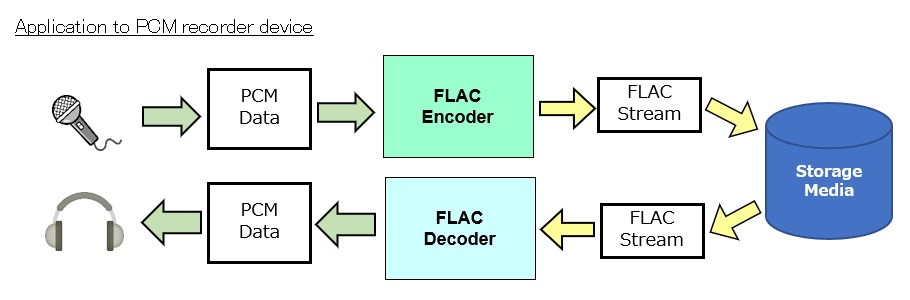
Before we dive into the intricacies of Flac encoding, let’s start with the basics. Flac is a lossless audio compression format, which means it reduces file size without compromising the original audio quality. This is in contrast to lossy compression formats like MP3, which discard some audio data to achieve smaller file sizes. Flac, on the other hand, retains every bit of the audio information, ensuring that what you hear is as close to the original recording as possible.
Imagine you have a favorite painting, and you want to make a copy to hang in a smaller room. With lossy compression, it’s like making a photocopy of the painting, but the copy loses some details and colors. Flac encoding, on the other hand, is like having a professional artist recreate the painting on a smaller canvas while preserving all the nuances and details. The result is a beautiful, high-fidelity reproduction.
Flac vs. Other Audio Formats
To truly appreciate Flac encoding, it’s essential to compare it with other audio formats. The most popular alternative to Flac is the MP3 format. MP3 is well-known for its widespread use, but it’s a lossy format. This means that during compression, some audio data is discarded to achieve smaller file sizes. The result is a compromise between file size and audio quality.
Let’s put this into perspective: If you were to store your favorite songs on a mobile device, a lossy format like MP3 might be suitable. It’s like having a collection of smaller, convenient-to-carry reproductions of famous paintings. However, if you want to archive your audio collection or create a master copy for your home theater, Flac encoding is the equivalent of preserving the original artwork in all its glory.
The Magic of Lossless Compression
One of the remarkable features of Flac encoding is its lossless nature. It achieves this through a clever algorithm that compresses audio data without losing any of the information. Think of it as a magician’s trick – a skilled magician can fit a deck of cards into a small box without removing any cards. Flac is like that magician, making your audio files smaller while keeping every musical note intact.
The beauty of lossless compression becomes evident when you’re dealing with vast audio libraries. Let’s say you have a music collection that takes up hundreds of gigabytes in its raw, uncompressed form. Flac encoding allows you to shrink that collection significantly, saving precious storage space. This is akin to having a magical bag that can hold many more items than it seems possible, yet you can retrieve each one intact whenever you need it.
Compatibility and Versatility
Flac encoding offers the best of both worlds: high-quality audio and compatibility. While some older devices may not support Flac natively, there are numerous apps and software tools available that can decode Flac files for playback. So, even if you have a mix of old and new devices, you can enjoy your music library without compromise.
Consider this scenario: You have a vast collection of unique musical instruments, and you want to play them on different types of stages. Flac encoding ensures that your instruments sound just as vibrant and authentic in a small jazz club as they do in a grand concert hall. It’s like having an ensemble of versatile musicians who can adapt to any setting without losing their precision and flair.
Preservation of Metadata
Flac doesn’t just preserve the audio quality; it also ensures that all the associated metadata, such as artist names, album titles, and track information, remains intact. This is crucial for those who want a well-organized music library. Think of your music collection as a vast library, and the metadata as the catalog that helps you quickly find the book you want to read. Flac encoding ensures that the catalog is meticulously maintained, so you can easily locate your favorite songs.
Flac Encoding: The Audiophile’s Dream
Now, let’s talk about why Flac encoding is often dubbed the “audiophile’s choice.” Audiophiles are individuals who have a deep appreciation for high-fidelity sound and are willing to invest in quality equipment to enjoy the best audio experience. For them, Flac is the gold standard because it delivers audio in its purest form, maintaining every subtle detail and nuance.
Imagine you’re a wine connoisseur, and you’re savoring a rare vintage. Flac encoding is like enjoying that wine in a crystal-clear glass that enhances the aroma, taste, and color, allowing you to fully appreciate the wine’s complexity. This level of detail is what sets Flac apart and makes it the preferred choice for those who demand nothing but the best in audio quality.
Flac Encoding in the Real World
To understand Flac encoding better, let’s look at some real-world examples. Consider a music producer working on a new album. They want to ensure that the final mix and master sound precisely as intended. Flac encoding is their best friend in this scenario. It allows them to store and share high-quality audio files with collaborators and record labels, ensuring that every note and sound effect is preserved.
Now, picture yourself as a car enthusiast who’s invested in a high-end sound system for your vehicle. You want to experience your favorite music with the utmost clarity while cruising down the highway. Flac-encoded audio files provide the closest experience to having a live concert in your car. You hear every instrument, every vocal, and every beat in perfect harmony, just as the artist intended.
Practical Steps for Using Flac Encoding
If you’re eager to embrace Flac encoding for your own audio needs, there are some practical steps to consider:
1. Choosing the Right Software
Look for audio players that support Flac. Download Mp4Gain to convert or encode to FLAC.
2. Converting Existing Audio
If you have a vast collection of audio files in other formats, consider converting them to Flac to enjoy the benefits of lossless compression.
3. Organizing Your Library
Make sure to maintain the metadata of your Flac files for easy access and organization.
4. Backing Up Your Collection
As your Flac-encoded library grows, consider creating backup copies to protect your valuable audio assets.
5. Enjoying the Experience
Once your library is set up, sit back, and savor the audio quality that Flac encoding brings to your music collection.
Latest Words on Flac Encoding
In conclusion, Flac encoding is a true audiophile’s choice when it comes to preserving audio quality while minimizing storage space. This lossless compression format is like having a magical preservation method for your music, keeping it pristine and unaltered. Whether you’re a music producer striving for perfection or a car enthusiast seeking the ultimate audio experience, Flac is your gateway to auditory bliss. Don’t hesitate to explore this world of high-fidelity sound and unlock the full potential of your audio collection with Flac encoding.
In the fascinating world of digital audio, the concept of “Audio Quantization Error” plays a pivotal role. Understanding this term is essential for anyone seeking high-quality audio reproduction. Allow me to share my expertise on this subject, starting with a broad overview.
Demystifying Audio Quantization Error
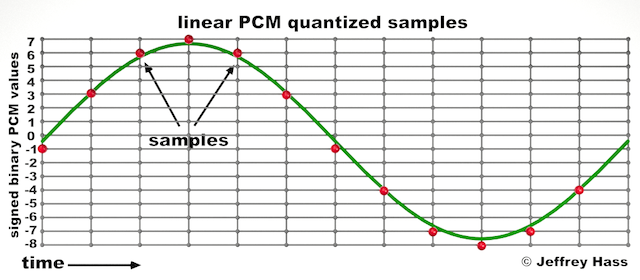
Audio quantization error is a fundamental aspect of digital audio processing. When analog sound waves are converted into digital signals, they undergo quantization. This means that the continuous analog signal is sampled and approximated in discrete steps. These steps are represented by binary values, typically in the form of bits (e.g., 16-bit, 24-bit). Now, what’s crucial to grasp here is that these discrete steps can lead to imperfections in audio reproduction.
Quantization error, often referred to as “quantization noise,” occurs when the actual analog signal deviates from the approximated digital representation. Imagine you have a beautiful painting, and you’re asked to replicate it using only a limited set of colors. The more restricted your color palette, the less accurate your reproduction will be. In the same way, the fewer bits you use for audio quantization, the more pronounced the quantization error becomes.
Quantization Levels and the Impact on Sound Quality
The number of quantization levels (related to bit depth) directly affects the precision of audio representation. For instance, a 16-bit audio recording has 65,536 possible levels, while a 24-bit recording provides a staggering 16,777,216 levels. This increased bit depth allows for a much finer representation of the original analog signal. Hence, a higher bit depth results in a reduction of quantization error, leading to superior sound quality.
To illustrate this, consider a grayscale image with only two colors: black and white. This is akin to an extremely low bit depth in audio, where the audio signal is either “on” or “off.” Now, imagine a high-resolution image with millions of colors, similar to the detail you get in a 24-bit audio recording. The difference in quality is apparent.
The Role of Dithering in Minimizing Quantization Error
One might wonder if there’s a way to mitigate quantization error in low-bit-depth audio recordings. Enter “dithering.” Dithering is a technique that introduces low-level noise to the audio signal, effectively spreading out the quantization error across a broader spectrum. Think of it as adding a sprinkle of fine grains of sand to a painting to blend the colors. This subtle noise masks the harshness of quantization error and makes it less noticeable to the human ear.
Now, as we’ve explored the fundamentals of audio quantization error, let’s delve into the questions that often arise:
How Does Quantization Error Affect Music Production?
In the realm of music production, quantization error can be a significant concern, particularly for professionals aiming to achieve top-tier sound quality. When producing music, especially in genres where subtle nuances are crucial, such as classical or jazz, quantization errors become more perceptible. To maintain audio fidelity, a higher bit depth is preferred during recording and production, ensuring minimal quantization noise.
Is There an Ideal Bit Depth for Audio Recording?
The ideal bit depth for audio recording is a subject of debate among audio enthusiasts. While 24-bit recording is commonly favored for its excellent dynamic range and low quantization error, it’s worth noting that the final audio format for most consumer applications, like CDs or streaming, is often 16-bit. The choice of bit depth should be based on the specific requirements of the project, keeping in mind the trade-off between audio quality and file size.
Can Quantization Error be Completely Eliminated?
Regrettably, quantization error cannot be entirely eliminated, as it’s an inherent part of the digital audio conversion process. However, it can be minimized to the point where it’s imperceptible to the human ear. Through techniques like dithering and the use of higher bit depths, the impact of quantization error can be significantly reduced, allowing for exceptional audio quality.
Last Words about Audio Quantization Error
In the ever-evolving world of audio technology, understanding audio quantization error is a fundamental step towards achieving superior sound quality. As an expert in the field, I’ve shared insights, experiences, and technical knowledge to demystify this concept. Remember, the bit depth you choose in audio recording significantly influences the extent of quantization error, and techniques like dithering play a pivotal role in mitigating its effects. The quest for pristine audio quality is an ongoing journey, but armed with this knowledge, you’re better equipped to make informed decisions in your audio endeavors.
Audio channel remapping is a powerful technique that allows you to reconfigure how audio signals are distributed across different speakers or channels in a sound system. This process is essential in the world of audio engineering, as it can significantly impact the quality of sound output in various applications. In this article, I will delve into the intricacies of audio channel remapping, providing you with a comprehensive understanding of the subject and addressing related questions that you might have.
The Basics of Audio Channel Remapping
To start, audio channel remapping involves the alteration of audio signals to achieve specific spatial audio effects or to adapt to various playback configurations. It’s commonly used in home theaters, surround sound setups, and even in professional audio production. Imagine you have a 5.1 surround sound system, and you want to enjoy a movie that’s mixed in 7.1 surround. Audio channel remapping can help redistribute the audio elements to your available channels, delivering an immersive experience.
Consider this scenario: You’re watching a high-octane action scene in a movie, and the sound of a car approaching from behind should be heard from the rear speakers. With audio channel remapping, the sound can be dynamically redirected to the appropriate speakers, creating a more realistic and engaging audio experience.
Remapping Audio Channels in Software
One of the most common questions related to audio channel remapping is, “How do I remap audio channels in software?” This is a crucial aspect, as software solutions offer a flexible way to adjust audio channel assignments. Various audio editing and playback software tools, such as Adobe Audition or VLC Media Player, allow you to remap channels to your liking.
For instance, you can change the default audio channel mapping for a video in VLC. By going to Tools > Preferences > Audio, you can set your preferred audio output configuration, effectively remapping the channels based on your sound system’s setup. This level of customization empowers you to optimize your audio experience for any media.
Enhancing Surround Sound with Audio Channel Remapping
Now, let’s address the question of whether audio channel remapping can improve surround sound. The answer is a resounding yes. By reallocating audio channels effectively, you can enhance the immersion of your surround sound setup. Let’s return to the example of a 5.1 system playing 7.1 content. Audio channel remapping allows you to adapt the audio so that you don’t miss out on any details. You can make sure that the dialogue remains clear from the center speaker, while ambient sounds and effects are distributed to the appropriate channels, delivering a more enveloping experience.
The Benefits of Audio Channel Remapping
Finally, let’s explore the benefits of audio channel remapping. This technique not only caters to home theater enthusiasts but also holds significance in the realm of professional audio production. It enables sound engineers to optimize audio for various playback scenarios, ensuring that the intended impact is achieved. In summary, audio channel remapping offers the following advantages:
Customization: You can adapt audio to your specific speaker configuration.
Enhanced Immersion: It improves surround sound experiences.
Compatibility: Allows you to enjoy diverse audio content on your system.
Last Words about Audio Channel Remapping
In conclusion, audio channel remapping is a valuable tool for audio enthusiasts and professionals alike. With the ability to customize audio distribution, enhance surround sound, and achieve compatibility with various audio formats, it plays a vital role in delivering an exceptional auditory experience. I hope this article has provided you with valuable insights into the world of audio channel remapping and its applications.






Comments:
Comment 1: I’ve been struggling with audio quality in my podcasts, and this article provided valuable insights. Thanks!
Comment 2: Can you share more details on how to set volume presets for different music genres? I’d love to learn more about this.
Comment 3: I’ve used MP4Gain, and it’s made a world of difference in my music library. Highly recommended!
Comment 4: This article has been a great help in understanding the technical aspects of MP3 volume control. I appreciate the expert insights.
Comment 5: I wish there was more information on how to edit metadata tags for volume control. Can you expand on this topic?
Comment 6: As a content creator, batch processing has been a time-saver for me. It’s fantastic to see this mentioned here.
Comment 7: I’ve been looking for an article like this for a long time. Thanks for sharing these expert tips on MP3 volume control.
Comment 8: I love how you’ve explained complex concepts in a simple and relatable way. This article is a gem for audio enthusiasts like me.
Comment 9: Can you recommend some alternatives to MP4Gain for volume control? I’d like to explore different options.
Comment 10: This article is a must-read for anyone dealing with audio files. It’s packed with practical advice and expert knowledge.