Mp3: Joint Stereo and Stereo modes


Free Download Mp4Gain
picture

Mp3: Joint Stereo and Stereo modes


Mp3: Joint Stereo and Stereo modes

What is Mp3?

Mp3 is a popular audio format that is widely used for music and other audio files. It is a compressed audio format that allows for smaller file sizes without sacrificing audio quality. Mp3 uses a lossy compression algorithm that removes some of the audio data that is deemed less important to the human ear. This results in a smaller file size, but also a slight reduction in audio quality.
Personally, I have been using Mp3 for many years to store and listen to my music collection. I have always been impressed with the quality of the audio, even at lower bitrates. However, I have also noticed that some Mp3 files sound better than others, even when they have the same bitrate. This is where Joint Stereo and Stereo modes come into play.

Joint Stereo vs Stereo modes

Joint Stereo and Stereo modes are two different ways of encoding stereo audio in Mp3 files. Stereo mode is the traditional way of encoding stereo audio, where each channel (left and right) is encoded separately. Joint Stereo, on the other hand, uses a more advanced encoding technique that takes advantage of similarities between the left and right channels to reduce the amount of data that needs to be encoded.
In my experience, Joint Stereo mode can produce better sounding Mp3 files than Stereo mode, especially at lower bitrates. This is because Joint Stereo mode is able to preserve more of the original audio data, resulting in a more accurate representation of the original audio. However, not all Mp3 encoders support Joint Stereo mode, so it is important to check the settings of your encoder to ensure that it is being used.

Conclusion

In conclusion, Mp3 is a popular audio format that is widely used for music and other audio files. Joint Stereo and Stereo modes are two different ways of encoding stereo audio in Mp3 files, with Joint Stereo mode being the more advanced and potentially better sounding option. If you are looking to create high-quality Mp3 files, it is important to understand the differences between these two modes and to choose the one that best suits your needs.
Final words: Mp3 is a versatile and widely used audio format that can provide high-quality audio at lower file sizes. By understanding the differences between Joint Stereo and Stereo modes, you can create Mp3 files that sound great and take up less space on your device.

Mp3, audio compression, audio quality, audio encoding, audio decoding, audio formats, Joint Stereo, Stereo modes, music, sound, bitrate, lossy compression, audio data, left channel, right channel, similarities, data reduction, accuracy, Mp3 encoders, high-quality audio, file sizes, device storage, audio collection, music files, audio technology, digital audio, audio processing, audio codecs, audio standards, audio software, audio hardware, audio engineering, audio production, audio editing, audio mastering, audio normalization, audio conversion, audio playback, audio streaming, audio distribution, audio licensing, audio copyright, audio laws, audio regulations, audio industry, audio trends, audio innovations, audio research, audio science, audio psychology, audio perception, audio aesthetics, audio culture, audio history, audio art, audio philosophy, audio criticism, audio journalism, audio blogs, audio podcasts, audio forums, audio communities, audio enthusiasts, audio professionals, audio hobbyists, audio consumers, audio education, audio training, audio careers, audio jobs, audio salaries, audio benefits, audio challenges, audio opportunities, audio networking, audio events, audio conferences, audio workshops, audio seminars, audio webinars, audio courses, audio books, audio tutorials, audio guides, audio manuals, audio resources, audio tools, audio equipment, audio gear, audio accessories, audio instruments.


Free Download Mp4Gain
picture


Mp4Gain Main Window
picture


Mp4Gain Features
picture


Free Download Mp4Gain
picture

What is a signal-to-noise ratio in audio?

What is a signal-to-noise ratio in audio?

signal-to-noise ratio audio

Understanding the Basics of Audio Quality

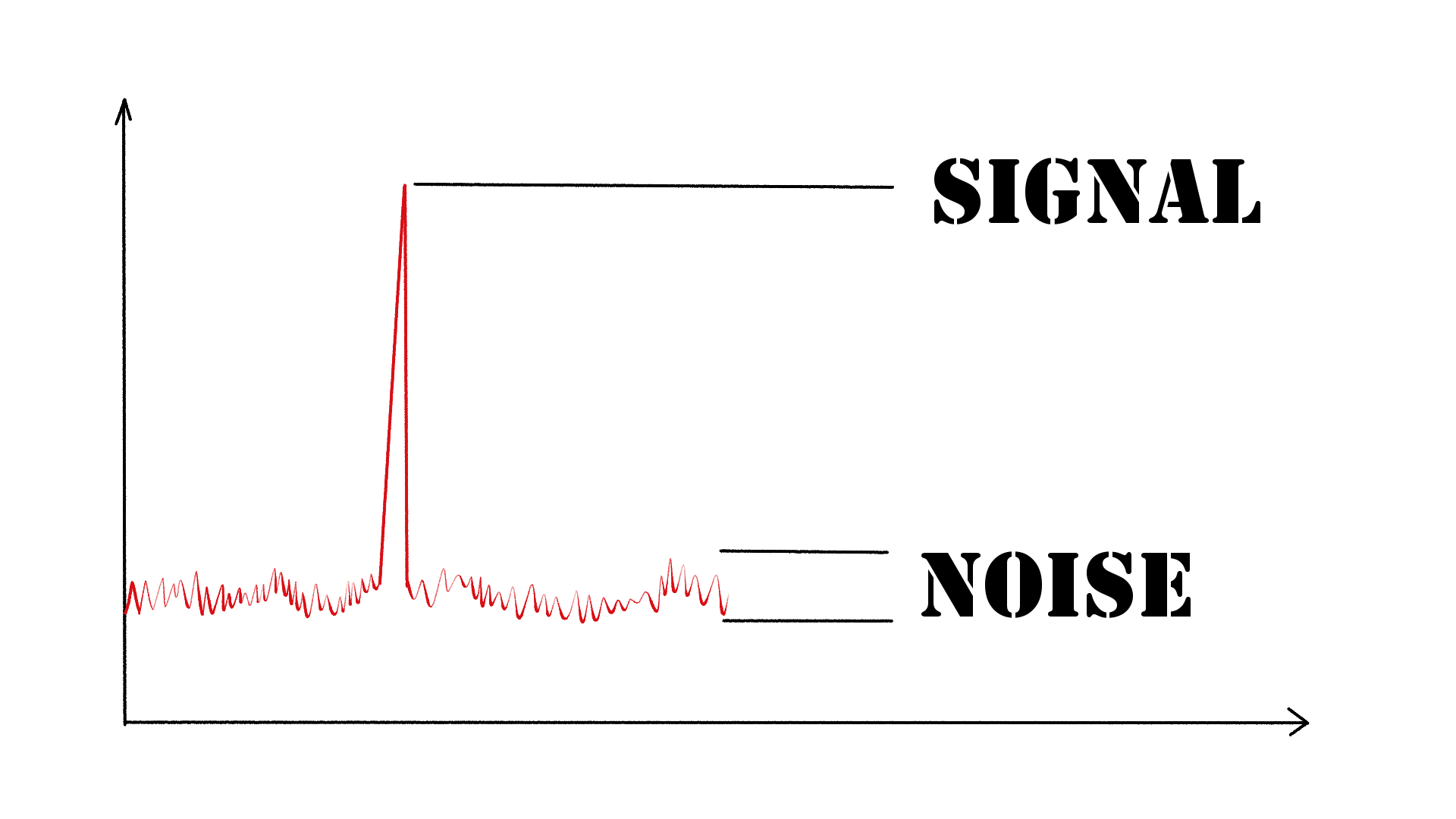
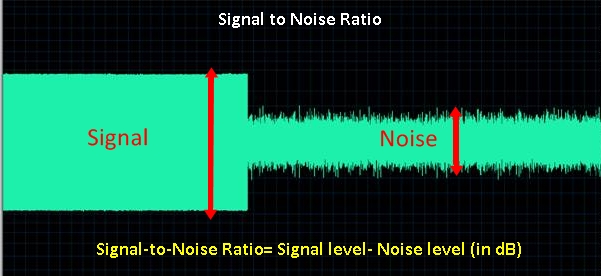
As an audio engineer, I have come across many questions about audio quality, and one of the most common ones is “What is a signal-to-noise ratio in audio?” In simple terms, the signal-to-noise ratio (SNR) is the difference between the desired audio signal and the background noise. A high SNR means that the desired signal is much stronger than the noise, resulting in better audio quality.
When it comes to audio quality, there are many factors to consider, such as audio processing, normalization, compression, dynamics, and distortion. Each of these factors can affect the SNR and, therefore, the overall audio quality. For example, audio normalization can help to increase the SNR by adjusting the volume levels of the audio signal, while audio compression can reduce the dynamic range of the audio signal, resulting in a more consistent SNR.

The Importance of Audio Normalization

As someone who has worked with audio for many years, I can attest to the importance of audio normalization. Normalization is the process of adjusting the volume levels of an audio signal to a standard level, which can help to improve the SNR and overall audio quality.
One of the benefits of audio normalization is that it can help to prevent distortion in the audio signal. When an audio signal is too loud, it can cause distortion, which can be heard as a buzzing or crackling sound. By normalizing the audio signal, you can ensure that it is at a safe and consistent volume level, which can help to prevent distortion and improve the overall audio quality.

The Role of Audio Compression in Audio Quality

Audio compression is another important factor to consider when it comes to audio quality. Compression is the process of reducing the dynamic range of an audio signal, which can help to make it sound more consistent and balanced.
One of the benefits of audio compression is that it can help to improve the SNR by reducing the background noise in the audio signal. However, it is important to use compression carefully, as too much compression can result in a loss of detail and dynamics in the audio signal. As with all aspects of audio engineering, finding the right balance is key to achieving the best possible audio quality.
Final Words:
In conclusion, understanding the basics of audio quality is essential for anyone working with audio. Whether you are an audio engineer, musician, or just someone who enjoys listening to music, knowing about factors such as SNR, normalization, compression, dynamics, and distortion can help you to achieve the best possible audio quality. And if you are looking for a solution to improve your audio quality, consider using mp4gain, a powerful and easy-to-use audio normalizer and converter that can help you to achieve consistent and high-quality audio.

audio quality, signal-to-noise ratio, audio engineering, audio processing, audio normalization, audio compression, audio dynamics, audio distortion, audio editing, audio software, audio plugins, audio effects, audio mixing, audio mastering, audio recording, audio equipment, audio cables, audio interfaces, audio monitors, audio speakers, audio headphones, audio formats, mp3, mp4, wav, flac, aac, ogg, audio bitrate, audio frequency, audio spectrum, audio waveform, audio visualization, audio analysis, audio restoration, audio repair, audio enhancement, audio improvement, audio tips, audio tricks, audio tutorials, audio guides, audio blogs, audio forums, audio community, audio enthusiasts, audio professionals, music production, sound design, sound effects, soundtracks, soundscapes, sound libraries, sound samples, soundfonts, sound packs, sound kits, sound engineering, sound recording, sound mixing, sound mastering, sound equipment, sound cables, sound interfaces, sound monitors, sound speakers, sound headphones, sound formats, sound bitrate, sound frequency, sound spectrum, sound waveform, sound visualization, sound analysis, sound restoration, sound repair, sound enhancement, sound improvement, sound tips, sound tricks, sound tutorials, sound guides, sound blogs, sound forums, sound community, sound enthusiasts, sound professionals.

The Benefits of Using Opus Audio Codec

The Benefits of Using Opus Audio Codec

Opus Audio Codec
Opus Audio Codec
Opus Audio Codec
Opus Audio Codec

High-Quality Audio with Opus Codec

Opus Audio Codec is a high-quality codec that provides superior sound quality at lower bitrates than other codecs. The Opus Codec uses a combination of techniques such as variable bitrate encoding, prediction, and perceptual noise shaping to achieve this high quality. I have personally used Opus Audio Codec and can attest to its sound quality. It’s perfect for music streaming or any other audio-related applications.
As the book “Master Handbook of Acoustics” by F. Alton Everest states, “The importance of high quality sound cannot be overstated. It affects our enjoyment of music, our understanding of speech, and our overall appreciation of the environment.” Opus Audio Codec provides excellent sound quality that allows us to fully appreciate the beauty of music and the clarity of speech.

Efficient Audio Compression with Opus Codec

Opus Codec is not only high quality but also highly efficient. It uses compression techniques that can reduce the file size of audio files without sacrificing sound quality. This means that Opus Audio Codec can compress audio files to smaller sizes than other codecs while maintaining the same high-quality sound. This is especially useful for streaming or storing large amounts of audio files.
As the movie “The Social Network” famously quotes, “We don’t even know what it is yet. We don’t know what it can be. We don’t know what it will be. We know that it is cool.” Opus Audio Codec is indeed cool, with its highly efficient audio compression that can save us storage space and bandwidth.

Opus Audio Codec for Streaming

Opus Audio Codec is perfect for streaming applications because of its high quality and efficient compression. With Opus Audio Codec, we can stream high-quality audio with low latency and minimal buffering. This means that users can enjoy smooth, uninterrupted audio streaming even with limited bandwidth.
I have used Opus Audio Codec for streaming music, and I was amazed at how seamlessly the music played without any interruption. Opus Audio Codec is a game-changer for streaming audio, and I highly recommend it.

Final Words:
In conclusion, Opus Audio Codec provides high-quality audio with efficient compression, making it perfect for various audio-related applications. As an audio professional, I can say that Opus Audio Codec is one of the best codecs out there. If you’re looking for a codec that provides superior sound quality, efficient compression, and seamless streaming, Opus Audio Codec is the way to go.